
We may receive a commission from our partners if you click on a link to review or purchase a product or service. Click to Learn More
Rippling is the best employee management software due to its all-in-one payroll, time tracking, benefits, scheduling, recruiting, and performance management functionality.
Other great options include Connecteam, which has an excellent mobile app for employee management on the go. Meanwhile, Deel lets you get started for just $5 per employee, per month.
Based on our extensive hands-on research and testing, I’ve put together a guide to the best available employee management software in 2026.
-
Rippling is the best overall employee management platform, due to its all-in-one suite that includes payroll, time tracking, benefits, and international hiring features.
-
Connecteam is the only option that offers a free plan, making it ideal for small teams needing mobile-first features.
-
BambooHR has the best built-in AI tools, like an HR chatbot and automated survey insights, though live customer support is limited to 12 hours a day.
-
Gusto is best for regulated industries like finance, providing built-in alerts and full compliance support for ACA, HIPAA, and ERISA standards.
-
Deel is the best value employee management platform, starting at $5 per employee per month, with scalable, modular pricing for growing teams.
Honed over years of market and user research, our research methodology scores each product (eight in total) across 56 areas of investigation.
Once the research team has gathered all of this information, it is handed over to our talented team of (human) writers, who turn it into the reviews and guides that you’ll find across our site. This is one of them.
For a full breakdown of how we research the best payroll products on the market, head to our methodology section.
What Are the Best Employee Management Software Platforms in 2026?
- Rippling — Best overall
- Connecteam — Best for on-the-go teams
- BambooHR — Best AI features
- Gusto — Best for compliance
- Deel — Best value
|
Starting price
|
Free plan
|
Support hours
|
Pros
|
Cons
|
Automatic tax filing
|
Global hiring
|
Key features
|
|||
|---|---|---|---|---|---|---|---|---|---|---|
|
SPONSORED
|

|

|

|

|

|
|||||
|
|
|
|
|
|
|
|||||
|
|
|
|
|
|
|||||
|
|
|
|
|
|
|||||
|
|
|
|
|
|
|||||
|
|
|
|
|
|
|
|||||
|
|
|
|
|
|
|
|||||
|
|
|
|
|
|
|||||
| Try HiBob | Try Rippling | Try Connecteam | Try BambooHR | Compare Quotes | Try Deel |
1. Rippling — Best Overall
Rippling is the best overall employee management platform because of its vast functionality, comprising payroll, benefits, onboarding, offboarding, recruiting, and more.
Rippling HR

Overview
-
Pros
- All-in-one functionality across all HR categories, like payroll and IT
- Provides international payment features for global businesses
- No-code automation tool to streamline operations
-
Cons:
- No transparent pricing for variety of services
- No 24/7 live support to solve problems for your team
- Vast functionality can be intimidating for beginners
Pricing
-
 Custom pricing
-
No free trial
Images
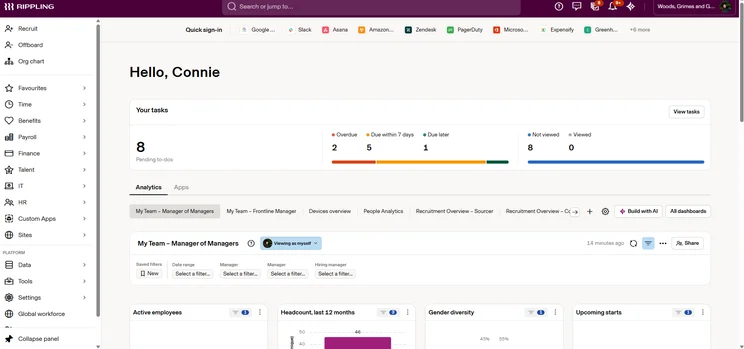
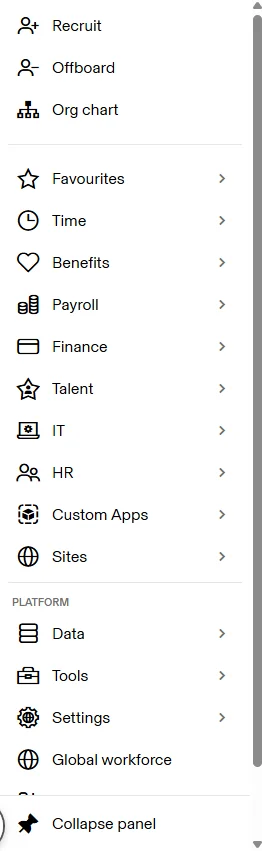
Rippling simplifies global operations by letting you pay international employees in local currencies with built-in compliance.
Other standout features include a self-service app that enables employees to clock in and out. Managers can then review and approve hours, which will then automatically sync with payroll details.
I’ve tested Rippling, and despite its massive feature catalog, I found the platform to be highly easy to use.
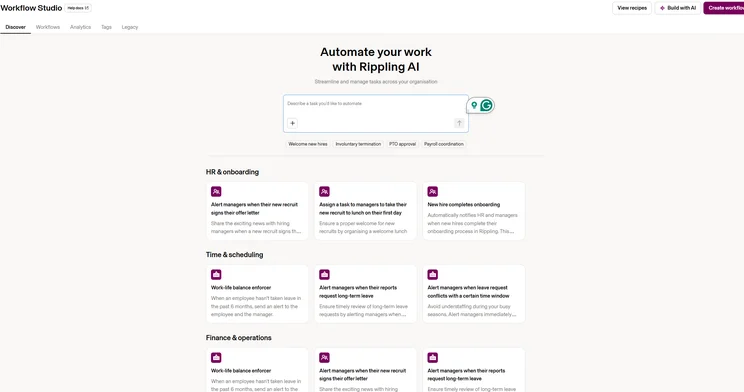
For example, you can easily build powerful AI workflows via natural language prompting, by configuring triggers, or choosing from a library of prebuilt workflows.
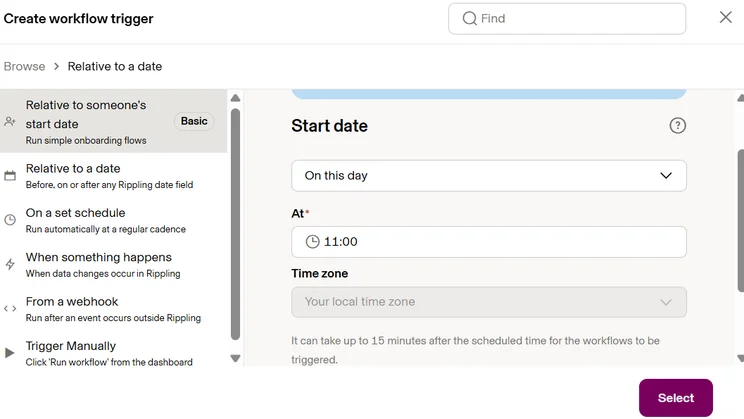
By giving users a choice of how they want to build their workflows, Rippling shows you what is possible. Source: Tech.co
How much does Rippling cost?
Rippling pricing operates on a custom, modular basis, so you will need to contact the company directly for your quote.
Rippling does not offer a free plan nor a free trial, but you can request a demo.
2. Connecteam — Best for On-the-Go Teams
Connecteam is the best employee management platform for on-the-go teams. Its comprehensive app for employees and managers can schedule shifts, track hours, assign tasks, and more.
Connecteam

In Short
-
Pros
- Easy to use mobile app for on-the-go management
- Real-time employee tracking with Breadcrumbs feature
- Free for small businesses with less than 10 employees
-
Cons
- No offline functionality available
- HIPAA-registered accounts cost extra on all plans
- More than 30 users incurs additional fee
Pricing
-
Small Business: Free
-
Basic: $29/month
-
Advanced: $49/month
-
Expert: $99/month
-
Enterprise: Custom pricing
Images
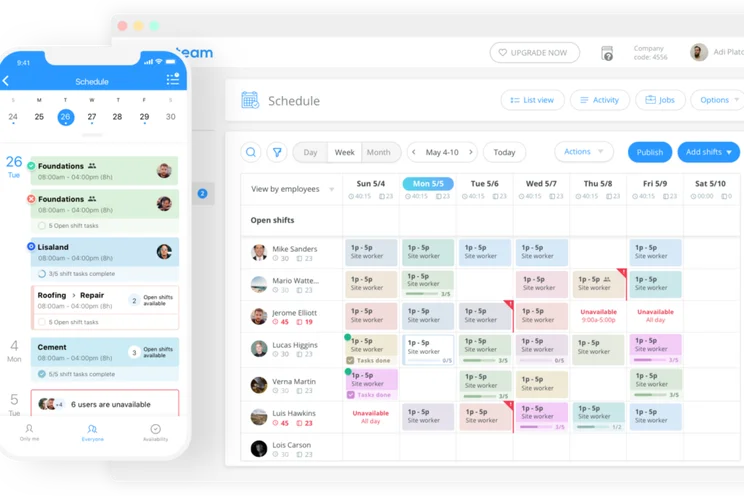
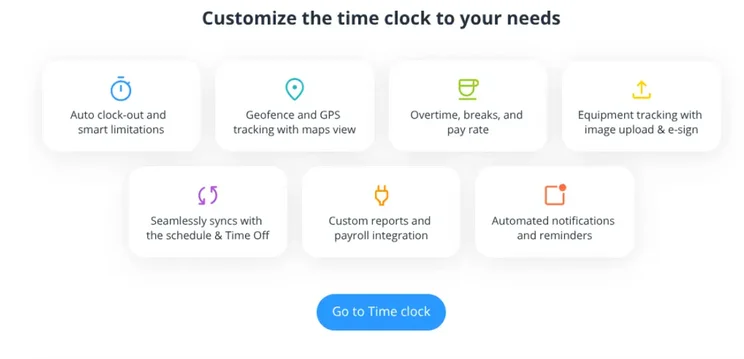
Track employees via GPS with the Breadcrumbs feature, giving you oversight of how far along they are in a particular job.
As well as training and onboarding new hires, the Connecteam app can facilitate team communication through internal messaging.
However, the app does lack offline functionality, which can be problematic if your business operates in rural areas.
Connecteam charges extra once you exceed 30 users, which makes it a better choice for small businesses that want to keep costs low.
Notably, Connecteam is the only platform on this list to offer a free option, with the Small Business plan available at no cost for up to 10 users.
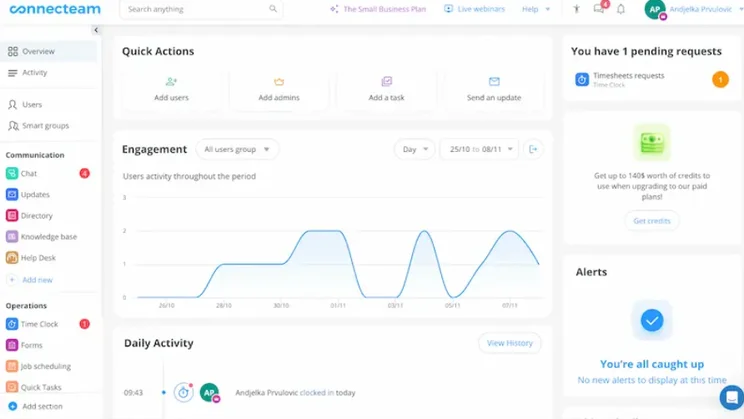
The Connecteam dashboard combines shortcuts, graphs, and a navigation column to segment information. Source: Timeero
How much does Connecteam cost?
- Small Business — Free
- Basic — $29 per month ($0.80 per month for each extra user)
- Advanced — $49 per month ($2.50 per month for each extra user)
- Expert — $99 per month ($4.20 per month for each extra user)
- Enterprise — Custom
3. BambooHR — Best AI Features
BambooHR is the employee management software with the best AI features. It includes an AI chatbot (Ask BambooHR) for employee queries and automated AI topic summaries to extract survey insights.
BambooHR

In short
-
Pros
- Excellent data visualization tools
- Modern, intuitive interface
- Built-in AI assistant
-
Cons
- Customer support only available 12/7
Pricing plans
-
Core: $10/employee/month
-
Pro: $17/employee/month
-
Elite: $25/employee/month
-
Limited time deal: Upgrade to Elite with a 12-month contract and get free Payroll until January 2027
Images
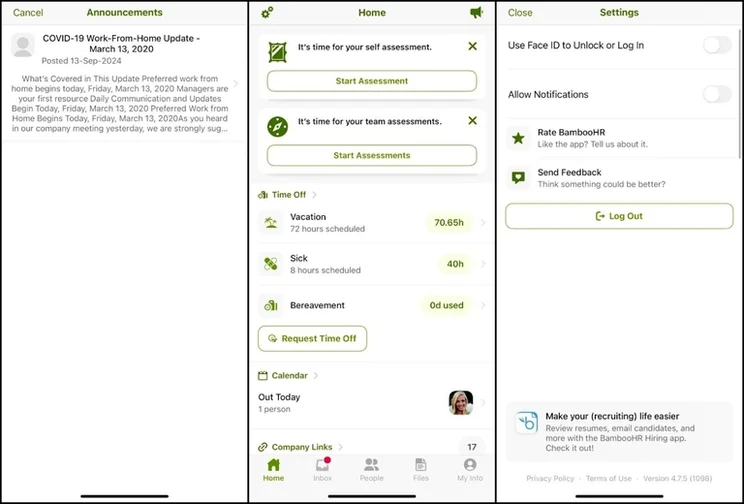
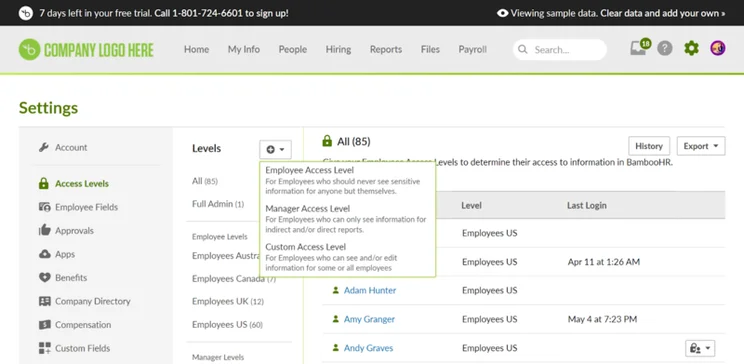
BambooHR is highly easy to use, with an intuitive interface and social-media-style functionality that feels instantly familiar.
The platform is simple to navigate because it lacks customizability, which should appeal to businesses that want to avoid lengthy setup times.
BambooHR also lacks 24/7 support, with representatives only available from 6AM–6PM MT, Monday to Friday.
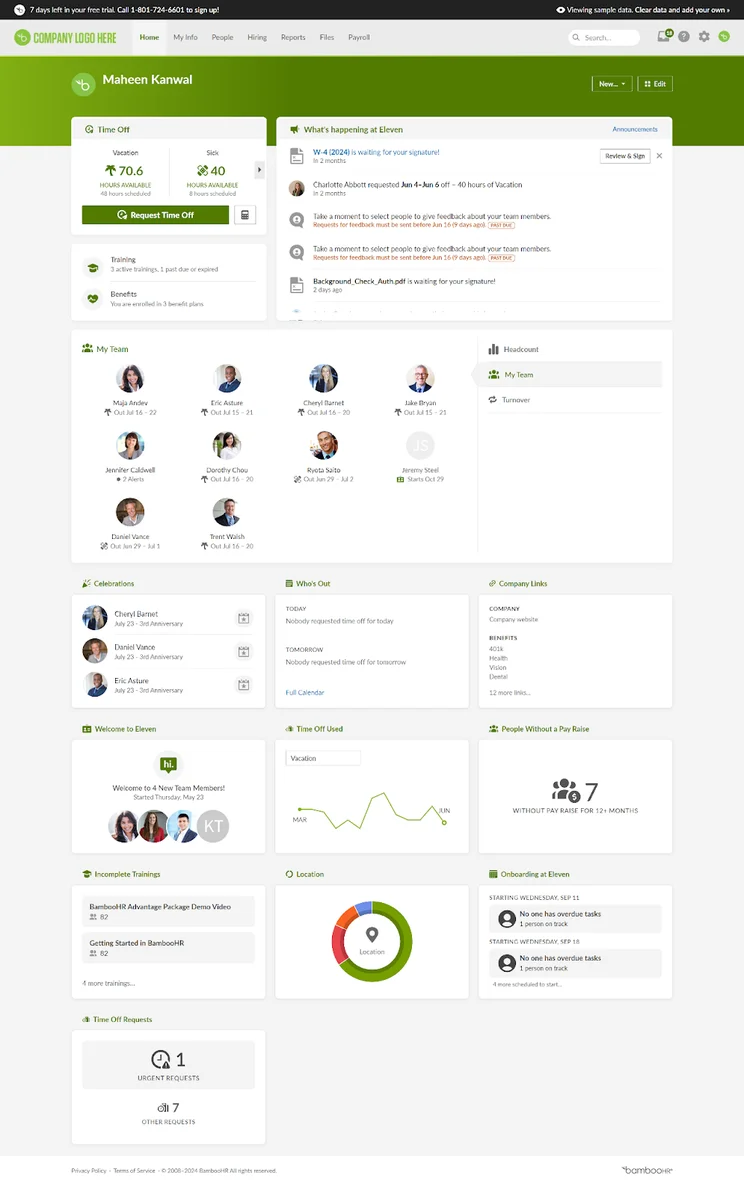
The BambooHR dashboard gives users oversight of key data. Source: Connectteam
How much does BambooHR cost?
- Core — $10 per employee, per month
- Pro — $17 per employee, per month
- Elite — $25 per employee, per month
BambooHR also offers discounts for non-profits and businesses that buy in volume. Visit the pricing page for more information.
4. Gusto — Best for Compliance
Gusto is the best employee management software for compliance. The platform has multiple compliance certificates, and alerts businesses when they risk breaching local regulations.
Gusto

Overview
-
Pros:
- No minimum contract length
- Live training sessions
- Employee app for clocking-in
- Integration with accounting tools like FreshBooks and QuickBooks
- Labor law compliance alerts
-
Cons:
- No native global payroll
- Lacks integrations with HCM platforms like SAP and Oracle
Pricing
-
Simple: $49/month + $6/month/person
-
Plus: $80/month + $12/month/person
-
Premium: $180/month + $22/month/person
-
Contractor Only: $35/month + $6/month/person (currently available for $0/month for first 6 months)
Images
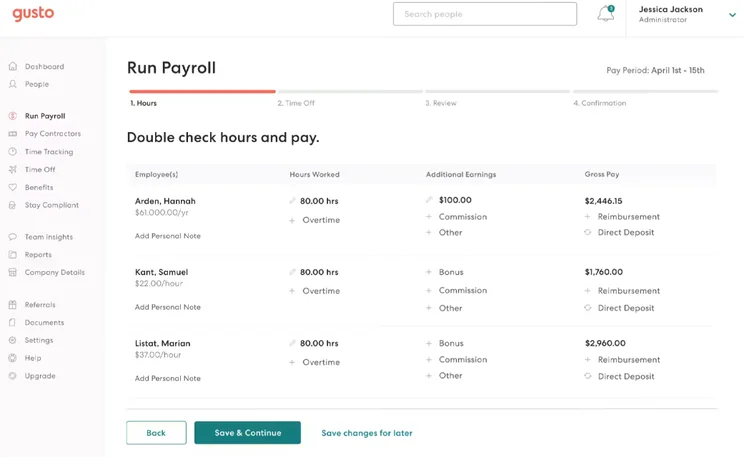
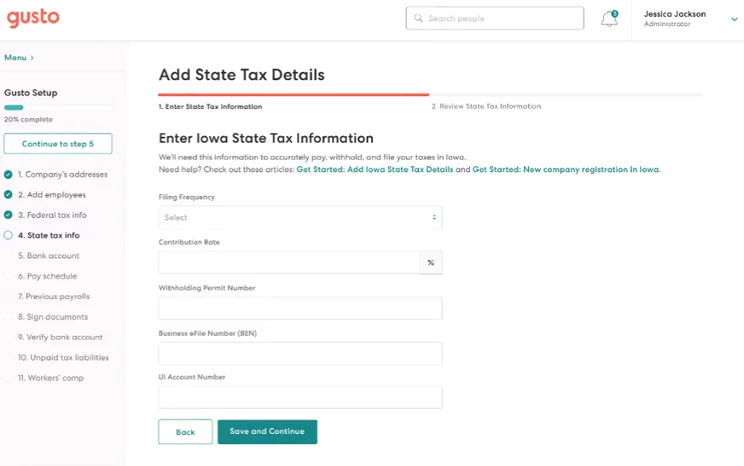
Gusto built-in compliance features meet ACA, HIPAA, and ERISA regulatory standards.
In addition, the platform provides risk alerts, trigger-based updates, and proactively monitors changes to compliance requirements.
Because of these features, Gusto is a great option for businesses in heavily regulated industries, such as finance.
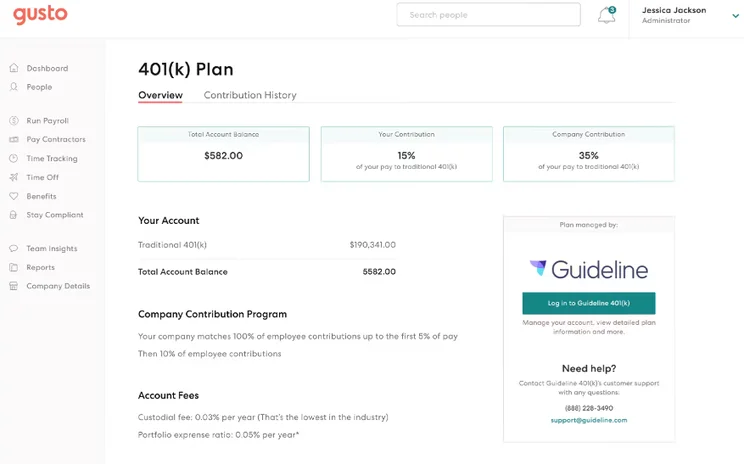
Gusto 401k retirement plans are offered in conjunction with Guideline. Source: Software Advice
How much does Gusto cost?
- Simple — $49 per month (plus $6 per month, per person)
- Plus — $80 per month (plus $12 per month, per person)
- Premium — $180 per month (plus $22 per month, per person)
- Contractor Only — $35 per month (plus $6 per month, per person)
New users can currently get the Contractor Only plan for $0 per month (plus $6 per month, per person) for the first 6 months of a one-year contract.
5. Deel — Best Value
Deel provides high-value employee management with modular plans starting at $5 per employee, per month.
Deel

In short
-
Pros
- Standout compliance functionality for overseas hiring
- In-depth integrations with QuickBooks and Xero
-
Cons
- No mobile app to perform HR functions on the go
- US employment features will cost your business extra
Pricing
-
Core HR: $5/employee/month
-
Recruit: $14/employee/month
-
Develop: $22/employee/month
-
Full Deel HR: Custom pricing
Images
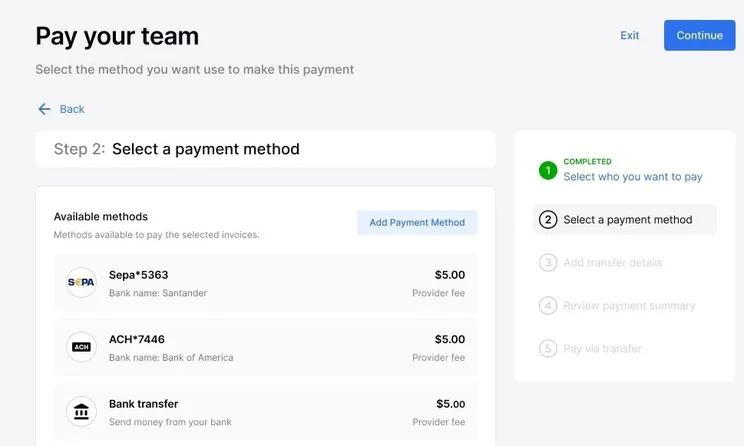
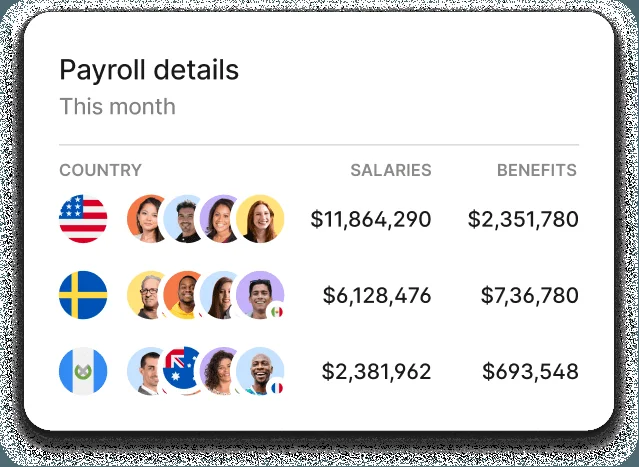
Similar to Rippling, Deel pricing operates on a custom, modular basis, so you never pay for unwanted functionality. In addition, there are no hidden fees.
Impressively, businesses can get started for just $5 per employee, per month with the Core HR plan, which enables you to track time, manage employee documents, get compliance insights, view employee analytics, and more.
Deel has everything that small businesses with low headcounts need to manage their employees. At the same time, you can scale the platform on demand by adding further modules.
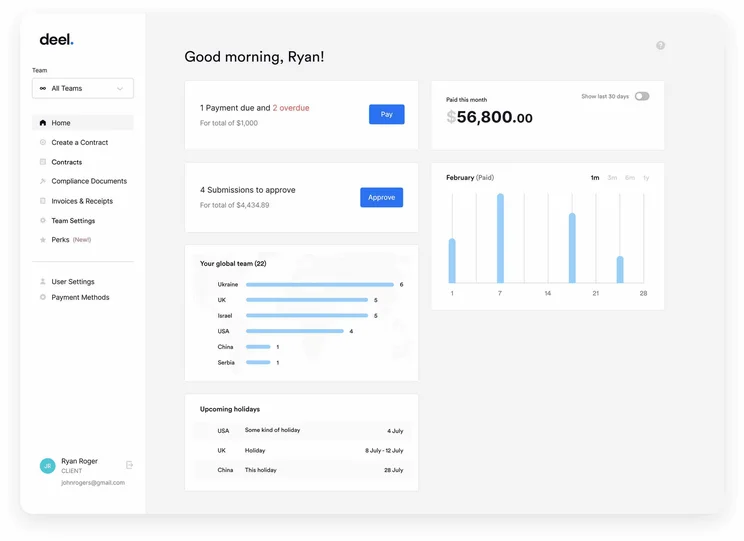
The Deel dashboard is streamlined and easy to navigate. Source: SelectSoftware Reviews
How much does Deel cost?
- Core HR — $5 per employee, per month
- Recruit — $14 per employee, per month
- Develop — $22 per employee, per month
- Full Deel HR — Custom pricing
For information on other available Deel modules, head to the company pricing page.
How Did We Compare the Best Employee Management Software?
We understand how important choosing the right software for your team is, and that’s why we go the extra mile when researching and reviewing the top providers.
First, we conduct an initial exploration to find the most relevant and useful platforms on the market. Then, we analyze their potential using a vigorous methodology that focuses on the concerns businesses care about the most, including the quality and quantity features, entry price, average plan cost, presence of a free plan and user experience.
These findings then help determine each software’s overall potential, which businesses they are best suited for and how they size up against the wider competition.
So much more goes into our research process, though. If you’d like to learn more about how we test and review products at Tech.co, you can learn more about our research here.
The best employee management software is Rippling. From payroll and benefits to time tracking and performance management, the platform has a huge range of functions.
Rippling is also highly easy to use, with clear navigation and an intuitive workflow builder, among other features.
Other options include Connecteam, which has a superior mobile experience, and Gusto, which is a great option for businesses in highly regulated industries.
Frequently Asked Questions
When choosing the right employee management software, consider which functionality you require, how compliant the platform is, and your business size, location, and budget.
If you have fewer than 5 employees, and you only need to track shifts, Excel or Google Sheets is sufficient. You should opt for employee management software if your needs are more sophisticated than that.
Switching employee management platforms is quite difficult as it requires migrating across sensitive information, such as employee records and pay history.
If you click on, sign up to a service through, or make a purchase through the links on our site, or use our quotes tool to receive custom pricing for your business needs, we may earn a referral fee from the supplier(s) of the technology you’re interested in. This helps Tech.co to provide free information and reviews, and carries no additional cost to you. Most importantly, it doesn’t affect our editorial impartiality. Ratings and rankings on Tech.co cannot be bought. Our reviews are based on objective research analysis. Rare exceptions to this will be marked clearly as a ‘sponsored’ table column, or explained by a full advertising disclosure on the page, in place of this one. Click to return to top of page


