
These workflows are from Tech.co’s weekly newsletter, The AI Strat. To receive free weekly workflows tried and tested by industry experts, subscribe to the newsletter.
Even though you’d be hard pressed to find a company that isn’t using AI in some capacity, how you use AI is incredibly important. The best way forward is to use AI to reimagine your business’s existing capabilities, rather than just introducing it into the workplace.
Luckily, these workflows remove a lot of the initial guesswork. Each one provides an easy-to-follow graphic and proof of its success. Even if you don’t use them verbatim, take them as inspiration for your next AI workflow.
This month’s workflows are:
- Influencer campaign coordination workflow
- Turn conversations into knowledge bases workflow
- Build Ideal Customer Profiles from job listings workflow
- Lead follow-up workflow
Influencer Campaign Coordination Workflow
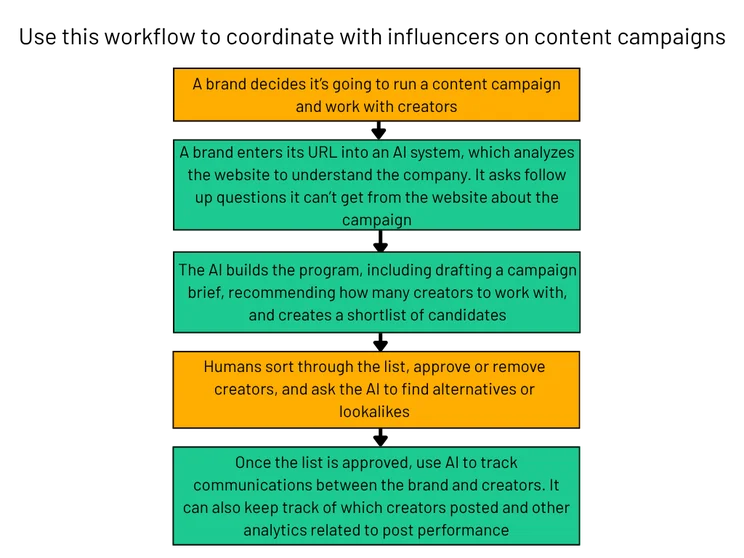
Recommended by Vivien Garnès and Kevin Creusy, co-CEOs at Upfluence
This workflow is great for brands that frequently work with content creators on campaigns, and want to streamline much of the research, planning, and tracking processes involved.
Drudge work like searching for creators, writing outreach emails, following up, and coordinating can be handled automatically. This lets brands focus on communications that directly impact creative output – including the vision and authenticity that will draw customers to you in the first place.
Turn Conversations into Knowledge Bases Workflow
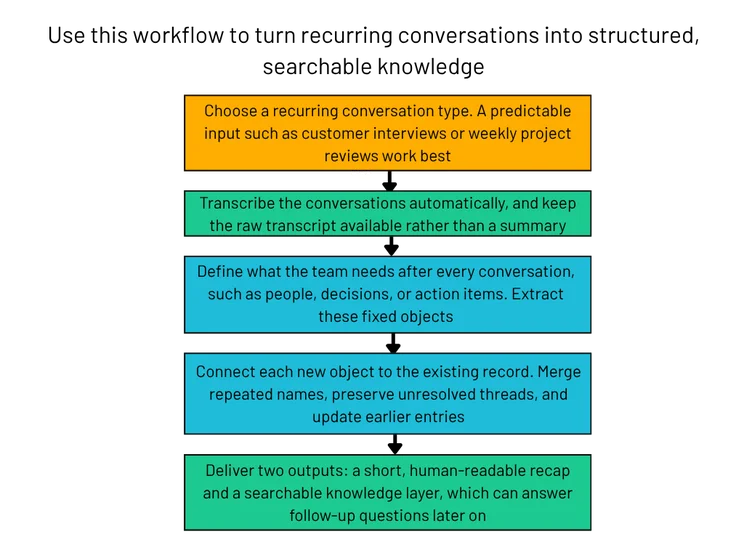
Recommended by Joshua Gilley, co-founder of Loreify
Nobody wants to keep looking for the answers to the same questions, especially if that answer happens to be pretty straightforward. It slows you down, and can cause frustration.
Luckily, this workflow allows teams to turn recurring meetings and conversations into searchable knowledge bases, so gathering answers becomes frictionless.
Gilley uses this workflow at Loreify, which records long Dungeons & Dragons sessions. The workflow makes organized notes available post-sessions within 5-10 minutes.
Build Ideal Customer Profiles from Job Listings Workflow
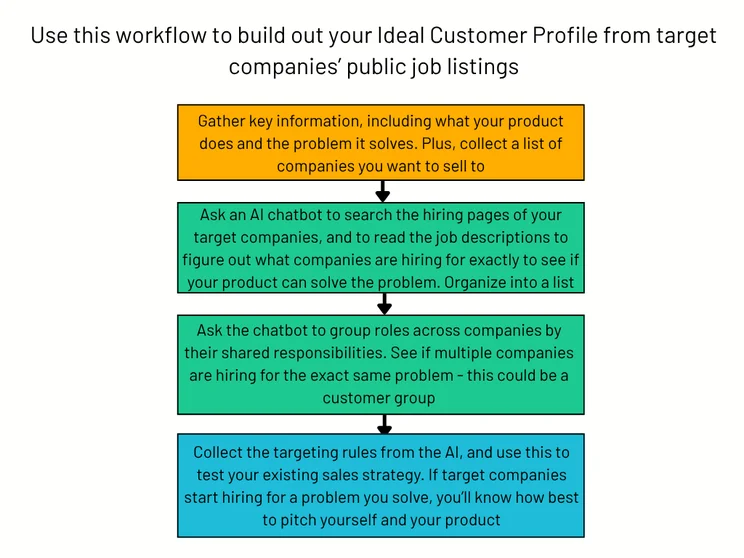
Recommended by Maya Shamary, brand visibility expert at Semrush
This workflow enables businesses to build their Ideal Customer Profile (ICP) from public job listings. By identifying the skills and responsibilities a company is hiring for, you can find exactly where the need for your product exists.
Shamary says this workflow has turned 8-10 hours of manual analysis of open listings into a couple of minutes, and has reduced 7-14 days of customer research.
Lead Follow-Up Workflow
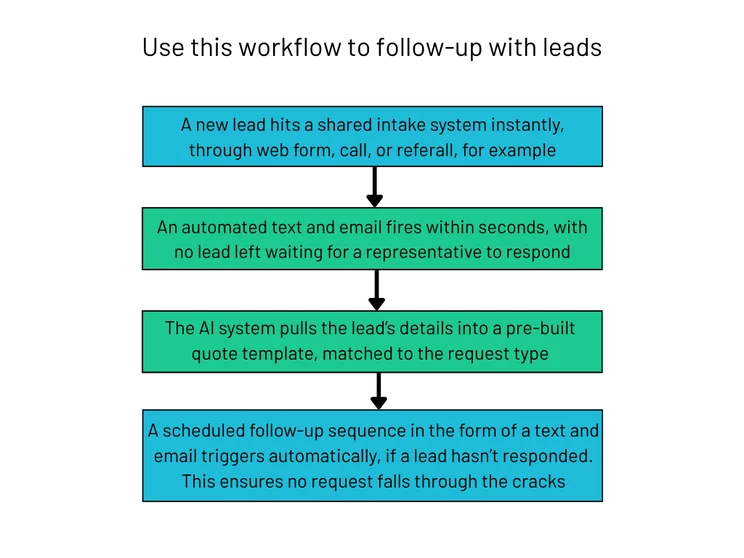
Recommended by Devin Elder, founder of Ark40 Consulting
Leads won’t be left hanging with this workflow, allowing your business to quickly capitalize on customer interest and avoid losing leads in the process. Companies are already using AI in sales, and the potential is great in this area.
Elder uses this workflow for clients. In one instance, a customer service representative saved 10 hours a week that used to go into manual data entry.
Understanding How AI Can Improve Workflows
At this stage of AI development, it’s widely understood that AI alone doesn’t make your business more productive. The best way to make the technology work for you is to integrate it into your existing workflows, but only where it’s absolutely needed.
In fact, with some studies suggesting AI can have an adverse effect on productivity, where you choose not to include AI is just as important as where you do implement it. Businesses should prioritize auditing and understanding their existing processes, before making strategic and security-driven decisions about whether AI would benefit.
Every week, I take an AI workflow that has led to genuine business impact from experts across industries, and create a ready-to-implement graphic so anyone can get started. If you’d like this in your inbox every Wednesday and more, subscribe to the AI Strat newsletter.


