

To create the perfect CRM dashboard, first consider who’ll be using it, what to show, and which platform fits your workflow. Platforms like monday CRM help organizations transform raw sales data into actionable insights.
Your CRM dashboard is your business’s home base. Customizable CRM dashboards take all your sales data and turns it into clear charts and graphs so you can see exactly how you’re doing at a glance.
monday CRM has AI-powered features like automated summaries and proactive insights, so you spend less time hunting for numbers and more time acting on them.
Key Takeaways
- CRM dashboards replace scattered spreadsheets and static reports with one real-time view of your business.
- Focus on KPIs that actually drive decisions: sales pipeline conversion, win rate by rep, activity volume, and revenue forecasting are a strong starting point.
- Keep it simple. If non-technical stakeholders can’t immediately understand what they’re looking at, the dashboard isn’t doing its job.
- Platforms like monday CRM include AI-powered insights that surface patterns automatically, so nothing important slips through.
- A CRM dashboard is never finished. Audit it regularly, gather team feedback, and keep refining as your business changes.
In this guide:
- What Is a CRM Dashboard and Why Are They Important?
- What Are the Differences Between Dashboards and Reports?
- What Are the Benefits of CRM Dashboards?
- 6 Steps to Build and Customize a CRM Dashboard
- Which KPIs Should a CRM Dashboard Include?
- How AI Fits Into Your CRM Dashboard
- Verdict: Choosing the Right CRM Platform is the Secret to a Great Dashboard
- FAQs
What Is a CRM Dashboard and Why Are They Important?
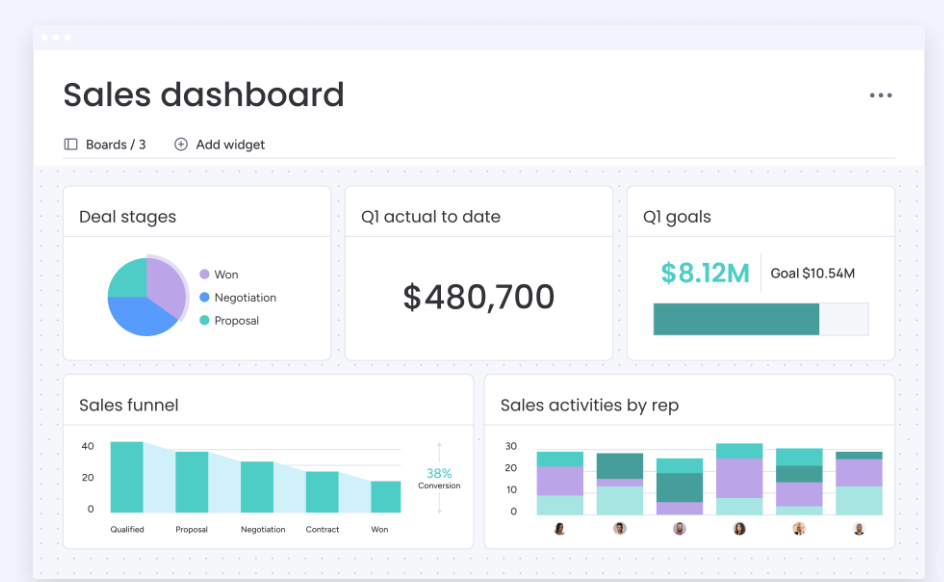
A CRM dashboard is a real-time summary of key business information, such as sales data, project progress, and KPIs.
Made up of charts, graphs, tables, and other data visualizations, CRM dashboards provide a clear picture of how your business is performing across the metrics that matter.
monday CRM lets you customize your dashboard to surface exactly what you need. With everything in one place, you can make confident decisions and quickly assess the impact of your campaigns.
Without a CRM dashboard, important data tends to be scattered across spreadsheets, inboxes, and disconnected systems, which means time spent hunting for numbers instead of acting on them.
A well-built CRM dashboard cuts through that noise so your team can focus on the work that actually matters.
| What it does | Pros | Cons | Better For | |
|---|---|---|---|---|
Dashboards | Reports | |||
|
| |||
|
| |||
|
| |||
|
|
What Are the Benefits of CRM Dashboards?
CRM dashboards unlock deeper insight into your business performance, giving your organization greater oversight of key metrics and how they all fit together.
Forecast accurately
CRM dashboards enable you to build reliable predictions about where your business is headed, getting ahead of market shifts before they catch you off guard.
Adapt to customer preferences
Through email open rates, click-through rates, and other metrics, CRM dashboards let you track how your campaigns are landing, and adapt accordingly.
Track employee performance
Your dashboard can show how your individual team members are performing, so you know who deserves plaudits and who needs more support.
Spot patterns faster
Clearly laying out your data enables you to quickly spot trends. monday CRM goes further with AI-powered insights that surface patterns automatically, so nothing important slips through.
Prioritize goals
Your dashboard can display all of your team members’ individual workloads, and which specific tasks you should prioritize. This means fewer bottlenecks and, ultimately, better performance.
6 Steps to Build and Customize a CRM Dashboard
To create a CRM dashboard for your organization, start by identifying your stakeholders, mapping out your process, and collating your metrics.
Identify stakeholders
- Consider who is using the platform and what they need from it
- Provision different permission levels where relevant
Map out process
- Walk through your complete workflow from start to finish
- This informs which metrics are most important
Collate your metrics
- List your chosen metrics
- Use graphs and charts to break up the page
Customize your dashboard
- Tweak your dashboard to your specifications
- monday CRM lets you populate your dashboard with dynamic widgets to display relevant data
- Make sure your dashboard is clear and uncluttered
- Configure automatic updates so that the page is pulling through the latest information
Gather feedback
- Share your dashboard with relevant stakeholders
- Gather feedback and keep refining
Manage your board
- Archive old items when no longer needed to keep your board tidy
- monday agents automatically flag and merge duplicate contacts
Which KPIs Should a CRM Dashboard Include?
The core KPIs to track are sales pipeline conversion, win rate per rep, activity volume, and revenue forecasting.
- Sales pipeline metrics, such as stage conversion rates, identify the best-performing stages of the sales funnel.
- Conversion metrics, such as win rate by sales rep, highlight top performers and reps who need coaching.
- Activity tracking metrics like calls and emails per lead show how much effort it takes to move a deal forward.
- Forecast metrics, including forecast versus actual revenue, measure predictions against actual performance.
- Customer retention metrics, like churn rate, reveal how many customers you lose each quarter.
How AI Fits Into Your CRM Dashboard
AI in your CRM dashboard enables you to close the gap between seeing data and knowing what to do with it.
During setup, AI can clean and organize your data before it reaches the dashboard, flagging duplicates, categorizing leads, and keeping pipeline stages current without manual input.
Once it’s live, AI-generated summaries and proactive alerts mean your team spends less time reading charts and more time responding to what they’re showing.
AI also strengthens forecasting, using live pipeline data to surface accurate predictions about revenue and team performance.
monday CRM has AI built into its foundations. monday agents and monday sidekick are the most visible examples, but the intelligence runs deeper than that, surfacing in the way data is organized, insights are flagged, and workflows are suggested across the platform.
Verdict: Choosing the Right CRM Platform is the Secret to a Great Dashboard
Choosing the right CRM platform brings a wide range of benefits and use cases. monday CRM, for example, allow you to build powerful dashboards that give your whole team a clearer, more accurate picture of the business.
How you put yours together will depend on your platform of choice, but the best practices stay the same: know your stakeholders, choose the right metrics, and keep the layout clean enough for everyone to use.
Once your CRM dashboard is up and running, and with AI-powered insights helping surface what matters, you can look forward to smarter decisions and a better bottom line.
The Connected Boards widget makes it easy to see everything in one place, not just what lives inside your CRM.