
HR software pricing generally starts at around $30 to $50 per month, plus another $5 to $10 per employee, per month. For more advanced features and third-party integrations, though, you’ll likely have to go with more expensive plans, which can cost up to $2,000 per month.
If you’re a smaller business that can’t afford those prices, some providers like Deel offer free HR software for a limited number of employees. However, these plans come with some notable limitations, including a lack of payroll and compliance functionality.
In this guide, we’ll explain how the HR software price works, the average costs for specific businesses, and what kinds of hidden costs you should watch out for before you make a decision.
Popular HR Software Prices
- Deel: Free, or paid plans from $49 per employee, per month (around $5,880 a year for 10 users)
- Paychex: Starts at $39 per month, plus $5 per employee (around $1,068 a year for 10 users)
- Paycor: Starts at $99 per month, plus $5 per employee (around $1,788 a year for 10 users)
- Rippling: Starts at $35 per month, plus $8 per employee (around $1,380 a year for 10 users)
- monday.com: Starts with a free plan, rising to $9 per month (around $1,080 a year for 10 users)
How Do HR Software Pricing Models Work?
Before we get to how much you’ll actually pay for HR software, it’s important to understand how the pricing models actually work. Otherwise, you could end up paying a lot more than you need to for your service.
Most HR software pricing falls into one of a few categories, which we’ll explain below.
- Freemium plans: Some HR platforms will offer a free plan that can serve a limited number of employees with fewer advanced features, like payroll and compliance. It can get you started, but you’ll likely have to go for the paid plan eventually. Better for very small companies.
- Monthly subscriptions: This cloud-based software option costs less on a monthly basis, between $30 and $50 per month and $5 to $10 per employee, per month but you won’t have to maintain a server and you can easily scale it with your business. Better for small companies.
- Custom enterprise plans: Many HR software providers offer fully customizable plans for bigger teams that are willing to pay a bit more for an advanced, catered HR experience. Better for large companies.
- One-time/perpetual licenses: You can host on-site HR software for between $80 and $250 per employee, with costs dropping for larger numbers of employees. It requires more maintenance and support, though, but you’ll save on the monthly charges from third-party suppliers. Better for very large companies.

Payroll features are generally only available on paid plans with HR software. Source: Rippling
What Factors Influence HR Software Prices?
Costs vary from brand to brand, but the total cost of your HR software package will depend on a number of predictable elements as well. You can start your cost estimation by checking this list of factors:
- Admin users: Small businesses will likely just need a single admin account in order to manage all employees. In most cases, adding multiple administrators will mean moving up to a more expensive plan.
- Employees: Virtually all SaaS HR software charges a per-employee fee, so you can expect your costs to increase steadily as the number of employees working at your business grows.
- Features and functionality: How many HR processes will your software need to cover? Recruitment, payroll, training, and onboarding are commonly included on the least expensive plans, while pricier plans may add functionality including applicant tracking, shift scheduling, performance management, EOR services, and more.
- Sophistication: Smaller businesses may be content with a just-the-basics HR system, while growing operations could benefit from complex features aided by tools such as AI workflows or advanced analytics.
- Ready-made software integrations: Your business may need HR software that integrates with related business software such as employee expensing, recruitment, or time tracking. You might also find it easier to use HR software that can integrate with your accounting software, to keep things like taxes, bonuses, and payroll accounted for on one platform.
- User support level: What tier of software support will you want? While basic ticket resolution might be enough, in-depth technical support or expert service support is always worth aiming for — though it will inevitably cost more.
Keep in mind how rapidly you anticipate your operation to scale up. In the future, you might find you have the funds on hand to shift to an on-premise solution.
Check out our HR software guide for more information.
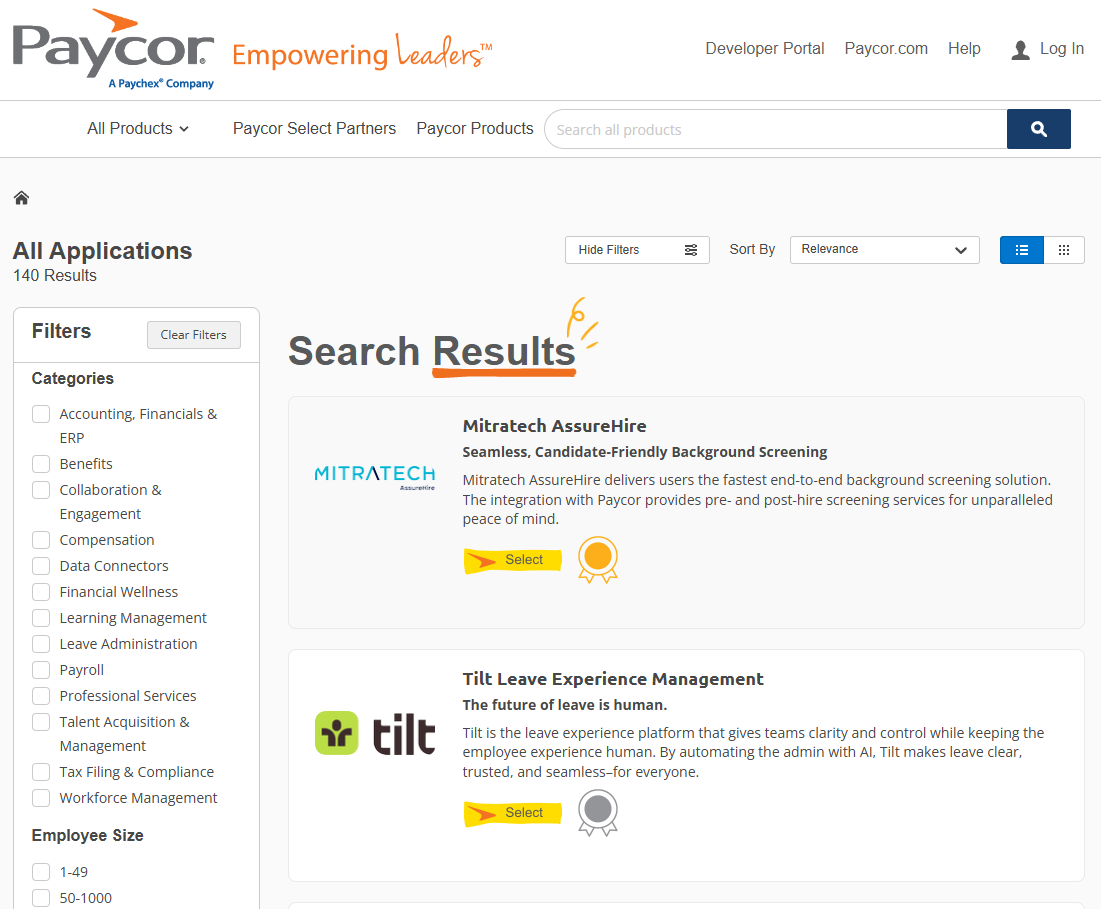
If you need HR software that integrates with other systems, be sure to check the provider’s app library before you sign up for a service that isn’t compatible. Source: Tech.co testing
HRMS vs HRIS: How Does Pricing Differ?
HRIS stands for human resources information system, and it refers to software designed to cover the basics of storing employee data. Reliable databases are a key part of HR services, and an HRIS provides the raw data needed to complete tasks like payroll, benefits, training, and scheduling.
However, it won’t guide managers through those processes. For that, you’ll need the more advanced HRMS.
HRMS stands for human resource management system, and it refers to software that manages all the core HR processes, and not just the data needed for those processes. This is likely the type of software your business is looking for since it’s a one-stop shop for most human resource needs.
To be honest, these terms are a little outdated and you’re unlikely to see the actual software brands refer to themselves with either. Rather than get bogged down in this terminology, however, we’d recommend simply looking for top HR software brands and double-checking them to ensure that they offer all the features you need at a price that works for you.
How Much Does Popular HR Software Cost?
In most cases, HR software does not offer publicly available pricing. Providers like Rippling and Paycor ask businesses that are interested in their services to request a quote, so that they can get a tailored experience for their particular enterprise.
However, there are a few exceptions, with Deel listing its price clearly as $49 per employee, per month, and alternatives like monday.com providing transparent pricing (starting at $9 per user, per month). Still, for most providers, you’ll have to reach out if you want to know the HR software price for your business.
Below, we’ve collected some of the top HR software on the market in 2026, comparing them on features, pricing, and free plans, so you can get a better idea of what’s out there for your business.
| Starting price | Free plan | Performance management | Automatic tax filing | Background checks | IT management | Global hiring | |||
|---|---|---|---|---|---|---|---|---|---|
| BEST OVERALL  |  |  |  |  | |||||
| | | | | | |||||
| | | | | | |||||
| | | | | | |||||
| | | | | | |||||
| | | | | | |||||
| | | | | | |||||
| Try Rippling | Try monday.com | Try Deel | Try Paycor | Try Paychex |
Can You Get HR Software for Free?
Some HR platforms offer a freemium option that might be able to deliver basic HR software for your small business. The two top options to consider are monday.com or Deel, both of which come with limited free plans.
However, costs tend to be high in the world of HR platforms, so freemium options will always lack a few fairly core functions. For example, monday.com is really a project management platform rather than a traditional HR software: it’s great at onboarding and recruitment, but can’t handle payroll or benefits administration.
Deel, meanwhile, handles expenses, time off, bonuses, and reports for teams of up to 200 people on its free plan, but charges an undisclosed amount for a plan that covers onboarding, payroll, and benefits.
For more on these HR solutions and others, check out our full guide to the best HR software or skim the table above.

The reports on Deel allow you to get a clear picture of your HR stats, but custom reports aren’t available with the free plan. Source: Deel
What Hidden Fees Should You Expect?
Paying for your monthly subscription is just the start. On top of the base HR software price, you’ll also need to find room in your budget for a range of additional charges, with these four being the most common:
- Data migration: The vendor that you pick will likely be able to migrate your historical employee and payroll data for you. Many services charge an extra fee for this chore, though. Typical ranges are between $200 to $500, depending on the amount of data, though some HR services include it for free.
- Training: Your managers and employees will need to learn how to use the new HR software. Your provider will probably offer free online resources to help, but a dedicated virtual training session might cost $100 to $200 for a few hours.
- Maintenance: Your managers will need to verify and modify employee data to ensure it remains correct as employees’ salaries, mailing addresses, and other data will change over time. This is tough to quantify as a dollar amount, since it will be part of managers’ duties.
- Technical support: Nearly any SaaS HR system will bundle some form of tech support into the plan you use, but an on-premises system will require in-house or on-demand IT support that can easily cost more than $1,000 per month.
Next Steps: Which Software Is Best for You?
The right HR software for your business is the one that offers all the features you need, can scale up with your operation, and comes at a price that fits your budget.
In the end, you’ll likely pay between $30 to $50 per month, plus an additional $5 to $10 per employee, per month, with the potential for additional costs kicking in for ongoing support, maintenance, and more.
To get started on the process of picking an HR software, comb through the top brand names in order to verify that they offer all the functions and integrations you need. Then, sign up for a free demo or trial in order to get familiar with the interface. Prices and custom quotes from a few of the best HR software options are available below.
If you click on, sign up to a service through, or make a purchase through the links on our site, or use our quotes tool to receive custom pricing for your business needs, we may earn a referral fee from the supplier(s) of the technology you’re interested in. This helps Tech.co to provide free information and reviews, and carries no additional cost to you. Most importantly, it doesn’t affect our editorial impartiality. Ratings and rankings on Tech.co cannot be bought. Our reviews are based on objective research analysis. Rare exceptions to this will be marked clearly as a ‘sponsored’ table column, or explained by a full advertising disclosure on the page, in place of this one. Click to return to top of page