


Papaya Global is the best employer of record (EOR) service, thanks to its advanced features for larger businesses, like Payroll OS and integration with J.P. Morgan, and its dedicated implementation team to streamline onboarding.
According to our in-depth research, though, there are other options out there. Deel is a good fit for smaller businesses, thanks to its intuitive interface and quick payment system, while Rippling is a top choice for businesses that need an all-in-one HR/EOR platform.
In this guide, you’ll learn about the top EOR platforms available in 2026, including how much they cost and what they can do.
Key Takeaways
- What is EOR? An employer of record (EOR) platform manages the hiring, payroll, and legal compliance of hiring employees in other countries, removing the need to create local business entities.
- Papaya is the best option for larger businesses, with a massive data consolidation tools and advanced integrations.
- Deel is our top choice for smaller businesses, thanks to its swift interface that can help you pay employees fast.
- EOR platforms can cost between $199–$1,000 per employee, per month. Still, you should always contact providers directly for a custom quote based on the needs of your business
- When choosing an EOR, businesses should consider country coverage, features, and how quickly you can onboard new hires
What Is an Employer of Record (EOR)?
An EOR is a platform that acts as a legal employer on behalf of another company so that they can hire employees in another country, without having a legal presence there.
EOR platforms are used by businesses that want to expand globally while automating the legal and compliance responsibilities that go with that kind of growth.
EOR services are typically available as an add-on to other HR software tools, like payroll and time tracking, but there are some platforms that are exclusively dedicated to EOR functionality.
Check out our EOR explainer guide to learn more.
Best Employer of Record (EOR) Platforms Reviewed
We’ve investigated a wide range of HR platforms, including EOR tools, over hours and hours of in-depth research, and we’ve decided that the options listed below are the best, depending on your particular business needs.
- Papaya Global – Best for large businesses
- Deel – Best for small businesses
- Multiplier – Best for hiring in the Asia-Pacific (APAC) market
- Rippling – Best for all-in-one HR platform
- RemoFirst – Best for startups on a budget
| Starting price | Starting price (contracting) | Key features | |||
|---|---|---|---|---|---|
| SPONSORED PROVIDER  |  |  |  |  |  |
| Papaya Global | Rippling EOR | ||||
| Starting price: (limited time offer) | Custom | Custom | |||
| Custom | Custom | ||||
|
|
|
|
|
|
| Try Pebl | See Review | Try Deel | Try Multiplier | See Review | Try RemoFirst |
1. Papaya Global: Best for Large Businesses
- Price: $499 per employee, per month
Papaya Global is a top choice for large businesses when it comes to EOR. The platform provides a vast selection of analytic tools to consolidate information across multiple countries, as well as unique integrations for in-depth payment infrastructure.
However, because Papaya Global is so robust, many users note that it can be more difficult to use, with a lengthy setup process and complex interface. There is some implementation support, but it still takes a few weeks to get properly started.
Papaya Global is compatible with 15 different currencies and 160 different countries. It also has SOC 1 Type II, SOC 2 Type II, ISO 27001, and ISO 27701 security certifications.

Pros:
- Dashboard consolidates data across multiple countries
- Integrates with J.P. Morgan for easy payments
- Customizable notifications
Cons:
- Robust functionality is a bit harder to use
- Lengthy setup and onboarding process
- Slower response times for support team
- EOR: $499/employee/month

- COR: $295/month
- Custom quote required
Why is Papaya Global a good EOR service?
One of the biggest perks of Papaya Global is that it offers an exclusive integration with J.P. Morgan, which allows the platform to provide payment to employees quickly and in whatever currency they require. This eliminates the need for third-party payment systems, which can be a bit less reliable in the long run.
Beyond that, Papaya Global mostly excels at consolidating the data of employees across multiple countries and enterprises onto a single dashboard. This gives you actionable analytics with big picture implications, rather than trying to piece the information of multiple countries together.

Papaya Global’s software allows users to fill in fields when adding each new EOR employee. Source: Papaya Global
How much does Papaya Global cost?
Papaya Global pricing starts at $499 per month for its Employer of Record (EOR) platform, but you will still need to get a quote for your business to be sure exactly how much the system will cost.
Papaya Global also offers some other similar services, like Contractor of Record (COR) for $295 per month, simple contractor payment platform for $5 per month, and basic payroll tools for $29 per month.
2. Deel: Best for Smaller Businesses
- Price: $599 per employee, per month
Deel is our top HR software tool for small businesses and its EOR is equally effective for those kind of operations. The platform prioritizes ease of use, allowing agile HR managers to make hires quickly by automating a lot of compliance functionality for users.
The downside for small businesses though, is that a lot of additional functionality that makes Deel so popular is available as a paid add-on. That means you’ll have to pay a bit extra beyond the $599 per employee, per month, starting price to get access to tools like equity management and localized benefits.
Deel is compatible with 120 different currencies and more than 150 countries. It also has SOC 2 Type II, ISO 27001, and HIPAA compliance security certifications.
Pros:
- Extremely easy to use interface for beginners
- Transparent pricing starting at $599 per month
- 24/7 email and live chat support
Cons:
- More expensive than other budget EOR platforms
- A lot of functionality requires paid add-ons
- Standard: $599/employee/month
- Enterprise: $899/employee/month
- Contractors: $49/contractor/month
Why is Deel a good EOR service?
If you’re a business owner that is unfamiliar with EOR services or just want to make sure your team doesn’t have endure a lengthy onboarding process, Deel is a great option. The extremely intuitive interface makes accomplishing tasks simple, and it provides helpful suggestion boxes that offer an ongoing tutorial for the entire system.
Deel also offers advanced compliance options through its Deel Shield platform, which can automatically update to reflect changing local regulations, which is great for businesses that are established in a wide variety of countries.

Deel’s software guides users through setting up each contract. Source: Deel
How much does Deel cost?
Deel’s pricing starts at $599 per employee, per month, which is a higher starting price than any other EOR provider — with the exception of Remote. Contractors are costly as well, starting at $49 per employee, per month.
The all-in-one workforce platform does offer 24/7 live chat support alongside an impressive array of EOR perks, so get in touch with Deel for a quote to get a full list of what you’ll receive for your money.
3. Multiplier: Best for Hiring in Asia-Pacific (APAC) Market
Multiplier is an excellent middle-of-the-road choice between Deel and Papaya Global, providing users with an intuitive interface while still offering robust legal compliance expertise for global businesses. It’s particularly well-suited for businesses that are looking to hire staff in the Asia-Pacific market, because of its unique compliance and benefits tailored to that area.
However, because it was founded in 2020, it doesn’t offer as many third-party or native integrations with other systems, which can great a lot of manual data entry requirements if you can’t sync more complex platforms.
Multiplier is compatible with 120 different currencies and more than 150 different countries. It also has SOC 2 Type II, SOC 3, ISO 27001:2022, and PCI-DSS security certifications.

Pros:
- Payroll and insurance are bundled with local compliance
- Supports visa paperwork for employees
- Supports employee stock ownership plans
Cons:
- Reviewers cite slow customer service
- 24/5 support, not 24/7
- Limited training resources
- EOR: $400/employee/month
- Contractors: $40/contractor/month
- Global Payroll and Immigration offers custom pricing
Why is Multiplier a good EOR service?
For one, the $400 per employee, per month, starting price is a good deal, given that Multiplier bundles local compliance with global payroll and insurance, two core business needs that some EOR vendors usually only offer at a higher price point.
Plus, Multiplier throws in support for visa paperwork, which most other EOR vendors, like Papaya Global and RemoFirst, will charge extra for.
Beyond that, Multiplier also uniquely offers built-in management for the Employee Stock Option Plan (ESOP) directly on the main dashboard, while other platforms treat it as a paid add-on.

The Multiplier dashboard gives users a snapshot of a variety of different metrics and goals. Source: Multiplier
How much does Multiplier cost?
The EOR from Multiplier costs $400 per employee, per month, which includes instant employment contracts, payroll, payments, payslips, benefits, insurance, and 24/5 local support.
Contractors can be acquired for a tenth of the cost for employees: $40 per contractor, per month. These prices are typical for the industry, although the exact price will vary depending on the services included.
4. Rippling: Best All-in-One HR Platform
- Price: Custom
If you need a full-on HR platform in addition to an EOR, Rippling is your best bet. This massive, connected HR system provides seamless integration between everything from payroll and benefits to IT and performance management on a single platform.
More importantly, Rippling heavily prioritizes automation, so all these platforms work together to reduce manual data entry, making it perfect for larger businesses that don’t want these kind of important employee operations to slip through the cracks.
All this functionality and automation comes at a cost, though, with many users noting that it can be quite difficult to get the hang of, with a lengthy setup and onboarding process.
Rippling is compatible with 180 different currencies and 185 different countries. It also has SOC 1 Type II, SOC 2 Type II, SOC 3, ISO 27001, ISO 27018, and CSA STAR Level 2 security certifications.

Pros:
- Massive all-in-one HR solution that connects systems
- Detailed reporting with in-depth dashboards
- Extremely helpful automation system to save time
Cons:
- No transparent pricing options
- Insurance and HR cost extra
- Complicated interface for beginners
- Custom pricing
- Supports contractors and employees
- Free demo
Why is Rippling a good EOR service?
Rippling makes the list of best EOR services because of automation. The vast functionality of the platform allows users to create complex “If/Then” rules that span across departments, so you can be sure that your team is working on the same information across the company.
The biggest perk that is unique to Rippling is the integrated device management built into the platform. This makes Rippling the only EOR service on this list that can get a pre-configured laptop to your employees in different countries, all tracked within the platform.

Rippling’s software lets users generate EOR reports. Source: Rippling
How much does Rippling cost?
Rippling is the only top EOR provider in this guide that does not make its global EOR pricing public, either for full-time employees or for part-time contract workers.
Instead, you’ll have to get in touch with the features and number of employees or contractors that your business needs to receive a free quote.
5. RemoFirst: Best for Startups on a Budget
- Price: $199 per employee, per month
If the prices you’ve seen so far have been intimidating, RemoFirst might be the right EOR for you. Aimed at entrepreneurs and startups, the low price and the basic functionality checks all the boxes for hiring abroad, without all the bells and whistles.
RemoFirst won’t be able to scale with your business, though, as its quite limited when it comes to advanced features, offering no device management or global data consolidation features. Simply put, this platform is for early stage companies and not much else.
RemoFirst doesn’t skimp on the basics, though, offering compatibility with 110 currencies and 185 different countries. The platform is also fully GDPR and CCPA compliant.

Pros:
- Extremely affordable option for EOR
- Covers 185 countries, more than most other platforms
- 24/7 support with live chat and email
Cons:
- Device management tools cost extra
- Visa and immigration aid costs extra
- No global data consolidation across multiple countries
- EOR: $199/employee/month
- Contractors: $25/contractor/month
- Free plan available
Why is RemoFirst a good EOR service?
RemoFirst’s low $199 per employee, per month, starting cost is a big selling point, but that doesn’t mean that RemoFirst won’t offer the features you need. You’ll still get access to payroll, tax filing, pensions, local compliance, HR guidance for standard needs like onboarding and termination, IP protection, and 24/7 support with live chat and email.
The RemoFirst interface is also quite functional, allowing clients to bundle paperwork when needed, like aggregating invoices into a single payment. They can also quickly sort information internally, like viewing international payroll on an employee-by-employee basis, by country, or by amount paid.

The RemoFirst software breaks down international payroll by person, country, and more. Source: RemoFirst
How much does RemoFirst cost?
As we’ve mentioned, RemoFirst costs just $199 per employee, per month, the lowest starting cost of any EOR service in this guide. This includes equity, bonuses, payroll, tax filings, pensions, and around-the-clock support.
Contractors are also fairly inexpensive, starting at $25 per person, per month. There’s also a free plan to get started with contractors, which starts with basics like onboarding new contractors in seconds, free identity checks, and contract generation and management
What's New For RemoFirst?
- RemoHealth Global health insurance: RemoFirst launched its own global health insurance system, allowing companies to provide custom, international private medical insurance to employees without relying on external software. (January, 2024)
- Round-the-clock customer support: RemoFirst EOR rolled out 24/7 support options this year, including dedicated account managers for each client. This new service helps to provide personalized assistance across time zones, whenever it’s needed. (March, 2024)
How to Choose an Employer of Record (EOR) Provider
The best EOR depends on your particular business needs. While others may provide robust features for large businesses, others are more suitable for smaller entities when it comes to price and speed of hiring.
Below, we’ve provided some important criteria to consider before choosing the EOR for your business.
- Country coverage: Some EOR providers only operate in certain countries, so you’ll want to make sure that your chosen platform has coverage where you need them to.
- HR needs: Whether it’s taxes, benefits, or time tracking, different platforms offer different functionalities for your HR needs, which is why you should always verify before deciding.
- Scalability: If your business is growing fast, you’ll want to be sure that the EOR you choose can hire as fast as you need it to, and can manage your entire global staff without issue.
- Security: EOR deals with employee data on a global scale, so be sure your given platform has ISO 27001 certification and SOC2 Type II compliance to be as secure as possible.
- Integrations: EOR platforms operate better when you can integrate them with other systems, so make sure to check how many other systems are compatible.
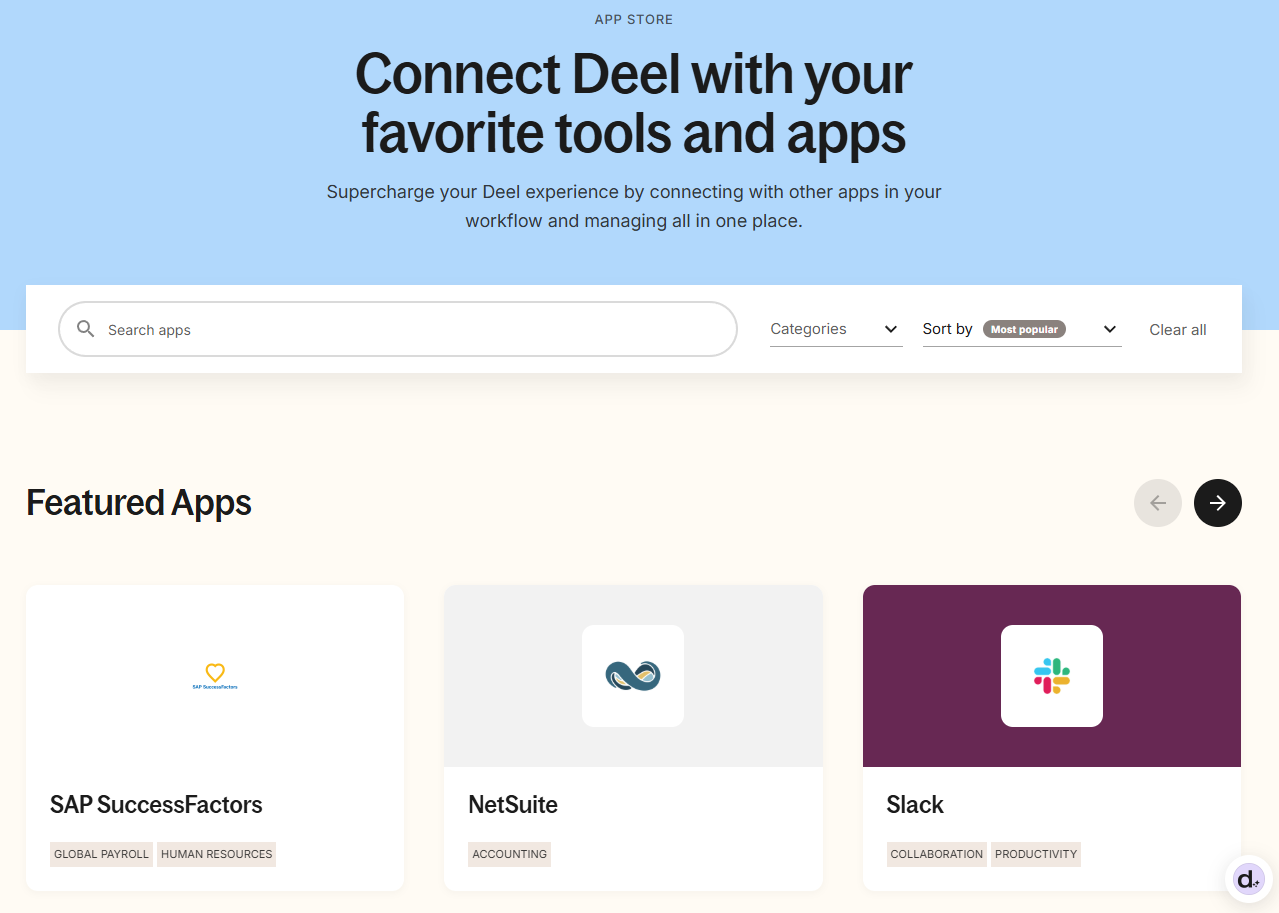
Deel provides access to its app library to everyone, so you can check if your other platforms will integrate before you buy. Source: Tech.co testing
How Did We Evaluate Employer of Record (EOR) Services?
We understand how important choosing the right Employer of Record (EOR) software for your team is, and that’s why we go the extra mile when researching and reviewing the top providers.
First, we conduct an initial exploration to find the most relevant and useful platforms on the market. Then, we analyze their potential using a vigorous methodology that focuses on the concerns businesses care about the most, including:
- Features: Both the overall functionality and number of features weighs heavily on how effective these platforms are.
- Entry price: The starting cost for smaller businesses is a good way to gauge whether its accessible across the industry.
- Average cost of plans: Knowing whether it will be expensive to scale in the long run should have a big impact on your decision.
- User experience: Ease of use should always be considered, especially if you haven’t used this kind of software in the past.
- Support options: Businesses need to know how available the provider will be if they require assistance with an issue.
These findings then help determine each software’s overall potential, which businesses they are best suited for, and how they size up against the wider competition.
So much more goes into our research process, though. If you’d like to learn more about how we test and review products at Tech.co, you can learn more about our research here.
Verdict: What Is the Best Employer of Record (EOR) Service?
We recommend Papaya Global’s EOR service for any business that’s expanding into a new country. It can handle compliance and payroll across more than 160 countries, it’s easy to use, and it goes the extra mile with perks like visa aid and equity management.
Many other great EOR vendors will serve you well, but it’s RemoFirst that offers the lowest starting cost for employees and contractors, while Deel has a particularly easy interface and stellar 24/7 support.
In the end, your best approach is to contact the EOR services that best meets your needs. Your specific business needs will determine the exact quote that each service will offer.
If you click on, sign up to a service through, or make a purchase through the links on our site, or use our quotes tool to receive custom pricing for your business needs, we may earn a referral fee from the supplier(s) of the technology you’re interested in. This helps Tech.co to provide free information and reviews, and carries no additional cost to you. Most importantly, it doesn’t affect our editorial impartiality. Ratings and rankings on Tech.co cannot be bought. Our reviews are based on objective research analysis. Rare exceptions to this will be marked clearly as a ‘sponsored’ table column, or explained by a full advertising disclosure on the page, in place of this one. Click to return to top of page