
When weighing low-code vs no-code, both offer a fast, accessible way to build a website or app, but the right choice depends on your goals.
Neither is better than the other, but low-code is more technical and offers advanced control, while no-code is a natural fit for anyone with zero coding experience. AI tools and website builders like GoDaddy Airo AI Builder typically use versions of these methods to serve a wide range of users.
This guide walks you through the key differences between low-code and no-code, which building process to use for your site or app, and how each building method works.
- No-code will help you launch a website or app in hours to days without writing code, using visual editors and natural language prompts
- Low-code is a good building option if you need advanced customization, want to add custom code, and have engineering support
- Both no-code and low-code use subscription models and AI credit allowances, but low-code can incur high developer expenses too
- Not all no-code platforms allow you to export code, but GoDaddy’s Airo AI Builder is a rare exception on the market

GoDaddy's Airo AI Builder is a no-code platform
GoDaddy's Airo AI Builder takes natural language prompts and brings your website, app, pages, databases, or logic to life, no coding required.
Low-Code vs No-Code: At a Glance
To put it simply, low-code building requires a basic understanding of code, architecture, and programming, so it’s more suitable if you’ve got a larger team with engineering or IT support. No-code tools, like GoDaddy’s Airo AI Builder, write the code for you, using drag-and-drop editors or agentic AI building, making it more accessible for builders with no coding experience.
However, when comparing low-code vs no-code, you’ll find that both methods share a lot of similarities. Both offer a quick build time, low-cost subscriptions, real-time feedback, and AI support.
| Low-code | No-code | |
| Skill level | Low-to-medium – an understanding of JavaScript, APIs, and custom CSS is useful | Very low – it uses visual components and requires natural language prompts |
| Speed | Days to weeks | Hours to days |
| Customization | High; allows custom scripting and integration | Customizable, but dependent on the vendor |
| Flexibility | Add relevant functionality yourself, but you have to juggle multiple platforms, and you could make your site or app more vulnerable to security risks | Access the benefits of your provider’s infrastructure, such as hosting, security, and built-in tools |
| Recommended for | Developers and engineers | Small businesses |
When I tested GoDaddy’s Airo AI Builder (a no-code website and app creator), I built a professional-looking website in less than 20 minutes with no coding experience required. That time included the initial site creation, additional page generation, and design tweaks.

What Is Low-Code Building?
Low-code is more user-friendly than traditional coding, relying on visual editors while also offering flexibility for custom code and integrations. You get the best of both worlds with low-code building – use pre-built elements and add your own custom code if necessary. You get more control over your project, without needing to start from scratch or write every line of code yourself.
Some experience in coding can be useful, particularly if you want to build anything complex, such as unique business workflows or customer support portals.
- Accelerates time-to-market versus traditional coding methods (you can get your website or app live in days or weeks)
- Low-code tools typically include hosting, security, and staging as part of your package
- Flexibility to add custom code, such as JavaScript or Python, which gives developers more creative control over the output
- Frees up engineering teams to focus on high-priority, high-value work that requires coding
- Risk of vendor lock-in, making it difficult to export your code or switch providers if you outgrow the platform
- Some coding knowledge is preferable, making it less beginner-friendly than no-code
- Low-code can be less budget-friendly if you need to hire someone to add code
- Without experienced builders, you could end up with messy code, patchy security, and unmonitored data access
What Is No-Code Building?
No-code building is incredibly beginner-friendly, providing the building blocks for anyone to create a website or app from scratch. You don’t need any coding experience, since there’s no need to write code at all. If you can describe what you want, use drag-and-drop elements, and navigate intuitive interfaces, you can handle no-code.
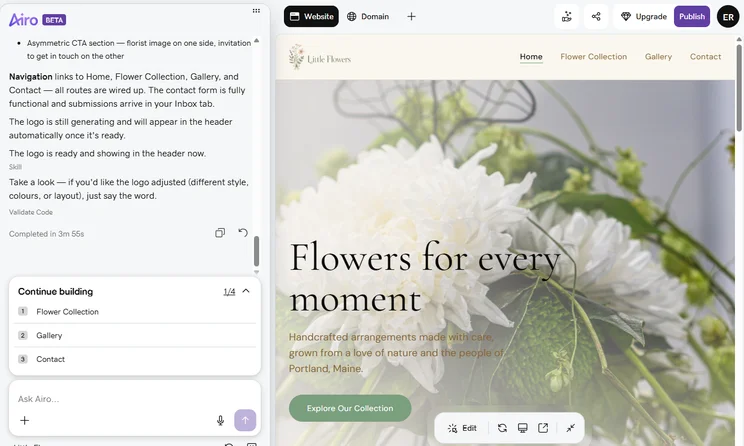
I created a website with GoDaddy’s Airo AI Builder using simple prompts. By describing what I wanted, whether that’s a change of color scheme or a new page, the AI would plan and code the whole thing for me. But if I wanted more control, I could manually change components in the editor myself, without using AI credits.

No-code is ideal for businesses with limited time and no budget to hire experienced developers. No-code will handle all of the manual programming for you, so there’s slightly less flexibility than low-code tools, but no-code minimizes the risk of code errors or bugs, since the platform will automatically test each component.
- No-code removes the barrier to entry when it comes to building a website or app
- No-code building is a faster route than low-code – simply describe what you want and let AI generate your website or app in minutes (a fully polished site or app will take hours to days to get ready)
- It’s easier to make changes across a variety of elements or pages in one go, making your website or app more adaptable and less reliant on engineering support
- Additional functionality and security are built into the platform and fully automated – for example, GoDaddy's Airo AI Builder plans include SSL, a custom domain, SEO, ecommerce, booking tools, and more
- You can also export your code with GoDaddy's Airo AI Builder
- You’re more dependent on what your no-code tool can design and produce (if the builder doesn’t support a certain feature, you’ll be stuck, so make sure to choose wisely)
- You’ll need to pay for additional AI credits or upgrade your plan if you exceed your allowance
- Less ideal for highly technical projects or enterprise-level businesses who need absolute control
How To Choose Between Low-Code and No-Code
Before you build your website or app, you must understand your team’s technical capability, timeline, budget, project complexity, feature requirements, and scalability. Consider these questions when deciding between the two building methods:
- What’s your budget?
- Do you have a tight deadline?
- Who will be using the tool, and do they have coding experience?
- Do you have a team of experts to lean on?
- How big is your project? Can you grow long-term?
- Do you need to integrate with other platforms or apps?
You should choose low-code if you have some coding knowledge (or a team of engineers or developers to rely on), need to add complex integrations, and want full control over your site or app.
In contrast, choose no-code if you have a smaller budget, limited tech skills, and want an all-in-one builder that requires no coding experience. For example, GoDaddy’s Airo AI Builder plans include a free custom domain, built-in analytics, hosting, SSL, and database, making it convenient and easy to manage in one place. No-code is designed for small businesses and lean teams who need to launch their site or app quickly.
Final Thoughts: Is Low-Code or No-Code Better?
Low-code and no-code make building a website or app fast, cheap, and accessible. That said, no-code is the easiest option – it’s in the name. No-code writes all of the code, presenting a visual layout for you to review. In comparison, low-code is a mix of no-code and traditional coding, combining pre-built elements with the option to inject custom code.
The building method you choose will depend entirely on your skill level, project needs, budget, timeline, and long-term plan.
But if you’re still deciding between the two, I recommend trying GoDaddy’s Airo AI Builder – the no-code builder has three paid plans ($9.99 to $99.99 per month) that include a free custom domain and larger AI credit allowances, plus extra features, such as ecommerce and premium support. There is also a free plan with 50 AI credits per month that allows you to explore your idea, building unlimited preview sites and apps before you pay a dime.
FAQs: Low-Code vs No-Code
No-code platforms can support high-traffic projects with ease, but you might want to consider low-code if you need to process a lot of background data or integrate custom workflows.
It depends on your low-code or no-code platform. Most low-code platforms allow you to fully export your source code, while many no-code platforms lock you into their platform without the option to take your code elsewhere. However, the no-code builder GoDaddy Airo AI Builder allows you to export your code.
Low-code tends to be more expensive than no-code, since you need to pay for the tool and will likely also need to hire a developer or specialist. No-code platforms will also charge a subscription fee, as well as AI credit usage charges, but you can monitor your credit allowance to make sure you stick to your budget.


