

We may receive a commission from our partners if you click on a link to review or purchase a product or service. Click to Learn More
The GoDaddy Airo AI Builder is one of our top-rated AI website builders, letting you build a website or app from scratch using natural language prompts. You don’t need any coding experience; simply ask GoDaddy for what you want, and it will build it.
In this guide, I’ll walk you through how to use GoDaddy’s Airo AI Builder from a starting prompt to customizing your pages to publishing your project.
- Create websites, online stores, and web apps in minutes with GoDaddy’s Airo AI Builder, without any coding experience
- GoDaddy offers a free plan for preview builds (with 50 monthly AI credits), or paid plans range from $9.99 to $99.99 per month (billed annually)
- You can sell products with any GoDaddy Airo AI Builder plan, but we recommend the Professional or Ultimate plans for most online stores if you need ongoing updates to your store
- All of GoDaddy’s Airo AI Builder paid plans include a free custom domain, code export, built-in analytics, hosting, SSL, and database

Build a professional website or app in minutes
GoDaddy’s Airo AI Builder takes natural language prompts and brings your website, app, pages, databases, or logic to life, no coding required.
What Is GoDaddy’s Airo AI Builder?
GoDaddy’s Airo AI Builder is the platform’s website builder and app creator, accessible to all skill levels, whether it’s your first time using AI to build a site or you’re a developer looking to save time. This no-code, beginner-friendly tool lets you create websites, online stores, web apps, portfolios, and more.
GoDaddy’s Airo AI Builder brings together everything your business will need into one hub, including hosting, your site’s domain, ecommerce, and support. You can start building and testing out ideas with the free plan (which includes 50 AI credits), or upgrade to unlock advanced features, additional credits, and publish your work.
- Ask AI to build what you want, and GoDaddy's Airo AI Builder handles the work
- All sites are optimized for mobiles
- You can export your app’s code without paying extra
- Built-in security measures include SSL and DDoS protection
- 24/7 phone and chat support from GoDaddy
- 4.4 out of 5 on Trustpilot, based on over 142k reviews
- You can’t publish your site or app on the free plan (but you get unlimited preview builds)
How To Use GoDaddy’s Airo AI Builder: Step-by-Step Guide
I put GoDaddy’s Airo AI Builder to the test, using a fake business idea to create a website from scratch. In total, the process of generating a site, tweaking content, and adding new pages took roughly 20 minutes.
I’ll walk you through how to use GoDaddy’s Airo AI Builder step-by-step, from prompting to publishing.
1. Write Your Prompt
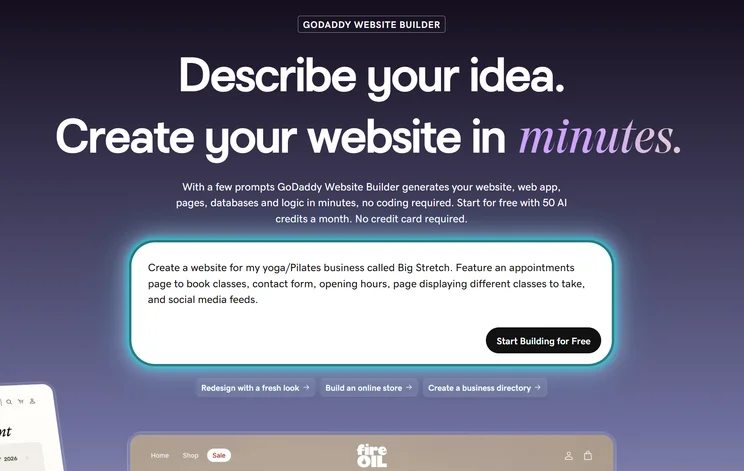
To start, navigate to the GoDaddy Airo AI Builder landing page – you’ll see a text box for you to add your prompt and describe your idea. You can also add a URL, upload a file, or use a voice prompt at this stage.
If you’re not sure what to build, you can also use GoDaddy’s pre-written prompts, or choose from an existing template as a starting point.
For my test, I wanted to build a yoga and Pilates business called Big Stretch. My prompt for GoDaddy’s Airo AI Builder was simple:
- Create a website for my yoga/Pilates business called Big Stretch. Feature an appointments page to book classes, contact form, opening hours, page displaying different classes to take, and social media feeds.
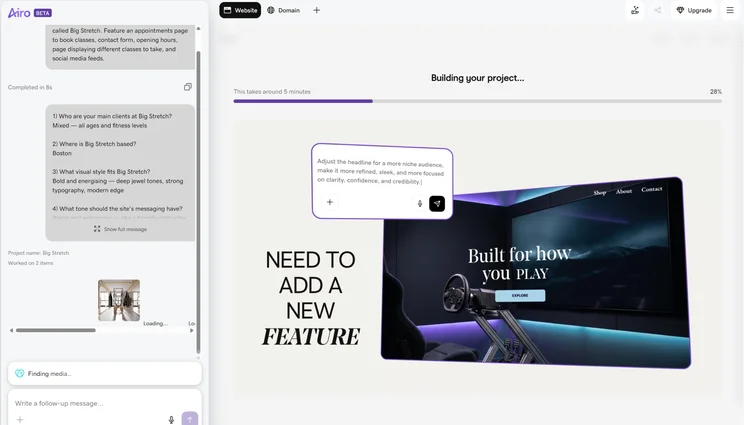
Before GoDaddy started generating my site, I had to answer a few questions around:
- Understanding my main clients
- Business location
- Visual style preference
- Brand tone of voice
These are good things to think about ahead of building your website and writing your prompt, but GoDaddy helps you along by offering suggested responses, as well as an option for you to add your own information.
After selecting my preferences, GoDaddy’s Airo AI Builder got to work to bring my prompt to life.
All suggestions from GoDaddy’s Airo AI Builder during the build were already tailored to my prompt, meaning each option was suitable and relevant for my fake yoga and Pilates business. I didn’t have any tough decisions to make; it was all just a matter of preference and which style I liked best.
For example, when asked about what visual style I’d like for the website, GoDaddy suggested options like “soft and organic” or “bold and energising,” along with details about what those visuals could look like and why they’re suitable for my industry.

2. Review Your AI-Generated Website
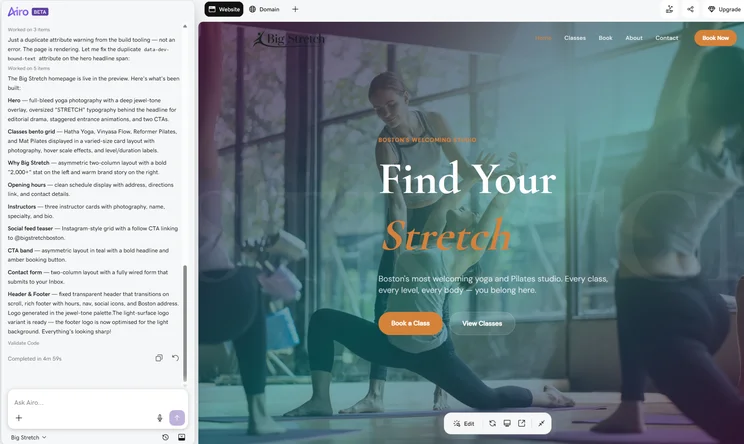
GoDaddy’s Airo AI Builder took 4 minutes 49 seconds to generate my website.
With a sidebar chat to the left and a site preview to the right of the screen, I could immediately see my site’s homepage. While other pages are linked in the navigation bar, GoDaddy’s Airo AI Builder only generates the homepage to start.
For the homepage, GoDaddy provided me with a list of what it had produced, all tailored to my prompt and business:
- Hero element
- Classes bento grid
- Why you can trust the business section
- Opening hours
- Information about instructors
- Social feed teaser
- CTA band
- Contact form
- Header and footer
3. Edit Your Site With GoDaddy’s Airo AI Builder
After GoDaddy’s Airo AI Builder has generated your site, it’s time to make any changes you want. I found customizing the site really intuitive and quick, since I could request edits in the sidebar chat, or click the “Edit” button to take action myself (or add annotations for the AI). Though it might take you a few prompts to get the output you desire!
Text and image edits don’t use up any AI credits when using the edit mode, which is really helpful for these early-stage tweaks. Only larger changes, such as adding a new section or redesigning a page, will eat into your AI credit allowance.

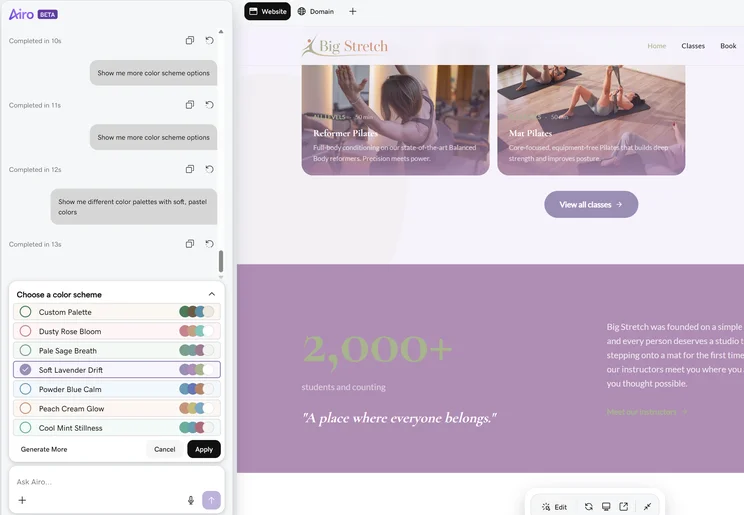
I initially chose a “bold and energising” visual style during the prompting stage, but I didn’t love the outcome. I asked GoDaddy’s Airo AI Builder to change the site’s look to another suggestion: “soft and organic.” The AI then updated the colors, fonts, shapes, buttons, shadows, homepage structure, and logo to match.
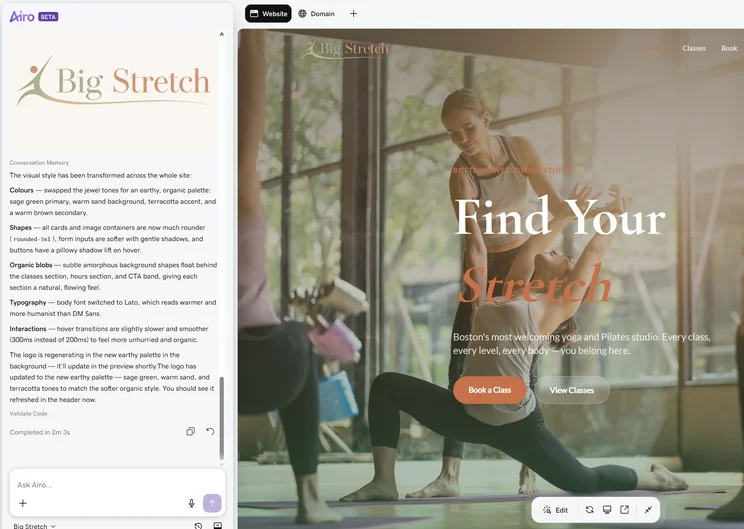
I also asked to replace the orange in the color palette with a blue tone. Again, GoDaddy did this quickly, but the swap wasn’t to my liking, so I then asked GoDaddy’s AI Builder to suggest alternative color palettes to choose from. GoDaddy gave me five palettes to choose from, with visuals and names, including “Soft Clay Sage” and “Gentle Moss Linen.” I could click through each color palette option and see it applied to my site in real time.
4. Add New Pages
GoDaddy populated my site’s homepage with links to relevant pages (both in the navigation bar and within the copy itself). When clicking on these links, a pop-up box appears with the option to get GoDaddy’s Airo AI Builder to build that page.
The process is pretty straightforward. The GoDaddy Airo AI Builder takes the information it already knows about your business and the content that exists, and uses that to generate the new pages.
In some instances, the AI will ask additional questions. For example, to build out the bookings page, GoDaddy wanted to know what actions visitors should take on the page and which classes should be bookable.
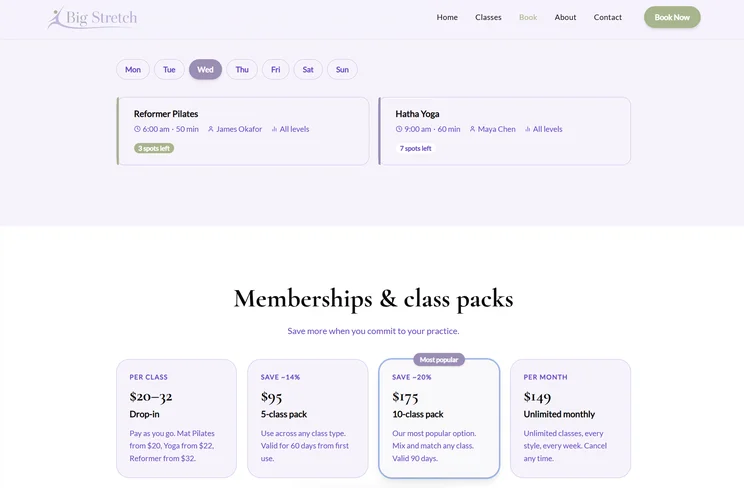
According to the AI chat, adding a Classes page took 2 minutes 23 seconds, the Bookings page took 2m 49s, the About page took 1m 58s, and the Contact page took 1m 34s.
You can prompt GoDaddy’s Airo AI Builder at the start to build an online store for you. Alternatively, if you want to add a shop to your existing project, you can click on the Commerce tab in the top bar or ask GoDaddy’s Airo AI Builder to add a store, add products, build a shop page, and help set up a checkout.
The Commerce tab will show you your sales activity, recent payments, payouts, and quick links to help you manage orders and view reports.
5. Optimize Your Site
After customizing your visuals, tweaking content, and adding new pages, it’s time to optimize your site ahead of launch. These tasks include:
- Setting up your tabs – add new shortcuts to your GoDaddy Airo AI Builder editor to help you manage and maintain your website, such as analytics and commerce (click the plus symbol in the top navigation bar)
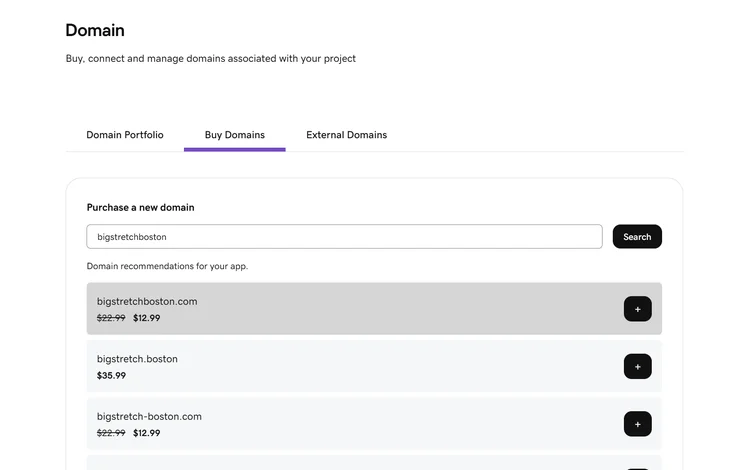
- Connect a custom domain – as a leading domain registrar, you can purchase a domain from GoDaddy (a .com domain costs $12.99 for your first year, then $22.99 per year after, though all Airo plans gift you a custom domain for free for the first year)
- Check your metadata – SEO/AEO support is built into GoDaddy’s Airo AI Builder, ensuring all pages are automatically optimized for search to help improve your site’s visibility online (additional SEO measures are suggested once you publish, such as connecting with Google Search Console)
6. Publish Your Website
Once you’re happy with your site’s design, have checked over the AI-generated content (replacing copy where necessary), and optimized your pages, it’s time to launch your site.
Simply click the purple “Publish” button in the top right to take the final step and share your site publicly.
7. Post-Launch Promotion
Next, take a look at GoDaddy’s “Marketing” tab to start promoting your website and build brand awareness. Here, you’ll be prompted to ask the AI for a marketing campaign, automating a message to the AI chat.
After answering a few questions about what I wanted the campaign to achieve and my key goals, GoDaddy’s Airo AI Builder built a detailed campaign plan for me.
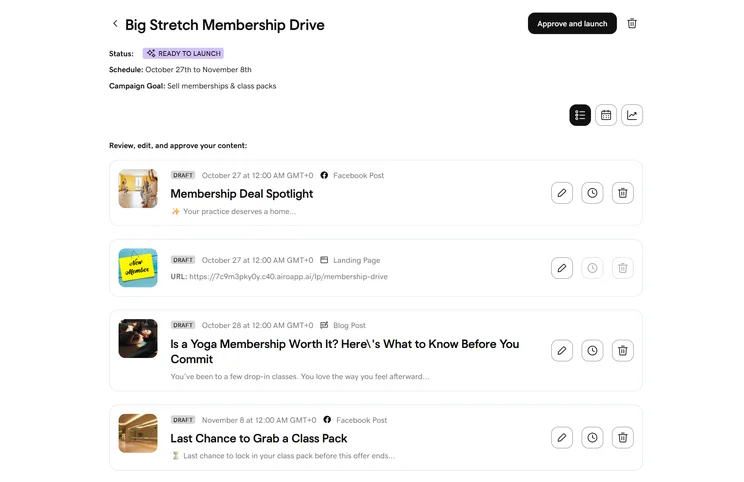
The proposed plan (which focused on selling more memberships) included a dedicated landing page, a blog post, and two social media posts. It also included the campaign dates, a reason for the AI’s content decisions, and what to expect in terms of success, which is a nice touch to help new businesses set realistic expectations.
The marketing campaign took 8 minutes 2 seconds to generate – I could review, edit, and approve each step of the campaign before clicking “Approve and launch.”
How Much Does GoDaddy Airo AI Builder Cost?
GoDaddy’s Airo AI Builder has a free plan, plus three premium plans, ranging from $9.99 to $99.99 per month (billed annually). You can only publish your site or app with a paid plan, but all plans let you start building with monthly AI credits.
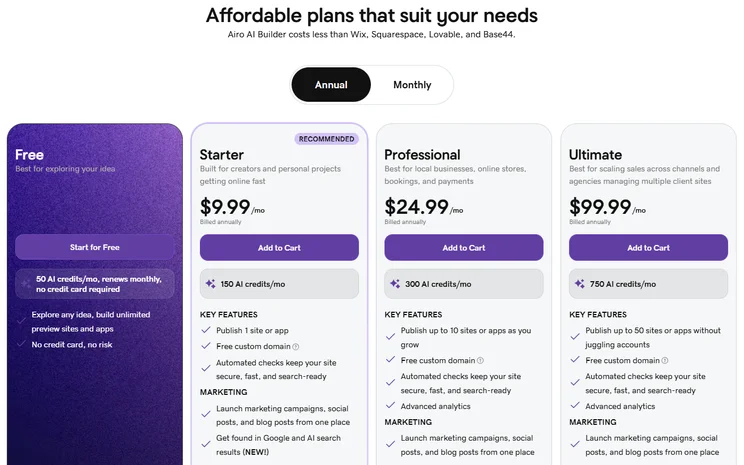
You can compare GoDaddy’s pricing in the table below:
|
Plan
|
Price (3-year contract)
The price per month you'll pay if you choose to be billed for 36 months
|
Price (2-year contract)
The price per month you'll pay if you choose to be billed for 24 months
|
Price (1-year contract)
The price per month you'll pay if you choose to be billed annually
|
Price (1-month contract)
The price per month you'll pay if you choose to be billed monthly
|
AI credits
|
Best for
|
Published websites or apps
How many websites or apps can you publish with this plan?
|
Free custom domain
|
Ecommerce
|
Key features
|
|---|---|---|---|---|---|---|---|---|---|---|
|
Free |
Starter |
Professional |
Ultimate |
|||||||
|
$0 |
$12.29/month |
$30.39/month |
$122.99/month |
|||||||
|
$0 |
$11.69/month |
$28.99/month |
$116.99/month |
|||||||
|
$0 |
$9.99/month |
$24.99/month |
$99.99/month |
|||||||
|
$0 |
$19.99/month |
$49.99/month |
$199.99/month |
|||||||
|
50 |
150 |
300 |
750 |
|||||||
|
Exploring and testing new ideas |
Launching your business or idea online |
Growing commerce businesses |
Larger businesses and team collaboration |
|||||||
|
Unlimited builds (preview only) |
1 |
10 |
50 |
|||||||
|
|
|
|
|
|||||||
|
|
Link or QR code only |
|
|
|||||||
|
|
|
|
Can I top up my AI credits with GoDaddy?
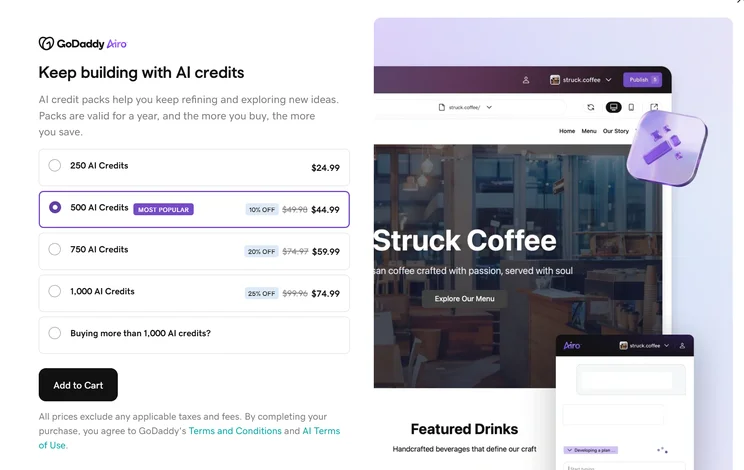
If you run out of your monthly AI credit allowance with GoDaddy’s Airo AI Builder, you can top up your limit with AI credit packs, starting from $24.99. You can purchase more credits by selecting “Manage your Airo plan,” or you can upgrade your existing plan to unlock a higher monthly credit allowance.
Final Verdict: Should You Use GoDaddy’s Airo AI Builder?
GoDaddy’s Airo AI Builder is incredibly versatile, giving beginners and experienced developers the tools they need to build websites and apps from scratch in a rapid timeframe.
Whether you’re looking to generate an informational blog, showcase your work with a portfolio, set up an online store, or develop a web app, GoDaddy’s Airo AI Builder can help you from prompt to publication. Plus, you can get started with its free website builder plan and test out ideas before you commit to a premium subscription.
FAQs: GoDaddy Airo AI Builder Guide
GoDaddy’s Airo AI Builder has a free plan, letting you build an unlimited number of sites or apps (in preview mode only), with 50 AI credits per month. You must upgrade to publish your projects, unlock advanced tools (such as ecommerce), and access additional credits.
All GoDaddy Airo AI Builder plans include a free SSL certificate, DDoS protection, and automatic backups. Ultimate plan subscribers will also have access to cyber risk assessments and a 30-day free trial of Norton Small Business (but both of these features are labelled as “coming soon” for now).
GoDaddy is a domain registrar, web host, and website builder – GoDaddy’s Airo AI Builder is built into this ecosystem. With GoDaddy’s Airo AI Builder, small businesses can describe the website or web app they want, and the AI will build it from scratch.


