

We may receive a commission from our partners if you click on a link to review or purchase a product or service. Click to Learn More
Individuals with no coding experience at all can build an app in 2026 using vibe coding platforms such as Base44. All you need is a clear idea to describe in plain English, and you can be up-and-running in only a few minutes.
However, despite recent advances in AI, there’s no silver bullet when it comes to app development. So, to help you explore all available options, we cover three ways you can build an app, unpacking their key benefits, drawbacks, and use cases.

Turn ideas into apps in minutes
Build fully-functional apps that work for you, with just your words
No coding needed
- The best option for non-coders wanting to build an app in 2026 is through the use of vibe coding tools. This is a modern, accessible method of building an app yourself, using simple language prompts.
- You can hire someone to code and design your website, usually a developer, who will ensure high-quality custom results, but costs can run upwards of $10,000.
- You can use a website-to-app converter that can turn an existing website into an app with some compromises when it comes to functionality.
- If you do choose a vibe coding tool, we would recommend Base44, which provides a simple and easy-to-use interface for beginners and offers a free plan so your business can get started straightaway.
How to Make an App: Summaries
How To Use a No-Code or Vibe Coding Platform
Vibe coding platforms are the most accessible method for building an app, because they let you create fully-functional apps without learning a lick of code, which can take months of study.
Working in a similar way to ChatGPT, platforms such as Base44 and Agentforce Vibes take care of every step of the process for you. All you need is a clear idea of what you want to achieve and knowledge of the best way to communicate it to the AI, known as prompting.
Our own original research shows that almost 62% of SMBs are now using AI, illustrating that these platforms are already making waves across the business world.
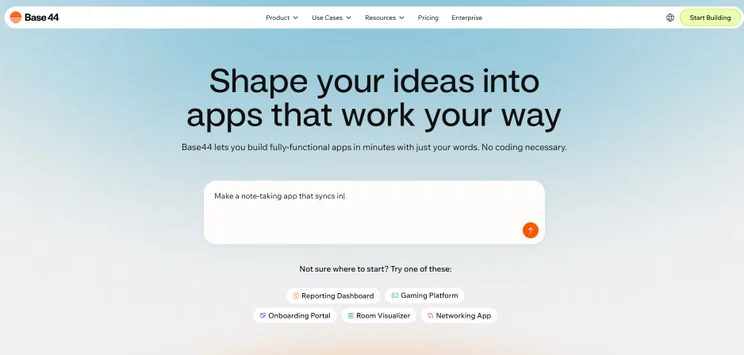
Getting set up with Base44 is simple: all we had to do was write our initial prompt in the box, and let the AI get to work. Source: Tech.co testing
Once you’ve given Base44 your idea, your app will be ready to go in a few minutes. Then, you’ll be taken to the editing screen, where you can continue to work with the AI to tweak and perfect the results in real-time.
Vibe coding platforms also make it super easy to deploy your app once you’ve finished editing it. In Base44, for example, all you have to do is navigate to the “publish” button in the top corner of the page, and your app will go live.
If you need help with vibe coding a website, check out our dedicated guide.
Learning how to properly prompt vibe coding platforms can save your business from having to continually re-prompt the AI, and instead, you can get the results you need much quicker.
I’d recommend asking other AI tools, such as ChatGPT or Gemini, to evaluate your prompts for you. They will be able to tell you how effective your prompt is, and how easily the AI will grasp your request and execute it.
Gemini, for example, told me to specifically state non-negotiable design elements of my app, such as my business’s color scheme, to ensure strong branding throughout my project.

What are the benefits of vibe coding?
- The process is incredibly quick and easy, especially when compared with coding an app yourself or outsourcing the task to a third party.
- No learning curve required. Platforms like Base44 require no coding experience, and by simply telling the AI what you want to make, your ideas can be transformed into a live product within a couple of minutes.
- You’ll get ongoing feedback from the AI that will help you naturally improve your app, giving your employees a better idea of how to use their time when working and therefore boosting their efficiency.
- Most vibe coding platform offer free entry-level plans, allowing users to be up-and-running with a functional first draft in a few minutes.
What are the drawbacks of vibe coding?
- Vibe coding doesn’t give you granular control over your app. Although you can refine your app with additional prompts, you won’t be as familiar with the inner workings of your app as if you coded it yourself.
- You might struggle to create highly specialized or large-scale applications, as platforms tend to be less optimized for these purposes. But, with how quickly they are developing, I doubt it’ll be long before building complex apps becomes easier.
How to Hire an App Developer
Hiring a professional is the best choice for those that want to create a highly specialized or complex app, but lack the time or expertise to do it themselves. This approach involves outsourcing the entire app development process to a skilled third-party, whether it be a freelance developer or a dedicated agency.
According to our own data, 21% of SMB leaders would pay upwards of $1,500 for a human website designer even if an AI tool can deliver a comparable result for much cheaper. So, there’s still an appetite for human ability in the age of AI.
Websites like Upwork and Fiverr are great resources for finding freelance developers, while development agencies listed on sites like Gloats are better suited to support complex projects.
What are the benefits of hiring a developer?
- You’re guaranteed a high-quality, bug-free product made by a professional.
- You can overcome the limitations of DIY app-builders, which currently struggle to create apps requiring sophisticated features, like real-time location.
- You can get up and running quickly using an experienced team or developer.
What are the drawbacks of hiring a developer?
- Professional developers are expensive. Hiring a developer for a complex app typically costs between $10,000 and $150,000, and hourly rates often exceed $200. As budgets are squeezed for small businesses in 2026, these numbers can be difficult to reckon with.
- You won’t be able to make day-to-day decisions about the technical design of your app, meaning you’ll have to sacrifice some control and spend time feeding back on changes.
How to Use a Website-to-App Converter
Website-to-app converters are automated platforms that let you transform existing websites into professional, ready-to-use mobile apps within a few minutes. These are not suited to making an app from scratch, however.
Platforms like Convertixo just require you to enter your website’s URL into a box once you’ve made an account and your website will be converted in less than a few minutes.
What are the benefits of a website-to-app converter?
- If you already have a website, this is the quickest way to get an app on the market.
- You’ll save some money compared with outsourcing the project.
What are the drawbacks of a website-to-app converter?
- This is only an option for those with existing websites and won’t give you the tools necessary to build an app entirely from scratch.
- You won’t have complete access to elements, such as device hardware or the camera, making the method a poor fit for apps that rely heavily on native phone features.
What Are The Best Vibe Coding Apps?
Vibe coding might still be an emerging technology, but according to a report from Gartner, 70% of new apps will be built using low-code or no-code technologies in 2026.
In terms of platforms you should consider, Base44 has already emerged as a clear leader of vibe coding platforms. Base44 handles all functions in-house, allowing users to manage a custom product without leaving its centralized dashboard. Secondly, its prompt-first workflow and full-stack capabilities make it a great choice for beginners.
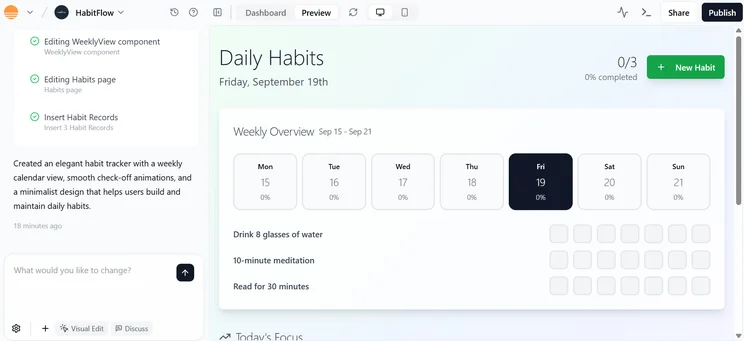
Base44 let me create a Daily Habits app in a couple of minutes, by entering a natural language prompt. Source: Tech.co testing
Base44’s chat-based interface is also very easy to get started on. Instead of navigating drag-and-drop builders, all you need to do is type what you want into the chat window, making it ideal for users with little technical know-how who need a working app within a couple of minutes.
Turn ideas into apps in minutes
Build fully-functional apps that work for you, with just your words
No coding needed
Other vibe coding platforms to consider include:
- Lovable: Another prompt-driven platform with a low learning curve. I’d recommend it for developers with a little more coding expertise that still want a user-friendly platform.
- Cursor: Oriented towards experienced developers who want more of an AI coding assistant. It’s still a no-code solution, but is specifically valuable if you know how to code.
- Bolt.new: Ideal for users that want a more complete experience, through access to both mobile and desktop apps. It also integrates with GitHub and Figma.
There also exists a range of free vibe coding platforms and plans you can check out if you want to explore the software yourself.
There is no shortage of ways you can make an app in 2026. With the rapid development of vibe coding, it’s never been easier for non-coders to design and deploy a professional app within a matter of minutes, thanks to platforms such as Base44.
Beyond vibe coding, there are other ways your business can create an app. There is the option of learning code yourself, hiring a developer, and converting your existing website into an app through a website-to-app converter.
However, for businesses that want to create their app within an intuitive, fuss-free platform that will save money and boost efficiency, a vibe coding platform is your best bet.
If you click on, sign up to a service through, or make a purchase through the links on our site, or use our quotes tool to receive custom pricing for your business needs, we may earn a referral fee from the supplier(s) of the technology you’re interested in. This helps Tech.co to provide free information and reviews, and carries no additional cost to you. Most importantly, it doesn’t affect our editorial impartiality. Ratings and rankings on Tech.co cannot be bought. Our reviews are based on objective research analysis. Rare exceptions to this will be marked clearly as a ‘sponsored’ table column, or explained by a full advertising disclosure on the page, in place of this one. Click to return to top of page


