

We may receive a commission from our partners if you click on a link to review or purchase a product or service. Click to Learn More
FreshBooks is a better accounting software provider when compared with Wave. This is because FreshBooks offers a strong range of features for a competitive price, all within a user-friendly interface.
FreshBooks also has a better selection of advanced features, including time tracking, project profitability tools, and over 100 third-party integrations, whereas Wave doesn’t offer any of these features.
Read on to find out everything you need to know about these two accounting tools in this FreshBooks vs Wave comparison, including their core features, pricing, operational efficiency, and how they compare with other top accounting software.
- FreshBooks is the best accounting software thanks to its wider feature set, strong operational efficiency, and 100+ third-party integrations.
- Wave is the best choice for businesses on a tight budget, offering a completely free core plan and a low-cost Pro tier at $19 per month.
- Unlike Wave, FreshBooks Premium provides advanced tools like time tracking, project profitability analysis, and audit trails.
- For retail businesses needing stock tracking, FreshBooks provides inventory management across all paid plans – something Wave doesn’t offer.
- While Wave includes a free tier, adding paid add-ons or integrating external software via Zapier requires additional monthly fees.
Our software rankings are based on our unique, in-depth research categories, including software attributes, pricing factors, support, and more.
FreshBooks vs Wave: At a Glance
FreshBooks is the better accounting solution for businesses that need comprehensive financial management, while Wave is ideal for smaller operations and budget-conscious businesses. In this FreshBooks vs Wave comparison, you can compare the two providers in the table below.
|
Starting price
|
Free trial
|
Max users
|
Best for
|
Core Benefit
|
Payroll processing
|
Phone support
|
Try now
|
||
|---|---|---|---|---|---|---|---|---|---|
 |

|
||||||||
|
FreshBooks |
|||||||||
|
|
|||||||||
|
30 days |
It’s free, no trial needed |
||||||||
|
Unlimited |
1 |
||||||||
|
New businesses |
Overall |
||||||||
|
Inventory tools at a low price, plus a great 60% discount for the first 6 months |
Basic accounting functionality for free |
||||||||
|
|
|
||||||||
|
|
|
||||||||
| Try FreshBooks | Try Wave Starter |

Is FreshBooks or Wave for you?
See how they compare to other providers to find the best accounting software for your business.
Read our full guide to Wave pricing for more information.
Best for Accounting Functionality: Draw
FreshBooks offers better functionality, but only at higher plans. Wave has a solid feature set across its plans. This beats FreshBooks’ cheaper plans, but loses to its Premium plan.
If your business has limited needs, I would recommend Wave as the most inexpensive solution, but if it has greater accounting needs, FreshBooks Premium is best. Here is how FreshBooks and Wave stood up against each other:
Invoicing and quoting
- Wave has strong invoicing features with an app that lets users send invoices easily
- FreshBooks offers recurring invoices, automated invoices, and quote sending, but lacks multi-currency invoicing and quoting
Tax preparation
- Wave can generate a Payroll Wage & Tax Report, but for further features, you’ll need a payroll subscription
- FreshBooks includes automatic tax updates, and can only support a range of tax types on a separate Making Tax Digital software
Journal entry
- Wave supports documenting transactions through journal entries, recording expenses, and a receipt maker
- FreshBooks supports documenting transactions
Time tracking
- Wave doesn’t come with time tracking capabilities
- FreshBooks offers strong time tracking capabilities
Financial transactions and reconciliation
- Wave can create a reconciliation period and fix any unreconciled periods, and various bank accounts can be linked to a Wave account
- FreshBooks links with multiple bank accounts and effectively facilitates bank reconciliation
Payments and processing
- Wave has domestic transfer fees in place, and offers 40+ currencies
- FreshBooks has domestic transfer fees in place with each payment type, and it accepts all major currencies
You can learn more about Wave’s feature offering in our Wave accounting review.
Best Value: Wave
Wave provides the best value for budget-conscious users with a completely free core plan and a low-cost $19/month Pro tier.
The Wave service has plenty of additional costs for add-ons, like payroll and bookkeeping support. But its free plan comes with no limits on clients, invoices, estimates, or bills.
FreshBooks offers no free plans, but it has a 30-day free trial available for its four paid plans, which are Lite, Plus, Premium, and Select. Unlike Wave, all of FreshBooks’ plans have a one-user limit, except the Select plan, which is capped at two users. Additional members will cost an extra $11 per month across all plans.
Here are the different FreshBooks plans:
- The Lite plan is $23 per month and includes core features such as custom invoicing and unlimited estimates, but is capped at just five billable clients.
- The Plus plan is $43 per month and adds automations for invoices, late fees, and late payment reminders, with a billable client cap of 50.
- The Premium plan is $70 per month, with unlimited billable clients. It adds features such as customized email templates and signatures, and automated client emails with dynamic fields.
- The Select plan is available for corporations at a custom price, and adds a dedicated Account Manager, training, and lower credit card transaction rates.
Businesses with limited needs should pick Wave, while those that can benefit from an expanded set of features should opt for FreshBooks Premium.
Committed to finding free software? Check out our guide to the best free accounting software for small businesses.
|
Price
|
Users
|
Bookkeeping
Does it include bookkeeping functions?
|
Accounts payable
Does it include a range of accounts payable functions?
|
Accounts receivable
Does it include a range of accounts receivable functions?
|
Project accounting
Does it offer tools to track different projects?
|
Financial reporting
Does it offer financial reporting tools?
|
Budget and forecasting
Does it offer budgeting and forecasting tools?
|
|||
|---|---|---|---|---|---|---|---|---|---|---|
|
|
|
|
|
|
|
|||||
|
Wave |
Wave |
|||||||||
|
Wave |
Pro |
|||||||||
|
|
Free |
|
|
|||||||
|
1 |
Unlimited |
1 |
Unlimited |
1 |
3 |
|||||
|
|
|
|
|
|
|
|||||
|
Expenses tracking only |
|
|
|
|
|
|||||
|
|
|
|
|
|
|
|||||
|
Time-tracking only |
|
|
|
|
|
|||||
|
|
|
|
|
|
|
|||||
|
|
|
|
|
|
|
Best for Operational Efficiency: FreshBooks
FreshBooks delivers superior operational efficiency by providing automated mismatched balance flagging, audit trails, and project profitability tools – features absent in Wave.
That said, FreshBooks doesn’t offer robust forecasting and budgeting tools, which could be crucial for businesses looking to plan and manage finances accurately. Therefore, a solution like QuickBooks could be a better option in some cases.
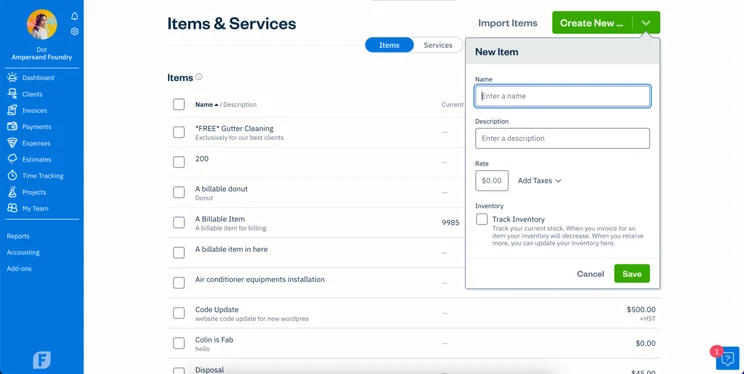
FreshBooks includes native inventory tracking across all paid plans, whereas Wave lacks built-in inventory management entirely. Source: Tech.co testing.
Similarly, I found that users can connect Wave with several third-party apps, such as Mailchimp and Stripe. However, this is done through Zapier, which requires an account and a monthly subscription of at least $19.99 per month. You’ll also need a Wave Pro plan subscription to connect any new or existing API integrations.
Therefore, FreshBooks wins out in this category. It offers over 100 integration options, so businesses wanting to connect their payroll or customer relationship management (CRM) products are in luck. However, this doesn’t compare to the over 1,000 integrations available in Xero.
How Do FreshBooks & Wave Compare With Alternatives?
FreshBooks is the best option for businesses with its vast help and support options, and Wave is the best free accounting software.
But they’re far from the only options. Check out our table of the best accounting services for more, and read on for a few select competitors worth considering.
|
Starting price
|
Free trial
|
Best for
|
Pros
|
Cons
|
Try now
|
||
|---|---|---|---|---|---|---|---|
|
|
 |
 |
 |
 |
|||
|
FreshBooks |
Xero |
Zoho Books |
FreeAgent |
QuickBooks |
|||
|
|
|
Free |
|
|
|||
|
30 days |
30 days |
14 days |
30 days |
30 days |
|||
|
New businesses |
Experienced accountants and established businesses with complex financial needs |
Integrations |
Budget-conscious businesses |
Businesses needing advanced financial insights and customization |
|||
|
|
|
|
|
|||
|
|
|
|
|
|||
| Try FreshBooks | Try Xero now | Try Zoho Books | Get Quotes | Try QuickBooks |
FreshBooks vs QuickBooks vs Wave
QuickBooks ranks as the top overall accounting software for advanced financial insights and reporting customization. The QuickBooks accounting service offers better features and add-ons than either Wave or FreshBooks, even though Wave does still have the best pricing overall.
Plus, QuickBooks offers a level of customizability that I was impressed with during testing, including the option for multiple delivery addresses for clients and customized reporting.
FreshBooks vs Zoho Books vs Wave
Zoho Books is another solid choice, with highly effective transaction documentation and at-a-glance insights into key information such as cash flow and payments.
The service’s automation features are one standout benefit, letting busy operations send regular invoices and estimates with minimum effort. During testing, however, I found Zoho Books to be less than ideal for businesses that want integrations beyond its designated catalog.
How Did We Score FreshBooks & Wave Against Others?
At Tech.co, we take our impartial research and analysis seriously, so you can have complete confidence that we’re giving you the clearest, most useful recommendations.
After conducting an initial investigation to identify the most relevant, popular, and established accounting tools in the market, we conducted further research, including testing six major accounting software platforms.
Based on years of market and user needs research, we’ve established an accounting software testing methodology that scores these platforms against six main categories, and 25 subcategories — with a total of 1,512 areas of investigation being considered overall.
We also put the platforms through their paces with hands-on testing to gain a deeper grasp of their average user experience. We dedicated 57 hours to carrying out 37 user tests, with a total of 555 tasks being completed in total.
Our main testing categories for accounting software are:
- Core accounting features: We check how adept a platform will be at managing accounting tasks, focusing on key bookkeeping features like invoicing, tax preparation, journal entry, time tracking, financial transactions, and payment support.
- Operational efficiency: We determine how capable a system is at ensuring day-to-day processes run seamlessly, paying close attention to third-party integrations, collaboration tools, AI automation, and customization options.
- Financial planning: We assess how capable a system will be at measuring income, profits, and losses. Specifically, we check for the presence and quality of forecasting and budgeting, inventory management, reporting, and compliance tools.
- Help and support: We assess how useful and reliable a platform’s support system is, focusing on support options, whether it’s 24/7 support or knowledge center accuracy, as well as cloud backup, and security safeguards.
- Pricing: We compare the overall cost of each platform, taking factors like monthly costs, set-up fees, hidden fees, and free plans into account. We also measure how strict contracts are, and how much it would cost for a business to terminate them early.
- User experience: An overall judgment of how easily users can interact with the platform. We tested each accounting platform and got our team to report how easy they were to use, how they felt when they were using them, and how likely they were to recommend the platform to another business.
When it comes to calculating a product’s final score, not all testing areas are weighted evenly, with factors like “core accounting features” and “operational efficiency” being prioritized for small businesses, while sector-specific features are valued more highly for businesses across different industries.
We understand that accounting software is always evolving. That’s why at Tech.co, we have full-time product researchers to re-run this testing process regularly. It’s the only way to ensure our results remain reflective of the present day.
Learn more about our research.
In this FreshBooks vs Wave verdict, I recommend FreshBooks over Wave because it offers better features overall. Wave is a good pick for side businesses, since it has a free plan that offers complex tools, but FreshBooks offers more for growing businesses and better operational efficiency with many integration options.
I also found that FreshBooks is great for retailers because it offers inventory management on all plans (Wave doesn’t offer it at all).
In the end, the best accounting solution for you depends on the unique needs of your business. Once you know what those are, there’s just one step left: compare quotes from the top options on the market. Our quick quotes form will let you do just that — within minutes.
Frequently Asked Questions
Yes, both platforms offer integrated online payment processing.
Wave Payments allows clients to pay directly via credit card or bank transfer (ACH) with pay-as-you-go processing fees.
FreshBooks uses FreshBooks Payments (powered by WePay/Stripe) and integrates with third-party payment gateways like Stripe or PayPal, though processing fees apply depending on the payment method used.
FreshBooks includes automated receipt scanning in its mobile app, which extracts expense data and categorizes transactions automatically.
Wave previously offered a standalone receipt scanner, but now integrates receipt capture directly into its core app. However, automated OCR receipt scanning features require paid add-ons or a Pro subscription.
Both platforms allow you to export your core financial data (such as transactions, invoice history, customer contacts, and reports) via CSV files to migrate to more advanced enterprise platforms like QuickBooks Online or Xero.
FreshBooks offers higher-tier plans like Select for scaling teams, whereas Wave’s features remain oriented toward micro-businesses and sole traders.
Wave allows you to invite unlimited users (including collaborators and external accountants) to a single account without extra charges on its free tier.
FreshBooks limits base account access to 1–2 users depending on the plan and charges an additional monthly fee per extra user or team member.
Wave allows you to send invoices to an unlimited number of clients on both its free Starter and paid Pro plans.
In contrast, FreshBooks caps the number of active billable clients based on your tier—limiting the Lite plan to 5 clients and the Plus plan to 50 clients, requiring you to upgrade to the Premium plan for unlimited client invoicing.
If you click on, sign up to a service through, or make a purchase through the links on our site, or use our quotes tool to receive custom pricing for your business needs, we may earn a referral fee from the supplier(s) of the technology you’re interested in. This helps Tech.co to provide free information and reviews, and carries no additional cost to you. Most importantly, it doesn’t affect our editorial impartiality. Ratings and rankings on Tech.co cannot be bought. Our reviews are based on objective research analysis. Rare exceptions to this will be marked clearly as a ‘sponsored’ table column, or explained by a full advertising disclosure on the page, in place of this one. Click to return to top of page


