

Trello is a better project management software tool than Jira. Both platforms excel in very different areas, so which one best suits your business will depend on what you’re looking for. Jira’s feature set and pricing may make it best for larger operations, while Trello is a great fit for small businesses.
Jira has a better range of task management features than Trello, including time-tracking, task dependencies, and decent data visualization tools on all of its plans. However, you’ll find Trello easier to use than Jira, and that’s pretty crucial.
In this guide, I’ll be unpacking which of these providers is a better fit for your business, looking at pricing, features, and everything in between. And make sure to check out our project management comparison page to see if there might be a better option out there.
In this guide, we cover:
- Jira vs Trello: Head-to-Head
- Best for Value: Jira
- Best for Functionality & Features: Jira
- Easiest to Use: Trello
- Best for Freelancers: Trello
- Best for Small Teams: Trello
- Best for Large Teams: Jira
- Best for Teams Working With IT: Jira
- Jira vs Trello: Is It Easy to Switch Between Them?
- Jira vs Trello Pricing Plans
- About Our Project Management Research
- Verdict: Why Trello Is Better Overall
Putting Jira and Trello Head-to-Head
Jira’s Work Management software and Trello are both great choices for teams managing projects. Trello is a simple, general-use project management program that will suit teams that need a central location to track tasks and check on project progress, whereas Jira is a full-fledged project management and issue-tracking tool with a wider range of capabilities.
All in all, Trello is easier to use than Jira, which has historically been geared towards IT and software development teams. Because of this, our researchers agreed that it was more capable than Trello when it comes to task management, data visualization, and collaboration.
- Trello is best for independent workers or personal projects since it has a free tier with unlimited personal boards.
- Jira is better for visualizing project data and better for data-intensive projects.
- Trello is best for small teams that want a straightforward setup experience.
- Jira is best for software development teams or IT departments, with great issue-tracking features.
- Trello is better for basic task management and a minimalist approach.
- Jira is better for large teams who want to centralize their workflows around a singular app.
| Price All prices listed are per user, per month (billed annually) | Pros | Cons | Verdict | ||
|---|---|---|---|---|---|
 |  | ||||
| Jira | Trello | ||||
| $9.05/user/month | $5/user/month | ||||
|
| ||||
|
| ||||
| A great value piece of software that’s ideal for tech, software development, and engineering teams | A fairly-priced, stripped-down option, best for small teams who need a central location for basic task management |
Test Summary
I found Trello really easy to get to grips with. Adding new cards (tasks) to the board view was really simple, and I didn’t feel like I was drowning in menu options or features I didn’t plan on using.
Quite a few different parts of the software (like the calendar) were automatically populated with data I’d already entered into my board, which saved me time during setup.
However, when I attempted to carry out more complex task management duties, such as drawing dependencies between tasks, I started running into dead ends. That’s where Jira performed much better — I felt like I could add more detail than I could with Trello.
Granted, Jira was a little overwhelming to start (and I wasn’t familiar with some of the jargon), but I’d definitely choose it over Trello if I was carrying out a large project.

Jira is Better for Project Views and Visualizing Data
Jira has multiple ways to view projects on all plans, including Gantt charts, Kanban boards, and a spreadsheet-style view with formulas — which is why it’s slightly better for complex task management and the kind of issue-tracking software development, engineering, and tech teams do on a daily basis.
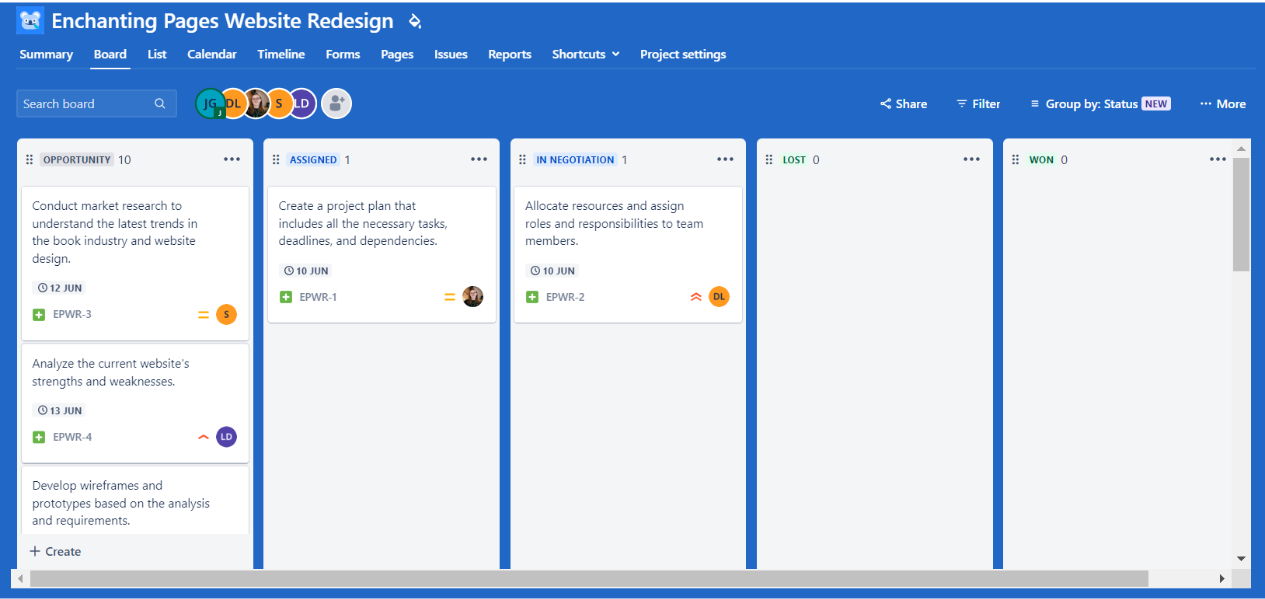
Jira’s Kanban board lets users complete each task within a larger project timeline. Source: Tech.co testing
Trello, by contrast, only offers a spreadsheet-style view on its Premium and Enterprise plans, but without those useful formulas Jira offers. The classic Gantt chart view, which is called a “Timeline” in Jira, isn’t included in Trello’s free or Standard plan. Jira includes this feature on all of its plans, as do most other competitors.
Another difference is the fact that Trello offers very few tools to visualize data on its free plan or Standard plan, with no custom or preset charts and no widget builder, whereas Jira has a lot more options for data visualization on its cheaper plans.
There are other crucial tools that you’ll find in most project management software tools — such as task dependencies — which Trello just doesn’t provide. They’re actually quite useful for understanding your project’s critical path and what you should be prioritizing, so it makes sense that Jira offers them on all of its plans.

Users can draw dependencies between tasks in Jira’s Timeline view. Source: Tech.co testing
Furthermore, a dashboard for project data and preset charts is only available on Trello’s pricier plans, while Jira offers data dashboards with preset charts and 28 different widget options. However, Jira doesn’t have a custom chart builder. Ultimately, neither of these providers excels in terms of project layout and data visualization, but Jira is clearly superior.
Jira Is Better Value Than Trello
Overall, Jira offers a better value than Trello. Both providers offer free plans, but Jira’s free option is much better when it comes to features. There are lots of tools for visualizing data, for example, which isn’t covered by Trello’s free plan. It’s actually one of the better free plans we’ve tested, with a generous 10-user limit that beats both Smartsheet and monday work management.
Although Trello’s first paid plan is cheaper than Jira’s ($5 per user, per month versus $9.05 per user, per month or a little lower, depending on the total users), Jira has a larger set of features, including a Gantt chart for visualizing project progress, and just like Trello, includes custom and pre-built automation capabilities for streamlining workflows.
Jira Has Superior Features to Trello
While neither provider particularly excels when it comes to functionality, Jira, again, is the better option of the two. To begin with, it has a very strong range of task management tools across all of its plans, including a Kanban board, custom fields, and a time-tracking function.
By contrast, Trello lacks some key features, such as task dependencies. Scrum and burndown charts are also not included with Trello, but Jira offers them — which makes it a better option for agile teams.
Neither Jira nor Trello has as many collaboration features as the likes of ClickUp, which offers an online whiteboard and a project message board.
Trello does boast some impressive workflow creation tools for a cheap provider, as well as custom automation on all of its plans. However, it struggles a little with budget information, and there’s no billing or invoicing function.
Trello Is More Secure Than Jira
Both providers are very secure, but Trello narrowly edges this one. They both offer two-factor authentication options, but Trello offers guest access, which Jira doesn’t provide, and also has a user permissions function available on all plans, while Jira only offers this on its paid plans.
Trello Is Easier to Use Than Jira
Trello is a lot easier to use and set up than Jira. Trello has a similar card-and-board interface to Jira, but makes it much easier to get up and running because most things can be edited pretty easily with a couple of clicks. There’s simply not as much menu-diving as you’ll experience with Jira, and the interface isn’t quite as busy, which makes it a little less overwhelming.

Trello’s Kanban board is simple and easy to edit. Source: Tech.co testing
For that reason, Trello is often the better choice for smaller businesses that just need a barebones project management program, rather than a more complex offering such as Jira. Trello itself is very easy to understand, but any team choosing the free tier will probably find themselves frustrated with it unless their needs are simple.
“I love Trello,” says Tech.co’s former head of commercial content support, Robyn Summers-Emler, who used software every day while in the role. “I’m a big fan of the simple visualization of how I’m making progress — it’s just the right level of customization without being confusing.”
“I also like that it’s simple to collaborate with other people by adding members to each card I’ve made,” she continues. “Some of the other project management software have felt a little bit like they’re overcomplicating things, but Trello is perfect for managing my team’s tasks.”
“Overall, I think it’s a really simple idea executed really well — from what I can tell, Jira would have a lot of features I just wouldn’t need,” she added.
Trello Is Better Than Jira for Freelancers
Since it offers a free tier with unlimited personal boards, there’s no question that Trello is the best choice for freelancers working alone. It also supports up to 10 team boards, meaning you can invite colleagues — or even clients — when a team effort is required.
For a singular user, Jira might feel somewhat overwhelming — it’s got so many settings and features that a solo freelancer just wouldn’t get much use out of. Trello is less intimidating and is likely to have everything you need to orchestrate simple task-tracking.

Trello’s interface allows users to create and set any task labels they need. Source: Tech.co testing
A downside of Trello’s free tier is that file attachments are limited to 10MB each, while the paid tiers support a maximum of 250MB per file attachment — although this is unlikely to affect those working solo or freelancers as much as it might multiple team members trying to work together. You’ll just have to store your files locally or on a cloud drive.
Trello Is (Usually) Better Than Jira for Small Teams
For very small teams with fewer than 10 members, Trello is the better choice, especially if your project is pretty straightforward and you just need a place to keep all of your tasks and information.
If what you need is effectively a glorified to-do list, then Trello’s uncomplicated interface will be your best bet. However, small teams with highly complex tasks may want to opt for Jira, simply because of the wider range of features for higher-level task management that we discussed above.
Jira and Trello both offer free plans with user limits of 10. However, Jira’s free plan has a much larger array of features across almost all areas of project management, from task management to collaboration.
So, if you have a small team, don’t want to spend anything at all on project management, and want the most features, then Jira is your way to go.
Compare Jira and Trello to other suites with our guide to the Best Project Management Software.
Jira Is Better Than Trello for Large Teams
Due to its wider range of features, Jira is the better option for large teams. On its Enterprise plan, you’ll have access to centralized security controls, user subscriptions, and Atlassian’s powerful data analytics tools, as well as 24/7 Enterprise support.
Trello can still be used by large businesses and teams to manage projects — and its enterprise plan is one of the cheapest around — but it’s still a more basic program that teams with complex project needs are likely to find more limiting than Jira.
Jira’s integration with Confluence, plus its document templates under the Pages tab, provides easy ways to add necessary documents to a project. It also supports helpful features such as “at mentions,” which can draw a colleague’s attention to a document.
There are thousands of apps on the Atlassian marketplace for Jira customers, of which 720 are free for up to 10 users, including Google Drive and Docs for Jira.
Both systems also offer a range of useful integrations with popular business software: they both integrate or connect with Slack, Google Workspace, and HubSpot, among others.
Jira Is Better Than Trello for Teams Working With IT
As Jira was purpose-built for software development teams, there’s only one winner here: Jira. It’s still flexible enough to work as a general project management tool. The only thing you’ll have to do is add some of the features that you feel are missing, such as Gantt charts or calendars.
For companies that are already invested in Jira for bug tracking, developing a company website, or creating products, using Jira as an extension of that makes a lot of sense. This is especially true for teams that have to work closely with the software development team.
For teams with more simple needs, however, Trello will probably be a better shout.
Jira vs Trello: Is it Easy to Switch Between Them?
Yes — and it’s easy to use them alongside each other too. Jira and Trello are both products made by Australian software company Atlassian, and that means that it’s really simple to migrate your data from one to the other. There are extensive instructions on how to move your data both ways available on the Atlassian website.
There’s also a two-way sync tool available on the Atlassian Marketplace for Jira and Trello that will let you automatically turn Trello cards into Jira issues, as well as customize how the two products integrate. This may come in handy if another team in your company already uses Trello or Jira.
How Much Do Jira and Trello Cost?
Jira has four pricing tiers, one of which is free. The cost for the first two paid tiers will vary, depending on the number of users, but the low tier will cost $9.05 per user, per month, for the first 100 users, and the higher tier will cost $18.30 per user, per month, for the first 100 users. Beyond that, there’s an Enterprise plan with custom pricing.
Meanwhile, Trello also has four pricing tiers, including a free one. Its paid plans cost $5 per user, per month, $10 per user, per month, and $17.50 per user, per month. You can view their respective plans in the table below.
| Price (annually) The amount you'll pay per month, when billed annually | Users | Projects/boards | Storage | Support | Automations | Kanban board | Gantt chart | Custom chart builder | Resource management | Time tracking | ||
|---|---|---|---|---|---|---|---|---|---|---|---|---|
| | | | | | | | | |||||
| Jira Free | Trello Free | Jira Standard | Trello Standard | Jira Premium | Trello Premium | Jira Enterprise | Trello Enterprise | |||||
| Free | Free | $9.05/user/month (if under 100 users) | $5/user/month | $18,300 (100 users) | $10/user/month | Custom | $17.50/user/month | |||||
| 10 maximum | 10 | 50,000 maximum | Unlimited | 50,000 maximum | Unlimited | 50,000 maximum | Unlimited | |||||
| Unlimited | 10 | Unlimited | Unlimited | Unlimited | Unlimited | Unlimited | Unlimited | |||||
| 2GB | Unlimited (10MB per file) | 250GB | Unlimited (250MB per file) | Unlimited | Unlimited (250MB per file) | Unlimited | Unlimited (250MB per file) | |||||
|
|
|
|
|
|
|
| |||||
| 100/month | 250/month | 1,700/month | 1,000/month | Per user automation limits (1,000/month) | Unlimited | Unlimited | Unlimited | |||||
| | | | | | | | | |||||
| | | | Available as Power-Up | | | | Available as Power-Up | |||||
| | | | | | | | | |||||
| | | | | | | | | |||||
| | | | | | | | |
Jira pricing
- Jira’s free tier is quite generous, offering 2GB of storage, and all the data visualization features that you’ll have on the paid plans.
- It’s not quite as good as Teamwork’s free plan, which has 24/7 live support, a spreadsheet view for task management, and a team instant messenger for a small additional fee, all of which Jira’s doesn’t offer for free.
- Jira’s Standard plan (starting at $9.05 per user, per month) has a user limit of 100,000, and you’ll also get 250GB of storage space.
- The pricier Premium tier starts at $18.30 per user, per month, although this price drops as the number of users expands. The storage cap is removed completely.
Trello pricing
- Trello has four plans: a Free plan, a Standard plan, a Premium plan, and an Enterprise plan.
- The Free plan only allows a max of 10MB per file, which is very small, so most businesses might find themselves getting stopped frequently by this. You’ll also only be offered 10 boards.
- The Standard plan, at $5 per user, per month, is ideal for small businesses that don’t require a lot of advanced features. It raises the file size to 250MB, and gives the user unlimited boards.
- The Premium plan is $10 per user, per month. You’ll be given priority support if you need to contact Trello. This plan also adds a wide range of new board views, including map, calendar, timeline, team table, and unlimited automations.
- The final paid tier is the Enterprise tier, which starts at $17.50 per user, per month, with a per-user cost that drops as the total number of users increases. Users are capped at 5,000 (costing $7.38 per user, per month), although custom quotes can increase this number.
Alternatives to Jira vs Trello
Jira versus Trello isn’t the only project management head-to-head you should be thinking about — in fact, there are providers out there that scored better than both of them on our last round of testing.
Our best project management software tool is monday work management, which offers exceptional ease of use and a robust feature set for $12 per user, per month. monday work management also has a generous free plan, which is one of our picks of the best free project management platforms.
Another option is Teamwork, which will also let you get started for free, albeit with less functionality than you’ll find on monday work management’s free plan. At $10.99, the first paid Teamwork plan is only a little more expensive than Jira’s Standard plan, and offers 5,000 automations per month compared with Jira’s relatively modest 1,700.
Wrike’s pricing plans are also a bit more expensive than both Jira and Trello, but it has a free plan with a decent 15-user limit and a better selection of features for managing complex tasks than Trello’s. It also boasts some really neat integrations, connecting to a much wider range of useful programs than either Jira or Trello.
Read our guides to the top Jira alternatives and Trello alternatives, or compare Jira vs Trello and various other matchups using our table below.
| Price from All prices listed as per user, per month (billed annually) | Free plan | Verdict | |||||||
|---|---|---|---|---|---|---|---|---|---|
| Best Overall  | Best for Building Automations  | Best for Task Management and Collaboration  | FEATURED: Best for Spreadsheet Fans  |  |  | | |  |  |
| monday work management | Teamwork | ClickUp | Smartsheet | Asana | Wrike | Trello | Jira | Zoho Projects | Basecamp |
| $9/user/month | $9.99/user/month | $7/user/month | $9/user/month | $10.99/user/month | $10/user/month | $5/user/month | $7.91/user/month (300 users) | $4/user/month | $15/user/month |
| | | | | | | 10 users | | | |
| Incredibly easy to use, great for small businesses, and our top-performing provider on test — and there’s a generous free trial period | A great user experience all round, with an easy-to-use automation builder and great budget tracking capabilities | Powerful, feature-rich software suitable for teams of all sizes, with an impressive free tier for individuals and a great value plans for teams | A great tool for spreadsheet-natives, which can take your Excel-based task planning to the next level | A simple task-list-based project management platform with an acceptable free tier | A very capable yet pricey service with a huge number of useful integrations, plus a free tier option to try | A fairly-priced, stripped-down option, best for small teams who need a central location for basic task management | A great value piece of software that’s ideal for tech, software development, and engineering teams | A solid project management solution with an attractive free tier for small teams and a very affordable premium plan | A very basic, relatively limited software that’s a lot simpler than its competitors |
About Our Project Management Research
At Tech.co, we conduct extensive research into all the software, services, and products that feature in our reviews and head-to-heads. We devise custom testing criteria to put the best providers on the market through their paces and then utilize them during extensive usability tests.
When we tested and assessed the top 14 project management software solutions, we focused on five key areas: value for money, ease of use, customer support, security, integrations, and functionality.
Within the “functionality” criterion, each project management software application was given a score for collaboration, task management, data visualization, and workflow creation.
Although we do have commercial partnerships with some of the providers we write about, insights from our research allow us to maintain editorial independence. All of the conclusions we draw in our articles are based solely on our own research — which is the way it’ll always stay.
Verdict: Why Trello Is Better than Jira
In the battle of Jira versus Trello, Trello wins. It’s significantly easier to use and quicker to set up, and scores better for both customer support and security. If you’re looking for a simple task-tracking solution to use for organizational purposes, Trello is one of your best bets — but you’ll probably find Jira a little too much.
That being said, Jira is better for complex projects and will be appreciated by tech and engineering teams who are used to agile working and using burndown charts, which Jira offers but Trello doesn’t.
All in all, Jira has a better functionality score of 3.1/5 versus Trello’s 2.6/5, including multiple data visualization tools that Trello doesn’t offer, such as time-tracking, budget management, and task dependencies.
Unless you work in software development or already use other Atlassian products, however, we’d recommend monday work management over both of them. It has a lot more features than Jira and Trello, including collaboration tools neither provider offers.
If you’re still unsure which provider will be the best investment, head over to our comparison page and find the project management tool best suited to your business.
If you click on, sign up to a service through, or make a purchase through the links on our site, or use our quotes tool to receive custom pricing for your business needs, we may earn a referral fee from the supplier(s) of the technology you’re interested in. This helps Tech.co to provide free information and reviews, and carries no additional cost to you. Most importantly, it doesn’t affect our editorial impartiality. Ratings and rankings on Tech.co cannot be bought. Our reviews are based on objective research analysis. Rare exceptions to this will be marked clearly as a ‘sponsored’ table column, or explained by a full advertising disclosure on the page, in place of this one. Click to return to top of page