

We may receive a commission from our partners if you click on a link to review or purchase a product or service. Click to Learn More
To set up an AI workflow, you need to use a platform such as monday workflows. This combines your existing data with sophisticated machine learning (ML) algorithms, natural language processing (NLP), and automation triggers to keep projects moving without manual effort.
Unlike traditional workflows that operate based on predefined logic, AI workflows leverage agents to autonomously execute tasks based on context. They can be used to streamline processes and boost your productivity.
- AI workflows use agents to execute tasks based on context, enabling teams to automate entire project processes from trigger to completion.
- Businesses can save up to 15 hours per week by automating repetitive tasks, freeing up time for the work that actually requires human judgment.
- A typical AI workflow moves through four key stages: data sourcing, AI-powered processing, automated action, and feedback and refinement.
- Agents can be embedded across all kinds of projects, giving the same team the ability to consistently do more.
- With AI workflows running around the clock, teams can execute more projects in parallel, expanding capacity without expanding headcount.
What Is an AI Workflow?
An AI workflow uses autonomous agents to execute end-to-end business processes by combining ML, NLP, and context-based decisions.
For example, a project team might deploy an AI workflow that automatically assigns tasks when a milestone is reached and notifies the relevant people.
AI workflows handle execution with minimal manual input. They’re assisted by AI agents that can comprehend complex inputs, identify patterns from historical data, make independent decisions, adapt to changing conditions, and continuously execute tasks.
What Goes Into an AI Workflow?
An AI workflow operates across three core layers — data and context, AI intelligence, and workflow orchestration, allowing agents to act on context rather than static rules.
Data and context
The data and context layer acts as the bridge between the raw data and the AI model itself. It translates raw data into actionable meaning, manages short-term and long-term memory, and enforces access control.
AI intelligence
Via ML and large language models (LLMs), this layer classifies and summarizes information, predicts outcomes or suggests actions, generates content, and reasons across multiple inputs.
Workflow orchestration
This is the execution layer, comprising triggers, conditional logic, integrations, monitoring, and governance.
Is my business data used to train AI models?
In most cases, your business data is not used to train public models, but always verify this with your chosen provider. Reputable platforms are transparent about data usage and typically offer enterprise-grade security standards.
Look for GDPR compliance and SOC 2 Type II certification as a baseline.
|
Depends upon
|
Capabilities
|
Main benefit
|
|
|---|---|---|---|
Traditional automated workflow |
AI workflow |
||
|
Dependent on predefined logic to execute commands, e.g. if x then y |
Able to interpret natural language and make decisions based on patterns and context |
||
|
Executes single tasks in a sequence, e.g. notifying a stakeholder when a task is complete |
Able to carry out end-to-end processes, e.g. input, analysis, action, reporting |
||
|
Streamlines processes for individual projects |
Continuously runs multiple tasks to allow teams to focus on higher-value objectives |
What are the typical stages of an AI workflow?
A typical AI workflow comprises four steps:
- Data sourcing: Gathering apps, databases, forms, files, and other inputs.
- AI-powered processing: Agents identify patterns, categorize inputs, and form predictions to determine the best next action.
- Automated action: Triggering next steps across your project — such as updating a status, assigning a task, or generating a report.
- Feedback and refinement: Iterating and improving the workflow through performance metrics or human input.
Together, the stages that make up a workflow are what allow your team to focus on higher-value work while AI handles the execution.
How To Build AI Workflows: Step-by-Step Guide
Below, we’ll walk through each step using monday.com’s AI workflow builder to illustrate how it works in practice.
Step 1: Identify the problem you want to solve
- Pinpoint a specific, repeatable process that’s eating up your team’s time.
- The clearer the problem, the more effective your workflow will be.
- Think about what triggers this process, what data it needs, and what a successful outcome looks like.
Step 2: Choose an AI automation workflow tool
- monday.com’s AI workflow builder is built directly into your project boards.
- This means your workflows have immediate access to your existing data, team structure, and project context.
- No further integrations or setup are required.
Step 3: Set your triggers
- In monday.com’s AI workflow builder, this might be a task moving to a new status, a new item being added to a board, or a project deadline approaching.
- Choose a trigger that reflects the real-world moment when action needs to be taken.
Step 4: Add actions
- Actions are what monday agents execute once the trigger fires, like updating a project status, assigning a task to the right person, sending a notification, or generating a summary.
- Chain multiple actions together to cover an entire project process end-to-end.
Step 5: Deploy the workflow
- Once your workflow is live, monitor its performance to make sure it’s producing the right outcomes.
- Review it regularly and refine your triggers, conditions, and actions as your projects evolve.
Step 6: Keep a human in the loop
- A human should be involved at every stage of the workflow.
- It’s particularly important for employees to monitor and evaluate a workflow’s output.
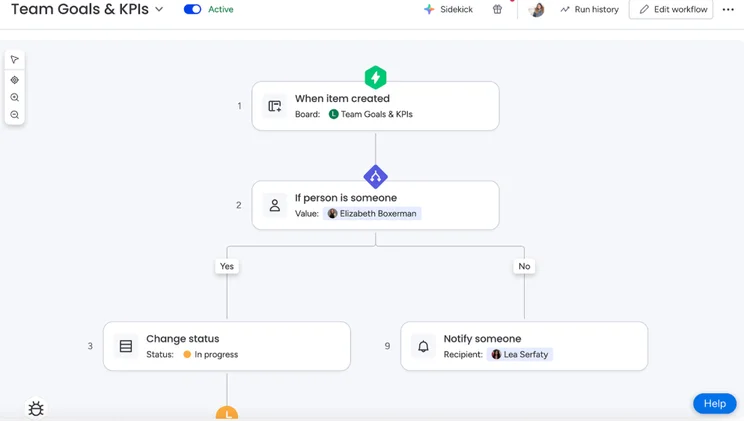
monday.com’s AI workflow builder allows users to create end-to-end workflows through simple drag-and-drop. Source: monday.com
What Are the Benefits of AI Workflows?
AI workflows can save time, eliminate human error, and scale when demand requires.
Save time
- According to data cited by Cornell Design Group, AI workflows save businesses up to 15 hours per week by automating repetitive tasks like data entry and follow-up correspondence.
- With monday.com’s AI workflow builder, you can create custom workflows to automate repetitive tasks and keep your projects on track.
- For example, in project status tracking, automated workflows send instant notifications upon milestone completion.
Eliminate human error
- By automating manual data entry, AI workflows can eliminate human error.
- Standardized processes across teams and geographies ensure consistent output.
- For instance, monday.com’s AI workflow builder can automatically log project updates, sync data across boards, and keep records accurate without relying on manual input.
Highly scalable
- AI workflows enable organizations to do more without stretching their teams.
- Businesses can run a higher volume of processes around the clock, allowing them to take on more projects without scaling headcount.
- Project teams can set up a workflow that automatically onboards new projects, creates boards, assigns roles, and sets milestones.
How To Optimize an AI Workflow
- Conduct regular reviews of your AI workflows to make sure that they’re performing as expected.
- Practice AI agent observability, which is the process of monitoring the end-to-end decisions and actions of your agents across the workflow.
- Regularly review the data you’re feeding into your AI workflows; this is what principally determines their output.
- Your team’s involvement is key to any functioning AI workflow. While agents handle repetitive tasks, people are needed to oversee both input and output.
How Much Do AI Workflow Tools Cost in 2026?
You can typically pay for workflow automation tools on a subscription or per-usage basis. In general, opting for a monthly or annual subscription is a cheaper option than paying for a bespoke, custom-built AI model.
For example, monday.com’s AI Work Platform has five pricing plans:
- Free
- Basic: $9 per seat, per month
- Standard: $12 per seat, per month
- Pro: $19 per seat, per month
- Enterprise: Custom pricing
AI features and enhancements are available across all plans, with more advanced capabilities unlocked at higher tiers.
To build an AI workflow, start with the problem that you’re trying to solve, choose your preferred tool, set your triggers, add actions, deploy the workflow, and keep a human in the loop.
Once built, AI workflows, powered by agents, can process data, make decisions, and carry out scalable tasks to streamline your day-to-day operations.
With monday.com’s AI workflow builder, getting started is more accessible than it sounds. Once you’ve identified problem areas you want to focus on, you can build a custom workflow to drive results.
FAQs
To connect your existing data to an AI workflow, you’ll need a solution like monday.com’s AI Work Platform. It integrates with a wide range of third-party vendors, so you can bring your existing data and workflows together without starting from scratch.
It depends on the complexity of your projects. Pre-built templates are a great starting point. In monday.com’s AI Work Platform, you’ll find ready-made workflows for common use cases like task routing and project status updates.
For more specific needs, the AI workflow builder lets you build from scratch using a simple prompt, giving you full control without any technical expertise.
Definitely. AI workflows can be especially valuable for smaller teams with limited time and resources. Plans for the AI Work Platform start from free, and even at entry level you get access to AI credits. Automating repetitive project tasks means your team can punch above its weight without adding headcount.


