





The best AI website builder is Wix due to its vast selection of AI features, including an AI-powered product recommender, agentic commerce support, and new flagship AI builder, Wix Harmony.
To help you find the best option for you, our research team spent over 300 hours researching and testing several top AI website builders. We’ll dig into their features and prices below.
Key Takeaways
- Best overall: Wix is our top AI website builder, offering over 20 AI tools (including an AI assistant), a conversational AI builder, and vibe coding platform, Wix Harmony.
- Budget: Hostinger is the best choice for users on a budget, with access to its full suite of AI tools costing just $3.99 per month (for a four-year contract).
- AI design support: Squarespace’s designs and creative tools are unmatched and incredibly beginner-friendly.
- Ecommerce: Shopify offers dedicated AI-powered sales tools, including support with product descriptions, agentic commerce, and Shopify Sidekick.
- Ease of use: 43% of 300 SMBs we surveyed use a website for their business, and AI website builders make setting up and maintaining a site easy.
Why Trust Us? Our Research Methodology
After conducting an initial exploration to identify the most relevant, popular, and established AI website builders in the market, we put them through their paces with hands-on testing to see their real strengths and weaknesses. In this case, our research consisted of:
- 12 website builder products
- 300 hours
- 207 areas of investigation
- Six core categories of investigation
- 36 subcategories
At Tech.co, we have a number of full-time in-house researchers, who re-run this testing process regularly, to ensure our results remain reflective of the present day.
| Cheapest price | Special deal | Free plan | Free trial | Pros | Cons | App store Is there an app store available to utilize third-party integrations? | Templates How many templates are available? | AI site creation | AI features | AI-guided SEO support | AI content generation | Vibe coding Does the platform offer built-in vibe coding tools to generate apps? | ||
|---|---|---|---|---|---|---|---|---|---|---|---|---|---|---|
| Best AI Website Builder  |  |  |  |  | ||||||||||
| Wix | Squarespace | Hostinger | Shopify | GoDaddy | ||||||||||
| $15.30/month with code TAKE10 | $17.10/month with code TC10 | $2.69/month with code TECH | $1/month for first 3 months | Save 54% with annual contract | ||||||||||
| | | | | | ||||||||||
| 14-day free trial | 14-day free trial | 14-day free trial | 3-day free trial | 7-day free trial | ||||||||||
|
|
|
|
| ||||||||||
|
|
|
|
| ||||||||||
| | | | | | ||||||||||
| 2,000+ | 180+ | 400+ | 900+ | 200+ | ||||||||||
| Blueprint AI |
| AI site builder | GoDaddy Airo | ||||||||||
|
|
|
|
| ||||||||||
|
|
|
|
| ||||||||||
|
|
|
|
| ||||||||||
| | | | | |
What's the Difference Between AI Builders and Vibe Coding Tools?
You can use natural language prompts with vibe coding tools, as opposed to relying on drag-and-drop editors or pre-built elements, giving you much more flexibility and control over your site. That said, AI website builders can be easier to use and maintain, and often include perks, like a custom domain, as part of your package.
As you can see, the line between the two can get a little blurry, especially with website builders offering vibe coding products. AI website builders were quite an up-and-coming feature a few years ago, but they’re already seen as a standard requirement from most platforms (and something we expect to see when testing website builders). Now, vibe coding tools, like Wix Harmony and GoDaddy Airo, are becoming the new norm for accessible website building.

Emma is Deputy Editor and the resident website builder expert on Tech.co.
The Best AI Website Builders for 2026
- Wix — Best AI website builder overall
- Squarespace — Best for creative businesses
- Hostinger — Cheapest AI website builder
- Shopify — Best for selling online
- GoDaddy — Best for getting online quickly
1. Wix: Best Overall AI Website Builder
Wix is the best AI website builder on the market due to its wide range of AI features, intuitive interface, and 24/7 business support. AI-powered tools can assist you at every stage of the journey, from designing your site, promoting your business, and maintaining visibility.
Why is Wix a good AI website builder?
- Based on our testing, Wix has the most comprehensive range of AI features, with over 20 AI tools, two AI website building options (a chatbot and vibe coding alternative), and a built-in AI agent Aria for expert support
- The traditional AI website builder starts with a conversational onboarding process, asking you questions about your site needs, generating relevant copy and images for your chosen theme, and ensuring your account has the right tools and features set up
- Wix Harmony, the new hybrid AI editor from Wix which launched earlier in 2026, gives you the power to create a site using natural language prompts, while maintaining the popular drag-and-drop controls (from my tests, Harmony can take around five minutes to generate a site)
- You can access AI features from Wix’s free plan, so you can build your site without committing to a paid plan yet
- Wix has inline generative editing tools, meaning you can iterate text and graphics in real time
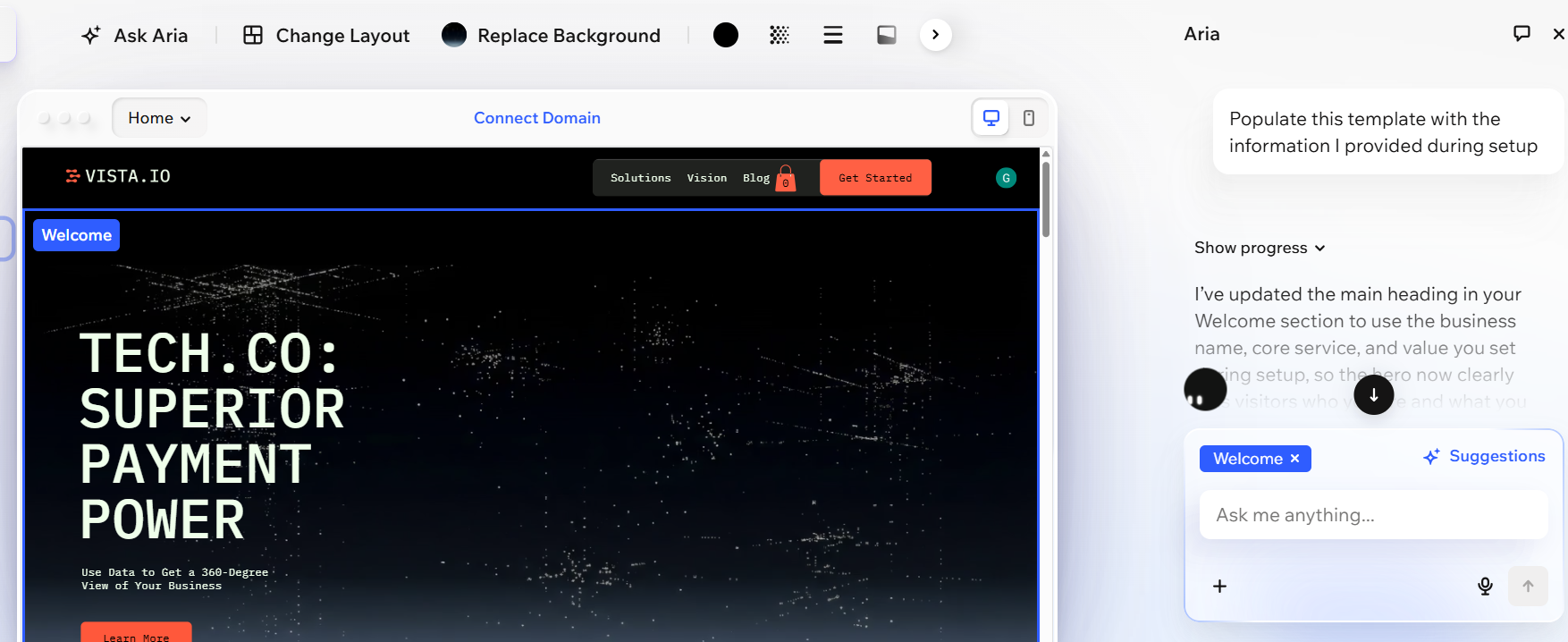
A website that I generated with Wix Harmony, Wix’s hybrid AI builder. Source: Tech.co testing
How much does Wix’s AI builder cost?
| Plan | Special deal | Price (1-year contract) The price per month you'll pay if you choose to be billed annually | Price (1-month contract) The price per month you'll pay if you choose to be billed monthly | Ecommerce |
|---|---|---|---|---|
| Free | Light | Core | Business | Business Elite |
| $0 | $15.30/month with code TAKE10 | $26.10/month with code TAKE10 | $35.10/month with code TAKE10 | $143.10/month with code TAKE10 |
| $0 | $17/month | $29/month | $39/month | $159/month |
| $0 | $24/month | $36/month | $46/month | $172/month |
| | | | | |
2. Squarespace: Best AI Website Builder for Creative Businesses
Squarespace is the best AI website builder for creative businesses, with an AI website builder that collaborates with you, instead of taking full control. Blueprint AI Builder is a five-step process, where Squarespace provides various design options for you to choose from as you shape your site’s look.
Why is Squarespace a good AI website builder?
- Squarespace’s Blueprint AI Builder provides a range of pre-built elements, color schemes, and font types to choose from
- The new AI Visibility tool gives businesses a dashboard to track where and how their website appears across AI search engines, monitor trends and visibility, and compare performance with competitors (get 10-120 credits/month, depending on your Squarespace plan)
- Create polished, branded marketing campaigns through Squarespace’s AI-powered Design Intelligence framework, helping you optimize your external communications
- Get 24/7 support with Beacon AI, a built-in business assistant that can help with SEO and ecommerce tasks, such as creating new products
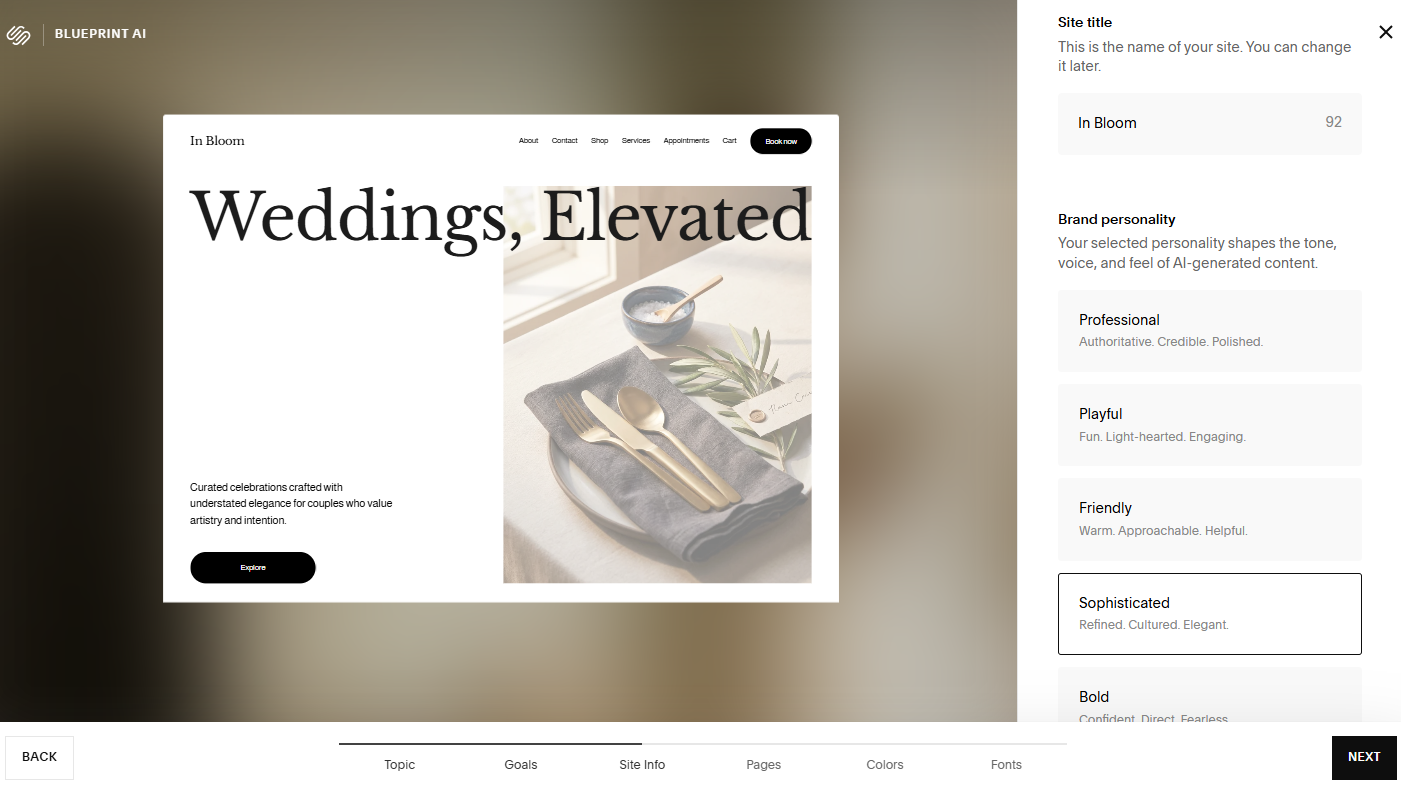
The first step of Squarespace’s Blueprint AI Builder is to name your site and choose from seven brand personality options. Source: Tech.co testing
My Experience With Squarespace
What stuck out to me the most when I tested Squarespace was how good-looking the website it generated for me was.
Like Wix, I just had to answer a few questions about my site to get started. It actually took less time for Squarespace to create a website for me than Wix, and a better looking one at that.

How much does Squarespace’s AI builder cost?
| Plan | Special deal | Price (1-year contract) The price per month you'll pay if you choose to be billed annually | Price (1-month contract) The price per month you'll pay if you choose to be billed monthly | Ecommerce |
|---|---|---|---|---|
| Basic | Core | Plus | Advanced | |
| $17.10/month with code TC10 | $26.10/month with code TC10 | $44.10/month with code TC10 | $89.10/month with code TC10 | |
| $19/month | $29/month | $49/month | $99/month | |
| $25/month | $39/month | $65/month | $139/month | |
| Limited | | | |
3. Hostinger: Cheapest AI Website Builder
Hostinger is the cheapest AI website builder by some distance. Starting at just $2.99 per month, Hostinger is an extremely attractive proposition for users who want to build a site without breaking the bank.
That said, while you can use Hostinger’s AI website builder on the cheapest Premium plan, you’ll need the $3.99 per month Business plan to unlock the full suite of AI tools.
Why is Hostinger a good AI website builder?
- The AI website builder is one of the easiest builders we’ve tested, creating a custom template based on a prompt in 30 seconds (though I did need to make additional changes using the drag-and-drop editor)
- Hostinger’s AI assistant Kodee continually suggests live performance corrections and is available to answer queries or support with tasks 24/7
- Hostinger automatically generates optimized metadata to give your site the best chance to appear in search results
- There’s a suite of AI tools to build, promote, and maintain your business, including an AI logo maker, blog post generator, and Hostinger Reach (an AI-powered email marketing tool)
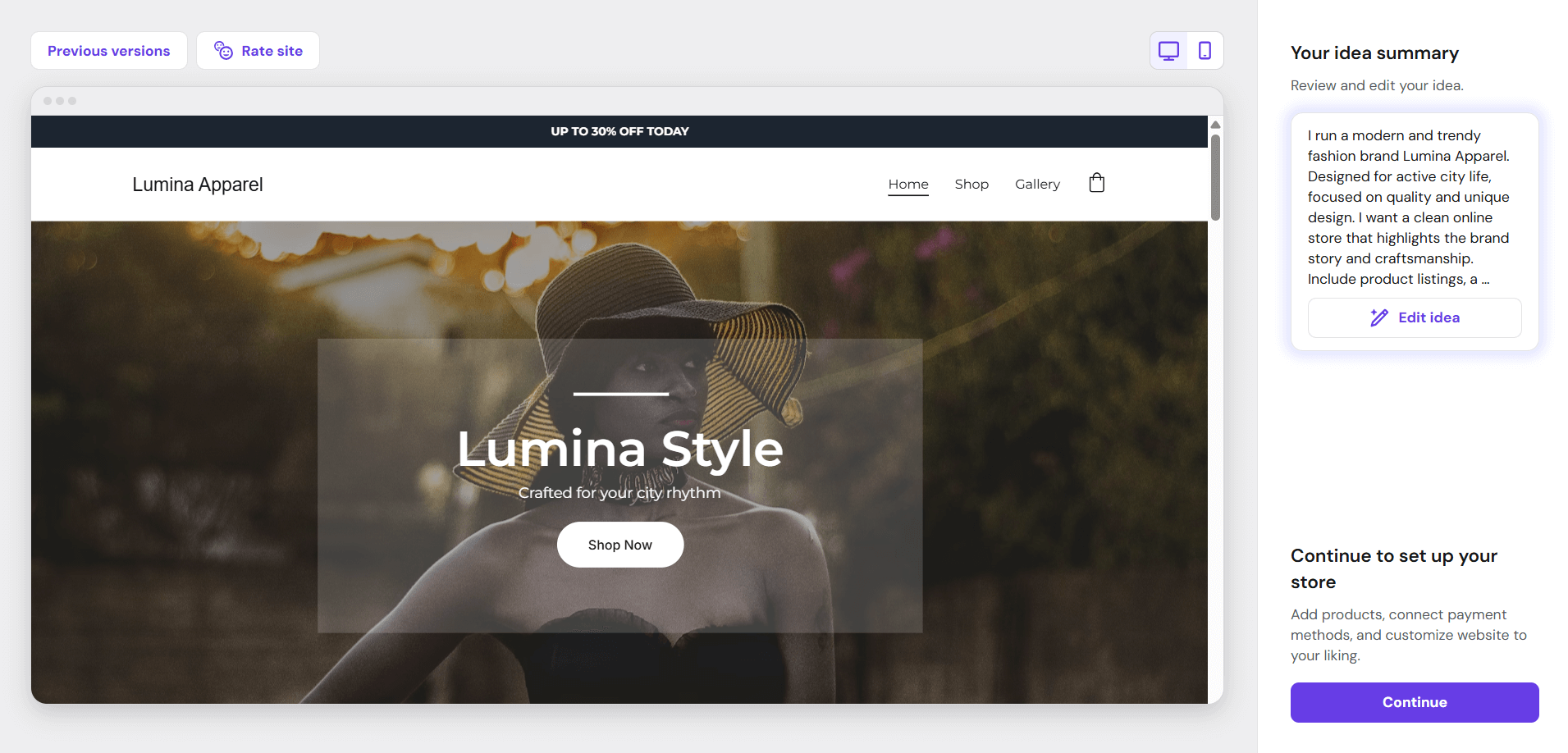
Hostinger’s AI website generator created this online store in a few minutes. Source: Tech.co testing
What Do Real Users Think of Hostinger?
This year, we surveyed 300 small businesses every month to get their insights on leading website builders, including all of our top AI website builders. Overall, Hostinger is the only builder that over half of SMBs (56%) would recommend to others.
In comparison, 42% would recommend Wix, 45% would recommend Squarespace, 47% would recommend Shopify, and 44% would recommend GoDaddy.
Emma is Deputy Editor and the resident website builder expert on Tech.co.
How much does Hostinger’s AI builder cost?
| Plan | Special deal | Price (4-year contract) The price per month you'll pay if you choose to be billed for 48 months | Price (1-year contract) The price per month you'll pay if you choose to be billed annually | Price (1-month contract) The price per month you'll pay if you choose to be billed monthly | Ecommerce |
|---|---|---|---|---|---|
| Premium | Unlimited | Cloud Startup | |||
| $2.69/month with code TECH | $3.59/month with code TECH | $7.19/month with code TECH | |||
| $2.99/month | $3.99/month | $7.99/month | |||
| $3.99/month | $4.99/month | $9.99/month | |||
| $11.99/month | $18.99/month | $27.99/month | |||
| | | |
4. Shopify: Best AI Website Builder for Selling Online
Shopify is the best AI website builder for selling online because of its built-in AI assistant, unmatched sales tools, and scalability. As an ecommerce website builder, the platform combines powerful selling tools with bountiful AI features to support businesses as they grow from small sellers to large enterprises.
Why is Shopify a good AI website builder?
- Shopify helps your business sell across AI channels with a built-in agentic commerce dashboard, focused analytics, and personalized recommendations
- Shopify Sidekick is an AI-powered business assistant that can support with strategy discussions, run audits, generate performance summaries, and take care of day-to-day tasks, such as creating new product pages or social posts
- You can use AI to generate an online store with a full site layout, theme, and sample products, though I found Shopify’s editor much harder to use than platforms with a drag-and-drop editor
- Shopify uses AI to forecast possible stock management anomalies, so you can oversee your inventory with precision
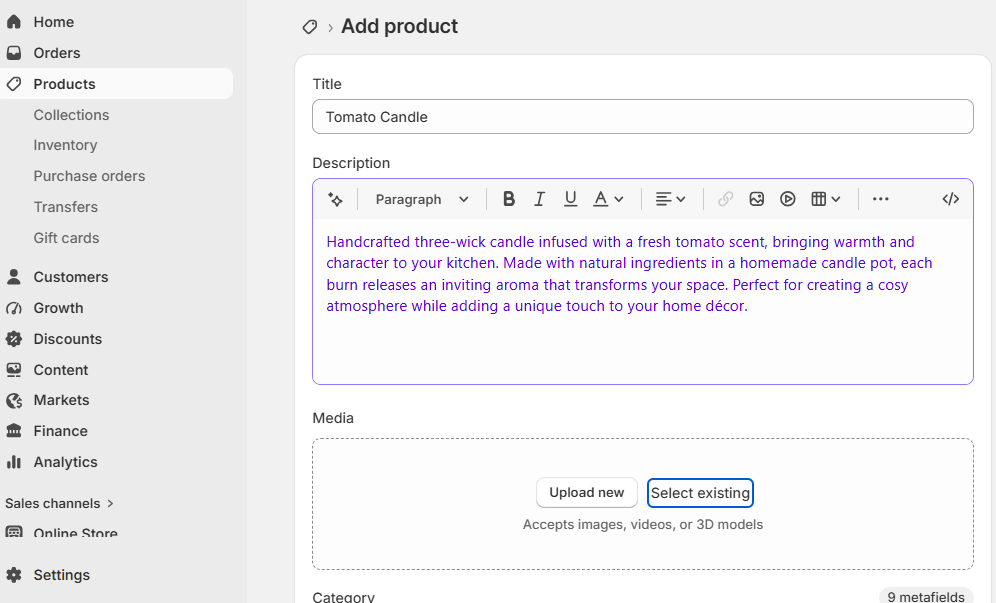
I used Sidekick to generate a product description for me based on a few keywords. Source: Tech.co testing
How much does Shopify’s AI builder cost?
| Plan | Price (1-year contract) The price per month you'll pay if you choose to be billed annually | Price (1-month contract) The price per month you'll pay if you choose to be billed monthly | Ecommerce |
|---|---|---|---|
| Basic | Grow | Advanced | |
| $29/month | $79/month | $299/month | |
| $39/month | $105/month | $399/month | |
| | | |
5. GoDaddy: Best AI Website Builder for Getting Online Quickly
GoDaddy is the best AI website builder for getting a site online quickly. The Airo AI Builder requires a simple prompt about what you want to build, and it’ll generate a custom site for you in roughly five minutes. I could message Airo with additional requests or tweaks, or select from suggested options, such as building an “About” page, which is useful for beginners.
Why is GoDaddy Airo a good AI website builder?
- I could ask Airo to make changes directly to the site by clicking on an element to edit, making the whole design process very conversational and natural
- You can build your site for free with GoDaddy Airo (with 50 AI credits per month), but you’ll need to upgrade your plan to publish your site
- GoDaddy generates social media marketing assets from a single prompt, and its AI-powered social calendar can help you plan content ahead of time
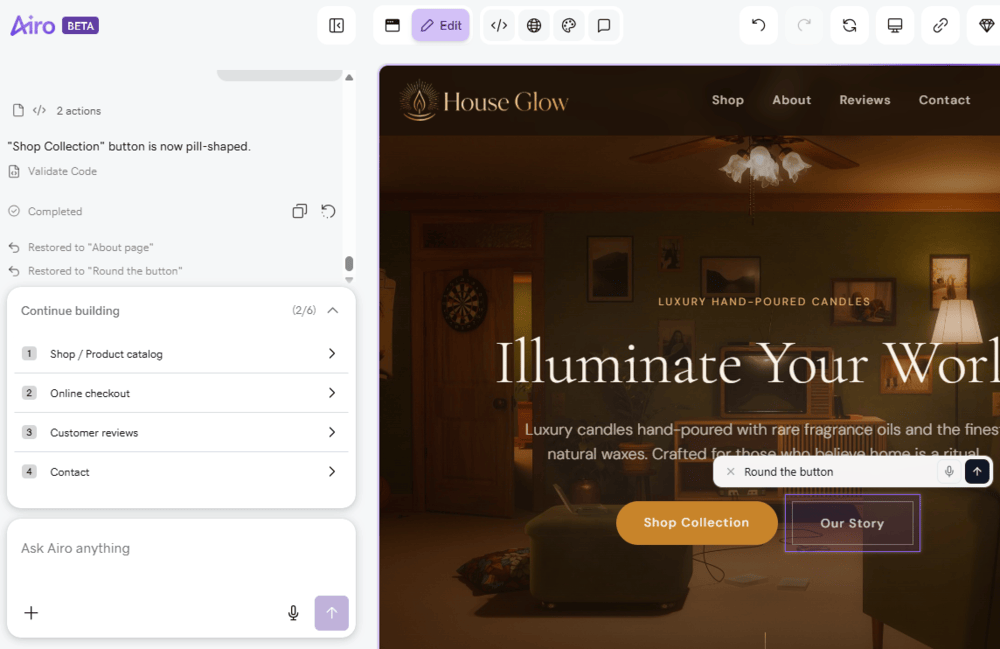
I could message Airo in the sidebar or click directly on the website preview to make changes. Source: Tech.co testing
How much does GoDaddy’s Airo AI Builder cost?
| Plan | Price (1-year contract) The price per month you'll pay if you choose to be billed annually | Price (1-month contract) The price per month you'll pay if you choose to be billed monthly | Credits |
|---|---|---|---|
| Free | Starter | Professional | Ultimate |
| $0 | $9.99/month | $24.99/month | $99.99/month |
| $0 | $19.99/month | $49.99/month | $199.99/month |
| 50 AI credits/mo | 150 AI credits/mo | 300 AI credits/mo | 750 AI credits/mo |
How We Compared the Best AI Website Builders
We take our impartial research and analysis seriously, so you can have complete confidence that we’re giving you the clearest, most useful product recommendations.
Our main testing categories for website builders are:
- Website features (30%): The capabilities and functionalities offered by a website builder, e.g., blog functionality, SEO capability, marketing capacity, and the AI features included.
- Design functionality (30%): The aesthetic appeal and visual layout of a website created using a website builder. It encompasses aspects such as page templates, customizable themes, and AI design support.
- Value for money (15%): The balance between the cost of a website builder and the benefits it provides. It considers factors such as pricing plans, subscription models, and available features.
- User experience (15%): How user-friendly and intuitive a website builder is for people with varying levels of technical expertise.
- Help and support (5%): The assistance and resources available to users when they encounter issues or need guidance while using a website builder.
- Customer satisfaction (5%): External customer opinion. This is the feedback and ratings given by customers who have used a particular website builder — the market position and reputation a website builder holds.
When it comes to calculating a product’s final score, not all testing areas are weighted evenly, as we know some aspects matter more to our readers than others, which are simply “nice to have”.
Verdict: What Is the Best AI Website Builder?
The best AI website builder is Wix, which has an unmatched selection of AI features, allowing us to create a site from scratch after just a few questions.
Additionally, the platform provided us with a variety of generative AI features that made it easy to add content and images, as well as to get insight into how the site performed when it comes to SEO.
Other great options include Squarespace, Hostinger, Shopify, and GoDaddy, which offer AI features that can help you build a site — from content generators to image editors — so you can save time and focus on your business.
Check out our guide to the best free website builders for more info.
If you click on, sign up to a service through, or make a purchase through the links on our site, or use our quotes tool to receive custom pricing for your business needs, we may earn a referral fee from the supplier(s) of the technology you’re interested in. This helps Tech.co to provide free information and reviews, and carries no additional cost to you. Most importantly, it doesn’t affect our editorial impartiality. Ratings and rankings on Tech.co cannot be bought. Our reviews are based on objective research analysis. Rare exceptions to this will be marked clearly as a ‘sponsored’ table column, or explained by a full advertising disclosure on the page, in place of this one. Click to return to top of page