

Asana pricing starts with a free plan that can be used by two users and will be perfect for you if your top priority is keeping down project management costs. The Starter plan – Asana’s first paid plan – costs $10.99 per user, per month when billed annually.
There’s also a $24.99 per user, per month Advanced plan, an Enterprise tier (custom pricing), and an Enterprise+ tier (custom pricing), which will suit you if you’re part of a larger organization with IT departments and more stringent needs. However, note that Asana’s pricing is higher than our other top-rated project management software options, monday work management (from $9/user/month) and Smartsheet (from $9/user/month).
Over the course of our research, we scored Asana highly, with particular credit to its massive library of available integrations and easy-to-use interface. The platform also delivers a good value for its cost, even though we liked rival Teamwork even better, thanks to its low starting price and superior free plan.
Asana: Quick Summary
Asana is a highly capable project management software tool, with an easy-to-use interface, a good selection of task management features, and a huge library of available integrations.
It’s a great solution for small businesses with a limited software budget, since the free plan can accommodate two users. While this tier is limited in its functionality, users can perform simple task management and collaborate on projects.
In terms of pricing, Asana offers pricing plans that start at $0 per user, per month for the Personal plan and go up to $24.99 per user, per month for the Advanced plan. The company does not publicly list pricing for either of the Enterprise plans. This pricing flexibility is great for scalable companies, as it can be dialed up or down to suit your needs.
| Price (annually) The amount you'll pay per month, when billed annually | Users | Projects/boards | Automations | Gantt chart | Resource management | Time tracking | ||
|---|---|---|---|---|---|---|---|---|
| TRY IT FOR FREE  | | | | | ||||
| Asana Personal | Asana Starter | Asana Advanced | Asana Enterprise | Asana Enterprise+ | ||||
| Free | $10.99/user/month | $24.99/user/month | Custom | Custom | ||||
| 2 | Unlimited | Unlimited | Unlimited | Unlimited | ||||
| Unlimited | Unlimited | Unlimited | Unlimited | Unlimited | ||||
| N/A | Unlimited | Unlimited | Unlimited | Unlimited | ||||
| | | | | | ||||
| | | | | | ||||
| | | | | |
Asana Pricing Plan Breakdown
Read on to see how the project management costs you’ll incur with different Asana plans compare, and to find out which teams they’re best for. Here’s a look at the pricing plans on offer from Asana:
- Asana Personal: ($0 – and no hidden fees)
- Asana Starter: $10.99/user/month when billed annually ($131.88/user/year)
- Asana Advanced: $24.99/user/month when billed annually, ($299.88/user/year)
- Asana Enterprise: No public pricing
- Asana Enterprise+: No public pricing
Asana Personal pricing
Asana’s free tier is the absolute basic service the company provides. It supports the ability to make tasks and to view them in a list view, kanban board view (pictured below), or a calendar. You can also name assignees and due dates, and collaborate with one additional team member.
This is a good solution for individual freelancers or very small teams that don’t require task dependencies and milestones. Asana Personal does have a limit of two members per team. This is typical for the industry, as rival monday work management has a free plan with the same user cap.
Unlike monday work management, however, Asana includes its full range of integrations on all of its plans. Asana integrates with over 200 different apps for marketing, finance, and communication.
Who should use Asana Personal? Freelancers or small teams with simple task management needs.

I found Asana’s use of color coding a nice way to distinguish between different tasks, without being too overbearing. Image: Tech.co’s testing process.
Asana Starter pricing
Asana Starter pricing starts at $10.99 per user per month billed annually, or $13.49 per user billed monthly.
This tier adds the timeline, task dependencies, and milestones, all of which are important features for teams above 15.
Starter’s task dependencies help teams to coordinate tasks that need to be completed in a specific order. Meanwhile, Milestones help everyone understand what they’re working towards, and provide periodic intervals for managers to see that the project is on track. Elsewhere, the Timeline view offers a visual look at the entire project workflow, which aids in coordination among team members.
Other features include custom fields, advanced search and reporting, a form builder (pictured below), private teams and projects, and premium content from the company’s training materials. You’ll also have access to project templates relevant to seven organizational departments (e.g. HR, sales, design) – although this is available on the free plan too.
Who should use Asana Starter? Smaller teams with complex workflows.
Asana Advanced pricing
If even more features are required for a larger team, it’s time to look at Asana Advanced (previously Asana Business). This tier costs $24.99 per user, per month when billed annually, while for a month-to-month charge, you’re looking at $30.49 per user.
The Advanced plan is ideal for larger teams that need more coordination than is possible with Asana Starter. Asana’s Portfolio view displays all team projects and their current states of progress, while Workload shows the responsibilities of each team member and whether or not they have too many tasks on their plate.
Asana Advanced also adds forms, proofing, the ability to lock custom fields, and custom and pre-built automation.
Who should use Asana Advanced? Mid-size teams with advanced project management needs.

I was impressed by the fact you can integrate third-party apps into the automation builder process. Image: Tech.co’s testing process.
Asana Enterprise tiers pricing
As is the industry standard for Enterprise plans, Asana Enterprise and Enterprise+ have no public pricing. These tiers are geared towards large organizations and require a call to the sales department.
Should your business be suitable for an Enterprise plan, you’ll find features that large organizations need, such as Security Assertion Markup Language (SAML) for managing single sign-on. There is also user provision and de-provisioning, which allows the IT department to decide who can and cannot use the company’s Asana subscription.
Both tiers also support data export and deletion, custom branding, and priority support. Teams can also block third-party integrations so that their projects are not used with unauthorized software or apps.
The Enterprise tiers also make it easier to build automations and boast a 99.9% uptime promise – and they’re the only Asana plans with 24/7 live support provided.
Enterprise+, meanwhile, offers the same functionality with additional auditing capabilities, data loss prevention integration support, and more.
Who should use the Enterprise tiers? Large companies seeking greater security and admin controls.
Which Asana Pricing Plan Should I Choose?
If you’re set on Asana, it’s crucial you choose the best plan for your business specifically.
Personal, like the name suggests, is the best choice for individuals and freelancers looking to better organize their projects, particularly because not all project management offers a free plan. Once you start adding complexity, such as large teams working on dependent tasks, it’s time to start looking up the chain.
Most small and mid-sized teams will find that Starter is more than enough. Managers won’t have access to Portfolios, which lets them examine the progress of multiple projects at once, but will be able to use key features for team coordination, such as dependencies and milestones.
The Advanced tier is for larger companies or organizations that urgently need the Portfolios feature in order to properly track everything. Forms and proofing are also key features that bigger companies will appreciate, while the new Workload feature is an excellent complement to Portfolios.
Enterprise and Enterprise+ are for enterprises or any other massive organization that needs greater control over Asana in order to manage its users.
Asana Cost Per User
Like most business software, Asana charges on a per-user (also known as a “per-seat”) basis. While this can sometimes mean a higher cost compared to flat fees, it allows companies to scale their service fairly between smaller teams and larger corporations.
To get the best price, however, you have to pay on a yearly basis. Our fictional team of five looking for the Starter tier would pay $659.40 for one year, in one lump sum. If they didn’t want to make that commitment right away, they could pay the month-to-month fee of $13.49 per user, bringing the monthly total to $67.45. This would raise the annual cost to $809.40 – an increase of almost $150 over the annual one-time charge.
Now for the Advanced Plan. If you’re paying annually for five people, you’ll pay $1499.40, whereas month-by-month you’ll pay $1829.40. There’s no public pricing for the Enterprise plan, so you’ll have to contact Asana’s sales team if you want to know exactly what you’ll pay.
In our opinion, the more costly month-to-month fee is better for teams that need project management short-term, or that need more time for testing beyond Asana’s 30-day free trial.
Does Asana have a free plan?
Yes. As we’ve discussed already, Asana has a free plan, called Asana Personal. However, as with most free plans, it’s a limited software solution and won’t be expansive enough for businesses who want useful, granular insights into their project delivery.
Asana’s free plan is markedly more limited than the free plan offered by Zoho Projects. Zoho Projects has a better range of tools for managing tasks on its free plan than Asana, like a task dependency function.
Asana Features
Asana is one of Tech.co’s top choices for project management software. It offers a good set of features – particularly when it comes to displaying project data – making it great for workflow creation and data visualization.
We gave Asana a high score for task management because the software gives you multiple ways to view a project’s progress (including Gantt charts, a kanban board, and a spreadsheet-style view) and lets you switch between each board seamlessly.
Asana’s modern web design is easy to navigate and understand while having the features you need to manage complex projects. Katie, an SEO Campaigns Executive who uses Asana on a daily basis, told Tech.co that Asana had a positive impact on her organization and workday.
“We’ve got an Individual Tasks project that allows us to see what everyone is working on, so it’s easy to keep track of the team’s work. Different views for projects are also really helpful – especially using the board view for our campaigns.”
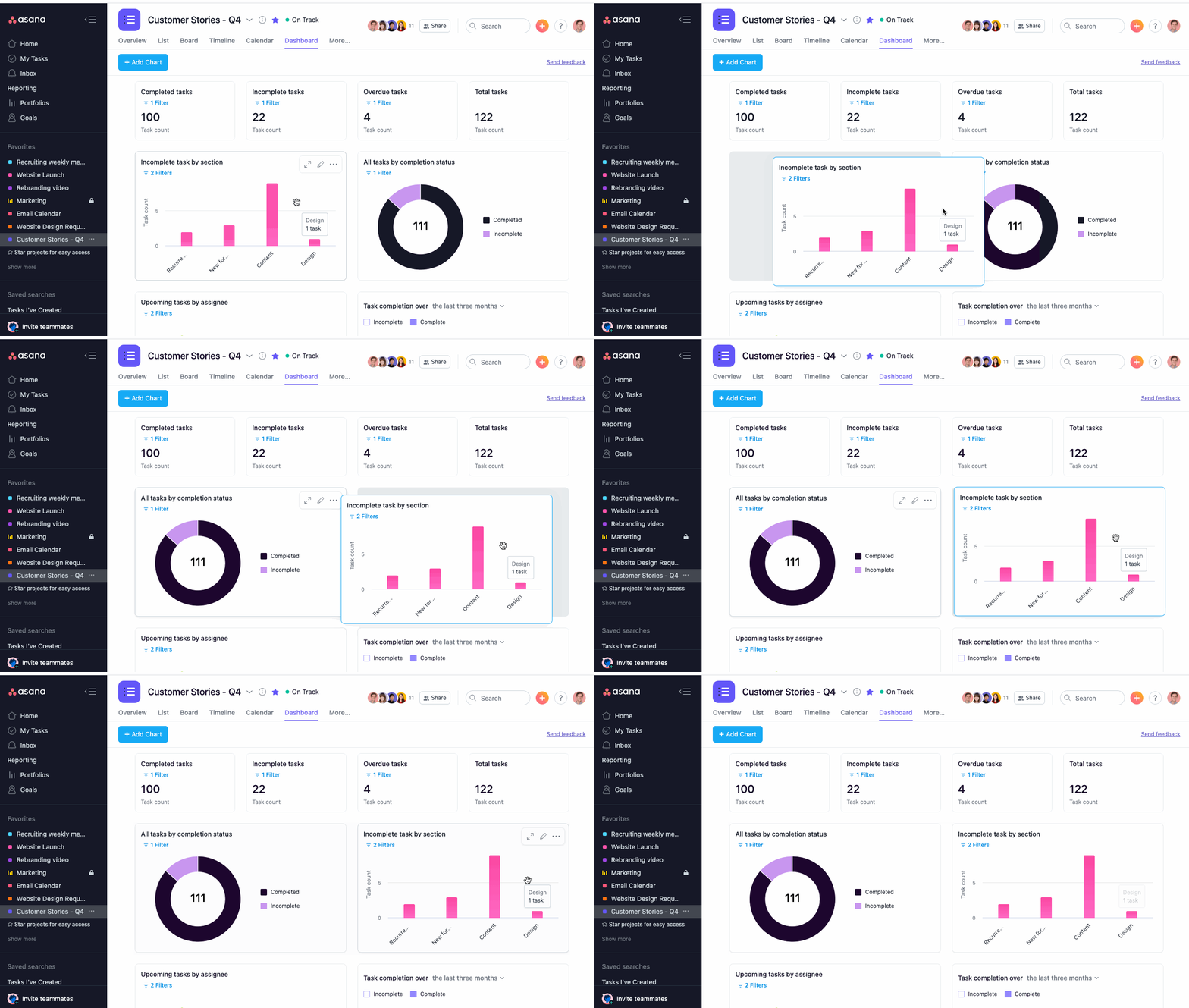
Asana’s data visualization tools offer a number of ways to present your data. Source: Tech.co’s testing process
Asana has a wide range of data visualization tools (although none are available on the free plan). Due to their versatility and usability, we gave Asana’s data visualization tools a near-perfect score. There are over 6 preset chart types and a custom chart builder that will let you utilize project data from your custom fields.
Asana also offers strong security tools, with multiple verification and authentication methods (2FA, single sign-on, Google authentication) available on the Starter, Advanced, and Enterprise plans, as well as a way to manage user permissions.
The Asana platform has added a wide range of AI tools in recent years: Projects can be managed by semantic AI search that works across language barriers, while business reviews can be generated with AI risk reports to surface potential risks before they become actual problems.
Customer support is another strong area: Onboarding assistance is included on the Enterprise plans. All plans have email support (including Asana’s free plan), although you can only access 24/7 support in the Enterprise plans.
Asana Test Summary (2024)
Asana was definitely one of the easier-to-use project management software tools on test – the interface is very similar to Teamwork and Wrike’s. Although it’s easy to use in the sense that you don’t often need to go digging through too many menus to find what you want and you can edit most stuff on your boards and tables just by clicking on it, I found the interface a little cramped compared to the likes of monday work management, which provides a much more minimalistic layout.
Although Asana’s rule-based automation builder impressed me in 2022, I actually found monday work management’s text-based version a lot simpler to use, and easier to work out, which is part of the reason why Asana’s workflow creation score decreased slightly. However, I did like Asana’s dashboard – which populated itself with my project data automatically.
Overall, I wouldn’t say it’s a software tool that will take you too long to get to grips with, even if you’re not experienced with project management software. I’d say it’s certainly a lot more straightforward than Jira, Smartsheet, and Zoho Projects.

Who Is Asana Best For?
Asana is a great project management tool for a variety of different teams and uses cases. We’ve outlined some of the businesses that would benefit the most from Asana below.
Busy teams looking to save time
We would recommend Asana for any team wanting to streamline their workflows thanks to its automation builder, which is a great way to reduce time spent on manual work. Automations are not available on the free plan.
Project management beginners
Thanks to its intuitive software and well-equipped support center, Asana was one of the easiest project management tools we tested to get started on, making it great for those new to the software. What’s more, with Asana Forum, Academy, webinars, Help Center, Support, and Developer Guide available across all plans, there is a good selection of educational information you can dip into.
Teams with bigger budgets
Since Asana’s free plan is quite limited and cheaper options are available, we’d advise looking elsewhere if you’re a team working on a tight budget. Teamwork’s free plan has a better range of task management features, for instance.
However, if you’ve got the budget to pay for a provider like Asana, it’s definitely a worthy investment. Like monday work management and ClickUp, once you’re all set up with Asana, there’s going to be very little chance you’ll need to transition to another tool or application, even if your business grows significantly. This would not be the case with the likes of Trello and Basecamp, which quickly become limiting if you want to manage multiple projects with lots of moving parts.
Remote and hybrid teams
While Asana lacks an online whiteboard tool, unlike ClickUp, the software offers tons of collaboration features like a project message board, calendar view, and resource management feature, making it easier for remote workers to connect from afar.
Teams with lots of deliverables
Asana’s Starter and Advanced plans have a huge range of data display tools, making it a good option if you’re scheduled to deliver a number of data-driven or data-intensive projects.
In both of these cases, cheaper programs like Trello don’t quite match up, and that’s in large part because it’s much harder to get a top-level overview of work that has been completed and work that is still in progress, particularly if you have multiple teams working on different aspects of the same project.
Asana Alternatives
We know that Asana isn’t for everyone. There are tons of other top project management software providers to choose from.
Asana vs monday work management
monday work management is also a better option than Asana, and is actually one of our project management software favorites, scoring higher than the 10 other major providers we tested in our most recent round of testing, including Asana.
During our review of monday work management, we found it better at task management than Asana, since monday work management cleverly utilizes white space and a minimalist design, and feels a little less cluttered than Asana’s interface.
What’s more, monday work management has a better set of collaboration features than Asana, such as an online whiteboard.
monday work management pricing is also better value for money than Asana. Its first plan costs $9 per user, per month, compared to Asana’s equivalent $10.99 per user, per month. In addition, its Pro plan ($19 per user, per month) is almost $6 cheaper than Asana’s equivalent Advanced plan ($24.99 per user, per month). To round things off, monday work management also offers an extra plan – the Standard plan ($12 per user, per month) in between the Basic and Pro plans, as well as Enterprise plan with no public pricing.
Read our full Asana vs monday work management breakdown for more information.
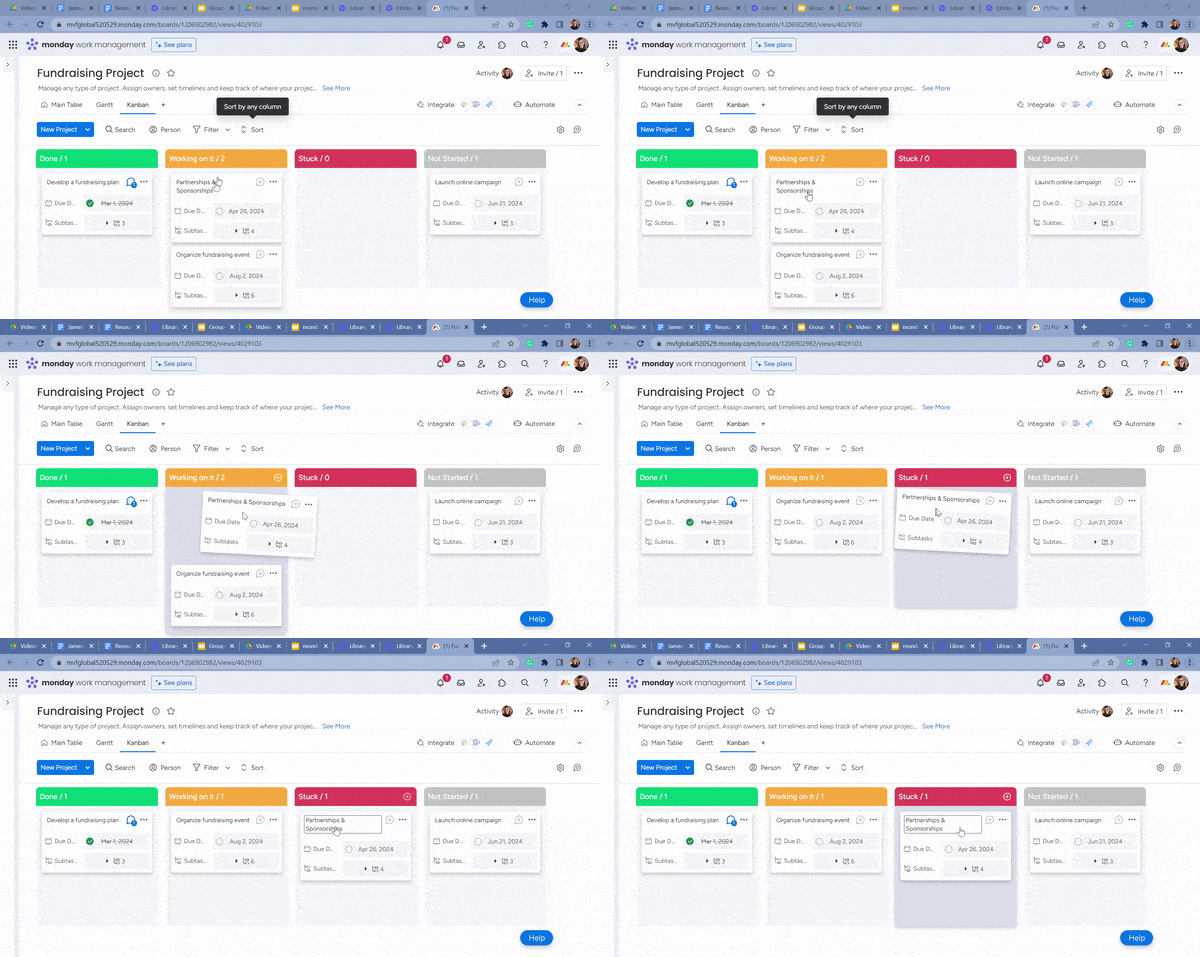
monday work management’s kanban board makes it really easy to manage individual tasks within an overriding workflow. Image: Tech.co testing
Asana vs ClickUp
In our last round of testing, we found ClickUp’s pricing plans to be better value for money than Asana’s. They offer a similar level of functionality, with the former edging it in terms of task management and collaboration. Asana, meanwhile, boasts a cleaner interface and a quicker setup time.
ClickUp’s free plan has a much better array of features than Asana’s free plan. For instance, you’ll get 100 automations per month on ClickUp’s, compared with zero on Asana’s. You’ll also get 100 Portfolio uses, 60 Gantt chart uses, and 60 uses of custom fields – none of which you’ll get on Asana’s free plan.
ClickUp offers live chat support on all of its plans, including its first paid plan, whereas Asana only provides this on its Enterprise plans. ClickUp also has a much more fully-featured free plan than Asana, with custom automation, custom fields, and more.
What’s more, ClickUp 3.0, ClickUp’s new and improved platform, includes an AI assistant to help you with info summarizing, task description generation, and various other tasks. Find out more in our ClickUp 3.0 review.
Read our full ClickUp vs Asana review for a more in-depth comparison between these two competitors.
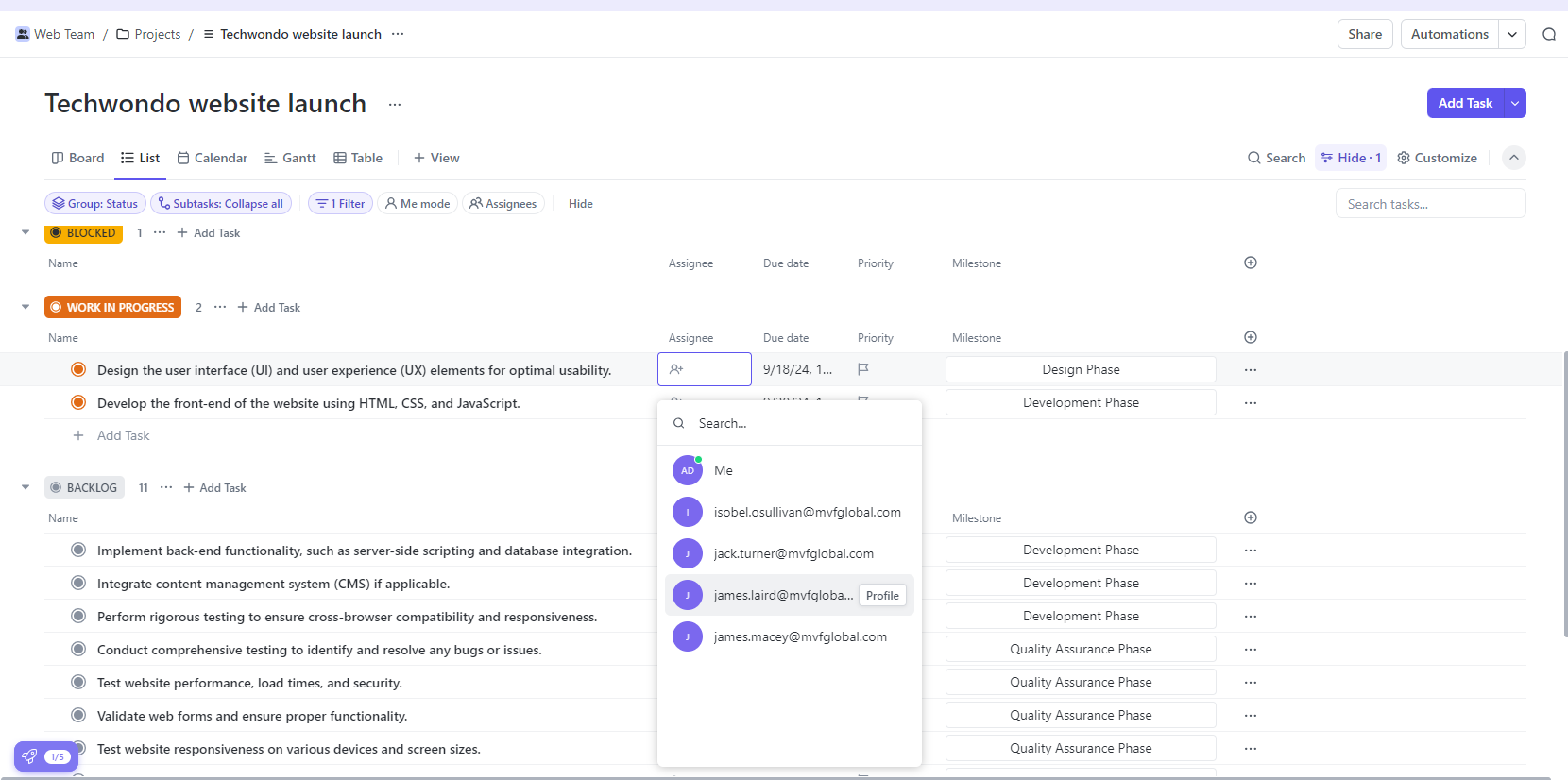
ClickUp’s list view can be a little overwhelming for first-time users. Image: Tech.co testing
Asana vs Teamwork
Teamwork is a slightly more intuitive program than Asana, with a better setup process.
The Teamwork platform also has an excellent free plan that betters Asana’s. If you sign up, you’ll get Gantt charts, milestones, task dependencies, and a selection of preset data visualization charts and widgets. Asana, meanwhile, doesn’t offer any of these on its free plan.
“I thought the onboarding was really fantastic – I liked how it kind of kept you in line. It kind of not only asks all the right questions, but it sets you up for success quite early on.” – Natasha Willet, Tech.co’s insights manager and participant in our project management software testing series.

Teamwork Project view is clearly laid out, and the use of alphabetization is a nice touch. Source: Tech.co testing
| Price from All prices listed as per user, per month (billed annually) | Free plan | Verdict | |||||||
|---|---|---|---|---|---|---|---|---|---|
| Best Overall  | Best for Building Automations  | Best for Task Management and Collaboration  | FEATURED: Best for Spreadsheet Fans  |  |  |  |  |  |  |
| monday work management | Teamwork | ClickUp | Smartsheet | Asana | Wrike | Trello | Jira | Zoho Projects | Basecamp |
| $9/user/month | $9.99/user/month | $7/user/month | $9/user/month | $10.99/user/month | $10/user/month | $5/user/month | $7.91/user/month (300 users) | $4/user/month | $15/user/month |
| | | | | | | 10 users | | | |
| Incredibly easy to use, great for small businesses, and our top-performing provider on test — and there’s a generous free trial period | A great user experience all round, with an easy-to-use automation builder and great budget tracking capabilities | Powerful, feature-rich software suitable for teams of all sizes, with an impressive free tier for individuals and a great value plans for teams | A great tool for spreadsheet-natives, which can take your Excel-based task planning to the next level | A simple task-list-based project management platform with an acceptable free tier | A very capable yet pricey service with a huge number of useful integrations, plus a free tier option to try | A fairly-priced, stripped-down option, best for small teams who need a central location for basic task management | A great value piece of software that’s ideal for tech, software development, and engineering teams | A solid project management solution with an attractive free tier for small teams and a very affordable premium plan | A very basic, relatively limited software that’s a lot simpler than its competitors |
Asana Hidden Costs and Discounts
Some project management software tools only offer specific features if you pay extra – for example, Smartsheet only offers phone support on some plans for an additional fee, and ClickUp’s AI assistant tools are available as add-ons, starting at $9 per month.
As far as project management software goes, Asana has relatively few hidden costs and fees. Some of its integrations will fetch a cost, and some of its key features are only available on more expensive plans. Only Advanced and Enterprise-level subscribers are eligible for in-built time tracking, for instance. Before you commit to Asana, definitely dig into the integrations that you’re interested in so that you’re not caught cold with surprise fees.
In terms of discounts, Asana says on its FAQs page that the provider “is happy to offer eligible nonprofit organizations a discount on an Asana Starter or Asana Advanced annual plan.”
What’s New in Asana?
Heading into 2026, Asana has continued to add new functions and updates. These include “AI Teammates,” which lets users collaborate with agentic AI, as well as AI risk reports, prebuilt smart workflows, and integrations that pair AI Studio with tools like Dropbox and Box.
New project management tools include subtask visibility to keep projects on task, the ability to make automations align with your team’s work schedule, and relative date triggers so that automations can be fired when project deadlines draw near.
Finally, the platform has rolled out more complex goal management tools, which allow users to craft custom fields for goals and to save grid views for goals, for better organization. Taken together, all these tweaks offer a range of ways to let your team remain streamlined and increasingly efficient.
Can I Switch from Other Software to Asana?
In most cases, yes. Asana is one of the most widely used project management platforms in the world, with more than 100,000 paying organizations – so a whole host of other popular programs already integrate with Asana.
This actually includes a lot of rival project management software apps, such as monday work management, Jira, and ClickUp. So, even if you’re already set up with project management software, migrating your data probably won’t take too long at all. You can also connect to other apps via Zapier, which has a large collection of Asana integrations such as Google Calendar, Slack and Airtable.
What’s more, Asana has an extensive guide designed to walk users through the process of migrating data from other tools, apps, and platforms to their Asana workspace.
At Tech.co we don’t write about products and services without conducting thorough research, and hands-on testing where applicable. While this process can be time consuming, it’s time well spent if it means we’re providing better, more useful information for your business.
When it comes to project management software, we test out each program first-hand, guided by an in-house research framework consisting of six core assessment areas that break down into a range of smaller subcategories. This framework is based on the factors companies and project managers have told us are important to their everyday usage. The six criteria are:
- Ease of use: After getting five to six participants to test each project management software for an hour, we assessed how easy it was to set up a project with the platforms, how clear their interfaces were, and how easy they were to navigate.
- Pricing: We look at all plan costs. Providers offering lots of features for lower costs will have better pricing scores than those that lock them away on higher-tier plans.
- Customer support: We assess the ways you can contact your project management software provider if something goes wrong. Providers offering 24/7 live support, as well as phone-based support and onboarding assistance, get the best scores.
- Security: For this area, we assess the security options offered by each provider. This includes user-level security features like two-factor authentication, as well as more administrative security measures like user permissions and IP restrictions.
- Integrations: We assess the quantity — and the quality — of the applications each project management software provider integrates with.
- Functionality: This part of our research involves assessing the full feature set that each product provides. We look at four function-based sub-categories as part of this, including task management, project and workflow creation, data visualization, and collaboration.
It’s important to note that not all of these criteria hold equal weight in our testing methodology. This is best practice and based on what businesses have told us is essential, compared with what’s simply “nice to have”.
Because of their central importance to project management, how easy each tool is to use, how much it costs, features for project and workflow creation, and task management had more of an impact overall than other criteria.
Verdict: Should You Pay for Asana?
Asana’s first plan starts at $10.99 per user, per month, and although you’ll get a very capable project management software solution with an excellent automation builder and customizable project templates, there are cheaper paid plans out there that are more feature-rich than Asana’s.
Teamwork’s $9.99 per user, per month Basics plan, for example, offers features such as billable time tracking, invoices, unlimited task list templates, and a “Team” view that Asana doesn’t offer on any of its plans.
As for Asana’s free offering, it’s limited compared to other providers like ClickUp, which gives away a remarkable amount of features for free, including real-time chat, whiteboards, collaborative docs, data dashboards, and sprint management.
If you’d like to find out which project management software plan is the best fit for your business, check out the latest project management software deals.
Asana Pricing FAQs
If you click on, sign up to a service through, or make a purchase through the links on our site, or use our quotes tool to receive custom pricing for your business needs, we may earn a referral fee from the supplier(s) of the technology you’re interested in. This helps Tech.co to provide free information and reviews, and carries no additional cost to you. Most importantly, it doesn’t affect our editorial impartiality. Ratings and rankings on Tech.co cannot be bought. Our reviews are based on objective research analysis. Rare exceptions to this will be marked clearly as a ‘sponsored’ table column, or explained by a full advertising disclosure on the page, in place of this one. Click to return to top of page