


The best website builder for beginners is Squarespace, because its easy-to-use interface is sleek and intuitive without sacrificing customizability or functionality. Plus, our research has found that Squarespace offers an AI website builder that will help beginners get started straightaway.
Squarespace isn’t the only option out there, though. For beginners on a budget, we’d recommend Hostinger, because of its range of AI tools and affordable entry-level prices. Beginners will also find Hostinger’s feature set both extensive and accessible, without being overwhelming.
In this guide, we’ll walk you through the best website builders for beginners, based on our research and user-testing process. We’ll also give beginners advice on what to look for when choosing the right website builder, and offer tips to help you get started.
Key Takeaways
- Squarespace is the top choice for beginners due to its user-friendly interface, smooth backend, and well-designed templates that you can edit after publishing your site.
- Hostinger is the best choice for budget-conscious customers, with plans that can start at just $2.99 per month.
- Wix is our favorite website builder overall, but its rich feature set can be a little overwhelming for first-time users.
- Shopify can also be a little bit intimidating because of the sheer breadth of functionality, but it’s our recommended ecommerce platform, with advanced features like inventory management.
- In terms of pricing, the monthly cost for a beginner-friendly website builder generally ranges from around $3 to $29 per month, while some providers, including Wix, will allow you to get started for free.
- When searching for a website builder, beginners should prioritize how easy a platform is to use, the customer support options, as well as the number of AI tools available and how they can help streamline the process.
| Paid plan Monthly | Free plan | Pros | Cons | Try now | ||
|---|---|---|---|---|---|---|
| FEATURED PROVIDER | ||||||

|
|
|
|
| |||
| | | | | | ||
|
|
|
|
| ||
|
|
|
|
| ||
| See Pricing | See Pricing | See Pricing | See Pricing | See Pricing |
Best Website Builder for Beginners Reviews
Below, we’ve reviewed each website builder based on its suitability for beginners.
- Squarespace – Easiest website builder for getting started as a beginner
- Hostinger – Most affordable website builder for beginners
- GoDaddy – Best website builder for a beginner wanting a quick setup
- Wix – Best for a beginner that wants to take advantage of plenty of features
- Shopify – Best for beginners wanting strong ecommerce functionality
Use the links above to read our reviews of each provider.
1. Squarespace: Easiest Website Builder To Get Started With
- Price from: $16 per month
Our research and testing found Squarespace to be the easiest website builder for beginners, because of the combination of a simple, easy-to-navigate interface where we found it straightforward to carry out functions, and an AI website builder we simply had to follow, step-by-step, to get up and running with a site.
Beginners just getting started with website builders will find that every function is exactly where it should be, and that elements such as designing your site are made simple with a combination of AI tools and the drag-and-drop editor.
Pros
- Easiest website builder to use across our research
- Plenty of content-focused features for blogging
- Integrates with Acuity for booking and appointments
Cons
- Limited language support for international businesses
- AI site builder creates fairly generic output
- Performed poorly on-site speed tests in our research
- Basic: $16/month
- Core: $23/month
- Plus: $39/month
- Advanced: $99/month
- 10% off with code TC10
- 14-day free trial
Why I recommend Squarespace for beginners
Squarespace makes the process of building a website really enjoyable, particularly because of the balance the platform achieves of creating styles for you, and offering easy-to-use tools that will help you customize the site yourself.
When I was designing my site, tasks such as adding a block onto my home page was done with just the click of a button, and then I could enable the platform’s grid view in order to align the block where I wanted it to go.
If you’re a beginner, you’ll want a platform that feels intuitive and will guide you forward. Squarespace certainly ticks this box with its drag-and-drop editor making website design feel seamless, and a wealth of AI tools that can automatically carry out more complex tasks for you.
What makes Squarespace a good choice for beginners?
- It’s easy to use: Squarespace offers a clean and simple interface, where functions feel well spaced out, so users can easily find what they want to do. Adding elements to a page is as easy as clicking a button, and moving them around is done using an intuitive drag-and-drop editor.
- It has a step-by-step AI builder: With Squarespace, all beginners have to do is follow the instructions on screen, giving details about the kind of site they’re looking to build, and the AI will handle the rest. Blueprint AI can create a website for you in less than 30 seconds, according to our tests. This will help beginners avoid having to navigate the system early on just to get started with a first draft.
- It doesn’t sacrifice aesthetics: Squarespace ensures that beginners can still create a good-looking website without all of the technical know-how, because it creates the best-looking sites out of all the providers we’ve tested, and has the best looking templates.
- It has AI tools that can help with complex functions: Squarespace’s AI tools simplify functions that could be difficult for beginners. For example, when our users used the AI Text Creator, we found it could generate high-quality text for us, or we could prompt it ourselves. We were also able to shorten or lengthen text, and ask it to make corrections.
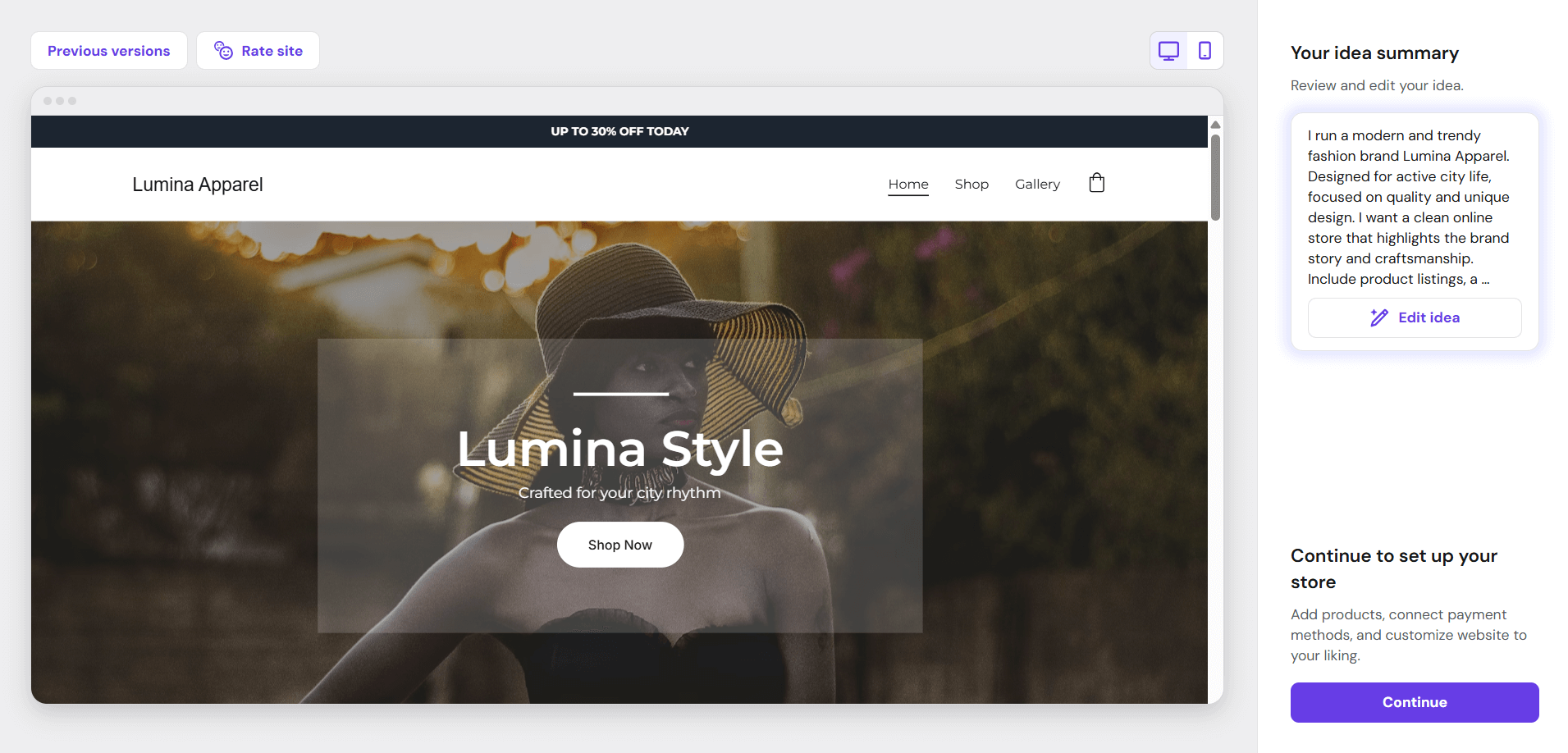
Squarespace stood out for us in testing because of an easy-to-use interface, with clearly marked sections and functions, and it’s beautiful template options. Images: Tech.co testing
What's New with Squarespace? (2026)
- Blueprint AI: The platform’s design assistant has had some recent upgrades, including AI image backgrounds and AI video backgrounds that can enhance your site.
- Responsive website editing: Squarespace’s design tools now have new editing logic to further optimize its design and improve designs for mobile users.
- Beacon AI: Provides tools such as an AI site scanner that catches SEO and visibility-related errors on your site, and an AI product composer that can generate product and service listings.
2. Hostinger: Most Affordable Website Builder for Beginners
- Price from: $1.79/month (Use code ‘TECH’ for 86% off)
Hostinger is the most affordable website builder on our list, particularly if you take advantage of consistent sales that can see the provider drop to as little as $1.79 per month, plus three months free.
Hostinger certainly beats competitors like Wix on price, and it can match them on features, too. For example, like Squarespace, Hostinger offers an AI website builder that can have your site up and running in seconds.
Beginners that are eager to trial and experiment with different providers will do well with Hostinger, thanks to an affordable entry price that still retains top-quality features and a solid interface.
Pros
- AI generated site in three steps (60 seconds)
- Built-in heatmap for advanced site analytics
- Language translations capabilities
Cons
- No app market for third-party integrations
- No email marketing in any paid plans
- No free trial or free plan for users
- 30-day money back guarantee
- Plans from: $1.79/month (with code 'TECH')
- Free domain included (first year)
Why I recommend Hostinger for beginners
Hostinger’s price makes it a great entry point for beginners that want to get stuck in with a platform, without paying too much initially.
While Hostinger’s price does make it stand out in our research, I would highlight that you won’t get as many features when compared with contenders like Wix. This does, however, mean the builder is easier to use because of the more limited number of options users have.
There are AI features that will benefit beginners, though, such as an AI website builder. But Hostinger’s AI text capabilities were noted in our tests as not being as effective as, for example, Squarespace’s.
What makes Hostinger a good choice for beginners?
- It’s easy to use: Beginners will take less time exploring Hostinger and trying to figure out how everything works, getting a website built quicker. Limited functionality means Hostinger’s interface is simpler to navigate than more complex builders, like Shopify. That being said, if you’re looking for more advanced features, we’d steer you more towards Wix.
- It topped our site speed tests: Hostinger beat both Squarespace and Wix when we tested site speed across both desktop and mobile devices. This makes it easy for beginners to get started quickly and become comfortable with Hostinger, without being slowed by site speed.
- It simplifies concepts like SEO: For beginners who might be new to concepts such as SEO, Hostinger’s automated process and useful tips will help users avoid having to decipher the more complex terms and processes. During our tests, one user was very impressed that Hostinger had already filled out their site’s SEO settings, after having set up. The platform had already suggested keywords and offered SEO tips.
- It has some AI tools: Hostinger offers an AI website builder that got our site ready in less than 30 seconds during testing. There is also an AI image and text generator, and an AI blog generator that can write up to 2,000 words for your site. AI functionality will help speed up and automate complex practices for beginners so they can still have a high-quality website.
See how Hostinger compares with Wix, another one of our top choices.
At a great price, users can get a full-functioning website with Hostinger. In particular, we enjoyed using the provider’s unique AI tools, such as the heatmap. Images: Tech.co testing
What's New with Hostinger? (2026)
- Hostinger Horizons: The platform’s vibe coding offering is now live — allowing users to create a fully functioning website using AI, without the need for code.
- Shippo integration: Hostinger now integrates with the shipping platform Shippo, where you can enjoy features such as buying and printing labels right from your dashboard.
- Improved appointments: Hostinger now offers a dedicated appointment set up, where you can choose a meeting location or use auto-generated Google Meet links by connecting your Google Calendar.
3. GoDaddy: Best Website Builder for Beginners Wanting a Quick Setup
- Price from: $9.99/month
GoDaddy is a great option for users that want to get up and running quickly, because of its AI website builder and simple setup process.
Users favorably compared GoDaddy’s setup with Wix and Shopify, suggesting that the overall process was much more straightforward, thanks to an initial onboarding tour for new users and the ability to see which sections are available to you immediately after logging on. Beginners that want to get started quickly will do well with GoDaddy,
Pros
- AI generated websites in two steps (30 seconds)
- 24/7 phone support available for all plans
- Free forever plan can publish site
Cons
- No mobile website editor to modify pages on the go
- Overly generic website design with fewer templates than other builders
- No app market to branch out functionality across your site
- Basic: $9.99/month
- Premium: $14.99/month
- Commerce: $20.99/month
Why I recommend GoDaddy for beginners
GoDaddy has one of the most efficient AI website builders out of all the builders I’ve tested. All I had to do was answer a few questions from the platform’s AI builder, GoDaddy Airo, about the website I wanted to make and, in less than 30 seconds, I had a draft ready to go.
For beginners, this is an easy way to get started, without having to navigate the platform beforehand. However, I would note that GoDaddy doesn’t offer a tutorial for starters or a checklist like Wix.
If you’re completely new to the world of website builders, this might make it difficult to understand what to do next.
What makes GoDaddy a good choice for beginners?
- Speedy set up: GoDaddy offers the quickest setup time out of all the other platforms we tested, making it ideal for businesses that don’t have tons of time to invest in the process of building a website.
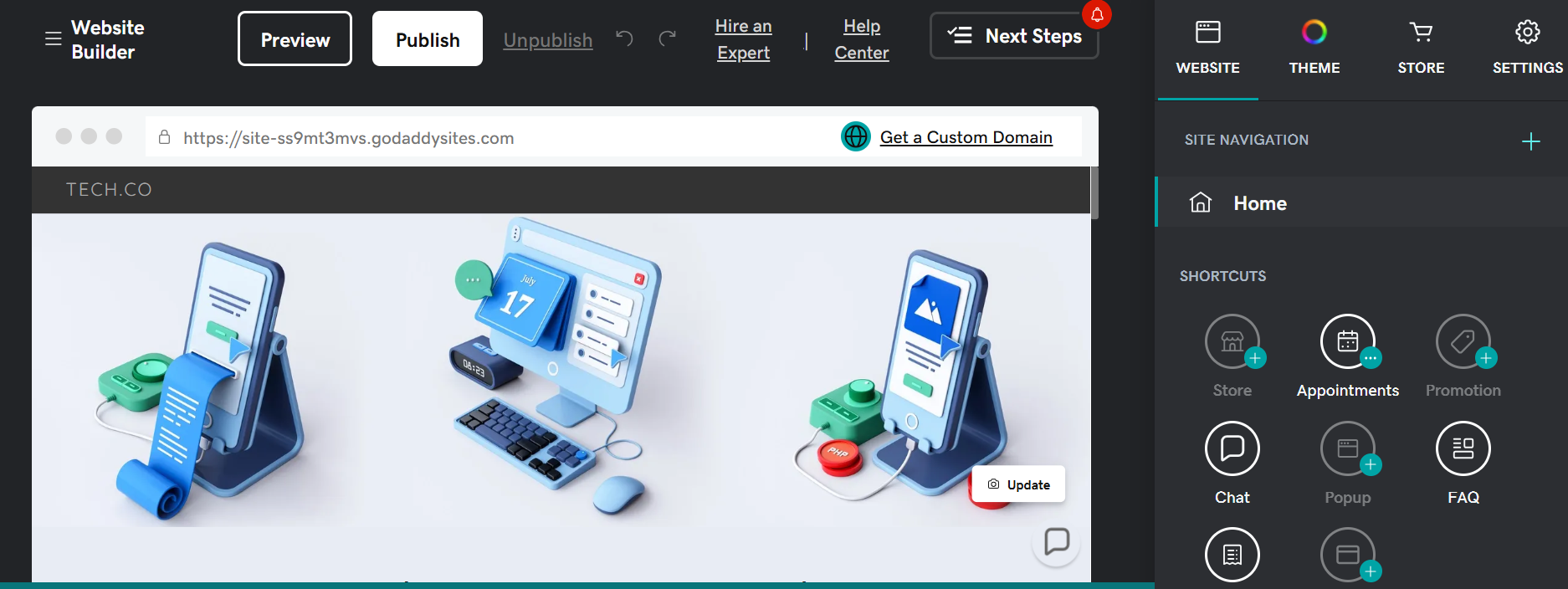
- Ease of use: GoDaddy has a simple interface that, much like Hostinger, has fewer features compared with other builders, making it easier to navigate. Likewise, our users enjoyed using GoDaddy’s page editor during testing, which allowed them to add elements simply by clicking a big plus button. This made it easy for us to keep track of each part of the process on one screen.
- AI tools: GoDaddy offers an AI website builder, GoDaddy Airo. There is also an AI content generator, which is particularly beneficial for beginners looking for assistance with website-focused copy. However, we did find that the accuracy was inconsistent with these tools, and our users had to take extra time to edit and fact-check to avoid mistakes.
- Customer support: Beginners will always be able to get in contact with the experts at GoDaddy if they are having trouble, because the platform offers 24/7 phone support.
GoDaddy’s AI website builder got us set up with a site in very litte time, although, we did find a few of the templates were outdated. Images: Tech.co testing
What's New with GoDaddy? (2026)
- GoDaddy Conversations: GoDaddy has a new WhatsApp integration, known as GoDaddy Conversations, which utilizes AI to flag important and not-so-important customer conversations.
- GoDaddy Airo included in WordPress: WordPress users can now simplify their site’s creation with GoDaddy Airo.
- GoDaddy Studio: Users of the app can now post directly to Instagram or Facebook, as well as create and customize their content.
4. Wix: Best Website Builder for Beginners Wanting Advanced Features
- Price from: $17 per month
Wix is the best website builder we’ve tested, mostly because of its advanced set of features and top-of-the-line AI tools. Depending on the kind of beginner you are, Wix can be either a blessing or a curse.
On the one hand, Wix’s advanced capability means beginners can get hands-on with a range of tools and become more easily accustomed to how website builders work. However, while our users did find Wix’s interface user-friendly, the number of options available could become overwhelming to new users.
Plus, having to get to grips with the platform means you may not have a website ready as quickly as with an option like Hostinger, which has fewer features.
Pros
- Unrivaled selection of website features across design, sales, and support
- AI features can create a site in 60 seconds
- Quality free forever plan available
Cons
- No template switching once published
- Number of features can be overwhelming for some beginners
- Steep price increase for scaling businesses
- Light: $17/month
- Core: $29/month
- Business: $39/month
- Business Elite: $159/month
- 10% off any plan with code TAKE10
- 14-day free trial available
Why I recommend Wix for beginners
Wix has some of the best AI tools in the market right now and these definitely add a layer of usability for beginners using website builders for the first time.
When I had generated a website of my own, Wix’s AI website builder went a step further and generated a personalized dashboard with all of the features I would need, based on my website idea. For example, it had fitted me with ecommerce tools when I told it I wanted to sell items.
This is a great option for beginners that don’t necessarily know what they’re going to need to make their website a success.
What makes Wix a good choice for beginners?
- Advanced offering: Wix has a vast set of features, including built-in email marketing and a booking tool. For beginners that want an advanced website, Wix is a great option. However, the platform can be difficult to navigate if you are new to website builders, so we’d recommend taking advantage of Wix’s support options where needed.
- Step-by-step guides: Wix provides custom, step-by-step guides that will walk you through the set up process of your specific site. For a blog, for instance, you’ll get steps like “write your first post” to guide you.
- Straightforward design options: Wix allows beginners to get started with designing their website with ease, because a rough outline will already be in place. The provider has over 2,000 templates on offer, way more than options like Squarespace, which only has 186.
- Help and support: Using Wix, beginners have access to reliable communication with the experts. Wix offers 24/7 support to all customers on paid plans, as well as an extensive knowledge center.
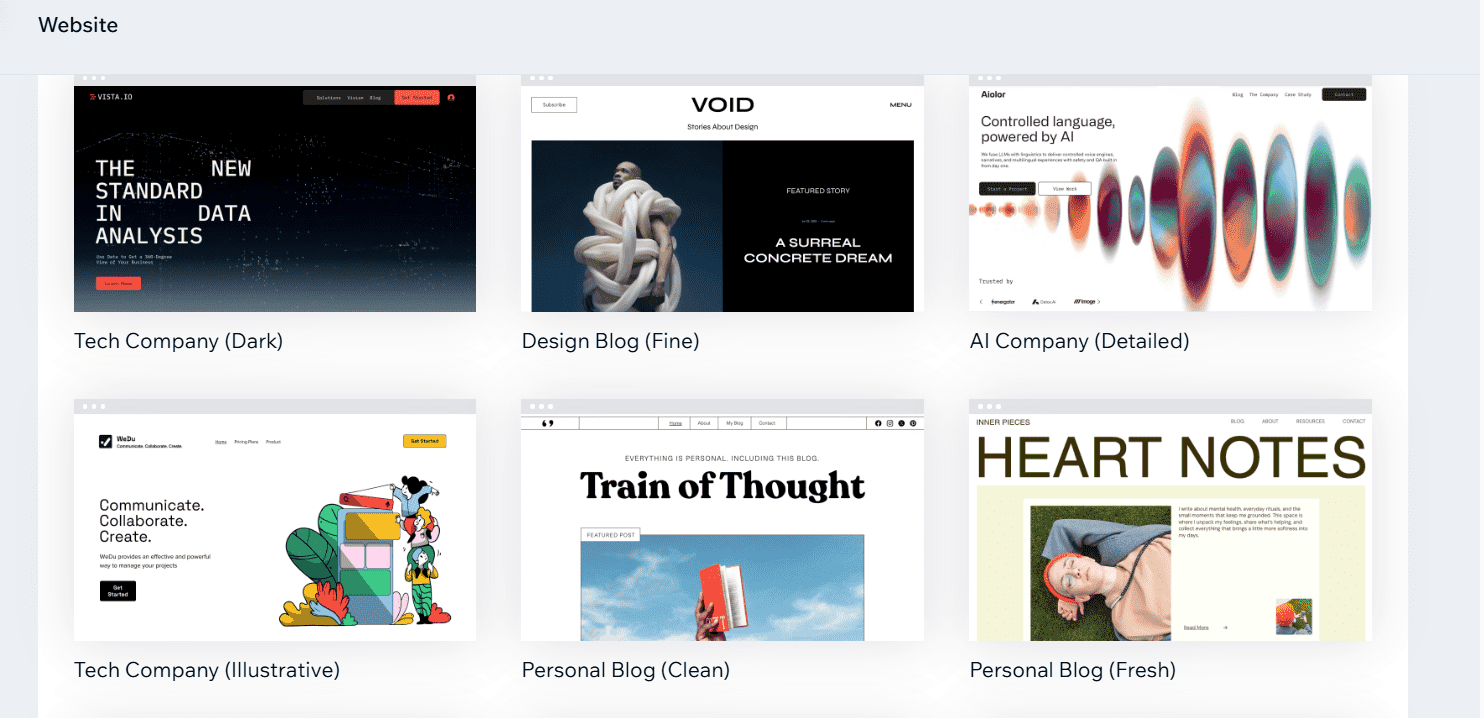
Wix offers all-round functionality, from design tools to analytics, however we found it may take some time for a beginner to become acquainted with all of its features. Images: Tech.co testing
What's New with Wix? (2026)
- Wix Harmony: Wix recently launched a new AI website builder platform that combines elements of vibe coding with Wix’s powerful editing capabilities, such as drag-and-drop functionality.
- Stripe partnership: Wix has partnered with payments provider Stripe, allowing users to leverage the power of Stripe’s Agentic Commerce Suite.
5. Shopify: Best Website Builder for Beginners Wanting Ecommerce Functionality
- Price from: $29 per month
- Offer (2026): $1 per month for first three months
Shopify has some of the most robust online store features available, including built-in inventory management and unlimited products. Likewise, it offers an immense app library, giving beginners the opportunity to create an all-in-one platform that has everything they need for their business, streamlining operations.
Overall, Shopify is one of the best ecommerce website builders we’ve tested, making it perfect for beginners that want to get started selling online.
Pros
- Add unlimited products with your own CSV
- Customizable member areas
- Intuitive product-adding experience for beginners
- AI site builder can have you live in seconds
Cons
- Monthly fees for POS system integration
- Scheduling and booking requires add-on
- No tutorials for setup, so tough for beginners
- Limited SEO settings available
- Basic Plan: $29/month
- Grow Plan: $79/month
- Advanced Plan: $299/month
Why I recommend Shopify for beginners
Like the other providers on our list, Shopify offers a full-on AI website builder that can generate an online storefront for you, with nothing more than a simple natural language prompt.
When we tested the platform, our users found some tasks — like inputting shipping addresses — fairly straightforward. However, in some cases we had to rely on Shopify’s AI assistant, Sidekick.
While the AI assistant is a valuable resource to have, Shopify’s advanced set of features and lack of initial tutorials will make some beginners stumble. That being said, like Wix, if you have more time to become accustomed to the platform, beginners will benefit in the long run.
What makes Shopify a good choice for beginners?
- Intuitive platform: Shopify provides an accessible platform for beginners wanting to get started with ecommerce functionality. Basic functions like adding products to your online store or customizing invoices were easy for us to carry out during our tests.
- AI tools: On top of its AI website builder, Shopify offers users an AI assistant, Sidekick, that will be particularly beneficial for beginners when navigating the platform’s many features. There is also Shopify Magic, which can help with tasks such as writing product descriptions and inputting correct SEO keywords.
- Vast app market: Shopify’s range of integrations, from SEO to dropshipping, allows beginners to create an all-in-one solution for their business, where functions can all be accessed from the same place.
- Advanced features: Shopify has a lot of features that users can take advantage of and, like Wix, this can be both a benefit and a drawback for beginners. If you have more time to spend understanding a platform, beginners can benefit from Shopify’s advanced functionality. However, for beginners that don’t have a lot of time and want a platform to immediately feel at ease with, we’d recommend Squarespace or GoDaddy.
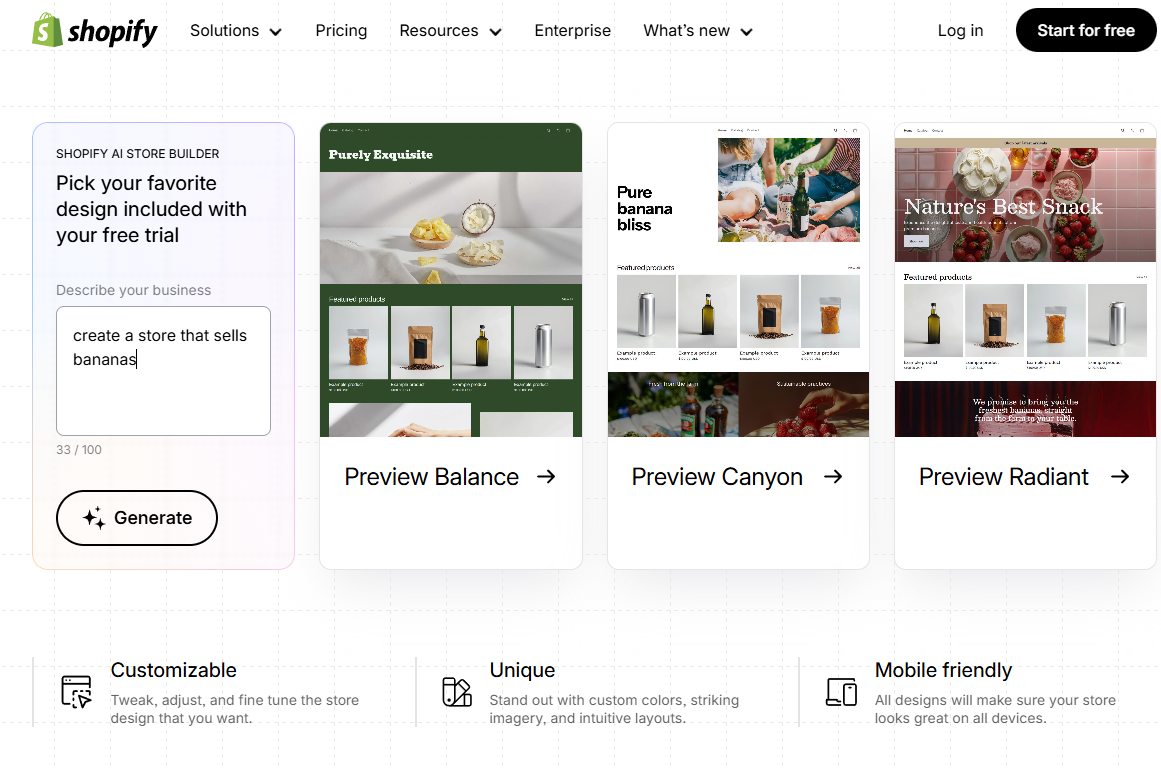
Shopify was one of the best ecommerce website bulilders we tested for beginners, because of the ease at which we could carry out basic functions in our test, and its wealth of AI features. Images: Tech.co testing
What's New with Shopify? (2026)
- Sidekick AI: Shopify’s AI assistant now goes beyond standard chatbot duties, and can be queried about sudden dips in sales and inventory levels.
- Horizon theme system: The update introduces 10 professionally designed themes templates which focus on conversion, including engagement and sales.
How to Choose a Website Builder as a Beginner
The market will look slightly different based on whether your business has used website builders or not. Here are the main elements to consider when making your choice as a beginner:
- Price: How much you’re willing to spend will depend on your budget. Businesses looking to cut costs should go for an option like Hostinger, whereas Shopify’s price tag is reserved as a higher-end option. Some providers, like Wix, also offer free plans. While this might be good for a beginner learning the ropes before making a long-term decision, we wouldn’t recommend a free option for most businesses looking to grow.
- Features: An ecommerce business will need their website to do different things than a hospitality business. Beginners should also consider the amount of features a provider has, and how this will lend itself to the overall ease of use of the platform. More features may mean advanced functionality, but it could also mean more to navigate.
- Ease of use: Platforms that prioritize intuitiveness and user-friendly dashboards will be best suited for beginners, particularly if you want to have a website ready as soon as possible. A more convoluted interface, with multiple complex options, will slow you down.
- AI tools: AI tools give beginners the opportunity to access advanced functions without having to do all the technical heavy-lifting. Instead, AI can help with concepts that might be new to beginners, such as SEO.
- Customer support: A provider with expert support across multiple channels works best for beginners, as it means there are consistent places you can go for support. 24/7 support is another bonus, meaning you can get help any time you need, lessening the time spent struggling through certain tasks.
- Business type: Some providers are more geared towards certain use cases than others. Squarespace, for example, is a highly customizable and design-focused option, best for businesses building a unique brand. Beginners should choose a platform that directly correlates to what they want to use their site for, as it means all the tools available on the platform will be geared towards that purpose.
Tech.co has been testing website builders for years. The results of our testing can best be utilized on our deals comparison page, where you can get further recommendations of other website builders we’ve tested and reviewed.
How Do I Make a Website as a Beginner?
Here are some key points to remember when building a website for the first time:
- Pick your name, purpose, and theme, ahead of time: Ensuring you have these details ironed out means you’ll have a much easier time of it when it comes to making your site. Think about what you want your website to do and how you want it to look.
- Use a website builder: They’re cheaper than web developers and give you a website you know how to use. Plus, they’re packed with AI features that can streamline the entire website building process, particularly for beginners. We like Wix, due to its prices, range of features, and ease of use. See how it ranks against rivals in our website builder comparison table.
- Focus on audience: Consider the people you want to visit your site, and what you want them to do while they’re there. It will help you make informed decisions during the creation process, including the design of your site.
- Optimize your site for SEO: If you want your site to get seen, you’ll need a dedicated SEO strategy. Identifying your site’s top keywords, creating relevant content, and optimizing your copy and images are a great place to start. Many website builders provide assistance with SEO and visibility, so if in doubt, it’s not a bad place to go.
- Consider the mobile version: Most people nowadays access websites and services from their phones, rather than their desktop. So, think of ways to make your website compatible across both formats, so you can benefit from both desktop-based and mobile audiences.
Read our full guide to building a website here.
How do I make a website with AI?
Use a provider’s AI website builder, as well as its suite of AI tools, to help you make a website using AI.
In 2026, the majority of website builders (including the ones on our list) are equipped with AI features that make building a website easy, especially for beginners.
Most notably, providers will have their own AI website builders. In a lot of cases these act like a common AI chatbot, asking you basic questions about what your website will look like and what you want it to do. Then, it will create an entire, functional website for you, just like that.
Like today’s AI chatbots, we just had a simple conversation with the Wix AI website builder about what we wanted on our website. Image: Tech.co testing
Providers will also offer individual AI tools that will enhance your website once it’s already been built. GoDaddy, for example, has its Airo system, which provides generative AI tools specialized in creating logos, product descriptions, social media marketing slogans, and more.
To get the best out of these tools, we’d recommend making sure your inputs are as descriptive as possible. Give as much detail as you can, and you’ll get the result closest to what you have envisioned for your site.
For more information, visit our guide on AI website builders.
Can I create a website for free?
Yes, many top providers offer a free plan that allows users to create a website completely for free, such as Wix.
However, there will be some caveats. For one, you’ll likely have to put up with ads from your website builder of choice, which won’t make your site look as professional.
Likewise, you’ll be missing out on some really useful features that could improve the experience of your website for customers, help you make more money, or give you more exposure.
Read our full guide on whether you can create a website for free.
Can I switch website builders later?
It’s entirely possible to switch website builders later down the line, especially if you’ve found a platform that better suits your needs.
Beginners, for example, may opt for a choice like Hostinger, with less functionality when learning the basics, and later turn to Wix or Shopify when they’re ready to take on more features.
The process will, most of the time, involve manually transferring your existing website data onto a new platform, as providers won’t usually support direct migration. This might sometimes mean inputting each element of your site, one by one, on the new platform.
Likewise, you can transfer your domain name from your current website builder’s settings. This will most likely involve requesting an Authorization Code from your current provider, and entering it when prompted.
We take our impartial research and analysis seriously, so you can have complete confidence that we're giving you the clearest, most useful product recommendations.
After conducting an initial exploration to identify the most relevant, popular, and established tools in the market, we put them through their paces with hands-on testing to see their real strengths and weaknesses. In this case, we put 16 website builder products to the test across 398 areas of investigation.
Based on years of market and user needs research, we've established a website builder testing methodology that scores each product in six core categories of investigation and 33 subcategories. This covers everything from customer feedback to design, ease of use, and more.
Our main testing categories for website builders are:
- Website features: The capabilities and functionalities offered by a website builder, e.g. blog functionality, SEO capability, and marketing capacity.
- Design functionality: The aesthetic appeal and visual layout of a website created using a website builder. It encompasses aspects such as page templates and customizable themes.
- Customer satisfaction: External customer opinion. This is the feedback and ratings given by customers who have used a particular website builder — the market position and reputation a website builder holds.
- User experience: How user-friendly and intuitive a website builder is for people with varying levels of technical expertise.
- Value for money: The balance between the cost of a website builder and the benefits it provides. It considers factors such as pricing plans, subscription models, and available features.
- Help and support: The assistance and resources available to users when they encounter issues or need guidance while using a website builder.
When it comes to calculating a product's final score, not all testing areas are weighted evenly, as we know some aspects matter more to our readers than others, which are simply “nice to have”. After hundreds of hours, our process is complete, and the results should ensure you can find the best solution for your needs.
At Tech.co, we have a number of full-time in-house researchers, who re-run this testing process regularly, to ensure our results remain reflective of the present day.
Verdict: What's the Best Website Builder for Beginners?
If you’re building a site for the first time, we’d recommend using Squarespace. Not only does it boast the best user experience out of any platform on this list, but it also offers the best templates and design features, making it a perfect match for users building creative sites for the first time.
It also offers an AI builder that can get your site live quickly and easily, while still maintaining a lot of control over your design.
To view more of your options, click one of the buttons below, or learn more about other noteworthy website builders via our deals page.
If you’re looking for the best cheap website builders, check out our dedicated guide.
However, a third-party agency is worth paying for, if you need a unique website and have a large enough budget.
We’d recommend opting for a paid plan instead — with the right discount, services like Wix start at just a few dollars per month.
Better yet, with AI website builders now commonplace in the market, the first draft of a website can be generated in as little as 30 seconds with the right website builder.
Our research and testing found that Squarespace is the best platform for beginners wanting to build a website. GoDaddy, Hostinger, and Wix are also solid options.
If you want more control over your site, WordPress might be a better option. But this does involve a steeper learning curve and more time managing your website in general.
If you click on, sign up to a service through, or make a purchase through the links on our site, or use our quotes tool to receive custom pricing for your business needs, we may earn a referral fee from the supplier(s) of the technology you’re interested in. This helps Tech.co to provide free information and reviews, and carries no additional cost to you. Most importantly, it doesn’t affect our editorial impartiality. Ratings and rankings on Tech.co cannot be bought. Our reviews are based on objective research analysis. Rare exceptions to this will be marked clearly as a ‘sponsored’ table column, or explained by a full advertising disclosure on the page, in place of this one. Click to return to top of page