


The pricing for monday work management starts at $9 per user, per month, for the Basic plan, and more demanding businesses can opt for the $12 Standard plan for the best value or the $19 Pro plan to get access to even more features like Chart View and time tracking.
On top of that, monday work management offers a free plan that allows for up to two users. The plan is understandably a bit more restricted, though, limiting the number of boards you can create to only three.
In this guide, we’ll explain exactly how much monday work management costs for your business by analyzing each of the pricing plans, breaking down the free plan, explaining any hidden costs, and comparing monday work management pricing with other top project management platforms.
Key Takeaways
- monday work management pricing starts at $9 per user, per month, for the Basic plan, increases to $12 per user, per month, for the Standard plan, and also offers a more advanced Pro plan for $19 per user, per month.
- There is a free plan available from monday work management, which allows for up to two users.
- monday work management has no hidden fees beyond the monthly subscription rate, although some third-party integrations do require a paid add-on to work.
- monday work management offers an 18% discount for users that are willing to sign up for a yearly contract, rather than paying month to month.
- Compared with other project management platforms, the starting price for monday work management is a tad expensive, but it’s worth it given monday work management offers unlimited boards and items with this plan, as well as automations, integrations, and access to monday AI features.
In this guide:
 💻 monday.com has a 20% discount available for startups right now 👌 📈
Find out if you're eligible today.
| Price (annually) The amount you'll pay per month, when billed annually | Users | Projects/boards | Storage | Kanban board | Gantt chart | Calendar | Time tracking | AI features | ||
|---|---|---|---|---|---|---|---|---|---|---|
 | | | | | ||||||
| Free | Basic | Standard | Pro | Enterprise | ||||||
| Free | $9/user/month | $12/user/month | $19/user/month | Custom | ||||||
| 2 | Unlimited | Unlimited | Unlimited | Unlimited | ||||||
| 3 | Unlimited | Unlimited | Unlimited | Unlimited | ||||||
| 500MB | 5GB | 20GB | 100GB | 1,000GB | ||||||
| | | | | | ||||||
| | | | | | ||||||
| | | | | | ||||||
| | | | | | ||||||
| N/A |
|
|
|
|
Basic plan – $9 per person, per month
The Basic tier will cost you $9 per user, per month, billed annually as $108 per user, per year. Alternatively, it’s available for $12 per user, per month when billed monthly. All in all, it’s a very generous introduction to monday work management. You’ll get everything included in the free tier, plus:
- Unlimited free viewers
- Unlimited “Items” (boards, projects, etc.)
- One dashboard (based on one board)
- Prioritized customer support
- Embedded forms
- 5GB of storage
Although this includes many of the basic features you’ll need, there aren’t that many task management features included, and you won’t have a timeline, calendar, or chart view available.
A comparable package offered by another provider would be ClickUp’s Unlimited plan, which is available for less money ($7 per user, per month), yet it has more features. However, monday work management offers 24/7 live support on all of its plans, while ClickUp does not.
Standard plan – $12 per person, per month
The Standard tier will cost you $12 per user, per month, billed annually as $144 per user, per year. Alternatively, it’s available for $14 per user, per month, when billed monthly. You’re given guest access, meaning that others can do more than just view your boards.
- Storage increases to 20GB
- 200+ templates
- You can share projects with people outside your team
- Gantt and Timeline views
- Guest access
- Automations and integrations (250 actions per month)
- Dashboard (up to five combined boards)
You’ll also be able to start using automations and integrations (250 per month). Automations are a great way to reduce manual admin, freeing up time that can be used elsewhere.
Finally, you’ll be given more options regarding the ways you can view your projects, gaining access to Timeline and Gantt views, plus a custom chart builder which our testing group found really easy to use during testing. We were able to pull data through from custom fields, and even export data that any given chart is using.
All in all, the Standard tier is the best value-for-money plan offered by monday work management. You can sign up for a free trial to put it to the test, and start organizing your workflow today.
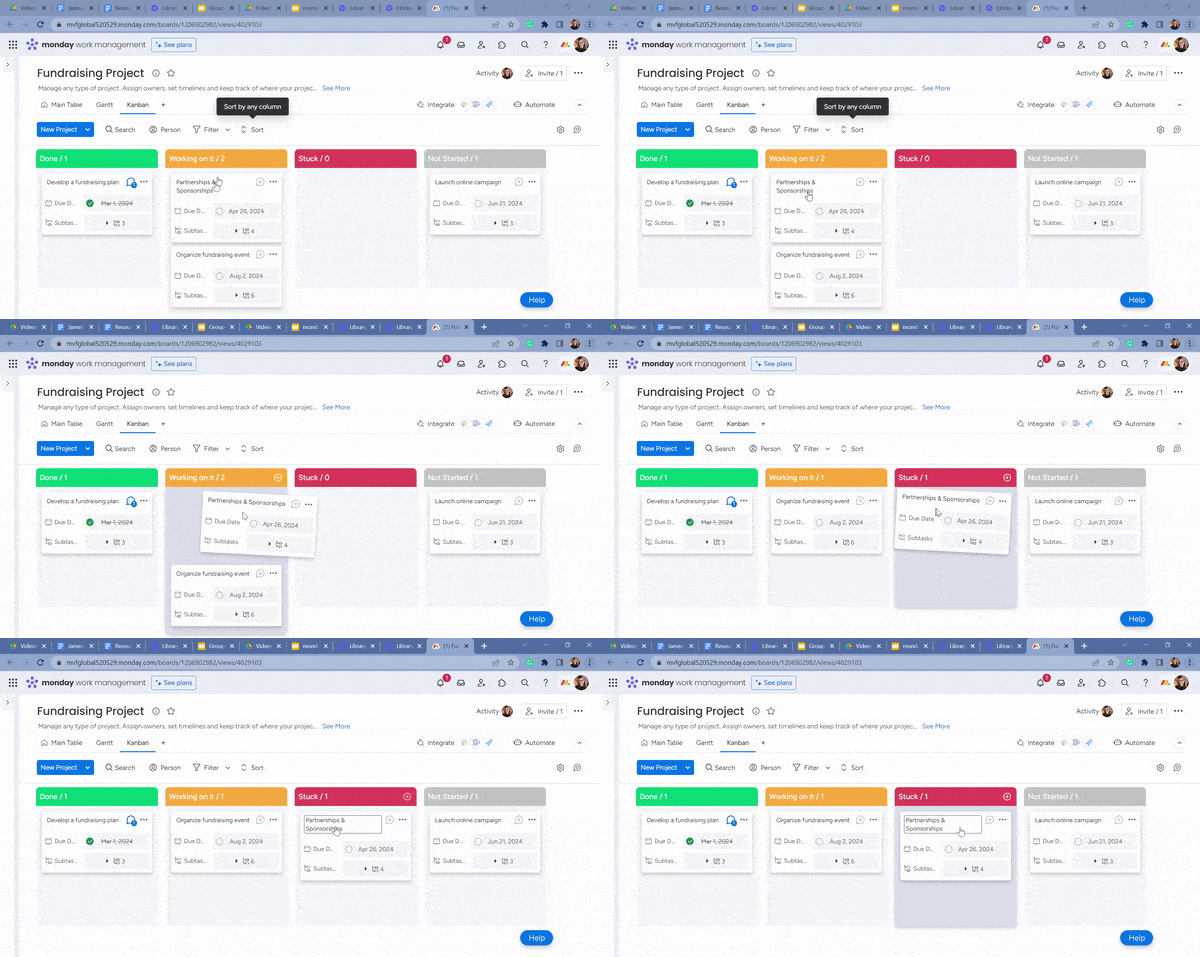
Moving tasks on monday work management’s Kanban board. Source: Tech.co testing
Pro plan – $19 per user, per month
The Pro plan will cost you $19 per user, per month, billed annually as $228 per user, per year. Alternatively, it’s available for $24 per user, per month when billed monthly. This is intended for medium-to-large businesses, but the cost is a lot higher than the standard tier. You’ll get everything included in previous tiers plus:
- Formula and dependency columns
- Private projects (boards and docs)
- Dashboard (up to 10 combined boards)
- Increases to automation and integration limits (25,000 a month each)
- Chart view
If you’re a bigger business, the Pro tier price tag might be worth it, as your automations and integrations are increased from 250 to 25,000 each, and it’s comparable to pricing plans offered by Smartsheet (Business plan: $19 per user, per month). Your dashboard can also combine up to 10 projects, making top-level organization easier.
If you’re handling a complex project, this tier is probably the best choice. It includes task dependencies and a “workload view,” for example, allowing you to see how much time individual members of your team have to spare for work.
As far as brand-new features go, you’ll be offered time tracking, which can help you keep tabs on how long certain tasks take. You’ll also have access to chart view, letting you visualize your data in different graphs and charts.
Enterprise plan – Custom
There’s no public pricing for this monday work management plan, so you’ll have to reach out to the sales team to get an accurate quote. The plan is geared towards very large businesses that need enterprise-grade features. In addition to the features included with the Pro plan, you’ll have access to:
- A higher API rate limit
- Multi-level permissions
- Advanced reporting and analytics
- Premium support
- Audit logs
- Tailored onboarding assistance
- Dashboard (up to 50 combined boards)
As well as these features — many of which will only be relevant to larger businesses with hundreds or even thousands of users working on projects — monday work management increases each of the automation and integration limits to 250,000 a month.
There are also extra security features, like IP restriction, and various compliance certifications. However, Asana, Wrike, and other top project management providers also offer single sign-on (SSO) capabilities. Large companies managing significant amounts of customer or client data need assurances that it will be safe while they manage projects.
However, competitors like ClickUp don’t offer IP restriction capabilities on any plans.

Assigning sub-tasks in monday work management. Source: Tech.co testing
Does monday work management have a free plan?
Yes, monday work management has a free plan, and it’s one of the better free plans available in the project management space. This plan is ideally suited to people who work alone or as a duo because it has a user limit of two. Key features include:
- Up to three “boards”
- 200+ templates
- 20+ column types
- Two-person user limit
- One-week activity log
- iOS and Mobile apps
The free plan user limit is smaller than Asana’s free plan (with a user limit of 15) and Wrike’s no-fee package (with an unlimited user limit). So, if you have a small team, we’d suggest checking out the Standard and Pro plans from monday work management.
Naturally, the Free tier is not as feature-rich as some of monday work management’s paid plans, as there are no automations, limited ways to visualize data usefully, and fewer task management features. There’s no Gantt chart view, for example, whereas ClickUp provides one on its free plan.

monday Work Management Pricing vs Competitors
monday work management is the best project management platform on the market, with a great $9 per user, per month starting price to match.
In comparison, popular solutions like Asana ($10.99 per user, per month) and Wrike ($10 per user, per month) are slightly less affordable than monday work management but do provide serious functionality, including AI features, unlimited custom fields, and dashboards to combine different projects into one location.
If you’re looking for an even more affordable project management solution, we’d recommend ClickUp ($7 per user, per month), Trello ($5 per user, per month), or Zoho Projects ($4 per user, per month). They all come in well under monday work management on price, also offer free plans, and they still provide basics like unlimited projects and third-party integrations.
| Price All prices listed are per user, per month (billed annually) | Free plan | Pros | Cons | Time tracking | Client portal | HIPAA compliance | Offline mode | AI assistant | AI features | ||
|---|---|---|---|---|---|---|---|---|---|---|---|
| |  |  |  |  |  | ||||||
| monday work management | Teamwork | ClickUp | Asana | Wrike | Trello | ||||||
| $12/user/month | $9.99/user/month | $7/user/month | $10.99/user/month | $10/user/month | $5/user/month | ||||||
| | | | | | 10 users | ||||||
|
|
|
|
|
| ||||||
|
|
|
|
|
| ||||||
| | | | Paid add-on | | Paid add-on | ||||||
| | | | | | | ||||||
| Enterprise plan only | | Enterprise plan only | Enterprise plan only | | | ||||||
| | | | Mobile only | | | ||||||
| monday AI Sidekick | TeamworkAI | ClickUp Brain | Asana AI | Wrike Copilot | AI Project Planner Power Up | ||||||
|
|
|
|
|
|
Is monday Work Management Pricing a Good Value?
monday work management is one of the best project management tools money can currently buy. Our research found it to be the highest-performing project management provider.
Despite this, it may not be the best project management software for your business or the best value for your money. It really depends on what you’re looking for. Here’s the low-down on some of the top monday work management alternatives.
monday work management offers a better user experience, but ClickUp is superior when it comes to task management and easy workflow creation. ClickUp is also one of our top-rated tools when it comes to value for money, given that many of its best features are available on ClickUp’s free plan.
The $7 per user, per month ClickUp Unlimited plan is even better value for money and comes with a Gantt chart, free project management templates, and a dashboard for your data — with no user or project limit, so it’ll suit businesses of all sizes. Read our monday work management versus ClickUp comparison for more information.
Although it’s not as easy to use as monday work management, Smartsheet’s spreadsheet-like structure makes it a great option for businesses that use spreadsheets to manage projects and is part of the reason it’s so straightforward and familiar feeling. monday work management and Smartsheet both have a limited free plan, and both paid plans cost $9 per user, per month.
If streamlining your workflows with automation is your most important priority, then Teamwork is worth checking out — of all the providers we tested, we found its automation builder one of the easiest to use, so perhaps this would offer your business the most value in the long run. What’s more, Teamwork’s first paid plan, the $10.99 per user, per month, Starter plan, is cheaper than monday work management’s first paid plan ($12 per user, per month).
Meanwhile, Jira offers far and away the best value for money when it comes to engineering team use and data visualization and is priced below monday work management, with paid plans starting at $9.05 per user, per month for up to 100 users. Prices get even lower if you opt for more users, too. Additionally, Jira’s free plan is a lot more capable than monday work management‘s free plan, allowing for unlimited projects and up to ten users.
Zoho Projects, on the other hand, is the lowest-priced premium option, starting at just $4 per user, per month, if cost is what matters to you most.
For more information on project management tools and their value, see our overall project management comparison chart.
Test Summary
I found monday work management the easiest-to-use provider overall, as did many others in our testing group. Its minimalistic interface and clever use of white space meant I didn’t feel overwhelmed when using the software, which can’t be said for every tool we’ve tested.
For example, when testing Smartsheet, I felt like there was a lot on the screen and this was making me feel less organized, not more organized — monday work management was the exact opposite.
I’d recommend monday work management to anyone who doesn’t have experience with project management because I felt it’s a little easier to guess where things might be — you don’t need your hand held by on-screen instructions like the ones provided by ClickUp and Jira.
I was seriously impressed by monday work management‘s customer support — when I used the live chat message to notify monday work management‘s support team that I was stuck on something, they asked for more information on my problem and then sent me a video showing me how to fix it. This all happened in minutes, so I wasn’t stuck for long.

Does monday Work Management Have Hidden Fees?
monday work management does not charge extra for specific features. In other words, if a tool or function is listed as included within a monday work management pricing plan, then you’ll have access to it once you pay the cost of that plan. In this way, there are no “hidden” costs, which you may find with some other providers.
The provider’s knowledge base, industry guides, webinars, video center, and YouTube page are all freely accessible to monday work management subscribers and can be used for troubleshooting issues or simply learning more about the provider’s capabilities and functions.
It’s worth mentioning that monday work management’s app marketplace has a number of free and built-in integrations, but it also has some apps that you’ll have to pay a little bit extra for to use. You’ll be able to pay for many of the additional CRM, project management, integrations, and collaboration apps inside the monday work management app, but some require you to pay on their respective sites.
And monday work management isn’t shy about rolling out new updates — at no extra cost. In August 2024, for instance, the platform introduced the ability to enable or disable weekends, save drafts while filling out long forms, and export canvases to PDF format.
Other monday.com Products
In this guide, we’ve been talking about the pricing for the project management system from parent company monday.com, which is called monday work management. However, it’s worth remembering that monday.com offers a range of other business-facing products that could be a better fit for your particular needs.
Here are some of the other monday.com products you can use and how much they cost:
- monday CRM ($12 per user, per month): The customer relationship management (CRM) platform from monday provides the same color-coordinated interface and automation-driven platform, but provides more customer-facing features like pipelines and lead management.
- monday dev ($9 per user, per month): This is a platform designed for product and development teams, featuring tools like backlog and sprint management.
- monday service ($26 per user, per month): This is a dedicated customer service platform from monday.com that offers a ticketing system to help users manage customer concerns.
- monday campaigns ($50/month): This is a dedicated email marketing platform from monday.com that provides unlimited emails and segments for all users.
Check out our monday CRM review for more information.
At Tech.co we don’t write about products and services without conducting thorough research, and hands-on testing where applicable. While this process can be time consuming, it’s time well spent if it means we’re providing better, more useful information for your business.
When it comes to project management software, we test out each program first-hand, guided by an in-house research framework consisting of six core assessment areas that break down into a range of smaller subcategories. This framework is based on the factors companies and project managers have told us are important to their everyday usage. The six criteria are:
- Ease of use: After getting five to six participants to test each project management software for an hour, we assessed how easy it was to set up a project with the platforms, how clear their interfaces were, and how easy they were to navigate.
- Pricing: We look at all plan costs. Providers offering lots of features for lower costs will have better pricing scores than those that lock them away on higher-tier plans.
- Customer support: We assess the ways you can contact your project management software provider if something goes wrong. Providers offering 24/7 live support, as well as phone-based support and onboarding assistance, get the best scores.
- Security: For this area, we assess the security options offered by each provider. This includes user-level security features like two-factor authentication, as well as more administrative security measures like user permissions and IP restrictions.
- Integrations: We assess the quantity — and the quality — of the applications each project management software provider integrates with.
- Functionality: This part of our research involves assessing the full feature set that each product provides. We look at four function-based sub-categories as part of this, including task management, project and workflow creation, data visualization, and collaboration.
It’s important to note that not all of these criteria hold equal weight in our testing methodology. This is best practice and based on what businesses have told us is essential, compared with what’s simply “nice to have”.
Because of their central importance to project management, how easy each tool is to use, how much it costs, features for project and workflow creation, and task management had more of an impact overall than other criteria.
Verdict: Is monday Work Management Worth the Cost?
All things considered, monday work management is an extremely capable, easy-to-use project management software tool, excelling in task management and workflow creation. It is a better program overall than competitors such as Smartsheet and Asana.
With a starting plan of $9 per user per month, monday work management is firmly in the middle of the pack when it comes to value, and cheaper than competitors Wrike and Asana.
However, rival Teamwork scores higher for workflow creation — even offering an automation builder with its free plan. It should be noted, however, that monday work management’s provider company, monday.com, routinely introduces new updates to its platform at no extra cost, ensuring that your money goes a little bit further.
You certainly won’t be disappointed if you do opt for monday work management, but there are other good options out there, such as Teamwork. To get the best value deal currently available on the project management market, we’d recommend checking out our provider comparison tool.
If you click on, sign up to a service through, or make a purchase through the links on our site, or use our quotes tool to receive custom pricing for your business needs, we may earn a referral fee from the supplier(s) of the technology you’re interested in. This helps Tech.co to provide free information and reviews, and carries no additional cost to you. Most importantly, it doesn’t affect our editorial impartiality. Ratings and rankings on Tech.co cannot be bought. Our reviews are based on objective research analysis. Rare exceptions to this will be marked clearly as a ‘sponsored’ table column, or explained by a full advertising disclosure on the page, in place of this one. Click to return to top of page