FBI Reveals How Much Americans Lost to Cybercrime Last Year

US citizens lost an astonishingly large amount of money to cybercrime during 2023, with complaints rising sharply from 2022.

The FBI has revealed that US citizens lost a combined total of $12.5 billion to cybercrime in 2023, significantly more than they lost during the year prior.

Of the different types of cybercrime, the FBI says investment fraud, business email compromise, and ransomware attacks remain the most lucrative and damaging strategies.

The news is the latest reminder of why we all need to stay vigilant online and keep our eyes peeled for scams and cons, as well as the importance of using cybersecurity tools like VPNs and password managers to avoid data breaches.

US Citizens Lose Billions to Cybercrime

In its 2023 Internet Crime Report, published this week, the FBI revealed that Americans lost $12.5 billion to cybercrime during 2023. That works out to roughly $40 in losses per US citizen.

While this number is huge, when compared to last year’s cybercrime stats, it looks even more concerning – the overall number of complaints rose sharply in 2023.

The IC3 says 880,418 complaints were registered during last year, a year-on-year increase of nearly 10%. Worryingly, ransomware is on the rise once more after a dip in 2022, with complaints rising by 18%.

The total of $12.5 billion, on the other hand, is 22% higher than what was lost last year. Losses to ransomware, for example, rose by 74% to $59.6 million.


About Tech.co Video Thumbnail Showing Lead Writer Conor Cawley Smiling Next to Tech.co LogoThis just in! View
the top business tech deals for 2026 👨‍💻
See the list button

Investment Fraud and Business Email Compromise Loom Large

“The past year”, the FBI says, “investment fraud was once again the costliest type of crime tracked by IC3. Losses to investment scams rose from $3.31 billion in 2022 to $4.57 billion in 2023 – a 38% increase.”

The Bureau also reports that 21,489 complaints had been received about business email compromise, with a total of $2.9 billion lost via this attack method.

Tech support scams also continue to wreak havoc on innocent consumers, raking in almost $925,000 and accounting for over half of the scams targeted towards people over 50.

Staying Safe Online

Cybersecurity threats are constantly evolving, and they’re only going to get more sophisticated – especially with the rise of AI scams. And while ensuring your systems are protected with best-in-class software is important, your staff team needs to be able to spot things that slip through the net.

It’s now more important than ever to ensure that your employees are equipped with the knowledge and skills to identify and mitigate potential cybersecurity risks, and regular training is the best way to do this.

Training sessions should cover topics such as phishing awareness, password hygiene, and the importance of regular software updates. More and more, companies are testing their employees with mock phishing emails, and this can be a good way to identify the individuals at your business who need extra support.

By instilling a culture of vigilance and providing regular training like this, you can significantly reduce the likelihood of falling victim to cyber threats like investment fraud and tech support scams. So stay safe, and make sure you’re brushing up on your knowledge whenever you can.

Written by:
Aaron Drapkin is Tech.co's Content Manager. He has been researching and writing about technology, politics, and society in print and online publications since graduating with a Philosophy degree from the University of Bristol six years ago. Aaron's focus areas include VPNs, cybersecurity, AI and project management software. He has been quoted in the Daily Mirror, Daily Express, The Daily Mail, Computer Weekly, Cybernews, Lifewire, HR News and the Silicon Republic speaking on various privacy and cybersecurity issues, and has articles published in Wired, Vice, Metro, ProPrivacy, The Week, and Politics.co.uk covering a wide range of topics.

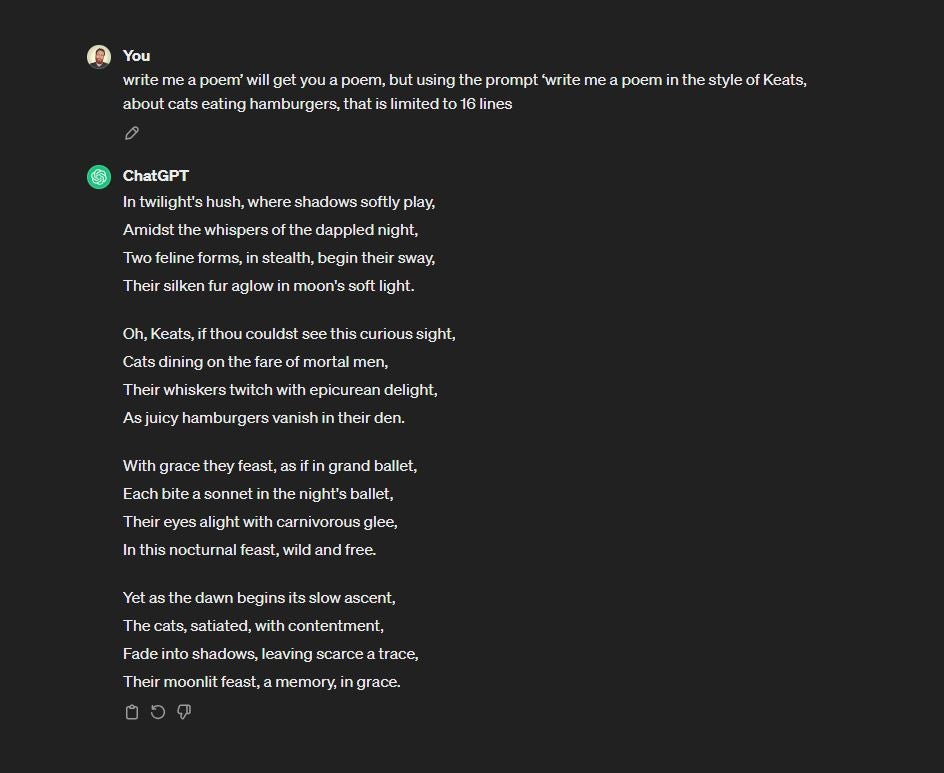
4 Ways to Get ChatGPT Plus’ GPT-4 Model for Free

Want to try GPT-4 for free? It normally costs $20 a month, but you don't have to pay a penny if you know the right methods.

Like it or loathe it, there’s no getting away from ChatGPT these days. OpenAI’s wildly popular AI chatbot is being talked about everywhere in 2024, from the meeting room to the barroom.

However, many people are still only familiar with using ChatGPT’s entry-level GPT-3.5 model. This is the version that’s available for free on the ChatGPT website, while the more advanced GPT-4 engine is locked behind a ChatGPT Plus subscription.

This costs $20 a month, and while you can easily part with that for little more than a coffee and a pastry in many major US cities these days, it’s also still not pocket change.

Fortunately, there are ways you use GPT-4 for free. In this guide, we’ll show you how to get free GPT-4 access, so you can test out its capabilities for yourself and see if paying for that premium ChatGPT account is right for you.

Can You Really Use GPT-4 Free Without a ChatGPT Plus Subscription?

In a word, yes. There are a limited number of ways to use GPT-4 free, but they do exist if you know where to look. They range from relatively easy to access (Microsoft Copilot and Bing) to slightly more tricky, but we’re going to show all of the ones we had success with using ourselves.

The best free GPT-4 methods are thanks to Microsoft, whose close relationship with ChatGPT owner OpenAI is no secret. The Redmond-based tech giant plowed a cool $10 billion in the AI startup back in January 2023, and among other things, its sizeable investment seems to have given it first dibs on OpenAI’s latest large language models (LLMs).


About Tech.co Video Thumbnail Showing Lead Writer Conor Cawley Smiling Next to Tech.co LogoThis just in! View
the top business tech deals for 2026 👨‍💻
See the list button

An LLM is what GPT-4 technically is, though as we’ve said, you can just think of it as the engine driving the AI chatbot you actually interact with on your screen, if AI jargon isn’t your thing.

Previously, there were even more ways to use GPT-4 for free. These included Quora CEO Adam D’Angelo’s Poe AI tool. However, Poe and others have since gone behind paywalls themselves, meaning we’re now down to four verifiable ways you can get the best of ChatGPT without paying a penny, plus one wild card.

Let’s get started.

1) How to Use GPT-4 and DALL-E 3 Free with Microsoft Copilot

In practice, Microsoft’s cozy relationship with OpenAI means that even the free version of Microsoft’s own Copilot AI chatbot runs GPT-4. As you can see, it even comes complete with many of the bells and whistles you get with a full ChatGPT Pro subscription, like integration with DALL-E 3, one of the best AI image generators.

To get started, first you need to go to the Microsoft Copilot website.

From there, you can actually jump straight in to asking Copilot questions if you want. Here, I tested it with a quite specific question on postcolonial literary theory. I’ve always wanted to actually use that BA in English Literature and it’s great it’s only taken me 13 years to successfully deploy it in a professional context.

Screenshot of Microsoft Copilot AI responding to question using GPT-4 large language model

After a couple of responses, Copilot will inevitably prompt you to sign in to (or create) a Microsoft account. This isn’t necessarily a bad thing, though, as being signed in and using Copilot unlocks free DALLE-3 access.

You can either wait for Copilot to ask you to log in, or take the initiative and head to the “Sign in” box located in the top right-hand corner of the Copilot homepage.

Microsoft Copilot homepage with Sign in box highlighted

From there, follow the prompts and log in with your Microsoft details, or create an account if you need to. That will then get you full access to the (still free) version of Copilot with no limit on prompts/questions, and DALL-E 3 integration.

It’s worth reiterating this is one of the better AI image tools around, given that some of its rivals like Google Gemini have suffered high-profile fails recently. I fed Copilot a relatively simple image prompt, but its output was nevertheless competent and looked slicker than when I’ve tested other tools with similarly uncomplicated requests.

All in all, if you want to check out what GPT-4 is capable of, then Copilot is the obvious and best place to start. Honestly, based on my experience, for most casual users the Copilot Pro tier isn’t necessary. Sure, it has faster response times, which can be handy if you’re making loads of images, but unless you’re using it in a time-sensitive business environment it’s unlikely to be an issue.

Copilot is also available as a dedicated app for Android and iOS, meaning you can also use GPT-4 free on your iPhone and practically any other smartphone you’re likely to own.

2) How to Use GPT-4 Free in Microsoft Bing

This is two sides of the same coins, really, but Microsoft’s Bing search engine also integrates full Copilot AI smarts and offers another simple, streamlined way to use GPT-4 for free.

The advantage (and key difference) here is that if you’re using Bing as your primary interface with the internet, it means you input prompts and ask questions straight in the search bar.

The really cool thing is, if Bing detects an AI prompt, it will include a GPT-4 powered Copilot response right in your search results. Alternatively, if you click the Copilot button instead of just smacking your Enter key, Bing will open Copilot in its own window for you.

Screenshot of Microsoft Bing search engine featuring integrated Copilot GPT-4 AI response

As with using Copilot through its standalone website, accessing Copilot and therefore GPT-4 through Bing also lets you use DALL-E 3 free. Here’s another quick test I ran, just to check it was indeed outputting the same quality as on the chatbot’s own site.

Screenshot of Copilot used through Bing showing free DALL-E 3 image generation and GPT-4 features

You’ll also find Bing apps for iOS and Android, giving you the same functionality and GPT-4 access on mobile devices like smartphones and tablets.

3) How to Try GPT-4 Free in Perplexity AI

Moving on from Microsoft? Well, sort of. Perplexity AI is a promising platform that bills itself as a conversational AI search engine. Not long ago, its AI responses were drawn exclusively from Copilot and therefore GPT-4.

Now, toggling on its “Pro” search option unlocks responses powered by either GPT-4 or Anthropic’s Claude AI (currently Claude 2.1, but presumably soon Claude 3). The choice is yours, and Perplexity is also working on its own homebrewed Experimental 70b Model, which you can also try with Pro.

The catch? Things called “Pro” usually have a price attached to them and that is indeed the case with Perplexity Pro. However, free users get one Pro conversation every four hours on the house, while Perplexity Pro offers a free 7-day trial to anyone interested in taking our a yearly plan.

Crucially, I was able to confirm that you don’t pay upfront for the Pro plan so as long as you cancel in good time, you won’t be out of pocket, even temporarily.

Perplexity Pro AI billing screen showing free trial details

Is it worth it? The only way to know for sure is to try it for yourself, but based on my experience it’s worth considering. Namely, you get two premium AI models (Claude and GPT-4) for the same price you’d pay for a GPT Plus subscription, which is definitely appealing.

In terms of the competence of its responses, it did an OK job summarizing affordable restaurants in London. It would have been nice if its “conversational” powers extended to asking if I wanted an itinerary made, even better if this was provided by default.

However, the list itself was accurately and I can vouch by a number of its picks for great budget eats in the UK capital. Here’s lookin’ at you, Roti King…

Screenshot of Perplexity AI responding to question

4) Merlin

Merlin is a handy ChatGPT Chrome extension that basically bakes GPT-4 powers into your browser. When installed, you simply fire Merlin up with CTRL + M command (or CMD + M on Apple computers), then you use it for a variety of purposes including engaging in standard AI chatbot conversations.

For these, Merlin operates a credit system whereby you can generate a GPT-4 response for 30 credits, compared to 1x credit for GPT-3.5. You get 102 free credits every day, but they don’t roll over if they go unused.

Better still, Merlin now lets you use your credits to generate responses from AI models, including the all-new Claude 3 Opus, which is Anthropic’s would-be ChatGPT killer. You can also interact with Gemini, Mistral AI (aka Le Chatbot) and many more.

Merlin really comes into its own as an AI extension for quickly summarizing webpages, the option for which appears automatically if you’ve got the plugin enabled.

It’s completely different to the other entries in this guide and, as well as allowing you to use GPT-4 free more than just the once, it lets you do a bunch of other useful stuff too.

You can download and install the extension from the Merlin website.

Screenshot of Merlin Chrome ChatGPT extension with GPT-4 access

Can You Use GPT-4 for Free on Hugging Face?

A final way that some people say you can get GPT-4 free is on open source AI and machine learning community Hugging Face.

A number of its ‘Spaces’ say they integrate the GPT-4 model, though in my testing I wasn’t happy that enough (or any) of them actively and consistently worked as promised. I therefore can’t fully recommend it, compared to the more reliable tools outlined above.

That said, your mileage with Hugging Face and GPT-4 may vary. It’s a cool place regardless, so check it out by all means.

Screenshot of GPT-4 Spaces on open source AI community Hugging Face website

Want to learn more about ChatGPT in general? Check out our full ChatGPT tutorial guide for all the tips and tricks you need to master the AI platform.

Written by:
Aaron Drapkin is Tech.co's Content Manager. He has been researching and writing about technology, politics, and society in print and online publications since graduating with a Philosophy degree from the University of Bristol six years ago. Aaron's focus areas include VPNs, cybersecurity, AI and project management software. He has been quoted in the Daily Mirror, Daily Express, The Daily Mail, Computer Weekly, Cybernews, Lifewire, HR News and the Silicon Republic speaking on various privacy and cybersecurity issues, and has articles published in Wired, Vice, Metro, ProPrivacy, The Week, and Politics.co.uk covering a wide range of topics.

What Are Quiet Layoffs? Employee Reduction Method Explained

This new term describes the process of giving employees advanced notice of firings so they can plan for the future.

Company firings might be changing for businesses around the world, as a new phenomenon describes as “quiet layoffs” has become more popular in 2024.

There’s always a new tech term to learn in the modern era. Between quiet quitting and tech neck, the business world is constantly undergoing a significant paradigm shift, and linguistics are quick to establish a new way to describe it.

In this guide, we’ll explain exactly what quiet layoffs are, how they compare to quiet firing, and whether or not this new trend is good for employees or if it just stresses them out more.

What Are Quiet Layoffs?

Quiet layoffs describe the employee reduction process of giving employees advanced notice that they will be let go from the company in the near future. Effectively, the employees in question will be given a time period, anywhere between a few weeks and a few months, before they actually lose compensation and benefits.

In the same way as a two-week notice gives a company time to find a replacement for an employee, quiet layoffs give employees a bit of time to a make a plan after they are terminated. Whether it be looking for a new job or signing up for some kind of assistance, quiet layoffs are designed to make the layoff process a bit less brutal on the employee.


About Tech.co Video Thumbnail Showing Lead Writer Conor Cawley Smiling Next to Tech.co LogoThis just in! View
the top business tech deals for 2026 👨‍💻
See the list button

Quiet Layoffs: Pros & Cons

Any business trend is going to have its pros and cons when it comes to your workforce, but it’s all about decision making in the long run. Here are some of the pros and cons of quiet layoffs at your business.

Pros of Quiet Layoffs

For one, the ability to give your employees a bit of time to plan for the future is simply a nice thing to do. The urgency of termination at some businesses can cause dramatic exits, particularly when a lot of roles are tied to important benefits like health insurance. In that vein, quiet layoffs can contribute to better morale for your team, as you won’t be sowing the seeds of your own demise every time someone gets fired.

On top of that, quiet layoffs can help tone down the instances of bad press that come from mass layoffs. It creates less of a spectacle at the company, which means that you aren’t going to be inundated with reporters trying to find out how many employees were axed in a single day.

Cons of Quiet Layoffs

Quiet layoffs can be good when done properly, but there’s always the potential for something to go wrong. Right out of the gate, many employers worry that knowledge of the layoff ahead of time could leave them open to potential security breaches, as a disgruntled employee will still have access to company data on a regular basis.

Additionally, advanced notice of layoffs can actually have a negative impact on mental health, especially if a date isn’t set in advance. The idea that “any day could be your last” could be increasingly stressful on a daily basis, ruining any hope of productivity or successful job search.

The Difference Between Quiet Layoffs and Quiet Firing

With all the tech lingo circulating in 2024, it’s safe to assume that getting it all in line is difficult for the average employee. After all, how many different kinds of quiet employment are out there for people to decipher?

One notably confusing distinction is that between quiet layoffs and quiet firing. While the nomenclature is quite similar, these two employee reduction methods are decidedly different, particularly from the employee’s point of view.

As we mentioned, quiet layoffs are the act of giving employees advanced notice of layoffs so that they have time to plan for the future. Quiet firing, on the other hand, is the process of making a role undesirable — typically through initiatives like return-to-office mandates and rigorous performance reviews — so that employees will quit rather than be fired.

Suffice to say, quiet layoffs are an admittedly more humane version of employee reduction than quiet firing, in the same way breaking up with someone face to face is better than being mean to them until they break up with you is a more humane way to end a relationship.

Should Your Business Do Quiet Layoffs?

Unlike the majority of new tech terms in the last few years, quiet layoffs actually seems like a better alternative to the current system. The process allows for employees to have a bit of notice, so they can start the job search a little early, which will help given the slow hiring process that has gripped so many businesses.

There are obviously pitfalls, and if you’re concerned about disgruntled employees stealing valuable company data, you might want to reconsider. But as long as you’re doing it the right way, you should be able to foster a healthier work environment in the long run.

Written by:
Aaron Drapkin is Tech.co's Content Manager. He has been researching and writing about technology, politics, and society in print and online publications since graduating with a Philosophy degree from the University of Bristol six years ago. Aaron's focus areas include VPNs, cybersecurity, AI and project management software. He has been quoted in the Daily Mirror, Daily Express, The Daily Mail, Computer Weekly, Cybernews, Lifewire, HR News and the Silicon Republic speaking on various privacy and cybersecurity issues, and has articles published in Wired, Vice, Metro, ProPrivacy, The Week, and Politics.co.uk covering a wide range of topics.

The Most Useful New iOS 17.4 Features You’ll Actually Care About

iOS 17.4 is ringing the changes for iPhone users all over the world and these are the new features you'll actually care about

Apple has just released the latest version of its mobile operating system, iOS 17.4, with the update headlined by the ability to finally download apps from third-party stores. At least, that’s the deal in Europe.

iOS 17.4 lands hours before the European Union’s Digital Markets Act (DMA) makes it effectively illegal for Apple to continue its infamous “walled garden” ecosystem, which has been deemed to give the company an unfair competitive advantage over its rivals. Again, in Europe.

Competition laws differ dramatically in the US, of course, but globally there loads of new iOS 17.4 features to enjoy as well, including the usual slew of fresh emoji and a health security update as well.  Let’s take a look at the new features dropping for iPhones (and iPads, though iPadOS is now technically its own software).

New iOS 17.4 Features: Third-Party App Stores Incoming

The biggest change in iOS 17.4 will be for iPhone and iPad users in EU countries, where third-party app marketplaces will become available for the first time.

This will mean an explosion of choice when it comes to being able to download apps from small, independent developers, but also potentially less stringent quality and security controls. One of the most common criticisms of Google’s rival Android platform is that its more open app ecosystem has left it comparatively swamped with malware.


About Tech.co Video Thumbnail Showing Lead Writer Conor Cawley Smiling Next to Tech.co LogoThis just in! View
the top business tech deals for 2026 👨‍💻
See the list button

All that said, at launch on March 7 things will look strangely familiar for European iOS users, as Apple will now need to approve all the alternative app stores and marketplaces that want to feature on iOS, both instead of and in addition to just approving individual apps for its own iOS App Store.

This is going to take time, and we’re currently only aware of one alternative iOS app store that’s going to be ready this week: Germany-based enterprise app marketplace mobivention.

Lastly, as part of the EU-only round of iOS 17.4 features incoming, the opening up of Apple’s walled garden will also extend to third-party payment platforms, so you may soon be able to load a Google Wallet directly on to your iPhone, if you’d prefer that over the native iOS Wallet app.

New iOS 17.4 Security Features

There’s no doubt that iOS 17.4’s new features are headlined by the enforced changes for the European market. Incremental updates come in all shapes and sizes, with iOS 17.4 seeming comparatively small compared to some recent efforts – namely iOS 17.2, which introduced the new Journals app and Spatial Video capture.

However, there’s also changes on the security front as well, namely improvements to Stolen Device Protection. This feature is still relatively fresh out the box itself, but now it’s gotten a little bit better with the release of iOS 17.4. The key change is to the security delay option, which will now be able to be implemented across all locations, not just ones your iPhone or iPad detects to be unusual or new.

In addition, iMessage is getting a new cryptographic security protocol known as PQ3, which is said to bolster its end-to-end encryption against quantum computing attacks.

 New iOS 17.4 Features: Siri and Podcasts Learn New Languages

The final super useful new iOS 17.4 features we’ll highlight are the additional languages now available to Apple’s Siri assistant and its Podcasts app.

For Siri, it’s actually a case of the digital helper’s existing language skills getting a little more refined. As of the iOS 17.4 update, Siri will be able to read incoming messages in all of the languages it supports. Previously, you had to manually toggle Siri’s default language between tongues.

For Apple Podcasts, it’s a much more noticeable change in the form of auto-generated transcripts to accompanying your listening, which will launch in English, Fresh, German and Spanish.

How to Download iOS 17.4 Today

That’s not all, though. Apple’s new iOS 17.4 release has still more features that will be coming to iPhones  for the first time, including over 100 new emoji and additional details for the Battery Health section of devices.

Owners of compatible Apple products (that’s the iPhone X and 2nd-gen iPhone SE and above) may well be prompted to download iOS 17.4 on their device. However, if you want to manually prompt the update, then here’s what to do.

Simply follow the Settings > General > Software Update pathway on your handset and make sure you’re connected to Wi-Fi when downloading. As ever, our top tip is to wait a few days, as not only will your download time likely be much less, but any obvious iOS 17.4 problems will have come to light and you can make a more informed decision.

Written by:
Aaron Drapkin is Tech.co's Content Manager. He has been researching and writing about technology, politics, and society in print and online publications since graduating with a Philosophy degree from the University of Bristol six years ago. Aaron's focus areas include VPNs, cybersecurity, AI and project management software. He has been quoted in the Daily Mirror, Daily Express, The Daily Mail, Computer Weekly, Cybernews, Lifewire, HR News and the Silicon Republic speaking on various privacy and cybersecurity issues, and has articles published in Wired, Vice, Metro, ProPrivacy, The Week, and Politics.co.uk covering a wide range of topics.

What Is Mistral AI? Le Chat and Mistral Large Explained

This French AI startup already has a multi-million-dollar deal with Microsoft. Here's why.

ChatGPT has a big French competitor: The tech startup Mistral AI has just launched three paid AI plans – Mistral Large, Mistral Small, and Mistral Embedded – along with a free chatbot option, “Le Chat.”

Mistral AI is making a splashy entrance into the already-packed battle for AI hegemony, alongside more established competitors including Google Gemini, Claude, Copilot Pro, and many others. What makes it stand out? Mistral is claiming that its most powerful model, Mistral Large, is second only to ChatGPT 4 Turbo.

Plus, Le Chat is free to for all to use online, a move that may help it pick up attention from those hoping to use chatbots to help them plan their lives. But how much can the bot help you? Here’s what to know.

What Is Mistral Le Chat?

No, “Le Chat” is not a description of the internet from someone in 2010. It’s Mistral AI’s answer to the free ChatGPT chatbot.

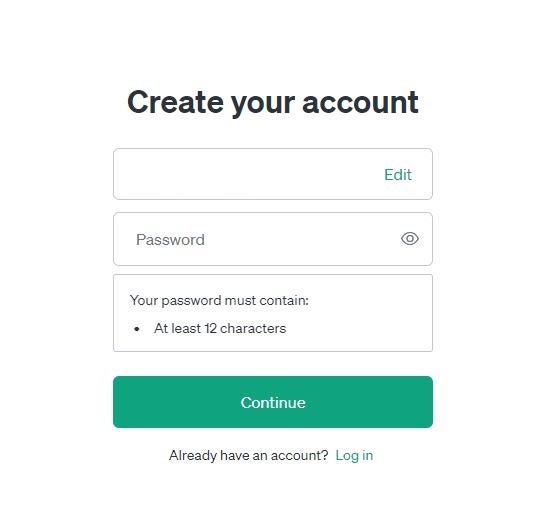
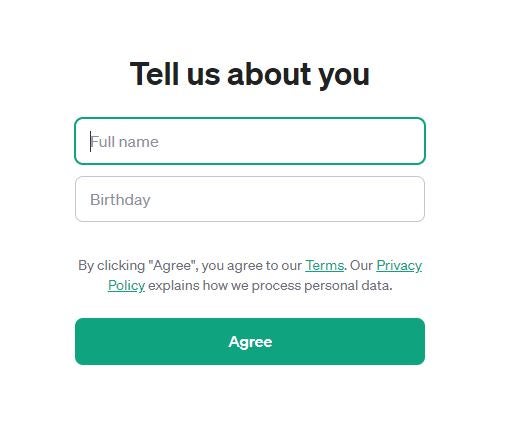
Users can sign up with just an email address and a password in order to take a crack at talking to Le Chat. In response, the service will rapidly spit out an answer to any question you care to ask it.

It’s a useful service for getting first-draft responses to common concerns that you don’t want to Google for yourself: You might ask about a receipe for a great home-cooked meal or ask for fashion advice. The more guidance you can offer in your prompt, the better a response you’ll get, from the writing style to the word count.

To check it out, head over to chat.mistral.ai/chat

What Is Mistral Large?

Mistral Large refers to the powerful AI engine that Mistral offers to businesses and consumers who are willing to pay more for a better experience. It boasts a great latency-to-performance ratio, and the creators say they’ve defeated the challenges any generative AI engine must deal with: It has resisted biases, can be customized to fit a company’s needs, and operates quickly.

Companies hoping to adapt an AI tool for internal use might opt for a Mistral model if they want an option that makes self-deployment easy, or they need an option with “advanced modular moderation controls.” The service can be deployed in the cloud or on-premises.

Mistral also says that its Large model has “strong” programming language skills, and can learn and respond in multiple languages: English, French, Italian, German, Spanish.

The company also offer Mistral Small, an option that’s less costly than Large and works best for low-latency tasks, as well as Mistral Embedded, an embedding model that helps with semantic search & RAGs. (Embedded can only handle English)

Mistral AI explainer

Mistral explains the difference between its three models on its website.

Who Owns Mistral AI?

Mistral AI is a French AI startup, cofounded in April 2023 by former DeepMind researcher Arthur Mensch, former Meta employee Timothée Lacroix, and former Meta employee Guillaume Lample.

Arguably, Microsoft has some influence over the company, as well: In February 2024, Microsoft entered a multi-year deal with Mistral AI, giving the startup €15 million (or $16 million) to bring Mistral Large to its cloud computing platform Azure.

For Microsoft, it’s a quick way to hedge their OpenAI bets with another LLM that’s already established in Europe. Microsoft is far from abandoning its relationship with the San Francisco-based OpenAI, however, particularly given that its already invested a whopping $10 billion into the popular AI company.

Also, not that anyone was asking, but here’s the origin for the name itself: The word “mistral” is defined by Oxford Languages as a “strong, cold northwesterly wind that blows through the Rhône valley and southern France into the Mediterranean, mainly in winter.”

Mistral Tested: Is It Any Good?

We ran a few prompts through Mistral’s Le Chat, powered by the Large model. We even checked our results against ChatGPT’s responses to the exact same prompts. We’re happy to announce that Mistral offers advice that’s on par with what you’d receive from ChatGPT, from interior design advice to shopping suggestions.

Here’s a quick look at what we asked:

Click the previews to see larger versions of each image.

How Much Does Mistral AI Cost?

Here are the prices that Mistral makes public on its website for use of its LLMs:

  • Mistral Large costs $8/1M tokens (input) and $24/1M tokens (output)
  • Mistral Small costs $2/1M tokens (input) and $6/1M tokens (output)
  • Mistral Embed costs $0.1/1M tokens (input only)

The most you can expect to pay is for the Mistral Large model, which would be $8/1M tokens (input) and $24/1M tokens (output). For context, ChatGPT 4 Turbo starts at $10/1M tokens (input) and $60/1M tokens (output), making it a noteably pricier option. It’s certainly possible that Mistral is attempting to undercut its competition.

Mistral vs ChatGPT: What’s the Difference?

Officially, there’s one big reason why ChatGPT is better than Mistral: ChatGPT 4 Turbo earns a 86.4% for its Massive Multi-Task Language Understanding (MMLU) benchmark, compared to Mistral’s 81.2% benchmark. However, ChatGPT does not offer self-deployment for businesses, while Mistral does, and Mistral offers “advanced” moderation features, compared to ChatGPT’s standard offering.

What’s the difference when using the free versions of ChatGPT and the new Mistral AI? You might be surprised at how little a difference you can notice. They’ll both respond within seconds, deliver a lengthy stream of freshly-generated text — and they’ll even often give very similar responses to the same prompt.

One question that we asked both chatbots: “Can you recommend any fashion tips for a 32-year-old man in 2024?” In both cases, ChatGPT and Mistral Large both responded with a numbered list, and the first tip from both bots had the same headline: “1. Invest in Quality Basics.”

From there, the actual text differed. Mistral explained that “Investing in quality pieces can ensure they last longer and look better,” while ChatGPT said “Build your wardrobe around high-quality basics that never go out of style.”

Critics have pointed out some differences in outputs, with some saying that Mistral offers more concise answers. One redditor said that even an earlier, open source version of a Mistral model from December 2023 was, in their opinion, better than ChatGPT.

Mistral Large vs Mistral 7b

Hugging Face is a French-American machine learning company that develops computer tools for custom applications. It was one of a few companies that received early access to Mistral AI models last year. Specifically, Hugging Face used Mistral 7B, one of two open AI models that Mistral offers.

Mistral 7B is the earliest open model, with a speedy 7B transformer that could be customized quickly, though it used a limited 8k token context window. The other open model, Mistral 8x7B, is an evolution that uses a 32k context window and offers the multi-language fluency in English, French, Italian, German, and Spanish, (as well as the programing code strengths) that you’ll get from Mistral Large and Small.

These models are available for free under a permissive license, but unless you’re heavily into open-source code and figuring out artificial intelligence, you’ll likely prefer to stop with Mistral Large or Le Chat.

Written by:
Aaron Drapkin is Tech.co's Content Manager. He has been researching and writing about technology, politics, and society in print and online publications since graduating with a Philosophy degree from the University of Bristol six years ago. Aaron's focus areas include VPNs, cybersecurity, AI and project management software. He has been quoted in the Daily Mirror, Daily Express, The Daily Mail, Computer Weekly, Cybernews, Lifewire, HR News and the Silicon Republic speaking on various privacy and cybersecurity issues, and has articles published in Wired, Vice, Metro, ProPrivacy, The Week, and Politics.co.uk covering a wide range of topics.

How to Use ChatGPT’s New ‘Read Aloud’ Feature for AI Audio

ChatGPT has yet another new feature: The AI will now read its responses to you, with five different voices to pick from.

You’ve seen plenty of AI text, images, and video. Now get ready for yet another artificially intelligent sensory experience: ChatGPT can now talk to you.

ChatGPT’s new feature, “Read Aloud,” lets you hear what the generative text chatbot has to say. It’s available on both the web and mobile, with a voiceover audio that continues talking even when you leave the ChatGPT screen to move to another page.

Here’s how the tool works and how you can benefit from using it.

How Can I Get ChatGPT to Read Aloud to Me?

To test out the audio AI function, start by submitting a prompt to ChatGPT like normal — this could be instructions for how to plan a vacation or shop for groceries, or it might be a story. Once you have the response text that you need read, take these steps:

  1. Tap and hold on the response text. A small dropdown menu will appear.
  2. Click the “Read Aloud” option. An audio player will appear on your screen.
  3. Click the “Play” button. Enjoy your custom audio!
  4. You can also hit the Pause, Fastforward, and Rewind icons in order to control how you hear the audio, as needed.


About Tech.co Video Thumbnail Showing Lead Writer Conor Cawley Smiling Next to Tech.co LogoThis just in! View
the top business tech deals for 2026 👨‍💻
See the list button

The audio is read in a voice designed to sound as “natural” as possible, so be ready for some random pauses that prevent the entire audio from sounding robotic.

You can also edit the type of voice that you want ChatGPT to use. You can hear five different types of voice patterns, ranging from male to female to androgynous. The five voices are called Jupiter, Breeze, Ember, Cove and Sky.

You can toggle between those options by going to Settings > Speech > Voice

What Can You Use ChatGPT Read Aloud For?

People hoping to benefit from ChatGPT probably don’t need the audio option in order to hold a conversation — ChatGPT’s responses might not be long enough to justify hitting the audio option for each and every one.

But if you’ve asked it for a lengthy explainer, you might need your hands and eyes free to work on whatever you’re learning about. One of the most common use cases for ChatGPT’s new AI audio tool is likely handiwork: If ChatGPT is explaining how to put together a bed frame or how to unclog a sink, you might need an audio explanation while your hands are full.

Those with visual impairments can benefit from the audio option as well.

How You Can Get Started With ChatGPT Today

ChatGPT can’t be trusted for everything. Don’t turn to it for legal advice or homework help. But it can give you a first draft idea for plenty of chores that you may have been putting off for a rainy day. Perhaps it could suggest how to decorate your apartment, plan a trip, or come up with a thoughtful birthday gift for a friend.

Check out our full guide to using ChatGPT here, complete with all the price plans to know. More advanced options including creating your own ChatGPT bot, or “GPT,” as well as a few lists of AI prompts to consider.

Perhaps most important for all the aspiring chatbot masterminds out there, however, is one of our most recent guides: What is “tech neck?” — our guide to avoiding neck pain from all the hunching you might be doing while figuring out the perfect ChatGPT prompt.

Written by:
Aaron Drapkin is Tech.co's Content Manager. He has been researching and writing about technology, politics, and society in print and online publications since graduating with a Philosophy degree from the University of Bristol six years ago. Aaron's focus areas include VPNs, cybersecurity, AI and project management software. He has been quoted in the Daily Mirror, Daily Express, The Daily Mail, Computer Weekly, Cybernews, Lifewire, HR News and the Silicon Republic speaking on various privacy and cybersecurity issues, and has articles published in Wired, Vice, Metro, ProPrivacy, The Week, and Politics.co.uk covering a wide range of topics.

Facebook and Instagram Back Online After Massive Meta Outage

The two Meta platforms went down Tuesday morning, leaving thousands without access to their social media accounts.

Update (03/07): Facebook and Meta have been back online and stable for a day now, following the massive outage earlier in the week. A Meta spokesperson has gone on record as saying the downtime was due to a unspecified “technical issue,” without revealing more. Original story follows.

It’s another bad day for Meta, with two of its largest platforms — Instagram and Facebook — reportedly malfunctioning for a wide range of users.

Ever since Facebook acquired Instagram in 2012, these kinds of outages have been decidedly disruptive. After all, the two platforms are some of the most used in the world, combining for nearly 5 billion users worldwide. That means, when these platforms suffer outages, a lot of people are left in the dark.

So, when will today’s outage be resolved? We’ve got all the information you need to get back into your account as soon as possible.

Facebook and Instagram Outage Resolved

This morning, hundreds of thousands of users reported that they had been logged out of their Facebook and Instagram accounts and were unable to access the platform in any capacity. Yes, Threads was also impacted, but let’s be honest, people were more concerned about the status of the first two.

Fortunately, while the outage did last a few hours, the problem has reportedly been resolved, giving millions of users access to their accounts again to begin the procrastination of Tuesday’s workload.


About Tech.co Video Thumbnail Showing Lead Writer Conor Cawley Smiling Next to Tech.co LogoThis just in! View
the top business tech deals for 2026 👨‍💻
See the list button

“Earlier today, a technical issue caused people to have difficulty accessing some of our services. We resolved the issue as quickly as possible for everyone who was impacted, and we apologize for any inconvenience.” – Andy Stone, communications representative for Meta

There are still some lingering issues, as many have reported that the mobile app is still failing to load the social media platforms in question, but it seems the worst of the worst is over.

As for the reach, “a technical issue” was all users have heard about the outage so far, with no further explanation for why so many accounts were disrupted today, but at least the problem has been resolved… for now.

Another Tech Outage in 2024

Outages from big tech firms are becoming a bit too commonplace for the average user, particularly considering how important being connected is to people in 2024.

Sure, the ability to update your status or post a picture isn’t exactly vital when it comes to everyday life, but social media platforms aren’t the only services going down. In fact, we’re less than two weeks removed from an AT&T outage that saw thousands without cell service, which is decidedly more important for everyday users.

All that to say, a world increasingly reliant on technology that is forced to suffer these outages due to nothing more than “technical issues” is going to become inconvenient at best and downright dangerous at worst.

Written by:
Aaron Drapkin is Tech.co's Content Manager. He has been researching and writing about technology, politics, and society in print and online publications since graduating with a Philosophy degree from the University of Bristol six years ago. Aaron's focus areas include VPNs, cybersecurity, AI and project management software. He has been quoted in the Daily Mirror, Daily Express, The Daily Mail, Computer Weekly, Cybernews, Lifewire, HR News and the Silicon Republic speaking on various privacy and cybersecurity issues, and has articles published in Wired, Vice, Metro, ProPrivacy, The Week, and Politics.co.uk covering a wide range of topics.

What Is ‘Tech Neck’? Explainer and Exercises to Relieve Pain

The very modern painful condition is experienced by heavy tech-users, but there are ways to reduce the risks.

Unless you’ve experienced it first hand, it might be easy to dismiss tech neck as another piece of jargon like chronoworking or quiet quittingbut for those that have experienced it, it can be a debilitating condition that could ruin your day.

It’s a catch-all term for neck and back pain caused by poor posture, specifically poor posture that is experienced when using tech like phones, tablets and computers.

We look at the steps you can take to prevent tech neck, as well as exercises to help relieve the symptoms.

What is Tech Neck?

‘Tech Neck’ (sometimes known as ‘text-neck’) is the term used to explain pains and aches caused by the act of constantly looking down at a phone, tablet or screen. With the average American spending over four hours a day on their phones alone, it’s no surprise that our bodies are paying the price.

If you have experienced tech neck in the past, you’re not alone. According to one report from the National University of Athens, 64.7% of people who work from home are suffering from neck pain. What’s more, 39.2% of them admitted to being less productive due to this ailment.

It’s an issue that seems to be on the rise too. Google search data shows that more and more of us are searching for this term. Is it a coincidence that as our technology usage increases, searches for tech neck increase with it?

Google trends data showing the increase in searches for the term ‘tech neck’

How to Prevent Tech Neck

The quickest way to prevent tech neck is to stop using tech, of course, but for most of us living in the modern world, that’s no more viable that stopping breathing. However, there are some steps you can take to mitigate the dangers of tech neck.

  1. Take frequent breaks. We don’t expect you to stop using your devices altogether, but regular 20 to 30 minute breaks can make a big difference, and break up the routine of bad posture.
  2. Adjust your desk monitor or laptop, so that it is eye-level. Ideally you want to be looking directly at it, so try raising your monitor, or using a laptop stand to get the right height.
  3. Invest in a comfortable chair with good support. Bad posture can be exasperated by a bad chair. If you’re a remote worker for example, sitting on a dining chair for seven hours a day is going to do a number on your body. Invest in an ergonomic chair instead.
  4. Get a standing desk. You could scrap the chair altogether, and opt for standing desk. Standing for work has numerous proven health benefits, including reduction in back and neck pain.
  5. Exercise more. It’s a good idea to do stretches and physical exercise to keep yourself supple. Why not get moving during your regular breaks?
  6. Learn to leave your phone alone. Many of us check our phone through habit, and end up doom scrolling, hunched over the device for long sessions. Try to wean yourself off your device by habitually leaving it out of reach, or checking it only at certain times.
  7. Use a posture reminder app. Experts at NJ Spine & Orthopedic recommend this method for giving yourself regular prompts to check your posture and readjust.

Diagram showing the weight and ensuing strain that looking at a screen can cause.

Exercises to Help With Tech Neck

If you’re suffering from tech neck, the importance of exercise cannot be understated. Regular sessions of low-impact exercise, such as yoga or swimming, can assist with posture improvement and reduce back and neck aches.

The following exercises are recommendations from the North American Spine Society for relieving neck pain:

  1. Supine neutral head position. Lay on your back with a thin pillow, or none at all, and place your head so your ears are aligned with your shoulders and hips. Spend 5 – 10 minutes in this position every couple of hours, as needed.
  2. Supine retraction. As with the first exercise, this one requires you to lie down with the back of your head on the floor. Then, place your fingers on your chin and push downwards to that the chin tucks in. There should be a stretching sensation at the back of your neck. Repeat 8 – 10 times, and stop if you experience any pain.
  3. Sitting or standing neck retraction. Similar to the above, but done while sitting or standing. Use your fingers to push on your chin, to push you head as far back as it will go, while keeping your face looking forward. Hold position for 1 – 2 seconds, then return head to its normal position. Repeat 8 – 10 times and do the 3 – 4 sessions each day. The North American Spine Society states that as pain eases, you should be able to push your head even further back.
  4. Walk tall. This one might seem obvious, but it’s something that few of us actually manage, without a degree of effort. Align your ears with your shoulders while standing up, and make a conscious effort to retain this position. This will require a degree of concentration at first, as most people will subconsciously drift back into a hunched position.  Keep this up though and it should become second nature, with the improvement in posture easing neck pain.

Remember, it is advisable to speak to a medical professional before adopting new exercise regimes.

Written by:
Aaron Drapkin is Tech.co's Content Manager. He has been researching and writing about technology, politics, and society in print and online publications since graduating with a Philosophy degree from the University of Bristol six years ago. Aaron's focus areas include VPNs, cybersecurity, AI and project management software. He has been quoted in the Daily Mirror, Daily Express, The Daily Mail, Computer Weekly, Cybernews, Lifewire, HR News and the Silicon Republic speaking on various privacy and cybersecurity issues, and has articles published in Wired, Vice, Metro, ProPrivacy, The Week, and Politics.co.uk covering a wide range of topics.

Google Gemini Tutorial: How to Use Gemini AI (With Images)

The AI chatbot from Google is an excellent alternative to ChatGPT, as long as you know how to actually use it.

You know, ChatGPT isn’t the only AI chatbot on the market that’s worth a gander. As a matter of fact, Gemini — the generative AI platform from Google formerly known as Bard — can hold its own compared to its OpenAI-owned counterpart, you just need to know how to use it.

In this guide, you’ll learn how to use Google Gemini, including how to use prompts, create images, and manage data on the AI platform. Plus, we’ll help you decide whether or not the paid version — Gemini Advanced — is worth the investment.

If you’re looking to compare AI chatbot, though, be sure to check out our best AI chatbot guide, which compared several platforms with in-depth research from our team.

Google Logo
Google Workspace: Free for 14-Days Set up custom email, share files securely online, video chat from any device and more.
Get started

How to Sign Up for Google Gemini for Free

You’ll be happy to learn that, unlike some other AI chatbots, Google Gemini is completely free to use for all users. If you’re looking for a more advanced experience, though, you will have to pay a subscription, but we’ll cover some of the paid plans below.

As far as getting setup with Gemini for free, the process is quite simple. For starters, you’ll need a Google account to access Gemini, as the service is connected to services like Google Maps and YouTube. Simply head on over to the Gemini site and sign into your Google account or register for a new one to get started.


About Tech.co Video Thumbnail Showing Lead Writer Conor Cawley Smiling Next to Tech.co LogoThis just in! View
the top business tech deals for 2026 👨‍💻
See the list button

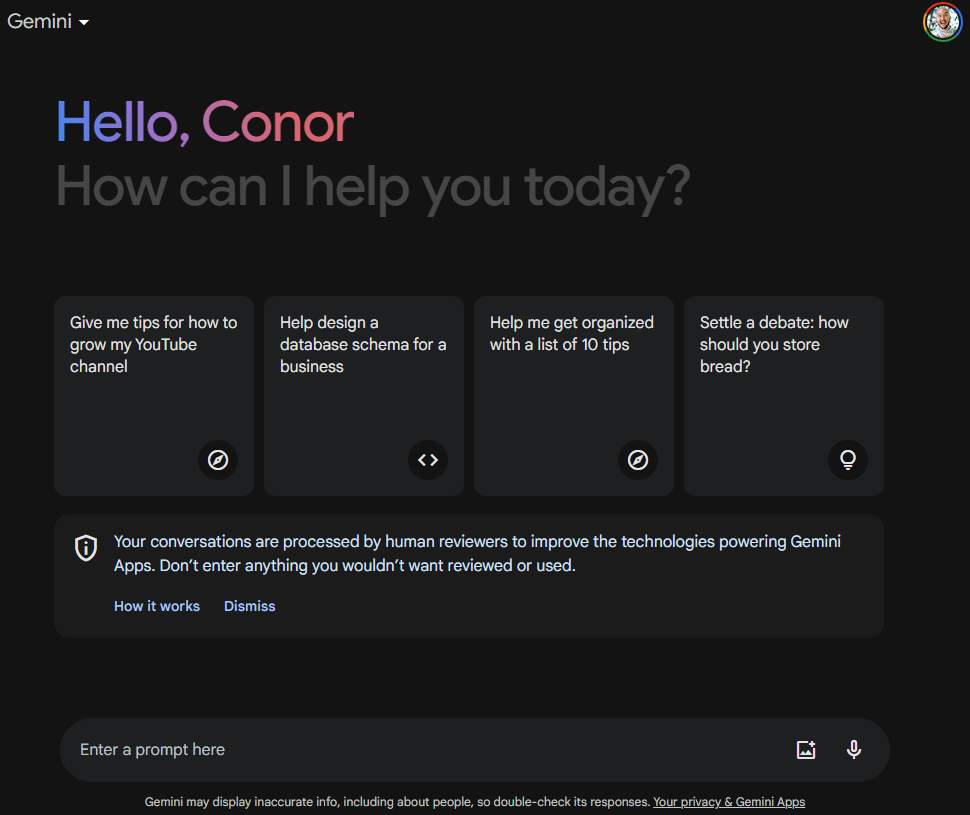
Once you’re all signed in, you’re ready to use Google Gemini! Just ask a question or suggest a prompt in the chat bar at the bottom of the screen, and you’ll have your answer in a few seconds.

Google Gemini Home Page

You’ll see from the home page that the service provides you with a few tips for getting started, offering prompts and suggestions that can help you find exactly what you’re looking for. However, if you really want to get the most out of the service, you’ll need to make your prompts a bit more advanced.

Also, it’s worth noting, as Gemini does in the small print underneath the chat box, that Gemini — along with most AI chatbots — don’t always provide accurate information, so be sure to check your work before submitting anything important.

How to Use Gemini Prompts

When it comes to AI chatbots like Gemini, it’s all about the prompts. These quick phrases and questions are used to instruct Gemini to perform actions, and if you want to get the most out of the platform, you’ll want to follow a few best practices.

First off, be specific. Gemini has all the information in the world at its fingertips, and being vague will rarely get you exactly what need. For example, instead of simply prompting Gemini to “write a story,” instead prompt it to “write a short story about an elephant that meets a pig at the grocery store in the style of Edgar Allen Poe.”

Google Gemini Poe Story

Beyond that, you’ll want to specifically use the correct action words to get what you’re after. Prompts that include words like “write,” “summarize,” or “generate” will ensure that the answer provided matches up with your actual request.

You’ll also need to note what kind of information you want included in the answer, as well as any information you want excluded. This helps Gemini narrow it down when it comes to sifting through the mountains of data at its avail.

Some studies have also found that the way to get the best responses from AI chatbots is to be emotional and genuine in your prompts. Even simply adding phrases like “this better work” or “my job is counting on it” to prompts can increase the value of responses but a notable percentage.

It’s also worth remembering that getting it wrong doesn’t mean you have to start from square one. Gemini is a continuous service, like its virtual assistant counterpart Google Assistant, so you can ask questions in success, tell it what went wrong, and it will take into account previous responses to give you the best option.

Google Gemini Poe Story Short

If you don’t feel like making your own prompts, we don’t blame you. This kind of work can be quite intensive, and with so many people using AI chatbots like Gemini, the number of pre-made prompts available is substantial. We’ve made guides for prompts that save time and prompts that unlock your full potential, so you can get started without having to come up with your own prompts.

How to Create Images in Gemini

Unlike some other AI chatbots — such as ChatGPT — Google Gemini allows users to create images on the same platform for free. That’s right, you don’t have to go to another site and deal with complicated settings and layers. All you have to do is ask for a picture and you’ll get it.

As you can imagine, prompts are quite important for creating image as well. If, for example, you tell Gemini to “show” you a specific picture, it will simply search the web for a picture that fits your description and provide you with that image, along with a link to the source.

To get exactly what you’re looking for, make sure to use works like “create” or “generate” in your prompt, so that Gemini knows it needs to develop something new, rather than simply search for an existing image.

Google Gemini Hot Dog Image

Gemini is a bit limited compared to other AI image generators, in that you can’t edit a lot of the parameters. If you want to get a bit more granular with your image generation, feel free to check out our guide to free AI image generator to mull your options.

How to Manage How Gemini Uses Your Data

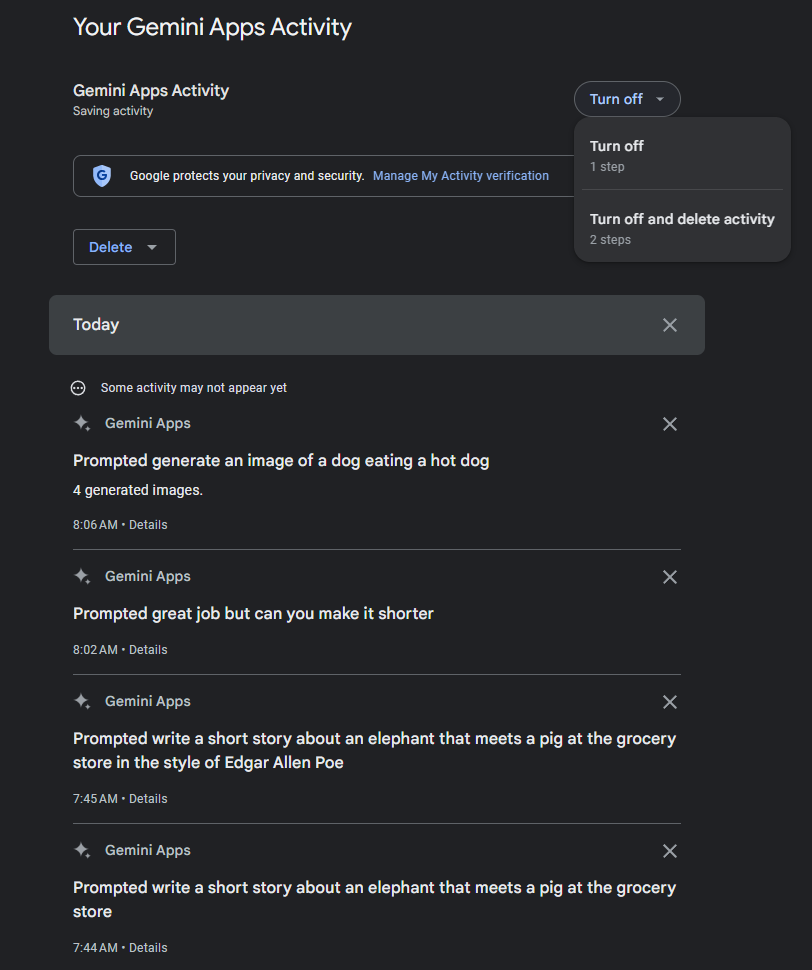
If you’re at all concerned about the implications of AI chatbot tracking your data, you’re in luck. Google Gemini does allow you to turn off activity tracking and delete previous activity throughout the app. Google doesn’t even make it hard to do so, either. All you have to do is follow the simple step-by-step guide below to turn off activity tracking and delete your data:

  • Go to the Google Gemini page.
  • Click on Activity in the bottom left corner.
  • Find the Gemini App Activity option at the top.
  • Click the Turn off button to the right.
  • Select either Turn off or Turn off and delete activity.
Google Gemini Apps Activity

As you can see above, Google Gemini allows you to erase individual prompts, making it easy to take control over your activity data on the platform. You can also just click on the Delete button, and you’ll be given the option to delete activity data for the Last day, Last hour, or All time. You can even set a custom range to delete activity data between specific dates.

Google Gemini vs Google Bard

There have been a lot of AI chatbots in the news over the last few years, so we’d forgive for getting a bit befuddled when it comes to Google’s own entrants into the industry. After all, the tech giant is notorious for its confusing name conventions, for everything from Duo and Meet to G-Suite and Google Workspace.

So, what’s the difference between Google Bard and Google Gemini? That’s the fun part, there is no difference, because they are one and the same.

That’s right, Google Bard, despite only launching in March 2023, has already undergone a rebrand/name-change, with Google changing it to Gemini in December 2023.

Should You Upgrade to Gemini Advanced?

Google Gemini is a free AI chatbot that you can access on your smartphone, computer, or tablet in a browser or in a mobile app. However, if want to take your AI game to the next level with Gemini, integrating it across Google services and getting a bit more power, you’re going to have to cough up a little dough.

Gemini Advanced is a paid-for plan from Google that bundles the AI chatbot with a Google One account. This gives you access to a more powerful experience that can handle more demanding tasks, like understanding multiple data sets across text, code, and images.

On top of that, Gemini Advanced gives you integration with other Google services, like Docs, Gmail, Slides, and Meet. You’ll be able to utilize the chatbot directly in these platforms to create content and improve communication, no matter what you’re doing.

You do have to pay for Gemini Advanced, though, and it’s not exactly cheap at $19.99 per month. There is, however, a two-month free trial available right now, so make sure to take advantage of that before the deal goes away.

Written by:
Aaron Drapkin is Tech.co's Content Manager. He has been researching and writing about technology, politics, and society in print and online publications since graduating with a Philosophy degree from the University of Bristol six years ago. Aaron's focus areas include VPNs, cybersecurity, AI and project management software. He has been quoted in the Daily Mirror, Daily Express, The Daily Mail, Computer Weekly, Cybernews, Lifewire, HR News and the Silicon Republic speaking on various privacy and cybersecurity issues, and has articles published in Wired, Vice, Metro, ProPrivacy, The Week, and Politics.co.uk covering a wide range of topics.

What Is Claude 3? Anthropic’s New AI Models Explained

Everything you really need to know about Anthropic's three new AI models, Claude 3 Opus, Sonnet and Haiku.

The AI arms race shows no signs of slowing down this year, with Anthropic the latest major player to refresh its offering with the launch of Claude 3.

In short, Claude 3 is AI unicorn Anthropic’s new large language model (LLM), which means it’s now what powers the Claude AI chatbot. Technically, there are three different models that fall under the Claude 3 umbrella: premium Claude 3 Opus, second-tier Claude 3 Sonnet, and the unreleased Claude 3 Haiku.

The company not only claims that Claude 3 beats it old Claude 2.1 model, but boasts that it puts ChatGPT’s rival GPT-4 model and Google’s Gemini Ultra to shame. What is Claude 3 and how does it really stack up against the likes of ChatGPT and GPT-4? Here’s what we know so far.

What is Claude 3? Opus, Sonnet and Haiku Explained

Claude 3 is the new family of LLMs from Anthropic, an AI startup that’s been backed by (among others) Amazon to the tune of a cool $4 billion. The company is loosely part of the effective altruism movement, which in practice means it’s trying to develop artificial intelligence technology in a safe, responsible way that benefits the public, not just shareholders.

The Claude 3 moniker covers three new LLMs, the most capable of which is Claude 3 Opus. It’s Anthropic’s new premium AI model, available only to Claude Pro users. According to the company’s benchmarks, its graduate-level reasoning capabilities scored 50.4% when tested compared to GPT-4’s 35.7% score.

Below that sits Claude 3 Sonnet, which is what’s available if you don’t want to pay for a Claude Pro subscription. It’s still said to be highly capable, of course, with its graduate test score being 40.4% (again, compared to GPT-4’s 35.7% grade).


About Tech.co Video Thumbnail Showing Lead Writer Conor Cawley Smiling Next to Tech.co LogoThis just in! View
the top business tech deals for 2026 👨‍💻
See the list button

Lastly, there’s Claude 3 Haiku, which is the currently unreleased third model. It sits at the bottom of the family tree in terms of sophistication and most capabilities, but is designed rather to be the fastest version and provide near-instant responses.

Haiku seems almost exclusively aimed as businesses as opposed to everyday users. Its speed means it’s the model that will help power things like customer-facing AI chatbots for websites, the ones that help you learn more about what you’re trying to buy, book appointment, and resolve other queries or complaints.

It’s also likely to be preferred by businesses who need to digest large amounts of data and reports in a time-sensitive manner.

Claude 3 Pricing: How Much Does Claude 3 Opus Cost?

As we’ve said, some Claude 3 models require you to pay for a Claude Pro subscription. Specifically, that’s the case with Claude 3 Opus, the most advanced version.

This effectively means that Claude 3 Opus pricing is set at $20 a month for consumers. Businesses wanting to use it will pay using the token system common for custom deployments of AI chatbot technology, which for Opus is $15 per million input tokens and $75 per million output tokens.

Claude 3 Sonnet is free to use on the open version of Claude AI that’s available to users all over the world, the “hard working” model in Anthropic’s own words, and companies can make it their own for $3 per million input tokens and $15 per million output tokens.

Right now, Claude 3 pricing for Haiku is therefore only available on a token basis: $0.25 per million input tokens and $1.25 per million output tokens.

Claude 3 vs GPT-4: First Look

We’re still testing Claude 3’s capabilities compared to key competitors like ChatGPT’s GPT-4 model. As such, we’re not yet in a position where we can share our thoughts.

That said, Anthropic has released a number of Claude 3 performance tests, which it says shows how the Claude 3 family stacks up against the likes of ChatGPT and Google’s Gemini Ultra LLM.

Of course, the key caveat here is that they’re Anthropic’s own tests and will be based, to a greater or lesser extent, on heavily engineered prompts designed to make the most of Claude 3’s capabilities.

That’s not to say Claude 3 isn’t hugely capable. It looks like it is. However, we can’t definitively say that it’s better or worse than ChatGPT, Gemini or any other chatbot until we’ve tested it fully ourselves.

Claude 3 benchmarks vs ChatGPT and GPT-4 and Gemini

Image Credit: Anthropic

How to Use Claude 3 Right Now

If you’re itching to see how Claude 3 responds to your favorite prompts, the good news is that middle model Claude 3 Sonnet has now rolled out to Claude AI in many countries around the world.

Better still, it couldn’t be easier to use Claude 3. Here’s how.

  1. Go to the Anthropic website
  2. Click the “Try Claude” button
  3. Login with your Google account (or create an account)

That’s it! You’ll now find yourself in the main Claude AI chat window, ready to start interacting with Anthropic’s helper. If you like what you see, you can then consider if upgrading to Opus and its additional capabilities is right for you.

Written by:
Aaron Drapkin is Tech.co's Content Manager. He has been researching and writing about technology, politics, and society in print and online publications since graduating with a Philosophy degree from the University of Bristol six years ago. Aaron's focus areas include VPNs, cybersecurity, AI and project management software. He has been quoted in the Daily Mirror, Daily Express, The Daily Mail, Computer Weekly, Cybernews, Lifewire, HR News and the Silicon Republic speaking on various privacy and cybersecurity issues, and has articles published in Wired, Vice, Metro, ProPrivacy, The Week, and Politics.co.uk covering a wide range of topics.

How to Make Free Video and Audio Calls on X (Twitter)

X now lets all users make calls for free, but its service is still far behind competitors like WhatsApp.

X, formerly Twitter, has just opened up its video and audio calling feature to users on all tiers – allowing everyone with an X account to call other users for absolutely free.

The extended capability, which aims to turn X into a multi-purpose communication app, places it in direct competition with platforms like Meta and Instagram. However, since X’s service lacks features like group calling and emoji reactions, it definitely shouldn’t be used to replace established VoIP services like WhatsApp and RingCentral.

If you’re curious about X’s communications feature, read on to find out how to make calls on the platform, and to learn about its features and limitations.

X Opens Up Audio and Video Calling Feature to Regular Users

While X hasn’t drummed up much positive publicity since Elon Musk acquired the platform in 2022, the social network has just added another string to its bow by making video and calling accessible to all users.

The feature, which was previously only available to Premium users since it was first launched last year, aims to make X into a multi-pronged communication tool. It lets users make calls on iPhones, Androids, Mac computers, and PCs and doesn’t require a phone number for them to get started.


About Tech.co Video Thumbnail Showing Lead Writer Conor Cawley Smiling Next to Tech.co LogoThis just in! View
the top business tech deals for 2026 👨‍💻
See the list button

How does X’s calling feature work?

By default, X users are only able to send and receive calls to users they follow or have in their address book. Users will also need to have sent at least one DM to each other for the function to work.

However, users can easily adjust their settings to enable calls from a wider pool of users. To do so, users simply have to open up their Messages settings on the app, before selecting if they want to grant access to people in their address book, people they follow, or verified users.

How to Make Audio and Video Calls on X in Five Simple Steps

Making a call using X is very straightforward. All you have to do is follow the steps below:

  1. Launch the X app on your chosen device
  2. Go to the DM section
  3. Select “Audio Call” or “Video Call” depending on your intent 
  4. The recipient will receive a notification that you are trying to call them
  5. Your conversation will now begin

How to Disable X’s Video and Audio Features

Granted, not everyone will want to make or receive calls on the platform. So if you’re happy just using the app to connect with others and browse poorly verified news articles, here’s how to opt out of the feature.

  1. Launch the X app on your chosen device
  2. Select your profile picture
  3. Select Settings and support
  4. Select Settings and privacy
  5. Select Privacy and safety
  6. Select Direct messages
  7. Turn off the slider that says “Enable audio and video calling”

This will remove the calling symbol from your DMs, and prevent fellow X users from reaching out to you via video or audio call.

How Do X’s Calling Features Stand Up to the Competition?

X’s audio and video call function was designed to give users another option to communicate without having to switch to other platforms like FaceTime and WhatsApp, and represents a new direction the company is taking to turn X into an “effective global address book.”

However, as far as internet phone services go, X’s calling features are pretty bare bones. They let users make video and audio calls using the internet, and give them options to put the call on speakerphone or mute, but that’s about it.

The calling function is reminiscent of those found on other social media apps like Meta, Instagram, and WhatsApp. Except unlike with many alternatives, X users aren’t able to carry out group calls or use augmented reality filters and backgrounds. X’s service also lacks advanced tools offered by WhatsApp, including in-call emoji reactions, banner notifications, and colorful waveforms.

Due to the simplicity of the calling features, they’re best suited towards X loyalists who are looking for a straightforward way to talk to fellow users without using a mobile number. People making regular calls with people outside of the platform and those requiring more advanced functions will be better off using WhatsApp or FaceTime instead.

If you’re making calls for business, our research found that RingCentral was the best VoIP softphone overall due to its excellent collaboration features and external integrations, while Zoom is the best value for money. There are lots of different quality calling apps available – including many free options – that don’t subject you to X’s technical glitches and limitations. So, whether you’re searching for a new way to make personal or business calls, see how they weigh up in our comparison table below.

Written by:
Aaron Drapkin is Tech.co's Content Manager. He has been researching and writing about technology, politics, and society in print and online publications since graduating with a Philosophy degree from the University of Bristol six years ago. Aaron's focus areas include VPNs, cybersecurity, AI and project management software. He has been quoted in the Daily Mirror, Daily Express, The Daily Mail, Computer Weekly, Cybernews, Lifewire, HR News and the Silicon Republic speaking on various privacy and cybersecurity issues, and has articles published in Wired, Vice, Metro, ProPrivacy, The Week, and Politics.co.uk covering a wide range of topics.

Here’s Why You Shouldn’t Be Relying On ChatGPT for Exercise Advice

The chatbot's exercise guidance isn't always reliable, especially for those with chronic conditions, finds new study.

If you’re relying on ChatGPT for workout advice, you should probably stop now. This is according to a recent analysis from a medical journal that calls out the AI chatbot for not always reflecting standard medical guidelines in its exercise directions.

While ChatGPT consistently struggled to cover the guidelines, the generative AI bot was found to be an especially bad source of information for people with chronic conditions like hypertension and fibromyalgia.

OpenAI’s chatbot’s health and wellbeing applications aren’t null and void, though. We explain how the tool can be used to reliably assist a healthy lifestyle, and where else you can go to seek trustworthy, expert-led exercise advice.

ChatGPT Found to Be an Unreliable Exercise Companion

ChatGPT can do many things. It can write code, create original artwork, and even write haiku poetry – but it shouldn’t be relied upon for accurate exercise advice, according to a recent report from the Journal of Medical Internet Research (JMIR).

The researchers behind the study used ChatGPT to create personalized exercise recommendations for 26 population types – from healthy adults and children to people with chronic conditions like obesity and cardiovascular disease.


About Tech.co Video Thumbnail Showing Lead Writer Conor Cawley Smiling Next to Tech.co LogoThis just in! View
the top business tech deals for 2026 👨‍💻
See the list button

They then evaluated its comprehension and accuracy against the American College of Sports Medicine’s (ACSM) Guidelines for Exercise Testing and Prescription – a handbook that is widely considered to be the gold standard in the domain. To ChatGPT’s credit, the researchers found that the chatbot’s answers were accurate 90.7% of the time.

However, the analysis found that recommendations weren’t comprehensive enough, with the answers only covering 41.2% of the guidelines. ChatGPT also misinformed a lot of users about whether they should exercise at all. The chatbot prompted 53% of users to seek medical clearance before exercising, even if a doctor’s clearance wasn’t necessary.

ChatGPT Advice is Even Worse For Users With Chronic Health Conditions

While ChatGPT was found to be fairly unreliable across the board, the researchers revealed it was even more flawed for those suffering from chronic health conditions.

ChatGPT consistently generated incorrect information for these populations, with the highest instances of misinformation found for those with hypertension, closely followed by those with fibromyalgia. For example, ChatGPT falsely warned users with hypertension to avoid vigorous exercise and encouraged it among users with HIV, even though this hasn’t been medically verified.

In addition to inconsistencies with ChatGPT’s guidance, the responses were also hard to understand. Most of the output was considered “difficult to read” by the researchers and were written at a college level, making them less accessible for those with lower levels of education.

How Can ChatGPT Be Used Safely?

While ChatGPT shouldn’t be used to create definitive health and exercise guidance – especially for those with serious health conditions – this doesn’t mean its use should be capped for the purpose completely.

If you want information verified by the ACSM’s Guidelines for Exercise Testing and Prescription without trawling through its 548 pages, we’d recommend specifying this clearly to ChatGPT.

For example, when crafting your ChatGPT prompt, you can ask the chatbot to offer exercise advice based on this handbook, alongside important information like your health status, age gender, and what you want to get out of your regime. You can also ask OpenAI’s chatbot to put this information in simple terms, to make it more accessible.

For extra peace of mind, we’d recommend cross-referencing this information against trusted online sources and making the most of online resources like the ACSM’s physical activity guidelines, which break information down into useful videos, webinars, and blogs.

If you’re on a wider well-being kick, we also recommend using these ChatGPT prompts to establish healthier patterns in 2024. But remember, while ChatGPT is a convenient tool that boasts high levels of accuracy, it’s always advised to do background research when using it to produce important guidance like fitness and dietary advice.

Written by:
Aaron Drapkin is Tech.co's Content Manager. He has been researching and writing about technology, politics, and society in print and online publications since graduating with a Philosophy degree from the University of Bristol six years ago. Aaron's focus areas include VPNs, cybersecurity, AI and project management software. He has been quoted in the Daily Mirror, Daily Express, The Daily Mail, Computer Weekly, Cybernews, Lifewire, HR News and the Silicon Republic speaking on various privacy and cybersecurity issues, and has articles published in Wired, Vice, Metro, ProPrivacy, The Week, and Politics.co.uk covering a wide range of topics.

63 Best Fully Remote Jobs to Apply for in March 2024

Our monthly guide to the best fully remote jobs features new entrants and more opportunities to apply for than ever.

As the calendar turns to March, job hunters may notice a surge in new listings. That’s because many companies now have a handle on their budgets for the new financial year, which starts in April. Fully remote jobs are very much included in the FY24 hiring spree now underway, making this one of the best times of year to land yourself a position with the flexibility you’ve always wanted.

In the post pandemic world, the advantages of home working are no longer a secret. You save a huge amount of money not commuting and buying oat flat whites every day, not to mention keeping your carbon emissions down.

The time saved on the freeway is also time you get to reinvest in friends, family, and hobbies, which is why studies like our own Impact of Technology on the Workplace report show such a clear link between fully remote work and job satisfaction.

If you’re here, you probably don’t need any more convincing, so let’s dive into the best fully remote jobs you can apply for in March 2024.

Microsoft

Microsoft is something of a trailblazer when it comes to working from home. It’s ranked as the top remote work company by respected careers site Indeed, which is no surprise when you see that it’s currently hiring for nearly 1,300 positions globally that are open to “up to 100% work from home” flexibility.

These include nearly 800 fully remote jobs being hired for this March in the US, with a heavy focus on software engineers but also ample opportunities across sales, marketing, and various support functions.


About Tech.co Video Thumbnail Showing Lead Writer Conor Cawley Smiling Next to Tech.co LogoThis just in! View
the top business tech deals for 2026 👨‍💻
See the list button

Compensation at Microsoft is usually ample and right now the tech giant seems particularly keen to add experience to its ranks, meaning salaries in excess of $100k are usually the norm.

This means you’ll have to look elsewhere for remote jobs you can do with no qualifications, but provided you’ve got a robust resume then Microsoft could be an ideal landing spot if you want to work from home most or all of the time.

Here’s a small sample of some of the fully remote jobs live at Microsoft this March.

  • Principal Content Manager
  • Technical Program Manager
  • Senior Abuse and Fraud Specialist
  • Software Engineer (multiple levels and vacancies)
  • Copilot Integrated Marketing Lead
  • Technical Support Engineer
  • Senior Data Scientist
  • Technology Consultant – Data & AI
  • Principal Security Researcher
  • Senior Director, Partner Sales

Apply for these jobs and view specifics such as salary ranges over at the Microsoft careers site.

Salesforce

Salesforce is a tech industry giant that’s known for many things. Its annual user conference, Dreamforce, is one of the world’s biggest tech events. Its flagship software is one of the best sales dashboards (and most popular CRMs) around. And it’s a great employer when it comes to fully remote working.

While not as universally pro-remote work as somewhere like Microsoft, Salesforce still offers flexible working arrangements for many positions. After all, its larger than life CEO Marc Benioff is known to be a remote worker himself and the outlook trickles down to most areas of the company, not just the hangar he keeps his Gulfstream private jet in.

Right now, it translates into over 150 remote jobs being hired for at Salesforce, which is up from the 133 vacancies we highlighted in our February ’24 roundup. That’s a positive sign, especially if you’re a software engineer, developer or sales rep, as this month’s listings are heavy on these kinds of roles.

Heck, you might even find yourself working with the Department of Defense! Here’s a taste of the fully remote jobs at Salesforce this month.

  • Senior Salesforce Developer
  • Success Guide
  • Account Executive
  • Sales Strategy Manager
  • Director, Engagement Delivery
  • Product Security Engineer
  • Digital Designer
  • Technical Account Manager
  • Account Executive, Department of Defense

Head over to the Salesforce jobs site to apply and learn more.

Williams-Sonoma

A new entrant and our first dark horse this month is Williams-Sonoma. Yep, the same Williams-Sonoma that sells those fancy chocolate covered strawberries you buy your boss every Christmas (but you’re still waiting on that promotion, hence you’re here).

With hundreds of stores in the US and around the world, plus high profile sub-brands like Pottery Barn to its name, Williams-Sonoma is a billion dollar company that’s current advertising a handful of intriguing remote jobs.

While some arms of the multinational company have instigated a return-to-office policy, its customer care division still boasts a nearly 85% fully remote workforce. There aren’t as many as some of the big names on this list, but these are more entry-level jobs and make a good jumping off point if your resume doesn’t double as a doorstop.

They also currently have at least one part-time opportunity we’ve spied, making it ideal for someone looking to devote more time to their family or side hustle.

  • Chargeback Associate, Fraud Operations
  • Customer Service Representative (Full-time)
  • Customer Service Representative (Part-time)
  • Project Manager
  • Virtual Design Studio Specialist x2

You can apply for these roles at the Williams-Sonoma customer care team site, or browse the company’s full range of over 1,000 current vacancies, bearing in mind we can only 100% confirm the ones highlighted above as fully remote.

Google

What to make of Google? The company has basically said it will penalize workers who don’t return to the office, yet continues to widely offer remote work as a perk for a number of roles.

As of March 2024, in practice this means Google is hiring for more than 75 jobs listed as “remote eligible.” These aren’t applications for the faint hearted, though, and you can expect a rigorous interview process in addition to the basic requirements like multiple years of experience in your field and a Bachelor’s or Masters degree.

Google’s Cloud division seems to be on a particular hiring spree at the minute, so here are some of the fully remote jobs you can apply for right now:

  • Data Analytics and AI Sales Lead, Public Sector
  • Data Center Architect
  • Senior Information Security Engineer
  • Staff Research Scientist, Google Research
  • Enterprise Field Sales Representative, Google Cloud
  • Tech Lead, Product Security Engineering
  • Field Solutions Engineer I, Generative AI, Google Cloud
  • Developer Relations Engineer

Learn more about these and other opportunities over at Google’s careers website.

Intuit

Intuit is the company behind major business software such as QuickBooks and MailChimp, but more than that, it’s one of the most remote friendly employers around.

In its latest survey of the best remote work companies, Indeed gives it a flexibility score of 88/100, which is second only to Microsoft in its 2024 power rankings. It even offers fully virtual internships, which is a rarity these days now COVID has (mostly) faded from view.

There’s less overall opportunities at Intuit right now compared some of the names on this list, but if you do find the right fit for your skill set you can sign on the dotted line knowing you’ll be working a company that’s genuinely committed to remote work.

Perhaps unsurprisingly for the accounting software developer, there’s serious demand for folks well versed in tax matters. Here are our Intuit job highlights for March.

  • Digital Sales Consultant (Inbound and Outbound vacancies)
  • Partner Development Manager
  • Tax Associates and Experts (multiple vacancies)
  • QuickBooks Live Expert
  • Multi-Domain Expert, SelectTime
  • Director Business Development
  • Senior Manager of Strategic Success, Mailchimp

Head over to the company’s jobs page to learn more and apply.

CVS Health

With nearly 10,000 stores across the US, drugstore chain CVS needs no introduction (especially if you’re from the East Coast, where you literally cannot avoid them).

However, its place in our monthly guide to the best fully remote job opportunities needs a bit more context, as you might associate it more with working part-time summer of senior year.

In actual fact, it’s also a major WFH employer and continues to impress us with just shy of 400 fully remote job vacancies at the time of writing this March. That’s down considerably from the nearly 700 openings we noted in February, but it’s still a more than healthy number and the flipside is it means the company successfully hired for around 300 remote roles last month!

Current vacancies span a range of departments from government relations and technology to clinical services, program management and business administration.

Here are our picks for the best remote jobs at CVS right now.

  • Senior Analyst, Resource Planning
  • Case Manager (multiple vacancies) 
  • Medical Director, Behavioral Health (Special Investigations)
  • Senior Manager, Actuarial Services
  • Senior Android Engineer
  • Inbound Queue Associate, Behavioral Health
  • Senior Technical Program Manager
  • Medicaid Pharmacy Support Technician
  • Quality Assurance Consultant

That’s only scratching the surface, so check out the CVS careers website for even more great fully remote jobs and to apply.

UnitedHealth Group

Sticking with the healthcare theme for a moment, another dark horse when it comes to working remotely is UnitedHealth Group. It’s a major player in the world of health insurance and lays claim to a workforce that’s “over 25%” telecommuters.

That equates to well over 400 fully remote jobs at UnitedHealth being hired for this March, including both healthcare-specific and more general roles across the group.

Some of the vacancies that stood out to us this month, and which part of the group’s umbrella they fall under, include:

  • Senior Pharmacy Audit Representative, Optum
  • Senior Digital Content Strategist, United Healthcare
  • Associate Claims Representative, United Healthcare
  • Senior Manager Data Analytics, United Healthcare
  • Central Support Operations Coordinator, Optum
  • Part-time Licensed Therapist, Optum
  • Executive Assistant, Optum

Head over to the UnitedHealth website to apply and browse all of its latest vacancies.

Amazon

There’s a strong case that Amazon shouldn’t be on this list, as it has been one of the more radical supporters of the return to office movement. The online mega mart shamefully appears to be stopping employee promotions for those who don’t fall in line, yet it still hires for a number remote roles that you might want to know about.

In fact, the company claims that “remote working is a key aspect of our business’ growth” and there’s no doubt it’s a big employer globally in this respect, with over 70 vacancies live at the time of writing this March.

That’s up from last month, based on our research, and those with technical expertise will be particularly well served. Here are our picks for the top Amazon remote jobs this month you can apply for.

  • Senior Operations Engineer (multiple vacancies)
  • Regional PR Manager
  • Senior Software Engineer, Mobile Video
  • Senior Penetration Testing Engineer, AWS Gen AI Security
  • Creative Director, Art (Twitch)
  • Launch Training Manager, Amazon Fresh Stores
  • Senior Content Editor, Strategic Seller Comms
  • Salesforce Developer, Ring

Head over to Amazon’s job search site to apply or find more opportunities.

Written by:
Aaron Drapkin is Tech.co's Content Manager. He has been researching and writing about technology, politics, and society in print and online publications since graduating with a Philosophy degree from the University of Bristol six years ago. Aaron's focus areas include VPNs, cybersecurity, AI and project management software. He has been quoted in the Daily Mirror, Daily Express, The Daily Mail, Computer Weekly, Cybernews, Lifewire, HR News and the Silicon Republic speaking on various privacy and cybersecurity issues, and has articles published in Wired, Vice, Metro, ProPrivacy, The Week, and Politics.co.uk covering a wide range of topics.

What Is Chronoworking and Could It Be the End of the Traditional 9 to 5?

Fed up with the rush hour commute? Want to work on your own time? Chronoworking could be the key.

Getting into the office three hours early so that you can leave halfway through the afternoon? You just might be a chronoworker.

“Chronoworking” refers to the practice of letting employees set their own hours in order to ensure they do their best work. The alternative, a one-size-fits-all nine-to-five, was the best that American labor unions could get in the 1800s, but in 2024, it may well be out of date.

Sure, the term “Chronoworking” itself might be another example of a workplace buzzword, like coffee badging, resenteeism, or the ever-popular quiet quitting. But there’s no denying that it highlights a growing interest among the general workforce: No matter whether it’s remote and hybrid work, four-day work weeks, or chronoworking, today’s overstressed employees are increasingly focused on finding a workflow that’s unique to their needs.

Okay, So What Is Chronoworking?

British journalist Ellen Scott coined the term “chronoworking” in an issue of her Working on Purpose newsletter. Here’s how she explains it:

“In 2023, there was the beginning of the dismantling of our Monday to Friday working culture. In 2024, I think the 9-5 will be in the firing line. We’ll be looking more deeply into how our body clocks and natural dips and rises in energy should define our working day, a trend that I’m calling chronoworking. “


About Tech.co Video Thumbnail Showing Lead Writer Conor Cawley Smiling Next to Tech.co LogoThis just in! View
the top business tech deals for 2026 👨‍💻
See the list button

Some people are simply natural early risers, the theory goes, while others need to sleep in past nine in order to stay healthy and well-regulated. Those who start work at six in the morning can be done by three in the afternoon, giving them time at the end of the day to relax or tackle household errands. They’ll still get the same work done as those who start late and work into the evening, but everyone has a schedule that works for their body.

It’s a science-backed concept: Circadian rhythms drive alertness within humans, and those rhythms don’t flick on for everyone at exactly nine a.m.

Studies already support the idea of outgrowing the standard work week: Four-day work weeks have been found to keep employees happier without lowering productivity. It makes sense that an even more customized work schedule could do the same.

Finally, it’s worth noting that this isn’t an entirely new idea: Most cultures around the world have a more relaxed approach towards timekeeping when compared to the US. Plus, concepts like the four-day work week have been gaining popularity for years.

Chronoworking Subverts Traditional Workplace Order

The nine-to-five, eight-hour workplace standard has long been accepted as the cost of existing as an office worker. It’s seen as a necessary evil, like taxes and homeowner’s insurance. We’ve even immortalized the concept in popular culture with references to the typical work week in everything from the hit 1980 Dolly Parton song to Garfield’s hatred of Mondays.

But the urge to standardize everyone’s activity is driven by a mechanical approach. In today’s world, the human approach is more popular, and it starts with assuming that everyone is different, with different needs. Adapting to individuals will create the best performances, which ultimately help the business just as much as the individuals who work there.

The cracks in traditional workplace policies have already started showing in other ways: Remote work has arguably paved the way for chronoworking to flourish.

How the Chronoworking Push Emerged From Remote Work Policies

Much like the nine-to-five, many of us have long accepted the unpaid commute to a physical office at the start and end of every work day as an acceptable cost of working. But that changed suddenly in March 2020, when the Covid pandemic forced all but the most essential in-person workers back to their homes to work remotely.

When the world economy didn’t (exactly) collapse, it became clear that remote work was a net benefit to today’s highly online and globalized workforce. Asynchronous work arrived, too. Remote work can certainly fit a nine-to-five, but it has fewer built-in guardrails forcing workers into the standard hours. Many remote workers instead follow an asynchronous schedule.

Remote and hybrid work flexibility has been shown to boost productivity, increase workers’ life spans, lower our collective carbon footprint, and increase business profitability. Check out our guide on How to Ask to Work From Home Remotely for more on how you can get in on it.

44.9% of Companies Are Adding Staggered or Flexible Work Schedules

The direct impact of Covid on the workforce can’t be understated. The biggest two changes were a reduction in non-essential travel and a sharp increase in remote work options. However, as a recent New World of Work survey concluded, the third most common change that businesses reported making to their operations specifically because of Covid was to introduce staggered work hours.

A full 44.9% of companies surveyed said that they will implement staggered or flexible work schedules due to Covid. With more remote workers, staggered work hours simply make sense as a way to keep a business operating at an optimal capacity.

A graph indicating 44 percent of businesses are adapting staggered work hours.

Image source: New World of Work survey

The asynchronous chronoworking routine also makes sense for businesses that operate across international timezones. Many of my own coworkers work in London, while I’m on the west coast of the US: Their “five” is my “nine.” This type of business model is the center of the Venn diagram that merges chronoworking and remote work.

Gen Z Might Embrace a Chronoworking Future

One more reason why chronoworking could be the wave of the future? The generation currently entering the workforce might love it. Gen Z – the term for those born between the mid-90s and the late aughts – are set to account for 27% of the workforce by 2025.

We already know that Gen Zers self-report benefiting from remote work options far more than the previous generation. One study we covered last year has the numbers:

“Research from the National Broadband Ireland study showed that over 55% of 18-24 year-olds polled felt remote and hybrid work had a positive impact on their career, as opposed to only 23% of 45-54 year-olds.”

Plus, Gen Z are natural asynchronous communicators. They love texting and messaging, but hate actual phone calls. But the strongest evidence that Gen Z will embrace chronoworking comes from one 2022 survey that found 53% of Gen Z employees say they “don’t have a clear start or finish time to their working day,” up from just 37% of the general workforce that said the same.

If any generation is going to overturn the staid, traditional way of conducting an office, it’ll be the youngest one. Businesses that want to reel in the next generation will likely offer perks like flex hours or remote options.

The Limits of Chronoworking: It’s Not for Everyone

Chronoworking will never take off across every industry. Plenty of jobs need to be accomplished on a set schedule, from garbage pickups to customer support teams. Graveyard shifts will stay the same, and every bakery will still need workers to clock in at 3 a.m. in order to get fresh crullers for the day.

Chronoworking will come with some challenges as well. Just as with any form of asynchronous collaboration, managers will need to set clear expectations and work with employees in order to ensure everyone stays on the same page especially because they aren’t working the same hours.

In the end, chronoworking’s current value to businesses lies in treating it as a perk to lure in the best and brightest workers. But as long as workers keep voicing their interest in greater work-hour flexibility, the corporate world will keep grudgingly improving. We have nothing to lose but our rush hours.

Written by:
Aaron Drapkin is Tech.co's Content Manager. He has been researching and writing about technology, politics, and society in print and online publications since graduating with a Philosophy degree from the University of Bristol six years ago. Aaron's focus areas include VPNs, cybersecurity, AI and project management software. He has been quoted in the Daily Mirror, Daily Express, The Daily Mail, Computer Weekly, Cybernews, Lifewire, HR News and the Silicon Republic speaking on various privacy and cybersecurity issues, and has articles published in Wired, Vice, Metro, ProPrivacy, The Week, and Politics.co.uk covering a wide range of topics.

GTA 6 Devs Fear “Toxic” Rockstar Return to Office Mandate

The video game industry is already suffered record-setting layoffs. Now, they're being forced back into the office as well.

Video game publisher Rockstar Games recently announced the end of its hybrid workplace policy, citing productivity and security as reasons why it’s forcing employees back into the office five days a week.

Now, the employees are pushing back.

According to the Independent Workers’ union of Great Britain (IWGB), which has some Rockstar employees as members, the news is just the latest broken promise from the gaming company. Rockstar previously told its workers that it would not call for a five-days-a-week policy.

Rockstar Previously Denied Plans for an RTO Mandate

In 2023, Rockstar mandated a transition to a three-day in-office work week. This, too, prompted pushback, in the form of a union petition with 175 signatures. In response, according to a report from Video Games Chronicle, Rockstar stated in a employee-wide email that “This isn’t our first step to 5 days a week. No one wants to go back to the old way of working.”

Flash forward to today, however, and that’s exactly what Rockstar is asking for.


About Tech.co Video Thumbnail Showing Lead Writer Conor Cawley Smiling Next to Tech.co LogoThis just in! View
the top business tech deals for 2026 👨‍💻
See the list button

Needless to say, the unionized workers aren’t happy. IWGB game workers chair Austin Kelmore has issued a statement on the matter:

“The workers in the IWGB Game Workers Union at Rockstar are pushing for transparency over pay and promotions, a healthy and inclusive workplace culture, and work life balance centred around what each worker needs. It is unacceptable that Rockstar leadership have gone back on their word time and time again and have ignored the workers’ requests for basic working conditions. -Austin Kelmore

Kelmore added that workers “are done with letting executives make reckless and harmful decisions” and that there is “no better time than now to join our union and push for this to be the healthy and sustainable games industry we know it can be.”

Is This a “Return to Toxic Crunch Practices” for Rockstar?

Some employees are calling the company’s continued push towards fully in-office work an example of the “reckless and harmful” choices that the video game industry has been making recently, while others warn of a return to Rockstar’s old, “toxic” office culture.

Rockstar’s past culture of encouraging excessive overtime has been well documented, with one 2018 Kotaku exposé mentioning reports of 100-hour work weeks peppered with “mental breakdowns and heavy drinking.”

While the company has claimed for years that it has improved its workplace practices, the apparent broken promises surrounding its push for a full return to the office – and the lack of flexibility inherent to a full-time return to the office in the first place – has understandably given some employees pause.

How Do Video Game Company Layoffs Fit Into the Picture?

According to estimates, reported layoffs across the video game industry hit a then-record-setting 8,500 jobs lost in 2022. That record was then topped in 2023, with 10,500 positions cut, and now, just barely past two months into 2024, the industry has already suffered well over 8,000 jobs lost.

To make matters worse, these cuts are coming during a boom time for video game successes, with The Legend of Zelda: Tears of the Kingdom, Spider-Man 2, and Baldur’s Gate 3 among just a few of the huge hits in the last year alone. The billions earned, it seems, aren’t trickling down to the thousands of laid-off employees who actually made the games happen.

Those layoffs mirror the larger tech industry, which is still regularly laying off hardworking employees and has been since late 2022. And, with all the still-employed workers fearing for their jobs, too, executives could be feeling empowered to push for return-to-office mandates – all despite evidence indicating that remote workers are actually more productive.

Written by:
Aaron Drapkin is Tech.co's Content Manager. He has been researching and writing about technology, politics, and society in print and online publications since graduating with a Philosophy degree from the University of Bristol six years ago. Aaron's focus areas include VPNs, cybersecurity, AI and project management software. He has been quoted in the Daily Mirror, Daily Express, The Daily Mail, Computer Weekly, Cybernews, Lifewire, HR News and the Silicon Republic speaking on various privacy and cybersecurity issues, and has articles published in Wired, Vice, Metro, ProPrivacy, The Week, and Politics.co.uk covering a wide range of topics.

Millions of Facebook and Google Users Hit by 2FA Data Leak

A SMS routing company used by Google, Facebook and TikTok is accused of leaking its own database.

Millions of Facebook, Google, WhatsApp and TikTok users have had their account security compromised, after a text message routing company left one of its internal databases exposed and leaked supposedly private 2FA (two-factor authentication) codes into public view.

The massive bungle is virtually the same as a full on data breach and the buck stops with YX International, an Asia-based tech company that claims to process as many as five million SMS texts a day.

It also makes cellular networking equipment, but in this case its expertise appears to lie in leaving sensitive data in plain view online, without so much as a password protecting the one-time passcodes and password reset links that were discovered.

Researcher Reveals Leaky Company Database

YX International might not be a name you’re familiar with, at least until now. However, it seems to have been contracted by some of the biggest tech operations around to process highly sensitive SMS messages featuring 2FA codes and password recovery details.

Security researcher Anurag Sen discovered the loophole, which saw the YX database available to view online with nothing more than knowledge of its public IP address.


About Tech.co Video Thumbnail Showing Lead Writer Conor Cawley Smiling Next to Tech.co LogoThis just in! View
the top business tech deals for 2026 👨‍💻
See the list button

This means that users of some of mega platforms like TikTok, Facebook, WhatsApp and Google could have their one-time passcodes and even password reset links compromised by bad actors.

It’s unclear if this happened, as the server that hosted the details didn’t store access logs, which would have shown if anyone other than Sen visited it.

YX International Has “Sealed” Vulnerability

In addition, the database also included a number of YX International employee email and password combinations, making it tantamount to a breach for the guilty company as well.

A mystery YX spokesperson has since told TechCrunch, who first reported on the leak, that the company has now “sealed this vulnerability” without expanding on the incident.

The good news, if there is any, is that two-factor authentication passcodes typically expire a matter of minutes if not seconds after they’re issued. This means that bad actors would have had to be lurking on the leaked database in real-time to have a chance of making use of the SMS firm’s shocking security oversight.

Another Day, Another Security Blunder

News of YX International’s massive goof would probably hit harder, if such epic fails weren’t worrying commonplace in the world of cybersecurity.

Unfortunately, they are. In our recently released Impact of Technology in Workplace report, for instance, we highlight that 1 in 10 business leaders admit to being unaware if their company was breached in the last year or not.

It’s cybersecurity statistics like these that underline the importance of having the right tools at your disposal, namely a good cheap VPN, as when in use these apps help throw online crooks off the scent of your private data, even if vulnerabilities exist elsewhere.

Written by:
Aaron Drapkin is Tech.co's Content Manager. He has been researching and writing about technology, politics, and society in print and online publications since graduating with a Philosophy degree from the University of Bristol six years ago. Aaron's focus areas include VPNs, cybersecurity, AI and project management software. He has been quoted in the Daily Mirror, Daily Express, The Daily Mail, Computer Weekly, Cybernews, Lifewire, HR News and the Silicon Republic speaking on various privacy and cybersecurity issues, and has articles published in Wired, Vice, Metro, ProPrivacy, The Week, and Politics.co.uk covering a wide range of topics.

9 Statistics That Prove Return to Office Mandates Don’t Work

Company after company is calling staff back to the office, and ending remote work. This data shows why they've got it wrong.

Last August, reports surfaced of the internal response that SVP of Amazon Video and Studios Mike Hopkins gave when asked about the reasoning behind Amazon’s huge push for a return to the office following years of remote and hybrid work. As Hopkins put it, he had “no data either way” to justify the unpopular decision.

Perhaps if Hopkins had looked a little closer at all the surveys, studies, and government data that have emerged across the past few years, he would have found that missing data – data that indicates Amazon’s choice was the wrong one all along.

Remote work is certainly here to stay in some form. I’m fully remote myself, and I have been since long before the Covid pandemic. But as businesses increasingly push for a full return to in-office work, it’s worth highlighting all the benefits of leaving remote and hybrid workplaces open as an option for any workers who need them.

It’s not just charity, after all: Many statistics show that remote work is better, both for employers as well as employees. Here’s all the data you need to prove it.

1. Over 33% of Remote Workers Would Leave Their Job If Forced Back to the Office

More than one third of remote workers would leave their jobs if forced back to the office full time, according to a UK-focused report out last year from networking site LinkedIn. The data, culled from LinkedIn and from multiple worker surveys, also found that six out of ten workers were considering leaving their jobs. Of those polled, 52% said they either had already left or were thinking about leaving their current job due to a lack of workplace flexibility.

2. 40% of Office Workers Report Working Longer Hours When Remote Or Hybrid

Does skipping your daily commute leave you with more time and energy for your job? Whatever the case, it seems that working from home boosts productivity: A study from workplace wellness company Ergotron found that 40% of respondents said that they worked longer hours when fully or even just partially remote.

To be more specific, using data from the National Bureau of Economic Research, those remote workdays are about 48.5 minutes longer on average. That’s nearly 200 extra working hours during the year. But there’s more to the picture than just an increase in hours worked, as our next stat shows.

3. RTO Mandates Negatively Impact Women

Following a huge dip at the start of the Covid pandemic, the number of office hours worked rose back up to the pre-pandemic standard in 2022. Break the amount of hours worked down by gender, however, and there’s still a discrepancy: Women are working nearly 5% more now than they were before the pandemic, while men are working fewer hours.

That statistic is from UK government data, but other countries have turned up similar research. Last year, India-based IT services company TCS reported that more women were leaving their company than men in the wake of an RTO mandate. The glass ceiling is still around, and the loss of flexibility that comes with the return to a physical office makes that ceiling just a little bit lower.

4. Returning to the Office Is Not Increasing Companies’ Profits

An RTO mandate is ostensibly a hard-nosed business decision, aimed at giving profits a much-needed shot in the arm. But reality paints a different picture. Value and productivity don’t improve with returns to the office, according to a fresh 2024 research paper.

Researchers at the Katz Graduate School of Business at the University of Pittsburgh combed through public RTO data from 137 S&P 500 firms and ultimately found that RTO mandates had no significant impact on either stock returns or profitability. The researchers instead theorized that managers can use RTO mandates (and those who don’t follow them) as narratives to justify poor stock performances.

5. Remote-Friendly Companies Show 16% Higher Revenue Growth

Further backing up the revenue benefits of remote work options is a recent study by tech startup Scoop, in partnership with the Boston Consulting Group. After matching the work policies against the revenue growth of 554 public companies, they found that fully flexible public companies grew revenue 16% higher than fully in-office companies. In addition, hybrid companies grew revenues 13% more than in-office companies.

Perhaps bosses are realizing that their own agenda isn’t working out for them, if our next stat is anything to go by.

6. 80% of Bosses Regret Pushing for RTO Mandates

One study from Envoy found that 80% of about 1,000 executives surveyed said they would have adjusted their return-to-office approach if their workplace data had been more accurate. That’s a big admission to make, given the ongoing unpopularity of RTO mandates in today’s globalized and very online world. According to the Envoy CEO, those decisions were “based on executives’ opinions rather than employee data.”

7. Gen Z Benefits the Most From Remote Work

Any companies trying to attract the youngest generation currently entering the workforce would do well to consider offering remote work options: Gen Z loves them. According to a National Broadband Ireland study, more than 55% of 18-24 year-olds say that remote and hybrid work had a positive impact on their career, a huge jump up from the 23% of 45-54 year-olds who said the same. It’s a clear indicator that the importance of remote work will only grow stronger in the future.

8. Remote Work Can Reduce Carbon Footprints by 54%

One underacknowledged reason why RTO mandates are a failure? They’re doubling carbon emissions when compared with the alternative. “Remote workers could have a 54% lower carbon footprint compared to onsite workers,” as one study out from the peer-reviewed journal Proceedings of the National Academy of Sciences (PNAS) explains. Given our current climate crisis, any limits we can add to carbon emissions are sorely needed.

9. US Remote Workers Earn $8,500 More Than Office Staff

In the US, workers who are remote earn a higher salary, on average, when compared to those who work entirely in-office. Call center software provider Ringover analyzed 15,800 job listings across 30 major US cities, finding that the average remote worker earned $8,553 more annually.

What’s the takeaway here? While you might assume that remote workers are better and therefore earn more, the real lesson could be that higher paid positions have more leverage, and therefore are allowed a perk that most business leaders would prefer not to offer – workplace flexibility.

That would make sense when compared with another study that found smaller companies are more likely to offer hybrid options. A small company needs to offer perks in order to compete with larger, established competitors, and when those big companies push for RTO mandates, they’re setting themselves up to fail.

Written by:
Aaron Drapkin is Tech.co's Content Manager. He has been researching and writing about technology, politics, and society in print and online publications since graduating with a Philosophy degree from the University of Bristol six years ago. Aaron's focus areas include VPNs, cybersecurity, AI and project management software. He has been quoted in the Daily Mirror, Daily Express, The Daily Mail, Computer Weekly, Cybernews, Lifewire, HR News and the Silicon Republic speaking on various privacy and cybersecurity issues, and has articles published in Wired, Vice, Metro, ProPrivacy, The Week, and Politics.co.uk covering a wide range of topics.

Fortnite Players Have Just Hours Left to Claim in Huge $245M Settlement

While the deadline for claims was originally moved back by a month, today is your final chance to get the pay out.

The clock is ticking for anyone who wants to be part of the ongoing Fortnite settlement and claim their stake in the $245 million pay out, with the deadline for submissions being today.

Those who made in-game purchases playing the game without being fully aware of what they were paying for are eligible for the pay out from Fortnite maker, Epic Games.

The deadline for claims was originally set for January, but customers were granted a little more time to submit their applications. However, today is your last chance, for real this time.

What is the Fortnite Settlement About?

In 2023, Epic Games settled two US lawsuits which claimed the gaming giant had used underhand methods to encourage Fortnite players to buy in-game products. The settlement amount was set at $245 million.

The FTC itself noted: “The company charged parents and gamers of all ages for unwanted items and locked the accounts of customers who disputed wrongful charges with their credit card companies.”

It’s not just the public that is getting a pay out. Epic Games also agreed to pay $275 million to the US government for compiling the personal information of individuals under the age of 13 without their parent’s consent.

Fortnite Settlement Claim Deadline

The settlement against Epic Games was originally scheduled for January 17th. However, at the start of 2024, this was pushed back to February 29th, giving those that hadn’t applied some extra time to submit their forms.

As for the actual pay out amount, as always with cases like this, it’s difficult to know for sure and depends on several factors, the biggest one being how many people make a claim. However, it’s expected that the pay out to individuals will be around $6.

How to Make a Fortnite Settlement Claim – and Who is Eligible?

To make a claim in the Fortnite settlement, all you need to do is visit the official Fortnite Refunds website.

There’s also a chance you may have been contacted directly by email by the FTC about a claim. You can recognize these emails as they would have come from Fortnite Refund Administrator <fortniterefund@rcnotifications.com>. It’s worth double checking the email address if you’ve received any communications about the settlement, as scammers have been known to use such claims as an opportunity to defraud victims.


About Tech.co Video Thumbnail Showing Lead Writer Conor Cawley Smiling Next to Tech.co LogoThis just in! View
the top business tech deals for 2026 👨‍💻
See the list button

There’s a set criteria you’ll need to meet to be eligible for a Fortnite pay out. You’ll also need to be 18 or over. Details of the settlement criteria in full are:

  • You were charged in-game currency for items you didn’t want between January 2017 and September 2022
  • One of your children made charges to your credit card between January 2017 and November 2018 without you knowing about it
  • You were locked out of your account between January 2017 and September 2022 after you made your credit card company aware of the wrongful charges

Include your claim number or your Epic account ID in your filing. Minors can have a parent or guardian complete the form on their behalf if they’re not yet of age.

Written by:
Aaron Drapkin is Tech.co's Content Manager. He has been researching and writing about technology, politics, and society in print and online publications since graduating with a Philosophy degree from the University of Bristol six years ago. Aaron's focus areas include VPNs, cybersecurity, AI and project management software. He has been quoted in the Daily Mirror, Daily Express, The Daily Mail, Computer Weekly, Cybernews, Lifewire, HR News and the Silicon Republic speaking on various privacy and cybersecurity issues, and has articles published in Wired, Vice, Metro, ProPrivacy, The Week, and Politics.co.uk covering a wide range of topics.

ChatGPT Tutorial – How to Use OpenAI’s AI Tool (With Images)

ChatGPT is an excellent tool with hundreds of uses, for work and play. We show you how to get started with the AI chatbot.

It seems that all anyone is talking about in 2024 is AI, and of all the platforms, ChatGPT is certainly the most well known one. This is for good reason – it’s free, and pretty easy to use.

However, if you’ve never use AI before, you may find it daunting. After all, we’ve been told that AI is a hugely powerful tool that could change the world, so how do you get started?

In this guide we’ll cover the basics of ChatGPT, such as how to sign up, how to write prompts, and whether or not it’s worth subscribing to the premium version.

How to Sign Up for ChatGPT for Free

First the good news – ChatGPT is free to use. There is a paid-for subscription service too, that offers more advanced features, but we’ll go over that later. First, you’ll want to sign up for ChatGPT.

Head to ChatGPT and click on the ‘Sign up’ button. Here, you can add your email address, or, if you want the fastest route, login with your Google, Microsoft or Apple account details. If you choose to enter your email address, you’ll then be prompted to add a password. It’s worth noting that it needs to be at least 12 characters long.


About Tech.co Video Thumbnail Showing Lead Writer Conor Cawley Smiling Next to Tech.co LogoThis just in! View
the top business tech deals for 2026 👨‍💻
See the list button

After that, you’ll be sent an email to verify your address. Open the email and click on the link provided, and you’ll then be prompted to add a few more details – your full name, and date of birth.

Once you’ve done this, you’re in! At this point the platform gives you a few tips about using the service, including the fact that it may give inaccurate information, and to be careful about sharing sensitive information. We’ll get into that one later.

At the bottom of the ChatGPT screen, you’ll see a box marked ‘Message ChatGPT’, which is where you’ll start your AI journey.

So now you have access to ChatGPT, what next? Well, you’re going to need some prompts…

How to Use ChatGPT Prompts

Once you start exploring ChatGPT and other AI platforms, you’ll hear a lot about prompts. These are essentially the instructions you give to an AI to get it to perform an action, and some are better than others. For example, using the prompt ‘write me a poem’ will get you a poem, but using the prompt ‘write me a poem in the style of Keats, about cats eating hamburgers, that is limited to 16 lines’ will yield you exactly what you’re looking for.

You can create your own prompts, or simply use other peoples. For example, we’ve created a number of prompts designed to save you time at work, as well as some others that will help you unlock your full potential.

The key to creating your own prompts is to be clear as to what you want ChatGPT to actually do. Use instructional words such as ‘Write’, ‘Explain’ ‘Create’, etc. The clearer your command, the better the result will be.

Next, you’ll want to add plenty of context. As we mentioned earlier, woolly commands like ‘write a poem’ will generate you a poem, but not the one you want. Give explicit instructions on what you actually want ChatGPT to include. Similarly, you can also tell it what NOT to include. Don’t want any dogs in your cat poem? No problem, just make sure to let it know.

You may also benefit from being honest and emotionally open with ChatGPT. We understand this sounds slightly leftfield, but research has shown that users are more likely to get a better response when adding information such as ‘this is very important to my career’ and ‘you’d better be sure’.

If you get a response from ChatGPT that you like, but isn’t 100% perfect, you don’t need to start from scratch. Just tell the AI where it went wrong, and it will try again, taking your correction into consideration. Try something like ‘Can you write the above again, but this time with 12 lines instead of 16.’

It’s also worth telling ChatGPT a little bit more about yourself for more tailored responses. Be careful here – we’re not suggesting that you give it your social security number and mother’s maiden name (please don’t do that), but let’s say you’re using it to help you write a cover letter for a job vacancy. Telling ChatGPT you’re a project manager will enable it to give a more focused and precise response.

It’s actually possible to offer ChatGPT some details about yourself up front, so it can customize your responses each time. To do this, access the Customize ChatGPT option, found by clicking on your profile in the bottom left. Here you can add information about yourself, as well as tailor how you wish the platform to respond. For example you can provide information about the general length of responses you want, as well as how you would like to be addressed.

How to Create Images in ChatGPT

At this point you might think that there’s nothing ChatGPT can’t do. That’s not quite accurate – it can’t generate images – or at least the free version can’t. Try it, and you’ll receive a message similar to “As an AI text-based model, I’m unable to directly create images.”

OpenAI also operates DALL-E, an AI image generation platform, but accessing this isn’t quite as straightforward as ChatGPT. DALL-E 2, which at one point was free to access, is no longer accepting sign ups, and DALL-E 3, the latest version, is part of the paid-for ChatGPT Plus package.

However, there are plenty of free AI image generator options out there, including Bing Image Generator, Adobe Firefly, Canva and Nightcafe.

How to Manage How ChatGPT Uses Your Data

ChatGPT warns users against giving too much personal information away. This is good advice when using any online platform, but it’s especially pertinent when using ChatGPT, as there have been cases in the past where personal data has been shared by the platform.

Some of the information you should never share with ChatGPT includes personal data, sensitive company data, and passwords.

As of this year, OpenAI introduced the Memory feature to ChatGPT, which, as the name suggests, allows the tool to remember information about you for future use. If you don’t like the sound of this, then you can turn it off. Go to Settings > Personalization > Memories.

Much like your web browser, ChatGPT remembers everything you have entered previously, but you can manage this too. Under Settings > General, it’s possible to look at all previous chats, and delete them individually. You can also choose to delete them all in one swoop, with the red button.

How to Delete a ChatGPT Account

If you decide ChatGPT isn’t for you, then deleting your account, and all associated data, is refreshingly straightforward.

Head to Settings > Data Controls. Here you’ll find a red ‘delete account’ option. Before you click on it though, you may wish to make use of the option above it, ‘export data’. This enables you to save a record of your searches before nuking your account.

If you decide to delete your account, it’s worth remembering that this is permanent and can’t be undone. In fact, OpenAI won’t even permit you to sign up again in the future with the same email address. You also won’t be able to access other OpenAI services, such as image creator Dall-E.

Should You Upgrade to ChatGPT Plus?

If you’re just starting out on your ChatGPT journey, then the free version will be all you need. However, if you quickly become an AI whizz, there are perks to the subscription service that may appeal to you.

The first thing to know is that the Plus tier costs $20 a month. For that, you’ll get access to a more powerful ChatGPT model, GPT-4, but you can also use the standard GPT 3.5 too. GPT-4 is more capable, but takes longer to respond, which may be an issue if you’re a heavy user.

Plus subscribers are also able to create images directly within the ChatGPT environment, via DALL-E 3 (as well as use it separately, if they wish).

Perhaps the biggest draw of ChatGPT Plus, is the ability to use custom GPTs and plugins. With Plus, users can access the ChatGPT store and access hundreds of GPTs created for specific tasks.

How to Use the ChatGPT GPT Store

A relatively new addition for ChatGPT Plus users, the ChatGPT store  is a treasure trove of useful applications that can really up your GPT game. If you’re struggling with prompts, or want to unlock the full potential of ChatGPT but don’t have the experience, then having access to these GPTs can be a real boon.

For example, Logo Creator, will, as the name suggests, allow you to generate logos directly from ChatGPT in seconds. GPT Consensus, one of the most popular GPTs, with over two million downloads, lets users search 200 million academic papers.

Using GPTs from the store is as simple as clicking on the one you like the look of, and hitting ‘Start chat’. You can also use the search function to narrow down what you’re looking for, and we’d recommend paying attention to the star ratings too – some GPTs are definitely better than others, and the ratings will let you focus on the ones worth your time.

Depending on how accomplished you become with ChatGPT, you can even create and sell your own GPTs on the platform.

Written by:
Aaron Drapkin is Tech.co's Content Manager. He has been researching and writing about technology, politics, and society in print and online publications since graduating with a Philosophy degree from the University of Bristol six years ago. Aaron's focus areas include VPNs, cybersecurity, AI and project management software. He has been quoted in the Daily Mirror, Daily Express, The Daily Mail, Computer Weekly, Cybernews, Lifewire, HR News and the Silicon Republic speaking on various privacy and cybersecurity issues, and has articles published in Wired, Vice, Metro, ProPrivacy, The Week, and Politics.co.uk covering a wide range of topics.

9 Ways to Make Your LinkedIn Profile Stand Out to Employers

Your LinkedIn is probably due an upgrade. Fly above the competition with these practical steps.

If you’re looking to explore new professional opportunities in 2024, you need to be on LinkedIn. Due to the platform’s networking functions and search features, around 72% of recruiters turn to LinkedIn when hiring new talent, making it among the top sites for landing a job in the US.

Yet, with the site attracting millions of job seekers, standing out among the competition isn’t always easy, especially as the labor market continues to cool amid widespread layoffs and the growing use of AI.

There are lots of tangible steps you can take to boost your profile to recruiters and employers on LinkedIn, from securing a professional headshot to using the platform’s job seeking features to your advantage. Read on to improve your hiring potential today or jump to a specific tip using the links below.


About Tech.co Video Thumbnail Showing Lead Writer Conor Cawley Smiling Next to Tech.co LogoThis just in! View
the top business tech deals for 2026 👨‍💻
See the list button

1. Nail your headshot

For better or for worse, your experience isn’t the only thing that does the talking on LinkedIn. Your LinkedIn headshot is one of the first impressions recruiters get when they see your profile, and while how you look shouldn’t influence your ability to secure a job, how you choose to present yourself will.

A professional headshot indicates that you take pride in your presentation and that you’re serious about the job search. It also helps to get your personality across to recruiters, in a way that’s almost impossible to do through text. In the age of the iPhone, taking a well-crafted, polished headshot doesn’t need to cost big bucks. All you need is a professional or appropriate outfit, a plain background, and a friend or reliable self-time spot to take the photo.

Example of some AI generated LinkedIn headshots

If this isn’t feasible, you can also create a professional LinkedIn headshot using AI. There are a plenty of apps that can help you do this, like Vivid AI and Aragon AI. However, you should approach these apps with caution, as some AI headshot generators alter the appearance of the user, and these images also risk your LinkedIn profile being flagged as a fake account.

2. Upload a professional banner image

Visually customizing your LinkedIn profile shouldn’t stop at your header image. LinkedIn’s banner feature is also a great way to display your personal brand, and to make your profile stand out from the masses.

Banners are a prime piece of real estate on your LinkedIn profile, and they can be used as your own personal business card. Whether you want to use it to display a personal quote that means a lot to you, your company logo, or the city you’re searching for a job in, there are lots of creative ways to utilize the feature.

If you’re struggling to find an existing banner that’s representative of you, you can also make your own on Canva by editing images of your own or ones from Pexel, the platform’s in-house stock photo library.

3. Perfect your summary

If your LinkedIn banner image is your business card, think of your summary as your cover letter. You should use this space to give readers a quick overview of yourself, what you do, and what you can offer professionally.

Summaries help recruiters assess your eligibility at a glance, without having to rife through years of work experience. They also give them insight into your personality and aspirations – something that is hard to decipher through the rest of your profile.

Thanks to LinkedIn’s SEO, a well-crafted summary can also improve your visibility on the platform. Specifically, seamlessly integrating keywords relating to your position or field of work, into your summary will increase your profile’s chances of getting viewed by the right people.

4. Show off Your Credentials

Many roles require qualifications, training or specialized certification. To stop potential employees playing the guessing game, it’s a good idea to put any credentials you have upfront.

LinkedIn has a dedicated section where you can add these, and you also have the extra option of taking LinkedIn’s ‘skill assessment‘ surveys, which, providing you score 70% or more, will give you a special LinkedIn badge to show that you know your way around certain software and platforms.

Performing these LinkedIn assessments also unlocks free training courses, allowing you to up your skills even further.

5. Tailor Your Experience to LinkedIn

Now it’s time to showcase your experience. If you’re building your LinkedIn profile from scratch, or updating it after a long hiatus, it may be tempting to paste pre-written sections from your CV – but don’t.

Your CV and LinkedIn profile have slightly different aims. Your LinkedIn should be tailored to the wide job search over one particular opportunity, so should include a more detailed overview of your career history, and it should demonstrate your versatile skills.

When filling out your job experience we also recommend formatting the copy in bullet points to make it scannable,  using active tense to keep the copy engaging, and avoiding hyperbolic statements and language to make you seem personable.

6. Expand your network

While we don’t recommend reaching out to anyone and everyone on LinkedIn for the sake of it, making valuable connections is a highly effective way to increase the viability of your profile.

Instead of sitting back and waiting for recruiters to come to you, taking the power back and strengthening your professional network keeps your profile from staying stagnant while opening up opportunities for professional growth.

You should deploy a targeted approach, though. We’d recommend reaching out to people with mutual connections first, and with experience in your industry. This way, you’re more likely to benefit from the new connection, and they’re more likely to accept your request.

7. Turn on ‘Open to Work’

LinkedIn has a plethora of smart focused designed to connect job seekers to professional opportunities, including its Open to Work banner. By turning on your Open to Work banner, you automatically let recruiters know that you’re looking for a job. You can also customize this feature by entering your preferred job titles and locations.

And don’t worry, if your boss doesn’t know you’re searching elsewhere, you’re able to change its settings to ensure the banner is only able to be viewed by recruiters and hiring managers.

Activating LinkedIn’s Open to Work banner couldn’t be easier, either. All you have to do is click ‘Open to’ in blue under your profile picture, select ‘Finding a new job’ in the dropdown menu, and select ‘Choose who sees you’re open’ to control its visibility.

8. Create a Personal URL

If you want to take your professionalism to the next level, you can even create a custom URL.

Opposed to the randomly generated code that users are automatically assigned on the platform, custom profile URLs make it easier for recruiters to find you, and also help you achieve a more polished online image.

Like displaying a professional headshot or using a custom header, creating a custom URL makes it clear to recruiters that you’re serious about the job search. It is easy as pie to change too, all you have to do is click the ‘Me’ icon at the top of the LinkedIn homepage, select ‘View profile’, and select ‘Edit public profile & URL’ before editing it to your liking.

9. Seek Endorsements from Colleagues

It’s easy to fabricate the truth on LinkedIn. For this reason, an easy way for recruiters to cut through the noise is by seeing what skills you’ve been endorsed for.

Being endorsed by colleagues is a clear way to validate strengths already shown in your profile, as well as bring attention to new ones. It also offers recruiters insight into what you might be like to work with, and how likely you are to fit into a team.

If your endorsements are few and far between, rest assured. You can easily ask a friend or colleague to endorse you on a particular skill, and you can also increase your chance of receiving them naturally by endorsing fellow professionals.

Written by:
Aaron Drapkin is Tech.co's Content Manager. He has been researching and writing about technology, politics, and society in print and online publications since graduating with a Philosophy degree from the University of Bristol six years ago. Aaron's focus areas include VPNs, cybersecurity, AI and project management software. He has been quoted in the Daily Mirror, Daily Express, The Daily Mail, Computer Weekly, Cybernews, Lifewire, HR News and the Silicon Republic speaking on various privacy and cybersecurity issues, and has articles published in Wired, Vice, Metro, ProPrivacy, The Week, and Politics.co.uk covering a wide range of topics.

Google’s Sundar Pichai Calls Gemini Race Swap AI Images “Unacceptable”

In a memo to employees, the CEO said that the images created by Google's AI were "wrong", and a fix was incoming.

Google found itself in hot water last week after its Gemini AI tool generated racially inaccurate historical images, including Black and Asian people portrayed as World War 2 Nazi soldiers.

Speaking out on the issue this week, CEO Sundar Pichai has told Google employees that this was ‘unacceptable’, and that the company would be working around the clock to resolve the issues.

It follows similar stories of AI going rogue, with ChatGPT recently spitting out alarming and threatening messages to users.

Gemini Goes Rogue with Insensitive Images

Last week, users of Google’s Gemini AI tool reported that it was generating factually inaccurate images, some of which were racially insensitive, such as depicting German Nazi soldiers as Black and Asian people. It also depicted the founding fathers of the US as being Black men.

The company was quick to respond to criticism, apologizing on X (formerly Twitter), as well as removing the ability for Gemini to generate images of people, as a short term measure. In a statement, Google said that Gemini was designed to generate a ‘wide range of people’, but in this instance, it had missed the mark.


About Tech.co Video Thumbnail Showing Lead Writer Conor Cawley Smiling Next to Tech.co LogoThis just in! View
the top business tech deals for 2026 👨‍💻
See the list button

Sundar Pichai Respond to Gemini Criticism

In a memo to Google employees, obtained by Semafor, CEO Sundar Pichai spoke out on the furore around the historically inaccurate images.

Pichai stated that the images created were ‘unacceptable’, and that the Gemini team was working around the clock to rectify the issues, saying that progress had already been made.

“No AI is perfect, especially at this emerging stage of the industry’s development, but we know the bar is high for us and we will keep at it for however long it takes.” – Statement from Sundar Pichai

Pichai went onto to say that Google’s focus must be on continuing to build helpful products, and building trust.

Learning Curve for AI Companies

As Pichai noted in his statement, ‘no AI is perfect’, and that’s certainly been a lesson that many tech companies have been quickly learning in their rush to create AI platforms.

Just last week, dozens of ChatGPT users reported strange behaviours from the chatbot, from the fairly odd but inoffensive use of ‘Spanglish’, a mix of Spanish and English, to far more creepy responses such as suggesting it was sentient and in the room with the user.

Despite a lot of these AI solutions being relatively new, we have already seen a lot of cases of the technology behaving recklessly, causing offense to the public, and headaches for the companies behind them. It’s likely that instances such as Gemini’s race swap images are just the tip of the iceberg going forward. The real test will be how quickly these companies respond to, and fix, these anomalies.

Written by:
Aaron Drapkin is Tech.co's Content Manager. He has been researching and writing about technology, politics, and society in print and online publications since graduating with a Philosophy degree from the University of Bristol six years ago. Aaron's focus areas include VPNs, cybersecurity, AI and project management software. He has been quoted in the Daily Mirror, Daily Express, The Daily Mail, Computer Weekly, Cybernews, Lifewire, HR News and the Silicon Republic speaking on various privacy and cybersecurity issues, and has articles published in Wired, Vice, Metro, ProPrivacy, The Week, and Politics.co.uk covering a wide range of topics.
Back to top