Fully Remote Jobs at Microsoft You Can Apply for in February 2024

One of the most valuable companies in the world has more than a thousand fully remote jobs currently available to candidates.

For years, working at a big tech company was the dream. The employee perks, the prestige, and the compensation made these roles highly sought after in the business world. Since the pandemic, though, remote work has also become one of the most valuable options for workers across the world.

Fortunately, you don’t have to pick one or the other. Big tech companies like Google and Microsoft are still offering a wide range of full remote positions, and unlike some other firms, don’t have any plans to get rid of them.

In this guide, you’ll learn about some of the remote roles currently available at Microsoft in February 2024, as well as the value of remote work and whether or not a big tech job at Microsoft is a good fit for you.

Fully Remote Microsoft Jobs: Listings and Locations

If you head on over to the Microsoft careers page, you’ll find a filter in the search bar that allows you to categorize the available roles by the amount of remote flexibility. The roles listed below fall under the “up to 100% work from home” category, which means there’s a good chance you can be fully remote for these roles.

According to the Microsoft career page, there are 1228 roles that are up to 100% work from home, so you have a lot of options to choose from. Here are some fully remote jobs at Microsoft, along with their location of origin:

Remember, these roles are listed as “up to 100% work from home,” which doesn’t necessarily guarantee that the job will be fully remote, so you’ll have to discuss with the hiring professional or your eventual manager to determine exactly how remote this role will be.

Is Remote Work a Fit for You?

If you have never worked a remote job before, this new transition could be quite the adjustment. While working from home is obviously a popular employee perk, there are some things to consider before you do to ensure that this kind of working condition is a good fit for you.

For one, remote work can be a bit isolating, as you don’t get to interact with coworkers in the same way. Additionally, not everyone can draw effective lines between work life and home life, which can actually have more of a negative impact on work-life balance than the alternative.


About Tech.co Video Thumbnail Showing Lead Writer Conor Cawley Smiling Next to Tech.co LogoThis just in! View
the top business tech deals for 2026 👨‍💻
See the list button

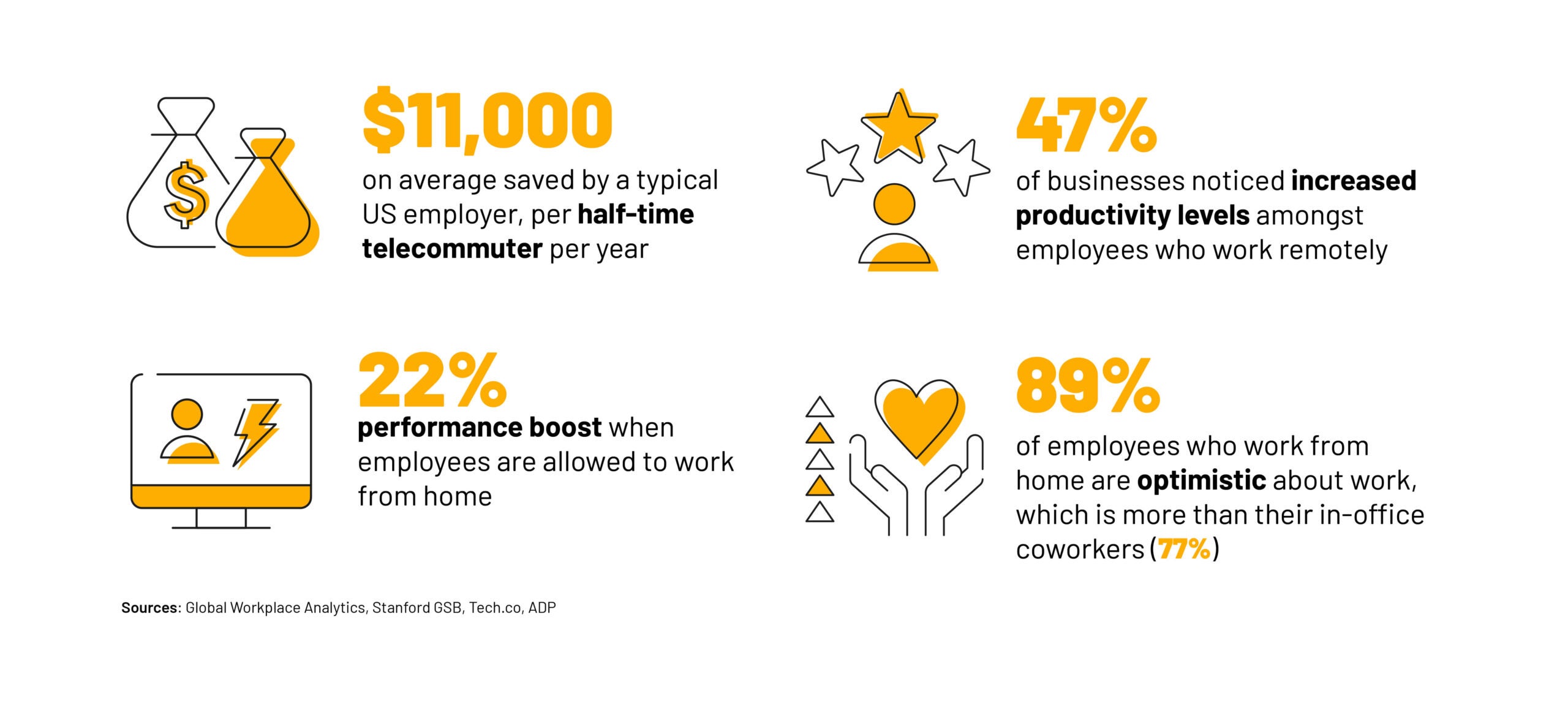
Overall, though, remote work can be a huge boon for workers looking for a bit more flexibility. Work from home statistics have shown that it can improve mental health, increase salary, and even boost productivity. Suffice to say, it’s a no-brainer for employees that can handle the downfalls.

Even more importantly, remote work can be a massive benefit for businesses. Studies have found that it can help businesses retain top employees, improve productivity, increase revenue, and even save money in the long run. Suffice to say, all those businesses forcing employees back into the office aren’t doing so based on data.

Key WFH Stats Productivity

Is Microsoft a Good Fit for You?

If you’ve decided that remote work is indeed a good fit for you, it’s time to consider the other part of the equation: Microsoft. As is common with many big tech firms, Microsoft is often considered one of the top picks for aspiring engineers, managers, and pretty much any other role under the sun, but is it right for you?

For starters, you better like using Microsoft Teams. As you can imagine, the popular collaboration platform is the exclusive go-to solution for the tech firm, connecting in-office and remote employees through video conferencing and other digital resources.

Beyond that, though, Microsoft is an infamously good company to work for. While it may miss out on some of the high-quality employee perks that Google is known for, it still provides robust compensation packages and perks that are competitive in the tech industry. You’ll get parental leave, paid time off, retirement plans, and an employee discount on the wide range of Microsoft products.

On top of all that, Microsoft is committed to inclusion and diversity, with a firm commitment to pay equality for similar roles across the company. All that to say, Microsoft should be a good fit for the majority of candidates out there, and with the roles being fully remote, the necessity to move to the Pacific Northwest — where Microsoft is headquartered — is nonexistent.

How to Apply for Fully Remote Jobs

If you’re looking for a remote job at Microsoft, you can check out the Microsoft careers page to get a good look at the 200+ fully remote jobs available right now.

If you’re willing to branch out a bit, though, Tech.co has a wide range of guides that can help you find fully remote jobs, 4-day workweek jobs, and entry level jobs, depending on what you’re looking for.

And don’t forget to check back with Tech.co for up-to-date job listing guides that will help you get your job search off on the right foot.

Written by:
Conor is the Lead Writer for Tech.co. For the last eight years, he’s covered everything from tech news and product reviews to digital marketing trends and business tech innovations. He's a feature, reviews, and news contributor for Android Police, and he has hosted tech-focused events for SXSW, Tech in Motion, and General Assembly, to name a few. He also cannot pronounce the word "colloquially" correctly. You can email Conor at conor@tech.co.

Deutsche Bank Is the Latest Business to Ditch Remote Work

Despite studies showing the value of remote work, Deutsche Bank wants all employees in the office at least three days a week.

Businesses offering remote work are dropping like flies, with Deutsche Bank announcing that its employees must be in the office at least three days a week.

The remote work trend from the days of the pandemic is long behind us, with an avalanche of return-to-office mandates hitting employees across the country. Despite statistics that show the value of remote work, these businesses are dead set on getting workers back to their commute.

Despite being a vocal proponent of remote work, Deutsche Bank now joins the ranks of businesses that don’t care about employee wellbeing or, apparently, their bottom line.

Deutsche Bank Announces Return-to-Office Mandate

A memo to Deutsche Bank employees, acquired by Bloomberg, stated that managers across the company must report to the office at least four days per week, while other employees will be required to be in the office at least three days per week, starting in June 2024.

“Its new guidelines will ensure consistency across the bank and strengthen senior leadership presence in the office, which remains the primary place of work.” – Deutsche Bank memo to employees

The explanation is similar to that of other return-to-office mandates across the business world, providing little data and plenty of platitudes in hopes of encouraging employees to resume their commute.

A Full 180 from Deutsche Bank

The news likely comes as quite a shock to the nearly 85,000 employees at Deutsche Bank, as the financial institution offered a considerably flexible work from home policy during and after the pandemic.

Prior to this news, employees were encouraged, “on a voluntary basis to work remotely up to 40-60% of their time based on their role, activity and country,” according to the Deutsche Bank HR website.


About Tech.co Video Thumbnail Showing Lead Writer Conor Cawley Smiling Next to Tech.co LogoThis just in! View
the top business tech deals for 2026 👨‍💻
See the list button

Even worse, Deutsche Bank has previously been quite public about the success of its remote work policy, publishing studies and infographics lording its productivity numbers while working from home. And considering 70% of employees appreciated the flexibility and 87% said they felt more productive, Deutsche Bank is still getting rid of the popular employee perk.

The Value of Remote Work

You might assume, because of all the return-to-work mandates hitting employees across the world, that there are studies showing remote work actively contributing to lower revenues, impeding productivity, and a general drain on the success of businesses.

However, no such statistics exist. In fact, quite the opposite is true, with the majority of studies showing that productivity improves, mental health increases, and employees and employers alike are better off when employees are given flexibility with work-from-home options.

In most cases, though, these decision makers aren’t worried about employee wellbeing or even the productivity of their work. Whether it be control, loneliness, or commercial real estate prices, the reasoning for these return-to-work mandates remains a mystery to the employees that have to endure them.

Written by:
Conor is the Lead Writer for Tech.co. For the last eight years, he’s covered everything from tech news and product reviews to digital marketing trends and business tech innovations. He's a feature, reviews, and news contributor for Android Police, and he has hosted tech-focused events for SXSW, Tech in Motion, and General Assembly, to name a few. He also cannot pronounce the word "colloquially" correctly. You can email Conor at conor@tech.co.

What Is Sora by OpenAI? Who Can Access Incredible AI Video Tool Revealed

The content generated by OpenAI's new AI video generator has to be seen to be believed. Here's everything we know so far.

Once again, OpenAI has broken the internet with an earth-shattering AI announcement – an AI video generator called Sora which can create eerily life-like videos. Some of the examples released already are hard to distinguish from real camera footage.

Sora is a diffusion model with transformer architecture, meaning its neural network functions in a similar way to ChatGPT. OpenAI has been tight-lipped on its official release date, but says that it wants to show people what’s “on the horizon” for artificial intelligence.

Here’s everything we know about Sora so far, and why the launch of the video generator to the general public might not be for some time yet.

What Is Sora?

Sora is a text-to-video AI model developed by ChatGPT creators OpenAI. “Text-to-video” means that Sora takes text prompts and turns them into short video clips. The batch released by OpenAI this week is truly breathtaking. Take a look at this completely AI-generated video of an Octopus:

A video produced by OpenAI’s new AI tool, Sora. Video: OpenAI

“Sora is able to generate complex scenes with multiple characters, specific types of motion, and accurate details of the subject and background,” OpenAI explains in a blog post published this week, within which more videos were released. “The model understands not only what the user has asked for in the prompt, but also how those things exist in the physical world.”

Who Can Access Sora Now?

Sora is currently being put through its paces by security researchers who are responsible for ensuring it’s safe and secure before it’s released to the public, and assessing “critical risks”.

However, OpenAI says that a small cohort of visual artists, filmmakers, and designers have been given access to Sora too. No artists or designers taking part in the trial are named.

Some in-the-know accounts on the OpenAI forum seem to signal that there will be a waiting list rolled out at some point, which will be the first chance to get your hands on it.

Unfortunately, there is no indication of when we’ll be able to sign up to use Sora.


About Tech.co Video Thumbnail Showing Lead Writer Conor Cawley Smiling Next to Tech.co LogoThis just in! View
the top business tech deals for 2026 👨‍💻
See the list button

When Will Sora Be Available to the Public?

Sadly, there is currently no release date for Sora. All the content that’s been going viral on the internet over the past 24 hours has come out of the announcement blog post published by OpenAI.

Interestingly, it doesn’t seem like OpenAI has even given a vague indication of when it might be made generally available – there’s not even been an indication that it will be released this year.

That’s quite unusual for such a large announcement, and could suggest it’s a long way off public release – but then again, OpenAI does admit that it’s sharing its research early. With the speed that the artificial intelligence industry has moved over the past two years, the true launch date is anyone’s guess.

What’s the Hold Up with Sora?

As we’ve covered, OpenAI is not prepared to release Sora to the public yet, unsatisfied that the video-generating technology has been sufficiently safety tested. This is good, considering the myriad of ethical issues relating to the creation of such lifelike videos – not to mention during a year with so many elections.

“We’ll be taking several important safety steps ahead of making Sora available in OpenAI’s products” “We are working with red teamers  –  domain experts in areas like misinformation, hateful content, and bias - who will be adversarially testing the model” it added.

OpenAI also says it is working on an AI video detection classifier that can identify whether a video has been produced by Sora or not.

This seems like a similar step to the one that was taken after ChatGPT was launched, after which the AI company launched a text classifier. However, it was later shut down due to its unreliability. When we tested it to see if it could uncover ChatGPT Plagiarism, it was unable to even detect content generated by itself.

How Does Sora Work?

“Sora is a diffusion model which generates a video by starting off with one that looks like static noise and gradually transforms it by removing the noise over many steps,” OpenAI said this week.

The technology works similarly to the GPT family of language models that power the company’s chatbot, ChatGPT. They all use a “transformer” architecture – a type of neural network that takes inputs and “transforms” them into outputs. They’ve also incorporated elements of DALLE-3, such as the recaptioning system.

OpenAI has fed Sora videos and images as units of data – or “patches”. “By unifying how we represent data” OpenAI days, “we can train diffusion transformers on a wider range of visual data than was possible before, spanning different durations, resolutions, and aspect ratios.

You can read a little bit more about how OpenAI’s AI video generation technology works in this blog post located in the company’s research portal.

Written by:
Conor is the Lead Writer for Tech.co. For the last eight years, he’s covered everything from tech news and product reviews to digital marketing trends and business tech innovations. He's a feature, reviews, and news contributor for Android Police, and he has hosted tech-focused events for SXSW, Tech in Motion, and General Assembly, to name a few. He also cannot pronounce the word "colloquially" correctly. You can email Conor at conor@tech.co.

11 Small Business Grants and Loans to Apply For in 2024

Getting a financial boost could be easier than you think, with these useful grant and lending options.

There’s no denying that 2024 is a challenging year to run a business. As inflation rates spiral and consumer demand takes a hit, business owners are forced to be more mindful of their bottom lines than ever. But whether you’re grappling with debt, or looking to expand, accessing third-party financing may be easier than you think.

While free money may sound too good to be true, there are hundreds of grants available to small businesses in 2024 designed to make financing more accessible to business owners. Grants tend to have more specialist eligibility requirements, however, so if you aren’t eligible for financial aid we also list some lending options – including government-backed and private loans.

Read on to find a financing option that suits you, whatever your business’s specialism, needs, and financial profile, or jump to a specific funding type below.

In this guide: 

Small Business Grants to Apply For Today

If your business doesn’t have enough capital to take on future debts or has a unique specialism or back story that could catch the eye of grantors, it might be a good idea to apply for a grant. Here’s a roundup of some grants to be aware of in 2024:

  1. FedEx Small Business Grant
  2. The National Association for the Self Employed (NASE) Growth Grants Program
  3. Minority Business Development Agency (MBDA) Business Grants
  4. Amber Business Grants For Women
  5. The USDA Rural Business Enterprise Grants (RBEG) Program


About Tech.co Video Thumbnail Showing Lead Writer Conor Cawley Smiling Next to Tech.co LogoThis just in! View
the top business tech deals for 2026 👨‍💻
See the list button

1. FedEx Small Business Grant

  • For: Small businesses
  • Amount: Up to $50,000
  • Grantor: FedEx

FedEx’s Small Business Grant is a grant contest run by delivery company FedEx. Unlike a lot of grants on this list, the competition is open to all US small businesses, as long as they have fewer than 99 employees, have been operating for at least six months, and have a FedEx business account that’s been open before September 1, 2023.

The winner of FexEx’s Small Business Grant will receive $50,000, while the remaining nine winners will get $20,000. Up to 100 businesses will receive honorary mentions and get $300 in My FedEx Rewards vouchers. It’s competitive though – last year 18,000 applicants competed for only 12 slots.

Learn more and apply here

  • Deadline: April 1

2. The National Association for the Self Employed (NASE) Growth Grants Program

  • For: Micro-businesses
  • Amount: $4,000
  • Grantor: NASE

NASE has a grant program that gives up to $4,000 to successful businesses. Grants can be used at the discretion of the business owner – from marketing to onboarding and beyond, but winners need to use the funds as they pledged to in their application.

To be eligible for the program, you need to be a NASE member, and monthly and Silver members have to be involved with the organization for over 90 days. Since 2006, NASE has handed out almost $1,000,000 through the program. If you’re interested in becoming a recipient, create a NASE membership by following the link below.

Create a membership here

  • Deadline: Applications are reviewed quarterly

3. Minority Business Development Agency (MBDA) Business Grants

  • For: Minority-owned businesses
  • Amount: Undisclosed
  • Grantor: MBDA

The MBDA, which was originally established as the Office of Minority Business Enterprise by President Richard M. Nixon, offers financial assistance to minority-owned businesses in the form of grants.

The grant amount will vary based on the needs of the recipient. To apply, you need to register your business to obtain a Unique Entity ID number so the application can be tracked. You then need to register with SAM, using an Employer Identification number. The organization also recommends that interested businesses attend teleconference presentations to learn more about the process, alongside watching this YouTube video.

Learn more and apply here

  • Deadline: March 17

4. Amber Business Grants For Women

  • For: Female-owned businesses
  • Amount: $1,000 to $10,000
  • Grantor: WomensNet

The Amber Foundation helps women start businesses and nurture existing ones. The organization offers $1,000 to successful applicants each month, and one of these monthly winners will be awarded $10,000 at the end of the year.

Fortunately, the program doesn’t require a lengthy application. Female entrepreneurs can apply anytime by telling their story, however, details about your company, industry, and market will help your case seem more competitive.

Successful applicants have a tangible passion for their pursuit, are business savvy, and have a clear vision. If you think you have what it takes, click the link below.

Apply here

  • Deadline: Monthly

5. The USDA Rural Business Enterprise Grants (RBEG) Program

  • For: Rural businesses
  • Amount: $10,000 to $500,000
  • Lendor: USDA

USDA Rural Business Development Grants Program issues financial backing for small and emerging businesses in local areas. The grants can be used up to the business owner’s discretion, but common uses include land acquisition, renovation, project planning, construction, and more.

To be eligible, businesses need to employ 50 employees or fewer and have less than $1 million in projected growth revenues. If you think you’re in for a shot, and would like to receive up to $500,000 in financial backing, click on the link below.

Learn more and apply here

  • Deadline: Varies

Small Business Loans to Apply For Today

If you’re willing and able to invest in your business’s future, take a look at these government and private small business loans below.

  1. U.S. Small Business Administration SBA 7(a) loans
  2. U.S. Small Business Administration 504 loans
  3. U.S. Small Business Administration Microloans
  4. Bank of America Business Advantage Unsecured Term Loan
  5. Wells Fargo BusinessLine Line of Credit
  6. Fundbox Line of Credit

1. U.S. Small Business Administration SBA 7(a) loans

  • For: Small businesses
  • Amount: Up to $5,00,000
  • Min. credit score: 625

The U.S. Small Business Administration offers a variety of flexible loans to small businesses, all with competitive terms comparable to non-guaranteed loans. Its primary program – the 7(a) loan program – lends businesses up to $5 million. Funds can be used for a variety of purposes including acquiring real estate, purchasing furniture or equipment, and refinancing current debt.

Funding can be available as a term loan or can be used as a line of credit. Since this loan is backed by the government, it offers generous interest rates of 11.50-15.00%. However, businesses typically need to offer collateral to secure the loan.

Learn more and apply here

2. U.S. Small Business Administration 504 loans

  • For: Small businesses
  • Amount: Up to $5,50,000
  • Min. credit score: 680

504 loans are another financing option provided by The U.S. Small Business Administration. Its maximum funding amount sits slightly higher at $5.5 million, and certain energy projects are eligible to receive loans for up to three projects (capping at $16.5 million in total).

Unlike the 7(a) loan, however, the 504 has fixed interest rates pegged to US treasury bonds, providing businesses with a degree of predictability. Its use case will be similar to the 7(a) loan, but due to its slightly larger lending potential, this loan is best suited for bigger investments like real estate purchases, property renovation, and construction projects.

Learn more and apply here

3. U.S. Small Business Administration Microloans

  • For: Small businesses
  • Amount: Up to $50,000
  • Min. credit score: 620

If you don’t need financial financing, the U.S. Small Business Administration also offers government-backed microloans. The loan is eligible for small businesses and certain not-for-profit childcare centers, and while the funding amount goes up to $50,000, its average size is around $13,000.

Due to its lower lending cap, businesses with a slightly lower credit score of 620 can be eligible for the loan. Microloans are ideal for businesses looking to rebuild, repair, or enhance their business by investing in assets like inventory, supplies, or furniture.

Learn more and apply here

4. Bank of America Business Advantage Unsecured Term Loan

  • For: Small businesses
  • Amount: Undisclosed
  • Min credit score: 670

If you don’t qualify for government-backed loans and are willing to repay slightly higher interest rates, it could be a good idea to pursue small business private back loans. For those considering this financing option – Bank of America will be a good place to start.

Bank of America offers the most commercial and industrial loans out of any bank in the U.S. Its maximum loan size of $100,000 may shy in comparison to funding offered by the U.S. Small Business Administration, but the lenders competitive interest rates and flexible repayment terms still make it a great option, especially if you’re an existing Bank of America customer.

Learn more and apply here

5. Wells Fargo BusinessLine Line of Credit

  • For: Small businesses
  • Amount: Up to $150,000
  • Min credit score: 680

Popular US bank Wells Fargo also offers a small business financing option called a Business Line of credit. The size of loans ranges between $10,000 to $150,000, and new Wells Fargo customers don’t have to pay an annual fee for the first year.

Wells Fargo’s Line of Credit charges reasonable interest rates of 10.25-18.25%, and because it’s a revolving credit line, the type of financing isn’t subject to an annual review. However, because no collateral is required for the loan, businesses will need to have a credit score of at least 680 to apply and will need to have been in business for at least two years.

Learn more and apply here

6. Fundbox Line of Credit

  • For: Small businesses
  • Amount: Up to $150,000
  • Min credit score: 600

Fundbox line of credit is another form of private financing that businesses can use to invest in their future. Unlike government-backed loans, this loan can be approved within a day of applying, making it ideal for businesses looking to cover emergency costs.

Its application process is quick and straightforward too, and its low minimum credit score requirement is great for businesses with poor credit scores that have been denied from other business loans. These perks come with a catch, though. Fundbox’s line of credit charges interest rates of anywhere between 36.00-99.00%, which is a steep charge compared with traditional banks.

Learn more and apply here

Small business loans can be an excellent way to invest in your business and safeguard its future, especially if you can’t qualify for private grant programs. However, it’s important to be aware that every type of lending can incur risks, even with government-based loans.

If you secure your loan with a personal guarantee, your personal assets could be at risk if you fail to meet repayment deadlines. Taking on too much debt could impact your credit score as well, which could make it harder to access financing down the line.

For these reasons, it is always worth cutting back where possible, like by utilizing free and low-cost software solutions, before incurring future debts with government-backed or private loans.

Written by:
Conor is the Lead Writer for Tech.co. For the last eight years, he’s covered everything from tech news and product reviews to digital marketing trends and business tech innovations. He's a feature, reviews, and news contributor for Android Police, and he has hosted tech-focused events for SXSW, Tech in Motion, and General Assembly, to name a few. He also cannot pronounce the word "colloquially" correctly. You can email Conor at conor@tech.co.

Cisco Cuts Thousands of Workers As Big Tech Layoffs Continue

Cisco workers get the short straw yet again, at the company pivots to "high-growth" areas.

Silicon Valley technology giant Cisco plans to lay off 5% of its global workforce – equating to approximately 4,250 workers – as the company continues to grapple with wavering demand for its products.

This sees Cisco join the ranks of other high-profile tech companies, like Google, Microsoft, and Amazon, that have also issued marching orders this year.

While big tech layoffs are nothing new, these recent actions made by Cisco send a clear signal that the sector is still a long way from making a comeback.

Cisco Struggles to Hit Revenue Targets

In what’s shaping up to be yet another challenging year for big tech businesses, internet networking company Cisco has announced it will be reducing its workforce by 5% in a desperate effort to recover costs.

This news comes three months after the California-based company projected a 6.6% annual revenue drop and a slight decrease in adjusted earnings per share. Cisco also reported that it would be lowering its annual revenue forecast to $51.5 billion to $52.5 billion from $53.8 billion to $55 billion, in response to a drop in demand for its products.


About Tech.co Video Thumbnail Showing Lead Writer Conor Cawley Smiling Next to Tech.co LogoThis just in! View
the top business tech deals for 2026 👨‍💻
See the list button

Demand For Cisco Products Has Been Wavering

According to company CEO Charles Robbins, Cisco has been witnessing weak demand with its telecom and cable customers. The company is planning to switch to “high-growth areas” to recover costs, underscoring its decision to cut a large portion of the workforce.

“In terms of the macro environment, we are seeing a greater degree of caution and scrutiny of deals given the high level of uncertainty. As we’re hearing this from our customers, it’s leading us to be more cautious with our forecast and expectations.” – Cisco CEO, Charles Robbins

Robbins also cited its ongoing acquisition of software company Splunk as evidence of its plan to accelerate sales growth – a deal that is expected to be closed by the second financial quarter of this year.

Like most Silicon Valley companies, Cisco is also planning to safeguard its future with AI. This commitment was displayed in the recent extension of Cisco’s partnership with AI chip maker Nvidia, and the company’s joint mission to integrate Cisco’s Ethernet cables with Nvidia’s AI technology.

Cisco’s Total Layoff Casualty Count Almost Hits 10,000

Cisco’s latest round of cuts echoes an eerily similar action made in 2022, when the technology handed out pink slips to 5,000 workers ahead of its $28 billion acquisition of Splunk. The company justified the 2022 layoffs as part of a “rebalancing act”, and an effort they were taking to “rightsize” certain businesses.

Unfortunately for tech workers, serial layoffs aren’t unique to Cisco. As consumer demand continues to fluctuate, other major tech firms like Google and Amazon have recently issued multiple rounds of cuts – with Google reporting to have spent $700 million on layoffs this year alone.

These developments raise big tech’s layoffs to a total of 34,560 in 2024 according to layoff tracker layoffs.fyi, sparking concerns around job insecurity across the tech sector. However, while clerical roles face the biggest risk of being automated, as companies like Cisco place more of an emphasis on AI, greater demand is being created for candidates with AI skills.

With the labor market being notoriously unpredictable, it is uncertain how future trends will shape the employment landscape. But for workers looking to safeguard their future careers, upskilling yourself with AI skills is a great place to start.

Written by:
Conor is the Lead Writer for Tech.co. For the last eight years, he’s covered everything from tech news and product reviews to digital marketing trends and business tech innovations. He's a feature, reviews, and news contributor for Android Police, and he has hosted tech-focused events for SXSW, Tech in Motion, and General Assembly, to name a few. He also cannot pronounce the word "colloquially" correctly. You can email Conor at conor@tech.co.

Mozilla Makes Layoffs and Scales Back Existing Products

The company is downsizing to refocus efforts on Firefox and artificial intelligence.

Software community Mozilla is laying off around 60 workers and considerably scaling back its product offering and strategy according to an internal memo shared this week.

The news comes just days after the appointment of interim CEO Laura Chambers, and looks set to impact VPN, Relay, and its Online Footprint Scrubber.

It also comes as the latest organization to join the relentlessly growing list of tech companies making layoffs in 2024. 

Scaling Back Product Offering

Mozilla called the downsizing decision a “strategic correction” which will allow teams to focus on areas that the organization feel have the greatest chance of success.

A Mozilla spokesperson stated: “We’ve made the difficult decision to eliminate approximately 60 roles from across the company. We intend to re-prioritize resources towards products like Firefox Mobile, where there’s a significant opportunity to grow and establish a better model for the industry.”


About Tech.co Video Thumbnail Showing Lead Writer Conor Cawley Smiling Next to Tech.co LogoThis just in! View
the top business tech deals for 2026 👨‍💻
See the list button

The company behind the Firefox browser will shut down its 3D virtual world Hubs, first launched back in 2018, and scale back investment for mozilla.social.

What Exactly Are The Changes?

Scaling back investment on mozilla.social

Mozilla.social was the company’s attempt to create a “safer, better social media experience, based on Mastodon and the Fediverse”. However, this idea proved difficult to execute properly, needing more team agility and greater funds to service the platform at the size it was. Now, a smaller team will work on a more modest approach to the concept.

Scaling back investment on Security and Privacy products

Following recognition that security and privacy is a competitive space, Mozilla plans to reduce financing for VPN, Relay, and Online Footprint Scrubber. It will however, “maintain investment in products addressing customer needs in growing market segments”.

Winding down the 3D virtual world Hubs

The company noted that “demand has moved away from 3D virtual worlds… impacting all industry players”, giving it little justification in using resources for the Hubs platform.

Optimizing the size of its People Team

Owing to the layoffs in MozProd and subsequent staffing budgets, some roles have been consolidated in the People and other support service teams.

AI Focus Ahead

The memo also announced a renewed focus on bringing “trustworthy” artificial intelligence capabilities into Firefox. To do this, it will merge the teams currently working on Pocket, Content, and AI/MI.

This AI focus will capitalize on work already started following its acquisition of Fakespot last year, which is an AI-powered platform able to detect fake reviews and scams. 

While details on some of the specific organizational changes are still to be shared, it’s been confirmed that there will be no changes within Legal & Policy, Finance & Business Operations, Marketing, or Strategy & Operations.

Written by:
Conor is the Lead Writer for Tech.co. For the last eight years, he’s covered everything from tech news and product reviews to digital marketing trends and business tech innovations. He's a feature, reviews, and news contributor for Android Police, and he has hosted tech-focused events for SXSW, Tech in Motion, and General Assembly, to name a few. He also cannot pronounce the word "colloquially" correctly. You can email Conor at conor@tech.co.

ChatGPT Will Now Remember You – How to Turn Off Memory Feature

OpenAI is testing a feature to help ChatGPT remember who you are and what you like. Don't worry, you can turn it off.

Things are about to get a lot more personal with ChatGPT, following OpenAI’s latest announcement that its testing a memory feature for the chatbot.

The new feature will remember saved chats and preferences, so anything a user has previously asked or discussed with the chatbot will be used when providing new, more personalized responses.

The update comes following the recent news that ChatGPT is joining the 3D world of Apple Vision Pro, further blurring the lines of artificial intelligence and reality.

How Will Memory Work?

According to a blog post from OpenAI announcing the feature, memory will work in two ways: by users asking it to remember something specifically or by allowing the chatbot to pick up on preferences itself.

So for instance you could explain that you regularly travel to New York and are always on the lookout for coffee spots that have just opened up, or your company has certain tone, voice and format preferences for blog posts which it should adhere to.


About Tech.co Video Thumbnail Showing Lead Writer Conor Cawley Smiling Next to Tech.co LogoThis just in! View
the top business tech deals for 2026 👨‍💻
See the list button

On the other hand, you can leave ChatGPT to pick up on those details over time, storing information every time you ask a question.

The ultimate aim is for the chatbot to feel more and more personal, without needing to be reminded of who you are and what you like.

For now, memory is only being rolled out to a “small portion” of both free and Plus users for testing. It will be sharing broader roll out plans soon.

How to Turn Off ChatGPT Memory Feature

On the surface this may feel like ChatGPT’s overt way of collecting and saving mass amounts of personal data and preferences from users for training or other purposes. However, OpenAI has been clear that its chatbot won’t get carried away and users are to remain very much in the driving seat.

Memory can be turned off at any time by tapping on Settings > Personalization > Memories. The feature then won’t be able to create or use the things you share with it.

Similarly, if you’ve had it on but would prefer ChatGPT to forget everything, you simply need to tell it to do so. All memories can also be viewed and deleted by heading to Settings > Personalization > Manage Memories.

Much like how other internet services create a profile of you as a user based on interactions and preferences with their digital applications, ChatGPT’s memories will evolve with every prompt and question. However, they won’t be linked to conversations, meaning you can’t just delete a chat to erase a memory. This must be done by deleting the memory itself.

Custom GPTs To Enable Memory Too

OpenAI has confirmed that Custom GPTs will have their own distinct memories too, although the stored information won’t be shared automatically from ChatGPT, but rather will need to be enabled by its builder. 

The company shared the Artful Greeting Card GPT as an example. Say you wish to create a birthday card for your daughter who loves jellyfish. Providing you share that information with the GPT in a one-off instance, it’ll remember it year after year for future jellyfish-themed greetings cards.

GPTs will have to wait for this feature however, until memory is rolled out more broadly.

Written by:
Conor is the Lead Writer for Tech.co. For the last eight years, he’s covered everything from tech news and product reviews to digital marketing trends and business tech innovations. He's a feature, reviews, and news contributor for Android Police, and he has hosted tech-focused events for SXSW, Tech in Motion, and General Assembly, to name a few. He also cannot pronounce the word "colloquially" correctly. You can email Conor at conor@tech.co.

5 Gen Z Workplace Traits Business Leaders Say They Can’t Live Without

Gen Z gets a bad rap for being hard to work with. But lots of businesses deeply appreciate their presence in the workplace.

As age demographics go, Gen Z doesn’t have the most stellar reputation for hard work. Often described as “entitled” in the press and “difficult” to have in the office, it’s no wonder they feel the benefits of remote working more than any other generation.

The stats suggest that many now see the generation as “lazy”, and believe managers hire them at their own peril. However, few would argue that a balance of youth and experience is bad for business – in fact, many would say it’s necessary to compete in 2024.

So, are Gen Z bringing any positive traits to the workplace? Well, they tend to come with quite a few, actually – according to the more than 70 business leaders that spoke to Tech.co over the last week about their experience managing and employing the demographic.

Gen Z: A “Difficult” Generation?

A survey conducted by Resumebuilder in 2023 revealed that 74% of bosses said that Gen Z were difficult to work with, with 49% saying they were tough to work with “all or most of the time”. Allegedly, the demographic lacks motivation and drive.

One Reddit user on the r/GenX subreddit even went as far as to say they were “afraid” of working with Gen Z, with the post gaining hundreds of likes and lots of comments.

But there are two sides to every story – and writing off a whole demographic as easily offended and unwilling to put in the effort is short-sighted.

In fact, many key decision-makers have a very clear idea of the uniquely positive things that Gen Z employees bring to their workplaces.


About Tech.co Video Thumbnail Showing Lead Writer Conor Cawley Smiling Next to Tech.co LogoThis just in! View
the top business tech deals for 2026 👨‍💻
See the list button

Gen Z Workplace Traits That Managers Love

To see the other side of that story, we asked a group of business leaders about the Gen Z workplace traits that the demographic brings to the table. Here some of the key themes that stood out to us from our time speaking to businesses.

1. Gen Z workers always come with fresh ideas

Several key decision makers managing mentioned how vital it was to have young staff members tuned into the latest trends and stories – something Gen Z in their free time yet has automatic, tangible value to millions of businesses.

“By Monday, our Gen Z employees are already well-versed in events that occurred on Sunday,” says Harry Johns White, Marketing Manager at NBABlast. “This trait is incredibly valuable in our fast-paced industry.”

“Their use of social media as a tool for information gathering is noteworthy,” White continued. “They often scoop important news from these platforms, staying ahead of traditional media outlets. There have been numerous occasions where I’ve wanted to share a news piece from a newspaper, only to find they are already familiar with the story.”

“Having grown up in a digital world, they are able to approach challenges in creative, innovative ways. At Lottery ‘n Go, our Gen Z writers develop ideas for engaging lottery content on emerging platforms that we would never think of” – Liam Wilson, Editor-In-Chief, Lottery n’ Go

Being alert to social and technological change in this way leads to more useful, imaginative suggestions on how to do things differently. Kateryna Popova, HR consultant at PRM, told Tech.co. that Gen Z “are not afraid to challenge the status quo and bring innovative ideas to the table”.

Popova went on to say that her Gen Z employees’ refreshing desire to make an impact and find value in their jobs has so far “led to more community-focused initiatives at PRM, such as community-driven events.

“The amount of fresh ideas and perspectives they have is simply mind-blowing to me,” Mateusz Calik, CEO of Delante SEO Agency, agrees. “They are literally [the] driving force behind our company’s ability to stay ahead of trends and continuously evolve our strategies.”

2. Gen Z employees approach workplace relationships differently

Other business leaders who spoke to Tech.co said that Gen Z employees they’d worked with contributed to creating a more positive atmosphere in the office.

“Their approach to workplace relationships is notably different,” observes Michał Kierul, CEO of INTechHouse. “We had instances where employees, despite sharing the same office space, interacted minimally, primarily on a need basis. However, within just two months of a Gen Z employee’s probation period, there was a noticeable change.”

“They made an effort to know everyone in the office well” he continued. “When asked about this approach, they emphasized the importance of good communication for effective teamwork. They believe that understanding colleagues personally leads to better professional interactions and a more cohesive work environment.”

Jay York, Owner of Grove Brands, also credits Gen Z employees with making the office a more pleasant place to work. “Gen Z are great at making the workplace fun, contributing a lot in the way of humor” he told Tech.co via email. “They are also very community-oriented, always interested in bringing the team together, through outside game nights.”

“I think they are fiercely protective of maintaining a positive space and are not afraid to voice their concerns or frustrations” he added.

3. Gen Z want to improve how things work

We are creatures of habit, and some work processes can quickly become stale and obsolete if their utility is not continuously questioned and assessed. Gen Z, however, are willing to stick their head above the parapet and drive change in the workplace.

“Something I’d like to highlight about Gen Z employees is their straightforward and transparent communication style,” says Kamil Rejent, CEO at Survicate, who has worked extensively with Gen Z employees. “They prefer directness and clarity, which has reduced many misunderstandings for me already”.

“Despite their reputation for impatience, I’ve found that this trait often manifests as a drive for efficiency and a dislike for unnecessary bureaucracy,” Rejent continued. “They are results-oriented people and prefer streamlined processes, which pushes our company to eliminate redundancies and focus on what truly matters.”

“What positively sets Gen Z apart from employees from other generations is a willingness to embrace change and differences, agrees Mathias Ahlgren, CEO & Founder at Website Rating, who also reported that his Gen Z colleagues had a unique “willingness to see things from more than one viewpoint”.

And who knows – that Gen Z drive to improve things might just save you some money. “I had a Gen Z employee approach me about free online platforms that could help with some of our internal processes, and they were right!” recalls Bobby Lawson, technology editor at EarthWeb, who also praised their digital fluency and willingness to troubleshoot technical issues.

4. Gen Z workers are adaptable problem solvers

While Gen Z is often depicted as a generation that gives up when the going gets tough, several business leaders we spoke to reported that in their experience, members of Gen Z have always been eager, resilient problem solvers.

“Gen Z excels in their attitude to problem-solving. They approach problems with an uncommon fusion of imagination and practicality,” Hemponix CEO Sam Romain explains.

“[Gen Z’s] innovative thinking and openness to trying new things have revolutionized the way we handle both our internal operations and our product offers” – Sam Romain, Hemponix.

Ryan Carrigan, CEO of MoveBuddha, also appreciates Gen Z’s willingness to think out of the box. Gen Z employees help him to “round out a fuller perspective of our team’s capabilities and strategies.”

“There’s a unique adaptability and resourcefulness that they bring to the table,” he explained to Tech.co via email, citing the drastic economic and social shifts those in the demographic have lived through already. “I value the way that Gen Z tends to approach collaboration.”

5. Gen Z workers set healthy boundaries for themselves

While Gen Zers’ emphasis on not overworking themselves is often portrayed as a weakness – an unwillingness to go “the extra mile” that often leads to longer hours – others see this as one of the demographic’s key strengths.

“[Gen Z’s] ability to prioritize their well-being without compromising on the quality of their work is a lesson in balance that benefits the entire workplace,” says Roksolana Ponomarenko, sustainable development ambassador at PRM.

“It fosters a healthier, more sustainable work environment and encourages others to adopt a similar mindset” she added.

Will Hatton, founder and CEO of the Broke Backpacker, said that he’s most impressed by Gen Z’s ability to “stick up for themselves” and “draw boundaries” where they see fit.

“They aren’t afraid of honesty and will call situations as they see it,” Hatton continued, adding that Gen Z’s “confidence, courage, and ability to draw boundaries are three of the best characteristics they bring to [their] workplace.”

Gen Z: Time for a Rethink?

It seems that Gen Z’s workplace reputation might be down to perspectives and management styles, in at least some cases.

It’s plausible that key traits – such as a desire to drive change in the here and now – may come off as impatience to someone who’s been in the same job for 20 years. A Gen Z-age employee’s deep-seated motivation to make their workplaces more inclusive, on the other hand – which entails speaking up when they are not – may come across to older colleagues as “easily offended”. These misunderstandings, importantly, are not Gen Z’s to apologize for.

In fact, those willing to understand Gen Z’s motivations, appreciate their positives, and recognize that the demographic brings a whole range of great traits to the office, seem to have no problem harnessing them to maximize value for their business.

While the anecdotal evidence presented in this article of course does not void the Resumebuilder survey referenced earlier on in this article, the businesses we spoke to don’t seem to be struggling with Gen Z’s level of effort and motivation. Maybe that’s just a coincidence – or maybe (not-so-coincidentally) it’s because Gen Zers feel they’re valued in those workplaces, and that their output is appreciated.

Of course, lazy and difficult employees have always existed in every industry, and they’ll continue to cause problems for managers and workplace leaders in the future. Gen Z – true digital natives and hungry information consumers who live hectic lives sped up by the internet – are populating the workforce while remaining criminally misunderstood by those who’ve been in the rat race for much, much longer. 

Written by:
Conor is the Lead Writer for Tech.co. For the last eight years, he’s covered everything from tech news and product reviews to digital marketing trends and business tech innovations. He's a feature, reviews, and news contributor for Android Police, and he has hosted tech-focused events for SXSW, Tech in Motion, and General Assembly, to name a few. He also cannot pronounce the word "colloquially" correctly. You can email Conor at conor@tech.co.

9 Passive Income Ideas That Can Make You Money on the Side

Need to make a bit of extra money? These passive income ideas can help you rake it in without too much effort.

It never hurts to have a bit of extra money coming in, particularly in 2024. With inflation still hitting businesses and individuals alike, a bit of passive income can go a long way in shoring up your financial situation.

Where is the best place to start, though? If you’re looking to make a bit of money on the side, there are plenty of avenues online that can help, especially given the increased functionality and popularity of AI platforms like ChatGPT.

In this guide, you’ll learn about a few passive income ideas that can put you on the path to financial security.

Best Passive Income Ideas

While there are a lot of ways to earn passive income, we’ve focused below on tech-focused avenues that allow you to use online tools like website builders and social media management platforms to make it easier. Here are our best picks for passive income ideas:


About Tech.co Video Thumbnail Showing Lead Writer Conor Cawley Smiling Next to Tech.co LogoThis just in! View
the top business tech deals for 2026 👨‍💻
See the list button

1. Sell online

One of the best and most popular means of making popular income is to sell something online. Between Amazon and Temu, ecommerce spending is high across the board, which means there’s a lot of potential for you to get a piece.

When we say “something,” we really do mean “anything.” Selling online has become quite expansive over the last few years, with passive income seekers offering everything from products and artwork to courses and advice. All you have to do is set up an online store, and you’ll be able to sell pretty much anything directly from your site.

If you need help setting up an online store, you’re in luck. Tech.co has done some extensive research on the best ecommerce website builders, which can help you build your site, marketing your products, and generally manage your online selling business.

2. Affiliate marketing

If you don’t feel like selling your own products online, we don’t blame you. As far as passive income goes, it’s pretty labor intensive, between all the shipping, processing, and actual production of products. Fortunately, affiliate marketing is a great way to earn a bit of money with a bit less effort on your part.

Essentially, affiliate marketing allows you to earn money by recommending products. You simply create a customized link that, when other people click it and make a purchase, will give you a percentage of the purchase. It’s ideal for influencers that have a big following and want to recommend products to their fans.

As for how to get started with affiliate marketing, you’ll have to find an affiliate program that allows for these kinds of partnerships. Amazon is likely your best bet to start off, as it allows for a simple affiliate link system and obviously offers plenty of products to get you started.

3. Create content

If you’re a good writer or a knowledgeable expert, there’s a good chance that content creation is your best path to passive income. By starting a blog — and more important regularly updating it — you will grow a substantial following that can translate into revenue.

Again, though, this certainly isn’t a very “passive” way to make money at first. You’ll need to be consistent and engaging to build an audience, which obviously takes a lot of effort in the beginning.  But once you’ve grown your audience a bit and established a brand, you’ll be able to leverage your following into sponsors and other revenue streams for you and your business.

Obviously, you’ll want to have some writing skills to go along with an interesting niche, but starting a blog isn’t that hard from a technical standpoint. Website builders for blogging are easy to find, with some options even being free, although you’ll have a hard time getting noticed without a paid plan,

4. Sponsored social media posts

Content creation is the only way to make passive income that is funded by sponsors. In fact, if you’re better at social media than creating content for a blog, sponsored social media posts could be your meal ticket to some serious money on the side.

Again, this method of earning passive income requires you to have a big following to get any traction, so you’ll have to put in some effort building up your likes, your follows, and your subscribers.

Once you do, though, you can reach out to sponsors that might be willing to pay you on a per-post basis. These payouts are typically based on the number of engaged followers you have, so make sure you’re being consistent on social media to keep those numbers up.

5. Develop an app

Mobile apps are serious moneymakers if you can get it right, which is why there are so many available across the Apple App Store and the Google Play Store.

Whether you create a mobile game that users absolutely love or can tackle a necessary function that will keep users organized and productive, the app functionality has to be popular enough to — say it with me — garner a large following.

There are two ways to monetize the app. You can either have in-app ads for your free app, which can be frustrating but will definitely get more users online. Or, you can create a paid app, which will charge users a fee every time they download it. Obviously, this will keep your numbers a bit lower, but you will make more passive income this way, if it’s popular.

6. Dropshipping

If none of the options above appeal to you — because they’re either too much work or just don’t sound right — drop shipping might be the way to go.

Drop shipping is the process of having an online storefront, but instead of having to store inventory, you simply arrange to ship sold products to customers directly from a separate supplier warehouse. You don’t own or create products, you’re just the middleman between wholesale prices and needy customers.

Even better, the process of drop shipping can be effectively set up to be fully automated, so you’ll really be getting passive income in the truest of senses.

7. Design an online course

Online education has become quite popular over the last few years, particularly given the pandemic got everyone inside and learning on Zoom. As a result, there are plenty of online course options that you could explore, if you have something to teach.

As far as making money goes, there are a few options. For starters, you could just charge for your course, which is obviously the most straight forward way, although might curb your initial student counts, particularly if you aren’t an actual teacher. Conversely, you could go the freemium model direction, which would see you offering some courses for free, with more in-depth information available for a fee.

But Amazon doesn’t sell courses, so where can you do this? Well, there are plenty of online course sites that can help you get started, including Coursera and Udemy.

8. Sell Your Designs

If you have an artistic streak, one path to passive income could be creating original designs and selling them through an online store such as CafePress.

Once you’ve created a design, all the work is pretty much done. Simply upload it to a merchandise site that allows for custom designs, and buyers will be able to purchase t-shirts, badges, mugs, tote bags…pretty much anything, with your design.

To attract the most attention, you can either create unique, eye-catching designs, or lean into meme culture, hopping on whatever happens to be trending that week. Both are valid, although one may prove more artistically fulfilling!

9. Narrate Audiobooks

Do you have a nice voice? Can you have friends hanging on your every word has you regale them with the tale of your last minute rush to catch a flight?

Well, in that case, audiobook narration could be for you. You don’t need much to get started in the world of narration – a clear speaking voice and a decent mic are the essentials – and you can pitch yourself to authors on sites such as Amazon’s ACX service.

The once humble audiobook industry is expected to be worth $35 billion dollars by 2030. Maybe some of that cash could be yours?

Written by:
Conor is the Lead Writer for Tech.co. For the last eight years, he’s covered everything from tech news and product reviews to digital marketing trends and business tech innovations. He's a feature, reviews, and news contributor for Android Police, and he has hosted tech-focused events for SXSW, Tech in Motion, and General Assembly, to name a few. He also cannot pronounce the word "colloquially" correctly. You can email Conor at conor@tech.co.

Google Expands AI Training Courses & Launches AI Fund for Businesses

The tech giant is putting more learning materials online and creating a fund for firms that want to upskill their workers.

Google announced this week that it is adding more resources and AI training courses to its Google Certificates Program. The company also said it plans to make its learning materials available in 18 additional languages, giving millions more the chance to upskill themselves.

The tech giant is investing heavily in expanding AI educational opportunities in Europe too to equip “workers with the skills they need to avoid being left behind.”

The news will be welcomed by anyone keen to participate in a widely recognized AI course but doesn’t have the budget to invest in a paid one at this moment in time.

Google Expands AI Training Courses For Everyone

Google announced today that it is investing €25 million (roughly $27.9 million) in the AI Opportunity Initiative for Europe.

Excitingly, this includes plans to add new resources available on its existing Google Career Certificates program, in order “to help learners discover how professionals in their fields are using AI, while gaining hands-on experience applying AI to workplace scenarios.”

The company’s AI foundational courses and online webinars, on the other hand, are now available in 18 additional languages, so even more workers can get themselves ready for an AI-powered economy, where being skilled enough to use the tech productively will matter much more.


About Tech.co Video Thumbnail Showing Lead Writer Conor Cawley Smiling Next to Tech.co LogoThis just in! View
the top business tech deals for 2026 👨‍💻
See the list button

Google’s Multi-Million Dollar AI Fund for Businesses

Along with expanding its training materials, Google announced that it has launched the “AI Opportunity Fund: Europe”, in cooperation with the Centre for Public Impact. This is where it seems the vast majority of the €25 million will be spent.

The tech giant says it’s looking for “social enterprises and nonprofits” to apply for some of the money if they feel like their staff would benefit from being upskilled in AI-related areas.

“Selected organizations will receive bespoke and facilitated training on foundational AI in local languages delivered directly to the workers in their communities… as well as cash grants for critical wraparound support, such as childcare or compensation for pay, to remove the barrier to learning” Google explains.

Are Google AI courses Free?

A lot of the AI foundational courses mentioned above can be found in Google’s library of online courses are free to take. They’re pretty comprehensive considering you’re not paying anything, and there are also lots of additional resources and teaching materials you can access for free too.

However, Most Google Career Certificate learners will have to pay a Coursera monthly fee for taking one Google certificate course, typically around $49. However, This may vary depending on how quickly you complete the course.

Google also offers “funded scholarships” for certificates across Europe, the Middle East, and Africa. You can access AI training courses free of charge from Google if you’re able to obtain one of these scholarships.

Remember, there are other free AI training courses you can take online, which offer different ways to learn and bespoke skills that can help carve out your niche, such a coding, advertising, and prompt engineering.

Written by:
Conor is the Lead Writer for Tech.co. For the last eight years, he’s covered everything from tech news and product reviews to digital marketing trends and business tech innovations. He's a feature, reviews, and news contributor for Android Police, and he has hosted tech-focused events for SXSW, Tech in Motion, and General Assembly, to name a few. He also cannot pronounce the word "colloquially" correctly. You can email Conor at conor@tech.co.

Business Attitudes Towards AI in the Workplace 2024

How do people really feel about AI in the workplace? Our in-depth survey takes the pulse on the new technology at the office.

Artificial intelligence (AI) has come on to the business scene in a major way in recent years. Ever since the launch of ChatGPT in November 2022, organizations of all shapes and sizes have been adopting the technology to streamline processes and improve productivity.

How does the average company actual feel about AI and its widespread adoption in 2024? In an effort to better understand the attitudes of businesses towards AI, Tech.co conducted an in-depth survey, the full results of which can be found in our Impact of Technology in the Workplace report.

In this guide, we’ll explore how businesses are using AI, ways in which it improves job satisfaction, how it is impacting job roles, and reveal which AI chatbots and tools are most popular among those taking advantage of the cutting edge tech in the workplace.

Short on time? You download the full report for free to check out at your convenience.

AI Improves Job Satisfaction

  • 59% of senior leaders who use AI claim it’s had a positive impact on their job satisfaction.

The goal of adopting AI platforms into your business is typically to improve productivity. After all, these platforms cost money, and if it isn’t improving your bottom line, what’s the point?

Still, the use of AI in the workplace has a wide range of benefits beyond simply improving productivity. In fact, our research found that the technology is having a notably positive impact on job satisfaction as well, making the tedious tasks associated with work a bit more manageable.

Not only that, our research established a clear link between AI usage and 4-day workweek adoption, so it’s no wonder employees are generally happy with it!

Top AI Use in The Workplace

  • 30% of senior leaders who use AI claim it’s had a strong or significant impact on their work processes.
  • 36% claim AI has had a moderate impact on work processes.
  • Data analysis is the most popular use for AI in the workplace: 32% of businesses are using AI for data analysis tasks.

There’s no denying that companies are using AI in the workplace, as it’s become a hot button issue across the business landscape. However, the real question is how is it impacting these businesses and what are they using it for? Well, fortunately, we’ve got some answers.

Our research found that AI is having a moderate, strong, or significant impact on a large percentage of companies, which bodes well for the future of the tech for your business. Additionally, our report found that AI is most used for data analysis, which makes sense give its ability to examine and breakdown large sets on analytics.

Organizational AI Uses Graph

AI Adoption in the Workplace

  • 33% of businesses leaders say AI tools are being used to a limited extent.
  • Only 4% of companies have fully integrated AI tools throughout their organization (1 in 25).

News of AI in the business world has been widespread, with the technology powering a wide range of innovations that can contribute to substantial growth. However, as with any new technology, the adoption rate isn’t always universal for businesses outside of the tech sector. So, who’s actually using AI?

Our report found that use of AI is still fairly limited across the business world. In fact, a very small percentage have fully integrated the technology into their business operations, which means there is plenty of room for growth over the next few years as AI evolves.

AI Tool use in Organizations graph

Attitudes Towards AI in the Workplace

  • The majority of businesses (42%) feel “neutral” about the use of AI in the workplace.

The only way adoption of AI in the workplace is going to hit that upper echelon is if attitudes towards AI are positive enough to warrant a paradigm shift in the technology used across the business landscape. So how do people feel about AI?

Our survey found that many decision makers are at best “neutral” to adopting the tech for themselves. Between misinformation and general concerns about AI safety, AI has a long way to go before it can be universally adopted, as people simply aren’t on board just yet.

Feelings About AI in the Workplace Graph

Most Popular AI Tool For Businesses

  • ChatGPT was the most popular AI tool for businesses in 2023

In tech, being first is arguably one of the most important ways to guarantee success in a new industry. The iPhone is a glaring example, but the reality is that getting your product out first allows you to establish yourself in the business world before anyone else is even around.

The same appears to be the case with ChatGPT, as the generative AI platform that started it all remains the most popular tool for businesses around the world by a fairly large margin. In our study of over 1000 US business leaders, 65% of respondents reported usage of it, compared to just 48% who said they used Google’s rival, Bard.

Google Bard is naturally a competitor given its search engine prowess over the last few decades, but for now, ChatGPT remains on top.

Top AI Tools Graph

AI Impact on Job Roles

  • Over half (53%) of respondents whose organizations use AI state that they’ve had no impact on removing job roles within their organizations.
  • The most popular AI tasks for role replacement are supply chain management assets (71%), legal research (65%), predictive maintenance of fixed (64%), inventory management (63%), and financial analysis (63%).
  • 63% of senior leadership professionals whose organizations use AI for writing tasks state that AI tools have had no impact on removing job roles.

One of the biggest fears when it comes to AI in the workplace is jobs. More specifically, employees are concerned that rampant automation will lead to the mass layoffs, an understandable position given the impact of new technology on the employment market.

Still, our research found that the majority of companies are seeing zero job removals as a result of AI, with an even higher percentage noting that AI is not replacing writing jobs like everyone thought they would.

Even better, when AI is replacing jobs, it’s focused on particular roles, so if you aren’t in those industries, you’re definitely safe for now. Still, if you do have concerns, there are ways you can future-proof your career against AI.

AI Job Impact Graph

AI and False Information

  • 49% of senior leadership are concerned about the risk of large language AI models generating false information.

Due to the infantile status of the technology, studies have found time and time again that generative AI platforms like ChatGPT and Google Bard suffer from hallucinations, the colloquial term for false information created by these services.

As a result, decision makers are hesitant to adopt the technology into business operations. After all, if you can’t rely on one of your business tools to provide you with accurate information, what’s the point of using it at all?

AI False Information Graph
Written by:
Conor is the Lead Writer for Tech.co. For the last eight years, he’s covered everything from tech news and product reviews to digital marketing trends and business tech innovations. He's a feature, reviews, and news contributor for Android Police, and he has hosted tech-focused events for SXSW, Tech in Motion, and General Assembly, to name a few. He also cannot pronounce the word "colloquially" correctly. You can email Conor at conor@tech.co.

Fully Remote Jobs at Google You Can Apply for in February 2024

Looking for a job at Google, but don't want to be forced into the office? Check out these fully remote Google job vacancies.

Are you looking for a remote job, and think Google might be the place to secure one? Well, the good news is you’re in luck. The tech giant has a huge range of fully remote roles still open in February 2024, and not all of them require significant relevant experience to apply.

There are fully remote Google jobs available that will see you placed in teams working out of California, Texas, Oregon, and Washington D.C., as well as cities such as London, Milan, Jakarta, Mexico City, and New York. While there’s no contractual obligation to meet your team in person in any of these roles, if you’re nearby, you’ll always be welcome in Google’s offices.

So, without further ado, here are the best remote jobs available at Google this February. While we don’t want to panic you, if one seems like the right fit, apply as soon as possible – many of the remote jobs Google made available in January are no longer accepting any applications.

Fully Remote Google Jobs Still Open in February 2024

Google has a job listing portal that includes all of the remote and in-office roles that Google currently has available. The “location” listed on these jobs refers to the office or area your role will be associated with, but this doesn’t dictate whether you’ll have to come into the office or not. If a role is labeled as “Remote eligible”, this means that it can be completed remotely.

As with any remote job at any company, the exact terms of your working arrangements will be at your manager’s discretion – although most decent managers will want your input and opinions. Remember, if you’re truly a good fit for the job and you interview well, you’ll have the widest range of possibilities open to you.

In February 2024, Google offers 56 total jobs deemed “remote eligible”, which is slightly fewer than it was advertising in January. As well as the US/Canada-based roles listed above, there are remote jobs linked to offices in the Netherlands, Luxembourg, The UK and Italy now open.

Average Google Job Salaries

Like any other company, the average salary depends on the job role, responsibilities, and seniority. However, according to Glassdoor, the average Google salary “ranges from approximately $43,536 per year for a janitor/cleaner to $777,162 per year for a Senior Vice President”. So, it’s a rather big range.

More specifically, according to Payscale, a software engineer at Google will earn between $84k and $178k, at an average of $124,920. A technical program manager (TPM), on the other hand, can earn between $105k and $185k, with average salaries hovering around $145,634. Google’s data scientists tend to take home between $88k to $173k, while a software developer can make anywhere between $59k to $133k at Google.

Other jobs worth investigating at Google if you’re qualified include the IT Program Manager role, which is salaried at $79k to $163k which makes for a $119,916 average. Additionally, senior software engineers at Google make between $113k – $212k, Payscale estimates.

Is Working Remotely Right For You?

If you’re considering a remote job for the first time, you might have some reservations about it. It is a very different way to work than being in the office every day between nine and five. While there are some pitfalls to be aware of – including being overlooked for promotions – there are lots of advantages too.

For example, many parents have found remote working a complete godsend, as have those who look after their elderly parents or have mobility issues. For workers living on the outskirts of big cities, it’s helped them claw back hours in commuting time every week which can instead be spent relaxing and recuperating.


About Tech.co Video Thumbnail Showing Lead Writer Conor Cawley Smiling Next to Tech.co LogoThis just in! View
the top business tech deals for 2026 👨‍💻
See the list button

In a way, remote work is a great leveller. Anyone from anywhere can apply for a remote job, and in most cases, they won’t have to make the enormous sacrifices or life changes employees would have had to make a decade ago to land their dream jobs.

Now, you can secure a top role in New York without uprooting the life you’ve made for yourself in California – or vice versa – all thanks to remote work.

Although an exhaustive list is beyond the scope of this article, there are many more benefits to working remotely worth knowing about if you’re still sceptical about the idea.

Does Remote Work Harm Productivity?

While there are some advantages to heading into the office – face-to-face collaboration is still the easiest form of communication – most studies show that there’s remote workers are just as productive as their in-office counterparts.

Others even suggest the scales may have tipped further. One recent finding from Tech.co’s annual inaugural Impact of Technology on the Workplace report is that companies offering remote working roles actually report higher productivity than those that didn’t. But findings like this haven’t stopped big tech companies like Dell and Amazon calling implementing return to office mandates.

Despite numerous studies that throw cold water on the idea that some managers and CEOs don’t trust it. Luckily for you, however, there are lots of working-from-home productivity statistics out there you can use to try to convince your boss to let you work from home.

Working Remotely at Google

Google’s official company policy is a “hybrid” approach to work – most staff, known internally as Googlers, are expected to be in the office two or three days a week. They can work remotely from home for the remaining two or three days, and the tech giant also allows staff to work completely remotely for up to four weeks a year. Of course, while the majority of employees are hybrid, there are fully remote roles available.

While Google is known across the globe for its trendy, imaginative office spaces, and new-age work perks, working remotely for Google is a slightly different experience to being in the office, where much of this is directly at hand. This is the case when it comes to most remote jobs for companies that have offices, however, and there is still a myriad of perks and support available for Google employees working remotely.

One employee commenting on Google’s company profile on Glassdoor in January 2024 said that the company gave her $1500 to set up her own home office, while others praised the mental health support available and said the company was on a “different level” when it came to providing staff with benefits. Overall, Google has an average rating of 4.5/5 from current and former employees on Glassdoor – which is pretty impressive.

How to Apply for Fully Remote Jobs at Google

If you think one of the roles listed in this article is right for you, head over to the Google careers website, where you’ll find an extensive list of all the roles the tech giant is currently hiring for.

If you’re not completely set on getting a job at Google, don’t worry. There are lots of other companies hiring remote workers this February. If you think you’ve got what it takes to live the digital nomad lifestyle to its fullest, check out the best fully remote jobs for February.

Written by:
Conor is the Lead Writer for Tech.co. For the last eight years, he’s covered everything from tech news and product reviews to digital marketing trends and business tech innovations. He's a feature, reviews, and news contributor for Android Police, and he has hosted tech-focused events for SXSW, Tech in Motion, and General Assembly, to name a few. He also cannot pronounce the word "colloquially" correctly. You can email Conor at conor@tech.co.

How to Get Google’s New Gemini Advanced and Try Ultra Free

Google Bard's name is now Gemini and there's a new Advanced version powered by Ultra 1.0 LLM. Here's how to try them free.

After weeks of anticipation, Google has finally changed the name of Bard to Gemini, while also officially launching its Gemini Advanced version of the popular AI chatbot.

Bard was dubiously rushed to launch almost a year ago but has nevertheless proved to be one of the most convincing ChatGPT alternatives.

DeepMind CEO Demis Hassibis teased last summer that Gemini would trump GPT-4, and now, the world will be be able to see if he’s right. In fact, several reports are already claiming that Gemini Ultra 1.0 outpaces and outperforms GPT-4 on a wide range of benchmark tests.

Best of all, Google has made the Premium version of its Gemini AI chatbot – called Gemini Advanced – free for users, and it’s indeed the one powered by Ultra 1.0.

In this guide, we’ll show you how to sign up for and use Gemini Advanced for free, so you can see for yourself if the generative AI tool is poised to send shockwaves through the industry as promised.

Bard’s Relaunch as Gemini Complete

This week, Google rebranded its flagship generative AI tool, Bard, to Gemini, which has historically been used to refer to a class of large language models that includes Gemini Ultra, Gemini Pro, and Gemini Nano. Now, it will use Gemini to refer to the chatbot itself.

The language model powering the new Gemini chatbot is Gemini Pro, which replaced PaLM 2, the language model that has powered Bard previously, in December of last year. Before that, it was running on LaMDA, the same model that Google once infamously fired an employee for claiming was sentient.

In the new-and-slightly-improved Gemini interface, you should be able to find all of your saved chat history from your conversations with Bard, which means you can simply pick up where you left off.


About Tech.co Video Thumbnail Showing Lead Writer Conor Cawley Smiling Next to Tech.co LogoThis just in! View
the top business tech deals for 2026 👨‍💻
See the list button

How to Get Gemini Advanced and Ultra 1.0 Free

You can use the free version of Gemini in the same way you could use Bard for free – simply log in to your Google account and head over to the Bard page. However, at the moment, if you sign up for Google One AI Premium, you’ll be able to get access to Gemini Advanced for two months without paying anything.

While that’s a lot longer than your average free software trial, after it runs out, you’ll have to pay the $19.99 per month subscription fee for Google One AI Premium. That’s practically the same price as other premium AI tiers including ChatGPT Plus, Claude Pro, and Copilot Pro.

Although a lot of users can access the Gemini chatbot, it’s worth noting that Gemini Advanced has not been rolled out globally, or for everyone with a Google account. Google simply says that Gemini Advanced isn’t available in some countries, for work accounts for people under a certain age.

However, it definitely is available in the US and a common, legal workaround to access region-locked software is to set up a VPN. You’ll want to go with one of the best cheap VPNs at first for these purposes, so check out our guide to that to get started.

Bard vs Gemini: What’s the Difference?

In respect to the free version that everyone can access – not much, just minor alterations. The language model powering the free version, Gemini Pro, has been in place for two months, so nothing new there. Google has, however, made some changes to the interface to “reduce visual distractions, improve legibility and simplify the navigation.”

Bard test question

Bard is no more – Gemini takes its place. Image: Tech.co

But when it comes to Gemini advanced, it’s not just a name change – it’s a cast-iron upgrade. Gemini Advanced’s Ultra 1.0 LLM is a significantly more powerful language model than LaMDA and PaLM2.

More specifically, Google says in the chatbot’s release notes (which you can access in the interface) that “Gemini Advanced is far more capable at highly complex tasks like coding, logical reasoning, following nuanced instructions and creative collaboration.”

Neither (although LaMDA more so) of these two LLMs can compete with – and even surpass – GPT-4 on the same range of different tasks and tests that Ultra 1.0 can.

Although the full extent of Ultra 1.0’s powers is still unclear, one thing is for sure: 2024 is shaping up to be another ground-breaking year for artificial intelligence.

Written by:
Conor is the Lead Writer for Tech.co. For the last eight years, he’s covered everything from tech news and product reviews to digital marketing trends and business tech innovations. He's a feature, reviews, and news contributor for Android Police, and he has hosted tech-focused events for SXSW, Tech in Motion, and General Assembly, to name a few. He also cannot pronounce the word "colloquially" correctly. You can email Conor at conor@tech.co.

11 Easy Online Business Ideas to Make Money From Home in 2024

It's never been easier to start your own online business at home, all you need is a great idea. Here are 11 starting points.

In 2024, all you need to launch a successful business is an original idea, a stable internet connection, and potentially a free website builder. It’s also possible to very effectively promote yourself entirely through social media, especially when you’re just starting out, so don’t think you have to be especially tech-savvy to make money online.

In fact, some of the biggest businesses known to man were born in bedrooms, garages, and basements – including Amazon, Apple and Facebook to name just a few. Carving out your niche is less straightforward, though, especially as increasingly low barriers to entry drives up the competition across industries.

Whether you’re aiming to be the next tech titan or are just happy with a lucrative side hustle, there are lots of viable ideas to get started with that require minimal start-up costs and equipment. From dropshipping to custom GPT creations, we outline 11 easy online business ideas that can be launched from the convenience of your home and represent proven ways to make money online.

Read on for some entrepreneurial inspiration, and for tips on being your own boss.

The Best Online Business Ideas to Make Money at Home

There’s no shortage of ways to make money from home in 2024, as long as you’re willing to put in the graft. Here are some creative business ideas made possible by the internet, and online tools like ChatGPT:

  1. Affiliate marketing
  2. Make an online course
  3. Dropshipping
  4. Write a blog
  5. Sell goods online 
  6. Start a Print-on-demand business
  7. Sell an online service
  8. Create and sell an NFT
  9. Create a YouTube channel
  10. Make a custom GPT
  11. Create an eBook with ChatGPT

1. Affiliate marketing

  • Pros: Zero start-up costs
  • Cons: Requires an online following
  • Earning potential: $100 to $500 a month (as a beginner)

Affiliate marketing is a type of marketing where companies compensate individuals for promoting links to certain goods or services. Affiliate marketers receive a percentage of the sales or tragic generated through their efforts, so the bigger audience you already have, the bigger your earning potential.


About Tech.co Video Thumbnail Showing Lead Writer Conor Cawley Smiling Next to Tech.co LogoThis just in! View
the top business tech deals for 2026 👨‍💻
See the list button

There are a number of ways to cash in from affiliate marketing, from posting on social media to writing blog posts. One of the best things about affiliate marketing is that it doesn’t require any start-up costs, making it one of the most affordable ways to generate passive income.

2. Make an online course

  • Pros: Easy to set up
  • Cons: Need to market it yourself
  • Earning potential: $100 to $1,000 a month (as a beginner)

If you’ve got specific knowledge or a skill you think would benefit others, why not make and sell an online course? This is especially true if you’re clued up on new and emerging technologies, as spiking demand for online AI training courses shows.

Selling a course is a cost-effective and scalable way to make a steady income while sharing content you’re passionate about. It’s super easy to get started as well with web builder software like Squarespace and Hostinger.

However, there are some drawbacks to monetizing your knowledge. Just like with affiliate marketing, it is easier to make money with an established audience, so if you don’t have a large follower base, or aren’t prepared to market your course, this may not be the best business idea for you.

3. Dropshipping

  • Pros: Requires no start-up inventory
  • Cons: Its competetive
  • Earning potential: $1,000 to $3,000 in the first year

You’ve probably seen enough YouTube ads by now to know what drop shipping is. But if not, dropshipping is a low-risk business model that lets you sell products to customers without incurring wholesale running costs. Unlike with brick-and-mortar and traditional ecommerce, you don’t have to purchase a product unless you’ve already made a sale, reducing financial risks associated with surplus stock.

Dropshipping is a great option for entrepreneurial spirits with little funds available to invest in inventory. However, the world of dropshipping is extremely competitive, and profit margins are a lot lower than with traditional retail.

4. Write a blog

  • Pros: Allows for creative freedom
  • Cons: Can take time to build an audience
  • Earning potential: $70 to $100 a month (as a beginner)

If you’re a budding wordsmith, or are simply passionate about a certain subject, writing and monetizing a blog could be a good way to earn money on the side. After you’ve carved out your niche and put pen to paper, you’ll need to build a loyal online audience. Once you’ve amassed a decent amount of followers, you’re able to monetize your blog across various channels, including through sponsored posts, product sales, or third-party ads.

The great thing about blogging is you have the freedom to write about anything you care about. It’s also a natural way to foster and connect with an online community of like-minded people.

5. Sell goods online 

  • Pros: Can set own profit margins
  • Cons: Requires start-up inventory
  • Earning potential: Up to $10,000 per month

If you’re crafty, or have got an eye for second-hand goods, selling items online can be a decent money-maker. Selling products of your choice allows you to set your own profit margins, and market them to your liking. Lots of ecommerce platforms like Etsy, eBay, and Depop let you retail goods for free too, but they do charge a fraction of each sale.

Selling goods online does require start-up investments though, specifically when it comes to purchasing materials and stock. This makes retailing goods unsuitable to individuals looking to get started for free. Alternatively, you could set up your own site using one of the best ecommerce website builders, which gives you full control of your startup’s finances.

6. Start a print-on-demand business

  • Pros: Minimal start-up costs
  • Cons: Low margins
  • Earning potential: Around $1,500 per month (as a beginner)

Print-on-demand (PoD) is an order fulfillment method where business owners print designs on products like clothing, accessories, and decor using third-party suppliers. Like dropshipping, you don’t need to purchase the stock until the order is received, eliminating the need for costly inventory management. It’s important to research market trends before launching a PoD business, however, as some niches – like sustainable fashion and athleisure – are more lucrative than others.

Man printing a T-shirt from homeBecause the design and printing process are handled by third-party suppliers, all you need to do is market your service and manage orders. Like most business ventures on this list, a high-performing site will be necessary to carry out these steps.

7. Sell an online service

  • Pros: Can utilize existing talents
  • Cons: Hard to build a client base
  • Earning potential: Anywhere from $15 to $100 an hour (as a beginner)

You don’t need to sell something tangible to run a successful business. Selling a service like consulting, life coaching or personal training is a great way to profit from existing skills and experience.

This business idea might be appealing to those who already work for a service provider for their 9-5, but are looking to subsidize their income by going freelance in their spare time. However, if you’re experienced enough, are willing to work hard to build a roster of clients, and receive a decent amount of positive testimonials, there’s ample potential to turn this business into a full-time gig.

Don’t have a big marketing budget? Leveraging free-cost marketing channels and networking in your industry are effective ways to spread the word cheaply, according to author and certified speaking coach Kevin Williams.

8. Create and sell NFTs

  • Pros: Allows you to profit from pre-existing content
  • Cons: Requires technical knowledge
  • Earning potential: Anywhere from $200 to $1 million

Another creative way to make money online in 2024 is by making, and selling an original non-fungible token (NFT). While the hype around NFTs has dyed down a little since the technology broke into the mainstream in 2021, they can still be a decent money-maker for those with some spare time and the right technical know-how.

Anyone can make an NFT, but to avoid copyright infringement it’s best to make one from an original asset. However, even if this isn’t possible, you can still generate a decent income from trading NFTs based on trends and popularity.

9. Create a YouTube channel

  • Pros: Good way to monetize your passion
  • Cons: Time and energy-intensive
  • Earning potential: $18 per 1,000 views

If you’ve always wanted to try your hand at vlogging or video editing, monetizing a YouTube channel is a good way to earn massive income and explore your passions at the same time. While it takes work to build a following, once you reach 1,000 subscribers you can launch YouTube ads on your channel, and make up to $0.5 to $2.5 per 1000 views with AdSence.

Women cooking and filming herselfCreating a successful YouTube channel isn’t light work though. It can take years before a YouTube channel becomes profitable, so to make real profits on this platform you need to be willing to invest a decent amount of time and effort.

10. Make a custom GPT

  • Pros: Quick and easy to
  • Cons: Requires a paid ChatGPT plan
  • Earning potential: Up to $1000 a month

With the GPT store opening earlier this year, ChatGPT Premium and Enterprise users are now able to profit from their own custom GPTs. custom GPTs are customizable versions of ChatGPT that are tailored to a specific niche. From Christmas Card Maker’s to Simionizers, the limit really is your image, but as a general rule of thumb, the most successful GPTs will serve a unique use case and will be trained on richer data than similar competitors.

If you’re subscribed to ChatGPT Plus or Enterprise, creating a custom GPT couldn’t be easier too. All you need to do is name your GPT, add instructions and examples to the builder’s drop-down menu, test it, and you’re ready to go live.

For more detailed instructions, learn how to make a GPT that sells in 10 simple steps here.

11. Create an eBook with ChatGPT

  • Pros: No start-up costs
  • Cons: Very competitive field
  • Earning potential: Up to $2500 a week

You don’t need to be a trained author to write an eBook that sells; all you need is ChatGPT and some well-crafted prompts.

AI chatbots are content-creation machines, so it’s unsurprising so many people have begun using them to earn passively in 2024. The creation process is relatively straightforward too; all you need to do is come up with a niche or original idea – this could range from a mystery crime novel to a non-fiction book about botany – come up with a basic book structure (you can use ChatGPT for this too) and then write the book paragraph by paragraphs by feeding ChatGPT descriptive promotes.

After the book is complete, you can sell it directly through Amazon’s Kindle Direct Publishing (KDP), and earn up to 70% from each book sale.

What Do I Need to Start an Online Business?

The first port-of-call for budding entrepreneurs is creating a developed, yet realistic business plan. A business plan helps crystalize your thoughts into clear, actionable steps. Not only is the document critical when you’re taking your tentative first steps, but it’s also a useful tool for reaching important milestones and showing your concept off to investors and lenders.

Another prerequisite for a successful online business is a website. Whether you’re selling goods online or just looking to boost your reach, building a website will improve your business’s credibility and establish your status as an online competitor. Setting up a site doesn’t need to be an arduous task, either. There are tons of website builders that can help you build a professional site quickly and easily, each with their own specialisms and strengths.

Wix performed best in our independent web builder research, thanks to its generous free plan, excellent UX, and dynamic toolkit, while Squarespace edges out the competitor when it comes to design. See how our favorites weigh up side by side in our comparison table below.

Can I Start an Online Business with No Money?

Sure, heaps of capital make it easier to launch a business from the ground up. But this doesn’t mean there are no viable ways to start businesses for free.

If you’ve got a solid idea that requires financial backing, applying for small business loans and grants are great ways to sew seeds that could eventually flourish into a successful, lucrative business. Whether you need to cover operational expenses, invest in inventory, or launch a marketing campaign to get your business seen, financing can help launch a business forward while affording business owners peace of mind.

The US Small Business Administration (SBA) website is home to a variety of lending options including 7 (a) loans – its primary form of small business financial assistance, 504 loans, and microloans. The agency also provides a range of targeted small-business grants, targeted at research and learning institutions and community organizations.

You don’t need to access financing to get ahead, though. There are loads of business ideas to pursue that don’t require funding, including course-building, dropshipping, and selling goods through free sites like Etsy and Amazon. You don’t need to fork out on a pricey website builder to establish your online presence either.

Major names like Wix, GoDaddy, and Squarespace offer solid free plans. However, most free plans lack basic features like custom URLs and ecommerce functionality, so if these are must-haves for you, you’d be better off investing in a paid builder instead. Check out our guide to the best easy website builders to learn more about the most beginner-friendly options.

Benefits of Starting an Online Business

If you have the time and work ethic required to carry out the undertaking, starting your own business can pay dividends in a number of ways. Firstly, launching a business online is heads-and-shoulders cheaper than opening and maintaining a brick-and-mortar store. It’s also easier to reach a wider pool of potential consumers online than it would be in person, helping you to tap into new markets and expand your base significantly.

Starting an online business allows you to be your own boss too, affording you greater autonomy and control over how and when you work. This is especially valuable for those who are looking to carve out healthier professional boundaries, particularly when it comes to finding a work-life balance. The last perk is an obvious one: hustling from your home office can be extremely lucrative. At a time when the majority of Americans (78%) claim to have financial concerns, launching your own business could spell the difference between surviving and thriving in 2024.

What Makes a Successful Online Business?

If you’re new to entrepreneurship, there are a number of factors to be aware of before taking the plunge. Here are a few tips on launching a successful online business, taken from the mouths of experts themselves.

First, before you unveil your product or service to the world you need to make sure it actually addresses a need. You can come up with this need by referring to your own experiences, and that of your friends and family, or researching market opportunities online.

Research every spare hour you have. There is no shortcut to
knowledge, you must just stay focused on the end goal and absorb as much as
possible. – Ben Hilton, Managing Director of Switch Jam

You need to make sure you do your homework too. Whether it be researching competitors, market trends within your industry, or the legal aspects of launching a product or service, Google will be your best friend in the preliminary stages of running a business.

“Focus on necessities, skimp on luxuries. Use freelance platforms to find affordable services for your needs. Utilize free-to-use platforms like social networks for initial marketing.” –Virginia Miller, spokesperson for Simple Fulfillment

To avoid costly overheads, do as much of the in-house work as possible. From writing your own content to producing your own logo, only outsource the tasks you absolutely have to. Also, skimp on luxuries. Take advantage of free resources like complimentary web-builders and social media, and invest surplus money back into your venture.

Written by:
Conor is the Lead Writer for Tech.co. For the last eight years, he’s covered everything from tech news and product reviews to digital marketing trends and business tech innovations. He's a feature, reviews, and news contributor for Android Police, and he has hosted tech-focused events for SXSW, Tech in Motion, and General Assembly, to name a few. He also cannot pronounce the word "colloquially" correctly. You can email Conor at conor@tech.co.

7 Entry-Level AI Jobs That Don’t Need Any Qualifications

The job market is changing, with the addition of AI roles that can be quite lucrative, even without technical qualifications.

Artificial intelligence has become a big part of the business world over the last year, which means that career boards across the world are filled with AI jobs ripe for the taking.

However, these AI roles might seem a bit daunting to those without a computer science degree — or any degree for that matter — because of the technical nature of the technology. Fortunately, there’s nothing to worry about.

In this guide, you’ll learn about all the potential AI roles out there that require no qualifications, so you can start your job search today.

Best AI Jobs That Don’t Need Qualifications

Below, we’ve outlined some of the best AI jobs that don’t need qualifications, as well as what kind of skills are ideal for the role and the expected salary range for applicants.

  1. AI Policy Specialist
  2. Social Media Strategist
  3. AI Learning Specialist
  4. Project Manager
  5. AI Writer/Editor
  6. Prompt Engineers
  7. AI Researcher


About Tech.co Video Thumbnail Showing Lead Writer Conor Cawley Smiling Next to Tech.co LogoThis just in! View
the top business tech deals for 2026 👨‍💻
See the list button

1. AI Policy Specialist

While AI is still in the wild west stage of development and regulation, meaningful policy is inevitable, particularly given the serious concerns that have arisen over the last year. From copyright infringement to outright harassment, these AI tools are going to need to be reined in by lawmakers across the world.

Subsequently, AI policy specialists are going to be in high demand soon. This role involves developing AI policy for a particular business or ensuring that a businesses are in compliance with new and current regulations that focus on the technology in question.

Ideal skills: AI Policy Specialists need to be well-versed in policy and the legislative process, as well as having excellent writing and communication skills. It would also help to have at least a basic understanding of AI terminology, but not technical skills should be required.

Salary range: $118k-$145k per year

2. Social Media Strategist

AI has found its way into a wide range of business processes in the last year, with content creation becoming a primary functionality of the burgeoning technology. As a result, platforms like ChatGPT and Google Bard have become incredibly helpful in developing social media content and strategy for businesses around the world.

This means that the social media strategist role has become an AI job, making it easier to focus on big picture strategy rather than specific content creation. You’ll also be able to get more actionable data and insights from reporting, thanks to AI tools being used by social media platforms to track engagement.

Ideal skills: A social media strategy will still have to be quite adept at social media engagement and content creation, as AI will need to be properly prompted to get it right.

Salary range: $57k-70k per year

3. AI Learning Specialist

Because AI has become so popular across the business world, more and more employees are being trained on how to utilize the groundbreaking technology in their roles. This means that learning materials focused on AI have become more necessary than ever for businesses trying to keep up.

That’s where an AI learning specialist comes in. These professionals develop the training tools and content necessary for employees to understand exactly how to take advantage of AI to improve productivity as much as possible.

Ideal skills: An AI learning specialists will need excellent writing and communication skills and an eye for educational methodology for adults. Some familiarity with AI capabilities and features will be helpful, but not entirely necessary.

Salary range: $40-50 per hour

4. Project Manager

Project manager is a common role at most companies, with the job being used a managerial role designed to keep track of business goals, employee progress, and general productivity across a particular project.

Subsequently, with so many AI projects in the works at businesses around the world, project manager has become a vital role in rolling out AI tools for your team. You’ll be tasked with managing all aspects of project functionality, including key measurables, performance indicators, progress reports, and everything in between.

Ideal skills: Leadership and managerial skills will obviously be a must for a project manager role, as well as problem solving, critical thinking, and team and time management skills.

Salary range: $95k-$120k per year

5. AI Writer/Editor

Given ChatGPT became so popular from its effective content generation prowess, it’s safe to assume that many businesses are using it to writer and edit content for their business. Content generation platforms powered by AI are far from perfect, though, which is why an AI writer/editor has become such a common role.

The reality is that AI tools still experience a lot of mistakes — or AI hallucinations — and an AI writer/editor would be tasked with ensuring that content written by AI is fully up to snuff in regard to spelling errors and misinformation.

Ideal skills: This role will obviously require excellent writing and editing skills, as well as some fact-checking and research skills to keep misinformation at an absolute minimum.

Salary range: $20-25 per hour

6. Prompt Engineer

If you’ve had a chance to use AI tools like ChatGPT, you know that the use of prompts is arguably the most important factor to get right. After all, an effective prompt can be the difference between a well-written, on-brand piece of content and a poorly worded, misinformation-laden paragraph that will get you all fired.

As a prompt engineer, you’ll be sure that the former is prioritized over the latter. You’ll work across the departments of your business to create, develop, and manage a selection of prompts and follow-ups that can help you get the most out of AI tools for your team.

Ideal skills: Familiarity with AI platforms is key here, although the technical aspects aren’t as important as the actual functionality and content-focused inputs of the technology.

Salary range: $100k-150k per year

7. AI Researcher

As with any new technology, AI is always evolving, with new tools, iterations, and functionalities rolling out on what feels like a daily basis. Subsequently, businesses need someone on their team that can research these changes to stay up to date on the technology.

If you need a role with no AI qualifications, there are plenty of non-technical AI researchers that focus on other aspects of the tech, like the societal, economic, and ethical factors of AI on your business. These kinds of roles exist at companies across the industry spectrum, so you should be able to find something that fits your niche.

Ideal skills: As you can imagine, research skills will be key for this role, as you will be forced to stay informed on AI and its many impacts at all times. Additionally, you’ll need communication and presentation skills to inform your team of your gleaned research.

Salary range: $150k-250k per year

Written by:
Conor is the Lead Writer for Tech.co. For the last eight years, he’s covered everything from tech news and product reviews to digital marketing trends and business tech innovations. He's a feature, reviews, and news contributor for Android Police, and he has hosted tech-focused events for SXSW, Tech in Motion, and General Assembly, to name a few. He also cannot pronounce the word "colloquially" correctly. You can email Conor at conor@tech.co.

Facebook and Instagram Plan to Label All AI-Generated Images

The move is a step in the right direction, but experts warn that the technology is "easily evaded."

After several problematic instances of AI-generated images going viral online, Meta has announced plans to crack down in a major way.

The goal is to improve the technology used to identify AI-generated images and eventually label them on all of its social media platforms, including Facebook, Instagram, and Threads.

But will it actually help? We’ll explore the plan from Meta and whether or not the cat is already out of the bag when it comes to the threat of AI-generated images.

Meta Platforms to Label Images Generated by AI

Announced in a Meta blog post this week, the social media company is “working with industry partners” to iron out the most effective ways of “identifying AI-generated content, including video and audio.”

On top of that, Meta claims that “in the coming months,” they will roll out a labeling system on Facebook, Instagram, and Threads for content generated by AI to help combat the growing concerns around the technology.


About Tech.co Video Thumbnail Showing Lead Writer Conor Cawley Smiling Next to Tech.co LogoThis just in! View
the top business tech deals for 2026 👨‍💻
See the list button

“As the difference between human and synthetic content gets blurred, people want to know where the boundary lies. People are often coming across AI-generated content for the first time and our users have told us they appreciate transparency around this new technology. So, it’s important that we help people know when photorealistic content they’re seeing has been created using AI.” – Nick Clegg, president of global affairs at Meta

Meta has already used this technology on photorealistic images generated by Meta AI — labeling them as “Imagined by AI” — but this advancement would seek to label all AI-generated content that users post on the social media sites.

The Threat of AI-Generated Images

The idea of AI-generated images seems pretty harmless at first glance, particularly when you’re just using it to photoshop yourself in front of unicorn. But the reality is that this kind of technology has a lot of potentially nefarious uses — from disinformation to outright harassment — that could lead to some serious consequences.

Even worse, Meta’s attempt to combat the potential threat of AI-generated images, it may not be enough. Experts have noted that these kinds of labeling systems are far from perfect when it comes to getting it right.

“They may be able to train their detector to be able to flag some images specifically generated by some specific models. But those detectors can be easily evaded by some lightweight processing on top of the images, and they also can have a high rate of false positives. So I don’t think that it’s possible for a broad range of applications.” – Soheil Feizi, director of the Reliable AI Lab at the University of Maryland told the BBC.

This is certainly a step in the right direction, particularly if Meta can get a technical standard in place to actually impact the rest of the internet in regard to this problem. Still, the threat of AI-generated images looms large in the future of the web.

How to Spot AI-Generated Images

If you don’t want to wait a few months for Meta to roll out this labeling system to its many platforms, there are some ways that you can detect AI-generated images without a label.

For one, always look at the fingers and writing in the image. AI still seriously struggles with these basic elements when it comes to generating photorealistic content. In fact, AI-generated images are notoriously bad at getting the details right, so just take a good, long look at an image and you should be able to figure it out.

If you don’t want to rely on the naked eye, there’s also plenty of other online tools that can help you detect AI-generated images, although just like the system from Meta, they won’t be entirely perfect right away.

Written by:
Conor is the Lead Writer for Tech.co. For the last eight years, he’s covered everything from tech news and product reviews to digital marketing trends and business tech innovations. He's a feature, reviews, and news contributor for Android Police, and he has hosted tech-focused events for SXSW, Tech in Motion, and General Assembly, to name a few. He also cannot pronounce the word "colloquially" correctly. You can email Conor at conor@tech.co.

Google To Pay $350 Million In Data Privacy Class Action Lawsuit

Data security issues are costing the tech giant a substantial figure in this class action lawsuit.

Google has agreed to pay $350 million to settle a class action lawsuit with shareholders in which the tech giant is accused of inadvertently exposing user data.

Back in March 2018, Google was alerted to a 3-year software glitch that supposedly disclosed data from its now-defunct Google+ platform.

This news comes just over a month after the tech giant agreed to another out-of-court settlement for the $5 billion Incognito-mode tracking lawsuit.

Google+ Data Breach

The lawsuit revolves around a data breach that took place between 2015 and 2018, in which personal data from an estimated 500,000 Google+ users was exposed. This included names, birthdays, emails, occupations, and addresses.

According to company shareholders, Google executives were aware of the data breach, but concerned that sharing it would lead to regulatory and public scrutiny. Despite concealing the Google+ breach, Google remained vocal on its data privacy commitments elsewhere.


About Tech.co Video Thumbnail Showing Lead Writer Conor Cawley Smiling Next to Tech.co LogoThis just in! View
the top business tech deals for 2026 👨‍💻
See the list button

The court found that Google did not disclose the breach promptly enough which resulted in share prices plummeting and billions of dollars being wiped off its market value. 

Google Deny Wrongdoing

A preliminary settlement was filed in San Francisco federal court on Monday following more than a year of mediation.

In agreeing to settle, Google denied wrongdoing and stated it found no evidence that data has been misused. 

Google Spokesperson Jose Castaneda said: “We regularly identify and fix software issues, disclose information about them, and take these issues seriously. This matter concerns a product that no longer exists and we are pleased to have it resolved.”

A Second Attempt At Google Case

The lawsuit, led by Rhode Island Treasurer James Diossa, took place on behalf of a state pension fund that owned Alphabet stock. It covers Alphabet shareholders from April 23, 2018 to April 30, 2019.

It wasn’t the first time this had been brought to light however. Back in 2020, a different judge dismissed the shareholder case but it was revived in 2021 by the 9th U.S. Circuit Court of Appeals. 

Jason Forge, one of the Robbins Geller Rudman & Dowd partners representing the shareholders said: 

“Most people thought no one would recover a penny in this case, and when the first judge granted Google a dismissal the ‘I told you so’s’ were deafening. That just made Rhode Island and us more determined.”

Court papers also show that the shareholders’ lawyers may seek up to $66.5 million from the settlement for fees.

Written by:
Conor is the Lead Writer for Tech.co. For the last eight years, he’s covered everything from tech news and product reviews to digital marketing trends and business tech innovations. He's a feature, reviews, and news contributor for Android Police, and he has hosted tech-focused events for SXSW, Tech in Motion, and General Assembly, to name a few. He also cannot pronounce the word "colloquially" correctly. You can email Conor at conor@tech.co.

Bluesky Now Available to All – How to Join the Social Network

Been keen to try out the Twitter-like social network? Here’s how to do it.

Microblogging social platform Bluesky has dropped its invite-only system, meaning anyone can now sign up.

The X/Twitter-like network, which has been championed by Twitter co-founder Jack Dorsey in the past, is “building an open foundation for the social internet’ to help provide a more self-moderated and focused social experience.

It has also shared its interoperable plans which allows users move their friends, followers, and other data between competing social networks. 

What Is Bluesky?

Bluesky is perhaps the closest thing to Twitter you can get. And not X/Twitter, we mean Twitter of old. 

As well as a very familiar interface, you’ll find all the features you’d expect from a platform like this, such as posts, feeds and a mute button. The linear timelines can also be moderated using lists and content filters seemingly giving users more control and customization over what ends up in their feed. Direct messaging isn’t yet available but according to the platform, it’s on the way.


About Tech.co Video Thumbnail Showing Lead Writer Conor Cawley Smiling Next to Tech.co LogoThis just in! View
the top business tech deals for 2026 👨‍💻
See the list button

Set up as a public benefit operation, Bluesky has just under 40 full-time employees, half of which work on moderation and user support. According to CEO Jay Graber, the app has 1.6 million monthly users and 25,000 customer feeds. 

How Do I Sign Up for Bluesky?

Until Tuesday, those who wanted to join Bluesky needed an invitation from existing members. This was an intentional period of exclusivity, designed to give the platform more time to build out features and moderation tools. Now it’s in a more-ready state, membership is open to all.

The app has had over 3 million sign-ups since its launch last year, with even more downloads to its name. The hope is that because would-be users now don’t need an invite to join, those downloads will convert into active users and Bluesky can become a conversation platform for a more general audience.  

Signing up is now as simple as going to https://bsky.social, tapping the ‘sign up’ button, and creating an account. 

Interoperable Plans Ahead

According to the company, it is the “last social account you’ll ever need to create”. This is because it has plans for an interoperable system called ‘federation’, meaning it will allow and facilitate users moving their friend groups, followers, and any other handy data to competing social networks.

Meta’s Threads is already experimenting with this by allowing users to share posts to Mastodon using a decentralized protocol called ActivityPub. On this, Meta CEO Mark Zuckerberg stated last December: “Making Threads interoperable will give people more choice over how they interact and it will help content reach more people. I’m pretty optimistic about this.”

In contrast, Bluesky has gone with a federation algorithm called the Authenticated Transfer Protocol and seems to be the only social networking service to use it.

Bluesky is available for all on desktop, as well as the App Store and Google Play store.

Written by:
Conor is the Lead Writer for Tech.co. For the last eight years, he’s covered everything from tech news and product reviews to digital marketing trends and business tech innovations. He's a feature, reviews, and news contributor for Android Police, and he has hosted tech-focused events for SXSW, Tech in Motion, and General Assembly, to name a few. He also cannot pronounce the word "colloquially" correctly. You can email Conor at conor@tech.co.

How to Get Your Dream Remote Job in 2024

Remote workers can do their job from across the globe – but that makes it even harder to narrow down a job search.

Mention fully work-from-home jobs, and you probably conjure up an image of perfect contentment: Strolling through your temperature-controlled apartment for a 30-second-long commute, taking a snack break every half hour, and spending all day in your flannel pajamas.

The reality isn’t always as peaceful. Many remote workers are harried parents trying to keep an eye on a kid who just got the flu for the third time this month. They might be caring for an elderly parent. Or perhaps they simply have a heart condition, lung problem, or weakened immune system due to issues like cancer treatment or MCAS – all of whom the CDC still recommends take serious precautions when in public spaces due to the Covid pandemic that kickstarted the most recent wave of remote workers in the first place.

Whatever your reason, finding a great remote job is easier said than done. Since you could theoretically take a job anywhere in the world, the options can seem limitless and impossible to narrow down.

Still, it’s definitely worth the effort. As of this year, I’ve worked fully remotely for a full decade, and I can’t recommend it enough. For the right person, it’s the huge reduction in stress that we all need in 2024.

You can still land the perfect work-from-home position. Here’s our complete guide to the process.

Make Sure Working Remotely Is Right for You

First, you’ll need to look within yourself and make sure you have the right personality to handle fully remote work. It’s definitely not for everyone: Some workers need the structure of an in-office gig to stay on track, and the companionship of their coworkers to keep them sane.

Ideally, remote workers should have these traits:

  • Self-sufficiency – Remote workers need to take initiative so that they stay on deadline and turn in their work just as fast as everyone else. If your output doesn’t remain at the same level it would be if you were working in-person, your manager will definitely take note.
  • High motivation – Many in-person workers say they need the community of their whole team to keep them moving throughout the day. Remote workers will have to muster up their own motivation.
  • Strong communication – You’ll need to be able to make it clear what your contributions to a project have been, in order to both ensure everyone’s on the same page, and to make sure your team members remember that you’re doing the work.
  • Happy to work alone – The term “introvert” might not fully apply, but you should definitely be someone who’s happy to pop on a pair of headphones and type away all morning and afternoon. There’s some wiggle room here, though: Some people opt for coworking spaces or coffee shops to boost concentration.

Update Your CV to Make Yourself More Appealing to Remote Employers

When you’re looking for a remote position, your resume or CV needs to make you look like the right candidate for that job.

For starters, try leaning into remote-friendly skills: Expertise in relevant software is a big one.

In addition, plenty of soft skills will fit the remote worker profile: Proven communication, time-management, organizational, and collaborational skills are all a help. Find which jobs highlight these skills, and put them at the forefront.

Past work-from-home jobs will show that you’ve already gained the experience you need to go remote. Granted, this might be a Catch-22 situation, since you’ll need to have gotten a remote job in order to prove you can get a remote job. If you don’t have a full-time remote position in your work history, a part-time job or some freelance work will do just fine.

The job search can be a little counterintuitive. For instance, I wouldn’t necessarily recommend filtering your job-site searches only for remote positions, since many workplaces are open to it but won’t mention it front and center in their job positions. Instead, filter for positions that fit your skillset and advance the career you want, and apply to any of those openings that seem to have the potential for remote work. A couple terms to keep an eye out for: Companies that say they have an “agile” or “distributed” workforce.

Find Roles That Are Most Likely to Be Remote

As every fastfood worker, trash collector, and restaurant waiter will tell you, not every job can be done remotely. Which remote-friendly role is for you? Here, we’ve rounded up a selection of the most likely candidates.

Remote job roles that are often available without significant qualifications:

  • Data Entry
  • Language Tutor
  • Customer Service Representative
  • Virtual Assistant
  • Community Manager
  • Sales Representative
  • Translator
  • Content Writer
  • Transcriptionist
  • Fitness Instructor
  • Tech Support Specialist
  • Account Manager
  • AI Prompt Engineer
  • Tax Preparer (seasonal position)
  • Audio Book Narrator

Common tech jobs that pay well and are relatively in demand:

  • Web Developer
  • Social Media Manager
  • Data Analyst
  • Content Marketing Manager
  • Project Manager
  • Digital/Web Editor

Other specialized positions that could be a fit:

  • Actuary
  • Search Marketing Strategist
  • Computer Systems Analyst
  • Proofreader or Copy Marker
  • Statistician

We’ve also explored the major companies who are most likely to support remote work. Microsoft is at the head of the pack, with Disney, Slack, Spotify, and Dropbox also making the list. You can learn more about what each one has to offer in our guide to companies that offer remote work.

In the end, though, your best bet is to stick with the career that you know best and have experience in. If it’s not known for remote work, there’s a chance you can benefit: After all, you’ll have less competition from other remote-only workers.

Get to Grips With Remote Tech

Certain types of software are commonly used by companies that hire for remote positions, and you’ll increase your hireability if you already know the ins and outs of how these software options function.

Here’s a quick checklist to make sure you’re well versed.

  • Web conferencing – By now, everyone’s heard of Zoom, the company that rocketed to fame in 2020, beating options like GoTo Meeting or RingCentral. Video calling software is probably the software that remote workers are most likely to use daily, so check out our guide to the top tips for video calls.
  • Employers of record (EOR) – These companies exist in order to legally employ workers for a third party company that’s often in another country. For remote workers operating internationally, an EOR will probably handle your payroll, benefits, onboarding, and more.
  • VPNs – A virtual private network adds a layer of data security to all your online activity, and if you’re working remotely, chances are high that most of that work is over the internet. You can get your own VPN, or your employer may have an option in place.
  • Password managers – Like VPNs, the best password management tools will help to protect your online activity. They’ll keep you from getting scammed by a fake website login.

Once you’ve been brought onboard as a remote worker at a new position, you can figure out what brands the company uses for its needs and watch a few YouTube tutorials – you’ll be up to speed in no time.

Watch Out for Remote Job Scams

You can’t trust anyone on the internet, and the job search is no different. Scammers will claim to offer the perfect remote position, coax job-searchers into sharing their personal details, and get away with data theft or even bank fraud. Here’s our advice.

  • Watch out for jobs with “fees” – You should never be paying for the privilege of applying to a job.
  • Research the employer – Scammer might make up a fictional employer. You can also make sure you speak directly with the employer (or claiming to be them) so that you can later confirm that individual works for who they say they do.
  • Take it slow – Scammers don’t want their victims thinking straight, so they’ll speed you through the process. A fast hiring isn’t always a scam, but it’s a warning sign.
  • Double-check large salaries – We all want a huge payday, but that’s exactly why scammers will lie about offering you one. You probably deserve a higher salary than you think, but at the same time, you should be wary of a great deal.
  • Watch for personal detail requests – Real companies would never ask for your social security number or bank details until you’re fully hired.
  • Unsolicited job offers are suspicious – Scammers need to be proactive when generating leads to scam, so they’ll likely reach out to you for a fake job. This is a tricky one, though, because legitimate recruiters may well do the same. You’ll have to use your best judgement.
  • Comb over all written communication – Scammers often leave spelling or grammar errors, and might use email addresses or links that aren’t the official company ones you’d expect.

These scammers come in plenty of forms, but following all the above tips can help you stay safe. Find out more on how to avoid remote work scams.

Working a Remote Job Part Time

A part-time remote job could look like a fully remote job that you only work on for limited hours — a an ongoing freelance gig where you ghostwrite a blog post once or twice a week, for example. This can be a good way to transition to a full-time job, or to earn a little extra money while being supported through other means.

The term might also refer to a hybrid job, which workers spend a full 40 hours at, but only two or three days are spent in the physical office, leaving either two or three days left over to work from home. If that’s a fit for you, you’re in luck: Studies show that hybrid jobs have been rapidly becoming more popular — partially due to the decline in fully remote positions.

Use of the term “hybrid work” in job listings has risen by 29% between 2022 and 2023, one study found. That trend is not likely to reverse any time soon, since workers are clinging to all the flexibility they can get: 51% of workers polled in one 2021 survey said they’d quit their job if the hybrid option was dropped.

Ask Your Current Employer to Go Remote

Your dream remote job may just be the same one you have now if it were remote. Your employer depends on your work to keep their operation running, which is a big reason why they may be willing to accommodate your request to work fully remotely. Here’s how to approach the topic.

First, put together a compelling case for why you specifically need a remote position. Think about your past successes and challenges, and how working remotely to help you: Perhaps it would make you more fulfilled, offer a better work-life balance, and leave you with more energy to do your job. You can cite statistics on remote work benefits if you’d like, but a personal, from-the-heart case will probably work best.

Try suggesting a trial period first, and make sure to collect data on your productivity during the trial to prove you are just as effective at your home desk as at your office one. You can also deliver an ultimatum, letting your workplace know that you’ll have to quit if you can’t work fully remote. At worst, you may need to find another job, and you may raise your compensation at the same time as you land a position that will truly balance your work-life needs.

Written by:
Conor is the Lead Writer for Tech.co. For the last eight years, he’s covered everything from tech news and product reviews to digital marketing trends and business tech innovations. He's a feature, reviews, and news contributor for Android Police, and he has hosted tech-focused events for SXSW, Tech in Motion, and General Assembly, to name a few. He also cannot pronounce the word "colloquially" correctly. You can email Conor at conor@tech.co.

AI Meets AR With ChatGPT Launching On Apple Vision Pro App 

What happens when you add artificial intelligence to mixed reality? We’re about to find out.

ChatGPT has joined the 3D world of Apple Vision Pro and is now available on the visionOS App Store.

In a post on X/Twitter, OpenAI announced the news alongside a video of the ChatGPT interface working with the much-hyped Apple headset.

As of writing, it is the only chatbot available on the device’s App Store.

How the ChatGPT App Works

The ChatGPT app for Vision Pro will work just like it does on the mobile app and desktop versions. Using ChatGPT Voice users can share prompts via speaking instead of typing in order to receive generative AI responses.

From glancing at a tricky problem on your child’s homework and asking ChatGPT to explain it, to browsing the items in your fridge and asking for a recipe, this takes the app’s use cases into exciting territories.


About Tech.co Video Thumbnail Showing Lead Writer Conor Cawley Smiling Next to Tech.co LogoThis just in! View
the top business tech deals for 2026 👨‍💻
See the list button

Devs Hesitant To Build Apps for Vision Pro?

Thanks to the clear crossover between Apple enthusiasts and fans of ChatGPT, the app is likely to be a popular one for the device and its emergence on the OS App Store makes complete sense.

However, there are a few main players notably missing from the store including Netflix, Spotify, and YouTube. Could this hesitancy from developers to build native apps reflect the Vision Pro’s significant price tag?

At $3,500 it’s not tech that comes cheap, with many stating that the price point is out of reach for most consumers and that this limited adoption may not be worth the tech companies time and resources in developing applications.

Despite this, some tech companies are powering ahead with development for the visionOS platform – like Zoom who launched its app last week. DisneyPlus, Peacock, and Temu have all debuted their Vision Pro offerings too.

Widespread Adoption To Be Seen

In true Apple style, the launch of Vision Pro last week created a whirlwind of opinion and excitement.

In what feels like a product straight from the dreams of sci-fi enthusiasts, a single curved-panel of glass fits across the user’s eyes and there it claims to seamlessly blend digital content with a user’s physical space. 

Tasks that can be completed with the device include browsing the web in Safari, creating to-do lists in Notes, and chatting in Messages, all while being navigated by a user’s eyes, hands, and voice. Apple itself is confident that this will allow users to interact with apps while remaining present in the world around them.

Despite the innovation, and as mentioned above, there’s still a large question mark over the rate of sale for the device.

In its fiscal first-quarter results shared last week, Apple exceeded its revenue and earnings estimates. Its wearables category – known as ‘Other Products’ beat expectations but still saw an 11% year-on-year sales decline.

The Vision Pro will sit in this Other Products category however, experts and analysts have already stated they don’t believe it will drive significant revenue.

ChatGPT for Vision Pro is available to download now via the visionOS App Store.

Written by:
Conor is the Lead Writer for Tech.co. For the last eight years, he’s covered everything from tech news and product reviews to digital marketing trends and business tech innovations. He's a feature, reviews, and news contributor for Android Police, and he has hosted tech-focused events for SXSW, Tech in Motion, and General Assembly, to name a few. He also cannot pronounce the word "colloquially" correctly. You can email Conor at conor@tech.co.

More 2024 Tech Layoffs as Amazon Announces Hundreds of Job Cuts

Hundreds of jobs will be made redundant across Amazon Pharmacy and One Medical.

Amazon has this week confirmed that “a few hundred” jobs across its healthcare units will be cut. This will be at Amazon Pharmacy and the primary care company One Medical.

Despite the “strong momentum and positive customer feedback” as mentioned by Amazon Health Services Senior Vice President Neil Lindsay in a statement to employees, resources within the company’s healthcare offerings will be “realigned”.

This announcement highlights that the trend for tech layoffs in 2024 remains ever present, with Amazon itself no stranger to cutting jobs. This year alone it’s made 35% of its Twitch staff redundant alongside cuts to roles at Prime Video.

Making Way For Innovation

In a statement and memo to employees, Lindsay referenced the 96% customer satisfaction rating of its marketplace:

“The past year has been incredibly exciting for all of our health care businesses, and we’re seeing tremendous growth for Amazon Pharmacy, One Medical, and Amazon Clinic. We reinvented the Amazon Pharmacy experience throughout 2023 to make it more affordable and convenient for customers to get the prescription medications they need”.


About Tech.co Video Thumbnail Showing Lead Writer Conor Cawley Smiling Next to Tech.co LogoThis just in! View
the top business tech deals for 2026 👨‍💻
See the list button

Such positive customer sentiment hasn’t been enough to halt the elimination of hundreds of roles, however. In fact customer feedback was cited as the reason for job losses, in that the company is “realigning some resources to help accelerate our efforts to deliver the best experience for our patients, customers, and members”.

Those resources are likely to be invested into customer innovation and experience.

Lindsay did state that financial support, benefit continuation, and career assistance will be available for all affected by the job losses. They will also be given the chance to apply for new roles within the organization.

Online Pharmacy Leader

Amazon’s efforts to become a leader in the U.S. pharmacy market – estimated to be worth around $300 billion – have been apparent for some time now.

Back in 2018 the tech giant dipped its toe in the healthcare field when it acquired prescription-by-mail company PillPack for $753 million. 

Following this it announced a deal to acquire primary care company One Medical for $3.9 billion in 2022. The all-cash deal was the company’s third largest acquisition in its history, following the 2017 purchase of Whole Foods for $13.7 billion, and the 2022 purchase of Hollywood studio MGM for $8.5 billion.

The Amazon Pharmacy service provides prescription medications for home delivery, with Prime members eligible for free two-day delivery and discounts up to 80% on medications bought without insurance.

Redundancy Count Rises

Last year alone Amazon cut a total of 27,000 jobs companywide. Since then, both the company’s gaming and streaming and studio operations have also made additional redundancies. 

It would appear that organizational restructuring to drive efficiencies is the main rationale behind the redundancies.

On a reporter conference call following the publication of the company’s quarterly results last week, Amazon’s Chief Financial Officer Brian Olsavsky stated: “We are investing, and we are adding in some areas. But there’s a general feeling in most teams that we’re looking to hold the line on headcount, perhaps go down as we can drive efficiencies.”

Amazon ended its fourth quarter with 1,525,000 employees, which is slightly up from its third quarter but still below its high of 1.6 million employees back in 2022.

Written by:
Conor is the Lead Writer for Tech.co. For the last eight years, he’s covered everything from tech news and product reviews to digital marketing trends and business tech innovations. He's a feature, reviews, and news contributor for Android Police, and he has hosted tech-focused events for SXSW, Tech in Motion, and General Assembly, to name a few. He also cannot pronounce the word "colloquially" correctly. You can email Conor at conor@tech.co.
Back to top