Best Free and Paid AI Chatbots – Comparison Guide 2026

There's a huge range of AI chatbots available, but which ones are actually worth using? We put them to the test to find out.

ChatGPT is the most popular AI chatbot in the world, but despite what many believe, it isn’t the only option out there.

In fact, in 2026, the online world is lousy with AI chatbots to choose from, and each one has its own, unique selling point. Some excel at finding accurate, factual information, coding, and planning, while others are simply built for entertainment purposes.

That’s why we spent some time with a bunch of them, so that you can understand the differences between the best AI chatbots available in 2026. Then, you’ll be well-informed about the best ChatGPT alternatives to use when that service periodically goes down.

Key Takeaways

  • Best: The best AI chatbot remains ChatGPT for now, but there are quite a few other options that might be a better fit depending on your needs.
  • Pricing: All chatbots offer a free plan, but some offer paid plans with this strict limits and additional functionality.
  • AI tools: Beyond chatbots, there are other tools powered by AI that can help streamline your productivity in a lot of different ways.
  • Responsible use: If you’re going to use an AI chatbot, be sure to follow best practices so you don’t get in trouble at work.

What Is an AI Chatbot?

“AI chatbots” are a class of software applications or web interfaces that produce human-like conversations, respond to queries, and are capable of assisting with a wide range of tasks (depending on how intelligent they are).

Some AI chatbots are simple, like the helpbots you find on many websites. Conversational AI chatbots like ChatGPT, on the other hand, can help with an eclectic range of complex tasks that would take the average human hours to complete. AI chatbots have already been called upon for legal advice, financial planning, recipe suggestions, website design, and content creation.

ChatGPT can get pretty creative when it wants to, but we still recommend giving it your own spin. Source: Tech.co testing

ChatGPT can get pretty creative when it wants to, but we still recommend giving it your own spin. Source: Tech.co testing

This has led to their rapid and widespread usage in workplaces, but their application is much broader than that. Both consumer and business-facing versions are now offered by a range of different companies.

AI chatbots are powered by large language models (LLMs) – algorithms that use machine/deep learning techniques and huge sets of data to get a general grasp on language, so can be considered a form of artificial intelligence.

Prominent examples currently powering chatbots include Google’s Gemini and OpenAI’s GPT-4 (and the even newer GPT-4 Turbo).

The Best AI Chatbots in 2026 by Use Case

Here are the best AI chatbots available in 2026. Although there are a few more AI tools out there worth keeping an eye on (and for that, head on to the next section of this article), these stand out as the most important ones to know about as 2026 gets underway, a year during which significant strides are likely to be made in this area.

  1. ChatGPT: Best Overall AI Chatbot
  2. Google Gemini: Best For Creative Tasks
  3. Claude: Best for Large Inputs/Document Review
  4. Grok: Best for Entertaining Conversations
  5. Writesonic/Chatsonic: Best for Content Creation
  6. Meta AI: Best for Social Media
  7. Copilot: Best for Microsoft Users
  8. Perplexity AI: Best for Research
  9. Pi: Best Personal AI
  10. Personal AI: Best Personal Assistant
  11. Poe: Best Chabot Aggregator
  12. You.com: Best Copilot Alternative
  13. Character AI: Great Fun & Generates Images

1. ChatGPT – Best Overall AI Chatbot

  • Starting price: $20 per month
  • Free plan: Yes

The chatbot that needs no introduction, ChatGPT is by far the most widely-used chatbot on this list and its breakthrough LLM helped pave the way for similar models to be made after its release. 

ChatGPT
In Short

Pros: 

  • Powerful LLM
  • Regular updates
  • Create your own GPTs
  • Very scalable
  • Large context window

Cons: 

  • Sometimes servers crash
  • Phone number required
  • No real-time internet access on the free plan
Pricing
  • Free plan available
  • Plus: $20/month
  • Pro: $200/month

Created by OpenAI, ChatGPT has been powered by the GPT family of large language models throughout its public existence. Currently, the free version of the chatbot is powered by GPT-5 mini, with paid versions using the full-on GPT-5.

ChatGPT is most people’s go-to conversational chatbot for a good reason — but that’s also its biggest downside — the site sometimes goes down due to the immense amount of traffic it’s having to deal with, which leads users to be presented with immovable error codes.

chatgpt economy question

ChatGPT is considered the go-to solution for many because of its clear, comprehensive responses to queries. Source: Tech.co testing

While ChatGPT previously required integrations with DALL-E to generate images, the platform now offers the functionality built in, so you can just ask for an image of pretty much anything and you’ll have it ready to go in seconds (maybe minutes).

ChatGPT Image Generator

ChatGPT no longer requires an integration to generate images on the platform. Source: Tech.co testing

Companies can also use ChatGPT to build their own chatbot, helping them streamline a range of processes from customer service to lead generation. Find out how to create your own AI chatbot in seven simple steps.

2. Gemini – Best for Creative Tasks

  • Starting price: $19.99 per month
  • Free plan: Yes

After ChatGPT was launched by a Microsoft-backed company, it was only a matter of time before Google got in on the action. Google launched Bard in February 2023, changing the name in February 2025 to Gemini. And despite some early hiccups, it has proven to be the best ChatGPT alternative.

Gemini
In Short

Pros: 

  • Great at coding
  • Very quick and creative
  • Excellent image generation
  • Free to use

Cons: 

  • Hallucinations common
  • No build-your-own chatbot tool (yet)
  • No customer support
Pricing
  • Free plan available
  • Google AI Pro: $19.99/month
  • Google AI Ultra: $249.99/month

Like ChatGPT, Gemini has been powered by several different LLMs since its release in February 2023. First, it ran on LaMDA – which one former Google employee once said was sentient – before a switch to PaLM 2, which had better coding and mathematical capabilities.

Now, Gemini runs on a variety of language models, including Gemini 1.0, Gemini 1.5, Gemini 2.0, and Gemini 2.5, which have made it even more capable of engaging in complex topics in a natural way. Basically, it sounds a lot more human.

Bard Summarization test 2024

Gemini is built into platforms like Gmail and Docs, which makes its ability to summarize text very valuable. Source: Tech.co testing

Users are able to get started with Gemini for free, or you can pay $20 per month for the Google AI Pro plan, which includes more generous limits and up to 2 TB of storage.

3. Claude – Best for Large Inputs

  • Starting price: $17 per month
  • Free plan: Yes

After Gemini and ChatGPT, Claude is the most capable chatbot on this list, all things considered. It was created by Anthropic, an AI research and development startup bankrolled by Google and Amazon since it was founded in 2021.

Claude
In Short

Pros: 

  • Industry-leading context window perfect for enterprise application
  • Claude Instant (lightweight)
  • Constitutional AI
  • Pay-per-token pricing for businesses
  • Welcoming interface

Cons: 

  • Not as powerful as ChatGPT
  • No way to make custom bots
  • No internet access in real-time
Pricing
  • Free plan available
  • Pro: $17/month
  • Max: $100/month

The company’s first skin in the chatbot game was Claude 1.3, but Claude 2 was rolled out shortly after in July 2023. Now, Claude Sonnet 4.5, Anthropic’s most advanced chatbot yet, is available for users to try out.

Anthropic is pioneering a concept called “constitutional AI” – which is effectively a way to make an LLM safer by ensuring it “gains” values via a constitution provided.

Claude tells us how the dinosaurs died out

Claude’s responses are generally very educational, providing in-depth information about the topic you request. Source: Tech.co testing

“Anthropic’s language model Claude currently relies on a constitution curated by Anthropic employees,” Anthropic explains. “This constitution takes inspiration from outside sources like the United Nations Universal Declaration of Human Rights, as well as our own firsthand experience interacting with language models to make them more helpful and harmless”.

You can use Claude for free, but there’s also a paid version called Claude Pro for $17 per month. Find out more in our guide to Claude and Anthropic.

4. Grok – Best for Entertaining Conversations

  • Starting price: $30 per month
  • Free plan: Yes

Grok is Elon Musk’s biggest play in the AI space since he took over X/Twitter back in November 2022. The multi-billionaire actually co-founded OpenAI back in 2015, and more recently, launched xAI.

Grok’s name comes from the world of 1960s sci-fi and is now used as a term to mean intuitively or empathetically understanding something, or establishing a rapport.

Grok
In Short

Pros: 

  • Outperforms ChatGPT on some tests
  • Designed to be "humorous"
  • Has real-time access to X network

Cons: 

  • Only supports text inputs
  • Already being politicized
Pricing
  • Free plan available
  • SuperGrok: $30/month
  • SuperGrok Heavy: $300/month

The latest Grok language mode, Grok-4, is highly capable if a bit sarcastic. Compared to previous models, it offers enhanced reasoning and real-time search integration, a valuable perk for AI chatbots in 2026.

While it’s certainly not the most popular AI chatbot, largely reserved for settling debates on social media threads about whether the Earth is flat, X stills aims to make use of the AI tool more widespread, with a free plan available for all users now and a paid version for businesses that costs $30 per user, per month.
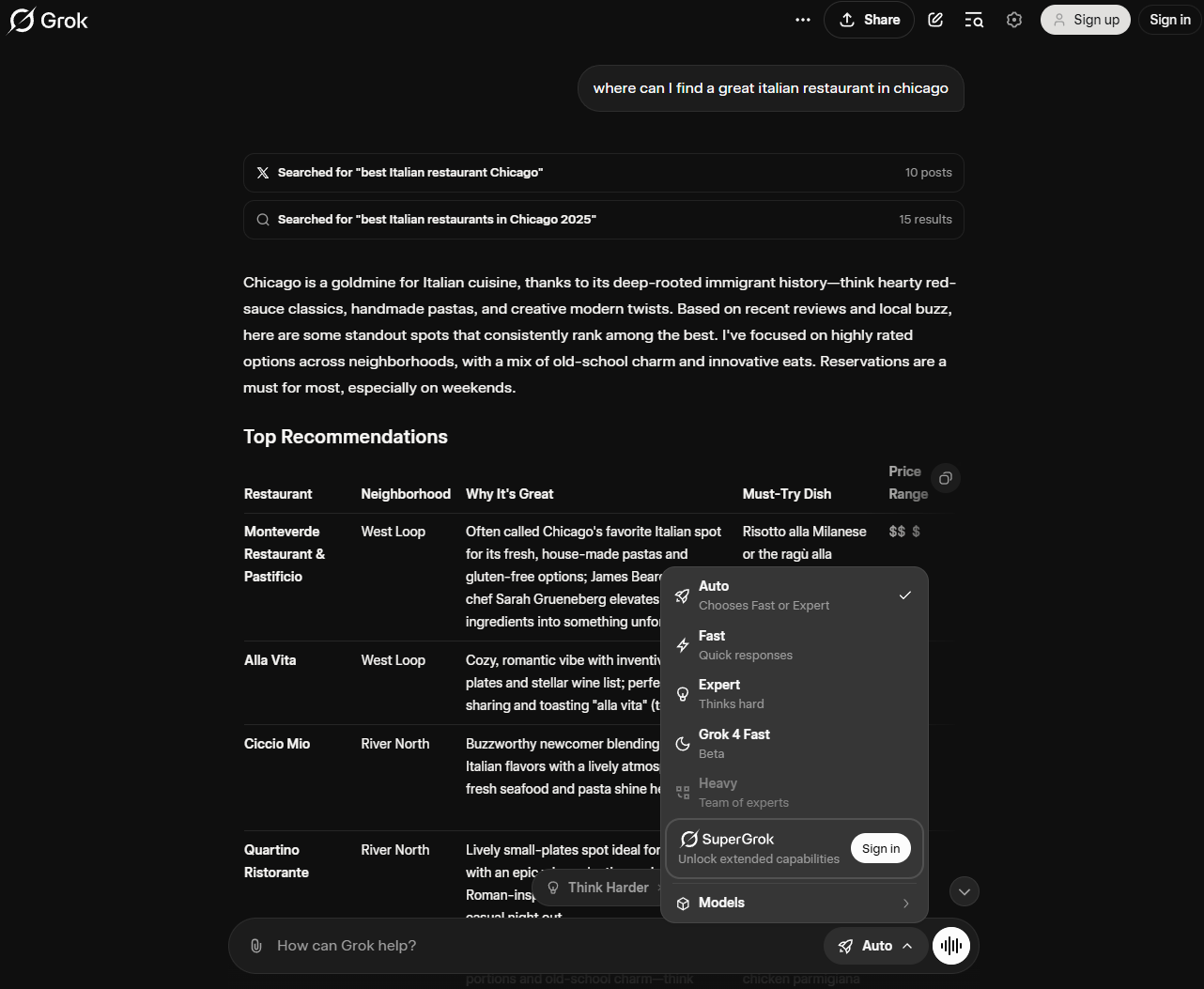
A Grok query displaying the different models you can use.

Grok offers a variety of models to choose from, and you get even more access if you’re willing to pay for it. Source: Tech.co testing

Grok is available for free for all users, but there are some paid plans to increase your limits. Check out our Grok pricing guide to learn more.

5. Writesonic – Best for Content Creation

  • Starting price: $39 per month
  • Free plan: Yes

If you need a bot to help you with large-scale writing tasks and bulk content creation, then Chatsonic is the best option currently on the market.

Writesonic
In Short

Pros: 

  • Huge range of additional tools
  • Great for businesses creating content
  • Build-your-own chatbot tool
  • Connected to the internet
  • Image generator

Cons:

  • Pricey if you don't need content creation features
  • Lack of customization options
  • High costs for generating lots of words


Pricing
  • Free plan available
  • Lite: $39/month
  • Standard: $79/month

There’s a ChatGPT-stye chatbot called Chatsonic included in all Writesonic plans (including the free plan) and it can help with a variety of tasks, including generating articles and blog posts, improving grammar, and bulk content generation. It also has tools that can be used to improve SEO and social media performance.

Now, Writesonic has caught up with OpenAI and offers users the ability to create custom chatbots with a tool called “Botsonic”. With Botsonic, you can edit the knowledge base of any bot you’re building by uploading documents, and you even import a bot you’ve made using a GPT language model into Writesonic.

Example of writesonic/chatsonic chat

Writesonic provided us with a lot of information about our requested topic, although we didn’t get those pictures of parrots we asked for. Source: Tech.co testing

Writesonic also includes Photosonic, its own AI image generator – but you can also generate images directly in Chatsonic. One of the big upsides to Writesonic’s chatbot feature is that it can access the internet in real time, so it won’t ever refuse to answer a question because of a knowledge cut-off point.

6. Meta AI – Best Chatbot for Social Media

  • Starting price: $10/month (coming soon)
  • Free plan: Yes

If you want your AI chatbot to be integrated into your social media experience, specifically on Facebook, Messenger, WhatsApp, or Instagram, you’ve found the best chatbot for that. Appropriately named Meta AI, this tool is Meta’s entry in the AI chatbot discussion, providing users with all the basics when it comes to responding to natural language prompts.

Meta AI
In Short

Pros: 

  • Built in to Meta platforms like Facebook and Instagram
  • Also offers Vibes service for lots of scrolling
  • Image generation and editing built in

Cons:

  • Meta's history of data mining
  • Limited integration with non-Meta services
  • Lots of errors and hallucinations
Pricing
  • Free plan available
  • Meta AI+: $10 per month (coming soon)

Currently powered by Llama 4 and Llama 3.1, Meta AI is available within the various social media channels from Meta, so you can easily craft messages to friends and get helpful summaries of your interactions.

Beyond that, though, you can access Meta AI on its own by heading over to the Meta AI website or downloading the Meta AI app. On the standalone platform, you’ll still have to log in to one of your Meta accounts, and Meta AI makes it very easy to share your generations on the various sites with a simple share button in the upper right corner.

Meta AI Vibes

The Vibes platform within Meta AI is a unique attempt to get users more interested in AI content. Source: Tech.co testing

In addition to the text generation functionality, Meta has some other tools that can help you out. For one, there’s the Create service, which allows you to generate images and videos that are quite realistic, even by today’s standards.

On top of that, there’s the newly released Vibes platform, which is effectively a TikTok feed of AI-generated videos and images.

7. Copilot – Best for Microsoft Users

  • Starting price: $30 per month
  • Free plan: Yes

If you’re entrenched in the Microsoft ecosystem of services, there’s only one chatbot that makes sense for you: Copilot. This AI model is Microsoft’s entry into the fray, with vast and comprehensive integration with a wide range of Microsoft services, including Windows, Office, Outlook, Teams, and more.

Copilot
In Short

Pros: 

  • Cites website sources it's using
  • Adjustable conversation style
  • Image and audio inputs are available
  • GPT-4 access

Cons:

  • 2,000-word cap on queries
  • Sign-in required for "longer conversations"


Pricing
  • Free plan available
  • First plan: $30/month
  • Second plan: $36/month

Copilot uses the same large language systems that have powered ChatGPT since its launch — currently GPT-5 and GPT-4o — but it is integrate with Microsoft’s technology, so you can get the full experience.

Just ensure you don’t bombard it with tons of questions at once, as it does deal well with this kind of informational overload and sometimes crashes -=— at least in our limited experience.

Askign copilot a question

Copilot is integrated with Bing, so you can easily provide prompts on the search engine. Source: Tech.co testing

The best thing about Copilot is that it’s completely free to use, and you don’t need to make an account to use it. It might verify that you’re human, but that just takes a single click and you’re ready to go.

Remember, though, signing in with your Microsoft account will give you the best experience and allow Copilot to provide you with longer answers.

8. Perplexity AI – Best for Research

  • Starting price: $40 per month
  • Free plan: Yes

Perplexity AI is an AI startup founded by Andy Konwinski, Aravind Srinivas, Denis Yarats, and Johnny Ho, who are all former Google AI researchers. There’s a free version available, while Perplexity Enterprise Pro costs $40 per month.

Perplexity AI
In Short

Pros: 

  • Provides pre-set prompts
  • Great at source citing
  • Clean & simple interface
  • Interesting 'Discover' tab
  • Playground tool included

Cons: 

  • Can be slow to answer
  • Not suitable for coding
  • Pricey paid plan
  • No custom model selection on free plan
Pricing
  • Free plan available
  • Pro: $40/month
  • Max: $325/month

Perplexity AI is powered by large language models from OpenAI (GPT-5) and Anthropic (Claude 4.5 Sonnet, Gemini 2.5), as well as its own technology.

More importantly, Perplexity AI’s language models are grounded in web search data and therefore have no knowledge cut-off. You can, for example, search “What happened on January 1, 2026?” and get a coherent answer from Perplexity AI.

perplexity AI results

Perplexity AI provides a robust set of information, including images and text, so you can fully research a topic with ease. Source: Tech.co testing

This key difference between Perplexity AI and many other widely-used chatbots like Gemini is that it always cites all of its sources used in any answer it gives, so users can make a judgment for themselves on whether the information is accurate, taking into account the source that it’s from. Images are also provided, sourced from the web. 

As you can see, the interface is pretty plain and uncluttered, and there’s also a “Discovery” tab, which will let you browse some trending stories and topics if you’re looking to explore the chatbot’s full potential. There’s also a Playground if you’d like a closer look at how the LLM functions.

9. Pi – Best Personal AI Chatbot

  • Starting price: N/A
  • Free plan: Yes

Pi is a chatbot launched by Inflection AI back in May of 2023. It’s designed to be a companion-style AI chatbot or “Personal AI” that can be used for lighthearted chatter, talking through problems, and generally being supportive.

Pi
In Short

Pros: 

  • Friendly & safe
  • Straightforward interface
  • Very quick responses

Cons: 

  • Not as powerful as ChatGPT
  • No real business application
Pricing
  • Free plan available
  • No paid option

Pi – which is completely free to use – has a welcoming interface, and like Perplexity AI, there’s a “Discovery” tab.

However, instead of being a direct route to trending topics, it’s a list of “conversation starters” you can use to prompt your conversations with Pi.

Pi app

The Pi interface is a bit more relaxed and well-designed, giving you a comfortable feeling while conversing with the AI chatbot. Source: Tech.co testing

Pi is a good Personal AI or Character AI alternative. It’s a little more general use than the build-it-yourself business/brand-focused chatbot offered by Personal AI, however, so don’t expect the same capabilities.

What Pi is really great for is pleasant conversations and talking through your problems. It’s never going to replace the likes of ChatGPT in work settings, but it looks well on its way to carving out its own, distinct niche.

10. Personal AI – Best Personal Assistant

  • Starting price: Custom
  • Free plan: Yes

Personal AI is exactly what its name implies: a personal AI assistant. The Human Labs Inc. creation is designed for a truly different and more specific purpose than generic giants like Gemini and ChatGPT.

Personal Ai
In Short

Pros: 

  • Highly customizable
  • Easy to train/edit
  • Lots of instructions

Cons: 

  • Long set-up time
  • Language model is small
  • Expensive plans
Pricing
  • Free plan available
  • Custom pricing for businesses

When you log in to Personal AI for the first time, it’ll ask you if you want to create a person for your professional life, personal life, or an “author.” You’ll need to upgrade to a different plan to create a personal AI for work, but the personal option is free.

You’ll then be able to choose if the AI should mirror you or someone else, and also edit its designated traits and communication styles.

You can then add information about your past work history, your interests, and various other aspects of your life – quite a bit like a social media profile. When we started to use it, it remembered things I’d put into my prompts regarding wanting to open a Bee sanctuary:

a chat with personal AI

As the name suggests, Personal AI provides more personal insights into your questions for life planning. Source: Tech.co testing

As we’ve covered, Personal AI is free to use. However, there’s also a paid version of the service, but you’ll have to reach out to them for an exact price, because they don’t list pricing publicly anymore.

Personal AI is quite easy to use, but if you want it to be truly effective, you’ll have to upload a lot of information about yourself during setup. If you’re happy to spend some time doing that, though, it’ll be much more helpful for personal development than a more general-use tool like ChatGPT or Claude.

11. Poe – Best Chatbot Aggregator

  • Starting price: $4.99 per month
  • Free plan: Yes

Poe isn’t actually a chatbot itself – it’s an AI platform that will allow you to access lots of other chatbots within a single, digital hub. If you’re someone who likes to have lots of choices – and you’re interested in using lots of different chatbots – then this might just be the platform for you.

Poe
In Short

Pros: 

  • Access to all major chatbots
  • Android and iOS apps
  • Assistant chatbot included
  • You can make your own AI bot

Cons: 

  • Assistant isn't very advanced
  • Pricey paid plans needed to access the best language models and features
Pricing
  • Free plan available
  • Starting price: $4.99/month

Despite its unique position in the market, Poe still provides its own chatbot, called Assistant, which you can use alongside all of the other apps and tools included within its platform.

Poe AI Chatbot List

Poe aggregates other AI chatbots into a single platform for easy comparison between models. Source: Tech.co testing

There’s a free version of Poe that’s available on the web, as well as iOS and Android devices via their respective app stores. However, the free plan won’t let you access every chatbot on the market – bots running advanced LLMs like GPT-5 are hidden behind a paywall.

12. You.com – Best Microsoft Copilot Alternative

  • Starting price: $15 per month
  • Free plan: Yes

You.com works similarly to Perplexity AI, combining the functions of a traditional search engine and an AI chatbot. When you start typing into the chat bar, for example, you’ll get auto-fill suggestions like you do when you’re using Google.

YouChat
In Short

Pros: 

  • Chatbot answer + web search
  • "Research" mode available
  • Access to multiple LLMs (GPT-4.1, Claude, Gemini)
  • Clear interface
  • Cites sources (usually)

Cons:

  • Not as useful for coding/paraphrasing etc.
  • Free plan has severe limitations
Pricing
  • Free plan available
  • Pro: $15/month
  • Max: $175/month

However, you’ll still be provided with a ChatGPT-style answer, and it’ll be sourced so you can click through to the websites it drew the information from. This makes it a good alternative for people who aren’t quite sold on Perplexity AI and Copilot.

YouChat questions

You.com provides users with in-depth answers and cited links, so you can follow up with the conversation. Source: Tech.co testing

You can use You.com powered by GPT-3.5 without making an account, but if you sign up for a paid plan, you’ll be able to use the latest models from OpenAI, Google, and Anthropic as well as other premium “modes”. There’s now a “research” mode available, which You.com says “provides analysis and topic explorations, with extensive citations and the ability to display information in an organized table.

13. Character AI – Best for Fun, Generated Images

  • Starting price: $9.99 per month
  • Free plan: Yes

Character AI is a chatbot platform that lets users chat with different characters/personas, rather than just a plain old chatbot. In October 2025, the company had around 20 million active users spending an average of two hours a day on the platform.

Character Ai
In Short

Pros: 

  • Some characters generate images
  • highly customizable
  • Users can make their own characters
  • You can use chatbots made by other people

Cons:

  • Some data privacy concerns
  • Chatbots aren't very advanced
  • Not suitable for work tasks
Pricing
  • Free plan available
  • c.ai+: $9.99/month
  • 20% for yearly contract

If you want to use Character AI, you’ll have to make an account. And, while it’s fun, we wouldn’t trust the information coming out of it as much as we would with Gemini or ChatGPT (although that’s not saying much).

Character AI conversation

Character AI allows users to ask specific characters, like Napoleon Bonaparte, questions as if they were AI chatbots. Source: Tech.co testing

There have been questions raised previously about whether Character AI is safe, and what the company does with the data created by conversations with users.

Honorable Mentions & Other AI Tools

Of course, the chatbots that we’ve featured in this article aren’t the only chatbots out there. There’s a whole ecosystem of tools available, many of which offer unique functionalities that may be a better fit for your particular needs.

Here are some other AI chatbots and models that you can choose from.

  • My AI – The AI chatbot that is built directly into the Snapchat interface for simple tasks like trivia and planning events.
  • Jasper AI – This is a very powerful tool, used by a significant number of businesses, and is just as useful as Writesonic (Chatsonic) for content creation.
  • OpenAI Platform Playground – This is an experimental tool made available by ChatGPT creators OpenAI. You can switch between different language models easily, and adjust other settings that you can’t normally change while using ChatGPT. Unfortunately, as of early 2026, this feature is no longer provided for free by OpenAI.
  • Replika AI – This is a “companion” chatbot — rather than assisting with day-to-day tasks, it allows users to interact with human-generated AI personas.
  • Quillbot – An AI companion for your written work that can paraphrase sentences, generate citations, and check your grammar.
  • MidJourney – This is the best AI image generator currently available. You don’t need any graphic design software to use Midjourney, but you will have to sign up to Discord to use the service.
  • Originality.ai – An AI detection tool that, while not 100% reliable (because none of them are), shows promising results that could help you spot AI slop.

On top of these AI platforms, vibe coding tools have become increasingly popular for businesses in 2026, allowing users to generate complete and functionality apps with natural language prompts.

Suffice to say, there are dozens of not hundreds of AI tools out there that perform a myriad of different functions, so if you haven’t found the right option for your business, just keep looking!

OpenAI Playground test question

The OpenAI Playground allows developers to get the most out of the OpenAI experience. Source: Tech.co testing

Is It Worth Upgrading to a Paid Plan?

Fortunately, most chatbots offer free plans that let you fire off prompts without paying a premium.

Free packages, like those offered by ChatGPT, Gemini, and Claude, offer surprisingly impressive capabilities, letting users write, plan, resolve queries using up-to-date data, and even create basic AI-generated images. For the casual AI user, these features will probably be enough to get by.

However, most free AI chatbots have pretty strict usage limits. For example, ChatGPT only lets free users send off 10 prompts every five hours, while Gemini Free limits requests to two per minute.

If you’re relying on the chatbot heavily to streamline work or personal processes, we’d recommend increasing access through a paid plan. Paid plans offer much more advanced features too, like file uploads, advanced image creation, and enhanced audio recognition.

Stick with a free plan if:

  • You only use chatbots sporadically
  • You aren’t interested in creating AI-generated images
  • You don’t want to commit to one chatbot
  • You use chatbots to assist with simple tasks like writing and problem-solving

You should upgrade to a paid plan if:

  • You use chatbots regularly for work or personal purposes
  • You want to generate high volumes of images
  • You want to create your own GPT
  • You want to use AI to assist with complex tasks like coding or data analysis

Tips on How to Use AI Responsibly

AI chatbots have a near-endless list of use cases and are undoubtedly very useful. But as is the case with any powerful yet freely available technology, it’s important to be aware of the risks and ethical considerations, and use it responsibly. Here are some tips on how to use AI responsibly.

  • Understand regulations –  Right now, Chatbots aren’t governed by any specific regulation, with governments only just getting around to exploring ways to manage AI development more broadly. But that’s changing, so be sure to stay aware of regulations in the space.
  • Curb data mining – Most chatbots have different policies that govern how they can use your data, as a user. Some allow you to turn off tracking, while others don’t, so if you don’t want your data used to train AI, make sure you find a model that allows that.
  • Ask permission – Some businesses have banned employees from using ChatGPT over privacy fears, and if you’re dealing with sensitive information, from customer data to source codes, then you don’t want to breach your own company’s rules and regulations.
  • Be honest – Of course, it’s also good to be upfront about whether you’re using AI for your own sake, with many bosses concerned that employees are using AI without permission.

All in all, AI usage is growing at a substantial rate and these tips will continue to evolve as time goes on, so make sure to check for more advice on how to use AI in the workplace.

Written by:
Aaron Drapkin is Tech.co's Content Manager. He has been researching and writing about technology, politics, and society in print and online publications since graduating with a Philosophy degree from the University of Bristol six years ago. Aaron's focus areas include VPNs, cybersecurity, AI and project management software. He has been quoted in the Daily Mirror, Daily Express, The Daily Mail, Computer Weekly, Cybernews, Lifewire, HR News and the Silicon Republic speaking on various privacy and cybersecurity issues, and has articles published in Wired, Vice, Metro, ProPrivacy, The Week, and Politics.co.uk covering a wide range of topics.

Apple Must Let Developers Link to Outside Payments, Says Supreme Court

The tech giant will still take a 27% cut of in-app purchases even if developers bypass its payment system.

Apple will open up its US App Store to allow outside payment options, following a Supreme Court ruling this week.

The company will now let all third-party apps sold in the US link to an outside developer website in order to process payments for in-app purchases.

Developers who choose to bypass Apple’s own payment system will be subject to pay a 27% share of revenue to the tech giant. 

This latest news comes as a secondary blow for the iPhone maker this year, as it was recently shared that Microsoft had overtaken it in becoming the most valuable company in the world. 

Supreme Court Doesn’t Want to Hear It

According to the Supreme Court decision, Apple’s business model didn’t violate antitrust laws. It did, however, go against California’s Unfair Competition Law by limiting developers’ ability to reference and signpost to alternate, potentially cheaper, payment systems.

Both Apple and Epic Games Inc., the developer behind Fortnite, asked the court to hear an appeal, but this was turned down without explanation. 


About Tech.co Video Thumbnail Showing Lead Writer Conor Cawley Smiling Next to Tech.co LogoThis just in! View
the top business tech deals for 2026 👨‍💻
See the list button

Following this, Apple has since introduced StoreKit Purchase Link Entitlement (US), allowing developers that offer in-app purchases the ability to add a link to their website that shares information on other ways to pay.

Apple Remains Unconvinced

Apple has since updated its guidelines but was sure to state that:

“We believe Apple’s in-app purchase system is the most convenient, safe, and secure way for users to purchase digital goods and services.”

It also shared a list of situations it wouldn’t be able to assist with should customers use a third-party payment option. This includes refunds, purchase history, and subscription management. For developers choosing to provide alternative payment systems, the responsibility of resolving these issues would now fall to them.

Despite publishing these guidelines, Apple remains unconvinced that outside payment options will work and consider collecting commissions to be “exceedingly difficult and in many cases, impossible,” due to the size of the App Store.

Google Faces Scrutiny Too

Linking to third-party payment options is fast becoming the norm for tech companies, with similar rulings having recently taken place.

Back in December, Google was said to have “willfully acquired or maintained monopoly power by engaging in anticompetitive conduct” against Epic Games, before being found guilty by U.S. District Judge James Donato.

Similarly, the search giant paid $700 million in settlement with the US attorney general over another case of monopolizing on the Play Store. This led to the company making changes to its app store model, including the option for developers to use alternative billing methods.

Written by:
Aaron Drapkin is Tech.co's Content Manager. He has been researching and writing about technology, politics, and society in print and online publications since graduating with a Philosophy degree from the University of Bristol six years ago. Aaron's focus areas include VPNs, cybersecurity, AI and project management software. He has been quoted in the Daily Mirror, Daily Express, The Daily Mail, Computer Weekly, Cybernews, Lifewire, HR News and the Silicon Republic speaking on various privacy and cybersecurity issues, and has articles published in Wired, Vice, Metro, ProPrivacy, The Week, and Politics.co.uk covering a wide range of topics.

India Warns Legal Consequences For Tech Companies Over Deepfake Inaction

What do an Indian cricket legend and one of the most famous American singers have in common? Deepfake scams.

Following a rise in deepfake advertisements in the country, India has issued a warning to tech companies that it is prepared to impose bans if they fail to take appropriate measures against them.

This comes after an ad went viral using a deepfake of Indian cricket legend Sachin Tendulkar to endorse a gaming app.  

Only last week Taylor Swift was involved in a similar AI scam, with her deepfake likeness seemingly endorsing Le Creuset cookware products, sparking concern over a rise of deepfakes in the mainstream.

Efforts To End Deepfakes

India’s junior minister for information technology, Rajeev Chandrasekhar told press that the ministry had informed tech platforms that failure to take action against deepfakes would result in legal consequences from New Delhi.

He also confirmed that the ministry plans to change the nation’s IT rules imminently, in order to establish definitive laws around deepfakes that will counteract their use.


About Tech.co Video Thumbnail Showing Lead Writer Conor Cawley Smiling Next to Tech.co LogoThis just in! View
the top business tech deals for 2026 👨‍💻
See the list button

Speaking to a press conference, Chandrasekhar stated: “If a platform thinks that they can get away without taking down deepfake videos, or merely maintain a casual approach to it, we have the power to protect our citizens by blocking such platforms.”

Tendulkar, one of India’s best-loved cricketers and the man whose likeness was used in the gaming ad that sparked the recent conversation, wrote on Twitter/X: “It is disturbing to see rampant misuse of technology. Social media platforms need to be alert and responsive to complaints. Swift action from their end is crucial to stopping the spread of misinformation and deepfakes.” 

“Unlawful And Dangerous”

Currently, India’s IT rules state that social media platforms have to ensure that “no misinformation is posted by any user.” Should they fail to comply, the platforms can be taken to court under Indian law. 

While the new rules around deepfakes are yet to be confirmed, it’s likely they will contain similar constraints and instruct platforms to remove the videos immediately when flagged. 

“Deepfake content is unlawful and dangerous, and it is unacceptable for companies to hide behind claims of ‘best-effort’ while allowing these fabrications to spread.” – Chandrasekhar

Celebrity Deepfakes On The Rise

Unfortunately this incident isn’t isolated, as it appears India is battling a rise in deepfakes, specifically within Bollywood. AI expert Aarti Samani has put this down to a young population, obsession with celebrity culture, and heavy use of social media. The result? “[deepfake] videos spreading quickly, magnifying the problem,” she explained.

The issue is growing further afield too, with the recent case of Taylor Swift and her supposed cookware endorsement, as well as a deepfake of YouTuber MrBeast being linked to a 2023 iPhone scam.

While many think they’re not susceptible to falling for a likeness, it has been proven that humans can only spot deepfake speech 73% of the time. This in itself causes particular concern as it’s election year here in the United States, the United Kingdom, and India, and an invasion of deepfakes on social media has already started to disrupt campaigns.

If you’re a consumer of the platforms and media that deepfakes are infiltrating, our advice would be to think critically as to whether a celebrity would endorse a particular campaign, and if in doubt, use an AI image detector.

Written by:
Aaron Drapkin is Tech.co's Content Manager. He has been researching and writing about technology, politics, and society in print and online publications since graduating with a Philosophy degree from the University of Bristol six years ago. Aaron's focus areas include VPNs, cybersecurity, AI and project management software. He has been quoted in the Daily Mirror, Daily Express, The Daily Mail, Computer Weekly, Cybernews, Lifewire, HR News and the Silicon Republic speaking on various privacy and cybersecurity issues, and has articles published in Wired, Vice, Metro, ProPrivacy, The Week, and Politics.co.uk covering a wide range of topics.

Amazon Launches New Generative AI Shopping Tool

Tired of scrolling through long product listings and reviews? Amazon’s latest feature aims to make shopping even easier.

Amazon is rolling out a new generative AI tool that can answer shoppers’ questions about a product and respond to creative prompts.

The feature has been designed to prevent shoppers from having to scroll through reviews or a product listing itself in order to find information.

This news highlights a clear trend of AI capabilities beginning to merge with e-Commerce. Just last week Microsoft and Walmart announced an AI-powered search function that aims to understand the context behind a customer’s query in order to generate personalized search results.

Better, Easier Shopping Ahead

Ever had a question about a product on Amazon that you struggled to find an answer for? Scrolling through lengthy product listings or hundreds of reviews in the chance of finding the information you need could soon be a thing of the past. 

Amazon has this week rolled out its latest AI tool that can answer shoppers’ questions about a specific item. In a few seconds the AI feature will deliver an answer, having first summarized information collated from the product review and listing.

This isn’t a wide-scale release, however. Currently only available in Amazon’s mobile app, it’s likely the technology will go through several iterations before being released to the web, with Amazon spokesperson Maria Boschetti stating:

“We’re constantly inventing to help make customers’ lives better and easier, and are currently testing a new feature powered by generative AI to improve shopping on Amazon by helping customers get answers to commonly asked product questions”.


About Tech.co Video Thumbnail Showing Lead Writer Conor Cawley Smiling Next to Tech.co LogoThis just in! View
the top business tech deals for 2026 👨‍💻
See the list button

Let’s Not Get Too Chatty Though

The tool hasn’t been designed to carry out a “conversation”, like OpenAI’s ChatGPT or Google’s Bard, but it does have a few creative quirks for users to enjoy.

Need to hear a product description written in the style of Yoda from Star Wars? How about a haiku on the t-shirt you’ve just been looking at? The new search feature will respond to creative prompts like those, but that’s where the fun will end.

Deviating into non-item based questions such as “Who is Jeff Bezos?” will return an error message, as the tool is not designed to veer from the topic of products.

Full Steam Ahead For AI

When it comes to AI tools, this isn’t Amazon’s first rodeo. 

Towards the end of last year, it released Amazon Q – a generative-AI assistant for the workplace that has been trained on 17 years of Amazon Web Services information. As well as this, third-party sellers can now use AI features to help them generate imagery for ads and write product listings.

Perhaps most interestingly however, is the possible foundation for this latest AI search functionality – Amazon’s AI-generated product review summaries. The company began testing this feature last summer, and the functionality gave users an overview of what shoppers liked and disliked about a particular product. This kind of information seems to main source of context that the new generative search capability is drawing upon.

All in all, Amazon doesn’t look set to slow down its AI innovations any time soon.

In its latest earnings call, CEO of Amazon Web Services Andy Jassy stated that the company will be using generative-AI to forecast inventory and figure out the best routes for its drivers. 

“Generative-AI is going to change every customer experience, and it’s going to make it much more accessible for everyday developers, and even business users, to use. So I think there’s going to be a lot of societal good.”

Written by:
Aaron Drapkin is Tech.co's Content Manager. He has been researching and writing about technology, politics, and society in print and online publications since graduating with a Philosophy degree from the University of Bristol six years ago. Aaron's focus areas include VPNs, cybersecurity, AI and project management software. He has been quoted in the Daily Mirror, Daily Express, The Daily Mail, Computer Weekly, Cybernews, Lifewire, HR News and the Silicon Republic speaking on various privacy and cybersecurity issues, and has articles published in Wired, Vice, Metro, ProPrivacy, The Week, and Politics.co.uk covering a wide range of topics.

Google Follows Last Week’s Layoffs with Even More Layoffs

Google announces a second round of layoffs in as many weeks, this time impacting its sales team.

Following last week’s news that it was to cut hundreds of staff from its Augmented Reality (AR) division, Google has just announced a fresh wave of redundancies. This time within its advertising sales team.

According to Google, the layoffs are part of a restructure that will help facilitate the “best possible service to our Ads customers”.

The news comes following significant job cuts at both Amazon and Duolingo in recent weeks, further confirming the concerning 2024 trend for tech redundancies.

Restructuring Specialist Teams

Around 1,000 Google employees in the AR, Pixel, Nest, and Fitbit teams got the news last week that their jobs were no more. Following this, “a few hundred roles globally” across the ad sales division are also being eliminated, this time owing to structural changes within the team.

According to Google spokesperson Chris Pappas:

“Every year we go through a rigorous process to structure our team to provide the best service to our Ads customers. We map customers to the right specialist teams and sales channels to meet their service needs. As part of this, a few hundred roles globally are being eliminated and impacted employees will be able to apply for open roles or elsewhere at Google.”


About Tech.co Video Thumbnail Showing Lead Writer Conor Cawley Smiling Next to Tech.co LogoThis just in! View
the top business tech deals for 2026 👨‍💻
See the list button

Better Support For SMEs

The news was delivered to staff via a memo from Google senior vice president Philipp Schindler, which also seemed to outline the restructure plans.

The redundancies mostly affect its Large Customer Sales unit, who are the team that sell ads to large businesses. As a result, the Google Customer Solutions team – those who sell to smaller clients – are now set to become the core ad sales team.

According to the tech giant, jobs cuts specifically in this area are intended to bring about better support for small and medium sized businesses advertising on Google. So much so, that the changes could actually result in increased hiring across the customer support team.

More Cuts To Come?

This time last year, Google cut around 12,000 jobs, reducing its workforce by roughly 6%. With layoffs remaining somewhat consistent throughout 2023, and now into 2024, speculation remains that this won’t be the last wave of cuts.

According to a company statement, Google said: “We’re responsibly investing in our company’s biggest priorities and the significant opportunities ahead. To best position us for these opportunities, throughout the second half of 2023, a number of our teams made changes to become more efficient and work better, and to align their resources to their biggest product priorities.”

Written by:
Aaron Drapkin is Tech.co's Content Manager. He has been researching and writing about technology, politics, and society in print and online publications since graduating with a Philosophy degree from the University of Bristol six years ago. Aaron's focus areas include VPNs, cybersecurity, AI and project management software. He has been quoted in the Daily Mirror, Daily Express, The Daily Mail, Computer Weekly, Cybernews, Lifewire, HR News and the Silicon Republic speaking on various privacy and cybersecurity issues, and has articles published in Wired, Vice, Metro, ProPrivacy, The Week, and Politics.co.uk covering a wide range of topics.

Equifax Customers Have Days Left to Claim up to $20,000 in Data Breach Settlement

Customers are entitled to thousands of dollars in the huge data breach settlement that affected over 140 million users.

Back in 2017, Equifax suffered one of the largest data breaches ever seen, compromising the details of over 140 million of its customers.

Among the details that were taken, names, addresses, driving licences and social security numbers were all exposed. That’s not to mention a smaller portion who had their credit card information stolen, too.

The case was subject of a class action lawsuit, and while the original deadline for claims has passed, Equifax customers can still apply for compensation for certain expenses. Read on to find out how.

Extended Claims Period in Equifax Settlement

The Equifax breach of 2017 was shocking in its scale, with 147 million customers affected, and a huge mountain of data exposed, which included names, addresses, driving licences and social security numbers. Some users, around 200,000, even had credit card details exposed.

A settlement lawsuit was made against Equifax, and while the company was cleared of any wrong doing, it did agree to compensate customers who had been impacted by the breach.

When is the Deadline for Equifax Breach Settlement?

The original date for claims to be submitted under the settlement has long passed, and unless you’ve got a time machine and can travel back to January 22, 2020, you’re out of luck. Customers who got their claims in before this deadline were eligible for free credit monitoring, or $125 cash.

However, there is also an extended claims period, which runs to January 22 2024, meaning that even if you missed the original deadline, you could still be entitled to some compensation.


About Tech.co Video Thumbnail Showing Lead Writer Conor Cawley Smiling Next to Tech.co LogoThis just in! View
the top business tech deals for 2026 👨‍💻
See the list button

Claims are still open for those who wish to be reimbursed for:

  • Time spent during the extended claims period (January 23 2020 to January 22 2024), recovering from fraud or ID theft caused by the breach, for $25 an hour.

and/or

  • Out of pocket losses during the extended claims period, as a result of the breach, up to $20,000.

How to Make an Equifax Settlement Claim – and Who is Eligible?

Anyone who was a victim of the original data breach is eligible. If you don’t know if you were affected, all you need is your surname and the last six digits of your social security number to find out. You can check via the tool on the settlement website.

To make a claim in the Equifax extended period settlement, simply head to the official Equifax Settlement website.

You’ll need to submit some information with your claim, depending on how you were affected. For example, if you suffered additional costs, expenses or losses due to the breach, you may be asked for police reports, IRS documents, FTC Identify Theft Reports, and letters refusing to refund you for fraudulent charges.

Written by:
Aaron Drapkin is Tech.co's Content Manager. He has been researching and writing about technology, politics, and society in print and online publications since graduating with a Philosophy degree from the University of Bristol six years ago. Aaron's focus areas include VPNs, cybersecurity, AI and project management software. He has been quoted in the Daily Mirror, Daily Express, The Daily Mail, Computer Weekly, Cybernews, Lifewire, HR News and the Silicon Republic speaking on various privacy and cybersecurity issues, and has articles published in Wired, Vice, Metro, ProPrivacy, The Week, and Politics.co.uk covering a wide range of topics.

How to Use Copilot Pro, Microsoft’s Latest AI Tool

Copilot Pro is now available for Microsoft 365 subscribers - and it costs the same amount of money as ChatGPT Plus.

Microsoft has announced a new subscription package, Copilot Pro, which is designed to give individual consumers access to the company’s AI tool – and it’s powered by the same language model that brings ChatGPT to life.

Access to the technology has also been expanded beyond the company’s trial program, and is now open to any business that wants to use it. But what is Microsoft’s Copilot Pro, who can use it, and how much does it cost? In this short-but-sweet guide, we cover:

What Is Copilot Pro?

Microsoft has announced a new AI subscription package this week, called Copilot Pro – which the company has said is geared towards individuals rather than businesses.

Before this, Microsoft had only released Copilot to businesses as part of an Early Access Program largely made up of Fortune 500 companies. Now, the Pro version is available for the average person to download and use in their workday.

Copilot Pro, Microsoft says, provides a “single AI experience” running across all of your devices and applications.

Along with access to the AI tool within Microsoft apps, you’ll also get access to GPT-4 Turbo “during peak times for faster performance” and enhanced AI image creation capabilities with Image Creator from Designer.


About Tech.co Video Thumbnail Showing Lead Writer Conor Cawley Smiling Next to Tech.co LogoThis just in! View
the top business tech deals for 2026 👨‍💻
See the list button

How Much Does Copilot Pro Cost?

Copilot Pro currently costs $20 per user, per month for a subscription. However, you will need an existing Microsoft 365 Personal or Family account to use Copilot Pro, as it can’t be just bought as a standalone AI tool to use with any program.

Although it doesn’t quite fulfill the same purpose, it’s a lot cheaper than some of the AI-powered content generation tools out there, such as Jasper. Considering you’ll have access to GPT-4 Turbo, it’s pretty good value for money.

How to Use Microsoft Copilot Pro

You can use Copilot Pro today by purchasing a subscription from Microsoft. As we’ve just covered, Copilot Pro costs $20 per user, per month at the moment, which is roughly in line with premium generative AI subscriptions offered by competitors like Anthropic’s Claude AI.

Once you’ve purchased a subscription, you’ll be able to use Copilot in Microsoft Word, Excel, and various other Microsoft apps. The Windows Key + C is the keyboard shortcut that brings up Copilot at present.

If you purchase a subscription and open a Word document, for example, you could ask Copilot to draft you a blog post rather than write it yourself. In Excel, you could ask it to create a chart or graphic based on the data you’ve provided.

As with most generative AI tool, working out how to use Copilot is pretty intuitive – just make sure your prompts are clear and as unambiguous as possible.

Can You Use Copilot for Free?

It’s not possible to use Copilot Pro for free – you’ll have to pay the subscription fee, which is the same price as a subscription to ChatGPT Plus.

You can, of course, access Copilot for free on the web if you want to see what the chatbot is made of, although it won’t be nearly as useful as the paid version you can use inside your Microsoft applications. The same goes for Copilot for Bing, which is accessible via the search engine.

Remember, if you’re looking for free AI tools, there are plenty of Copilot alternatives, such as Bard, which has a free version available powered by Gemini Pro.

Microsoft Expands Copilot Access to More Businesses

Along with a new individual/consumer-facing product, Microsoft has also expanded access to copilot to small businesses. So far, the software has only been available to a select few companies that participated in the early access program.

“Today we are excited to announce that Copilot for Microsoft 365 is now available for organizations of all sizes — with no seat minimum” one section of the blog posts states.

It’s unlikely to unseat ChatGPT as the world’s favorite AI tool just yet, but this marks an important expansion of access for millions of businesses who want a simple AI solution that integrates into the apps they use every day without a fuss.

Written by:
Aaron Drapkin is Tech.co's Content Manager. He has been researching and writing about technology, politics, and society in print and online publications since graduating with a Philosophy degree from the University of Bristol six years ago. Aaron's focus areas include VPNs, cybersecurity, AI and project management software. He has been quoted in the Daily Mirror, Daily Express, The Daily Mail, Computer Weekly, Cybernews, Lifewire, HR News and the Silicon Republic speaking on various privacy and cybersecurity issues, and has articles published in Wired, Vice, Metro, ProPrivacy, The Week, and Politics.co.uk covering a wide range of topics.

How to Future-Proof Your Career Against AI With 8 Simple Skills

Developments in AI don't have to cost you your career. Stay ahead of the curve with these expert-led steps.

AI-powered tools such as ChatGPT have made it easier for businesses to automate processes, ushering in a new era of workplace productivity, but leaving many workers anxious about their future employment as a result.

And it’s not just clerical roles on the chopping block. As AI models become even more adept at human-like reasoning, even previously ‘safe’ jobs including lawyers, coders, and financial analysts are at risk of becoming augmented or replaced altogether, if current trends continue.

But if you’re concerned about the future viability of your job, don’t hit the panic button just yet. There are a number of practical measures you can take to navigate the uncertainty, including leveraging your soft skills and using AI to your advantage.

Flip the narrative on job-stealing-AI with these simple, expert-led steps below, or read on to learn more about the technology’s current impact on the employment landscape.

  1. Use AI to speed up existing processes 
  2. Get proficient with ChatGPT Prompts
  3. Create a custom GPT for your company
  4. Become a research pro
  5. Hone your emotional intelligence
  6. Develop your creativity
  7. Work on your personal brand 
  8. Diversify your skillset

As the AI Takeover Looms, Which Roles Are The Most Vulnerable?

Technology has been automating jobs since the days of the power loom. However, while the previous industrial revolution revolved around physical labor, AI’s enhanced data processing and cognitive abilities make it a threat to a variety of clerical and knowledge-based roles.

To put a number on it, research firm Forrester predicts as many as 2.4 million jobs could be replaced in the US by 2023, but which ones are the most likely to be impacted?

As demonstrated in IBM’s recent decision to phase out back-office HR positions, roles at the greatest risk of replacement include administrative jobs like data entry clerks, human resources assistants, and account managers.


About Tech.co Video Thumbnail Showing Lead Writer Conor Cawley Smiling Next to Tech.co LogoThis just in! View
the top business tech deals for 2026 👨‍💻
See the list button

Legal and scientific assistants are also likely to see the nature of their roles change in coming years, according to Forester, while content writers and graphic designers will also face growing competition from AI chatbots.

While OpenAI’s powerful GPT-4 technology poses an increasing risk to high-salaried positions like lawyers, engineers, and scientists, it’s more likely that AI will be used to augment these roles rather than oust them altogether. But whatever your field or experience level, steps can be taken to mitigate the technology impact, as we explore below.

How to Protect Your Job Against AI in 8 Steps

Worried about AI? Take fate into your own hands with these simple actions.

1. Use AI to your advantage

As the adage goes, if you can’t beat them join them. While there are loads of tasks humans can complete better than bots, there’s no use competing against tools like ChatGPT when it comes to streamlining basic work processes.

By using AI to carry out basic functions like task scheduling, time management, and data analysis, you’ll have more time and energy to focus on human-led tasks. Using the technology smartly will also give you a leg-up over other colleagues with less AI literacy, whilst giving you leverage over your workplace’s future AI policy.

“Learn to work alongside AI systems as tools, leveraging their capabilities to enhance productivity and efficiency” Remi Alli, a lawyer from PR firm Elite Exclusivity explains. “Actively seek opportunities to incorporate AI tools into your work processes, which can make your role more essential.”

2. Get proficient with ChatGPT Prompts

A chatbot response is only as good as its input. So, another way to make the most of tools like ChatGPT, Google Bard, and Gemini is by learning to master the art of the prompt.

Generally speaking, there are a number of key factors to bear in mind when crafting your prompt. You should use neutral, objective language to avoid influencing the response with subjective framing. You should also be as specific as possible, add lots of context and examples for the chatbot to replicate, and specify what you aren’t looking for in an answer.

“Learn how to create prompts and build a process where you can produce ten times the output in far less time with far less effort. Being able to accomplish the work of multiple people effectively will help you stand out.” – Steven J.Wilson, Financial services marketing consultant

Whether you’re using ChatGPT for SEO research or content production, it’s also worth looking up tried-and-tested ChatGPT prompt examples so you can best utilize it for your specific industry.

3. Create a custom GPT for your company

OpenAI recently launched the GPT store, enabling users to create and profit from their own custom GPT. Learning the ropes of existing chatbots is one thing, but making a custom GPT for your company will help to make your role even more indispensable by proving to your employer that you’re an expert in the field.

Custom GPTs can service businesses in a variety of ways. They could be used as an internal resource center, helping employees get answers to company-focused queries quickly, or could also be used to handle external customer support inquiries. You don’t need to be an expert coder to build one, either. The process only takes around 15 minutes from start to finish as long as you follow these simple steps.

4. Become a research pro

There’s no denying that ChatGPT is a decent research companion. But with ChatGPT 3.5 only being able to retrieve information up to January 2022, and ChatGPT-4’s data cap only expanding to April of last year, the chatbot isn’t able to include contemporary data in its responses. AI chatbots are also prone to errors, providing incomplete information, and lacking source information, limiting their use even more.

To remedy these shortcomings it’s important to utilize a wide range of channels – from online blogs to academic journals – when conducting research. It’s also worth fact-checking the responses you receive from chatbots, to avoid relying on the tools wholeheartedly.

5. Hone your emotional intelligence

No matter how advanced AI gets, it will never be able to replace a human’s ability to emphasize and connect on an emotional level. Therefore, one way to gain leverage over AI, and to make yourself an indispensable player in your team, is to hone and develop your emotional intelligence (EI).

“A worker needs to consider, in their specific industry, what can AI not do. Learn and grow into that space. Will AI eventually move into that space? Possibly, so workers will need to regularly change course.” – Bryan Driscoll,  lawyer and HR consultant

Workers with high levels of EI are more adept at building strong relationships with colleagues, navigating unpredictable situations, and collaborating efficiently. In fact, a TalentSmart survey revealed that 90% of top performers are found to have high emotional intelligence.

There are lots of ways to demonstrate EI in a workplace context, including responding positively to new initiatives, being flexible with demands, socializing with co-workers outside of working hours, and practicing active listening.

6. Develop your creativity

Another facet where AI falls short is creativity. While chatbots are capable of processing swathes of data and generating complex code at the drop of the hat, AI will never be able to generate an original idea quite like a human.

This drawback is why AI models pose much less of a threat to jobs that hinge on creativity like novelists, choreographers, stylists, and musicians. But it’s not just creatives that will be shielded from the takeover. As long as you’re able to demonstrate creative processes in your current job, you’re going to have an advantage over AI.

“You will not be supplanted by AI in future
generations if you are a creative thinker who is always poised to solve problems, regardless of whether you are an expert in artificial intelligence or not.” –  Professor Te Wu, CEO of PMO Advisory

Even if you think you lack a creative streak, there are tons of ways to illustrate this strength to your employer, including brainstorming new ideas, reassessing establishing processes, and being open to innovative thinking.

7. Work on your personal brand

AI can accurately be described as a Jack of all trades, but a master of none. While chatbots are capable of carrying out a seemingly limited array of tasks, they will never be able to replicate the expertise, knowledge, and influence held by industry leaders.

Therefore, one of the best ways to safeguard your position in your current job and beyond is by carving out a specific niche in your field and developing your personal brand. Doing so will improve your competitive advantage in your industry, not just against AI tools, but against other workers vying for similar positions.

You don’t need to do this on your own either. Connecting with like-minded people and building a network is an excellent way to solidify your position as an industry leader, and to improve your career’s longevity.

8. Diversify your skillset

Finally, for those working in roles at greater risk of automation, now is an excellent time to strengthen your employment advantage by developing new skills.

It’s never too late to upskill, and as AI continues to disrupt the job market, adding more strings to your bow is the best way to stay ahead of the curve. Human skills that involve creativity, critical thinking, and problem-solving are a great place to start, as they’re becoming even more valuable in the age of AI. However, doubling down and improving your digital literacy will also serve you well, and make it easier to adapt to the changing landscape of work.

“AI relies heavily on data as a component. Gain expertise in comprehending, interpreting, and working with data by developing your talents. Data analysis, data visualization, and fundamental statistical understanding are all examples of this.” – Steve Elliot, Owner of Restoration1

Still an AI novice? It doesn’t take long to clue yourself up on the developing tech, especially with the right resources. Check out our guide to the best free AI training courses to learn how to use AI to your advantage.

Written by:
Aaron Drapkin is Tech.co's Content Manager. He has been researching and writing about technology, politics, and society in print and online publications since graduating with a Philosophy degree from the University of Bristol six years ago. Aaron's focus areas include VPNs, cybersecurity, AI and project management software. He has been quoted in the Daily Mirror, Daily Express, The Daily Mail, Computer Weekly, Cybernews, Lifewire, HR News and the Silicon Republic speaking on various privacy and cybersecurity issues, and has articles published in Wired, Vice, Metro, ProPrivacy, The Week, and Politics.co.uk covering a wide range of topics.

ChatGPT Will Send Users to a Voting Page When Asked About the Election

OpenAI has published the actions it is taking to ensure that ChatGPT used in abusive ways during this historic election year.

OpenAI has unveiled its plans to ensure ChatGPT doesn’t turn into a disruptive influence in the elections that are taking place across the globe this year, including in the US and UK.

One of the steps the company is taking to ensure US users are presented with legitimate voting information is to direct them to an “authoritative” voting site called CanIVote.Org, where users can find information relating to election procedures, voting locations, as well as early and absentee voting.

The startup also announced a raft of other important clarifications and changes relating to political content and abuse prevention on its platforms, which remain the most popular AI tools used by businesses.

ChatGPT to Direct Users to Page Containing Voting Information

“In the United States, we are working with the National Association of Secretaries of State (NASS), the nation’s oldest nonpartisan professional organization for public officials,” OpenAI revealed in a blog post this week.

As part of its approach to the 2024 US election, ChatGPT will send users directly to CanIVote.org, when asked certain questions about voting issues.

CanIVote.org is a webpage where all eligible US voters can find out their voter registration status, the location of their nearest polling station, and information on what constitutes valid identification for voting.

There’s also information relating to absentee and early voting available through the site, via links to state-based election authorities.


About Tech.co Video Thumbnail Showing Lead Writer Conor Cawley Smiling Next to Tech.co LogoThis just in! View
the top business tech deals for 2026 👨‍💻
See the list button

If this sort of action is successful in the US, OpenAI says, then they will repeat the approach in other regions during election cycles.

Other Steps ChatGPT is Taking During the Election Year

Along with directing voters to legitimate sources of voting information, there are several other steps OpenAI says it will take to ensure ChatGPT is not misused during election year.

For example, you won’t be able to build a GPT (a custom chatbot) that mimics a political figure or institution, and then pretend to speak on their behalf. “Applications” that try to deter people from participating are also off the menu.

“We work to anticipate and prevent relevant abuse—such as misleading “deepfakes”, scaled influence operations, or chatbots impersonating candidates,” Open AI says.

“Prior to releasing new systems, we red team them, engage users and external partners for feedback, and build safety mitigations to reduce the potential for harm,” the company adds.

In terms of image generation, early this year, ChatGPT is implementing the Coalition for Content Provenance and Authenticity’s digital credentials – which involves attaching a cryptographic marker to all images generated using DALL-E.

OpenAI also says it has seen some “promising” results from a new provenance classifier the company is experimenting with. The technology is designed to detect whether an image has been created with DALL-E even if it has been modified in some way.

Will ChatGPT Be a Good or a Bad Influence on Elections?

ChatGPT is widely used by businesses across the United States and the chatbot will be expected to respond cogently to an avalanche of political and legal queries as the election joins closer.

Although the prospect of ChatGPT – as well as other AI tools – being used to spread disinformation has been spoken about at great length, whether ChatGPT specifically will have a particularly negative impact on elections is far from clean-cut.

Of course, there’s the risk that ChatGPT provides incorrect political information unintentionally – although OpenAI seems to be addressing this possibility head-on with its approach.

Indeed, plans to direct voters to a site with legitimate voting information – and ensuring ChatGPT doesn’t misrepresent democratic processes – would suggest, at least on the surface, that OpenAI may have enforced tighter regulations on itself than many of the other channels we use to source information, where disinformation often festers.

Disinformation – as well as other persuasive political content – already flows quickly through social media sites, search engines, and even some traditional media channels at a rapid pace.

What’s more, OpenAI isn’t managing millions of users producing an endless stream of human-generated content like social media sites, and there are no equivalent First Amendment considerations. ChatGPT’s output isn’t “uncontrolled” in quite the same way, nor is it protected.

In theory, OpenAI could even enforce a “no-politics” rule if it really wanted to. That sort of broad-brush principle is already being applied to GPTs, which can’t be made to mimic figures or institutions.

The threat AI poses to democratic elections domestically – and it is a very real one – is more likely to come from generative AI tools that aren’t under the same level of public pressure to publicize their “approach” to the elections taking place in 2024, or from someone who’s built a malicious AI tool, and therefore won’t implement any guardrails.

Of course, nation-state actors are already using AI tools to spread disinformation, and this is probably the most likely way we’ll see AI used to disrupt democratic processes if the last few years of election meddling are anything to go on.

It’s also important to remember this is an AI system that continues to surprise us, and continues to prove itself both fallible and open to manipulation. And as soon as OpenAI makes any changes to ChatGPT, there’s an army of people waiting to push it to its logical limits. A spate of elections simply creates an additional, political motivation to do this.

Whatever happens, the way ChatGPT and other AI tools are being used by voters will be a story that will dominate the headlines throughout the year.

Written by:
Aaron Drapkin is Tech.co's Content Manager. He has been researching and writing about technology, politics, and society in print and online publications since graduating with a Philosophy degree from the University of Bristol six years ago. Aaron's focus areas include VPNs, cybersecurity, AI and project management software. He has been quoted in the Daily Mirror, Daily Express, The Daily Mail, Computer Weekly, Cybernews, Lifewire, HR News and the Silicon Republic speaking on various privacy and cybersecurity issues, and has articles published in Wired, Vice, Metro, ProPrivacy, The Week, and Politics.co.uk covering a wide range of topics.

Warning from IMF that AI Could Impact 60% of US Jobs

AI is on track to transform the global employment landscape, but changes won't be felt evenly, according to new report.

As artificial intelligence becomes increasingly embedded in our professional practices, 60% of US jobs risk becoming impacted by the technology, according to a new analysis from the International Monetary Fund (IMF).

While half of these impacted jobs will become assisted through the technology, the research found that the other half could be negatively impacted by AI, with some likely to become obsolete altogether.

The IMF’s report also highlighted AI’s potential impact on global inequality, with its findings suggesting that the economies of low-income countries could fall even further behind advanced nations by failing to “seize” the technology. Here’s what we know so far.

IMF: The Majority of US Jobs Will Soon Be Affected By AI

A new research report by the IMF is validating long-established anxieties about AI’s looming impact on the workplace.

The report, which was released on Sunday, warned that 40% of global jobs will soon become influenced by the technology in some way, with this figure rising to 60% for advanced economies like the US.


About Tech.co Video Thumbnail Showing Lead Writer Conor Cawley Smiling Next to Tech.co LogoThis just in! View
the top business tech deals for 2026 👨‍💻
See the list button

As AI-powered tools like ChatGPT and Google Bard continue to streamline professional processes and fill efficiency gaps for businesses, the results of these changes won’t be wholly negative though, with around 30% of roles in advanced economies standing to benefit from AI-enhanced productivity.

However, unlike previous with previous labor market disruptions, the report points out that white-collar jobs that require high levels of education aren’t exempt from this movement due to rapid advancement with AI and machine learning.

“Jobs that require nuanced judgment, creative problem-solving, or intricate data interpretation – traditionally the domain of highly educated professionals – may now be augmented or even replaced by advanced AI algorithms,” – IMF report

The report revealed that roles with a high degree of responsibility – like lawyers, surgeons, and judges – could see the nature of their role shift the most, while occupations like dishwashers and performers will remain relatively exempt.

The IMF’s report chimes with previous findings from Forrester, that revealed those on salaries of $90,000 and above will feel the brunt of AI much more compared to those on lower incomes with creative and blue-collar roles.

AI Could Exacerbate Global Inequalities

IMF’s recent report also shone a spotlight on stark differences around its global use.

According to the research, only 26% to 40% of jobs in low-income countries are likely to feel the impact of AI in the coming years. These dwarfed figures, compared to averages amongst advanced companies, suggest that fewer positions will be taken over in the short term within these nations.

As a result, IMF’s Managing Director Kristalina Georgieva pointed out that advanced countries will face greater immediate risks from AI, with jobs in major economies likely to disappear.

However, by failing to utilize the technology to enhance productivity, the report also suggests that these usage differences have the potential to exacerbate global inequalities in the long term, ringing alarm bells for countries that have been slow to uptake AI.

To avoid these inequalities from stoking social tensions, Georgieva explained that “comprehensive social safety nets” and “retraining programmes for vulnerable workers” are essential, especially in developing economies.

Do Current AI Guardrails Go Far Enough?

As AI development continues to outpace regulations around its use, many workers are growing increasingly anxious about their future employment – but how are governments responding?

After a sluggish start, a number of US states and cities have begun addressing the use of AI in the workplace, with New York recently rolling out a bill aimed at making AI-led hiring practices more transparent and Washington, D.C, Maryland, and Virginia cracking down on algorithmic discrimination within the workplace.

However, while Biden announced an executive order last October that seeks to address AI issues like job displacement and career opportunities, there currently remains little red tape around its use in the US, especially compared to Europe, where the extensive EU AI act is due to be finalized this June.

‘To find out more about the future of AI in the workplace, read our exclusive 2024 Tech.co report.

Written by:
Aaron Drapkin is Tech.co's Content Manager. He has been researching and writing about technology, politics, and society in print and online publications since graduating with a Philosophy degree from the University of Bristol six years ago. Aaron's focus areas include VPNs, cybersecurity, AI and project management software. He has been quoted in the Daily Mirror, Daily Express, The Daily Mail, Computer Weekly, Cybernews, Lifewire, HR News and the Silicon Republic speaking on various privacy and cybersecurity issues, and has articles published in Wired, Vice, Metro, ProPrivacy, The Week, and Politics.co.uk covering a wide range of topics.

Fully Remote Jobs at Amazon You Can Apply for in January

Amazon is opening its (virtual) doors to remote workers. Here are some exciting positions you can apply for right now.

As is the case with many tech companies, Amazon’s relationship with remote work is complex. After taking a liberal stance on home working since 2020, the ecommerce behemoth rolled out a return-to-office policy last year, and has since threatened to fire workers who don’t comply.

However, the Seattle-based company is also currently hiring for dozens of fully remote positions, making 2024 an opportune time for remote workers to seize the perks of working for Amazon – without having to brace the morning commute.

For those considering applying at Amazon this month, we’ve rounded up some openings that are currently up for grabs. We also shed light on what it’s like to work at Amazon, and how it compares to the experience working for its big tech rivals.

Fully Remote Corporate Jobs at Amazon for January

If you’ve always dreamed of becoming an Amazonian, but aren’t ready to sacrifice your WFH setup, now is the perfect time to apply for a corporate position. Amazon is currently hiring for 35 fully-remote roles, across a range of different departments from customer service to advertising.

Read on for some opportunities that are currently available, broken down by category.


About Tech.co Video Thumbnail Showing Lead Writer Conor Cawley Smiling Next to Tech.co LogoThis just in! View
the top business tech deals for 2026 👨‍💻
See the list button

Customer Service

Operations, IT & Support Engineering

Project & Product Management 

Software Development 

Sales & Advertising

Can’t find a role that you love? Don’t give up hope. Amazon posts new roles daily on its AmazonJobs platform, so check in regularly to avoid missing out.

Is Working at Amazon Right For You?

While Amazon has hit headlines recently for laying off another round of workers – this time from its live streaming site Twitch – there are still tons of reasons to apply for a job at the company.

Amazon offers a number of attractive benefits to its employees, including free mental heath care, partial tuition fee coverage, and private medical insurance after one full year of employment. Being the most popular online retailer in the US, Amazon’s name recognition is also second to none, making a corporate role a great CV booster and gateway to highly esteemed positions at other tech companies.

Plus, if you did want to work in person for a change of scenery, Amazon offers one of the most impressive offices in the world, with its Seattle-based headquarters housing a massive indoor rainforest, a wide selection of trendy co-working spaces, and an array of independent vendors.

Working at Amazon definitely won’t be everyone’s cup of tea, however. If its history of quelling worker-led unions and blocking promotions for white-collar employees who don’t comply with its RTO policy is anything to go by, its working conditions appear stricter than those at fellow tech giants Google and Microsoft. Amazon’s attrition rate is famously high too, with many former corporate workers citing burnout and hard-hitting workplace culture as reasons for quitting before their first three months were up.

While Amazon recently upped its corporate pay cap from $160,000 to $350,000 in 2022, wages at the company still lag behind many Silicon Vally firms, with the average software engineer at Amazon taking in $95,016, compared to $164,249 at Google, according to salary and company review site Glassdoor.

The Job Pool Isn’t Short of Remote Opportunities

If you’re intent on working from home, but can’t find a suitable position at Amazon, don’t stress. As demand for the flexible perk continues to climb higher, the internet is awash with exciting, fully remote opportunities.

Whether you work in sales analytics or comms, check out our round-up of the best remote opportunities to apply to in January here. Or, if securing a big name on your CV is important to you, you can take a look at some great opportunities being advertised at Apple and Microsoft too.

Written by:
Aaron Drapkin is Tech.co's Content Manager. He has been researching and writing about technology, politics, and society in print and online publications since graduating with a Philosophy degree from the University of Bristol six years ago. Aaron's focus areas include VPNs, cybersecurity, AI and project management software. He has been quoted in the Daily Mirror, Daily Express, The Daily Mail, Computer Weekly, Cybernews, Lifewire, HR News and the Silicon Republic speaking on various privacy and cybersecurity issues, and has articles published in Wired, Vice, Metro, ProPrivacy, The Week, and Politics.co.uk covering a wide range of topics.

The $245m Fortnite Settlement Deadline Just Changed Suddenly, Claim Now

The deadline to apply for part of the $245 million Fortnite settlement has just changed. Here's what you should know in 2024.

If you made an in-game purchase playing Fortnite without being 100% sure what you were doing, you might be entitled to a slice of the $245 million pay out pie agreed as a settlement by developer Epic Games.

However, the Fortnite settlement deadline has just changed quite dramatically and there’s new information you need to know. You might also want to brush up on how to make a Fortnite settlement claim to begin with – and we’ll show you how to do just that.

It’s actually good news if you’ve been dragging your feet with your claim,  as the Fortnite settlement deadline has been extended into February. Here’s the lowdown, plus why Epic Game is paying out over its Fortnite indiscretions.

Fortnite Settlement: Claim Deadline and Pay Out Amount (2024 Update)

As we’ve just hinted at, the deadline to claim in the Fortnite settlement has been extended to February 29, 2024, as per the official Fortnite refunds listing on the FTC website. The original deadline of January 17, 2024, no longer stands.

That’s right, Epic Games has had its hand forced by none other the Federal Trade Commission (FTC) itself when it comes to this Fortnite settlement. Provided you’re at least 18 years of age and made an in-game purchase between the qualifying dates, you might be eligible for a pay out when all is said and done.

The exact pay out amount will vary depending on how many people have their claims approved, though based on the millions of potentially eligible Fortnite gamers, some reddit users have speculated that it could be around $6 a head.

How to Make a Fortnite Settlement Claim – and Who is Eligible?

To make a claim in the Fortnite settlement, simply head to the relevant page of the Fortnite Refunds website.

You may also have been contacted directly by the FTC if it thinks you’re eligible to claim, though the government body notes that only emails coming from its official Fortnite Refund Administrator <fortniterefund@rcnotifications.com> address are legitimate. This is important, as scammers often seek to impersonate bodies doling out payouts.


About Tech.co Video Thumbnail Showing Lead Writer Conor Cawley Smiling Next to Tech.co LogoThis just in! View
the top business tech deals for 2026 👨‍💻
See the list button

You also need to meet a handful of criteria to be eligible for a Fortnite pay out in addition to being 18 or over. As per the FTC, claims will be considered provided the following conditions are met:

  • You were charged in-game currency for items you didn’t want between January 2017 and September 2022
  • One of your children made charges to your credit card between January 2017 and November 2018 without you knowing about it
  • You were locked out of your account between January 2017 and September 2022 after you made your credit card company aware of the wrongful charges

Include your claim number or your Epic account ID in your filing, while minors can have a parent or guardian complete the form on their behalf if they’re not yet of age.

Fortnite Refund Settlement: The TL;DR History

In short, Epic Games settled two US lawsuits in December 2022 claim it had used underhand methods to encourage Fortnite players to buy in-game products. The amount agreed with the FTC was $245 million.

The FTC itself notes: “The company charged parents and gamers of all ages for unwanted items and locked the accounts of customers who disputed wrongful charges with their credit card companies.”

Similar class-action lawsuits were brought around the world, including in Canada, but the one now nearing the final stages of settlement in the US is the biggest.

As part of a separate settlement, $275 million will be paid to the US government for compiling the personal information of individuals under the age of 13 without their parent’s consent.

Although the case was settled more than eight months ago, the claims process has only just opened up, which is why it’s been hitting the headlines again.

Written by:
Aaron Drapkin is Tech.co's Content Manager. He has been researching and writing about technology, politics, and society in print and online publications since graduating with a Philosophy degree from the University of Bristol six years ago. Aaron's focus areas include VPNs, cybersecurity, AI and project management software. He has been quoted in the Daily Mirror, Daily Express, The Daily Mail, Computer Weekly, Cybernews, Lifewire, HR News and the Silicon Republic speaking on various privacy and cybersecurity issues, and has articles published in Wired, Vice, Metro, ProPrivacy, The Week, and Politics.co.uk covering a wide range of topics.

The 43 Best Fully Remote Jobs to Apply for in January 2024

Is your new year's resolution a new fully remote job? We've rounded up the most interesting vacancies at the best companies.

In 2024, it’s harder than ever to stay healthy and happy, with inflation and price gauging on one end and our pandemic-battered immune systems dangling by a thread on the other. As a result, anyone planning a “new year, new you” reinvention is probably interested in rebalancing their day job against the rest of their life.

A fully remote job might be what you need to do just that. Working remotely isn’t for everyone, but for many, it offers a way to reduce stress and free up valuable commute time that can be redirected to rest, hobbies, or caring for your loved ones.

But with many CEOs pushing for a return to the office, nabbing a remote position can be tough. Plus, you’ll want to have a company that truly commits to remote work — some of them claim to offer remote positions, but will fail to honor thoses promises as soon as the wind changes.

Here, we’ve rounded up the top companies with track records of supporting remote-friendly cultures, along with a handful of currently open and fully remote positions at each organization. Hopefully, your new year’s resolution for less stress can come true at one of them in 2024.

Microsoft

Microsoft is the biggest name in remote-friendly companies. Other huge names in tech are doing everything they can to roll back remote policies — we at Tech.co hesitate to name names, but a few major companies that reduced their remote policies last year rhyme with “Schmamazon” and “Schmeta, formerly known as Schmacebook.”

However, Microsoft currently has about 940 open positions that are marked as “up to 100% remote” on its online job portal, compared to a total of just 419 positions that required employees to be fully on-site, and a whopping 1890 open positions for “up to 50% remote” jobs.


About Tech.co Video Thumbnail Showing Lead Writer Conor Cawley Smiling Next to Tech.co LogoThis just in! View
the top business tech deals for 2026 👨‍💻
See the list button

Granted, the phrase “up to” hints that your chances at an entirely remote position might vary depending on your manager, but the sheer number of fully remote positions is the biggest possible indicator that Microsoft is genuinely remote friendly. And, since the company is making newsworthy moves with the ChatGPT-owner OpenAI, it’s definitely staying in the tech conversation in 2024.

Here are a few fully remote positions to check out:

  • Senior Product Manager
  • Partner Marketing
  • ​​Principal Program Manager​
  • Talent Sourcer
  • Strategic Account Executive – Automotive
  • Business Applications Sales Specialist
  • Cloud Solution Architect

Check out all the other hundreds of open work-from-home positions over on the Microsoft job site today.

Want to work remotely for Amazon? Check out our dedicated guide to its January work from home vacancies.

Intuit

The one company that’s behind QuickBooks, TurboTax, and MailChimp is clearly a formidable software giant. At the same time, it’s also a top remote friendly workplace. At least, it is according to Indeed, which ranked it below only Microsoft on a recently updated list of the best remote companies in 2024.

Intuit ranks highly in Indeed’s reckoning for workplace happiness and flexibility. It also offers virtual internships, alongside remote jobs across a variety of career paths such as sales, design, software engineering, user experience, and accounting.

Here’s a list of a few open positions that are fully remote:

  • Principal Business Development Manager
  • Bilingual Customer Onboarding Specialist (Mailchimp)
  • Mid Market Sales Senior Marketing Manager, Payments
  • QuickBooks Live Expert
  • Senior Sales Product Specialist
  • Mid-Market Account Manager

You can check out the rest — there are several dozen in total — at the company’s job website.

CVS Health

The CVS franchise might not be on the top of your list of powerful tech companies to consider for a remote position, but that’s just why they’re worth considering. This dark horse contender landed near the top of Flexjobs.com’s recent rankings of companies with the most remote openings at the start of 2024: You’ll find nearly 790 remote postions listed on its job site today.

With thousands of locations, CVS is one of, if not the, largest pharmacy chain in the United States. One interesting result of this dominance? The stunning variety that you’ll find in the hundreds of remote positions that CVS has open right now. Where else can you apply for a job as a Senior Cybersecurity Incident Responder, a Field Service Technician, and a Licensed Clinical Therapist? Granted, we’d be more shocked if you were able to qualify for all three of those.

There are far more options beyond just the typical tech jobs when it comes to remote work at CVS. Here are a few remote positions to think about:

  • Pharmacist – Clinical Advisor
  • Medicare Community Lead Generator
  • Claims Processor
  • Bilingual Case Management Coordinator
  • Letter Writer/Auditor – Licensed Practical or Vocational Nurse
  • Senior Cybersecurity Incident Responder

Check out hundreds of additional open and remote positions at the company’s job website.

Robert Half

Robert Half International is a massive human resource consulting firm, making it a great fit for those looking for fully remote positions: Accounting and finance staffing industries are packed with white collar positions that can often be filled from any location with an internet connection.

That said, Robert Half has a lot more hybrid jobs open than fully remote ones. Should have been called Robert Half Remote, am I right? No one? Okay, moving on. The corporation currently has 85 hybrid positions open, compared to a similar 76 fully on-site positions, and 11 fully remote ones. It holds a reputation for remaining remote-friendly in 2024, and is a particularly good workplace environment if you are open to some in-person work.

Here, we’ve rounded up a selection of the fully remote job positions that are open now:

  • Finance Business Partner
  • Microsoft Solutions Architect
  • PeopleSoft Application Manager
  • Employee Communications Manager
  • Sr. Workday Integrations Engineer

Head over to the company job board to see all the hybrid positions as well, if you’re interested in roles such as Talent Manager or Branch Director.

Kelly

Like Robert Half, the office staffing company Kelly is another high-ranker on many online listicles for remote-friendly businesses. They’re based out of the US, but they operate internationally, with unique job boards for the US, Canada, and Mexico, as well as across the pond in Belgium, France, Germany, Hungary, Ireland, Italy, the UK, and even more countries.

At Kelly, you’ll work to help place employees at other companies across sectors including financial services, IT, and the legal business. As with many international operations, bilingual or translator positions are always open — if you can speak fluent English and Spanish, you have a wealth of options to chose from.

Their US job site lists over a hundred remote positions, which is nearly as many as on-site and indicates a healthy environment for remote workers. Here are a few of the most interesting open remote positions:

  • Medical Record Retrieval Ops Specialist
  • English / Spanish Language Interpreter
  • Field Application Specialist
  • Technical Writer
  • Payout and Risk Operator
  • Bilingual Spanish-English Interpreters

Check out Kelly’s job openings website here — although you’ll have to scroll down to the list of countries in order to head over to the job board that’s specific to your location.

BCD Travel

Is working remotely all about avoiding travel, or is it about freeing up time to devote to your travels? You’ll have to come up with a snappy answer to that one if you get a fully remote position at global corporate travel management company BCD Travel.

Working in the travel industry can be a fun, fast-paced position, and there’s no reason it wouldn’t be as fun when working remotely. You might want to persue a career as a travel consultant or as an events manager. Either way, BCD Travel is one of the well-respected names in the business, and they’re always hiring for something. Here’s a selection of currently open, fully virtual positions:

  • Senior Travel Consultant
  • IT Process Manager
  • Privacy Professional
  • System Developer Analyst
  • Training Specialist
  • Travel Agent (Germany)

The company has over 60 virtual positions open over here on its job site.

UnitedHealth Group

A big name in health insurance, UnitedHealth Group keeps its employees happy with benefits packages that include flexible options. As of an April 2020 blog post, the company said it provides “work/life flexibility via telecommuting to over 25% of [its] employees.”

Here, we’ve focused on the tech positions that you can apply for a remote position with at UnitedHeath — although they do have openings outside of the tech businsess, including a job for a remote Epidemiologist, should you qualify.

  • Paid Search Manager
  • Business Development Analyst
  • Sales Analytics and Insights Analyst
  • Report Coordinator
  • Service Desk Manager

You can check out all the remote positions open at UnitedHealth now over on their website.

Written by:
Aaron Drapkin is Tech.co's Content Manager. He has been researching and writing about technology, politics, and society in print and online publications since graduating with a Philosophy degree from the University of Bristol six years ago. Aaron's focus areas include VPNs, cybersecurity, AI and project management software. He has been quoted in the Daily Mirror, Daily Express, The Daily Mail, Computer Weekly, Cybernews, Lifewire, HR News and the Silicon Republic speaking on various privacy and cybersecurity issues, and has articles published in Wired, Vice, Metro, ProPrivacy, The Week, and Politics.co.uk covering a wide range of topics.

What are Amazon’s New Alexa AI Skills Like Character.AI?

Amazon has added three new AI Alexa skills to kick-off 2024, but what are they and how can you use them? Here's the lowdown.

You couldn’t miss the 2024 AI trends on display at the annual Consumer Electronics Show (CES) in Las Vegas this week, but one announcement that flew slightly under the radar was Amazon’s launch of new Alexa AI skills.

Unlike self-driving concept cars equipped with 16K TVs, you can actually use Alexa’s debut AI skills right away – and, best of all, they’re free for anyone with Alexa-enabled hardware.

Whether it’s getting some fitness advice or playing AI’s take on the popular “20 Questions” game, here’s how to use Amazon Alexa’s new skills today.

Wait, What are Amazon Alexa Skills Again?

As a quick refresher, Alexa is Amazon’s smart assistant that features on popular products like its Echo range of speakers and displays. Alexa “skills” are basically things Alexa can do or help you with.

They’re probably best understood as a cross between an app and a feature or integration, in that while many are built-in to the platform, others are powered by third-parties and need to be enabled.


About Tech.co Video Thumbnail Showing Lead Writer Conor Cawley Smiling Next to Tech.co LogoThis just in! View
the top business tech deals for 2026 👨‍💻
See the list button

For instance, one of the most popular Alexa skills is the helper’s ability to tell you the weather forecast. Amazon has built in a weather forecast skill to all of its Alexa speakers and other devices, but you can also separately deploy one from providers like Big Sky.

Similarly, Alexa supports meeting scheduling across a range of common calendars including iCloud, Gmail / G Suite, Microsoft Office 365 / Outlook and more. You just enable the one you want, then ask Alexa to, “schedule a call with David Smith” and let Amazon’s digital PA do the rest.

What New Alexa AI Skills are There in 2024?

We’re glad you asked, because that’s why we’re here. At CES 2024, Amazon unveiled three initial Alexa AI skills for you to try out.

The first three new Alexa AI skills are:

  • Character.AI
  • Splash
  • Volley Games

Here’s a more detailed look at them.

Character.AI

Character.AI is a popular AI tool in its own right and one of the best ChatGPT alternatives.

It’s an AI chatbot that can adopt the persona of anyone from a historical figure like Einstein to a more every day “character” like a travel agent or personal trainer.

Its Alexa skill is an extension of this core functionality, letting you converse with the generative AI chatbot through compatible hardware like Amazon’s Echo speakers. It’s another way for these devices to help you find stuff out, be it useful or slightly irreverent – as you’ll quickly find out many of bots created for Character.AI are!

Splash

Splash is an AI music generator. The Australian startup is actually now backed by Amazon itself, so it’s no surprise to see it appear as one of the first Alexa AI skills.

Basically, Splash lets you create “original” songs by conversing with it through an Alexa device. Ask it to make a song by specifying a genre, instrument, or style of music, then tweak it by adding lyrics and other additional elements.

Splash says that it has trained its model “exclusively” on self-owned music, so hopefully it’s not going to fall foul of any of the AI copyright battle currently raging.

Volley Games

Volley already boasts a handful of popular Alexa skill and lets you bring big name games like Jeopardy! and The Price is Right to your Amazon smart speaker or display.

Now, Volley Games has a new AI riff on “20 Questions” to add to its arsenal. Fire it up and your non-human host will give you a broad category, traditionally something like “animals” or “people.”

It’ll then be your job to ask the AI clarifying questions, in the hope of deducing the ultimate answer.

How to Use Amazon Alexa AI Skills Like Character.AI

Using Amazon’s new AI Alexa skills is really, really easy.

To get started, all you need to do is engage with Alexa, then asking it to open the specific AI skill you want.

So it’s as simple as saying, “Alexa, open Character.AI” to your Alexa-enabled device in the case of the often humorous chatbot.

Alternatively, you can say “Alexa, open Splash Music” to blast out some homebrewed AI tunes, while firing up Volley’s new game is: “Alexa, open Volley Games.” 

That’s the great thing about Alexa skills: activating them is usually just a case of knowing the name of the skill, and then prompting Alexa. In fact, as we’re talking all things AI here, it’s not entirely unlike how you would use ChatGPT prompts, just infinitely more convenient as all you need to do is speak.

Written by:
Aaron Drapkin is Tech.co's Content Manager. He has been researching and writing about technology, politics, and society in print and online publications since graduating with a Philosophy degree from the University of Bristol six years ago. Aaron's focus areas include VPNs, cybersecurity, AI and project management software. He has been quoted in the Daily Mirror, Daily Express, The Daily Mail, Computer Weekly, Cybernews, Lifewire, HR News and the Silicon Republic speaking on various privacy and cybersecurity issues, and has articles published in Wired, Vice, Metro, ProPrivacy, The Week, and Politics.co.uk covering a wide range of topics.

How to Use WhatsApp’s New Sticker Tool

Whatsapp has debuted a sticker editing tool on mobile for the first time, provided you're using iOS 17 and newer.

Get ready to take your friendship in-jokes to the next level: WhatsApp’s brand-new sticker feature now lets users create their own stickers. That’s right, you can take any old photo or meme that you have lying around and turn it into your own personal reaction, all from within the app itself.

It’s a first on mobile for the popular Meta-owned messaging app, although third-party apps have been offering custom WhatsApp sticker packs to enterprising users for a while now.

The new feature is rolling out to iOS 17 and newer users over the coming days, although Android users are being left in the lurch for now. Here’s a quick guide to how you can create and share your own stickers on WhatsApp.

How to Create Your Custom WhatsApp Stickers

First, update your WhatsApp, to ensure you have the latest version.

Once you do, open up your stickers tray and hit the big “+” symbol that you normally use to find more stickers. This time, you’ll see a “Create Sticker” popup that includes two options: “Use a photo” or “Generate with AI.”


About Tech.co Video Thumbnail Showing Lead Writer Conor Cawley Smiling Next to Tech.co LogoThis just in! View
the top business tech deals for 2026 👨‍💻
See the list button

If you chose to use a photo, you’ll pull up your entire iOS photo gallery, which you can swipe through to find a photo you took yourself or saved from the internet. Once you click on one of them, you’ll get two sticker options: One is the entire image, and another is an auto-generated cutout of the key figure or element that the photo features.

It worked pretty well for me, turning a photo of me holding my cat into a cutout of the two of us, and a photo of someone on a motorcycle into a cutout of just the person and the cycle together.

As with normal stickers, once you send the custom sticker you created, it will be automatically stored in your sticker tray, available whenever you need it in the future.

How to Edit Your Custom WhatsApp Stickers

You don’t have to just pick the quick and easy option: WhatsApp’s sticker editor lets you get a little more fancy.

A few buttons at the top of the editor allow users to add text bubbles, choosing from a range of colors and fonts, and you’ll have a drawing tool as well. If you’re familar with other social platform interfaces such as the Instagram Story editor, you’ll be able to pick this up easily.

You can edit an existing sticker from your tray: Just long-press the sticker in order to pull up the edit options. 

Whatsapp Creating Stickers

Go Impress Your Friends and Family

The stickers have just debuted, so you’re now in an elite group of sticker-editing masterminds. Go impress your mom with a custom sticker about how you love her, or annoy your best friend with that one annoying picture of themselves that they hate. The power is yours.

Your knowledge of WhatsApp doesn’t have to end here, though: We’ve previously issued a list of the top 11 tips and tricks to know about the app, letting you in on everything from setting your wallpaper to sending a message that will automatically disappear after 24 hours or a week. With this knowledge, you’ll be truly unstoppable. You just need to come up with a sticker to celebrate.

Written by:
Aaron Drapkin is Tech.co's Content Manager. He has been researching and writing about technology, politics, and society in print and online publications since graduating with a Philosophy degree from the University of Bristol six years ago. Aaron's focus areas include VPNs, cybersecurity, AI and project management software. He has been quoted in the Daily Mirror, Daily Express, The Daily Mail, Computer Weekly, Cybernews, Lifewire, HR News and the Silicon Republic speaking on various privacy and cybersecurity issues, and has articles published in Wired, Vice, Metro, ProPrivacy, The Week, and Politics.co.uk covering a wide range of topics.

Microsoft Overtakes Apple as Most Valuable Company in the World

Helped by its early lead in the race to monetize generative AI attracted investors, Microsoft is now at the top of the class.

Microsoft leapfrogged Apple on Thursday, becoming the most valuable company in the world, largely due to Apple reporting an underwhelming start to 2024 amid concerns about dwindling demand.

Shares in Microsoft increased to 1.5% with a market capitalization of $2.888 trillion versus Apple’s 0.03% decrease at a valuation of $2.887 trillion — the first time its valuation has fallen below that of Microsoft’s since 2021.

Just a few weeks prior, Apple’s valuation had peaked at $3.081 trillion on Dec. 14, ending 2023 with a 48% gain. Microsoft was stronger on that front too, closing out the year with a 57% increase, due to its prevalence in the exciting generative AI space and partnership with ChatGPT creators, OpenAI in 2023.

Apple Struggling in Competitive Market

According to the Reuters report, brokerage firm Redburn Atlantic speculated on the struggling iPhone creator, saying: “China could be a drag on performance over the coming years,” citing the recovery of Chinese phone manufacturer Huawei as a major obstacle to Apple’s dominance in the Chinese smartphone market.

The Chinese tech giant, Huawei Technologies, projected a 9% revenue growth in 2023 which might become a further thorn in Apple’s side over the coming years.


About Tech.co Video Thumbnail Showing Lead Writer Conor Cawley Smiling Next to Tech.co LogoThis just in! View
the top business tech deals for 2026 👨‍💻
See the list button

Wall Street appears to be favoring Microsoft at the moment. The company has no “sell,” whereas Apple has two. The brokerages covering the two companies also paint a fairer picture of Microsoft, with 90% of the analysts recommending buying the stock compared to two-thirds recommending buying Apple’s stock.

AI Innovations Pipeline: A Lifeline for Apple?

Apple appeared to be caught off-guard when chatGPT and other AI-powered technologies were unleashed on the world and has been slow to get off the starting blocks.

Whilst Microsoft and Google were busy unveiling their own chatbots, Apple could only conjure up an AI powered auto-correct system in the iOS 17 update released in September 2023. Although, Apple CEO, Tim Cook, insists the company has been working on generative AI for years.

A report by Bloomberg last summer stated that Apple had developed its own chatbot dubbed Apple GPT, which is currently in the testing phase, but only time will tell how it will be applied to Apple hardware products.

Since 2018, Microsoft has overtaken Apple as the most valuable company in the world a handful of times and only for short periods. The most recent stint in 2021 was incited by COVID, when supply chain issues had a negative impact on Apple’s stock price. Perhaps Microsoft should make the most of this once-in-a-blue-moon lead they have on the smartphone giant.

Written by:
Aaron Drapkin is Tech.co's Content Manager. He has been researching and writing about technology, politics, and society in print and online publications since graduating with a Philosophy degree from the University of Bristol six years ago. Aaron's focus areas include VPNs, cybersecurity, AI and project management software. He has been quoted in the Daily Mirror, Daily Express, The Daily Mail, Computer Weekly, Cybernews, Lifewire, HR News and the Silicon Republic speaking on various privacy and cybersecurity issues, and has articles published in Wired, Vice, Metro, ProPrivacy, The Week, and Politics.co.uk covering a wide range of topics.

WebMD Owner’s Return to Office Rant is Brutal Comedy Gold

“Don’t mess with us,” the company warns defiant employees who refuse to return to the office.

It was meant to be a tongue-in-cheek internal video acknowledging it was joining the long list of companies ending fully remote working. Instead, Internet Brands – the company that owns healthcare information site WebMD – has become the butt of its own joke after its awkward return to office call went viral.

In the two-minute long video, which was previously published on the Californian tech conglomerate’s Vimeo account before being pulled, Internet Brands CEO Bob Brisco chews out the “too big” number of employees still working remotely.

One particular highlight of the video includes the use of a stock image featuring a half-dressed white collar workers taking a video conferencing call in his boxers, while classic New Orleans song “Iko Iko” provides the soundtrack to another segment. Employees, however, seem less than amused by the stern underlying message.

WebMD Return to Office: “We’re Not Asking, We’re Informing”

While the original Vimeo post has been taken down by Internet Brands, this didn’t happen before it was widely circulated on other social media platforms.

As first reported by Vice, the video specifically targets those employees who don’t visit the office at all. After the camera pans around to show empty desks and meeting rooms, Brisco says he’s “getting serious” and isn’t “asking or negotiating at this point” about a return to office, but rather “informing of how we need to work together going forward”.


About Tech.co Video Thumbnail Showing Lead Writer Conor Cawley Smiling Next to Tech.co LogoThis just in! View
the top business tech deals for 2026 👨‍💻
See the list button

It’s worth noting that, however ill-judged its video was, Internet Brands is still offering a hybrid working policy. It’s not pushing a full, five-day return to office and in making flexible demands joins a number of other high-profile tech firms including Infosys, Roblox and Apple.

Internet Brands has also subsequently issued an updated video addressing the controversy surrounding its original HR fumble.

https://twitter.com/maxwellstrachan/status/1745446449343795506

Big Tech Remains Divided on Best Return to Office Strategy

Of the many firms mandating some kind of a return to pre-COVID office norms, some have taken a delicate return to office approach, including improving incentives like free coffee to lessen the blow and leading to the rise of the coffee badging trend.

Other have adopted a more hardline strategy amounting to “office or severance.” Brisco’s stern warning would seem to fall into the latter category, especially as its take on the “Iko Iko” included the joint message of “We mean business” and “Don’t mess with us.”

It’s still unclear as to which route is most effective in the long term, though our Impact of Technology in the Workplace report reveals that companies keeping at least an element of remote working boast higher levels of both productivity and job satisfaction.

Enforcing the Return to Office

In many ways, the ill-judged Internet Brands video sums up the struggle CEOs and business leaders have on their hands to convince employees to come back to a physical workplace.

The WebMD publisher may see a clear link between creativity, productivity, and office attendance, but it’s clear not all employees agree.

The video also sees a senior HR representative noting that “your manager will be in touch shortly about how this will be implemented and tracked,” while employees themselves have joked they’ve seen “better acting by hostages in direct to DVD movies.”

Fortunately, if you get an unwanted return to office imposed on you, there are plenty of companies still moving forward with newer ways of working. Here’s a look at some of the companies offering fully remote jobs right now.

Written by:
Aaron Drapkin is Tech.co's Content Manager. He has been researching and writing about technology, politics, and society in print and online publications since graduating with a Philosophy degree from the University of Bristol six years ago. Aaron's focus areas include VPNs, cybersecurity, AI and project management software. He has been quoted in the Daily Mirror, Daily Express, The Daily Mail, Computer Weekly, Cybernews, Lifewire, HR News and the Silicon Republic speaking on various privacy and cybersecurity issues, and has articles published in Wired, Vice, Metro, ProPrivacy, The Week, and Politics.co.uk covering a wide range of topics.

What Is Wi-Fi 7? The Speedy New Standard Explained

The new Wi-Fi standard provides faster speeds, increased capacity, and reduced latency for your internet connection.

Technology is always evolving, even the kind that you take for granted. Wi-Fi, for example, may not get an update every year, but it did this year, which means your connection is going to get that much better.

That’s right, a new standard of Wi-Fi is now available on select devices and routers — dubbed Wi-Fi 7 — that will bring faster speeds and higher quality connections for users around the world, improving everything from your Zoom calls to website loading times. But what do you need to know about the new internet standard?

In this guide, you’ll learn about how Wi-Fi 7 compares to Wi-Fi 6 and Wi-Fi 6E, how much faster the connection is, and when you should switch over to the new standard.

What Is Wi-Fi 7?

Wi-Fi 7 is the seventh generation of Wi-Fi evolution, supplanting Wi-Fi 6E as the new standard for internet connection. As with any upgrade, Wi-Fi 7 will be a substantial improvement, improving speeds, reducing latency, and increasing capacity.

As with all previous Wi-Fi updates, Wi-Fi 7 will be backwards compatible with previous iterations, including Wi-Fi 6 and Wi-Fi 5.


About Tech.co Video Thumbnail Showing Lead Writer Conor Cawley Smiling Next to Tech.co LogoThis just in! View
the top business tech deals for 2026 👨‍💻
See the list button

Wi-Fi 7 vs Wi-Fi 6 vs Wi-Fi 6E Compared

Naming conventions in the tech industry always get a bit convoluted, and that’s clearly the case when it comes to Wi-Fi. For those unfamiliar, Wi-Fi 6 launched in 2018, quickly followed by Wi-Fi 6E, which on the same standard (IEEE 802.11ax) but added further updates that improved the experience. Now, Wi-Fi 7 is the newest iteration on a new standard (IEEE 802.11be) that improves the technology even further.

So, how exactly does Wi-Fi 7 compare to its most recent predecessors? Let’s take a look at the difference in speeds, channels, bands, smart home functionality, and device compatibility.

Wi-Fi 7 Speed vs Wi-Fi 6 Speed

Obviously, the question on everyone’s mind isn’t whether or not Wi-Fi 7 is going to be faster than other iterations, but rather how much faster it will be. Luckily, this new Wi-Fi standard provides a big bump in that department.

According to a demonstration by Intel, the average PC with Wi-Fi 7 support can hit speeds of 5.8 Gbps, which is more than twice as fast as Wi-Fi 6 and Wi-Fi 6E.

From a theoretical standpoint, though, Wi-Fi 7 can hit speeds as high as 46 Gbps, which simply dwarfs the theoretical limit of Wi-Fi 6 at only 9.8 Gbps.

Wi-Fi 7 Bands vs Wi-Fi 6 Bands

A Wi-Fi band is the particular wireless broadcast frequency that a device uses to access internet over Wi-Fi. With the Wi-Fi 6 standard, routers typically only have two bands, 2.4 GHz and 5 GHz.

However, the Wi-Fi 6E update added a new band, the 6GHz band, which Wi-Fi 7 will also have available, improving the overall functionality of the band.

So, to recap, Wi-Fi 7 has three available bands: 2.4 GHz, 5 GHz, and 6 GHz.

Wi-Fi 7 vs Wi-Fi 6 Channels

Wi-Fi channels describe the frequency at which your device sends and receives internet signals. Essentially, it describes the capacity of your connection, so the more, the better.

For Wi-Fi 6 and Wi-Fi 6E, the maximum channel size is 160 MHz, which is quite admirable and can handle the majority of your internet needs. However, Wi-Fi 7 is obviously an improvement, doubling the maximum size of the channel to 320 MHz.

Additionally, thanks to something called Multi-Link Operation (MLO), Wi-Fi 7 routers will be able to connect to a Wi-Fi 7 compatible device across multiple channels. This will improve speeds by reducing the demand on channels across the board.

Even better, Wi-Fi 7 unlocks the ability to link bandwidths of different sizes, so you can get a wider variety, including 240 MHz, which further adds to the improved functionality, speed, and capacity of the the new standard.

Wi-Fi 7 Compatibility

Whether you’re an early adopter or you’re just tired of your slow home internet, you might be interested in getting your hands on a speedy Wi-Fi 7 connection. However, it’s not as simple just getting a new router.

While Wi-Fi 7 compatible routers are available for purchase, you’re going to have to do some digging, and the cost is understandably higher than your average device. Additionally, there aren’t a lot of devices out there that can receive the Wi-Fi 7 signal, so you aren’t going to see the fruits of your labor in real-time just yet.

Still, Wi-Fi 7 is obviously going to be the standard for the foreseeable future, so getting one now is discouraged, you’ll just have to be patient before you can see the results.

When Can You Use Wi-Fi 7?

There are Wi-Fi 7 routers and Wi-Fi 7 compatible devices available right now, so you can take advantage of the improved speeds and higher capacity immediately if you really want to.

However, the rarity and affordability of these devices doesn’t make them particularly accessible to the average user. More importantly, much like the routers, there aren’t a lot of popular devices out right now that are compatible with the new Wi-Fi 7 standard, so you won’t be getting the benefits of the upgrade in any meaningful way.

All that to say, even as an early adopter, you probably don’t need to worry about grabbing a Wi-Fi 7 router just yet.

Still, if you’re itching to try it out, there are some options, including the Samsung Galaxy S23 Ultra and the Acer Swift Edge Laptop. There are also plenty of Wi-Fi 7 routers available from various outlets, but they will run you at least $600 to get the new standard set up at your home.

Written by:
Aaron Drapkin is Tech.co's Content Manager. He has been researching and writing about technology, politics, and society in print and online publications since graduating with a Philosophy degree from the University of Bristol six years ago. Aaron's focus areas include VPNs, cybersecurity, AI and project management software. He has been quoted in the Daily Mirror, Daily Express, The Daily Mail, Computer Weekly, Cybernews, Lifewire, HR News and the Silicon Republic speaking on various privacy and cybersecurity issues, and has articles published in Wired, Vice, Metro, ProPrivacy, The Week, and Politics.co.uk covering a wide range of topics.

Google Latest to Join the Tech Layoff Trend That Kicked Off 2024

The tech giant joins the ranks of Meta, Amazon and Duolingo, as it makes cuts in the new year.

The tech sector layoff onslaught rolls on to 2024, with Alphabet’s Google being the latest to announce a fresh cull of employees in cost-cutting spree. It follows job losses at Amazon and Duolingo earlier in the week.

An exact number of affected employees was not given, but we know that the majority of cuts were made to the Augmented Reality (AR) team. The hardware team responsible for Pixel, Nest, and Fitbit products, and the Virtual Assistant Unit also lost a few hundred employees each.

Among those leaving the company are Fitbit co-founders James Park, Eric Friedman, as well as other Fitbit leaders.

Google Kicks of 2024 with Redundancies

Google has laid off hundreds of employees, with those affected including staff in its engineering and hardware divisions, as well as those working on Google Assistant, the company’s virtual assistant.

As reported by Reuters, a spokesperson for Google stated that the changes were needed for the company to become more efficient and ‘work better’, with a focus on bigger priorities meaning that some roles had to be eliminated, globally.


About Tech.co Video Thumbnail Showing Lead Writer Conor Cawley Smiling Next to Tech.co LogoThis just in! View
the top business tech deals for 2026 👨‍💻
See the list button

Last year Google announced it will be giving its virtual assistant an AI integrated makeover, with the implication that it could result in layoffs. It seems this week’s news is this implication realized. The Bard experiment is currently underway and enables Google Assistant to be a more personalized helper and complete more complicated tasks on behalf of its user.

In another statement to The Verge, Courtenay Mencini of Google, assured that they will be helping affected employees to find new positions both within Google and elsewhere.

Whilst the layoffs seem to be coming in thick and fast, it is just a small fraction of the total workforce. Alphabet, Google’s parent company employed 182,381 employees as of September 30th, 2023.

Google kicked off 2023 with cuts in January, too, although last year, it was a huge 12,000 unlucky employees who found themselves on the chopping block.

Could Google Cuts Spell the End of Fitbit?

Evidence is mounting that Google’s plan when acquiring Fitbit in 2019 was to push it out of the market all along. Laying off the majority of the Fitbit team, including its founders and leaders, might just be the final nail in the coffin for the much-loved sport watch brand.

What’s more, the tech giant quietly withdrew Fitbit products from more than a dozen countries in 2023. And in more suspicious activity, Google left Fitbit users disappointed when popular features were axed resulting in multi-day service outages and also stopped Fitbit Premium service subscriptions from auto-renewing.

The Fitbit brand remains popular despite the fact that the general fitness tracker market slowed in recent years due to the rise of smartwatches. The Fitbit-Google integration looked like a way for Google to compete more aggressively with the Apple watch and this latest jobs cut indicates that the Pixel Watch will be the device they are backing.

The Google Pixel watch is marketed primarily as a fitness watch but it also has all the Google Apps you might expect on your phone – like Gmail, Google Calendar and Google Wallet.

Written by:
Aaron Drapkin is Tech.co's Content Manager. He has been researching and writing about technology, politics, and society in print and online publications since graduating with a Philosophy degree from the University of Bristol six years ago. Aaron's focus areas include VPNs, cybersecurity, AI and project management software. He has been quoted in the Daily Mirror, Daily Express, The Daily Mail, Computer Weekly, Cybernews, Lifewire, HR News and the Silicon Republic speaking on various privacy and cybersecurity issues, and has articles published in Wired, Vice, Metro, ProPrivacy, The Week, and Politics.co.uk covering a wide range of topics.

What Is OpenAI’s GPT Store? Custom Chatbot Marketplace Now Live

You can visit the store now to check out featured and trending GPTs, but it's not available to free users.

ChatGPT has opened the GPT store, an online home for all the ChatGPT-powered bots that are custom-designed to help users with a vast range of different skills.

Users have created over 3 million custom GPTs since the functionality was introduced two months ago, according to ChatGPT creator OpenAI. Now, with the new store’s launch, they can make those GPTs available to anyone.

Creators will be able to earn revenue from their GPTs, based on user engagement, although OpenAI hasn’t yet revealed how this process will work. Still, here’s how to upload your own GPT and how to work within your company to create custom GPTs that might make your life easier.

How the GPT Store Works

You can visit the GPT store now to check out featured and trending GPTs, as well as GPT categories including Writing, Research & Analysis, Productivity, and more.

It’s not available for free, though: You’ll need to be a ChatGPT Plus, Team, or Enterprise user in order to access the GPTs available in the store. Plus, Team and Enterprise customers will be able to “manage” GPTs with granular controls. Here’s how Open AI puts it:

“Team customers have access to a private section of the GPT Store which includes GPTs securely published to your workspace. The GPT Store will be available soon for ChatGPT Enterprise customers and will include enhanced admin controls like choosing how internal-only GPTs are shared and which external GPTs may be used inside your business.”

If you’re unfamiliar with the “Team” plan, that’s for good reason: It just launched, too.

ChatGPT Team Plan Pricing

ChatGPT’s new store isn’t the only news. The service has finally added a new price plan, dubbed “Team.” The free version and the Pro version are each for a single user, but businesses with a lot of workers now have a monthly or annual subscription available that includes higher message caps on GPT-4.

Team also offers the ability to create and share GPTs internally and has an admin console for management within your workplace. Plus, OpenAI says that the GPT will not train on the data of companies using Team, which counts as a perk if you squint.

Here are all the current ChatGPT plans and prices:

  • Free: $0
  • Plus: $20 per month, billed monthly
  • Team (billed annually): $25 per month
  • Team (billed monthly): $30 per month
  • Enterprise: Contact OpenAI for a quote


About Tech.co Video Thumbnail Showing Lead Writer Conor Cawley Smiling Next to Tech.co LogoThis just in! View
the top business tech deals for 2026 👨‍💻
See the list button

How to Upload to the GPT Store

We’ve created a step-by-step guide for generating your own GPT program, and you can walk yourself through the process over here. Once you have it ready, sharing your own GPT to the new store just takes a couple of steps.

First, you’ll want to make your GPT accessible to all, which you can do by saving it for “Everyone.” Next, you’ll just have to verify your Builder profile. To do this, follow these steps:

Settings → Builder profile → Enable your name or a verified website

Then, you’re all done! It’s still unclear how you’ll profit, with OpenAI claiming that they will “launch a GPT builder revenue program” in the first quarter of the year. However, they make one element of the payment process clear: It will be based on user engagement with their GPTs. If your GPT is more popular, OpenAI will have higher compensation.

Want to Start Using GPT Today?

If you’re interested in the immediate value you could generate with this tech, consider looking into options like creating websites, Chrome extensions, or even YouTube channels, all with the aid of GPTs. We’ve covered these processes and others in our guide to the ways to make money with ChatGPT.

Outside of simple images and text conversations, figuring out how to benefit from ChatGPT is harder than you might think. This might explain the fairly low $25 per month price point for a Team subscription, which is just five dollars higher than the single-serving subscription for the professional tool: OpenAI wants to make sure ChatGPT stays in the tech conversation in 2024 by promoting deeper use than simple text-based back-and-forth conversations.

However, if you’re willing to dive into understanding how generative text AIs like ChatGPT work, you’ll certainly be a rising star in today’s tech world.

Written by:
Aaron Drapkin is Tech.co's Content Manager. He has been researching and writing about technology, politics, and society in print and online publications since graduating with a Philosophy degree from the University of Bristol six years ago. Aaron's focus areas include VPNs, cybersecurity, AI and project management software. He has been quoted in the Daily Mirror, Daily Express, The Daily Mail, Computer Weekly, Cybernews, Lifewire, HR News and the Silicon Republic speaking on various privacy and cybersecurity issues, and has articles published in Wired, Vice, Metro, ProPrivacy, The Week, and Politics.co.uk covering a wide range of topics.

Taylor Swift AI Scam Sees Singer Slinging Artisan Cookware

The popular singer is now one of many celebrities whose likeness has been used to scam users out of money and personal data.

Taylor Swift may get a lot of airtime at NFL games and award shows, but that doesn’t mean you should believe it when you see her selling cookware on social media. In the internet’s latest “Wait, what?” moment, the iconic singer has found herself the subject of an insidious AI scam.

AI deepfake technology has gotten a little too good over the years, leading to a wide range of celebrity doppelgangers being used to scam unsuspecting users out of their online data and personal finances.

Now, one featuring the famous “Anti-hero” singer’s likeness is being used to sell Le Creuset products to unsuspecting users on social media. As if anyone needed another reason to splurge on artisan cookware during a global economic crisis.

What You Need to Know About Taylor Swift AI Scam

According to a report from the New York Times, a deepfake AI scam has been showing up on social media platforms like TikTok and Facebook that shows Taylor Swift promoting, endorsing, and even giving away Le Creuset cookware products.

The actual video features the likeness of the singer, as well as a synthetic version of her voice using phrases like “Swifties” to convince users of its authenticity. Even worse, Taylor Swift is a known lover of Le Creuset products, with her cookware appearing in exposés and documentaries on multiple occasions, which lends even more credibility to the recent scam.


About Tech.co Video Thumbnail Showing Lead Writer Conor Cawley Smiling Next to Tech.co LogoThis just in! View
the top business tech deals for 2026 👨‍💻
See the list button

Once users click on the link, they’re taken to fake versions of popular cooking sites and shown falsified testimonials. Then, of course, they’re asked to provide financial information to cover the shipping for their free cookware, which is now in the hands of scammers to do with it what they please.

Other Celebrity AI Deepfake Scams to Watch Out For

While Taylor Swift is one of the most famous AI deepfakes to pop up lately, she’s certainly not the only celebrity likeness that has been used to scam users out of their money and personal data.

In fact, the likeness of MrBeast was used in a scam last year that saw the most popular YouTuber in the world giving away iPhones on social media. Given the MrBeast’s proclivity towards charity, the claim is far from farfetched, which is a notable theme across these kinds of scams.

Other celebrity deekfake scams that have popped up over the years include Tom Hanks, Gayle King, Steve Harvey, Ice Cube, Oprah and even The Rock.

How to Spot an AI Deepfake

Now that you know your favorite celebrities could be lurking on social media platforms waiting to trick you into buying stuff that will never show up, you probably want to learn how to spot these kinds of scams. After all, most people can’t spot deepfakes on their own, so a little help can go a long way.

First off, a simple online search of the endorsement or giveaway will almost always yield the information you need. In fact, these kinds of scams are tracked by websites just like Tech.co, so you can keep an eye out for known threats to your online security.

There are also AI image detectors out there, but in most cases, an inquisitive eye should be able to discern the authenticity of a deepfake. Simply put, thinking critically about a celebrity endorsement before handing over your financial data is always a good start to avoiding scams.

Header image credit: Jana Zills, CC BY 2.0, via Wikimedia Commons

Written by:
Aaron Drapkin is Tech.co's Content Manager. He has been researching and writing about technology, politics, and society in print and online publications since graduating with a Philosophy degree from the University of Bristol six years ago. Aaron's focus areas include VPNs, cybersecurity, AI and project management software. He has been quoted in the Daily Mirror, Daily Express, The Daily Mail, Computer Weekly, Cybernews, Lifewire, HR News and the Silicon Republic speaking on various privacy and cybersecurity issues, and has articles published in Wired, Vice, Metro, ProPrivacy, The Week, and Politics.co.uk covering a wide range of topics.
Back to top