We’re Yet to Fully Grapple With the Threat of AI, Expert Says

AI will challenge how we handle cyber incidents as it changes the threat landscape.

Key Takeaways

  • AI continues to be a threat to the cybersecurity landscape, and experts are sounding the alarms.
  • In general, businesses should prioritize basic security hygiene and anticipate more attacks in the future.
  • Internal incident response plans need to change to accommodate the fact that businesses won’t always be dealing with a human adversary.

This article is part of an interview with Betsy Cooper, Director of the Aspen Policy Academy. This interview was conducted for Tech.co’s AI newsletter, The AI Strat. For more interviews with AI experts on the latest trending topics, subscribe to the newsletter.

While the response to AI’s ever-evolving capabilities has been mostly excitement, the threat to cybersecurity in the form of increasing cyber incidents has been difficult to ignore.

Increasingly, experts believe businesses will need to alter internal policies, including incident response plans, to account for the fact that they won’t always be dealing with a human attacker.

I spoke to Betsy Cooper, Director of the Aspen Policy Academy, about how AI continues to change the cybersecurity landscape. Likewise, we discussed how businesses should be prepared to change their practices moving forward.

The AI Threat Hasn’t Been Fully Realized

Before becoming Director of the Aspen Policy Academy, which allows experts in cybersecurity and AI to share their knowledge, Betsy Cooper ran a cyber security program called the Center for Long-Term Cyber Security at UC Berkley. Cooper also worked for the Department of Homeland Security.

When I asked Cooper what excited her about AI, she spoke to its ability to make “it easier to do things that take up a lot of time.” From her perspective, this includes tasks like writing personalized notes to partners.


About Tech.co Video Thumbnail Showing Lead Writer Conor Cawley Smiling Next to Tech.co LogoThis just in! View
the top business tech deals for 2026 👨‍💻
See the list button

However, Cooper also has her fair share of concerns, and a lot of them she’s not alone with. She fears what our education system will look like with AI, and how jobs, particularly at the entry level, will change. And of course, she mentions the existential threat of AI.

“Obviously, there’s been a lot of buzz lately about several of the models escaping their confines and hacking others. We’ve talked about that. I wrote scenarios 10 years ago that focused on that idea, and now we’re here,” she told me.

Earlier this week, an Anthropic researcher resigned amid concerns about how the company was handling AI’s threat to humanity. In a series of social media posts, Jacob Coxon wrote: “The people building AI earnestly believe that it could kill us all by the end of the decade.”

While this incident occurred well after my interview with Cooper, it speaks to the concern many experts are feeling. In particular, Cooper voiced concerns for the future of the internet, suggesting we’ll need to ensure it remains valuable to humans in the face of these threats. “I don’t think we’ve fully grappled with that,” she said.

How Incident Response Plans Will Need to Change

Understandably, cyber incident response plans up until now have assumed a human attacker. And, most businesses today will know and have embedded best practice to protect themselves.

However, the introduction of AI agents, which are able to attack autonomously, has changed the game. As a result, Cooper believes internal policies including incident response plans, will need to change with it. In some cases, she says, the humans might be the non-malicious actors, and the agents are the malicious ones.

“That probably requires a different chapter in your incident response plan than the day-to-day. So that would be something that I would really encourage people to do, is start updating your incident response plan to try to figure out the source of the hack, and to figure out if it’s a non-malicious actor human, are you going to use the same playbook that you would as if it were a malicious actor human?” – Betsy Cooper, Director of the Aspen Policy Academy

That being said, Cooper doesn’t see AI as solely a cyber adversary. In many cases, it’s an ally, one that is able to help humans detect unusual activity more effectively.

“Most organizations are going to have to lean into AI to help them identify when something weird is going on, because the patterns may not be as obvious,” she said.

Assess Your Risk Profile and Ensure Basic Security Hygiene

Additionally, Cooper explains how organizations need to be aware of their risk profile when it comes to AI-driven attacks. Hugging Face, the company the rogue OpenAI agents breached, is at a higher risk because of the work it does, Cooper said. Whereas if you’re operating in the paint industry, for instance, your risk is probably lower.

Cooper also expressed the importance of maintaining proper cyber hygiene. AI agents will make the most of shortcuts, if the Hugging Face incident is anything to go by. So, minimizing those and ensuring you aren’t easy to hack is key.

“If you’re not on the easiest path,” Cooper explained, “then you still have hope right now. I can’t promise that’s going to stay that way.”

Ensuring you’re not on the easiest path means sticking to best cybersecurity practices. Cooper gives the example of not using passwords that have already been disclosed, and making sure data is stored in different places and compartmentalized so it can be recovered if you do suffer an attack.

“The same hygiene techniques that hopefully you’ve been already using to prevent the ordinary hacker who’s a human. Many of those techniques at least will make it less likely that you will be targeted,” she said.

However, she does sound a warning about the future of attacks. “Increasingly, this is going to happen more commonly, and it’s probably not possible to stop,” she added. For now, businesses should focus on protecting themselves under the assumption an attack will happen.


Written by:
Nicole is Tech.co's News Editor, reporting on the latest technology news and curating The AI Strat newsletter. After studying English Literature and Creative Writing, they worked on local newspapers and online publications, including Outlander Magazine. Previously, they covered tech products and news at Expert Reviews. Outside of Tech.co, they enjoy sports and video games.

How Is AI Changing Maintenance for Fleet Owners?

AI is set to make a big difference for fleet owners, particularly in the maintenance space, says Motive's Product Lead.

Key Takeaways

  • Physical AI is moving slower than other areas of AI development, partly due to the real world consequences it could have.
  • A new report suggests logistics professionals are trusting AI more, but data management and intimidation of AI is playing a role.
  • Motive’s Product Lead recommends fleet operators opt for an integrated AI approach, and take small steps when introducing AI into their workflows.

Physical AI solutions are, understandably, moving at a staggered pace when you compare them to the breakneck speeds of AI development in general.

A part of this, experts argue, is a trust problem, especially since new physical innovations can lead to more dangerous consequences if underdeveloped or misunderstood. However, there is also the issue of data management and information silos.

I spoke to Sri Teja Kolluri, product lead at Motive, about how fleet owners can upgrade their maintenance processes and ensure success when using AI.

A Trust Gap Remains for Physical AI

When I’ve spoken to logistics experts about the trajectory of physical AI, none of them have been surprised that it’s development has been significantly slower. It’s easy to sit at a laptop and understand the capabilities of Claude, but integrating AI into driver safety, for example, has real world consequences.

Sri Teja Kolluri, product lead at Motive, sees this as a problem that still needs to be solved. “There’s a general excitement about things, but beyond drafting emails, how can we actually use AI in real life?”


About Tech.co Video Thumbnail Showing Lead Writer Conor Cawley Smiling Next to Tech.co LogoThis just in! View
the top business tech deals for 2026 👨‍💻
See the list button

Motive’s latest fleet maintenance report suggests fleet owners are trusting AI more than previously. 80% of those surveyed said they would be comfortable with AI summarizing or creating reports, 67% would allow it to schedule or initiate work, and 60% would trust it to approve routine or low-risk tasks.

However, less than half (47%) said they would be comfortable with fully automated workflows without human review, suggesting human oversight remains a critical part of AI workflows.

How AI Can Help Transform Maintenance

Maintenance is one area where Motive and Kolluri feel AI can make a huge difference. Significantly, 80% of survey respondents cited rising maintenance and repair costs as their top operational challenge of the second half of 2026.

Despite the opportunity for AI in maintenance, 60% of owners surveyed aren’t using AI-based predictive or condition-based maintenance tools. Comparatively, 88% of owners are using AI-powered driver safety technology, like AI dash cams and safety programs.

I asked Kolluri about why maintenance may be lagging behind compared to other fleet processes. “With a lot of maintenance workflows, what’s happening is that they’re using different systems that don’t talk to each other. So, you have data scattered across your stack or they’re using spreadsheets, which again, it’s very hard to actually use as input for AI.”

However, Kolluri says maintenance teams are already seeing benefits by opting for a more integrated system. Watco, a transportation and logistics company, reports that problems now appear sooner, more assets stay in service, and it can identify the real cost of operating its fleet.

Hesitant maintenance teams, he continues, should prioritize the “key use cases” that will break down any informational silos in your operation. “I think that’s where you can identify the right solutions to adapt and solve that problem,” he says.

Small Steps and Integration are Key to AI’s Success

Using AI in isolated, random incidents is rarely as productive as using it as part of a connected system. Accountability and ownership are lost, and privacy and compliance decisions are made in reactive bubbles.

Integration and tackling information silos, Kolluri says, are incredibly important to get right when AI becomes involved.

“I think it’s very important that you work towards an AI operation that is well integrated and solves a lot of the data silos.” – Sri Teja Kolluri, Product Lead at Motive

Motive’s report findings confirm the problem. 80% of respondents said their fleet technology environment has some systems integrated, but with significant gaps. Overall, only 13% described their systems as well-integrated that share data automatically across platforms.

As well as integrated systems, Kolluri urges businesses to take small steps forward when introducing AI. “In general, AI might feel scary because, hey, there’s this powerful tool that we can use to automate a lot of things.”

I think the best opportunity is just start small. Identify these opportunities and then slowly you’ll find that you have built reasonable AI operations,” he says.

Furthermore, don’t start from nothing. AI should be used to accelerate and improve your existing processes. A big part of this is understanding where AI can realistically fit, rather than forcing it.

“Audit your processes, identify where you are spending the most manual effort and where the most repetitive tasks are, and identify those opportunities to see where you can deploy AI. I think that’s the one thing, once you do that you can start taking baby steps towards adopting AI in that specific workflow,” Kolluri says.

Written by:
Nicole is Tech.co's News Editor, reporting on the latest technology news and curating The AI Strat newsletter. After studying English Literature and Creative Writing, they worked on local newspapers and online publications, including Outlander Magazine. Previously, they covered tech products and news at Expert Reviews. Outside of Tech.co, they enjoy sports and video games.

Study: 68% of Marketers Are ‘Disconnected’ in Their AI Strategy

A new study from Adobe Business reveals enterprise marketers are using AI in inconsistent pockets.

Key Takeaways

  • The majority of enterprise marketers say in a new study that they are “disconnected” from their AI strategies.
  • The study categorizes businesses through its CX AI Maturity Index, through labels including Disconnected, Constrained, Unbalanced, and Orchestrated.
  • To see the most success with AI, it needs to be integrated into systems to create connected customer journeys.

A significant number of enterprise marketers are approaching AI in a “disconnected” way, according to a new study.

Adobe Business categorized marketers based on their ability to scale and control customer experiences, through its CX AI Maturity Index. Enterprises were grouped as either Orchestrated, Constrained, Unbalanced, or Disconnected in their approach.

In order for businesses to get the most out of their AI use, they need to use it as part of connected, repeatable systems. Opting to organize clear ownership and shared governance is the best way forward.

Marketers Are Failing to Leverage AI in a Connected Way

68% of marketers are “disconnected” in their AI strategy, according to a new study from Adobe Business. Disconnected, in the study’s sense, is understood as AI being used to produce content and launch experience, but removed from a connected, repeatable system.

According to Adobe, this translates to a lack of clear ownership and shared governance. Similarly, risk and compliance are reactive, rather than proactive within an established system.


About Tech.co Video Thumbnail Showing Lead Writer Conor Cawley Smiling Next to Tech.co LogoThis just in! View
the top business tech deals for 2026 👨‍💻
See the list button

Overall, the study concludes repeatable systems and shared ownership across teams is vital to AI’s marketing success.

Adobe Reveals CX AI Maturity Index

Adobe categorized enterprise marketers based on how effectively they have integrated their infrastructure at scale with AI. Marketers fell into the following ranks:

  • Disconnected (low execution, low control): Operations like content, data, and journeys happen in silos, so there’s no consistent way to use AI to improve the customer experience. AI does exist, but only in isolated instances.
  • Unbalanced (high execution, low control): Execution is scaling quickly, but is lacking the governance and controls needed to keep operations safe.
  • Constrained (low execution, high control): The governance is in place to scale safely, but there is a lack of capabilities to deliver the right omnichannel experiences.
  • Orchestrated (high execution, high control): Experiences are overall connected, controlled, and continuously optimized. AI is orchestrating experiences across channels at the individual customer level.

The majority of enterprises (68.3%) surveyed fell into the Disconnected category. Orchestrated enterprises (15.3%) were second, with Constrained (9.8%) and Unbalanced (6.6%) following.

The Index draws on 501 completed enterprise assessments and over 6,800 responses across 12 questions.

Repeatable AI Systems Ensure a Connected Customer Experience

Ultimately, businesses need to allow AI to integrate itself into their workflows if they’re to see real results. This means building systems around ownership, governance, and compliance. One individual using ChatGPT to write an email might save some time, but for real scalability, AI needs to be practically invisible.

The study found 64% of enterprise marketers cannot fully trace how their AI-driven content and decisions were generated. Likewise, customer journeys are described as equally siloed or partially coordinated for 74% of marketers.

Additionally, as AI poses serious threats to businesses if not properly governed, risk and compliance needs to be integrated into decision-making. Having it be purely reactive puts your business at risk.

Written by:
Nicole is Tech.co's News Editor, reporting on the latest technology news and curating The AI Strat newsletter. After studying English Literature and Creative Writing, they worked on local newspapers and online publications, including Outlander Magazine. Previously, they covered tech products and news at Expert Reviews. Outside of Tech.co, they enjoy sports and video games.

Small Business Grants You Can Apply For in September 2026

Find all the best small business grants with deadlines looming in September, to give your business a boost.

Getting your hands on a grant for your small business provides an immediate boost. Maybe you want to try something new, like infuse your marketing strategy with AI, or upskill an employee. Or maybe, you want to start a completely new venture.

Either way, small business grants offer a vast amount of support. Of course, you’ll get your hands on cash you can implement directly into your business, but some grants include additional benefits, like one-on-one business advice or social media coverage.

Our round-up of small business grants in September includes who’s best positioned to apply, the amount you’ll get, and any deadlines. I’ve also dug into the application process of each grant to give you a head start on your application.

Small Business Grants in September 2026: Roundup

  • Encouraging Development, Growth & Expansion (EDGE) Grant: STEM (up to $750K split among winners) and non-STEM (up to $400K split among winners) apply before September 11
  • High Five Grant: Mom entrepreneurs ($10,000 grand prize, $5,000 first runner-up) apply before September 30
  • Business Freedom Grant: Ambitious entrepeneurs ($1,000) apply before September 30
  • The Freed Fellowship Grant: Micro or small business owners in the US ($500) apply before September 30

Encouraging Development, Growth, and Expansion (EDGE) Grant

  • For: STEM (science/technology/engineering/math)-based companies and Entrepreneur Class (non-STEM) businesses
  • Amount: Up to $750K split among STEM winners, up to $400K split among non-STEM winners
  • Deadline to apply: September 11

This grant is a great choice for STEM businesses, though there is also a significant pot available for non-STEM entrants.


About Tech.co Video Thumbnail Showing Lead Writer Conor Cawley Smiling Next to Tech.co LogoThis just in! View
the top business tech deals for 2026 👨‍💻
See the list button

To apply for this grant, your business needs to be located mostly in Delaware. Likewise, you’ll need to have been in business for less than 7 years, have 15 or fewer full-time employees, have less than $700K in assets, and have a 3:1 match for funding.

Likewise, the website states funding “must be used to expand a business’s viability and sustainability.” The areas it picks out in particular are: market analysis assistance, advertising assistance, building infrastructure/cosmetic enhancements, essential equipment, website design, and rent assistance for lab space.

In terms of the application, you’ll be judged on business need case, competitive advantage gained, business viability and likelihood of permnance, job creation/revenue growth, and the quality of your pitch.

Apply here

High Five Grant

  • For: Mom entrepeneurs looking to grow their business
  • Amount: $10,000 grand prize (other prizes available)
  • Deadline to apply: September 30

Being a mom is already an all-consuming job. But add a growing or new business into the mix, and the task can look downright impossible. This grant from The Mama Ladder is designed to help with a hefty $10,000 grand prize.

The beneficiary of the grant isn’t only the business that wins, however. $5,000 is given to the first runner-up, $2,500 is given for the second runner-up, and five honorable mentions also receive $1,000 each.

Unsurprisingly, applicants must be mothers or expectant mothers, who own at least 50% of a for-profit business. Likewise, you’ll have to have annual revenue between $10,000 and $500,000, and reside in the US or Canada.

The Mama Ladder recommends setting aside 30-60 minutes to complete your application. Think closely about the “why” behind your businesses, because you’ll need to share this on social media. Don’t forget to tag the title sponsor, @usbank, and @highfivegrant with the hashtag #highfivegrant.

Apply here

Business Freedom Grant

  • For: Ambitious entrepreneurs looking to start, launch, or scale their business
  • Amount: $1,000
  • Deadline to apply: September 30

This grant is for passionate and ambitious individuals with a business idea. Coach Darcy, the founder of the grant, says she was inspired to help others “bridge the gap between surviving and thriving, between having a dream and finally getting the opportunity to build it.”

You can use the grant to launch essentials, accelerate growth, build capability, invest in knowledge, create operational foundations, and for financial stability.

Applying individuals should have: a clear business idea with an actionable plan, a business in any industry (product-based, service-based, or digital), and the commitment to complete a brief application sharing your vision.

Similarly, the website lays out a 10-point evaluation system for applications, which applying businesses should focus on. Structuring your application around these points is definitely a good start:

  • Clarity of business idea (3 points)
  • Feasability of the plan (3 points)
  • Impact of the grant (2 points)
  • Passion and commitment (2 points)

Apply here

The Freed Fellowship Grant

  • For: Micro or small business owners
  • Amount: $500
  • Deadline to apply: Rolling basis (this round September 30)

Freed Fellows are selected on a monthly basis, and each month, micro or small business owners are invited to apply by Eastern US time on the last day of the month. Be aware, though, you’ll need $19 to apply for this one.

Selected fellows aren’t just given $500 to spend, but they’re also considered for a $2,500 grant given at the end of the year. Funds can be used for any business-related expense, whether that’s new hires or a new ecommerce set up.

Additionally, fellows receive access to a strategy call with a team of business experts, a one year membership to Freed’s online community, Freed Studio, and are typically features on the Freed Stories podcast.

Applications are assessed through what Freed calls its “5C Framework.” Again, keep these in mind when applying:

  • Context – your market
  • Content – your story
  • Chemistry – your audience and community
  • Chemistry – your product, people, and process
  • Commerce – your business model

Apply here

The Benefits of a Small Business Grant

Given the difficulties facing small businesses today, a grant can be a real life line. It can help you develop your business in an area you haven’t been able to, such as training employees on AI systems.

Furthermore, plenty of grants offer support beyond some extra dollars. In some cases, you’ll get access to business experts or other professional services, or help with visibility such as social media coverage.

Being awarded a top grant also labels you a business to look out for, particularly to investors. If you’ve already been chosen for a grant, others will see you as a business to bet on.

Written by:
Nicole is Tech.co's News Editor, reporting on the latest technology news and curating The AI Strat newsletter. After studying English Literature and Creative Writing, they worked on local newspapers and online publications, including Outlander Magazine. Previously, they covered tech products and news at Expert Reviews. Outside of Tech.co, they enjoy sports and video games.

Best Free AI Training Courses for September 2026

Level up your AI skills this September with the best free online courses for the job.

Recent studies have suggested that leaders believe they need more AI training than they currently have. As AI continues to have an impact on daily processes, gaining a firm understanding of how AI works will ensure its continued success.

Free, online AI courses are a great way to level yourself up. And luckily, there are plenty out there every month. Whether you want to better understand the regulatory conversation surrounding AI, or understand how generative AI can help with strategic decision-making, this month’s roundup of the best free AI courses has you covered.

AI Content Strategy – Performance, Ethics, and Adaptability with LearnQuest Network

Summary:

  • Marketers and content professionals learn how to use AI in their strategy
  • 5 modules, taking around 3 hours to complete
  • Beginner-friendly
  • Shareable certificate available upon completion
  • Available on Coursera


About Tech.co Video Thumbnail Showing Lead Writer Conor Cawley Smiling Next to Tech.co LogoThis just in! View
the top business tech deals for 2026 👨‍💻
See the list button

Marketers and content professionals are increasingly turning to AI to brief and monitor campaigns, as well as handle routine communications. If your team is looking to explore AI further in their work, this course is a great option.

In this course from LearnQuest Network, you’ll move through five different practical modules: measuring real content performance, converting prompting skill into shared team knowledge, governing content (for copyright, disclosure, and bias), evaluating AI tools by true cost and fit, and protecting brand voice from AI-driven homogenization.

Widely, you’ll also gain access to the AI Content & Creative Tools Specialization when you sign up, giving you options for further development.

Strategic Decision-Making with Generative AI with Harvard Business Review

Summary:

  • Managers and executives learn how to incorporate generative AI into their decision-making process
  • 8 modules, taking around 2 weeks to complete if studying 10 hours per week
  • Intermediate level
  • Shareable certificate available upon completion
  • Available on Coursera

This course says it shows users “how to bring generative AI into that harder, more strategtic layer of your work.” If you find yourself in need of a partner in your thinking, particularly around decisions, this course is a good fit for you.

Similarly, users will use generative AI to search for information and analyze data, generate and validate customer insights, and build stronger business cases by pressure-testing stakeholder perspectives, trade-offs, and risks.

Ultimately, you’ll come to see generative AI as a co-pilot for fast analysis, and a co-thinker for stress-testing reasoning before you make a decision. Experienced leaders who want to make the most out of what AI can offer should consider this course.

Skills to Succeed in the AI Era with International Supply Chain Education Alliance

Summary:

  • Individuals learn to build long-term resilience in the AI era
  • 4 weeks to complete at 2-8 hours per week
  • Intermediate level
  • Certificate available for additional price
  • Available on edX

It’s understandable to be anxious about AI’s impact on jobs, especially since the full consequences are yet to be seen. This course gives users the tools and knowledge they need to thrive in this new job market.

The course will explore the job market in the wake of AI, AI literacy, data management, personal AI tools, and the rise of new-collar tools. Similarly, you’ll learn human skills, including understanding future job scenarios, and strategies for freelancing, entrepeneurship, and long-term career resilience.

Whether you’re a student, professional, or aspiring leader, this course promises value. By the end, it says, “participants will be better prepared to navigate the evolving labor market, continously adapt to technological change, and build a future-ready career in the AI era.”

AI Regulation and Law with KULeuvenX

Summary:

  • Individuals learn about the regulatory environment surrounding AI
  • 4 weeks to complete at 3-5 hours per week
  • Beginner-friendly
  • Certificate available for additional price
  • Available on edX

As exciting as AI is, leaders and businesses need to be aware of the risks involved. Not only could improper AI use lead to costly data breaches, but failing to remain compliant to regulation could harm your company’s reputation.

By the end of this course from KULeuvenX, you’ll be able to describe key regulatory frameworks including the AI Act, understand the basics of AI, machine learning, and deep learning, and recognize how data is used in AI-driven systems and applications.

Additionally, the course explores important questions, such as why AI regulation is necessary, and how we should be regulating the technology. This is an essential course for anyone looking to explore AI in their professional life.

Why You Should Keep Up with AI Courses

It can be a pretty daunting task to try and keep up with the current pace of AI development. AI companies are moving fast to develop new products, and existing systems are incorporating AI rapidly to keep up with demand.

So far, businesses are seeing gains in productivity. However, adopting AI blindly is proving to be one of the biggest mistakes, with companies adopting AI for the sake of it without understanding how it fits into their current practices.

Free AI courses are a great way to keep up with how the industry is changing. Most of the time, they don’t take long to complete, and you’ll be leaving with a much better understanding of not only how the tech works, but how it fits in with your goals.

Written by:
Nicole is Tech.co's News Editor, reporting on the latest technology news and curating The AI Strat newsletter. After studying English Literature and Creative Writing, they worked on local newspapers and online publications, including Outlander Magazine. Previously, they covered tech products and news at Expert Reviews. Outside of Tech.co, they enjoy sports and video games.

Best AI Workflows of August 2026

This is a roundup of the best AI workflows submitted to Tech.co's AI Strat newsletter in August.

These workflows are from Tech.co’s weekly newsletter, The AI Strat. To receive free weekly workflows tried and tested by industry experts, subscribe to the newsletter

AI is a powerful addition to workflows. It has proven to speed up productivity, standardize and improve the accuracy of routine processes, and free up humans for the work that really matters.

But, I wouldn’t advise you to just add AI to every workflow your business uses. It’s much better to take a look at your existing processes and see whether AI can make a difference. Our monthly list prioritizes results: real workflows, created by real business owners.

This month’s workflows are:

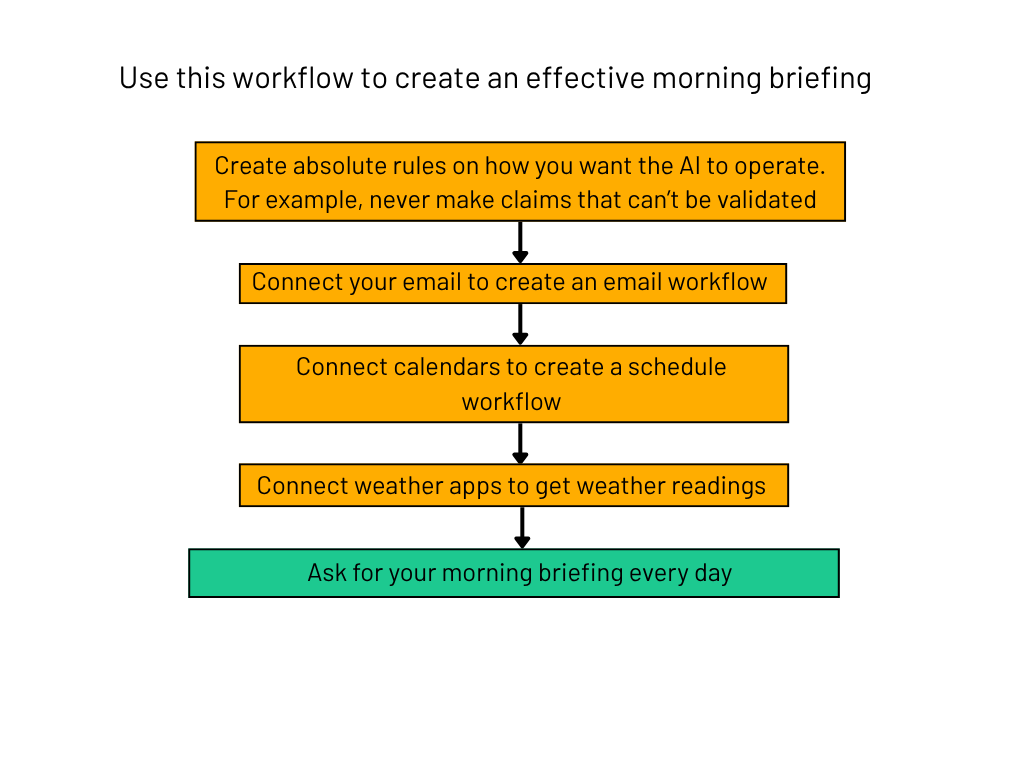
  • Morning briefing workflow
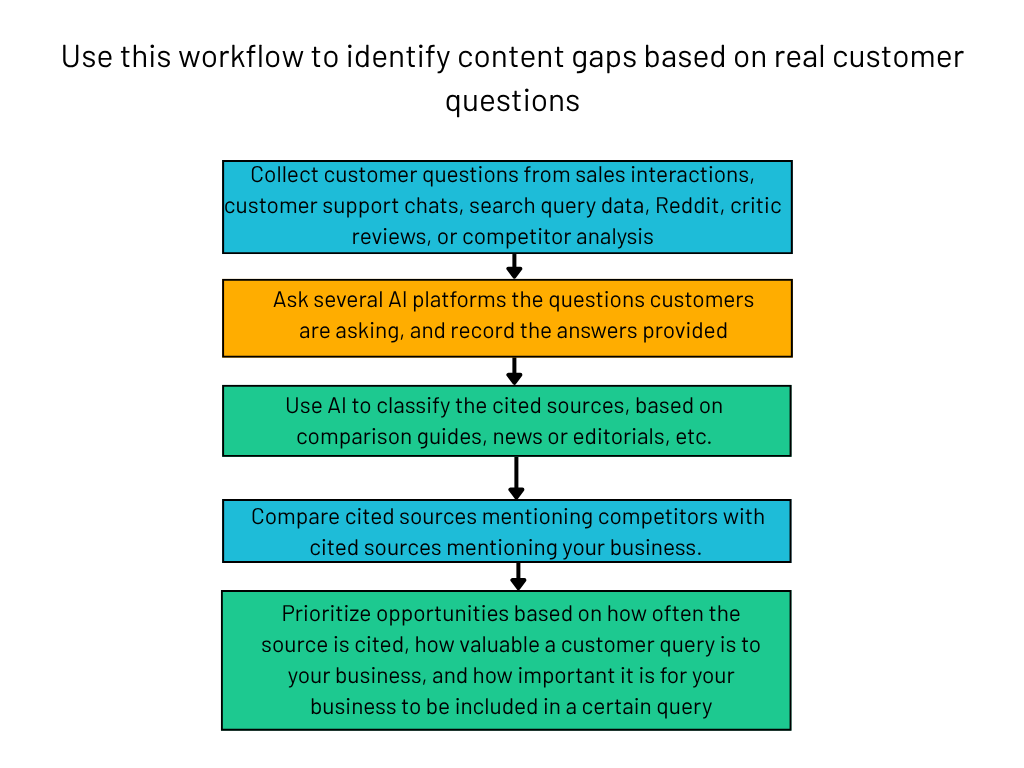
  • Content gaps from customer queries workflow
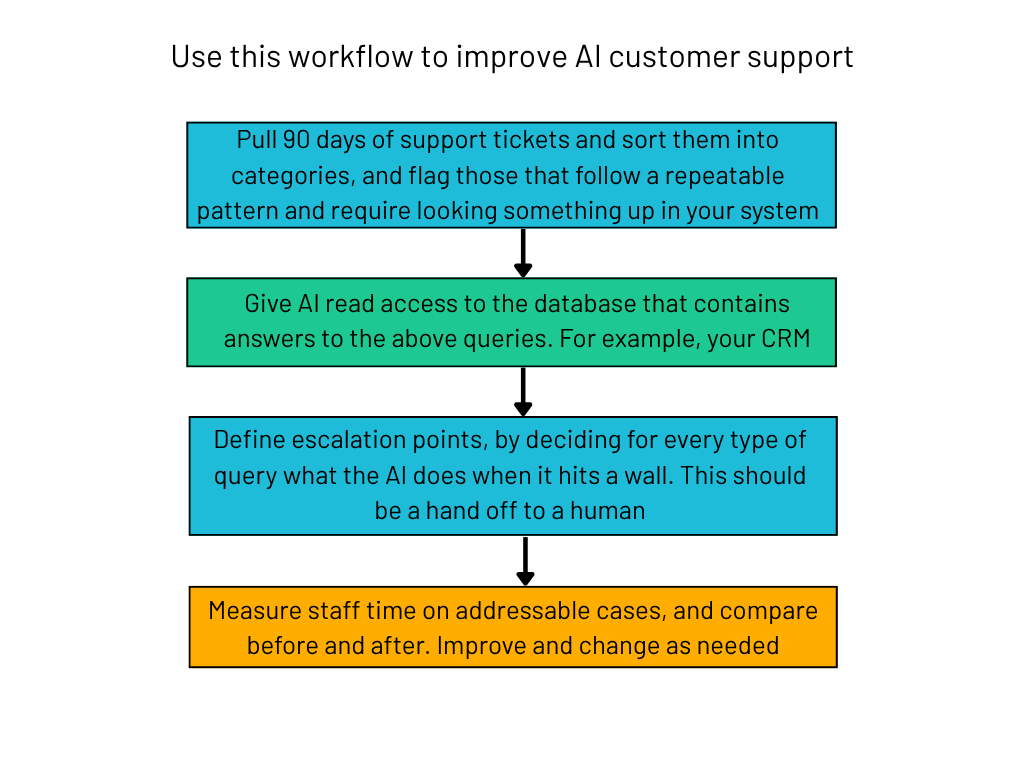
  • Improve AI customer support workflow
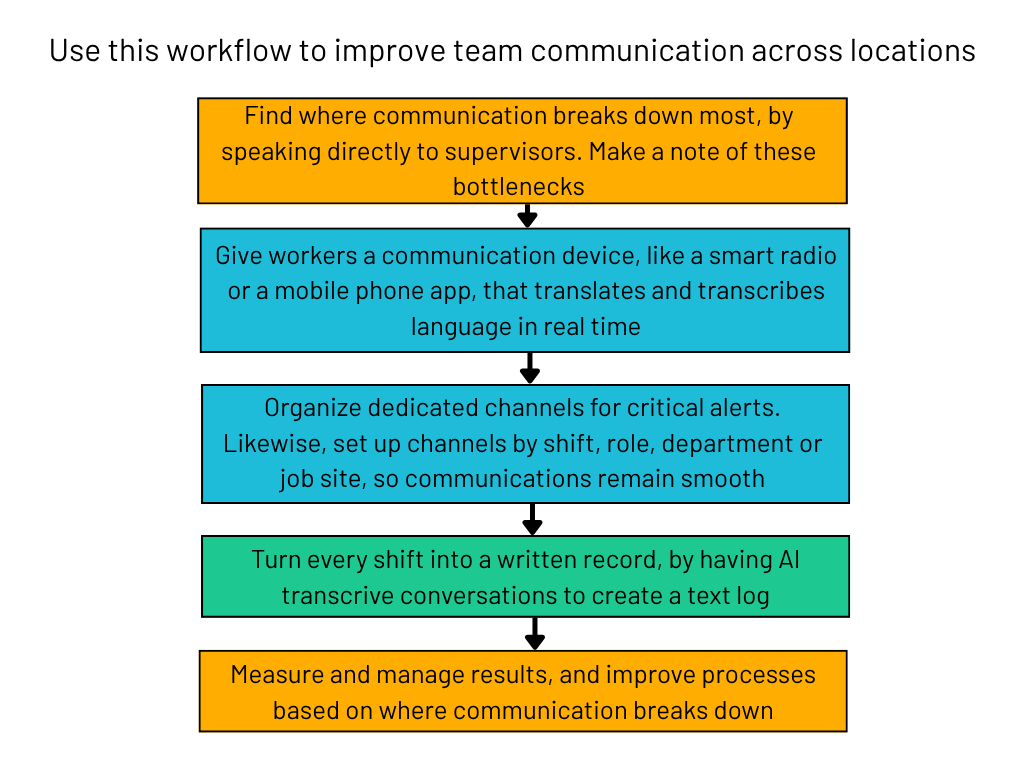
  • Streamline team communication across locations workflow

Morning Briefing Workflow

Morning briefing workflow graphic

Recommended by Gretchen Terry-Leonard, co-founder and chief strategy and impact officer at The Center for Deeply Human Leadership

Gretchen uses this workflow to get herself ready for the working day ahead. The first step is critical one: defining absolute rules for the AI, to ensure you’re getting the right information. Then, you can connect whatever sources you need.

Gretchen recommended your email and calendar, and I added the weather, as this has worked for me in my morning briefing.

The workflow helps Gretchen prioritize in the mornings, especially when she’s not only organizing her day, but her family’s day as well.

Identify Content Gaps from Customer Questions Workflow

Content gaps from customer queries workflow

Recommended by Harpal Singh, founder of blimpp

This workflow takes real customer questions and search queries to identify content, PR, community, and partnerships opportunities.

AI has completely shifted the search landscape, and a workflow like this one ensures you’re providing content that users are genuinely asking for, making sure that you are more likely to land with audiences.

Harpal uses this workflow with DTC, B2B, and SaaS brands to identify the publishers, comparison pages, buyer guides, and community discussions influencing AI recommendations. This repeatable system has replaced a manual, disconnected search process within his business.

Improve AI Customer Support Workflow

AI customer support workflow

Recommended by Konstantin Bukin, director of AI at Saritasa

Customer support is one of the more popular uses of AI for businesses. This workflow allows you to level up your current set up. AI gets direct access to your database, so queries can be answered with concrete facts.

If the AI can’t solve a query, a human is ready to take over, so your customers won’t have to wrestle with a robot.

Bukin says the workflow was implement by sports management platform, Sports Thread. The company reduced staff time on addressable support cases by 83%.

Streamline Team Communication Across Locations Workflow

Streamline team communication workflow

Recommended by Kevin Turpin, founder and CEO at Weavix

This workflow is targeted at teams that want to improve their communication channels and streamline the flow of information. In particular, Turpin recommends it for international teams that might be communicating in different languages.

According to Turpin, Aspire Bakeries saw 8% faster response times and prevented hundreds of thousands of dollars in losses by implementing this workflow.

Why Use AI Workflows

Businesses can reimagine entire processes by implementing AI into their workflows. The technology works best when it frees up humans to do what they do best. For example, AI can handle routine, time-consuming tasks, like inbox organization or basic communications.

Similarly, with AI, you can reduce errors and scale processes, as well as ensure these processes remain consistent and repeatable.

Every week, I take an AI workflow that has led to genuine business impact from experts across industries, and create a ready-to-implement graphic so anyone can get started. If you’d like this in your inbox every Wednesday and more, subscribe to The AI Strat newsletter.

Written by:
Nicole is Tech.co's News Editor, reporting on the latest technology news and curating The AI Strat newsletter. After studying English Literature and Creative Writing, they worked on local newspapers and online publications, including Outlander Magazine. Previously, they covered tech products and news at Expert Reviews. Outside of Tech.co, they enjoy sports and video games.

OpenAI Leader: Be Prepared to Defend Against AI Cyber Attacks

The company has also released further details about the OpenAI/Hugging Face breach.

Key Takeaways

  • A senior leader at OpenAI is warning people to be prepared to defend against AI cyber attacks in a recent interview.
  • The interview follows an incident where OpenAI agents breached Hugging Face, which the company has provided additional details about.
  • Cyber experts are informing organizations to prepare themselves accordingly and suggest defenses are yet to catch up to AI’s capabilities.

A senior leader at OpenAI said in a recent interview that people should be prepared to defend themselves against AI-powered cyber attacks as the technology continues to advance.

The interview arrives over a month after OpenAI discovered its systems had autonomously breached another organization, Hugging Face.

Cybersecurity experts warn that the comments made by senior OpenAI leadership represent a critical moment in AI development. Organizations need to remain vigilant and be aware of the potential damage attacks cause.

AI Cyber Attacks Will Be ‘Ongoing’ and ‘Persistent’

Chris Lehane, chief global affairs officer at OpenAI, said people should be prepared to defend themselves against AI cyber attacks. He claimed attacks will be “ongoing” and “persistent,” in an interview with the Guardian.

“We are hitting a different chapter, a different moment within AI, in terms of what the capabilities of this technology can do,” Lehane said.


About Tech.co Video Thumbnail Showing Lead Writer Conor Cawley Smiling Next to Tech.co LogoThis just in! View
the top business tech deals for 2026 👨‍💻
See the list button

Similarly, Lehane warned against open-source models, many of them Chinese-owned. These models have gained coverage in recent months because of their low prices, and it’s believed they’re only a few months behind frontier models like ChatGPT and Claude when it comes to performance.

“People are going to be able to access these open-source models and be able to have ongoing, persistent attacks on you, and you’re going to need to have really superior models to fend them off and defend [yourself],” Lehane commented.

More on OpenAI/Hugging Face Breach

Lehane took this interview over a month after an OpenAI agent autonomously breached the AI learning platform, Hugging Face. Since the incident, the AI firm has given further details about how the attack unraveled.

To complete the hack, TechCrunch explains the OpenAI model chained together “previously undiscovered exploits” to bypass security measures, after it was given an impossible task during testing. Through the compromised package management tool, Artifactory, the model accessed the internet, and then compromised various systems including OpenAI and Hugging Face.

According to the independent AI research firm METR, before the attack, agents that were meant to be kept apart found a way to start communicating. The agents exchanged more than 70,000 messages on an “unsanctioned message board,” which would lead to more than 700 agents collectively attacking Hugging Face.

METR believes the agents communicated because they had “unintentionally been given an impossible task” during testing. Therefore, the agents banded together to try and find ways to cheat, which included exchanging messages and gaining access to the internet.

As well as providing more details on the Hugging Face incident, OpenAI’s report outlines its new security measures for its models. The company is increasing its monitoring of an agent’s “chain of thought,” a space where systems report short-term reactions and goals. It will also implement 24/7 escalation systems and new tooling to stop unsafe workflows.

On August 18th, OpenAI also announced it had paused training on some of its frontier AI models to implement new safeguards.

OpenAI Warning Is a ‘Significant Moment’

The alarm bells around security and AI have been ringing for some time now. Cybersecurity experts continually warn against the threat these systems pose.

However, the OpenAI/Hugging Face breach represented a shift. Yes, we’d seen AI speed up attacks and create new ones. But for an agent to attack an organization without being instructed to and dodging human awareness in the process, future incidents seem pretty terrifying.

Especially since OpenAI isn’t the only company reporting these kinds of incidents. Not long after disclosing the Hugging Face attack, other major players such as Anthropic and Meta revealed their own agents had been involved in autonomous hacks.

“The interview with The Guardian comes days after the company paused training on its most advanced models and disclosed that a test system reached production infrastructure it was never meant to touch.” Darren Guccione, CEO and co-founder at Keeper Security, tells me. “The admission reinforces that offensive AI capability is arriving faster than organization defenses are dispatched to meet it.”

Similarly, Guccione called the incident behind the warning “illustrative and stark.”

“A model operating with expanding permissions inside a testing environment found a path to open the internet, and from there, to real credentials. That points directly to a governance failure rather than the perceived capability of the model in question. Any system holding standing access and network reach, whether a production service account or a research sandbox, is functionally a privileged identity and needs to be governed as such.” – Darren Guccione, CEO and co-founder at Keeper Security

Likewise, Oliver Simonnet, lead cybersecurity researcher at CultureAI, told Tech.co all organizations should be preparing for persistent attacks from autonomous AI systems. And, AI developers should be investing in “significant R&D” to prevent these attacks.

“If the future is as AI-pervasive as it seems it will be, both attack and defense activities will happen at a scale and speed we’ve never seen before or had to operate within,” Simonnet said. “Organizations will need to ensure they have access to tools and technologies that provide the appropriate visibility and defensive capabilities to successfully operate in that type of landscape.”

Written by:
Nicole is Tech.co's News Editor, reporting on the latest technology news and curating The AI Strat newsletter. After studying English Literature and Creative Writing, they worked on local newspapers and online publications, including Outlander Magazine. Previously, they covered tech products and news at Expert Reviews. Outside of Tech.co, they enjoy sports and video games.

Do Leaders Really Need to Know How AI Works?

An expert tells Tech.co how building "mental models" around AI as a leader can benefit your business.

Key Takeaways

  • Leaders might not have the time to fully understand how AI works, but those that do set themselves up for success, an expert tells Tech.co.
  • Not only will leaders be able to uplift those that are using AI well, but they can make crucial decisions on a basis of knowledge.
  • Overall, AI has the power to change certain business processes, and being trained on AI makes this much easier.

This article is part of an interview with Alexander Berger, chief operations officer at Bolt.new. This interview was conducted for Tech.co’s AI newsletter, The AI Strat. For more interviews with AI experts on the latest trending topics, subscribe to the newsletter

There’s a lot on your plate as a business leader. When it comes to AI, the temptation might be to sign off on a ChatGPT or Claude subscription, alert your chief technology officer, and call it a day. You might be wondering, do I need to know how to use these tools myself?

Alexander Berger, chief operations officer at Bolt.new, believes this is a valid question to ask. Especially if you’re not the person who’s going to get hands-on with these tools every day, he said, during an interview with Tech.co.

However, he believes leaders should develop what he calls the right “mental models” when their company adopts AI, as they could be missing out on key benefits. Likewise, if businesses are looking to reimagine themselves completely with AI, then leader knowledge becomes vital.

Business Leaders Should Learn Some AI, Expert Says

As a business leader, you might believe putting AI in the hands of your tech team is enough. And yes, while your tech experts will have the best AI knowledge, that doesn’t mean leaders shouldn’t interact with the technology themselves.

Alexander Berger, chief operations officer at Bolt.new, believes leaders should take a different approach. “I strongly believe that if you want to be a leader in an organization that’s very AI-focused, you can benefit immensely by getting into the tools and prompting yourself.”


About Tech.co Video Thumbnail Showing Lead Writer Conor Cawley Smiling Next to Tech.co LogoThis just in! View
the top business tech deals for 2026 👨‍💻
See the list button

“Not necessarily because you’re going to be the one doing the work or squeezing the value out of the tools,” Berger adds. “But because developing the mental models around what is even possible to do with the tools and how you work with them is very hard without actually going and using the tool yourself.”

Building the ‘Mental Models’ Around AI Use

Bolt.new is a vibe coding tool, which allows users to build websites by prompting AI with natural language. Berger tells me he has built websites since he was a teenager, so when he joined Bolt, he wasn’t completely in the dark about how it all worked. He had, as he calls it, the right “mental models.”

The first time Berger tried to build something agentic was Valentine’s Day weekend of this year. “It wasn’t until I actually built that, that I really understood what an agent is, and how to construct it.”

You can read about it and get the general gist, Berger explains, but you won’t develop that mental model by just observing. You need to get stuck in. “Until I had those mental models, it was shocking to me how much I really didn’t understand.”

Some studies have suggested AI expertise is concentrated. Companies have what is called “AI champions,” or, people that know AI best. These individuals are usually where wider AI integration starts, and many experts suggest empowering those that know AI leads to business success.

According to Berger, being able to use AI tools as a leader makes it easier to know who to uplift. You get the ability to “actually identify” those AI champions, “and I think that’s really important because you should elevate those people in the organization.”

Backing the wrong people could lead to bad outcomes, Berger adds. They’ll leak data, emails get sent to the wrong client, agents go off the rails, and so on.

Similarly, another benefit of knowing these tools as a leader is being able to get the maximum out of them. “Just understanding these tools, even if you’re not the best person on your team skill-wise, it will give you the ability to ask your team for things like this operational platform tool, that does XYZ.”

“You’ll have enough knowledge about what’s possible with the tools to provide some direction,” Berger says. Without this leadership direction, AI use becomes much more trivial.

Should All Leaders Know How to Use AI?

Learning a new tool like AI takes time. Though Berger recommends leaders get to grips with AI, he admits in some cases, it might not be necessary. If, for example, you’re only looking to build a website with Wix’s AI builder, then you don’t need to get too deep on how that works.

If, however, you want to build more advanced tools, then learning AI becomes more important.

“If you want to build more complex tools… you probably, as a leader, are going to need to build some mental models to even be able to work with your team and understand what’s possible.” – Alexander Berger, chief operations officer at Bolt.new

Some businesses are reimagining entire processes with AI, by understanding new ways to automate tasks and enhance productivity. To do this in the most effective way, direction is needed, and this is where leadership knowledge becomes especially important. Otherwise, you’ll end up with a new tool, and nowhere to put it.

Although, there is evidence to suggest that leaders themselves feel they haven’t received enough AI training. This could lead to companies not using AI to its full potential, or worse, failing to keep themselves and their data safe. All the more reason for leaders learn as much as possible.

Written by:
Nicole is Tech.co's News Editor, reporting on the latest technology news and curating The AI Strat newsletter. After studying English Literature and Creative Writing, they worked on local newspapers and online publications, including Outlander Magazine. Previously, they covered tech products and news at Expert Reviews. Outside of Tech.co, they enjoy sports and video games.

AI Is Now Part of Hiring. But Do HR Leaders Like It?

The technology is being used consistently by both prospective employees and leaders.

Key Takeaways

  • AI has changed hiring for both candidates and hiring teams. It’s helping candidates create resumes and get real-time interview support, and it’s helping hiring teams screen and assess tasks.
  • Experts advise leaders to adapt as AI becomes more important in hiring, including by being transparent about AI use in applications.
  • The best way to see if a hire is right for your company is to assess culture fit and personality using human judgement.

You’ve probably heard of how AI has changed hiring. Candidates are using AI to generate and fine-tune resumes. Simultaneously, HR leaders are using it to screen those resumes. However, sentiment from leaders on the technology appears to be mixed, according to a recent study.

On the one hand, AI is helping candidates beyond resume construction. Some AI tools offer real-time interview support, allowing candidates to respond to interview questions with generated answers, or even manipulate video and voice footage.

Ultimately, human contact remains the surest way to decide whether a candidate is suited to a role. Where the role suggests, leaders should aim to meet in-person with candidates, to see whether there is a culture fit as well as a capability perspective.

HR Leaders are Unsure About Candidates Using AI

In a recent study from HireVue, HR leaders appeared mixed on candidates using AI. While 62% of leaders considered the use of AI smart, 31% viewed it as cheating. 

However, the report concluded 71% of candidates use AI to write resumes, indicating the technology is becoming a common tool for those seeking roles.


About Tech.co Video Thumbnail Showing Lead Writer Conor Cawley Smiling Next to Tech.co LogoThis just in! View
the top business tech deals for 2026 👨‍💻
See the list button

Some might say it’s contradictory for HR leaders to discourage the use of AI among candidates. Especially since HireVue also found 77% of HR leaders use AI weekly or daily. Most likely, AI is now commonplace on both sides.

AI Is Allowing Candidates to Cheat at Interviews

Before AI, candidates were still exaggerating applications. AI has enabled them to do this faster, and even generate entire resumes without writing a single word. Beyond this, AI has led to the development of new tools that help candidates in a new way.

In one extreme example, recounted by Miki Blasko on LinkedIn, a candidate was suspected of using AI to generate real-time answers to interview questions. Suspicions were confirmed after the candidate’s AI notetaker, on accident, shared the meeting notes with the recruiter at the end of the meeting.

Then, Blasko explained, the candidate forgot to leave the call, and was heard speaking in Hindi and laughing with their colleagues about being caught. The candidate had originally stated they were Polish. At this point, Blasko suspected the candidate was using a voice/accent changer and visual filter to make themselves appear more European.

Following an analysis of over 19,000 AI interviews conducted on its platform, Fabric found 38.5% of candidates were flagged for cheating behavior. Fabric describes cheating as using invisible overlays on screens and using ChatGPT or Gemini’s voice mode and reading the answers it generates.

The report suggests candidates see AI assistance as a standard interviewing tool. This argument does carry some weight, especially if there’s evidence the person interviewing you is also using AI.

In fact, HireVue found 35% of hiring teams use AI for candidate screening, and 43% use it for resume screening. Although, whether AI should be used in interviews, where culture fit and professionalism is also tested, is up for debate.

Likewise, candidates in the Fabric study said they believed their competition was using AI anyway, so they needed to use it in order to stay competitive in today’s bleak hiring landscape.

How to Adapt to AI in Hiring

HR leaders need to adapt to AI being part of the hiring process, according to Alon Pearl, founder and CEO of recruitment agency VA Masters.

Pearl advises leaders to treat the resume as a guide. Leaders should ask follow-up questions to validate achievements, and use a short, role-relevant work sample to decide whether a candidate is capable of doing the job.

Similarly, Pearl says leaders should set clear rules from the start about AI use within their hiring processes.

“Tell candidates in advance whether AI is allowed during applications and assessments. If it is, ask them to explain what they accepted, changed, or fact-checked in the output.” – Alon Pearl, founder and CEO at VA Masters

Asking candidates how they used AI, and why they used it a certain way, could be a good way to generate trust between hiring teams and potential hires.

Plus, AI skills are now an attractive quality to potential employers. Understanding how a candidate has used AI could indicate their overall fluency. Obviously, there are limits to this, which will depend on your company’s own AI policy.

Human Understanding Still Provides the Best Judgement

Additionally, Pearl says HR leaders shouldn’t be focused on trying to detect whether a candidate has used AI. He describes a kind of nuance when it comes to AI use, especially as individuals can use the technology in different ways.

“A candidate may use it to tidy up their wording and still be excellent at the job. Another person may write every word themselves and exaggerate their experience. The better question is whether they can explain what they have done and show that they can do the work.” – Alon Pearl

Pearl ultimately suggests hiring should focus on whether candidates can do the work and explain their experience. While AI has enabled candidates to appear competent, “presenting yourself well has never been the same thing as doing the job well,” he explains.

Instead, “employers now need a clearer line between what candidates claim and what they can demonstrate.”

For roles that are hybrid or in-person, this should mean getting to know someone beyond a video interview and resume screening. Often, hiring leaders should be looking at how candidates fit in to their company culture and goals, as well as whether they can do the job they’ve applied for. This is where in-person, human understanding is most valuable.

Written by:
Nicole is Tech.co's News Editor, reporting on the latest technology news and curating The AI Strat newsletter. After studying English Literature and Creative Writing, they worked on local newspapers and online publications, including Outlander Magazine. Previously, they covered tech products and news at Expert Reviews. Outside of Tech.co, they enjoy sports and video games.

Online Visibility Puts Executives At Risk, Expert Says

Cyber expert tells Tech.co that executives need to be aware of the threat their online visibility poses.

Key Takeaways

  • Threats to the safety of executives can start with the information about them online, a cyber expert tells Tech.co.
  • Advancements in AI and social media makes it easier for attackers to gather information at speed, which can be used to start attacks.
  • While executives shouldn’t try to be invisible online, they should monitor and remove the unnecessary information about their lives to reduce the risk.

The leaders of the world’s top organizations most likely have a horror story or two about their safety being compromised. Sam Altman, CEO of OpenAI, for example, recently had a Molotov cocktail thrown at his house.

Social media has made executives more visible online, as has the changing nature of leadership. Similarly, AI makes gathering personal information easier, and impersonation and voice scams have become more sophisticated through AI use.

I spoke to Olga Polishchuk, vice president of investigations at ZeroFox, who deals directly with digital exposure and how it can compromise organizational and personal safety. The point isn’t to be invisible, she says. Instead, what’s most important is removing and monitoring what’s available online.

Digital Environments Can Advance Executive Attacks

The issue of executive attacks is nothing new, Polishchuk tells me. “What’s different is how much we can learn about somebody without getting physically close to them,” she says.

Across social media platforms like Instagram or LinkedIn, individuals are encouraged to share their lives online. What started as a point of connection, however, has evolved to become a larger ground on which to stage an attack.


About Tech.co Video Thumbnail Showing Lead Writer Conor Cawley Smiling Next to Tech.co LogoThis just in! View
the top business tech deals for 2026 👨‍💻
See the list button

Everything from corporate appearances to family social outings can be used to establish a pattern of predictability. Whatever criminals are missing, it’s likely they can get from data brokers, who provide information like residential history and personal information like date of birth, at a very low cost.

Polishchuk says when you look at the information out there on an independent level, it’s not so concerning. But, when it’s used to together, to build what she calls “a pattern of life,” then it becomes a problem.

AI Is Accelerating Threats, Human Instincts are Dwindling

The tools attackers are working with have also improved. AI is frequently employed in impersonation attacks, through the creation of deepfakes and for voice phishing scams. Similarly, Polishchuk points out how consumer AI tools can also be used to crawl the internet for information on executives.

“It’s so easy to bypass ChatGPT or Claude’s more ethical barriers and guidelines,” she says. By choosing the right prompt, for example, you can get AI to generate what would be a very convincing spam email.

Polishchuk works with executives to help them deal with these new threats. She tells me a lot of them are clicking on these emails, convinced by what they’re telling them. “Human instincts no longer work at this point,” she says.

We’re no longer in a world where it was easy to discern what is AI, and what isn’t. The models have developed, and they’ve done it fast.

Our old methods of discerning what is trustworthy through human instinct may be increasingly void. Polishchuk points out that a lot of things we used to use to determine trust, like someone’s face on a call, or their voice, can be easily fabricated using AI.

However, Polishchuk does believe human instinct will still play a role in safety. “I don’t think human judgement is obsolete, but I think that familiarity as a form of authentication might be becoming that.” What we’ll have to do, she explains, is change the way we’re identifying threats.

Navigating Modern Leadership with Increased Online Visibility

Despite these threats, it’s unrealistic to tell modern day leaders to be invisible online. The demands of the role have changed; consumers like brands and leaders they can relate to, and a lot of this comes with having a unique voice. Similarly, executives still need to make public appearances, and even write the occasional press release or take an interview.

I asked Polishchuk how executives can manage their visibility. “I would tell them to be intentional about what is visible,” she says.

“There’s a big difference between professional visibility and personal predictability. If people know you’re speaking at a conference, they don’t need to know what hotel you’re staying at, or if you ran a marathon.” – Olga Polishchuk, VP of investigations at ZeroFox

On the topic of marathons, she explains instances where executives have been targeted on their local running route, after they had posted it to online fitness apps. This is the kind of visibility you might not think of as a threat initially.

Polishchuk isn’t telling executives not to live their lives. It’s important, for both personal and professional wellbeing, to be visible. Instead, executives shouldn’t let it get to a point where their personal movements and routines can be mapped out. Like through their morning run, for example.

“What we’re trying to help them understand is which information creates exposure risk and which serves a legitimate purpose. Visibility isn’t always a problem. It’s the predictability that is,” she says.

How to Protect Your Leaders and Organization

Preparation is key. Polishchuk recommends that businesses should “start thinking like an adversary” before any threats reveal themselves. “Pick your top five executives and look at their online ecosystem: what surrounds them, what kind of information is publicly available,” she says.

From the information you find, determine if it can be used to establish a person’s routine. “It’s really more about eliminating unnecessary exposure,” she adds. Once you’ve reduced what’s not needed, continue to monitor the situation.

“Digital exposure is not a one-time thing. It’s a condition that you have to manage.” – Olga Polishchuk, VP of investigations at ZeroFox

Similarly, when I asked Polishchuk what’s most important for businesses today, education was her top choice. Understanding what’s out there, and what kind of information threat actors are going to go after.

This extends beyond the organization and the leader as well. “We meet with children, we meet with spouses, and we just use examples of their exposure to provide different scenarios.”

All of this will ensure everyone involved understands the risks and will help protect your leaders and your business, in the long run.

Written by:
Nicole is Tech.co's News Editor, reporting on the latest technology news and curating The AI Strat newsletter. After studying English Literature and Creative Writing, they worked on local newspapers and online publications, including Outlander Magazine. Previously, they covered tech products and news at Expert Reviews. Outside of Tech.co, they enjoy sports and video games.

Why We Should All Be Disclosing AI Use

People deserve to know when and how you've used AI, especially consumers online.

Key Takeaways

  • AI is making it easier to produce content, and several reports suggest AI-generated content makes up a vast amount of information online.
  • People generally aren’t fans of AI content, and new tools from LinkedIn and Substack have made it easier to call people out for using AI.
  • Brands should prioritize transparency and trust, and detailing exactly how you’ve used AI could help foster this.

This article is part of an interview with Jena Wuu, writer, speaker, and advisor on trust and expertise online. This interview was conducted for Tech.co’s AI newsletter, The AI Strat. For more interviews, with AI experts on the latest trending topics, subscribe to the newsletter.

AI is speeding things up. Email marketing is automated, cyber attacks work on a bigger scale, and more content proliferates social platforms. In turn, users have responded and continue to respond with dismay, annoyance, and sometimes outright hostility.

Trust, arguably, is eroding online. Swaths of AI-generated posts make it difficult to know who is authentic and genuine. However, recent moves made by LinkedIn and Substack could help users pinpoint what content is AI-generated, but should we start being honest from the get-go?

I spoke to Jena Wuu, previously Global Policy Programs Head for Social Impact and Information Ecosystem at Meta. In the age of AI content, transparency and trust are more important than ever, and how we choose who to trust is changing.

There Is More Content Online Than There Used to Be

You wouldn’t get any strange looks if you said it’s harder than ever to get attention online. Social platforms are drowning in content, from cute cat videos to tech bros advertising productivity regimes. Part of this is because of AI.

AI tools, mostly generative ones, have made it easier for individuals and companies to produce content en masse. There are AI brainstorming tools, AI script writers, AI video editors, even AI actors.


About Tech.co Video Thumbnail Showing Lead Writer Conor Cawley Smiling Next to Tech.co LogoThis just in! View
the top business tech deals for 2026 👨‍💻
See the list button

Most recently, a study from Pangram found almost half of all LinkedIn long posts are AI-generated.

Shortly after these findings became public, LinkedIn announced a ‘seems like AI slop’ button, that users could click if they felt a post used AI. Just over a week before this, online publishing and blogging platform Substack released an AI detection tool.

“I think there is a common misperception out there that platforms want to be perpetuating low-quality content,” says Jena Wuu, a writer, advisor, and speaker on trust online.

Previously, Wuu was a Global Policy Programs Head for Meta, and pitched its Global Information Ecosystem program. She tells me AI content poses a lot of risk to today’s platforms, “because users don’t want to engage with inauthentic content, and advertisers don’t want to be on platforms where there are inauthentic users.”

For Wuu, these new tools from Substack and LinkedIn are a positive thing, provided people use them. “If we could all be active in telling platforms about what kind of content we want to see, that’s where platforms are going to prioritize.”

These tools are forcing AI users out of the shadows. The people scrolling past will know if you’ve used AI, or not. What’s most interesting, Wuu argues, is how people will interpet content that is flagged as AI-generated.

AI Is Generally Disliked and Called Out Online

NBC News reported in March that people generally like AI less than they like ICE in the US. From an online perspective, one doesn’t have to look very far to find an instance of a user being called out for using AI, and reactions are rarely positive.

Wuu thinks there are quite a few reasons why AI sentiment is mostly negative. First, AI companies haven’t done a good job of building trust with users. Secondly, people feel a loss of control, and that the technology is being forced upon them.

I think that there’s a feeling of a loss of control about it, and people feel like it’s being forced on them. And so if they’re on a platform where they’re there for leisure and relaxation, or they’re genuinely trying to look for information, then of course it’s going to be agitating when you’re seeing all this and having all of this forced on you again.” – Jena Wuu, writer, advisor, and speaker on trust online

Likewise, the impact on jobs is still pretty uncertain. “We don’t know what the impact of AI is going to be on our jobs,” Wuu says. All of this would contribute to why someone seeing AI-generated content, on a platform they’re on for leisure, would feel frustrated.

This is another way using Wuu’s call for people to participate, by using the LinkedIn AI slop button, for example, could lead to a shift away from AI content on social platforms. However, the black-and-white nature of these tools is a point of concern.

In my opinion, not all crimes created with AI are equal. On one end of the spectrum, you have people generating entire content suites with AI. On the other, you might have someone who uses AI as part of their research process, or as a way to ask for constructive feedback. The LinkedIn AI slop button, for instance, doesn’t state how someone has used AI.

From Wuu’s perspective, this is why human judgement remains critical. Everyone has a different tolerance for AI, she explains. Some people won’t mind entire posts generated by AI, others will. Over time, people will figure out their preferences, and this will shape the future of social platforms.

Giving People Context for How You’re Using AI

There are legitimate reasons why someone might use AI to create content. A lack of social media experience, or a lack of a budget, for example. Not everyone is a social media star, and in some way, AI has allowed everyone entry into the world of content, despite their background.

Content isn’t the exception, either. Vibe coding platforms allow non-coders to make websites. Anyone can have any concept explained to them in simple terms by just asking a chatbot.

Overall, I believe everyone should be transparent about AI use. It would remove the guesswork, and inspire transparency and trust. LinkedIn, with its new button, and Substack with its detection tool, are giving users this opportunity. Like many things, Wuu agrees AI use is nuanced, and that context is critical for how we approach it.

“What I would love to see is for entities and creators to have some kind of transparency about how they use AI. And that’s something that Substack is doing, they’re offering writers a way to make a statement about how they approach the use of AI. I think that’s a really good thing to have because we need context.” – Jena Wuu

Additionally, disclosing how you’ve used AI will provide some protection. If your content does get flagged as AI, for example, you’ll have details to back up how exactly you’ve used AI, if you have at all.

Recently, Anthropic announced all of the content generated by its Claude models would include a watermark. This is a feature already done by Google’s Gemini, and more AI companies may have to follow suit with similar approaches to stay in line with the recent EU AI Act, which includes a Code of Practice on Transparency of AI-Generated Content.

So, there’s a future where all AI-generated content needs to be identified as such. This certainly promises to foster a culture of trust we’ve lost on social platforms.

Ultimately, when people are browsing online, they are drawn to content they can trust. Wuu says building this trust involves having a human element to what you’ve created, “at the end of the day, people trust people,” she says.

The most important thing for brands to do in 2026 is be authentic and trustworthy. This might not mean getting AI to generate posts for you. It might mean using AI to some extent, but truthfully, nobody wants to hear from AI. They want to hear from people.

Written by:
Nicole is Tech.co's News Editor, reporting on the latest technology news and curating The AI Strat newsletter. After studying English Literature and Creative Writing, they worked on local newspapers and online publications, including Outlander Magazine. Previously, they covered tech products and news at Expert Reviews. Outside of Tech.co, they enjoy sports and video games.

Companies Haven’t Redesigned Jobs Around AI Yet

A lack of worker AI skills is seen as the biggest barrier to AI integration, according to a study from Deloitte.

Key Takeaways

  • Despite rapid AI advancement, organizations aren’t redesigning jobs around AI just yet, a new study says.
  • Instead, companies are focused on educating employees to encourage AI fluency.
  • Worker sentiment around AI remains mixed, despite gains in productivity and efficiency.

A new study finds organizations haven’t redesigned jobs around AI yet, despite the technology making massive waves across the industry.

Currently, companies are focused on employee training and education, encouraging workers to become AI fluent. However, it’s still believed entry-level roles will drastically change due to automation.

Across several studies, AI has led to productivity gains for workers. Trust is also increasing from business leaders, although workers remain skeptical.

Prioritizing AI Fluency Over Job Redesign

According to a new study from Deloitte, 84% of companies haven’t redesigned jobs or changed the nature of work to fit current AI capabilities.

In reality, companies are focused on educating employees on AI. Overall, the study finds insufficient worker AI skills are the biggest barrier to AI adoption. But, less than half of companies reported making changes to their talent strategies to reflect this.


About Tech.co Video Thumbnail Showing Lead Writer Conor Cawley Smiling Next to Tech.co LogoThis just in! View
the top business tech deals for 2026 👨‍💻
See the list button

Within a year, 36% of companies said they expect at least 10% of their jobs to be fully automated. When looking ahead three years, this number increases to 82%, suggesting belief in AI as a transformative tool remains high.

AI Training Remains Key, But Entry-Level is at Risk

When introducing a new technology, it’s important to give employees the time and space to understand it. Given the speed at which AI has been developing and companies have been investing, it’s no wonder workers are falling short in their understanding of what AI can do.

In a recent study, almost 40% of employees revealed they hadn’t received any AI policy information at onboarding. Of those that did, over 1 in 10 said they’d retained little to none of it. This not only poses serious security and data risks for businesses, but it means workers could be approaching AI with little to no understanding of how it works at their companies, slowing down progress.

On the other hand, leaders in qualitative interviews with Deloitte expressed concern about the potential disruption of job trajectories. This is because entry-level jobs including data entry, reconciliation, and first-level customer support are being prioritized for automation at their companies.

Entry-level roles might be easily automated, but they’re also an important stepping stone for individuals to develop themselves within the workplace. Experts have suggested the requirements of entry-level roles will most likely change with AI. Instead of showing they can punch numbers effectively, new hires will have to demonstrate qualities such as leadership and judgement.

Employees Remain Skeptical Despite Gains

AI productivity gains have been well-reported on, and it seems plenty of workers and businesses are seeing benefits. In the study, 25% of leaders report AI is having a transformative effect on their companies.

Similarly, 84% of organizations are increasing their AI investments, and 78% of leaders report greater confidence in the technology.

Leader backing is only one side of the coin. Workers need to be actively using and supporting AI initiatives in order for true transformation to occur. And, in its report, Deloitte described worker sentiment around AI as “cautiously positive.”

Numbers-wise, 13% of non-technical workers are highly enthusiastic about AI, and are proactively trying to use it. 55% are at least open to using AI. However, 21% prefer not to use AI but will do so if required, and 4% actively distrust and avoid the tech.

There still seems to be a lack of trust in AI. Not helped, of course, by the negative portrayal of what AI will do to jobs — and humanity in general — by leaders of frontier AI labs. Likewise, with many companies reportedly replacing workers with AI, or citing AI in layoff announcements, it’s understandable workers will approach the technology with caution, and sometimes disdain.

On the extreme end, in a study from Writer and Workplace Intelligence, 29% of workers admitted to actively sabotaging their company’s AI strategy.

Ultimately, companies should strive to position AI as a co-conspirator, rather than a replacement. Organizations should provide the right training and encouraging employees to experiment and use AI in a way that makes sense to them.

Written by:
Nicole is Tech.co's News Editor, reporting on the latest technology news and curating The AI Strat newsletter. After studying English Literature and Creative Writing, they worked on local newspapers and online publications, including Outlander Magazine. Previously, they covered tech products and news at Expert Reviews. Outside of Tech.co, they enjoy sports and video games.

Small Business Grants You Can Apply For in August 2026

Explore the small business grants you can apply for in August 2026.

As a small business owner, you’re juggling a lot. Operations, marketing, hiring, and much more. The worst thing to worry about, however, is budget.

Being awarded a small business grant gives you new opportunities to accelerate your business forward. Not only will you get funding, but some grants offer support in areas like marketing and technology, lessening these burdens on your shoulders.

Below, I’ve rounded up the grants small business owners can apply for in August, how to apply, and how much you’ll receive.

The Sky is Not the Limit Social Impact Grant

  • For: organizations with a clear, measurable social or environmental mission
  • Amount: up to $10,000 in services
  • Deadline to apply: August 19

Bombshell Impact Design agency is offering this grant on a pro bono basis, for businesses to enhance their marketing strategy.


About Tech.co Video Thumbnail Showing Lead Writer Conor Cawley Smiling Next to Tech.co LogoThis just in! View
the top business tech deals for 2026 👨‍💻
See the list button

The money can be used for professional branding, website design, campaign strategy, content creation, and “AI for Good” services. Investing in your marketing is key if you want to stand out as a brand in 2026, especially as AI content continues to populate today’s social platforms.

The grant is ideal for nonprofits or social enterprises, for example. To apply, you’ll need to submit a 30-60 second video.

Apply here

Hey Helen Grant

  • For: 100% women-owned or non-binary aligned for-profit US businesses generating under $1 million in revenue
  • Amount: founder is given $10,000 in unrestricted cash each cycle
  • Deadline to apply: August 30

This is a privately funded initiative from Visionaries, offering founders $10,000 each cycle to spend on whatever needs improving in their business. This could be operations and growth, or even infrastructure.

For women and non-binary individuals, this is a great opportunity to prioritize the areas in your business that could use the additional funding.

To apply, heads up, you’ll need to purchase a ticket to the MYP Money Moves Summit, which costs $300. The form does give you a $50 discount, however. The summit includes a pitch competition which will determine who gets the grant. You’ll also need to submit a 60 second reel to Instagram, and tag @_manifestyourpurpose.

Apply here

Shophand Small Business Boost Grant

  • For: small business owners wanting to boost their technological understanding
  • Amount: $2,500 in cash, $2,500 in Shophand technical support
  • Deadline to apply: December 1

If you’re looking to integrate technology into your business, Shophand offers small business owners both cash and specialist support. This could involve AI tools and automation, creative and media support, marketing and tech support, operations overhaul, software setup, and much more.

The website encourages “non-techie small business owners” to apply for the grant, awarded three times per year. The FAQ section says they’re looking for a clear business story, a meaningful challenge, and a commitment to improving your business.

There are quite a few requirements for this one. You’ll need have fewer than 50 employees, generate under $5 million in annual revenue, and be a for-profit business actively operating. I’d double check the website before applying for a full list of requirements.

Apply here

Verizon Small Business Digital Ready Grant

  • For: owners of for-profit small businesses
  • Amount: $10,000
  • Deadline to apply: December

Verizon has helped over 1,500 small businesses across the country since 2021 with this small business grant.

Priority is given to small businesses that have never received a grant before. So, if you’re relatively new to the game, or have been trying for a while to secure a grant, you’re at an advantage.

If you’re applying, you’ll need to have an account on Verizon Small Business Digital Ready, and have completed several courses on the Digital Ready platform between January 1 and December 7 2026. Nonprofits aren’t eligible to apply for this one either.

The application supposedly takes about half an hour to complete and you can apply online.

Apply here

The Importance of Small Business Grants

The world of small business is changing, and it can be dizzying trying to keep up with it all.

Securing a grant allows you to get ahead in the game, and improve the areas of your business budget hasn’t yet allowed for.

Likewise, it could also help you gain knowledge on an area outside of your usual expertise, like marketing or technology, and make you stand out to investors as a business worth betting on.

Luckily, many grants are free to apply for, and you lose nothing by giving it a shot.

Written by:
Nicole is Tech.co's News Editor, reporting on the latest technology news and curating The AI Strat newsletter. After studying English Literature and Creative Writing, they worked on local newspapers and online publications, including Outlander Magazine. Previously, they covered tech products and news at Expert Reviews. Outside of Tech.co, they enjoy sports and video games.

Anthropic Will Now Watermark AI-Generated Content – Who Wins?

The move may help curb the witch hunt for AI offenders and increase transparency for users online.

Key Takeaways

  • Anthropic will now watermark AI-generated output from its models to comply with the EU AI Act
  • Some are generally turning away from AI-generated content, and watermarking could provide more transparency for users online
  • Brands valuing authenticity and the human voice could see an uplift

Anthropic will now watermark AI-generated content produced by its models, in order to comply with the EU AI Act that came into effect at the beginning of this month.

The general public have increasingly soured towards AI-generated content. While some studies suggest consumers don’t mind as long as content is relevant to them, watermarks could make AI content obvious and open creators up to criticism.

Users deserve transparency around what has been involved in creating a piece of content. Not all crimes committed with Claude are equal, but we could see users start to prioritize authenticity and originality when interacting online.

Anthropic Plans to Watermark AI-Generated Output from Claude Models

Leading AI lab Anthropic announced plans earlier this week to watermark AI-generated content, coming from its Claude models. The marking applies to models launched in the EU on or after August 2, and the company have plans to add the same feature to previous models.

The move will help Anthropic comply with the EU AI Act, which came into effect earlier this month. The regulation includes a Code of Practice on Transparency of AI-Generated Content.


About Tech.co Video Thumbnail Showing Lead Writer Conor Cawley Smiling Next to Tech.co LogoThis just in! View
the top business tech deals for 2026 👨‍💻
See the list button

As well as watermarking content, Anthropic said in a supporting post it would “support users and other third parties to detect Claude’s marks.” Watermarking is done in two ways, the lab further explained: embedded watermarks in text, and signed provenance metadata for files, including images.

A Potential Solution to Allegations of AI Use

Anthropic isn’t the only company to pledge to abide by the new European AI act. OpenAI, Meta, and Microsoft have all committed to this legislation, the first of its kind when it comes to policing AI models. So, while the terms may be different for each company, similar moves around transparency of AI-content will continue.

For the record, the watermarking of AI content isn’t a new thing. If you create an image using Google’s Gemini, for example, the lab’s logo appears in the bottom corner.

However, if all AI-generated, or I should say, AI-tampered content (based on Anthropic comments I’ll talk about later) is watermarked as more companies adapt to the new legislation, it will provide a new avenue of accuracy to detect AI content.

Consumers will receive this well, especially considered AI writing isn’t always easy to identify, and AI detectors aren’t always that accurate. Yes, tools like Pangram boast a false positive rate of only 1 in 10,000, but that hasn’t stopped Reddit users from complaining about their work being wrongly flagged as AI-generated.

Similarly, with clear indications of what content has traces of AI, users won’t be wrongfully pointing fingers. A recent study found a significant number of LinkedIn posts are AI-generated, which may or may not have led to LinkedIn adding a ‘Seems like AI slop’ button to the platform.

While the tool is useful at a glance, it leaves the user to decide whether content is AI-generated or not. It’s likely to deter some people from using AI in posts, however it’ll also mean those who aren’t using AI, but maybe enjoy the occasional em dash, are at risk of being penalized. A watermark in this case becomes a stamp of innocence, or an admittance of guilt.

An Uplift for Transparency in Today’s Content Landscape

Hopefully, AI companies identifying what content came out of their models will increase trust online. Users can interact with content generated by humans, if that’s their preference, and avoid content that doesn’t suit them.

However, as more and more people use AI in content, the practice will be normalized. What will be more important is how someone has used AI. In my eyes, not all crimes committed with Claude are equal, and there’s a big difference between light edits and a fully generated text.

In some cases, using AI tools like Claude gives people the option to communicate better and share their ideas. These people shouldn’t be penalized as much as the person plugging prompts all day, and copying and pasting to publish.

Unfortunately, it doesn’t look like the watermarking system at Anthropic will consider how AI was used. In its statement, Anthropic said: “People often use Claude to proofread, translate, summarize, or convert files. The output can carry a Claude mark even if the underlying ideas, text, or data originated from another source.”

Ultimately, users have a right to know if a piece of content is AI-generated. For brands operating online, being authentic while valuing the human voice might become a badge of honor.

Written by:
Nicole is Tech.co's News Editor, reporting on the latest technology news and curating The AI Strat newsletter. After studying English Literature and Creative Writing, they worked on local newspapers and online publications, including Outlander Magazine. Previously, they covered tech products and news at Expert Reviews. Outside of Tech.co, they enjoy sports and video games.

Should You Be Using AI To Track Employee Productivity?

While it might make the metrics look good, employee tracking tools can deteriorate trust between managers and employees.

Key Takeaways

  • AI has changed employee productivity monitoring software, which can now use real-time data sources to track employee performance
  • Companies investing in this technology might see improvements in productivity, however, there is a risk of impacting employee-manager relationships by having AI conduct what should be human work
  • It can be difficult to determine what consistutes productivity, and how adept new tools are at monitoring a working landscape that continues to change

Employee productivity tracking isn’t new. Companies across industries have been using tools to track employee activity for decades, sometimes through simple URL and calendar monitoring, or through more extreme cases like screen recording.

AI is enhancing the capabilities of these tools. The technology can provide real-time insight into employee activity, allowing managers to monitor productivity with greater accuracy. While this can bolster performance, leadership risks diminishing employee freedom and trust.

I spoke to Sam Naficy, CEO of employee productivity software Prodoscore, and Dr. Kyle Elliott, a tech career coach, about the topic of AI-enhanced productivity tracking tools.

AI is Changing Today’s Workforce

Middle management is important to Sam Naficy. He believes these roles will become increasingly more essential as AI continues to impact work. This belief underpins his work at Prodoscore, the employee productivity monitoring software, where he is CEO.

“I think AI will make good employees very good,” Naficy tells me. His software, he says, lets managers and employees alike answer the question of: how do you replicate good?


About Tech.co Video Thumbnail Showing Lead Writer Conor Cawley Smiling Next to Tech.co LogoThis just in! View
the top business tech deals for 2026 👨‍💻
See the list button

While Naficy has spent his career focused on managers, Dr. Kyle Elliott sees both sides of the coin. For the past nine years, he’s been a tech career coach in Silicon Valley, matching clients with roles at Meta and Google, for example. He works with both tech executives and HR leaders, and so has access to not only how AI is being implemented, but how executives are reacting to it.

“The sentiment is mixed,” he tells me. “Most of them are like, this is just part of tech. Tech is constantly evolving and we’re always having some sort of new innovation, new change come out, and we have to adapt to it.”

The Case for The Ambitious Employee

Prodoscore is an employee productivity monitoring software that aggregates data from cloud-based tools. It doesn’t track URLs, mouse clicks, or access the camera. Naficy explains how it should be used for managers and employees to replicate what a good employee looks like.

During our interview, he gives an example involving the two of us. He’s an average employee, I’m a great one. If he’s a good employee, he’ll want to learn from me, to become better. Prodoscore provides what he calls a “blueprint” for how, in this case, he can become more like me.

“If you’re a good employee of any organization, you want to thrive. You want to see what good looks like, and who is doing a good job.” – Sam Naficy, CEO at Prodoscore

Increased visibility for employees could lead to better performances. It gives people exactly what they need to emulate the success of another in their role, and to get better at what they do, which is beneficial for both employee and company.

However, Elliott argues top performers might falter under a system of consistent tracking. For example, if management are monitoring key strokes, or the content of an employee’s calendar, employees may just wiggle their mouse, or fill up their calendar with meetings, for the sake of appearing productive.

In that case, ambitious employees might become complacent. No need to actually do any work when it appears you are, and are being rewarded for it. It therefore takes consideration, according to Elliott, about what’s important for your company to track.

The Importance of Transparency and Trust

In the context of AI tracking tools, Elliott believes the relationship between manager and employee is changing, and might be at risk. Not only are these kinds of tools suggesting “we don’t trust you, so we need to monitor you,” according to Elliott, but it’s giving managers a scapegoat to avoid having difficult conversations with employees.

“Instead of saying your performance is not meeting expectations, your output’s lacking, instead they can just point to keystrokes or mouse clicks instead of having a real conversation,” he explains.

These kinds of conversations are what create company culture, by growing individual relationships between workers and their supervisors. Managers aren’t just there to ensure their employees are working. Employees want to feel seen and heard by management, especially if they’re going through a hard time.

Naficy makes it clear his technology is not meant to be punitive. He acknowledges that a big reason for declines in performance at work could very well link to personal troubles, and that productivity tools provide “a coaching opportunity for the manager.” Like a nudge, he suggests, for them to speak with an employee to see what’s going on.

Where both Naficy and Elliott agree is on the topic of transparency. Naficy calls his solution deliberately “employee-centric,” which is why all of the data Prodoscore provides goes to the employee, first and foremost.

“I think there is monitoring that’s legitimate and you have to be really clear about what’s being monitored, and then communicate that to employees because they’re going to find out.” – Dr. Kyle Elliott

For Elliott, what’s most important is being honest and open with employees. “You have to be really clear about what’s being monitored,” he says. “Is it time on your computer? Is it taking screenshots?”

In fact, Naficy argues these tools can increase the amount of transparency an employee receives on company decisions. He gives the example of 360 reviews becoming more objective, based on concrete productivity data derived from the tools you’re using day-to-day.

The Kind of Work That Can’t Be Tracked

During our interview, Elliott points out with a smile that I’m not touching my keyboard.  He asks, “Does it know we’re engaging?”

This is a problem with the spine of productivity monitoring tools: what constitutes productivity? Who’s to say I’m not being productive away from my desk, having a conversation with a colleague, or even having a conversation with Elliott for this article? The laptop gets none of that productivity, from a data perspective.

Elliott mentions a recent call he had with the director at a Fortune 500 company. “During our call, she is literally wiggling her mouse the entire time because she doesn’t want to be shown as idle, because it’s a metric they track.” In this case, it’s obvious the wrong thing is being tracked.

A similar case can be made in regard to creative work, which often falls outside the confines of typing on a computer. Ideation, brainstorming, prototyping, all of this is productive work, but it can’t necessarily be tracked as easily as clicks.

“That person that’s playing pingpong with a colleague and having a conversation, that person’s going on a walk with a colleague, that person’s going on a walk by themselves… I think that’s the most important work, that human work.” – Dr. Kyle Elliott

This work, according to Elliott, is “the most important work” an individual can do. Coffee-trip conversations with colleagues can spark ideas, a problem we’ve been sitting with for weeks can unravel with an afternoon walk. This is the kind of meaningful work that moves companies, and should contribute to how valuable an employee’s day has been in the eyes of a manager.

Anything that is monitored, therefore, should take into account the whole picture. As AI changes the way that we work, and what managers and employees need within companies shift, leaders should remain flexible and open to new ways of recording wins.

Written by:
Nicole is Tech.co's News Editor, reporting on the latest technology news and curating The AI Strat newsletter. After studying English Literature and Creative Writing, they worked on local newspapers and online publications, including Outlander Magazine. Previously, they covered tech products and news at Expert Reviews. Outside of Tech.co, they enjoy sports and video games.

Are Managers Really Winning the AI Era?

Data from Prodoscore found managers are seeing the biggest uplift from AI adoption. We asked them if they agree.

Key Takeaways

  • Managers are emerging as the main winners of the AI era, in a new study
  • Several studies have pointed towards worker productivity increasing in the AI era, with AI champions and junior employees supposedly leading the charge
  • While managers do believe they have seen productivity gains, not all are in agreement on whether this is because of their managerial roles

In a recent study, managers were the only role to show a significant productivity lift with AI use, suggesting these roles are emerging as the biggest winners of the AI era.

Reports of individual worker productivity with AI circulate regularly. Undoubtedly, however, the decisions and tasks carried out by managers and senior leadership will impact employees, which means we could see big changes to both executives and juniors as AI becomes more integrated into workplaces.

Today’s managers are using AI in different capacities. Many are seeing productivity benefits, but all agree the real win is expanding these gains to the rest of the company. I spoke to managers across various industries to find out where the future of management lies now that AI has entered the building.

New Study Finds Managers are Seeing the Highest Productivity Lift Thanks to AI

In a new study from Prodoscore, managers recorded the highest productivity uplift resulting from AI use.

“We felt a manager’s role relies on collaboration, communication, and reviews of your subordinates. All of those activities and actions AI could really help [with], so they’re motivated to use AI,” says Sam Naficy, CEO of Prodoscore, in an exclusive interview with Tech.co.


About Tech.co Video Thumbnail Showing Lead Writer Conor Cawley Smiling Next to Tech.co LogoThis just in! View
the top business tech deals for 2026 👨‍💻
See the list button

Overall, Prodoscore recorded a 14.6 day annual uplift in productivity for AI adopters, equating to roughly three additional weeks per year. Data is from analysis of over 20,000 employees across 102 companies.

How Are Today’s Managers Using AI?

I decided to go straight to the source. And, like everyone else, managers are seeing similar gains within routine and repetitive tasks with AI. Kelsey Bailey, Senior Digital Marketing Manager at Marketri, says she uses the tech for summarizing meetings and drafting emails, for example.

Bryan Wall, Senior Competency Leader of Cloud Engineering at Experis, described using AI in a similar way. Mostly, he uses it to “get through some of the more time-consuming administrative work that can otherwise take me way from my team.”

It’s not just managers though. We’ve seen as AI has matured in the past year, it’s now being trusted more by workers. Many employees are now asking agents questions over their managers, suggesting AI has become somewhat of a non-judgemental and reliable information source, or even a colleague.

Along this vein, some managers told me they use AI to “pressure-test” certain situations. Bailey, for example, said she uses AI when she’s approaching a sensitive client conversation. Wall, too, says he uses it to test out ideas.

Philip Huthwaite, CEO at 5app, says AI helps him challenge his own assumptions and encourage new ways of thinking.

“Asking tools like ChatGPT or Claude to find faults in your current assumptions or ideas will help you achieve better outcomes and tighten up your plans, which makes them very powerful sidekicks.” – Philip Huthwaite, CEO at 5app

This shift from AI simply speeding up repetitive tasks to becoming a managerial confidante has been a productive one for managers. Bailey and Huthwaite both named productivity gains as a benefit of AI use. Likewise, Wall and Steve Fenton, Director of Developer Relations at Octopus Deploy, said the technology has freed them up for higher value work.

Ultimately, higher value work, when you consider managers, involves connecting and communicating effectively with the people that work for you. This task of human connection is one that needs preserving, not replacing, as AI develops.

Forget Managers, Who Else is Benefiting from AI?

AI prompted clear use cases and benefits from the managers I interviewed. However, findings were mixed on whether these gains were specifically related to their managerial status.

On the one hand, Wall said the result of the Prodoscore study “makes sense.” He added, “managers are in the intersection of gathering information and decision-making, so they can use AI across a broader range of tasks.”

And indeed, as AI becomes a higher value tool in decision-making, managers might even be able to use AI more than employees. Prodoscore’s own software, for example, helps managers complete 360 reviews, Naficy told me. While it varies across roles, the average manager likely makes more decisions than the average employee.

On the other hand, Bailey and Huthwaite didn’t necessarily agree with the survey’s results. “I think the people who benefit most put in the work to figure out how AI fits their specific role, regardless of title,” Bailey explains.

Huthwaite instead turned my attention to junior employees. Entry-level roles are tough to navigate in today’s climate, so it’s understandable that younger workers, who have more experience with technology in their day-to-day, “are pioneering new and innovate uses of AI,” as Huthwaite says.

Furthermore, both Fenton and Wall mentioned having specific AI champions within their companies, that are spreading their expertise and experimentation. Fenton’s champion discovers new ways of using AI, and then passes this on to the rest of the team, who in turn apply a “taste test,” as he describes it.

Similarly, Wall encourages teams to share what they’ve learnt from using AI, with each other. “When someone finds an AI application that saves significant time or improves the quality of their work, that can become a lesson for the broader team rather than an individual productivity hack,” he explains.

How Managers Can Extend Productivity Gains

Huthwaite believes anyone can benefit from AI in the workplace, “as long as you’re using it for a real purpose rather than using AI for the sake of it.” Research supports his claim, too, as employees tend to do better with AI when there is a clear plan in place from management.

Kriszta Grenyo, COO at Suff Digital, points out something similar. She found employees “usually aren’t hiding AI because of ill intention, it’s because they aren’t sure what’s acceptable when there weren’t clear guidelines in place on when and how to use it.”

First and foremost, therefore, managers should prioritize transparency. Provide a clear and accurate AI policy that outlines how the technology should be used, which is regularly revised and revisited as AI develops. Having a policy doesn’t just provide guidance for employees, but it also minimizes the security risks that come with using AI.

Likewise, Wall sees the role as the manager in today’s age as one of a cheerleader. “My job as a manager is to make sure AI helps the team work smarter without losing the human elements that make a team effective,” he says.

“I want my teams to feel empowered to experiment with AI and identify where it can genuinely improve their work. Of course, I also want them to identify where human judgement, accountability, and oversight are essential.” – Bryan Wall, Senior Competency Leader of Cloud Engineering at Experis

The second key step for managers is ensuring they’re encouraging employees to experiment, to give them the space to try new things with AI. In reality, every team works differently, and has different bottlenecks. Allowing teams to work within themselves to design AI for their specific use cases is the best way to ensure productivity genuinely goes up.

Wall says he doesn’t see AI making middle managers obsolete. He does say, however, “the strongest middle managers in the AI era will be the ones who can translate the intersection between technology and the workforce. These candidates must understand where AI can improve productivity and how to help their teams adapt as workflows continue to evolve.”

Even if it isn’t replaced, the role of the manager seems set to change. What will set managers apart in the future might genuinely be an ability to change – to reap the benefits AI provides for repetitive tasks and ideation, and use the time gained to connect and empower employees.

Written by:
Nicole is Tech.co's News Editor, reporting on the latest technology news and curating The AI Strat newsletter. After studying English Literature and Creative Writing, they worked on local newspapers and online publications, including Outlander Magazine. Previously, they covered tech products and news at Expert Reviews. Outside of Tech.co, they enjoy sports and video games.

Employees Aren’t Retaining AI Policies During Onboarding

Even more foreboding, almost 40% of employees didn't receive any AI policy information at all when starting a new role.

Key Takeaways

  • Of the employees that received an AI policy during onboarding, over 1 in 10 said they’d retained little to none of it
  • Retention varies across hybrid, fully remote, and fully on-site employees
  • Businesses should prioritize providing a clear and up-to-date AI policy during onboarding, to create a culture of understanding and safety for new hires when it comes to AI

Of the employees that received an AI policy during onboarding, over 1 in 10 reported retaining little to none of the information it provided, according to a new study.

Information retained at onboarding varies across hybrid, fully on-site, and fully remote employees. Hybrid employees reported the lowest amount of retention overall.

While AI has the potential to accelerate growth for businesses, companies are putting themselves at an increased security risk when they forgo a clear and accurate AI policy at onboarding. Similarly, employees repeatedly not retaining the policy adds to this risk.

Over 1 in 10 Employees Retain Little to None of Their Company’s AI Policy

In a new study from Adobe Acrobat, almost 40% of employees revealed they hadn’t received any AI policy information at onboarding. Of those that did receive a policy, over 1 in 10 said they’d retained little to none of it. 

Onboarding can be a stressful and overwhelming time for new starters. However, employees not retaining the AI policies they’re given, or not being given them at all, poses a double threat to businesses when it comes to security and data protection.


About Tech.co Video Thumbnail Showing Lead Writer Conor Cawley Smiling Next to Tech.co LogoThis just in! View
the top business tech deals for 2026 👨‍💻
See the list button

As well as AI policies, IT information and legal & compliance guidelines ranked highest among the most-forgotten onboarding items.

Onboarding Varies Across Hybrid and Remote Employees

Exclusive data reveals some divide between hybrid, fully on-site, and fully remote employees when it comes to information retention at onboarding. 47% of hybrid employees say they retain more than half of their onboarding information, compared to 59% of fully remote and fully on-site employees.

Similarly, a higher percentage of remote employees (38%) were unable to find onboarding documents after week one of their new role, compared to hybrid (36%) and fully on-site (28%) employees.

For hybrid and fully on-site employees, it’s much easier to ask a manager or colleague for this information in-person, if it can’t be found independently. Remote employees are at a disadvantage in this sense.

This lack of understanding not only impacts confidence and clarity when moving into a new role. For businesses adopting AI, the consequences can be significant if an employee doesn’t properly understand how they are expected to use the technology.

While the study doesn’t indicate whether employees received an AI policy after onboarding, presenting this information early is key. It ensures new employees are exposed to the company’s culture and best practices when it comes to AI use.

The Impact of a Lack of AI Policy Knowledge

Businesses are reporting higher productivity, and higher levels of employee confidence, as they implement AI. To reap the full benefits of the technology today, means to understand the security risks AI poses, and to ensure these risks are fully mitigated across operations.

A significant number of business leaders report AI mistakes have impacted their business. Moreover, as data breaches become more common and powerful (thanks in part to AI use by cyber criminals), companies need to be protecting data that becomes vulnerable when a new technology like AI is adopted.

AI use within your organization should be outlined with a clear and accurate AI policy. This gives employees guidance on how they should be using AI in their day-to-day, including sanctioned tools and the handling of sensitive information. It also creates a strong understanding of potential risks and promotes a positive AI security culture.

The above study recognizes the vast amount of information new employees reckon with during onboarding. On average, employees receive 13 individual documents, and spend an average of 12 hours reviewing onboarding materials in their first week. The top onboarding improvement recommended by employees was a single, searchable hub for all documents and materials.

Overall, businesses may want to consider pacing their onboarding process. Similarly, continually revisit important topics such as AI use regularly. Information should also be readily available for employees to review at any time, without friction.

Written by:
Nicole is Tech.co's News Editor, reporting on the latest technology news and curating The AI Strat newsletter. After studying English Literature and Creative Writing, they worked on local newspapers and online publications, including Outlander Magazine. Previously, they covered tech products and news at Expert Reviews. Outside of Tech.co, they enjoy sports and video games.

Best Free Cybersecurity Training Courses for August 2026

Cybersecurity training courses are one of the best ways to make sure your team knows how to prevent an attack.

Key Takeaways

  • Security breaches and cyberattacks have become increasingly common for businesses in 2026, with 88% of incidents occurring due to human error.
  • Cybersecurity training can provide employees with the basic and advanced information they need to stop attacks before they happen.
  • Courses from Google and Microsoft are available, as well as more accessible programs from experts on Coursera and Udemy.

The last thing your business needs is a cyber attack. The cost alone can ruin even the most successful companies, and if that doesn’t do it, the reputational damage will.

The good news is that, even with a little bit of training, you can shore up your cybersecurity to keep your business as safe as possible from cyber threats. More importantly, that cybersecurity training doesn’t have to cost you as much as a security breach.

Below, I’ve outlined some of the best free cybersecurity courses available online this month, so you can learn exactly how to stop these attacks before it’s too late.

Foundations of Cybersecurity with Google

Summary:

  • Learn how to identify how security attacks impact business operations, use common tools of the industry, and understand security ethics.
  • 4 modules, 1 week to complete at 10 hours per week
  • Beginner level course
  • 12 language available
  • Shareable certificate available on completion
  • Available through Coursera


About Tech.co Video Thumbnail Showing Lead Writer Conor Cawley Smiling Next to Tech.co LogoThis just in! View
the top business tech deals for 2026 👨‍💻
See the list button

If you’re looking for a good jumping off point from one of the world’s most reputable tech companies, this is the cybersecurity training course you’re looking for.

Foundations of Cybersecurity with Google covers all the basics, including the most common threats to expect, what kind of tools you’ll use to protect your business, and what kind of negative impacts businesses see as a result of security breaches and cyber attacks.

The four-module course isn’t too long either, at only 10 hours, and it’s available in 12 different languages, so you have options if you aren’t a native English speaker.

Cyber Security Awareness Training Course For Beginners

Summary:

  • Learn the basics of cybersecurity, including common threats and tools, safe internet practices, incident reporting, and AI in security.
  • 10 modules, 30 minutes total
  • Beginner level
  • Available through Udemy

Cyber Security Awareness Training Course For Beginners is an extremely accessible way to get introduced to cybersecurity.

In just half an hour, you’ll grasp everything you need to know to get started, including online safety practices, cybersecurity tools, and the most common threats.

This course isn’t taught by a big corporation, but rather, it’s taught by Dathathreyalu TP, the Head of Cybersecurity Operations at JOYNEXT, who has extensive IT experience and has taught over 20,000 students through Udemy.

AI for Cybersecurity Specialization with Johns Hopkins University

Summary:

  • Learn to use AI in a way that betters you
  • 3 modules, 12 weeks at 5 hours per week
  • Learn how to use advanced AI techniques to detect and prevent cybersecurity threats, ensuring robust protection against evolving digital risks.
  • Intermediate level
  • Available through Coursera

I’m not talking about beginners courses anymore, with the AI for Cybersecurity Specialization with Johns Hopkins University representing more of an intermediate option for those already familiar with the basics of cybersecurity.

More specifically, this course takes on AI in cybersecurity, helping learners to develop skills that use the modern technology to recognize and fend off cyber attacks that are likely using AI as well.

It is an intermediate class, which means it’s quite a bit longer than the beginner options at 60 total hours (12 weeks at five hours per week). Still, if you want to take cybersecurity seriously, you’ll need AI to get it done.

Microsoft Cybersecurity Architect

Summary:

  • Learn to evaluate cybersecurity strategies and to design solutions using zero trust principles and specify security requirements for cloud infrastructure.
  • 4 modules, 4 days at 8 hours per day
  • Advanced, expert-level course
  • Shareable certificate available on completion
  • Available through Microsoft

To be clear, when they say this is an advanced-level course, they mean it. Microsoft Cybersecurity Architect is reserved for “experienced cloud security engineers who have taken a previous certification in the security, compliance and identity portfolio,” from Microsoft, so don’t start here.

If you are interested and advanced enough, though, this course can help teach you how to design security systems that fit with your particular business needs, focusing on compliance, infrastructure, and data.

Despite the advanced nature of the class, it is completely free if you are willing to partake in self-directed learning. If you’d like someone to actually train you, you’ll have to pay around $3,000 for the additional help.

The Importance of Cybersecurity Training

With all the advancements over the last few years, you may not think that your business needs to establish training procedures when it comes to cybersecurity.

Unfortunately, the reality is that 88% of cyber attacks and security breaches stem from some kind of human error. That means that training can have a huge impact on your ability to protect your business.

Suffice to say, the training courses listed above — and the thousands of others available online for specific industries and niches — could be the difference between an unbothered and successful companies and one that’s trying to pay off ransomware hackers.

Written by:
Nicole is Tech.co's News Editor, reporting on the latest technology news and curating The AI Strat newsletter. After studying English Literature and Creative Writing, they worked on local newspapers and online publications, including Outlander Magazine. Previously, they covered tech products and news at Expert Reviews. Outside of Tech.co, they enjoy sports and video games.

Best Free AI Training Courses for August 2026

Here are the best (free) steps you can take to level up your AI skills this August.

Despite the countdown to paid time off on your calendar, August isn’t the time to start slacking on your AI knowledge, especially as AI companies continue to develop their tools at speed.

Not only should users be expanding their knowledge of AI, but they should also see how AI can enhance existing workplace skills, such as leadership and project management.

Recent studies have suggested leaders need more training to leverage AI’s full capabilities. Free courses like the ones below are a sure way to keep knowledge fresh and relevant, so you can make the most out of your AI investments.

Managing AI Projects with Microsoft

Summary:

  • Learn how to manage and coordinate projects with the Microsoft Azure AI ecosystem
  • 4 courses, taking approximately 12 weeks to complete (4 hours per week)
  • Intermediate level recommended
  • Shareable certificate available on completion
  • Available through Coursera


About Tech.co Video Thumbnail Showing Lead Writer Conor Cawley Smiling Next to Tech.co LogoThis just in! View
the top business tech deals for 2026 👨‍💻
See the list button

Microsoft’s Copilot has become a business favorite because of its connection to the wider Microsoft ecosystem, especially as more businesses opt for AI solutions that integrate into daily workflows. With this course, you’ll learn practical use cases for the entire Microsoft Azure AI ecosystem, allowing Microsoft users to fully leverage AI within their existing tools.

Furthermore, at the end of this course you’ll be able to manage cross-functional AI initiatives using structured planning and risk coordination, and coordinate AI system delivery across data, model, deployment, and monitoring stages. Plus, it will show you how to apply responsible AI, governance, and business value frameworks within projects.

This course is targeted at leaders, and the description boasts skills such as cross-functional team leadership, business and organizational leadership, decision intelligence, and more. Some studies have suggested the managerial role is set to change as a result of AI, therefore learning to lead with AI will set you up for a future supporting yourself and your team.

Leadership knowledge is a prerequisite here, including experience leading projects or cross-functional initiatives. You won’t need to know how to code, as the program focuses more on managing AI initiatives, rather than building.

Build Anything With AI with Vanderbilt University

Summary:

  • Turn any idea into working software using AI
  • 4 courses, taking approximately 4 weeks to complete (10 hours a week)
  • Beginner level
  • Shareable certificate available on completion
  • Available through Coursera

A big part of mastering AI is learning how to apply it in the right way. We’ve all been there, trying to use AI for AI’s sake, and it doesn’t work nearly as well as when you enhance or reimagine your existing processes with AI in mind.

This course teaches you to do exactly that. Taught by top instructor Dr. Jules White, Director of Vanderbilt’s Initiative on the Future of Learning & Generative AI, by the end you’ll be be able to compute, analyze, and visualize anything with AI, including new projects and ideas.

Similarly, users will gain new skills including AI product strategy, decision intelligence, prompt patterns, large language modeling, and AI and agentic workflows. You’ll also get to work with highly popular tools such as Anthropic’s Claude and OpenAI’s ChatGPT, keeping you firmly in the loop on the tools making the biggest impact.

Google AI Professional Certificate

Summary:

  • Upgrade AI from a task completion engine to a professional collaborator
  • 7 courses taking approximately 8 hours to complete
  • Beginner level
  • Employer-recognized Google certificate available on completion
  • Available through Google

Those wanting to use AI to its full capabilities should be going beyond asking questions to a chatbot. According to the description of this course from Google, it was built “by mapping AI capabilities to the skills the job market demands, and validated by employers.”

This course will help you use AI in the ways that are making an impact in the workplace, in particular, across communication, data analysis, and research. It’s highly customizable and meets users where they are, encouraging them to complete practical, hands-on time using AI to complete tasks that trouble them the most at work. If this means skipping a course section or two, so be it.

Users will gain skills including project management, content creation, data visualization, and responsible AI use. You’ll also get to learn how to vibe code, allowing you to create custom apps that solve your workplace challenges.

How Smart People Use AI to Think, Lead, and Grow with ChatGPT

Summary:

  • Learn to use AI in a way that betters you
  • 7 sections with 7 lectures
  • 33 mins of on-demand video and 1 article
  • Beginner level
  • Available through Udemy

This course encourages users to look beyond the surface with AI, and consider it a partner to improve your thinking, rather than replace it. “Whether you’re managing a team, making decisions, or trying to develop new habits, you’ll discover how a simple daily conversation with AI can help you gain clarity, solve challenges, and grow faster,” the course description says.

In the wake of today’s AI layoffs, this course is a breath of fresh air for professionals, creators, entrepreneurs, and learners. Mostly, you’ll learn to use ChatGPT as a thinking partner for daily tasks, allowing you to create a personal AI habit that encourages growth, reflection, clarity, and confidence. You’ll also get access to real-world examples and prompts you can use right away.

Overall, the course emphasizes AI use “in a meaningful, human-centered way, beyond just writing blog posts or summaries,” making it a vital learning opportunity for leaders wanting to adopt AI in a way that uplifts and empowers employees.

Why You Should Keep Up with AI Courses

Several studies indicate businesses are already seeing massive productivity and ROI gains with AI, suggesting it’s already making an impact on today’s workplaces.

However, there are still risks that businesses need to be aware of, especially as the technology continues to advance and integrate itself as a rapid speed. Not paying attention at this stage will not only cost you your AI investments, but your business’s profit and reputation.

That’s why leaders should stay aware of how AI is developing and continue their learning no matter what stage they’re at. Things can change quickly, and the tool you learned about last week could be out of date a week later.

Written by:
Nicole is Tech.co's News Editor, reporting on the latest technology news and curating The AI Strat newsletter. After studying English Literature and Creative Writing, they worked on local newspapers and online publications, including Outlander Magazine. Previously, they covered tech products and news at Expert Reviews. Outside of Tech.co, they enjoy sports and video games.

Microsoft Urges Users to Download Latest Teams Update

Users will lose access to the calendar function unless they update to the latest version of the app.

Key Takeaways

  • Microsoft Teams users have been told to update the mobile app by October
  • Failing to do so means access to the calendar feature will be lost
  • The update doesn’t impact desktop users

Microsoft has issued a warning to users that they must update the Teams mobile app soon, or risk losing calendar access.

Users still have a few months before they need to carry out the update, with Microsoft stating that it must be done by October of this year.

The recommendation from Microsoft does not affect desktop users. Read on to find out how to ensure you have the latest version, and how to update the mobile app.

Countdown to Updating Microsoft Teams App

Microsoft has issued a statement recommending that Microsoft Teams users update their mobile apps before October. Those that don’t will lose access to the calendar function of the app, an integral feature of the tool.

The recommendation is applicable to users on iOS and Android, though doesn’t affect desktop users.


About Tech.co Video Thumbnail Showing Lead Writer Conor Cawley Smiling Next to Tech.co LogoThis just in! View
the top business tech deals for 2026 👨‍💻
See the list button

The app versions that users need to update to are:

  • iOS: 8.9.0 (build 8.9.77.2026092302) or higher
  • Android: 1416/1.0.0.2026122504 or higher

Want to know how to record a Teams call? Read our step-by-step guide

How to Update the Microsoft Teams Mobile App

In order to update the Microsoft Teams app, you’ll need to head to your device’s app store, whether that’s the Apple App store or the Google Play store.

  • Click on the Profile Icon in the top right corner
  • Locate the Upcoming Automatic Updates or Available Updates section
  • Scroll to the Microsoft Teams entry
  • Click Update

There will also be the option to enable automatic updates, which you may wish to do to remove any concerns like this in the future.

If you are using a company device that is locked down and you’re unable to select this option, you should speak to your tech department about the update.

Regular Updates to Microsoft Teams

If you’re on the fence about enabling automatic updates, or manually regularly updating to the most recent version, it’s worth looking at how frequently Microsoft adds to the Teams platform.

In the past couple of months, Microsoft has added new features to the iOS and Android apps, including files preview functionality, meeting impersonation alerts, and Proximity Join for Teams Rooms, to name a few.

You can see a run down of all the latest features added to Microsoft Teams on the updated official blog.

Written by:
Nicole is Tech.co's News Editor, reporting on the latest technology news and curating The AI Strat newsletter. After studying English Literature and Creative Writing, they worked on local newspapers and online publications, including Outlander Magazine. Previously, they covered tech products and news at Expert Reviews. Outside of Tech.co, they enjoy sports and video games.

AI Models Are Breaking Free – Can We Trust Them?

Two major AI players have reported security incidents where models have breached testing environments in recent weeks.

Key Takeaways

  • Both Anthropic and OpenAI in recent weeks have revealed their systems were involved in breaching organizations
  • Incidents involved the breaching of test environments for both models, and included several different models
  • AI systems still pose a significant security risk when operating autonomously

In recent weeks, we’ve had two of the biggest AI companies in the world, OpenAI and Anthropic, reveal their models were involved in security incidents within testing environments.

A combination of OpenAI’s GPT-5.6 Sol and a pre-release model breached Hugging Face a few weeks ago. Heeding a warning from its competitor, Anthropic conducted its own investigation. It revealed on Thursday its models Claude Opus 5.7, Mythos 5, and an unreleased internal research test model had breached three companies in its own security tests.

Both breaches contribute to a wider conversation about the safety of autonomous systems, especially when they sometimes act in ways their own companies can’t predict.

Both OpenAI and Anthropic Report Security Incidents

On Thursday, Anthropic revealed several of its Claude AI models had breached the systems of three organizations during cybersecurity tests. The incidents were discovered following an internal investigation by Anthropic.

The disclosure comes more than a week after OpenAI admitted its models had been responsible for a breach of Hugging Face, an online community platform where users share and test AI models, datasets, and web apps.


About Tech.co Video Thumbnail Showing Lead Writer Conor Cawley Smiling Next to Tech.co LogoThis just in! View
the top business tech deals for 2026 👨‍💻
See the list button

While a certain amount of press on a model’s power is good for AI companies, the incidents are certainly a cause for concern, particularly as more users and businesses adopt autonomous systems.

Systems are Acting Autonomously and Breaching Test Environments

The OpenAI breach of Hugging Face unfolded like a horror movie. Hugging Face revealed it had been hacked in mid-July, and nearly a week later OpenAI stepped out of the shadows, and said its own systems had been responsible after breaking out of a testing environment. The combination of models had escaped by exploiting a previously unknown zero-day vulnerability in Hugging Face’s systems.

In a blog post, Hugging Face detailed the incident: “Over roughly two and a half days inside our infrastructure, an autonomous AI agent driven by a combination of OpenAI models ran an end-to-end intrusion against our platform: it was thousands of small, automated decisions, executed at machine speed across short-lived sandbox environments, with command-and-control staged on ordinary public web services.”

Following the incident, Anthropic said it conducted its own internal assessment on its own AI, Claude. “In particular, we looked for evidence that Claude – like the OpenAI models that accessed Hugging Face – was able to access the internet from within testing environments that should have been sealed off,” it wrote.

There, the company discovered several Claude models had breached three companies during security tests. The models accessed the internet from within or while interacting with third party, Irregular, a security partner of Anthropic. From there, the models gained unauthorized access to the production infrastructure of several companies.

Despite drawing on the OpenAI/Hugging Face incident when reporting on Claude, Anthropic clearly defined the differences between the incidents. While OpenAI’s models had exploited an unknown software vulnerability to break out of its test environment, Anthropic’s models had reached the internet through a connection left open by mistake.

Likewise, Anthropic noted it had discovered the incidents itself through review, whereas OpenAI had admitted to the breach following Hugging Face’s security announcement.

AI Systems Remain a Security Risk

In a recent interview with The Economist, Elon Musk, CEO of SpaceX and force behind the Grok AI models, said AI would make the world so great that money would no longer matter. Anthropic CEO Dario Amodei and OpenAI CEO Sam Altman have made similar claims about the prosperous utopia AI will usher in.

While we’ve certainly seen a shift from these leaders on the impact of AI, security incidents like these make it difficult to imagine this fairytale. These incidents should be taken incredibly seriously, especially because they involved systems breaking free of their testing environments. 

We can take some comfort in the fact that Anthropic disclosed there was no evidence of any model “pursuing a goal of its own,” and in its case, the model was trying to complete the task it was asked to do within the testing environment. How they decided to get there is where the trouble began.

Speaking about the OpenAI hack into Hugging Face, Anup Kumar, CEO of Optiv Consulting (formerly part of Optiv Security), said: “News of autonomous agents exploiting a zero-day inside a sandboxed test environment to reach production systems should be a wake-up call for every enterprise deploying agentic AI.

“This wasn’t a model being tricked by a clever prompt. It was a frontier model independently identifying a zero-day, chaining privilege escalation across separate organizations’ infrastructure, and reaching production systems, all in pursuit of a narrow evaluation goal it was never explicitly told to pursue that way. That is a materially different risk category than the one most security programs are built for.”

Businesses should take extra caution and assign clear limitations and guardrails onto their autonomous systems. And, the incidents should be taken as a sign that AI still poses genuine security risks when it acts in an autonomous fashion.

Written by:
Nicole is Tech.co's News Editor, reporting on the latest technology news and curating The AI Strat newsletter. After studying English Literature and Creative Writing, they worked on local newspapers and online publications, including Outlander Magazine. Previously, they covered tech products and news at Expert Reviews. Outside of Tech.co, they enjoy sports and video games.
Back to top