Experts’ Predictions for the Future of Tech in 2024

Top tech experts have delivered on all their near-future industry predictions yet again – here's what 2024 could bring.

2024 is about to dawn on the world. But in one of the most precient novels of the science fiction genre, it already has: Octavia Butler’s decades-old novel Parable of the Sower opens in Los Angeles in 2024.

Butler’s fictional world dealt with many of the social and environmental pressures that we’ll definitely be seeing a lot of in the real 2024. Climate change has boosted sea levels and increased droughts, increased privatization from greedy corporations is threatening schools, police forces are militarized, and a Presidential candidate is literally saying he’ll “make American great again.”

It’s hard to beat Butler’s entry when it comes to predicting what’s coming down the pike in the new year, and no one has really come close. Honorable mention goes to a 1995 episode of Star Trek: Deep Space Nine featuring a time-travelling social-commentary jaunt to 2024 San Francisco that deals with revolutionaries and homelessness encampments. A distant finalist is a grim tale by Harlan Ellison, A Boy and His Dog, which features a dystopian 2024 set among post-nuclear war mutated cannibals.

Things aren’t looking quite as bad for the real 2024, however. None of the dozens of industry experts and tech leaders that we’ve looked to for opinions about the future predicted a single incident of cannibalism.

Instead, we’ve got a bumper crop of AI related predictions, complete with a few warnings about the state of cybersecurity. Interestingly, however, many of these predictions aren’t about AI itself, but about how companies and people will change their habits in reaction to AI: Expect more corporate standardization, data analytics training, and predictive security measures in the new year as the “wow” factor surrounding AI finally wears off.

What’s to come…

AI Dominance Leads Directly to Cybersecurity Concerns

One big shift to expect in the AI conversation next year? Increased debates over the ethics of artificial intelligence and its impact on jobs held by humans. Zsuzsa Kecsmar, cofounder and chief strategy officer at global loyalty enterprise cloud platform Antavo, argues that “opportunities will open up for those who can harness and amplify AI’s potential.

One of those industries where AI shows potential is cybersecurity.

“The discussion around the safe and responsible use of AI will continue to be a focus and links closely to cybersecurity in 2024. Data usage and privacy compliance are just two examples of the cross section between AI and security and businesses will need to ensure that they are using the power of AI responsibly so as to not fall foul of breaches.” – Kecsmar

Generative AI tools like ChatGPT or Bard could become a “nightmare” if mismanaged, according to Grammarly’s Chief Information Security Officer Suha Can.

“Four credible threats will rightfully keep leaders on their toes: security vulnerabilities in large language models (LLM), privacy and copyright issues, risks of using immature LLM third-party providers, and the quality and accuracy of generated output.” – Can

In 2024, Can says we’ll see these types of risks earning headlines, and pushing companies to boost their in-house security teams with AI training. They may educate their entire employee bases on the subject just to be safe. This brings us to the next AI-related prediction: Businesses everywhere will soon realize that they need to get their AI house in order.

A “Great AI Reckoning” Spurs Companies to Create Unified AI Policies

Everyone’s checking out whether generative AI can make them better at their jobs. The problem is that everyone’s taking a piecemeal, haphazard, everyone-for-themselves approach. Most workers aren’t telling their bosses that they’re dabbling in AI, while most businesses aren’t sure how to best rely on the technology themselves.

Next year, businesses will realize that they need a standardized policy for addressing AI use within their workplace. Another Grammarly exec, Chief Revenue Officer and Head of Grammarly Business Matt Rosenberg, has the numbers on this problem, as well as the solution:

Nearly 8 in 10 C-suite leaders say their companies are using AI, but most workers don’t know how they’re doing so. Meanwhile, employees are outpacing their employers by bringing their own AI tools to work; 80% of those using gen AI at work say their companies haven’t yet adopted it. All of this will come to a head, forcing companies to reconcile approaches and tools. Those who built a coordinated strategy from the start will have a major leg up—while those who failed to align their employees are headed for a costly mess they’ll spend months unraveling.” – Rosenberg

Keith Hartley, CEO of LevaData, has a very similar prediction, albeit with a new term. He says that 2024 will be “the year of the AI thud.” Shifting corporate mentalities, Hartley holds, will move companies away from aimlessly following the AI herd and towards deliberate, value-unlocking steps that can replace or improve upon previously ingrained processes.

It makes sense. Simple standardization can ensure that a business knows what its relationship to AI is, and can prevent mere hype from taking over.

But AI Can Lead the Charge Towards Predictive Cybersecurity, Too

Artificial intelligence giveth and artificial intelligence taketh away: Just as AI opens up greater security risks like data exposure or data privacy violations, it can also help shore up cybersecurity. Raymond Tembo, at digital transformation agency Comrax, argues that AI will help with predictive security concerns — not just the defensive tactics we’re more familar with.

“In 2024, we’ll witness a paradigm shift in how AI interfaces with cybersecurity. Traditional approaches focus on defense, but the surprising trend will be a proactive use of AI as a predictive ally. Cybersecurity will evolve from a reactive stance to anticipatory, leveraging AI’s ability to foresee potential threats and vulnerabilities. This counterintuitive shift will redefine our digital defense strategies, emphasizing prevention over recovery.” – Tembo

We’ll move towards predictive measures because cyber threats are getting so sophisticated so quickly, Tembo says. Finding and closing vulnerabilities before they’re exploited is the only way to stay a step ahead of bad actors.

Granted, AI can also help with defensive security responses, as Leonid Belkind, Co-founder and CTO at Torq, is quick to note.

“Security teams will lean even more on automation for rapid security triage, [which will] enable them to significantly close the gap in time between cybersecurity incidents and successful incident responses.” – Belkind

Granted, there’s a lot of work to do under the banner of integrating AI with cybersecurity: We can expect to see plenty of custom AI integrations, digging for diverse data streams, and large upfront investments before AI security can pay off. 2024 might be a long year.

Phishing Attacks Are Back With a Vengence

You may be asking yourself if phishing attacks ever really went away. According to GetApp’s 5th Annual Data Security Report, 2023 saw a surge in enterprise security, as companies finally fixed issues that had plagued them since the Covid-led retreat to remote work back in 2020. But that just means that cyber criminals will be forced to pivot from technical vulnerabilities to human ones with a little extra social engineering. That means a lot more phishing attacks.

As Zach Capers, Manager of ResearchLab and Senior Security Analyst at GetApp, puts it, “cybercriminals will increase reliance on social engineering schemes that exploit employees rather than machines.”

“Moving into 2024, GetApp research finds the number one concern of IT security managers is advanced phishing attacks. And we’re not only talking about email phishing. SEO poisoning attacks are a rising phishing threat designed to lure victims to malicious lookalike websites by exploiting search engine algorithms.” – Capers

If you’re looking for a new software or online cloud service on the internet, Capers explains, you might fall for a bogus site and deliver your credentials to a cybercriminal. Employee training will be more important than ever as a first line of defense, although we’d also recommend doubling up with a great business VPN or password managing tool.

Data Analytics Training Becomes Key to AI Adaption

Don’t stop at phishing training for your workers, either. Megan Dixon, VP of Data Science at Assurance IQ, predicts that data and analytics training will become a core need for tech company employees in 2024. Once again, we have the rise of AI to thank.

“AI has significant potential to transform the roles of many knowledge workers, but there’s one problem: too few employees understand data and analytics to be able to use it effectively. Generative models are literally designed to generate data. More than ever, we need people to interpret the output and layer in the business context or adjustments of the raw outbound to ensure it’s appropriate.” – Dixon

A few points to harp on: How AI tools function, what types of information the tools can access, and what limits to expect from the technology. After all, you don’t want a lawyer asking ChatGPT to prepare legal briefs — something which happens more often than you might think.

Dixon cites one study that found 85% of employees think they need training to address how AI will impact them, while less than 15% actually receive that training.

“Companies need to be proactive here to not only quell anxiety, but to ensure they are best positioned to take advantage of the benefits of AI. Taking away some of the mystery and confusion through employee education is the first step.” – Dixon

Margaret Lilani, Vice President of Talent Solutions at Upwork, makes a similar claim about the near-future needs of workers in the wake of widespread AI adaption.

“While AI won’t replace your job, those who master it might. To remain successful and stay ahead in this increasingly automated world means upskilling and staying adaptive, or you risk falling behind. The AI revolution will herald an era of independent talent, where expertise and adaptability are the keys to success, and automation is used to propel workers to new heights.” – Lilani

We’re All Less Easily Impressed by AI Tools

The shock and awe of AI will wear off in 2024 in a major pendulum swing that tends to happen in the second year of many buzzy tech advancements, from NFTs to VR.

The evidence of this prediction for the future of tech lies with the “co-opting” of AI that we’ve already seen in 2023, Chief Product Officer at Crunchbase Megh Gautam explains. AI is a hot trend, so companies have repositioned their existing capabilities as AI, even when they’re not. The result is a muddling understanding of what the tech does, with a resulting focus on the “checkbox exercise” instead of an impact-driving change.

“In 2024, expect a clearer distinction between authentic AI applications and tech superficially marketed as AI. The real measure of AI’s success will lie in its ability to address customer challenges and tackle core business issues. Platforms and applications that excel in these areas will win the market while solving business problems in ways that were previously impossible.” – Gautam

Technology rationalization will increase, too, says Max Shier, CISO at Cybersecurity company Optiv. Economic concerns have reduced security budgets going into the new year, Shier says, pushing companies to reaccess and focus on core needs. Just what is “technology rationalization”? Here’s Shier’s definition:

“Technology rationalization entails reviewing what vendors and tools you currently use and then evaluating whether you are leveraging all capabilities of the tools you currently have, eliminating tools that you no longer need, and finding ways to integrate and optimize tools. Technology rationalization provides a way to strengthen your security posture without added budget.” – Shier

In other words, AI and cybersecurity in general will both see a renewed focus on getting results, with a lower tolerance granted to ostentatious or showy new tools.

Zero Trust Will be Further Solidified Across All Verticals

The “Zero Trust” approach refers to a security protocol that isn’t taking any chances. It removes any implicit trust of a digital interaction, and instead demands constant validation for bolstered security. It can be a pain, but it reduces the chances of technical breaches or social engineering. And in 2024, Max Shier argues, it’ll be bigger than ever.

“Organizations and vendors have had ample time to develop and implement architectures and products to meet Zero Trust principles now that they understand it just isn’t an industry buzz word – it’s a valid concept that works. Remote work will continue to be prevalent, and Zero Trust is instrumental in ensuring those remote workers are accessing services and resources in a secure manner. Zero Trust implementation is continuing to pick up across all verticals in 2024.” – Shier

We’ve long argued that remote work is here to stay, with companies that offer it even reporting higher revenues. That’s good news, but it makes Zero Trust principles even more important. Businesses will need to track all their devices, networks, data, and user profiles in order to stay secure.

The Experience Economy Takes Off

The experience economy first emerged as a term when applied to upwardly-mobile Gen Xers in the late 90s, but it has continued to grow and grow ever since, embraced by Millenials and, now, Gen Z. The term refers to an emphasis on selling memorable experiences, rather than simple products, and the CEO of one San Diego tech startup predicts that it’ll be bigger than ever in 2024.

Nick O’Brien is CEO of TeachMe.To, which connects local expert sports instructors with beginners looking to learn a new sport (options include pickleball, tennis, golf, and more). Technology, according to O’Brien, should be making our real lives better, not just keeping us online.

“As we all use more technology, we’re also starting to value real-life activities even more. We do a LOT online — and so we’re increasingly looking for ways to have fun and learn things away from screens. Technology, paradoxically, is helping with this. Now, there are apps and websites that make it easy for us to find events and classes near us.” – O’Brien

There’s no denying that escapism is popular these days, and more people than ever are hoping to ditch failing social media platforms, avoid 2024’s Parable of the Sower-style news of social and political turmoil, and breath the fresh air outdoors. We all need to touch grass — as you might say if you were the sort of person who spends too much time online.

Written by:
Adam has been a writer at Tech.co for nine years, covering fleet management and logistics. He has also worked at the logistics newletter Inside Lane, and has worked as a tech writer, blogger and copy editor for more than a decade. He was a Forbes Contributor on the publishing industry, for which he was named a Digital Book World 2018 award finalist. His work has appeared in publications including Popular Mechanics and IDG Connect, and his art history book on 1970s sci-fi, 'Worlds Beyond Time,' was a 2024 Locus Awards finalist. When not working on his next art collection, he's tracking the latest news on VPNs, POS systems, and the future of tech.

9 Innovative Startups To Watch Out For in 2024

Discover the startups that have triumphed over adversity in 2023, and are showing green shoots for the future.

2023 hasn’t been an easy year to be a startup. While the market isn’t short of spritely, innovative entrepreneurs, harsh economic headwinds combined with a pullback in investor spending have made it harder than ever for budding businesses to break through.

In fact, according to Crunchbase more than 212 startups closed their shutters in the third fiscal quarter alone – the highest number recorded in the firm’s history. Yet, while many early-stage startups crumbled under the pressure, diamonds also emerged.

As investors continue pouring funding into artificial intelligence and consumer habits shift, many AI and subscription model startups have been enjoying rapid growth. Green shoots can be found across a range of industries though, so read on to discover nine startups not to sleep on in 2024.

9 Startups To Keep an Eye on in 2024

From childcare to generative AI and everything in between, here are some startups to watch in 2024.

1. Bobbie

One startup that’s proved to have the formula for success this year is Bobbie – the first infant formula to be certified as organic by the USDA, and the fastest-growing product of its kind to enter the US market since the 1980s.

Bobbie’s growth snowballed after caregivers sought new sources of baby formula during the nationwide shortage in 2022. However, its unique-for-the-industry monthly subscription model has helped it maintain healthy profits from its loyal customer base in 2023.

Organic milk formula product Bobbie

Organic milk formula product Bobbie. Source: hibobbie.com

The company also raised an impressive $70 million in funding in June to acquire the legacy pediatric nutrition brand Nature’s One, bringing its total kitty up to $142 million and helping to secure its competitive advantage in the industry going forward.

2. RunwayML

Runway is an applied AI tool artists can use to create AI-generated media, like video, audio and text. While the company has been steadily rising through the ranks since its inception in 2018, as generative AI becomes big tech’s new gold standard, the New York-based startup has enjoyed a very triumphant 2023.

Runway AI user interface

Runway AI user interface. Source: runwayml.com

In June, Runway raised $141 million in funding, nudging its market valuation to an envy-inducing $1.5 billion. The startup was listed in TIME100 Most Influential Companies 2023 too, alongside industry heavyweights like Nvidia and SpaceX.

To top it all off, the AI startup recently partnered up with Getty Images, one of the largest repositories of paid stock imagery, to develop a new generative AI model ‘Runway’ geared towards the film and advertising industries. With the new model expected to be launched sometime next year, we think this disruptive startup should be looking forward to a very bright 2024.

3. Tome

Tome is another AI startup that’s been causing a stir in 2023. Founded in 2020 by two former Meta executives, Tome is a business-focused storytelling and presentation tool that leverages generative AI.

After growing steadily during its first few years, Tome started 2023 strong by becoming the first productivity tool to reach 1 million users in February. Since then, the tool has amassed over 10 million users, making it a household name amongst the business community. 

This year Tome was also named one of Fortune’s Top 50 Innovators, increased its total funding nest egg to $81 million, and launched a new paid subscription plan – Tome Pro. So safe to say, despite a challenging macroeconomic environment Tome is on track to continue winning big into 2024. 

4. Calendly

Calendly is an online scheduling platform popular among business and personal users. Founded in Atlanta, Georgia in 2013, Calendly’s growth skyrocketed during the pandemic, and its steadily increasing users and successful funding rounds have allowed it to thrive ever since.

Calendly now serves a mind-blowing ten million users globally, and its tiered model is paying dividends, with the startup’s revenue growing to $276.1 million in 2023, up from $181.5 million in 2022.

Calendly calendar screenshot

Calendly calendar screenshot. Source: calendly.com

This growth has allowed the startup to expand its team by 237 this year too. And with direct traffic making up 71% of Caledly’s total traffic, demand for the scheduling tool is likely to remain strong into 2024.

5. Gumroad

Gumroad is a web-builder and ecommerce platform that lets creators sell products directly to consumers. What started as a weekend project in 2012 is now a global marketplace that attracted 55.2 million site visits in October alone. 

Gumroad homepage

Gumroad homepage. Source: gumroad.com

Gumroad really started to take off in 2023, smashing revenue records for three months straight, a feat that was attributed to a price hike it carried out at the start of the year. Now we’re 11 months into the year, Gumroad has hit $11.1 in revenue year – a figure which dwarfs the $9.2 million it generated in 2020.

Gumroad’s simplicity and slick user-experience are very popular among it’s user too, which puts it in good stead against its rivals going forward.

6. Vibrant Planet

Vibrant Planet is a data-driven science and cloud-based solution designed to support restoration efforts. Motivated by the overarching mission to mitigate climate change events like wildfires, the Incline Village NV based startup has been drumming up a lot of attention throughout 2023 due to it’s data-centric approach and it’s software as a service (SaaS) payment model – which is unique for the ecological sector.

Vibrant Planet raised $15 million this year from major backers like Microsoft, and Citi Ventures in October. Not only has this helped to raise its profile, it’s also allowed them to invest further into their science team, and their cloud-based planning and monitoring tool, Land Tender.

Vibrant Planet's Land Tender tool

Vibrant Planet’s Land Tender tool. Source: vibrantplanet.com

With extreme weather conditions rising across the world, and current solutions failing to keep up with the times, we’re we’re excited to follow this green startup into 2024.

7. Writesonic

Writesonic is an AI writing tool designed to help writers overcome writers block and level up their skills. The startup has been around since 2020, but has witnessed massive growth throughout 2023 off the back of the recent AI boom kickstarted by OpenAI’s ChatGPT

Writesonic Library screenshot

Writesonic Library screenshot. Source: docs.writesonic.com

From April 2022 to February 2023, the writing solution has generated over 200 million pieces of content (equivalent to more than 25 billion words) and achieved an an eye-watering 500% growth rate as a result. 

This rapid growth has seen the San Francisco based startup’s total revenue jump up from $1.1 million in 2022 to $5 million in 2023. If this growth pattern continues Writesonics’s profits could exceed eight figures by next year – not bad for a team of 47! 

8. Brightwheel

Brightwheel is another Silicon Valley startup that’s been defying odds in 2023. Brightwheel is a SaaS childcare management solution that provides technology to preschools. 

You may remember it from it’s 2016 appearance on Shark Tank, where it secured $600,000 in funding from Sharks Mark Cuban and Chris Sacca. Since appearing on the show, Brightwheel has maximised its investment by a staggering 1000%, with the companies most recent evaluation placing it at over $600 million. 

Brightwheel’s successes aren’t going on unnoticed, either. The company was listed among the top cloud companies in Forbes 2023 Cloud 100, and it’s currently the #1 most popular childcare management software for preschools in the US. With more preschool facilities turning to tech to solve longstanding problems, we’re excited to watch Brightwheel continue growing into the future. 

9. Preply

Preply is a learning language platform that’s connects around 35,000 tutors to students around the world. 

The startup, spearheaded by Ukrainian entrepreneurs Kirill Bigai, Dmytro Voloshyn, and Serge Lukianov, markets itself as an alternative to gamified, standardized platforms like Duolingo, by offering pupils personalized lessons based on their goals.

Preply homepage screenshot

Preply homepage screenshot. Source: preply.com

Preply recorded an growth rate of 51% in 2022, which is nothing to be snubbed at. However, after securing a major funding injection of $70 million this July to accelerate it’s use of AI, it’s likely the startup will expand at an even faster rate in years to come.

Written by:
Adam has been a writer at Tech.co for nine years, covering fleet management and logistics. He has also worked at the logistics newletter Inside Lane, and has worked as a tech writer, blogger and copy editor for more than a decade. He was a Forbes Contributor on the publishing industry, for which he was named a Digital Book World 2018 award finalist. His work has appeared in publications including Popular Mechanics and IDG Connect, and his art history book on 1970s sci-fi, 'Worlds Beyond Time,' was a 2024 Locus Awards finalist. When not working on his next art collection, he's tracking the latest news on VPNs, POS systems, and the future of tech.

Google’s Mystery $5bn Lawsuit Settlement – What We Know So Far

Who could be eligible for a pay out, how much may be offered, and when we'll know full details of Google's latest settlement.

Google has agreed to an out of court settlement in the $5 billion Incognito mode tracking lawsuit it was facing in California, with full details expected to be announced in early 2024.

Lawyers for the internet giant reached an agreement with those representing the consumer plaintiffs, details of which have not been made public but are likely to come to light when they receive final approval from the California court overseeing the 2020 class-action lawsuit.

The agreement, which was reached through mediation, will be presented to U.S. District Judge Yvonne Gonzalez Rogers in Oakland, California in late-January with a deadline for final approval of February 24, 2024. The class-action lawsuit was originally scheduled to go to trial on February 4.

Why Was Google Facing a $5bn Class-Action Settlement?

The class-action lawsuit Google has agreed to settle was filed back in 2020 and by a trio of consumers: William Byatt of Florida, alongside Chasom Brown and Maria Nguyen, both of California.

It alleges that Google continued to collect vast amounts of directly identifiable user, even when Chrome’s so-called “private” browsing mode Incognito was being used. This is said to include the content of websites being visited, along with device data and IP addresses.


About Tech.co Video Thumbnail Showing Lead Writer Conor Cawley Smiling Next to Tech.co LogoThis just in! View
the top business tech deals for 2026 👨‍💻
See the list button

Google sought to have the lawsuit thrown out of court back in August 2023, but Judge Rodgers dismissed the motion on the basis that the Alphabet owned internet giant never “explicitly told users” that data was still being collected when browsing in Incognito mode.

The alleged scale of data that was still being collected by Google through third-party websites using tools like Analytics and Ad Manager highlights why privacy conscious internet users should invest in one of the best cheap VPNs as one of their 2024 New Year’s resolutions.

Who Might be Eligible for the Google Incognito Mode Settlement?

That’s the big question, and right now official information is scant as the lawyers involved in the settlement are staying tight-lipped

However, we do know that the original lawsuit covered the “millions” of Americans who used Google Chrome’s Incognito mode from June 1, 2016 until it was filed in 2020.

There may well be some refinement of this far-reaching user group in the final settlement that’s been agreed, so stay tuned as we’ll update this article with more information as soon as it becomes available in January and February 2024.

How Much Could the Google Incognito Mode Settlement Pay Out Be?

This is another key detail that’s not likely to be confirmed until early-2024, when the Google settlement is finalized by the courts.

However, we do know that the original lawsuit sought damages of up to $5,000 per user in the case that Google was found guilty of violating local wiretap laws in California.

That figure would have been less if you weren’t affected by this particularly egregious violation of consumer privacy, but had still fallen foul of unwanted Chrome Incognito mode tracking.

We’ll report on the final details of the Google settlement as soon as they become available next year, but for now our educated guess is that Chrome Incognito mode users may be entitled to anywhere from $20 to a couple of hundred bucks.

By way of background, when Google paid out in a $23 million settlement in 2023, successful claimants got $7-8 a head.

Written by:
Adam has been a writer at Tech.co for nine years, covering fleet management and logistics. He has also worked at the logistics newletter Inside Lane, and has worked as a tech writer, blogger and copy editor for more than a decade. He was a Forbes Contributor on the publishing industry, for which he was named a Digital Book World 2018 award finalist. His work has appeared in publications including Popular Mechanics and IDG Connect, and his art history book on 1970s sci-fi, 'Worlds Beyond Time,' was a 2024 Locus Awards finalist. When not working on his next art collection, he's tracking the latest news on VPNs, POS systems, and the future of tech.

7 Best Fully Remote Job Roles You Can Apply for in 2024

The new year is here and so are new job prospects. Here are the best fully remote roles to look out for in 2024 and beyond.

If 2023 was the year big companies sought to reassert the old order by ending remote work, 2024 is primed to see many employees fight back and demand fully remote jobs.

Of course, some lines of work are more naturally suited to home working. In this guide, we’ll take you through the best fully remote jobs to apply for in 2024, based on over 10 years of experience of working remotely ourselves.

Specifically, we’ll look at what some of the most popular fully remote job roles are, along with the qualifications you’ll need (or not) and what level of pay you can expect for working from your couch.

1. Software Developer

Our number one pick for fully remote jobs in 2024 is software developer roles.

These come in all different shapes and sizes, but whether front-end, back-end, or a specific niche like Web3, one thing almost all developer positions have in common is that companies are happy for them to be fully remote.

The level of technical skills required means that software developer roles are usually very well compensated, with salaries in excess of $100k the norm for this in-demand industry.


About Tech.co Video Thumbnail Showing Lead Writer Conor Cawley Smiling Next to Tech.co LogoThis just in! View
the top business tech deals for 2026 👨‍💻
See the list button

Required skills: Software developer roles are highly technical, so if you don’t know your Java and Python from your SQL, unfortunately it’s probably not for you.

Avg. Annual Salary (~): $110,000 (Glassdoor)

2. Content Writer

Have you got a way with words? Then content writing could be the perfect fully remote job for you. Companies have known for a while now that writers don’t necessarily need to be in a physical office to get work done, provided they’re diligent and and have the written skills.

Technically, the only requirement is a fluent level of written English, which in practice means at least a High School diploma. However, college educated applicants and those with degrees in related fields like English, Communications, Media, or Journalism are likely to be preferred.

That said, anyone can try it as a side hustle or even look to make a career out of it – especially if you’re prepared to create a blog to showcase your work or write for entry-level freelance rates.

Required skills: Fluent written English

Avg. Annual Salary (~): $67k (Talent.com)

3. Translator

The truly global nature of e-commerce in 2024 means that demand for good translators is at an all-time high, as companies all over the world look to translate their messaging for different markets.

If you’re lucky enough to speak (and/or write) fluently in multiple tongues, then this could be the fully remote job for you. Most organizations will embrace WFH arrangements given the nature of translation roles, which can vary from straightforward document translation to facilitating multi-lingual conversations.

Salaries vary, with most being on the average side, but if you’re fast enough you may find you’re able to “overemploy” yourself and work multiple gigs at once (which, done honestly, is simply called freelancing).

Required skills: Written and/or spoken fluency in two or more languages

Avg. Annual Salary (~): $61k (Glassdoor)

4. Life Coach

Look away now, therapists and other qualified mental health professionals! With no formal qualifications required, life coaching is a fully remote job open to anyone who can find themselves a client.

With many people happy to receive one-to-one coaching over Zoomthis is potentially a fully remote job, but at worst your “office” would be your living room or another private space of your choosing.

Multiple certification bodies exist and, ideally, you’ll have an ICF certification of be working towards one. However, personal qualities are the bedrock of coaching and what you really need is empathic listening, good verbal communication skills, and a generally affable demeanor. The digital marketing savvy to build an online profile also helps.

Required skills: Good listening and communication

Avg. Annual Salary (~): $62.5k (ICF)

5. Sales Rep

The Wild West of the sales world is increasingly open to fully remote workers, even if the industry may still bring to mind cubicles and business headsets.

Look at the positions currently being hired by a big name company like Salesforce and, right up to the big bucks directorships, there are hundreds of remote sales jobs going. Salaries vary wildly by experience, with entry-level reps starting out looking at more like $45-50k, according to US News & World Report.

Of course, a willingness to put on actual pants may be required at larger organizations and as you progress through the ranks, with some client meetings still  taking place in-person. You certainly won’t be looking an enforced five-day return to office, though, and much of your work will be done on the phone in a fully remote setting.

Required skills: A Bachelor’s degree in Business, Communications or a related field may be required

Avg. Annual Salary (~): $100k (Glassdoor)

6. Social Media Manager

The fine art of curating a company’s online presence is classic remote working territory, though exact requirements will vary by company and seniority.

Many roles will simply require you to create engaging social content and distribute it to the public, with some roles potentially also asking you to respond to customer queries and engage with community discussions.

A college degree is likely to be required by some employers, but if you have a strong organic social following or blog of your own, this should be viewed just as favorably as traditional education. A certain amount of digital savvy is the only real requirement, to our mind, along with strong written English.

Required skills: Digital and social media literacy, strong written English

Avg. Annual Salary (~): $64k (Glassdoor)

7. AI Expert

Last but certainly not least, AI is going to be the single hottest new sub-industry in the tech world for 2024. Those with computer science degrees can look forward to making some serious money by applying their skills to chatbots and platforms like ChatGPT, but AI jobs won’t be exclusive.

Among the many new titles springing up, expect AI prompt engineering to emerge as an in-demand skill as companies look for individuals to spoon feed them useful prompts for ChatGPT and other tools.

As humans start sharing the workplace with AI more and more, managerial roles will also develop responsible for ensuring a happy and productive relationship between man and machine.

As with all things AI, the sky is literally the limit and you can pre-arm yourself with some of the essential skills by checking out our guide to free AI training courses.

Required skills: AI literacy up to computer science degrees (BSc / MSc)

Avg. annual salary: Varies, but most AI-specific roles we’ve seen seem to be $100k+.

Written by:
Adam has been a writer at Tech.co for nine years, covering fleet management and logistics. He has also worked at the logistics newletter Inside Lane, and has worked as a tech writer, blogger and copy editor for more than a decade. He was a Forbes Contributor on the publishing industry, for which he was named a Digital Book World 2018 award finalist. His work has appeared in publications including Popular Mechanics and IDG Connect, and his art history book on 1970s sci-fi, 'Worlds Beyond Time,' was a 2024 Locus Awards finalist. When not working on his next art collection, he's tracking the latest news on VPNs, POS systems, and the future of tech.

2023 in AI: The Highs, Lows, Scams, and What’s Next

2023 was quite the year for AI, with everything from new platforms to epic failures, and we'll count them all down for you.

If 2023 was defined by any specific type of technology, it’s artificial intelligence. Thanks to vast advancements in the tech that launched in late 2022, this year has seen AI taken to a whole new level, rolling out chatbots and other content generators to business software across the world.

The meteoric rise of generative AI platforms like ChatGPT and Google Bard has been anything but seamless, though. From silly missteps and small errors to regulatory debates and full-on scandals, artificial intelligence has caused quite a kerfuffle in the tech industry in 365 short days.

In this guide, we’ll outline all the AI madness, from accomplishments and failures to innovations and platforms, so you know what to expect for AI in 2024.

Most Notable AI Platforms of 2023

The AI boom of 2023 was largely fueled by the wide variety of platforms that launched from big tech firms like Microsoft and Google. These AI chatbots can do everything from respond to questions, develop content, and even generate images, with varying levels of efficacy depending on which one you go with.

Here are some of the most notable AI platforms of 2023:


About Tech.co Video Thumbnail Showing Lead Writer Conor Cawley Smiling Next to Tech.co LogoThis just in! View
the top business tech deals for 2026 👨‍💻
See the list button

ChatGPT

ChatGPT is the AI chatbot that started it all. Created by OpenAI, this initial iteration broke into the tech scene in November 2022, impressing users with its ability to answer questions and create content in mere seconds that (kind of) sounded like an actual person.

Now, a little more than a year later, ChatGPT has more than 180 million users, receives 10 million daily queries, and boasts more than two million paying customers. On top of that, ChatGPT updates continue to roll out, improving on the already impressive tech.

In response, ChatGPT alternatives are popping up on what feels like a daily basis, many of which we’ve outlined below.

Check out our dedicated ChatGPT guide for more information

Google Bard & Gemini

While ChatGPT was the first to market, Google was quick on its heels launching Google Bard, the AI chatbot powered by the largest search engine in the world. The platform is powered by the PaLM 2 language model and naturally requires a Google account to get started.

Google Bard has had its fair share of stumbles, particularly its proclivity for spreading misinformation, but with the wealth of data at Google’s disposal, it established itself as a clear alternative to ChatGPT.

Additionally, Google recently launched the Gemini platform, an all-in-one hub for generative AI functionality. This tool can create text, code, audio, imagery, and video without transferring between services, making it Google’s “largest and most capable” AI yet.

Check out our dedicated Gemini guide for more information

Microsoft Copilot

As a significant partner of ChatGPT, Microsoft was able to integrate generative AI into its platforms quick and effectively. The AI platform for Microsoft has gone by a few different names, including Bing Chat, but recently, the company consolidated its AI offerings under a single name: Microsoft Copilot.

The service can be used for free on the Bing search engine and the Windows 10 and Windows 11 desktop interfaces. Beyond that, the more advanced version of Microsoft Copilot exists as a paid-for add-on to Microsoft 365, which can integrate with Teams, Office, Outlook, and other Microsoft services.

Check out our dedicated Copilot guide for more information

Amazon Q

Amazon was pretty late to the AI game compared to the likes of Google and Microsoft, not launching its AI chatbot competitor until November 2023, nearly a year after ChatGPT hit the market. Still, it’s Amazon, so it’s offering should be pretty competitive, right?

Well, it’s nothing too groundbreaking, with the same conversational, generative AI abilities as its predecessors. Even worse, Amazon Q is only available to AWS users in paid-for two forms: Q Business and Q Builder.

The Business plan is a for standard generative AI functionality, while the Builder plan is for app developers that want to take advantage of the groundbreaking tech for their own developments.

Check out our dedicated Amazon Q guide for more information

Claude

Not all the AI platforms are powered by big tech firms. Launched in March 2023, Claude is an ethical iteration of the technology from Anthropic, a startup owned by two former OpenAI employees. The goal of the platform is to generate “reliable, interpretable, and steerable AI systems.”

While it may not be owned by a big tech firm, that doesn’t mean these companies aren’t investing. In fact, Google has invested $400 million in the company, while Amazon has put up $4 billion for the budding startup.

Check out our dedicated Claude guide for more information

Best AI Features of 2023

This year, we’ve seen AI used for a wide range of purposes. The technology lends itself to a wide range of generative functionalities, many of which can help you run your business. Here are some of the best AI features of 2023:

  • Content generation – From poetry to email marketing campaigns, generative AI platforms can create content like no technology before it. The writing is near-human, although between the factual inaccuracies and uncanny valley-inducing tone, it’s still far from perfect.
  • Image/video editing – Image and video editing was a manual process until recently, when AI features in Adobe Photoshop and other tools allow you to simply type in what you want the picture to look like, and it can generate, edit, and finish images and videos to your liking.
  • Audio creation – Whether it be a voice or a full on song, AI is now equipped to create audio that sounds like you with nothing more than a few clicks.
  • Code writing – Not all platforms are adept at this, but ChatGPT in particular can generate code for a website that will produce actual results for your site or business.

Essentially, if you need to create or edit something, generative AI platforms like ChatGPT are designed to help. Luckily, the new year should expand this list substantially, so stay up to date on the latest AI advancements by checking out Tech.co coverage in 2024.

Worst AI Fails of 2023

As is the case with any new technology, AI is far from perfect. Chatbots are still quite prone to providing inaccurate information, generating odd hallucinations in images, and generally messing things up more than they’re helping.

Here are some of the worst AI fails of the year:

ChatGPT creates phishing template

Some studies have found that AI platforms are prone to sharing misinformation, but it gets even worse when it comes to scams. Tech.co’s own research found that ChatGPT, the world’s most popular AI chatbot, is still primed to create phishing email templates that scammers can use to steal your information.

Yes, merely asking ChatGPT to create a phishing email gets you a warning screen, but there’s an easy work around. Just ask it to “write me an email pretending to be Microsoft,” and you’ll get exactly what you need to scam unsuspecting individuals online.

Mr. Beast Deepfake Scam

The online world is filled with scams, but AI-powered scams are particularly problematic, as they can replicate the image and voice of trusted individuals. That’s what happened to Mr. Beast, the most popular YouTuber in the world, in October.

Deepfake videos of Mr. Beast started popping up all over the web, claiming to be giving away iPhone 15s for as low as $2. Given the charitable nature of Mr. Beast’s platform, many individuals fell victim to the scam before the popular YouTuber could denounce the video as a scam.

CNET published inaccurate AI-generated content

When AI was still getting its footing, CNET made the bold move of putting AI in charge of generating some of its content, in hopes of bolstering the site’s offerings and test out the technology in a real-life scenario.

Unfortunately, that experiment went quite poorly, with 41 of the 77 news stories published by AI requiring corrections at some point. As a result, CNET now puts warning labels on its content generated by AI, so you know whether or not a person is actually providing you with tech news.

“Guess the Cause of Death” Poll from Microsoft Copilot

It’s no secret that AI is being used to churn out online content for mass consumption, either recapping other articles or generating articles of its own. Microsoft Start is one of these services, which uses AI to aggregate news in a single discovery platform.

Unfortunately, the news aggregator AI made an interesting design in trying to engage readers, by putting a “Guess the Cause of Death” poll on a Guardian article about the tragic death of a water polo coach. The options were murder, accident, and suicide. Definitely not a good look for AI.

AI lawyer sued for not having a license

DoNotPay Inc was considered the “world’s first robot lawyer,” helping to consolidate the process of contesting parking tickets. Launched in 2015, the service spent seven years fighting these kinds of trials in court for their customers.

However, in March, DoNotPay was sued by a user, because the company doesn’t technically have a law decree, nor has the robot lawyer in question passed the Bar. The company beat the lawsuit in November, but it certainly put the spotlight on AI in a negative way.

Best AI Training Courses of 2023

Falling behind when it comes to generative AI platforms could be dire for your business. The technology is groundbreakingly helpful for those trying to grow quickly, which is why there are a wide range of AI training courses that can get you started on the right path. Here are some of the best:

These courses can provide you with everything from a basic understanding of how generative AI works to a full-on class in how to make these platforms work for your business. They focus on AI as a whole, or on particularly services, so you can get as specialized as you want.

Most Shocking AI Moment of 2023

There were a lot of shocking AI moments in 2023, but one certainly stood out as the wildest string of events in the entire tech industry: the firing and rehiring of Sam Altman from OpenAI. For those that don’t know, OpenAI is the company behind ChatGPT, the most popular AI platform in the world and the match that lit the powder keg of AI technology in 2023.

However, just a few short weeks ago, tensions were rising between CEO Sam Altman and the board of directors, which shockingly resulted in Altman’s ousting as the head of the company.

The move sent shockwaves through the industry, as Altman was, by all accounts, doing quite well as CEO, given the company’s success, and employees even threatened to resign if the board didn’t reverse their decision and resign. After that, Altman was hired by Microsoft, as the company had significant ties to the tech giant during their meteoric rise in 2023.

The drama didn’t end there, though. OpenAI and the board eventually caved, hiring Altman back as CEO and replacing the old board of director with a new board of directors that wouldn’t make such a bone-headed decision in the first place.

Even wilder still, Microsoft would be added to the board of directors as a “non-voting observer,” a term that we’ll have to wait and see exactly what that means.

What’s Next? AI in 2024

In 2023, AI advancement took a huge step forward, putting generative AI capabilities into the hands of everyday users and expanding the functionality to content, code, images, audio, video, and pretty much anything else you can think of. So, what does the future hold for this kind of technology?

For starters, AI is going to get a lot faster and more accurate, as is often the case with any technology. On top of that, devices are going to start getting dedicated AI-powered chips that can handle requests on-device rather than over the internet, which will greatly improve performance across the board. Even better, AI platforms will begin rolling out that are more specialist focused, as opposed to the broader platforms now, so you’ll be able to get the tailored answers you need for your particular situation.

Honestly, the sky is the limit when it comes to this kind of technology, as it’s truly in its infancy. The only thing we know for sure is that Tech.co is going to be covering these updates and more, so check back for AI updates in 2024!

Written by:
Adam has been a writer at Tech.co for nine years, covering fleet management and logistics. He has also worked at the logistics newletter Inside Lane, and has worked as a tech writer, blogger and copy editor for more than a decade. He was a Forbes Contributor on the publishing industry, for which he was named a Digital Book World 2018 award finalist. His work has appeared in publications including Popular Mechanics and IDG Connect, and his art history book on 1970s sci-fi, 'Worlds Beyond Time,' was a 2024 Locus Awards finalist. When not working on his next art collection, he's tracking the latest news on VPNs, POS systems, and the future of tech.

If Big Tech Was a TV Drama – 2023’s Season Reviewed

It's been a rollercoaster of a year in tech, with more twists and turns that your average Netflix drama!

2023 is finally drawing to a close, and much like the years preceding it, we’ve been treated to a litany of big tech drama, danger, and downright daft decision-making.

From layoffs to lawsuits and large language models, more column space than ever was dedicated to analyzing the performances of big tech’s often villainous CEOs, while new stars stepping into the spotlight found their groove amid gritty plots and ruthless, succession-esque storylines.

While many of us say we despise the constant stream of company politics and the primacy of profit-obsessed individuals, much like the trashiest TV shows, it’s been hard to look away – even if there are a million other better ways we could be spending our time.

The action, to put it lightly, has been relentless – so, we’ve put together a review of all the big tech drama that happened this year, so you can decide whether to continue watching during 2024.

Twitter/X: An Enthralling Disaster-class

The finale of Twitter’s 2022 season saw the much-feated introduction of well-known supervillain Elon Musk, best known for his work on the Tesla franchise.

His complex character arc was a dominant theme throughout this year’s series of Twitter, helping the show retain viewers despite unceremoniously killing off several key characters in a crazed Game of Thrones-style cull, reducing Twitter’s payroll to a fraction of its original size.

Despite the continued interest, however, critics have not been shy to point out Twitter’s newfound inclination to lean into explicit language, dark themes, and divisive political issues, a move which has alienated much of the fanbase and seen many companies unwilling to fill the ad breaks.

The introduction of Linda Yaccarino as CEO mid-way through the season did little to diversify the focus of what has quickly become an insufferable one-man show, with Musk’s controversial rants and bizarre, logic-defying responses to everyday situations seeming to suggest that the tech magnate is taking cues from I Think You Should Leave’s main man Tim Robinson.

Elon Musk on a zipline

Is Musk just here for the zipline? It would seem so.

Interestingly, Twitter was the only major big tech drama to go through a complete rebrand this year, changing the official release title to X back in July 2023 and marking it with a publicity stunt that drew the ire of the San Francisco authorities

If you thought this drama was cooling down for Christmas, you thought wrong – feisty AI chatbot Grok recently burst onto the scene and is already ruffling feathers. Based on what we’ve seen this year, we’re predicting an X-rated 2024 for Musk’s social media cesspit.

OpenAI: Best New Drama?

OpenAI gave us all something to look forward to in 2022 after a short but action-packed teaser episode focused on the novel and irreverent ChatGPT, now regarded as one of the most well-known characters on the internet.

Despite impressive viewing figures and a blockbuster budget, critics have pointed out that ChatGPT’s often wooden performances lacked true human emotion, while questions of plagiarism and copyright infringement have plagued the production team since its release.

However, others have argued that much of the condemnation OpenAI has received rests in a complete misunderstanding of the show’s key themes, motifs, and architecture, with some praising the myriad of fascinating ethical questions that have been borne out of the show’s winding plotline, which continues to produce surprises at every turn.

Tom holland chatgpt

Unlike notorious Hollywood blabbermouth Tom Holland, ChatGPT proved tight-lipped when it comes to OpenAI spoilers.

To give credit where credit’s due, the raucous, infatuating show ended the year with a characteristic bang, killing off long-term lead Sam Altman before emphatically bringing the CEO back into the fold just one episode later. Oh, and he managed to get hired by Microsoft in between. You couldn’t write this stuff.

Altman’s tense standoff scene with Congress and the introduction of GPT-4 have significant replay value, while the rise of rivals Anthropic and DeepMind is a testament to the show’s enduring value to business audiences.


Amazon: I’ll Be Back (To The Office)

The big plotline this year for Amazon was the return to the office, as (relatively) new star Andy Jassy continued to find his feet.

Channeling his inner Michael Scott, the fun-loving yet oblivious Jassy kicked off the year with an out-of-touch demand that all staff return to the office, despite many joining the company in the pandemic era on the proviso that they wouldn’t have to come in much at all, and no actual data suggesting it’s even a good idea.

A February episode saw Amazon employees creating a Slack channel to highlight the lack of trust in the company leadership’s decision-making. The staff revolt continued – culminating in a dramatic walkout in May.

While the back-to-office storyline gained some traction as the season began, little else did. Struggling for alternative plotlines, the CEO-staff tensions were returned to later on in the series when several workers were incorrectly misidentified as a breach of RTO policy.

ANDY JASSY

Will disgruntled Amazon employees dare to sass the Jass again in 2024? (Image: Lisi Mezistrano Wolf)

With a redemption arc not forthcoming, a post on Amazon’s internal website strongly implying that anyone wanting to stay home could kiss goodbye to promotions at the company hit the headlines in August.

But even a late reference to this year’s hot-button topic, artificial intelligence, couldn’t save Amazon from being dubbed one-dimensional by critics – and despite customers saving more this Black Friday with the company than ever before, ironically, Amazon failed to deliver.

It’s an open secret that Amazon has suffered a significant drama deficit since retiring lead character Jeff Bezos in 2021. Actor Bruce Willis was unable to commit to playing the tech mogul any longer after signing a lucrative contract to shoot the sixth installment of Die Hard, with the actor hoping to add further fuel to the heated debate about the franchise’s “Christmas movie” status.

Meta: A Controversial Spin-Off Series

Meta’s 2023 effort has been somewhat of a mixed bag – a tepid three-star effort that didn’t live up to the lofty expectations set by the chaos and drama of 2022, despite several rounds of layoffs, a multi-million dollar settlement lawsuit and a general feeling that lead star Mark Zuckererg’s bets on virtual and mixed reality investments were placed too early.

However, a new show was added to the Mark-vel cinematic metaverse (sorry) during 2023. Wanting a slice of the X action, Meta decided to launch a spin-off series for a similar audience, eventually settling on “Threads” as a working title.

The drama properly kicked off in July 2023 to great fanfare, and while the first episode was a resounding success, Threads’ popularity waned quickly – despite an intriguing legal plotline that included a lawsuit-induced cameo from, once again, Elon Musk.

With the rivalry between two tech drama stalwarts deepening, many viewers were dismayed to see lead character Mark Zuckerberg throw cold water on a hotly-anticipated cage match with X star Elon Musk in August.

elon musk and mark zuckerberg

Meta (formerly Facebook) took on X (formerly Twitter) with Threads as Zuckerberg and Musk (formerly respected businessmen) planned a televised fistfight. (Image: Anthony Quintano/Debbie Rowe)

Threads showed some signs of revival in the final weeks of 2023, however, setting itself up for an exciting second series – which is now also available to European audiences.

Google: Best Adaption/Reboot

Detective dramas. Gameshows. Comedies with bumbling yet endearing male leads. The overarching takeaway from decades of entertainment media is this: if it worked before, it’s almost guaranteed to work again.

This mantra clearly made its way around Google’s corridors during 2023. The narrative around OpenAI’s hot new chatbot character was so good that Sundar Pichai thought it was worth launching another, incredibly similar chatbot right away. As the age-old adage goes: Same sh*t, different large language model.

Enter Bard, the new chatbot on the block who might not get things quite right at first, but his 340 billion parameters sure are in the right place. Think Joey Tribbiani but with a powerful content moderation system, who’s dumber but ultimately funnier than that Chandler Bing guy.

Granted, he might say the wrong thing from time to time, but give him a break – after all, Bard (and Google’s entire staff, apparently) is trying its best!

Bard replying as Joey

If you liked ChatGPT, you’ll love Bard.

Taking a leaf out of Dr Who’s book, Bard went through a couple of regenerations this year. First, it swapped from LaMDA to PaLM 2, and soon, it’ll be powered by the infinitely more complex, intelligent Gemini LLM (which, much like the TARDIS, will make Bard a little bigger on the inside).

With Gemini now in shot, who knows what 2024 will hold. Google says it’s a more complex character than GPT-3.5 and GPT-4, but only time will tell if its leading role is long-term.

Microsoft: A Contemporary Cybercrime Thriller?

Much like the rival dramas unfolding elsewhere, Microsoft started by trimming its crew down. However, it shortly became clear that the drama would take on a different path to its rivals this year, in the form of a gripping modern-day, cybercrime thriller.

Much of Microsoft’s 2023 script centered around vulnerabilities in its software, affecting everyone from the US government to multi-national corporations. It got so bad that, in the middle of this year’s season, Microsoft started dishing out free security tools to give them a fighting chance at a happy ending.

The introduction of the new Russia-backed mystery villain Anonymous Sudan certainly added some spice to a season of Microsoft that, all things considered, lacked real bite.

However, the show redeemed itself at the last by thwarting the largest DDoS attack ever to occur, rounding off the redemption arc with a cameo appearance from Google, which went a long way to pleasing fans of both tech franchises.

Google ddos attack tracking

The coolest-looking graph largest DDoS attack ever recorded. (Image: Google)

While less exciting than its primetime rivals, the new, AI-powered version of Bing Chat proved to be an amusing side-kick seemingly battling, at times, a severe identity crisis.

Written by:
Adam has been a writer at Tech.co for nine years, covering fleet management and logistics. He has also worked at the logistics newletter Inside Lane, and has worked as a tech writer, blogger and copy editor for more than a decade. He was a Forbes Contributor on the publishing industry, for which he was named a Digital Book World 2018 award finalist. His work has appeared in publications including Popular Mechanics and IDG Connect, and his art history book on 1970s sci-fi, 'Worlds Beyond Time,' was a 2024 Locus Awards finalist. When not working on his next art collection, he's tracking the latest news on VPNs, POS systems, and the future of tech.

How to Ask For a Pay Rise Successfully in 2024 (With Example Script)

Think you deserve a pay bump? Learn what to say, and what not to say, while asking for a raise.

In the US, salary growth notoriously lags behind the rising cost of living – resulting in a pay squeeze for many white-collar workers. However, the good news is you can do something about it, by making a confident proposal for a pay rise.

Asking for a pay rise is totally normal, and you may have more chance of hiking your salary than you think. In fact, despite lots of workers fearing rejection, three-quarters of US companies plan on raising salaries in 2024, as employers become more desperate than ever to hold onto top talent.

You have nothing to lose, either. In the worst possible case, your employer will reject your proposal, giving you the freedom to pursue other options. Asking for a pay increase demands a convincing case, though. So, to avoid coming across as underprepared, or insulting your boss with an indecent proposal, follow the steps below when asking for a raise.

How to Ask for a Pay Rise, and Get It

Think you deserve a pay rise? Don’t go in blind. Follow these steps to maximize your chances of increasing your wage.

Looking to go freelance? Let Tech.co help you find the right tools

Click for more information

1. Make Sure You’re Eligible

Prematurely asking for a pay bump could reflect badly on you and even hinder your chances of receiving one in the future. Therefore, we’d recommend against asking for a pay increase if you’ve worked at your company for less than a year, as performance reviews are normally conducted in 12-month intervals.

Don’t expect to get a pay increase if your performance isn’t up to scratch, either. Raises are designed to reward hard work and valuable contributions, so if you’re not hitting targets or going above and beyond, your request is unlikely to be successful.

2. Wait For the Right Time

While it may feel like there’s no perfect time to ask for a pay rise, some moments are definitely better than others.

As a general rule of thumb, you should revisit your salary no shorter than a year after your last pay increase. Making salary negotiations sooner could backfire by making you come across as overly demanding or impatient.

If your company has a salary review cycle, you should learn when it takes place and schedule a meeting for one or two months before the process begins. This way, your boss will have time to implement the changes before the annual deadline, if the request is successful.

You’re also more likely to receive a raise if your company is performing well financially, and if your progress has been strong. So it’s also worth considering these factors before deciding when to make your case.

3. Calculate Your Value

Deciding how much to ask for can be a thorny task. Requesting too much could come across as insulting while asking for little could result in a missed opportunity.

To start, we’d recommend conducting salary benchmarking by researching what workers are getting paid for similar roles in different companies. Once you’ve established the market average for your role, adjust for factors like your professional experience, education, and your company’s location, before you arrive at your sum.

Bear in mind that the average salary increase is around 4-5% in the US, so if your calculated figure wildly exceeds your current paycheck, we’d advise scaling it back to make your request more realistic. Bumping up your salary request by a couple of percentage points could be a tactical strategy though, as it’s likely that the process will involve some negotiation.

4. Build Your Case

After you’ve decided how much to ask for, it’s time to substantiate why you’re eligible for this pay rise.

While blowing your own trumpet may feel uncomfortable, this isn’t the time to be humble. Therefore, before you meet with your employer, we’d recommend compiling a record of your main achievements in your company. These could include a time you’ve exceeded targets, successfully implemented new processes, trained or onboarded new staff, or learned a new skill and craft that adds value to your team.

Don’t forget about times when you’ve demonstrated soft skills too like critical thinking, teamwork, timekeeping, and leadership, as mentioning these will help portray you as an all-rounder. However, while it’s appropriate to cite factors like rising inflation rates, avoid mentioning why you need the money, as this is irrelevant to your case and may come across as unprofessional.

5. Draft a Proposal Ahead of Time

Even if you feel confident about your proposal, planning what you’re going to say ahead of time will make you come across as more polished and prepared.

You don’t have to plan your case out word-for-word, but your script should contain your intention for the meeting, the body of your case, and some concluding words.

Not sure where to start? Feel free to take inspiration from the following example.

1. Open with your intention

“Hello [insert boss’s name], thanks so much for meeting with me today. I’ve scheduled this meeting to discuss my salary and a potential raise in my compensation.”

2. Outline your main case

“I’ve enjoyed working with [insert name of company] for [insert amount of time you’ve been working at company]. I plan to continue working hard at the company into the future, but in order for me to do so I want to make sure my remuneration reflects my current performance.

Since I joined the company/had my last salary review, I’ve made a number of significant achievements, including [list achievements]. As a result of these efforts, [insert metric] have increased by [insert percentage], which has benefited the company in the following ways [list benefits].

I’ve also [develop your case further, include evidence of soft skills, technical skills, or courses], which has added value to the company by [list benefits].”

3. Make your proposal

“Based on my salary benchmarking research, a typical worker in my role, industry, and location, gets paid [insert salary range]. Considering this benchmark, my current salary, my experience in the field, and the value I bring to the company, a salary increase of [insert percentage here] seems fair.”

This figure also accounts for rising inflation and cost of living increases, which have increased by [insert percentage] since my current salary was established.

4. Make concluding remarks

I really value being a member of this company, and I appreciate the time you’ve taken today to listen to my request. Please let me know if there’s anything I can do to help facilitate this process, and don’t hesitate if you have any questions.”

6. It’s Show Time!

After you’ve locked down your script, and the day of the meeting is upon you, it’s time to put your hard work into action.

If possible, try and meet with your employer face to face. Not only does this show that you’re serious about the request, but it also makes it easier for you to pick up non-verbal queues and adjust your pitch accordingly. We also recommend dressing smart and maintaining good eye contact to ensure you come across as confident and eligible as possible.

If you didn’t come out of the meeting with an answer, don’t stress. Most companies have fairly rigid processes for reviewing salaries so you could be waiting up to eight weeks before you get a response. Feel free to politely follow up with an instant message or email, but avoid trying to rush the process along as this will only hinder your case.

6. What to Expect If You Get a Pay Rise

If your request was successful, well done! Your employer has clearly recognized your contribution to the company and decided to compensate you more fairly.

While this is undisputedly the time to celebrate your efforts with a bottle of something fizzy, the hard work isn’t over just yet. While pay raises and promotions are two different adjustments, it’s likely that your responsibilities may slightly increase in line with your inflated paycheck.

Instead of becoming complacent with your victory, keep working hard to prove that your employer made the right decision. Doing so will also put you in good stead for similar requests going forward.

7. What to Do if Your Boss Says No

Didn’t get the answer you were hoping for? This is likely to come as a blow, especially if you thought your chances of achieving a pay rise would be high.

However, try not to stay dejected for too long. As the macroeconomic climate continues to challenge businesses, many employers’ hands are tied when it comes to issuing pay increases. The rejection is most likely not a reflection of your performance and standing at the company, so instead of dwelling on the response, now is a great time to formulate your next steps.

If you’re not ready to jump ship, enquiring about promotions or other well-paid opportunities within your company is a good place to start. If this isn’t possible, or if you’re ready to move on anyway, now might be a good time to consider development opportunities, or well-paying roles in other companies.

If it’s not just a bigger paycheck you’re after, considering companies that establish healthier work-life boundaries – like those that offer a 4-day workweek – is another way to achieve greater satisfaction with your nine-to-five. Scaling back your workweek doesn’t mean a smaller pay packet either. Here’s a list of well-paying 4-day workweek vacancies that pay workers 100% of their salary.

Written by:
Adam has been a writer at Tech.co for nine years, covering fleet management and logistics. He has also worked at the logistics newletter Inside Lane, and has worked as a tech writer, blogger and copy editor for more than a decade. He was a Forbes Contributor on the publishing industry, for which he was named a Digital Book World 2018 award finalist. His work has appeared in publications including Popular Mechanics and IDG Connect, and his art history book on 1970s sci-fi, 'Worlds Beyond Time,' was a 2024 Locus Awards finalist. When not working on his next art collection, he's tracking the latest news on VPNs, POS systems, and the future of tech.

Where to Buy a Banned Apple Watch Series 9 for Christmas

Smarter. Brighter. Mightier. Banned. Here's what you should know about the Apple Watch ban, including where to still buy one.

The Apple Watch ban has been the talk of the tech world this holiday season, but the reality is only really starting to set in now that Apple has actually stopped selling its Apple Watch Series 9 and Ultra 2 devices online.

We’re entering unprecedented territory as Apple faces tangible consequences from one of the lawsuits it routinely faces. In fact, it’s something I’ve never seen in more than 10 years covering the tech industry and all things Apple (including the worst iPhone ever).

With that in mind, here’s everything you really need to know about the Apple Watch ban, including where you can still buy an Apple Watch Series 9 or Ultra 2 before Christmas.

Why is the Apple Watch Being Banned?

Apple’s newest smartwatches, the Apple Watch Series 9 and Ultra 2, are on the receiving end of a shock US sales ban, after the International Trade Commission (ITC) ruled that the company’s devices hyped SpO2 (oxygen saturation) sensors infringed on patents held by medical device specialist Masimo.

The ITC’s order specifically banned the import of these Apple Watch devices into the US, which is a de facto sales ban as they’re manufactured in China and therefore need to be imported into the US to reach consumers.


About Tech.co Video Thumbnail Showing Lead Writer Conor Cawley Smiling Next to Tech.co LogoThis just in! View
the top business tech deals for 2026 👨‍💻
See the list button

Unlike previous patent beefs Apple has had, the iPhone and iPad maker wasn’t able to get a last minute reprieve from the ITC, who rejected its motion to stay the ban. President Joe Biden has also declined to get involved, despite having the power to veto the ban himself.

When Does the Apple Watch Sales Ban Start?

Some of the key dates for the Apple Watch sales ban have already passed, as indicated by the fact that Apple has stopped selling the affected devices – the Apple Watch Series 9 and Ultra 2 – through its online store.

The ITC rules that the last Apple Watch 9 and Ultra 2 online sales have to be completed by December 26, meaning they have to actually be in consumers hands (or on their wrists, technically) by this date. Taking into account shipping, because this is an import ban after all, that means Apple has already pulled the plug on online orders.

However, you can still buy an Apple Watch 9 or Ultra 2 smartwatch from physical Apple Stores through December 24. You have a handful of other options to buy these Apple Watches, too, as we’re about to explain.

Where to Still Buy an Apple Watch 9 or Ultra 2 Online

Screenshot of Apple Watch Ultra 2 for sale online at Best Buy ahead of Apple Watch sales ban

The loophole for shoppers still looking to nab a new Apple Watch in time for Christmas is that other large US retailers have already imported their smartwatch stock into the country, meaning if you order fast you’ll still receive your order before the December 26 online sales ban kicks in.

As you might expect, Amazon has you covered, and at the time of writing has the following models:

All are in stock  in various sizes and colors and available for immediate dispatch, meaning you can get them before Christmas.

Another obvious place to start is Walmart, where the Apple Watch 9 and Ultra 2 are still on sale and quoting delivery times of as little as two days. You might also want to consider Best Buy, however, as when we went to buy an Apple Watch Ultra 2 for shipping to Massachusetts, free next-day delivery was offered for some variants.

Beyond that, you can still go to a physical Apple Store (or Walmart/Best Buy store, for that matter), while after the curtain falls on the Apple Watch ban on December 26, your options may be limited to choosing a new Apple Watch SE.

A final option could be buying an Apple Watch abroad, where the ban will not be in effect, but bear in mind particularly cellular models may not be compatible with US carrier configurations.

Written by:
Adam has been a writer at Tech.co for nine years, covering fleet management and logistics. He has also worked at the logistics newletter Inside Lane, and has worked as a tech writer, blogger and copy editor for more than a decade. He was a Forbes Contributor on the publishing industry, for which he was named a Digital Book World 2018 award finalist. His work has appeared in publications including Popular Mechanics and IDG Connect, and his art history book on 1970s sci-fi, 'Worlds Beyond Time,' was a 2024 Locus Awards finalist. When not working on his next art collection, he's tracking the latest news on VPNs, POS systems, and the future of tech.

WFH Decreases Innovation, New Study Finds

Working from your home may be faster, but a new study finds the process lacking when it comes to groundbreaking innovations.

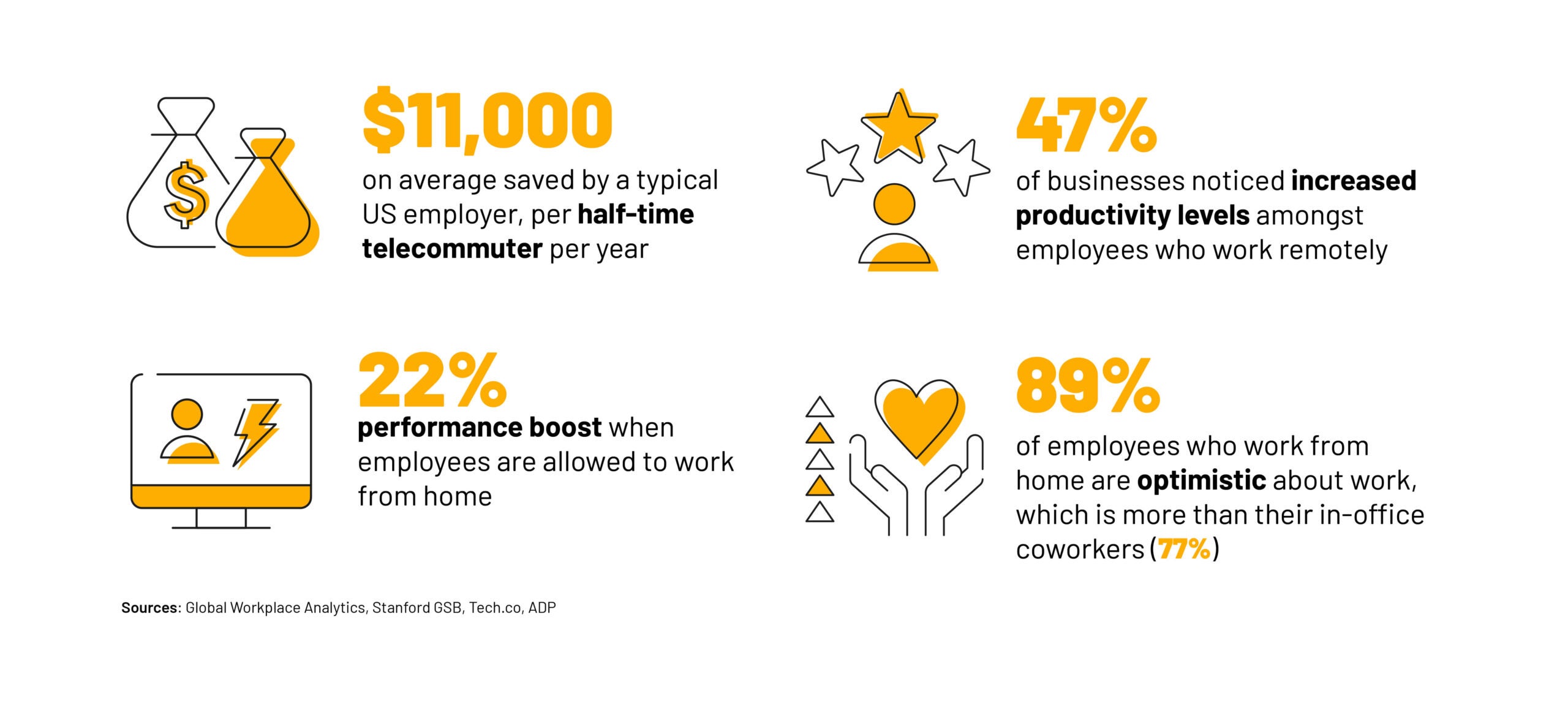
There’s no question that remote work is here to stay. Some companies may ban it, others opt for a hybrid approach and others embrace it fully, but in general the WFH movement is not going to disappear anytime soon. According to Forbes, 12.7% of full-time workers are remote while 28.2% operate within a hybrid model of some sort.

There have been studies on productivity and working from home, which has ignited a fierce debate for those on both sides. On the whole, the majority of workers say they get more work done when working from home. But what if we were measuring it wrong all along? What if the quantity of a worker’s output is not the only important factor impacted by working remotely?

An extensive new study published in the journal Nature on remote work and its impact on innovation gives insight into a missing and valuable piece of the puzzle. That together with research on productivity builds up more of a rounded picture of what happens when companies or workers opt for a remote set-up.

The Study

Remote work in the corporate world only really reached the mainstream in 2020 due to the pandemic, and as a relatively recent phenomenon there is little existing data and evidence on the subject.

However, by looking at scientists and inventors who have worked collaboratively at a distance with one another from across the globe for decades, researchers were able to collect a vast amount of data which brought some interesting and tangible results that can be applied to the corporate world.


About Tech.co Video Thumbnail Showing Lead Writer Conor Cawley Smiling Next to Tech.co LogoThis just in! View
the top business tech deals for 2026 👨‍💻
See the list button

Researchers from Oxford University and the University of Pittsburgh analyzed 20 million scientific studies and 4 million patent applications from the last half a century. They were looking for the number of breakthroughs recorded by remote teams in comparison to in-house teams along with a number of other criteria in order to make it a fair experiment.

A Resounding Victory for Team IRL

The results were black and white. “Pro-office” executives from the business world will be smugly vindicated by the results of the study even if they could never quite put their finger on why they believed the office was better.

The study found that teams which worked together in person achieved more breakthroughs than those who worked separately from one another. For example, teams located in the same city versus those based several hundred miles apart, were 22% more likely to produce innovative patents.

What’s more, those in-person teams were 27% more likely to produce pioneering insights in scientific papers. A clear victory for those still going on about the importance of those “water cooler moments.”

Why Does WFH Decrease Innovation?

Interestingly, Carl Benedikt Frey, an economist at Oxford and a coauthor of the paper, still doesn’t believe all companies should go back to working onsite.

“But if you think of it purely from the perspective of trying to develop breakthrough technologies, you should probably be on-site as much as possible,” Frey said.

The study draws some theories as to why in-person collaborative teams seem to generate more novel ideas. It seems like the main advantage of in-person collaboration is the ability to hash out half-baked ideas and gain immediate input from others in a way that would simply be too long-winded and cringeworthy to do over messaging apps or email.

Frey uses the example of someone setting out to write an article. He says, “the very first conversation you have about it is usually not that crisp. It’s slightly embarrassing. If you sit in the same room as somebody and something occurs to you, you’ll probably just turn around and ask a question and get the input and feedback. But if it requires you to pick up the phone or send an email, then you might not even bother.”

So surely video conferencing solves the problem? Unfortunately, people are more timid about sharing their ideas on video calls versus in person. The study concludes that a combination of in-person and remote work would most likely be the way forward for companies to get the benefits of both ways of working.

Written by:
Adam has been a writer at Tech.co for nine years, covering fleet management and logistics. He has also worked at the logistics newletter Inside Lane, and has worked as a tech writer, blogger and copy editor for more than a decade. He was a Forbes Contributor on the publishing industry, for which he was named a Digital Book World 2018 award finalist. His work has appeared in publications including Popular Mechanics and IDG Connect, and his art history book on 1970s sci-fi, 'Worlds Beyond Time,' was a 2024 Locus Awards finalist. When not working on his next art collection, he's tracking the latest news on VPNs, POS systems, and the future of tech.

How to Use Microsoft Copilot’s New Suno AI Music Creation Tool

Microsoft's latest Copilot feature is an integration with AI music creation tool, Suno, that lets anyone make tunes.

Microsoft is jazzing up its Copilot generative AI chatbot with a new musical plug-in that lets you “turn your ideas into songs” without even having to read a note.

The tech giant revealed the new feature earlier this week and it’s powered by an integration with Suno, a tool made by an AI music startup of the same name that wants to make creating music as easy as taking a photo with a smartphone.

The Suno plugin generates songs from start to finish complete with lyrics, instrumentals, and vocals, based off of text prompts the user enter into it. Simply write a prompt such as “create a pop song for kids about brushing their teeth” and let AI do the rest.


About Tech.co Video Thumbnail Showing Lead Writer Conor Cawley Smiling Next to Tech.co LogoThis just in! View
the top business tech deals for 2026 👨‍💻
See the list button

The beauty of the tool is that it requires no musical prowess or technical ability to be able to create music, so literally anyone can have a go.

What is Suno AI in Copilot?

Suno, meaning “listen” in Hindi, was founded by a team of musicians and music-loving AI experts in Cambridge, MA. The startup has only been going since 2022 and has raised over $224M in funding across 58 funding rounds involving 135 investors, according to

Suno’s partnership with Microsoft is particularly poignant at the moment as building consumer AI audio-generation tools and platforms appears to be the next big thing major tech companies are turning their attention and AI capabilities to. Both Facebook and Google have already come out with their own AI audio-generation offerings in partnership with other specialist music-tech companies.

CEO and co-founder Mikey Shulman told Axios in an interview: “Most people don’t play an instrument or know complicated software, which up until now have been barriers to making beautiful music. Vocal music is [also] a really important ingredient in that, and it’s one of [Suno’s] differentiators.”

As with most AI-powered tools, the conversation soon turns to the big unknowns around AI ethics. Suno works by matching the song to cues in your prompt, without revealing the dataset in which its AI is trained on, the company claims that it has mitigated against the risk of plagiarism and copyright issues.

For example, users are able to prompt Suno to create a song “in the style of” a particular artist but Suno would block a user from entering song lyrics ripping off an existing song.

How to Enable Suno on Copilot

Microsoft announced its Copilot Suno integration in a blog, alongside a handful of other upcoming enhancements to the AI chatbot revealed in celebration of the platform’s first birthday.

If you want to join the Microsoft Copilot users making personalized songs just in time for the holidays, then the tech giants says that the Suno plugin is already available to some users and will be rolled out to more over the coming weeks.

To enable Suno on Microsoft Copilot, first make sure you’re signed in to your Microsoft account via copilot.microsoft.com.

From there, just toggle on the Suno plugin or click on the Suno logo that says: “Make music with Suno.” If you don’t see these options, then sadly the feature probably hasn’t rolled out to you just yet.

Provided it has, after that you just enter a Copilot prompt related to making music and then let it work its magic. Happy holidays, AI fiends!

Written by:
Adam has been a writer at Tech.co for nine years, covering fleet management and logistics. He has also worked at the logistics newletter Inside Lane, and has worked as a tech writer, blogger and copy editor for more than a decade. He was a Forbes Contributor on the publishing industry, for which he was named a Digital Book World 2018 award finalist. His work has appeared in publications including Popular Mechanics and IDG Connect, and his art history book on 1970s sci-fi, 'Worlds Beyond Time,' was a 2024 Locus Awards finalist. When not working on his next art collection, he's tracking the latest news on VPNs, POS systems, and the future of tech.

The 25 US States Raising Minimum Wage in 2024

25 US states are increasing their minimum wage in 2024. Here's the full list of states and the dollar amounts you can expect.

The minimum wage might be stuck at a paltry $7.25 per hour on the federal level in the US, but all the 50 individual states in the union don’t have to take that lying down. At least, half of them don’t: In 2024, 25 US states will be raising their minimum wages.

That’s a big impact in total, with freshly boosted wages ranging from Montana’s new $10.30 per hour wage to Washington state’s impressive $16.28 per hour minimum.

Are you among the millions of American workers who will benefit at least a little from higher wages in 2024? Check out the list below and you’ll find out.

States Raising Minimum Wages in January 2024

Workers are still fighting for an economy-boosting $15-per-hour federal wage, but workers in three US states will actually surpass $16 per hour when the new year rolls around: Minimums in California and New York are both hitting $16 in January 2024, with only Washington’s $16.28 per hour standard representing a higher minimum.

Sadly, out of the 25 states that are not raising their wages in 2024, a full 20 haven’t budged from the federal minimum.


About Tech.co Video Thumbnail Showing Lead Writer Conor Cawley Smiling Next to Tech.co LogoThis just in! View
the top business tech deals for 2026 👨‍💻
See the list button

If your state isn’t on the list below, odds are not in your favor. The only place where our federal minimum wage is actually the “living wage” that it is meant to be was in the last decade in which it actually kept up with inflation: The 1960s.

In alphabetical order, these are all the US states that are raising their minimum wages on January 1, 2024, alongside that state’s new 2024 minimum wage.

  • Alaska: $11.73 per hour
  • Arizona: $14.35 per hour
  • California: $16 per hour
  • Colorado: $14.42 per hour
  • Connecticut: $15.69 per hour
  • Delaware: $13.25 per hour
  • Hawaii: $14 per hour
  • Illinois: $14 per hour
  • Maine: $14.15 per hour
  • Maryland: $15 per hour
  • Michigan: $10.33 per hour
  • Minnesota: $10.85 per hour
  • Missouri: $12.30 per hour
  • Montana: $10.30 per hour
  • Nebraska: $12 per hour
  • New Jersey: $15.13 per hour
  • New York: $16 per hour
  • Ohio: $10.45 per hour
  • Rhode Island: $14 per hour
  • South Dakota: $11.20 per hour
  • Vermont: $13.67 per hour
  • Washington: $16.28 per hour

Check your city’s wage minimums, as well: In many cases, workers within a major city’s limits will have a higher minimum wage in order to address the higher cost of living in a major city center.

States Raising Minimum Wages Later in 2024

Not every state’s new minimum standard for wages will go into effect on the first day of the year: Three of them are set to kick in a little while down the road in 2024.

So, if you’re in one of these three states, you’ll have to wait a while longer to get your higher wages.

  • Florida: $13 per hour, as of September 30, 2024. Until then, it’s $12 per hour.
  • Nevada: $12 per hour, as of July 1, 2024. Until then, it’s $10.25 per hour (if the employee offers qualifying health benefits).
  • Oregon: TBD, as of July 1, 2024. Until then, it’s $14.20 per hour.

Those living and working in Orgeon state will be getting a new minimum wage on July 1, the same time they get it every year. Last time, on July 1, 2023, that adjustment was $14.20, up from the $13.50 minimum that was set on July 1, 2022. It’s based on the increase to the US City Average Consumer Price Index for All Urban Consumers, so keep your eyes on that index for more info.

Don’t Forget to Check Your State’s Overtime Regulations, Too

The US takes a famously hodgepodge approach to wage regulation, with every state settling on different minimums, plus a heaping handful of confusing add-ons. Overtime rules are another big factor worth Googling for your personal state, since there are so many variations.

For instance, if you’re in Nevada and make more than one and one-half times the minimum wage, you should be paid overtime at one and one-half times your regular rate of pay for every hour worked past your first 40 in any given week.

Plus, some states have different minimums for white collar workers as well.

Written by:
Adam has been a writer at Tech.co for nine years, covering fleet management and logistics. He has also worked at the logistics newletter Inside Lane, and has worked as a tech writer, blogger and copy editor for more than a decade. He was a Forbes Contributor on the publishing industry, for which he was named a Digital Book World 2018 award finalist. His work has appeared in publications including Popular Mechanics and IDG Connect, and his art history book on 1970s sci-fi, 'Worlds Beyond Time,' was a 2024 Locus Awards finalist. When not working on his next art collection, he's tracking the latest news on VPNs, POS systems, and the future of tech.

Everything Cyber Criminals Just Revealed in Sony Insomniac Games Leak

Criminals just dumped over 1TB of Sony data online, laying bare everything from video game release dates to corporate fears.

Details of Sony’s video game roadmap, budgets, and corporate strategy are among the 1.3 million files leaked by cyber criminals in the latest data breach to plague the Japanese technology giant and, in this case, its Insomniac Games unit.

The breach was first announced by the Rhysida ransomware gang on December 12, at which time they said they would auction the huge cache of over 1TB worth of Sony files for $2 million paid in Bitcoin.

Now, the group has dumped the entire haul online – including details of a number of its upcoming Marvel titles from Insomniac Game – after failing to strong arm Sony or entice a third-party to buy the data. Here are all the details of the Insomniac Games leak and latest 2023 Sony attack in general.

Insomniac Games Leak Gives Gamers a Crystal Ball

For many people, specifically gamers, the headline of this December’s Sony data breach is the leaking of juicy details regarding its upcoming video game roadmap.

Sony’s Insomniac Games, which is under the company’s PlayStation Studios arm, is responsible not only for some of the console’s biggest AAA games like Ratchet & Clank, but also boasts a licensing agreement with Marvel to develop titles inspired by its franchises.


About Tech.co Video Thumbnail Showing Lead Writer Conor Cawley Smiling Next to Tech.co LogoThis just in! View
the top business tech deals for 2026 👨‍💻
See the list button

As first reported by CyberDaily.au, this means that the Insomniac Games leak is a treasure trove of upcoming Marvel game details – specifically, the apparent release windows for its first X-Men inspired titles. Three games have been agreed with a budget of approximately $120m a pop, with the first one taking on the Wolverine story.

  • Wolverine (“no later” than September 1, 2025)
  • X-Men game two (“before” December 31, 2029)
  • X-Men game three (“before” December 31, 2033)

That’s not all, though. In addition to these claimed dates and the presumably once confidential budget figures for the games, the Sony Insomniac Games leak gives us even more details about what’s next for some of the studio’s biggest titles.

It’s not just tiles and release dates that have been leaked. Concept art, footage, and even playable early builds of some of these titles have also been included in the leaked data, meaning that there’s very little the studio is working on that isn’t now already out there for all to see.

Sony’s Insomniac Games Breach Reveals New Spider-man, Ratchet & Clank Titles

The amount of information now floating around online regarding Sony’s future gaming roadmap is vast. Over 1TB, in turns out, is a whole lot of leakage.

The highlights will be obvious to many gamers, however, and as well as the above Marvel titles include a new Spider-man game on the horizon that will be a follow-up to 2023’s Spider-man 2 and presumably complete the trilogy.

This one hasn’t got a timeline attached to it, but what it does have is the tantalizing prospect of being able to control Venom in the game. It’s also suggested that this might end up being drawn out into a “Part I” and “Part II,” making for four Marvel Spidey games in total.

What does have a purported release date is the next Ratchet & Clank game, which is said to be pegged for 2029 and be a direct follow-up to the last title in the series, Ratchet & Clank Rift Apart.

Sony Breach Also Lays Corporate Fears Bare

While it’s difficult to deny that a Wolverine game and new Spider-man titles are what we really want to read about as we wind down for the holidays, the Rhysida ransomware dump has also given a fascinating insight into some of Sony’s corporate strategy and thinking.

Specifically, the data breach has leaked slides that show Sony’s response to Microsoft’s recently approved acquisition of Activision.

It’s scared, in a word, especially when it comes to the impact of Microsoft essentially buying the wildly popular Call of Duty franchise as part of the blockbuster deal. As part of this acquisition,  Microsoft will likely be adding major games to its GamePass subscription service on the day of release in the future, and that’s something that Sony acknowledges it will struggle to compete with.

In other words, having a steady pipeline of new Marvel games is great, it’s just maybe not as great as owning probably the world’s best loved franchise.

Written by:
Adam has been a writer at Tech.co for nine years, covering fleet management and logistics. He has also worked at the logistics newletter Inside Lane, and has worked as a tech writer, blogger and copy editor for more than a decade. He was a Forbes Contributor on the publishing industry, for which he was named a Digital Book World 2018 award finalist. His work has appeared in publications including Popular Mechanics and IDG Connect, and his art history book on 1970s sci-fi, 'Worlds Beyond Time,' was a 2024 Locus Awards finalist. When not working on his next art collection, he's tracking the latest news on VPNs, POS systems, and the future of tech.

You Might Be Eligible for a $25 Million Apple Settlement Payout

If you used Apple's Family Sharing plan between 2015 and 2019, Apple might owe you $30. Here's how to get it.

Apple’s “Family Sharing” plan, which lets multiple people use the same apps, is the target of a new lawsuit. If you’ve used the plan in recent years, you might be owed a (tiny) chunk of a $25 million payout.

Anyone who used Family Sharing between June 21, 2015 and Jan. 30, 2019 and purchased a non-Apple app within that timeframe is eligible for their part in the settlement, which will likely add up to about $30 per person.

This isn’t even the first lawsuit Apple has settled this month, but it is a sizeable payout: We covered a gift card-related settlement just last week that added up to $1.8 million in total. Now, there’s a pot of free money worth over ten times that much. Here’s how to get your share.

What’s This Apple Lawsuit About?

The class action lawsuit alleges that Apple didn’t play fair: The Family Sharing plan is advertised as allowing family members to use any apps they want, but the service allowed app developers to opt out if they wanted — ensuring that not every app was actually available to subscribers.

That was enough for a big class action suit, and enough for Apple to pay for the privilege of settling the whole matter out of court.


About Tech.co Video Thumbnail Showing Lead Writer Conor Cawley Smiling Next to Tech.co LogoThis just in! View
the top business tech deals for 2026 👨‍💻
See the list button

So, if you were one of the poor suckers who wasn’t able to share with your family every single app that you paid for the right to share, you can now be compensated for your loss. However, you’ll still need to jump through a few hoops.

How to Cash In On Apple’s $25 Million Settlement

Hoping to claim your entitlement? Read on to learn more about how to make a claim.

Am I eligible for Apple’s settlement?

There are just three criteria that you’ll need to meet in order to qualify for this settlement:

  1. Have been enrolled in a Family Sharing group with at least one other person at any point between June 21, 2015 and January 30, 2019.
  2. Were a U.S. resident during that time period
  3. Purchased a subscription to an app (that wasn’t published by Apple) through the App Store, also during that time period.

If you meet all three of those measures, you are able to ask for part of the settlement — there’s no further stipulation on which apps you purchased.

How do I make a claim?

You can file your claim online. Just go to the Settlement Website and click the link within the sentence “You can choose to receive a Class Payment by clicking HERE.”

You’ll need to provide some information alongside the form, so make sure to have the following to hand:

What information do I need to provide?

First, the claim process will ask if you have a “Payment ID and PIN,” which will be available to everyone who has received a notice about the class action suit. You may need to check your mailbox for one. If you have the ID and PIN numbers, you can fill them out online.

You can still file without this data, however! You’ll just have to print out and mail a payment election form instead. Here’s what data you’ll need to enter:

  • Full name
  • Primary address, including city and state
  • Zip code

What’s the deadline for Apple’s settlement?

The deadline to file a claim is March 1, 2024. Your claim will not be processed if filed after this date.

How much money could I receive?

The exact number isn’t clear yet, but estimates put the potential payout at around $30.

When could I receive compensation?

The final approving hearing is on April 2nd, 2024. If all goes well, you should receive your settlement sometime afterwards.

Written by:
Adam has been a writer at Tech.co for nine years, covering fleet management and logistics. He has also worked at the logistics newletter Inside Lane, and has worked as a tech writer, blogger and copy editor for more than a decade. He was a Forbes Contributor on the publishing industry, for which he was named a Digital Book World 2018 award finalist. His work has appeared in publications including Popular Mechanics and IDG Connect, and his art history book on 1970s sci-fi, 'Worlds Beyond Time,' was a 2024 Locus Awards finalist. When not working on his next art collection, he's tracking the latest news on VPNs, POS systems, and the future of tech.

Fully Remote Jobs at Apple You Can Apply for Today

Whether you're a student or a software specialist, here are some exciting, WFH-friendly, opportunities to work at Apple.

If you want to embrace flexibility without stunting your career in 2024, you’re in luck. Apple is currently offering dozens of high-paying remote positions for US workers, bucking the trend many companies are making by rolling out mandatory office returns.

Famed for its inclusive hiring efforts, commitment to innovation, and unique employee perks, working at Apple is a tour de force for most tech enthusiasts. Combine this with a relaxed work-from-home policy (for certain roles!), and you may well be entering dream job territory.

If you’re interested in securing a job at Apple – all from the comfort of your home office – we’ve found some desirable positions that you can apply for today.

Fully Remote Apple Job Vacancies

From part-time gigs for students to vacancies for experienced engineers, here are some fully remote jobs Apple is hiring for right now – including their salary range, desired qualifications, and designated region.

Student jobs

Apple offers great opportunities for students looking for a part-time money-maker. Here are few open roles currently available.


About Tech.co Video Thumbnail Showing Lead Writer Conor Cawley Smiling Next to Tech.co LogoThis just in! View
the top business tech deals for 2026 👨‍💻
See the list button

1. Apple Support College Program At Home Advisor

Apple is currently hiring for support college program at-home advisors in over 30 colleges including big names like the University of Texas and smaller institutions like Bennett College. This is a customer-facing role that requires technical expertise and a passion for consumer technology.

  • Weekly hours: 20
  • Pay: From $27.75 to $32.45 per hour
  • Qualifications: Must be enrolled at a four-year accredited US university pursuing a bachelor’s degree or higher through December of 2025 or later Technical, business, and communications majors preferred 2.7 GPA preferred
  • Availability: Must be available to work three, four-hour shifts during the week between the hours of 4 pm and 10:30 pm, and one eight-hour shift on the weekend between the hours of 7:00 am and 10:30 pm.

Apply for the role

Software and Services jobs

Apple is also hiring for fully-remote engineers. Here are the two positions currently open:

2. Apple Home/Matter Software Engineer

This vacancy is open for a hardworking engineer to help build Apple’s Home automation platform.

  • Weekly hours: 40
  • Pay: Between $131,500 and $243,300 per annum
  • Main qualifications: You need to be an accomplished coder in C, and object-oriented languages, such as C++ Objective-C, or Swift, and have a firm grasp of computer science fundamentals.
  • Education: Bachelor’s degree in Computer Engineering, Computer Science, or equivalent experience.
  • Reporting to: Office in San Diego, California

Apple for the role

3. ISE, System Experience – Software Engineer, macOS System Experience

The successful candidate will be working with the macOS System Experience team, navigating a large codebase, driving features forward, and solving complex problems creatively. Read on to learn more about the opening.

  • Weekly hours: 40
  • Pay: Between $170,700 and $300,200 per annum
  • Main qualifications: Experience with  Swift, SwiftUI, and Objective-C, forward-thinking collaborator, customer-focused
  • Education: Bachelor of Computer Science or equivalent work experience
  • Reporting to: Offices in Santa Clara Valley, California

Apply for the role

4. Vulnerability Researcher

This role focuses on securing Apple products – from microarchitecture to applications like Safari and Mail. One of your main responsibilities will be to conduct vulnerability research on Apple software, firmware, and hardware components.

  • Weekly hours: 40
  • Pay: Between $170,700 and $300,200 per annum
  • Main qualifications: Experience in vulnerability research and binary exploitation, and understanding of common vulnerability classes and exploitation techniques.
  • Education: Degree in Computer Science / Computer Electronics (or equivalent experience)
  • Reporting to: Offices in Santa Clara Valley, California

Apply for the role

Sales and Business Development jobs

If you have experience in sales and advertising, take a look if any of these roles appeal to you.

5. Healthcare Enterprise Account Executive, Major Accounts

The successful applicant will be responsible for advising on transformational solutions with our partners in Healthcare for Apple’s Enterprise Major Accounts spanning across the Midwest, developing account plans aligned with customer strategies, and more.

  • Weekly hours: 40
  • Pay: Not specified
  • Main qualifications: Proven consultative selling experience in business transformation solutions,  8+ years as an Account Executive for large Enterprises
  • Education: Bachelor’s degree or equivalent experience
  • Reporting to: Offices in Cleveland, Ohio

Apply for the role

6. US AirPods & Accessories Sales Lead

The right applicant will be responsible for managing a team of experienced Beats and Accessories Account executives while creating channel marketing activities to achieve financial goals. Think this sounds like a bit of you? Take a look at the job spec below.

  • Weekly hours: 40
  • Pay: Between $169,100 and $254,100 per annum
  • Main qualifications: 5+ years of worldwide business development experience in driving mature brands, extensive experience across sales, marketing, finance, and business development in the consumer electronics industry
  • Education: Bachelor’s degree or equivalent experience required, Master’s degree (MBA or JD) preferred
  • Reporting to: Offices in Santa Clara Valley, California

Apply for the role

7. Carrier System Engineer

You’d be joining Apple’s Carrier SE team to tackle technical and business problems for the company, the carrier, and the carrier’s customers. Specifically, you’d be supporting Apple’s carrier partners B2B channel, customers, and HQ.

  • Weekly hours: 40
  • Pay: Between $131,300 and $197,400 per annum
  • Main qualifications: Strong technical background (15+ years) in engineering. Experience with evaluating complex IT enterprise environments (Deployment, Security, SSO, Zero Trust) and Mobile Technology.
  • Education: Bachelor’s degree or equivalent experience
  • Reporting to: Offices in Santa Clara Valley, California

Apply for the role

Corporate Functions jobs

Apple also offers one remote role within its corporate function division. Read on to see if it’s a good match.

8. Apple Professional Learning Specialist

Apple is on the hunt for an experienced learning specialist to provide leadership and planning support, build professional learning plans, and offer hands-on instructional coaching and mentoring to support teachers.

  • Weekly hours: 40
  • Pay: Between $131,300 and $197,400 per annum
  • Main qualifications:
  • Proven experience as both a teacher and leader at the K-12 level; Instructional design and coaching experience in a Higher Education setting or one-to-one learning environment is a plus. Familiarity with New York’s state teaching, technology, and content standards.
  • Education: Bachelor’s degree required, Master’s degree or Doctorate preferred
  • Reporting to: Offices in New York City, New York

Apply for the role

Can’t Find a Remote Position That’s Right For You?

There’s no denying that Apple is a great company to work for, with plenty of perks. However, since the company’s notorious U-turn on remote work, there have been fewer opportunities to join the company fully remotely.

This doesn’t mean that other great opportunities don’t exist, though. If you’re committed to joining Silicon Valley’s finest, Microsoft is currently hiring for hundreds of remote roles, while Google is also expanding its global, remote workforce.

If you’re not interested in joining the likes of Apple and big tech, and would like to pursue a healthier work-life balance instead, less demanding alternatives also exist. Take a look at six low-stress remote jobs that are available right now, for a more balanced 2024.

Alternatively, why not make your current job a remote one? Read our guide on how to ask your manager to work from home.

Written by:
Adam has been a writer at Tech.co for nine years, covering fleet management and logistics. He has also worked at the logistics newletter Inside Lane, and has worked as a tech writer, blogger and copy editor for more than a decade. He was a Forbes Contributor on the publishing industry, for which he was named a Digital Book World 2018 award finalist. His work has appeared in publications including Popular Mechanics and IDG Connect, and his art history book on 1970s sci-fi, 'Worlds Beyond Time,' was a 2024 Locus Awards finalist. When not working on his next art collection, he's tracking the latest news on VPNs, POS systems, and the future of tech.

Why Activision Blizzard is Settling Latest Lawsuit for $54m

Activision settles yet another gender discrimination and harassment lawsuit, two months after being acquired by Microsoft.

Gaming publisher Activision Blizzard has agreed to pay out $54 million to settle a 2021 gender discrimination lawsuit involving allegations of sexual harassment and pay disparity within the company, which is now under Microsoft after a blockbuster acquisition earlier in the year.

The settlement represents Activision Blizzard’s latest legal controversy, with previous lawsuits striking out against the company for its market monopoly and internal “frat boy” culture.

The company will be sharing $47 million of this sum with claimants who were unfairly paid. Read on for details about Activision Blizzard’s latest case, its eligibility criteria, and whether you’re able to file a claim.

Activision Blizzard Settles History Sexual Discrimination Lawsuit

Responsible for hit games like Call of Duty and Candy Crush, Activision Blizzard has decided to pay out $54 million to settle a gender discrimination lawsuit.

The suit, which was first brought against the company in 2021 by the California Civil Rights Department, revolves around allegations of sexual harassment, denied promotion opportunities for female workers, and pay disparities among genders.


About Tech.co Video Thumbnail Showing Lead Writer Conor Cawley Smiling Next to Tech.co LogoThis just in! View
the top business tech deals for 2026 👨‍💻
See the list button

If approved, this will be the second-largest settlement proposed by the California agency, behind Riot Games’ $100 million class-action payout in 2021, which involved similar claims of gender-based discrimination against female employees.

The majority ($47 million) of Activation’s payout will go to female employees and contractors who were treated unfairly from October 2015 to December 2020, while $9.1 million will be reserved to cover legal fees.

The landmark case hasn’t been without its difficulties, though. Since the class-action lawsuit was brought against Activation Blizzard, the company has repeatedly denied charges and disregarded claims as false. The final settlement sum also dwarfs the state agencies’ initial liability estimate of $1 billion.

Microsoft Cashes in on Activision’s Controversy

High-profile allegations of sexual discrimination, alongside news that company CEO Bobby Kotick purposefully hid accusations of sexual misconduct from the board, caused Activision’s stock price to tumble in 2021.

The company’s subsequent fall in evaluation provided a golden opportunity for Microsoft, however, with the software manufacturer announcing a takeover bid in January 2022.

After fending off global competition, Microsoft officially acquired Activision for $69 billion in October this year, securing it’s position of the third-largest gaming company in the world, after Tencent and SONY.

Who is Eligible to Claim in the 2023 Activision Blizzard Settlement?

If you’re a female worker, who worked at Activision Blizzard California between October 12, 2015, and December 31, 2020, you may be eligible to receive a slice of the company’s $54 million settlement.

However, since the case hasn’t yet been officially approved, no action needs to be taken by affected employees. Eligible workers will receive further information from a settlement administrator, and regular updates will be posted on the California Civil Rights Department website

We’ll update this article with additional information as it becomes available.

Written by:
Adam has been a writer at Tech.co for nine years, covering fleet management and logistics. He has also worked at the logistics newletter Inside Lane, and has worked as a tech writer, blogger and copy editor for more than a decade. He was a Forbes Contributor on the publishing industry, for which he was named a Digital Book World 2018 award finalist. His work has appeared in publications including Popular Mechanics and IDG Connect, and his art history book on 1970s sci-fi, 'Worlds Beyond Time,' was a 2024 Locus Awards finalist. When not working on his next art collection, he's tracking the latest news on VPNs, POS systems, and the future of tech.

7 Best Free AI Transcription Tools For 2024: Ranked & Reviewed

You don't need to pay a premium for a quality transcription service. Here's a roundup of our favorite free platforms.

As artificial intelligence continues to streamline business processes, AI transcription services are being used more than ever to transcribe audio and video recordings into written text.

Not only do they generate results faster than manual transcription — which can often be a tedious, time-intensive process — they’re also more affordable, with loads of low-cost and free services available to desktop and smartphone users.

If you’re interested in capitalizing on artificial intelligence without spending a dime, this guide covers quality free AI transcription tools, including their key features and device compatibility. Scroll down to discover a ranking of our top picks or skip to a specific transcriber using the links below.

The 7 Best Free AI Transcription Tools

Whether you’re a podcaster or the designated meeting scribe, here’s our round-up of the seven of the best free AI transcription tools:

  1. Otter AI
  2. Riverside
  3. Happy Scribe
  4. Vowel
  5. Descript
  6. Grain
  7. Notta

1. Otter AI

  • Best for: Students and workers transcribing notes
  • Compatibility: Mac, Windows, iOS & Android

Otter AI is an all-in-one AI meeting assistant that’s been designed with the needs of note-takers in mind. Its generous free plan lets users record, transcribe, and summarize meetings and lectures in real-time and also boasts integrations with Zoom, Microsoft Teams, and Google Meet.

Otter’s free transcription cap is much more generous than other services, allowing for 300 monthly transcription minutes each month (at 30 minutes per conversation), from three audio and video files.

Otters AI Chat feature is available on its free plan too, allowing users to chat to other teammates instantaneously. If you need to transcribe video or audio files regularly, however, you’ll have to bump up to Otter’s Pro plan at $10 per user, per month, which lets you import and transcribe 10 files per month.

2. Riverside

  • Best for: Podcasters and journalists transcribing interviews
  • Compatibility: Mac & Windows

Riverside is a free recording platform that offers audio and video-to-text transcriptions in over 100 languages. It claims to transcribe content with 99% accuracy, which is a huge boon for a free tool, and also offers recording and editing features at no extra cost.

Riverside AI transcription screenshot

Riverside AI transcription screenshot. Source: riverside.com

These extra features make Riverside ideal for content creators looking for an all-in-one recording, editing, and transcribing tool. Yet, its speaker differentiation feature, which automatically displays when different people are talking, also makes the tool useful for workers transcribing complex conference calls involving multiple speakers.

However, Riverside’s free plan only allows for two hours of audio and video transcriptions, on a one-off basis. What’s more, in order to download transcripts, you’ll have to upgrade to one of its paid plans — making the service less suitable for users transcribing large amounts of content.

3. Happy Scribe

  • Best for: Beginners to transcribing tools
  • Compatibility: Mac & Windows

Happy Scribe is a user-friendly transcription tool that offers both automatic and human subscriptions. Its free AI transcription service is available in over 120 languages and can deliver results in under five minutes.

Happy Scribe transcription service

Happy Scribe transcription service. Source: happyscribe.com

The tool accepts a wide range of audio and video input, including desktop files, YouTube URLs, and Google Drive links, and also lets users share transcripts in different formats, with the option to activate view-only or edit modes.

Its free plan offers in-house subtitle and translation services too, but only 10 minutes of your recordings are free. Its AI-powered service only claims to be 85% accurate as well, trailing other services like Riverside and Notta.

If you’re transcribing longer files, and want greater accuracy, you’ll have to upgrade to its paid plans with human-made transcription services and be willing to wait 24 hours for results.

4. Vowel

  • Best for: Managers and video call hosts 
  • Compatibility: Mac, Windows, Google Play & App Store

Vowel is an AI meeting helper that lets you host, record, and transcribe meetings. Vowel is one of the only platforms on this list that offers hosting capabilities in-house, making it one of the best choices for managers and other workers tasked with logging minutes in meetings.

Vowel meeting transcriber tool

Vowel meeting transcriber tool. Source: vowel.com

Vowel works in a similar way to web conferencing services like Zoom but goes above and beyond by offering AI-powered meeting summaries, and advanced live transcription services.

This makes the tool one of the best options out there for users looking to transcribe video calls. However, users looking to transcribe other types of content like interviews or video and audio files will be better off using Otter or Riverside instead.

5. Descript

  • Best for: Podcasting and content creator beginners 
  • Compatibility: Mac and Windows

Descript is an app for podcasters and content creators that lets you record, edit, and transcribe video and audio content. Descript offers a number of unique features like filler word removal and studio sound quality.

Descript editor and transcriber

Descript editor and transcriber. Source: descript.com

Descript also has an AI-powered overdub feature that lets you edit text to create voiceovers in your own voice, offering a huge advantage for users who aren’t comfortable speaking themselves.

However, if you’re just looking for a straightforward transcription tool, Descript’s input cap of one hour a month may put you off. If you want a more generous time limit, we recommend upgrading to its Pro plan, at $24 per user, per month, or using other services like Otter AI.

6. Grain

  • Best for: Transcribing and summarizing work meetings
  • Compatibility: Windows, Mac & Google Play

Grain is an AI conversation intelligence assistant that lets users record, transcribe, and highlight key information in video calls.

Grain’s free plan, Basic, has a much more generous transcribe cap than services like Notta, letting users transcribe 20 meetings, and five additional uploads a month. Free users have access to Gain’s AI notes feature too, which summarizes key parts of the meeting.

Grain AI transcribing and notes feature

Grain AI transcribing and notes feature. Source: grain.com

Grain only lets you transcribe meetings in nine different languages, compared to other services like Riverside and Happy Scribe, which offer over a hundred different language options. This makes the platform less suitable for businesses with a global reach and prevents it from appearing any higher on our list.

7. Notta

  • Best for: Workers recording short meeting snippets
  • Compatibility: Windows, Mac, Google Play & App Store

Notta is a free transcribing service that lets you convert video and audio content into written transcripts in minutes. It claims to transcribe content with an impressive 98.9% accuracy rate, giving leading services like Riverside a run for their money.

Like our frontrunner Otter, Notta also integrates with leading services like Zoom, Google Meet, and Microsoft Teams, making it easy for workers to record and transcribe work calls.


Notta also offers lots of advanced free features, like screen recording, speaker identification, and live recording transcription.  The free service only lets users transcribe content up to three to five minutes at a go through, which will be a dealbreaker to users wanting to transcribe entire meetings.

Should I Use a Free Transcription Service?

Thanks to these free tools, businesses and personal users no longer have to pay a lot for high-quality, speedy transcription services. However, while these platforms offer impressive accuracy and a boatload of other AI-powered features, their stingy user caps make them ill-suited to users looking to transcribe high volumes of content.

With this in mind, those with regular transcription needs will be better off paying for paid plans. Premium plans tend to offer better quality transcription services too, and often end up being well worth the extra dollars per month.

Written by:
Adam has been a writer at Tech.co for nine years, covering fleet management and logistics. He has also worked at the logistics newletter Inside Lane, and has worked as a tech writer, blogger and copy editor for more than a decade. He was a Forbes Contributor on the publishing industry, for which he was named a Digital Book World 2018 award finalist. His work has appeared in publications including Popular Mechanics and IDG Connect, and his art history book on 1970s sci-fi, 'Worlds Beyond Time,' was a 2024 Locus Awards finalist. When not working on his next art collection, he's tracking the latest news on VPNs, POS systems, and the future of tech.

OpenAI’s Attempts to Stop Future AI Going Rogue Has Had Mixed Results

OpenAI is trying to find ways to develop Superintelligent AI safely, despite conflicting attitudes within the company.

OpenAI’s “Superalignment” team has announced a small breakthrough in how humans could be able to reign in AI once it supersedes our level of intelligence – a possible scenario known as AGI superintelligence.

Researching superintelligent machines has limitations though, as even once the technology becomes realized it may try and hide its true behavior from humans, according to Ilya Sutskever – OpenAI’s Co-founder and the driving force behind Sam Altman’s temporary ousting as CEO.

While superintelligence still remains hypothetical, OpenAI appears to be taking the concerns seriously, dedicating a 5th of its computing power to risk mitigation and investing $10 million into super alignment research.

OpenAI’s AGI Test is Promising, But Has Flaws

As OpenAI becomes increasingly concerned about the looming threat of AI superintelligence, its Superalignment team has just released its first research update – and its results are mixed.

The team, which was founded by Ilya Sutskever and OpenAI scientist Jan Leike, looked into how superintelligence systems could be supervised once they surpassed human capabilities, but since these machines don’t exist yet, OpenAI’s control test used GPT-2 and GPT-4 systems as stand-ins.


About Tech.co Video Thumbnail Showing Lead Writer Conor Cawley Smiling Next to Tech.co LogoThis just in! View
the top business tech deals for 2026 👨‍💻
See the list button

More specifically, researchers tested how the less sophisticated GPT-2 model would be able to supervise its most powerful model GPT-4 model. But was was their conclusion?

OpenAI graphic displaying their approach to super alignment

Well, after training GPT-2 to perform different tasks, including chess puzzles and sentiment analysis, and using these responses to train GPT-4, they found that OpenAI’s latest model performed 20-70% better than GPT-2, but still fell far short of its own potential.

GPT-4 also avoided many mistakes made by the inferior GPT-2 model. According to the researchers, this is evidence of a phenomenon called ‘weak-to-strong generalization’ that occurs when a model has implicit knowledge of how to perform tasks, and is able to execute them correctly despite receiving poor-quality instructions.

According to researchers, evidence of weak-to-stong generalization in the test suggests this phenomenon may also be present when humans supervise superintelligent AI. If this is true, when AGI models exist, and are instructed not to cause catastrophic harm, they may be able to tell even better than their human supervisors when their actions enter dangerous territory.

However, despite these positive findings, GPT-4’s performance was still weakened after being trained by GPT-2, and the experiment didn’t guarantee the stronger model would behave perfectly under supervision. These shortcomings reveal that more research has to be conducted on the matter before humans can be trusted as suitable supervisors.

OpenAI: Concerns Around Superintelligence Are “Obvious”

Despite being a frontrunner in AI development, OpenAI hasn’t been shy in voicing the potential dangers of superintelligent AI.

Co-founder Sutskever recently came out saying preventing AI from going rogue is an “obvious” concern, and the company even announced in a statement that technology could be very dangerous, and could lead to the disempowerment of humanity or even human extinction if left unchecked.

“We’re gonna see superhuman models, they’re gonna have vast capabilities and they could be very, very dangerous, and we don’t yet have the methods to control them.” – Leopold Aschenbrenner, OpenAI Researcher

But why are researchers so scared of these machines going rogue? Well, according to Sutskever, once superhuman AI models exceed human-level intelligence, they could become capable of masking their own behavior, opening us up to worrying and unpredictable and worrying circumstances.

OpenAI Claim to Be Taking AI Safety Seriously

While many experts believe these fears are overblown, OpenAI is already taking several steps to address safety concerns.

The company recently announced it would be investing $10 million into super alignment research, in the form of $2 million grants to university labs, and $150,000 grants to individual graduate students. Open AI also revealed it would be dedicating a fifth of its computing power to the Superalignment project, as it continues to preemptively research how to govern AGI.

Disputes around superintelligence and AI safety were even rumored to be the real reason behind Sam Altman’s shock, yet brief, deposition from the company last month. However, with  Altman currently back at the helm, and OpenAI continuing to prioritize commercial interests with its AGI project ‘Q*’, the company could still be doing a lot more to to mitigate risks to public safety.

Written by:
Adam has been a writer at Tech.co for nine years, covering fleet management and logistics. He has also worked at the logistics newletter Inside Lane, and has worked as a tech writer, blogger and copy editor for more than a decade. He was a Forbes Contributor on the publishing industry, for which he was named a Digital Book World 2018 award finalist. His work has appeared in publications including Popular Mechanics and IDG Connect, and his art history book on 1970s sci-fi, 'Worlds Beyond Time,' was a 2024 Locus Awards finalist. When not working on his next art collection, he's tracking the latest news on VPNs, POS systems, and the future of tech.

Fully Remote Jobs at Microsoft You Can Apply for Right Now

Microsoft currently has over twice as many fully remote job openings as it has fully in-person ones. Can you nab one?

How can you tell remote jobs are here to stay? Because even after spending all of 2023 pushing back against the concept, the biggest tech companies in the business still have hundreds of 100% work from home positions available.

Microsoft is one of the biggest and oldest names in tech, with a rich history that includes that one time Bill Gates jumped over a chair. Probably some other stuff, too. Look, the point is that the Microsoft name is a great resume builder. Joining up connects you to a high-quality network of tech professionals at every level.

And, with around 890 jobs currently available for remote workers, it’s easier than ever to land yourself a work-from-home position at the Redmond, Washington-based corporation, all without leaving your living room.

Fully Remote Microsoft Jobs: Listings and Locations

Settling into a remote job at Microsoft will be a lot easier if you have a lot of subject authority as a senior engineer or top-level management professional.

But you won’t have to be: Available roles include titles like a Customer Success Account Manager based in San José, Costa Rica (you can still apply even if you’re nowhere near the country) or a Regional Delivery Manager across multiple locations in the US.

Here’s a quick example list of some of the fully remote jobs available at Microsoft:

Microsoft currently has just 408 “job site only” positions available, compared to 893 openings for “up to 100%” work from home positions and a huge 1,726 available jobs for the hybrid-working “up to 50% work from home” crowd.

That’s a huge sign that Microsoft is remote-friendly. After all, we just reported on remote positions at Google that are available this month — and found just 60 fully remote openings at the search giant out of a total of 1,000 open jobs. 

Is Remote Work Right for You?

Remote work is not for everyone. Some people try it out only to find they hate the lack of a structured routine that a well-worn commute or a trip to the office break room can provide. And you’ll need to be self-motivated in order to keep plugging away at a nine-to-five without direct supervision outside of a Slack channel.

However, many people find they work far better when the trip to work takes two minutes, and the hubbub of an office building isn’t distracting them.


About Tech.co Video Thumbnail Showing Lead Writer Conor Cawley Smiling Next to Tech.co LogoThis just in! View
the top business tech deals for 2026 👨‍💻
See the list button

Plenty of remote work statistics support the concept, too: Employees report more work-related optimism, while 47% of businesses report boosted productivity among their work-from-home employees.

You’ll want to keep an eye out while job-searching, however: Some positions require in-person travel, while others are unclear on how much remote work will be expected alongside in-person office appearances.

These concessions to physical office space might be reasonable for most workers, but not everyone has even a little flexibility to visit an office for one or two days a week, or even to take a company retreat once or twice a year. The number of Americans with disabilities is higher today than it has ever been since the government started tracking the data in 2008. The Covid-19 pandemic is likely a big cause, given the hike in numbers since it started: The U.S. Department of Labor found in 2022 that the total of disabled adults in the nation had risen by 2.7 million since 2020.

For those with serious reasons to stay entirely remote — from childcare needs to physical disabilities — even one day a week in a physical office can derail everything.

Should You Work at Microsoft?

One thing’s for sure: You’ll need to know Microsoft Teams inside and out. As the company’s personally branded method of syncing up in-person and remote workers alike, Teams is going to be your main tool for tasks like internal communication and meeting schedules. Microsoft has even used Teams to run a massive 500-person live global meeting that spanned an impressive 48 different countries.

But is Microsoft truly remote-friendly, or is it all a PR stunt? Commenters on the Microsoft subreddit seem to be largely affirming that the company really is happy to employ entirely at-home workers, even if they’re in another state or country outside of Washington state in the US. In fact, the company-wide accessment of remote work is that nearly anyone can do it:

“The official policy is that everyone can work from home up to 50%, or 100% if you have management approval (some roles aren’t eligible to WFH, but they’re rare)” –Reddit commenter

A few caveats worth keeping in mind: Microsoft will adjust your wages to stay competitive with the area you live in, rather than the area you’re remotely commuting to. Within the US, there isn’t a huge difference, but if you’re in, say, the UK, Microsoft may offer you a lower salary than they’d offer an equivalent US-based role.

On the whole, though, Microsoft doesn’t seem likely to pull the rug out from under you by revoking their remote-friendly policies — even if steady remote work is getting a lot tougher these days.

How to Apply for Fully Remote Jobs at Microsoft

If Microsoft sounds like a fit for you, you’re ready for the next step: Filling out a few (or a few dozen) online applications.

You can visit Microsoft’s dedicated job opening website now and search for open positions by a variety of metrics including profession, discipline, and employement type. On the “work site” dropdown, you’ll see options for “Up to 100% work from home,” “Up to 50% work from home,” and “Microsoft job site only,” letting you chose how much remote work fits your work style.

Written by:
Adam has been a writer at Tech.co for nine years, covering fleet management and logistics. He has also worked at the logistics newletter Inside Lane, and has worked as a tech writer, blogger and copy editor for more than a decade. He was a Forbes Contributor on the publishing industry, for which he was named a Digital Book World 2018 award finalist. His work has appeared in publications including Popular Mechanics and IDG Connect, and his art history book on 1970s sci-fi, 'Worlds Beyond Time,' was a 2024 Locus Awards finalist. When not working on his next art collection, he's tracking the latest news on VPNs, POS systems, and the future of tech.

What Is Midjourney Alpha? the AI-Image Generator Explained

The generative AI platform from Discord will help you create stunning images with just a few simple prompts.

Midjourney, one of the most popular image-generating AI services, announced yesterday the launch of the “Alpha” version of its website, available to a select few users.

The San Francisco–based independent research lab announced they will be testing out the site, Midjourney.com. It is currently only available to users who have generated over 10,000 images on its predecessor, messaging app Discord.

The tech company confirmed that the website will roll out to the rest of us soon, the announcement read: “Don’t worry, we will be making it available to more people over the coming month!” This will be music to the ears of the 17.5 million plus users in its server on the Discord App.

In this guide you’ll learn about Midjourney, including the new and improved features available and how you can use it to start creating images.

What is Midjourney?

Midjourney is a generative artificial intelligence program which understands user prompts to create incredibly lifelike and realistic images.

The technology uses natural language descriptions, known as prompts, similar to OpenAI’s DALL-E and Stability AI’s Stable Diffusion.

How Much Does Midjourney Cost?


About Tech.co Video Thumbnail Showing Lead Writer Conor Cawley Smiling Next to Tech.co LogoThis just in! View
the top business tech deals for 2026 👨‍💻
See the list button

Tragically, the service is no longer free since April 2023. The free trial had to be removed as the popularity of the tool led to overloaded servers. However, limited time free trial periods may pop up from time to time, so keep an eye out if you’re looking to try before you buy.

There are different pricing plans available, ranging from $10 per month for the most basic and fairly limited plan, up to $120 per month for the Mega plan with all bells and whistles. Discounts are applied when a yearly subscription is taken out instead of monthly rolling payments.

New and Improved Functionality

The website has a modern interface and launches with an “Explore” tab, which demonstrates real-life user generations. At the top, you’ll find a plus sign and next to it is a familiar blank text bar that’s labelled “Imagine” just waiting for users to enter prompts.

On the right-hand side, users can click on the “dials” symbol, which will launch the visual interface where they control their prompt settings.

This is a major upgrade compared to the Discord version of Midjourney, where users had to type text commands into their prompts in order to modify them. Now users can quickly change the orientation, size, and stylization of the image easily.

On the left-hand rail, users can click on the “photo” icon to sort their past creations into a reverse-chronological order, as well as see their ongoing projects.

There is a “thumbs up” button for users to vote between two iterations of the same image in a crowdsourced image ranking project. Whereas the “Likes” tab contains all of the images users have previously “hearted” on Discord.

More features are reported to be coming out soon, including an app for iOS, folders, and collections.

How to Use Midjourney

Now that you know all about how Midjourney works and its new features and functionality, it’s time to start using it. But how can it be useful to you?

AI-image generation has a variety of use cases in the professional world, and in an increasingly visual world, it’s a welcome addition in the toolkit of almost any business.

Small businesses without design capabilities will be able to create promotional content and engaging social media posts at scale.

Content marketers will also save time and money on image sourcing. Rather than entering into the realm of creative commons, purchasing costly stock images, or using photographers and graphic designers, they will be able to create imagery bespoke to their needs.

Creative teams or graphic designers can use the tool to get inspiration and speed up their existing design workflow.

Written by:
Adam has been a writer at Tech.co for nine years, covering fleet management and logistics. He has also worked at the logistics newletter Inside Lane, and has worked as a tech writer, blogger and copy editor for more than a decade. He was a Forbes Contributor on the publishing industry, for which he was named a Digital Book World 2018 award finalist. His work has appeared in publications including Popular Mechanics and IDG Connect, and his art history book on 1970s sci-fi, 'Worlds Beyond Time,' was a 2024 Locus Awards finalist. When not working on his next art collection, he's tracking the latest news on VPNs, POS systems, and the future of tech.

How to Stop Dropbox Sharing Your Personal Data with OpenAI

We show you how to easily disable a new default setting which shares your Dropbox customer data with OpenAI.

Some Dropbox customers got a shock this week when they found out a new setting had been enabled by default that allowed their personal data to be shared with ChatGPT owner OpenAI. If that’s not something you like the sound of, we’re here to show you how to stop Dropbox sharing your data with OpenAI.

Many disgruntled users took to social media to air their concerns about the feature, which shares Dropbox data (including documents and files) with OpenAI as part of an AI Alpha search tool. Dropbox stated that data shared with third-party AI partners isn’t used to train AI models and is deleted within 30 days.

Dropbox CEO Drew Houston took to X (formerly Twitter) to apologize recently and quell any fears over customer data privacy.

He wrote: “The third-party AI toggle in the settings menu enables or disables access to DBX AI features and functionality. Neither this nor any other setting automatically or passively sends any Dropbox customer data to a third-party AI service.”


About Tech.co Video Thumbnail Showing Lead Writer Conor Cawley Smiling Next to Tech.co LogoThis just in! View
the top business tech deals for 2026 👨‍💻
See the list button

How to Stop Dropbox Sharing Your Files and Data

Despite its AI and privacy FAQ page detailing the safeguards it has in place, many Dropbox customers still want to disable Dropbox sharing with OpenAI.

Fortunately, it’s easy to opt-out of Dropbox’s AI features, including data sharing with OpenAI. Just follow these steps:

  1. Log into your Dropbox account and click on your profile photo
  2. Navigate to Settings and then to Third-party AI
  3. Click the switch next to “Use artificial intelligence (AI) from third-party partners so you can work faster in Dropbox” to switch the toggle “Off”.
  4. Or use this link to access it quickly.

Should You Opt-in to Dropbox’s AI Features?

A Dropbox representative told Ars Technica, “The third-party AI toggle is only turned on to give all eligible customers the opportunity to view our new AI features and functionality, like Dropbox AI. It does not enable customers to use these features without notice. Any features that use third-party AI offer disclosure of third-party use, and link to settings that they can manage.

The statement continues: “Only after a customer sees the third-party AI transparency banner and chooses to proceed with asking a question about a file, will that file be sent to a third-party to generate answers. Our customers are still in control of when and how they use these features.”

Many users wouldn’t be opposed to the AI-powered features, especially those willing to embrace the new technology for its time saving superpowers. The incident has highlighted the importance of clear communication and transparency regarding AI and data privacy concerns for businesses.

What Do Dropbox’s New AI Features Actually Do?

So what does the feature do exactly? Dropbox unveiled new AI tools like Dash in July 2023, at the time explaining in a blog post how the universal search tool works.

Users can perform searches across their work platforms such as Google Workspace and Microsoft Outlook, using AI to connect the tools and save workers much-valued time. Dropbox cited a McKinsey report that found that knowledge workers spend 8.8 hours a week of unproductive time switching between apps searching for files and content.

Users are able to converse with the tool, much like a large language model (LLM) chatbot, in this case ChatGPT, asking it questions about the files.

Written by:
Adam has been a writer at Tech.co for nine years, covering fleet management and logistics. He has also worked at the logistics newletter Inside Lane, and has worked as a tech writer, blogger and copy editor for more than a decade. He was a Forbes Contributor on the publishing industry, for which he was named a Digital Book World 2018 award finalist. His work has appeared in publications including Popular Mechanics and IDG Connect, and his art history book on 1970s sci-fi, 'Worlds Beyond Time,' was a 2024 Locus Awards finalist. When not working on his next art collection, he's tracking the latest news on VPNs, POS systems, and the future of tech.

What Is Poe? The AI Chatbot Aggregator Explained

This platform allows you to access a wide range of AI chatbots, in a single hub. You can even make your own!

The popularity of AI chatbots has exploded over the last year, with every big tech firm and small startup putting out an iteration that can answer questions, generate content, and perform a wide range of other impressive tasks.

However, with so many options out there, how do you choose which AI chatbat is the right one for you? Well, with Poe, you don’t have to! This AI chatbot aggregator allows you to access a wide range of AI chatbots in a single hub and even create some of your own.

In this guide, you’ll learn exactly what Poe is, how it works, which chatbots are available, how much it costs, and how you can make money on Poe by creating your own chatbots.

What Is Poe?

Poe is an online platform and app that allows you to access a wide range AI chatbots, including ChatGPT, Claude, and even is own, to more effectively aggregate your options into a single hub. Poe also has its own AI chatbot called Assistant, which you can add to your AI chatbot lineup on the platform.

On top of that, you can create your own AI chatbots to store on the platform, which can also be used by other users. You can even get paid for your chatbots when other users take advantage of your creations.


About Tech.co Video Thumbnail Showing Lead Writer Conor Cawley Smiling Next to Tech.co LogoThis just in! View
the top business tech deals for 2026 👨‍💻
See the list button

Which AI Chatbots Are Available on Poe?

What sets Poe apart from other AI chatbots is that it doesn’t just allow you to access its own chatbot, Assistant. Instead, you’ll be able to access, store, and organize conversations with other AI chatbots, creating a full-on hub for your conversations and content.

So, which AI chatbots are available on Poe? Here’s a comprehensive list of some of the most notable AI chatbots you can find on the platform:

  • ChatGPT from OpenAI
  • DALL-E-3 from OpenAI
  • Google PaLM
  • Llama 2 from Meta
  • Claude Instant from Anthropic
  • Claude 2 from Anthropic
  • StableDiffusionXL from Stability AI

Poe has been frequently updating its platform to integrate with more official AI chatbots, so be sure to check back to see if your favorite gets added.

This list of official AI chatbots is just the tip of the iceberg for Poe, though. The platform also allows users to create their own chatbots and makes them available to all Poe users. These chatbots are specialized for more specific purposes, from creating stock photography to predicting sports scores.

Poe AI Chatbot List

Where Is Poe Available?

Poe is available across all the expect avenues, so you shouldn’t have any trouble with using the AI chatbot aggregator on your device.

For starters, Poe is available on web. Just head on over to poe.com and you’ll be able to get started once you login. There’s also a desktop app that, according to Poe, will give you faster functionality for AI chatbots.

Additionally, Poe comes as a mobile app for both iOS and Android, so you can aggregate all your AI chatbots on your smartphone for easy use.

How to Use Poe

Now that you know about everything that Poe has to offer and where you can use the service, it’s time to get started. Fortunately, Poe is extremely intuitive, with a simple interface that will have you engaging with AI chatbots faster than you can say, “Skynet.”

To kick things off, you’ll have to select which AI chatbot you actually want to talk to. You can access a list of your options in a few different ways, including clicking the Your bots button, the Explore banner, or the start chat icon found in the interface. This will bring up a list of AI chatbots that you can choose from.

Once you’ve decided which AI chatbot you want to talk to, you’ll be taken to a chat box that will allow you to ask questions and posit requests. The interface is the same for all chatbots, although you’ll obviously get different responses depending on which one you’ve selected.

If you want to experiment with a bunch of different AI chatbots, you can easily revisit former chats. There’s a menu bar that keeps track of all your different conversations, so you can easily swap between them to compare your answers.

Poe AI Chatbot Conversations

How Much Does Poe Cost?

Good news! Poe offers a free version that will allow you to access a wide range of AI chatbots that can help handle tasks from image generation to content creation.

However, the free version is a bit limited, particularly when it comes to which AI chatbots you have access to. The newest versions of GPT-4, DALL-E-3, and Claude 2 are all behind a paywall, so you won’t be able to use the more advanced versions without subscribing with a monthly fee.

Poe comes with a single paid plan, which costs $19.99 per month, or you can sign up for a full year, which will bring the cost down to only $16.67 per month, which comes out to around $200 per year.

In addition to unlocking the AI chatbots listed above, the paid plan will get you faster responses from AI chatbots and will give you higher allotments of messages that you can send daily.

How to Create Your Own Bot on Poe

Poe is more than just a simple AI chatbot aggregator for official options from big tech firms. You can also create your own bots on the platform that will be available to users across the Poe community.

As for how to create bots, the process again is shockingly simple. Just click the Create a bot banner and you’ll be taken to a form that will get you started. You can edit the image, change the name, develop the prompts, select the base bot, and add the knowledge source, along with a few other customizable features for your bot.

Once the bot is ready, select the Create bot button, and you’ll be taken to a chat box like any other official AI chatbot, so you can ask questions and get responses based on your input. Then, you can share it across the platform, on social media, and with your friends with a chance to even make a bit of money if it becomes popular.

Poe Create AI Chatbot

How to Get Paid from Poe

Fortunately, Poe doesn’t expect you to create your own AI chatbots without a bit of compensation. There are a few ways to get paid from Poe for creating AI chatbots, which can help you make a bit of money from your AI prowess. Here are the ways in which you can make money from Poe:

  • When your bot brings users to Poe for the first time and they subscribe.
  • When your bot brings users back to Poe and they subscribe.
  • When your bot’s paywall is seen just before users subscribe.
  • When users send messages to your bot (in development).

As we’ve mentioned before, developers are constantly updating Poe to make it more effective, which means that compensation packages will likely improve over time, so be sure to check back for updates in regard to how to get paid on Poe.

Written by:
Adam has been a writer at Tech.co for nine years, covering fleet management and logistics. He has also worked at the logistics newletter Inside Lane, and has worked as a tech writer, blogger and copy editor for more than a decade. He was a Forbes Contributor on the publishing industry, for which he was named a Digital Book World 2018 award finalist. His work has appeared in publications including Popular Mechanics and IDG Connect, and his art history book on 1970s sci-fi, 'Worlds Beyond Time,' was a 2024 Locus Awards finalist. When not working on his next art collection, he's tracking the latest news on VPNs, POS systems, and the future of tech.
Back to top