Russia Accused of Forcing Apple to Remove VPNs from App Store

Reports indicate that at least 25 VPN apps have been removed from the App Store in Russia, including NordVPN and PIA.

VPN services are being removed from the App Store in Russia, with at least 25 apps reported to have been taken down.

Popular VPN services Red Shield VPN and Le VPN both confirmed on Thursday, July 4th that they had been removed from Apple’s library of apps on the basis that they “solicit, promote or encourage criminal or clearly reckless behaviour”.

The demand to Apple was made by Russia’s Roskomnadzor (short for Federal Service for Supervision of Communications, Information Technology and Mass Media) in a continuation of the state’s antipathy for its people’s online privacy.

25 VPN Apps Blocked

The original report from Interfax.ru stated that Roskomnadzor made the request of Apple to block 25 VPN apps, including some of the industry’s biggest names like NordVPN, Proton VPN, Planet VPN, Hidemy.Name VPN and Private Internet Access.

Providers Red Shield VPN and Le VPN subsequently confirmed that their apps were included in the sweeping removal.


About Tech.co Video Thumbnail Showing Lead Writer Conor Cawley Smiling Next to Tech.co LogoThis just in! View
the top business tech deals for 2026 👨‍💻
See the list button

Both posted screenshots of the notice they had received from Apple, informing them that their apps would be removed “because it includes content that is illegal in Russia, which is not in compliance with the App Review Guidelines.”

In a subsequent blog post, Le VPN stated that it had not been given the requisite 24 hours to address the concerns of the notice. And, even if it had been, that the time limit would have been insufficient to carry out, submit and have approved the necessary changes to its iOS app.

Demands for Apple to Unblock Apps

Following Apple’s actions, Le VPN has joined with other blocked providers to start a petition aimed at the tech giant to challenge the removal of their apps.

With over 1,250 signatories at the time of writing, the petition calls the Roskomnadzor a “Russian censorship agency” and accuses Apple of “help[ing] Putin and his regime deny access to free information to hundreds of thousands of people in Russia”.

It continues: “We consider Apple’s actions, driven by fear of losing the Russian market, to be immoral and even criminal.” Before urging US Congress to address the parties’ concerns.

Kremlin Curbing VPN Use

With VPN usage in Russia skyrocketing since the start of its conflict with Ukraine in early 2022, Moscow has attempted to tighten its already heavy-handed control on the use of the internet.

Having already banned Twitter and Facebook, it then passed a law last July that any service that provided information on how to bypass blocked sites would be added to the Roskomnadzor’s ‘Unified Register of Prohibited Information’.

That includes the use of privacy software like virtual private networks and, on March 1st this year, a full ban on VPN services in Russia advertising their unblocking software was put into effect.

“In accordance with the law, any tools that allow bypassing blocked or illegal content have been banned in Russia starting February 2020. VPN services fall under such tools if access to illegal resources is not limited when they are applied.” – Roskomnadzor

VPNs Historically Blocked in Russia

This is not the first time that VPN services have found themselves unable to operate in Russia, even before the ongoing conflict with Ukraine.

We began reporting on threats to block VPNs that didn’t support Kremlin censorship over five years ago, with bans applied to the likes of ExpressVPN,  NordVPN, TorGuard, NordVPN and IPVanish in June 2019. The clamp downs continued through to the start of the 2020s.

While the use of VPNs remains legal in Russia, all providers need to have government approval. And the use of VPNs to access websites and online content that are blacklisted by the Kremlin is illegal.

Written by:
Now a freelance writer, Adam is a journalist with over 10 years experience – getting his start at UK consumer publication Which?, before working across titles such as TechRadar, Tom's Guide and What Hi-Fi with Future Plc. From VPNs and antivirus software to cricket and film, investigations and research to reviews and how-to guides; Adam brings a vast array of experience and interests to his writing.

Small Business Grants You Can Apply For in July 2024

The clock is ticking. Support your businesses future by applying to one of these grants before next month.

As we ease into the summer months, business optimism finally seems to have recovered from its Covid-induced slump, with a new survey from the US Chamber of Commerce revealing that 73% of US business owners expect their revenue to grow in the next year.

Despite this, rising inflation rates and systematic barriers to entry are still preventing millions of business owners from finding success. The good news?  For every budding business struggling to break through, there’s probably a business grant out there to help.

If you’re interested in securing your future today, we’ve rounded up some exciting business grants accepting applications in July. If the thought of writing a proposal is making you anxious, we also explore how AI can be used to assist with the grant-writing process.

Small Business Grants to Apply For in July 2024

Securing funding for your business might be easier than you think. Here are some small business grants accepting applications in July:

  1. CO-100
  2. She’s Connected
  3. BREAKTHROUGH Program 
  4. Spark Good Local Grants
  5. HoneyBook Breakthrough Grant
  6. Elevate Creatives Fund


About Tech.co Video Thumbnail Showing Lead Writer Conor Cawley Smiling Next to Tech.co LogoThis just in! View
the top business tech deals for 2026 👨‍💻
See the list button

1. CO-100

  • For: Small to medium-sized businesses
  • Grantor: The U.S. Chamber of Commerce
  • Amount: $2,000 to $25,000

Formerly known as America’s Top Business Awards, the CO-100 is a premier awards program designed to honor the achievements of small businesses and highlight their contributions to America’s economic growth. The grant program, which is backed by the U.S. Chamber of Commerce, awards $25,000 to the overall CO-100 winner, and $2,000 to ten runners-up that also made the list.

In addition to financial support, each successful business will gain valuable media brand exposure, be able to access business guidance from experts in their field and be invited to VIP experiences run by the U.S. Chamber of Commerce. To be eligible for the grant, businesses must have fewer than 250 employees and have gross revenues under $20 million.

If you think you could be in for a chance of winning, make sure to get your application in by July 22. Also, it’s important to note that each business needs to pay a $99 application fee in order to be considered.

  • Deadline: July 22 (extended from original deadline of July 8)

Learn more and apply here

2. She’s Connected

  • For: Female-owned businesses
  • Grantor: AT&T
  • Amount: $50,000

She’s Connected by AT&T is a business grant for woman-owned businesses designed to empower female entrepreneurs and business owners through financing. The lucky winner of the grant scheme receives a total of $50,000, alongside one full year of AT&T service with a brand-new device, and will be featured on an episode of AT&T’s sponsorship program She’s Connected.

If you run a US woman-owned business with under 50 employees and are aged 18 years or older, you could be in with a chance of winning. Unlike with CO-100, it’s completely free to enter, so you don’t have anything to lose. However, with it’s deadline looming close, we’d recommend sending off the application as fast as you can.

Learn more and apply here

  • Deadline: July 10

3. BREAKTHROUGH Program 

  • For: Female-owned businesses
  • Grantor: digitalundivided and JPMorgan Chase & Co
  • Amount: $5,000

digitalundivided and JPMorgan’s BREAKTHROUGH Program is another small business grant scheme aimed at supporting the success of female entrepreneurs. Like lots of other organizations, JPMorgan is focused on helping businesses holistically, not just by handing them a cash package. For example, alongside a grant of $5,000, successful businesses receive virtual guidance on scaling and expanding their business, feedback and insights from experienced mentors, access to digitalundivided’s community of entrepreneurs, and more.

To be eligible you need to identify as a woman, be aged 18 or older, have owned a business for over a year, generate a minimum of $50,000 annually, and have an established website or mobile app.

  • Deadline: July 14

Learn more and apply here

4. Spark Good Local Grants

  • For: Local charities, government entities, or schools
  • Grantor: Walmart
  • Amount: $250 to $5,000

Spark Good is a local grant scheme run by Walmart, Sam’s Clubs, and Distribution Centers across the US. The program aims to address the local needs of communities by awarding financing to organizations that benefit the area where they operate. Successful applicants can receive anywhere from $250 to $5,000 in funding.

To be eligible, organizations need to have a Spark Good account and be verified by Deed (Walmart’s third-party verification service provider). Applicants also need to be registered organization like a public charity, government entity, or public or nonprofit school. Think you might miss the application window? Don’t panic, applications are accepted on a quarterly basis so you’ll always be able to apply for the next round.

  • Deadline: July 15

Learn more and apply here

5. HoneyBook Breakthrough Grant

  • For: Early-stage marketing and creative consultants
  • Grantor: HoneyBook
  • Amount: $18,000

The HoneyBook Breakthrough Grant is a new funding opportunity targeted at early-stage marketing and creative consultants funded by the client management platform HoneyBook. The 20 lucky winners receive $18,000 in cash grants, a 3-year subscription to HoneyBook Premium, and expert services set up by HoneyBook Pros.

To be eligible, you need to be an independent business owner who is selling their skills and expertise as a consultative service, has an established digital presence, has been in business for under three years, and is making less than $100,000 in annual revenue. If you fit the criteria, you have until July 16 to apply, and winners will be announced on August 5.

  • Deadline: July 16

Learn more and apply now

6. Elevate Creatives Fund

  • For: Small creative businesses
  • Grantor: Wave & Shorty Awards
  • Amount: $20,000

Are you an independent creator, or creative freelancer based in the US or Canada? If so, you should probably know about Wave & Shorty’s Elevate Creative Fund. The $120,000 fund was designed to fuel entrepreneurship by removing financial barriers for small creative business owners.

The six successful applicants receive $20,000 to grow their business, free creative or business mentorship, a feature on the Shorty Awards website, social media, and podcast, and an invitation to the live Shorty Impact Awards in November. Shortlisted applicants don’t go home empty-handed either. They get featured on the Shorty Award’s website and get free personalized bookkeeping coaching from Wave.

You have until the end of the month to apply for this grant, but if you don’t already have a Wave account you will have to pay an application fee of $49.

  • Deadline: July 31

Learn more and apply now

Using AI to Write Grant Proposals: The Do’s and the Don’ts

If you’ve got a serious case of writer’s block, or are applying for a large volume of grants at once, AI can help to optimize the writing process in a number of ways. For example, tools like ChatGPT can help you brainstorm ideas,  crystalize your business plans, and create a clear structure for your proposal.

Platforms like ChatGPT can also act as a useful proofreader. The chatbot can check for typos, and grammatical errors, and is even capable of analyzing and improving the tone of your copy. For busy business owners, this attention to detail can be a lifesaver, and could even improve their chances of creating a successful application.

However, don’t be deceived. While AI has the power to streamline the grant-writing process, it can backfire massively for businesses that get it wrong. A grant proposal should sound human, and express as much of your personality as possible. Therefore, if you rely too much on AI, you risk the proposal sounding overly generic and detached.

AI makes mistakes too. So, before firing off your application, we recommend reading it through with a fine tooth-comb, to make sure all information is correct and up-to-date, and the rest of the proposal is as human-sounding as possible.

Written by:
Now a freelance writer, Adam is a journalist with over 10 years experience – getting his start at UK consumer publication Which?, before working across titles such as TechRadar, Tom's Guide and What Hi-Fi with Future Plc. From VPNs and antivirus software to cricket and film, investigations and research to reviews and how-to guides; Adam brings a vast array of experience and interests to his writing.

4-Day Week Works For Blue Collar Workers Too, Study Finds

Ditching a working day makes waste collectors more content and less likely to quit, according to new research.

Contrary to the belief of many experts, the future of a 4-day work week doesn’t have to be limited to desk-based workers, according to a new study of public sector workers by the University of Cambridge and Salford.

The UK-based trial found that ditching a workday decreased stress levels for most workers, improved workplace efficiency overall, and lessened attrition rates among garbage collectors – opening up exciting implications for labor and service workers that have previously been excluded from discussions around the popular workplace benefit.

Despite the overall success of the trial, benefits weren’t recorded across the board, suggesting that more research and practical experiments need to be conducted before the movement can be embraced by every industry. Read on to learn more about the study, and what it could mean for the future of the 4-day workweek movement in the US.

Shorter Working Week Can Benefit The Public Sector

There’s no lack of research highlighting the potential of a 4-day work week. As demands to drop the 40-hour week ramp up globally, a slew of studies agree that dropping a working day can reduce burnout and improve the happiness of workers, while simultaneously benefiting the bottom line of businesses.

However, with the conversation mainly being centered around the experience of desk-based workers, the majority of research implies the model would struggle to be embraced universally due to the physical limitations of many service and blue-collar professions – until now.


About Tech.co Video Thumbnail Showing Lead Writer Conor Cawley Smiling Next to Tech.co LogoThis just in! View
the top business tech deals for 2026 👨‍💻
See the list button

After conducting a 15-month trial, a UK-based study backed by the University of Cambridge and Salford found that public sector waste collectors and desk-based workers both benefited from the 4-day workweek. Specifically, the study, which involved over 450 staffers, found that performance improved in 11 out of 24 areas, with little to no change being reported in two.

During the trial period, staff turnover decreased by 39% – saving the organization £371,500 (~$500,000) in recruiting costs – household planning applications were processed a week and a half earlier, and around 15% more planning application decisions were completed within the correct timescale compared to before.

Substantial improvements to the mental health of workers were recorded too, with the majority of participants claiming that they felt more energetic, confident, and happy at work when the trial was taking place. Commenting on the results of the trial, the director of the 4 Day Week Campaign Joe Ryle said they heralded “a huge opportunity for councils and organisations across the public sector to start planning for a four-day working week”.

Challenges Still Remain For The 4-Day Work Week

However, despite the overall success of the trial, the study also highlighted some sticking points involved with compressing the workweek into four days.

Notably, during the 14 weeks, the speed with which empty council houses were relet fell slightly from 28 to 40 days on average, and rent collection for public housing experienced similar drops. Almost half of the participants agreed or strongly agreed that their workdays intensified during the trial too, with only 6% reporting no difference at all.

While stress was down across the board, 14% of workers claimed that a 4-day workweek escalated their level of stress escalated during the time period too. This chimes with the results from another UK-based study, where employees at the London-based company Krystal experienced more stress after implementing the flexible workplace model.

Is a 4-Day Work Week Possible For Laborours In the US?

In the US, a four-day workweek is one of the most in-demand employee perks for all workers, not just those who work in offices.

Support for the movement among blue-collar workers has been evidenced time and time again, including in the United Auto Workers strike last September, where company employees demanded to be paid full-time wages for a 32-hour work week.

The results of the UK’s largest public sector 4-day workweek trial weren’t as unanimous as some previous studies, but it still provides fertile ground for similar experiments to be carried out on home soil. For example, with far fewer garbage collectors quitting during the duration of the trial, and levels of stress dropping overall, it’s clear that working a fewer number of hours a week benefits blue-collar workers just as much as their desk-based counterparts.

Boston College economist and author of a book about the 4-day workweek Juliet Schor also believes that companies from all industries would be able to benefit from the model, whether it be by bolstering productivity or improving staff retention.

“Results are absolutely consistent across every type of industry,” Schor said. “So the four-day week is absolutely as relevant for blue-collar workers as it is for office workers.” – Juliet Schor, Economist at Boston College

Moreover, lots of experts claim just like with desk-based work, there are lots of inefficiencies to be trimmed down in service or labor-intensive professions.  Matthew Bidwell, a social science employment researcher at Wharton believes every sector wastes time in the workday, and a 4-day workweek could force companies to overcome these efficiencies.

Employees don’t always have to sit patiently and wait for the perk to come to them, either. If you think that your company would be better off trimming down a working day, find out how to ask your boss for the benefit, in simple steps.

Written by:
Now a freelance writer, Adam is a journalist with over 10 years experience – getting his start at UK consumer publication Which?, before working across titles such as TechRadar, Tom's Guide and What Hi-Fi with Future Plc. From VPNs and antivirus software to cricket and film, investigations and research to reviews and how-to guides; Adam brings a vast array of experience and interests to his writing.

Fully Remote Jobs at Google You Can Apply for in July 2024

Ready to take the next step in your career? See if there are any opportunities for you at Google this July.

With Fall on the not-so-distant horizon, July is the perfect time to make the most of the summer sun by embracing remote work. And what better company is there to work remotely for than Google: the Silicon Valley powerhouse that has consistently been lauded as the best company to work for by publications like Fortune.

Despite Google notoriously dragging its feet when it comes to remote work, the search giant does currently offer a wide range of fully remote options for new candidates – granted not as many as Microsoft or Apple through.

If you’re interested in joining one of the best tech companies in the world from the convenience of your home office, we round up some remote jobs at Google you should currently be aware of. We also list some opportunities offered by tech competitors, so you can ensure you’re not leaving any stone unturned.

Fully Remote Jobs at Google for July 2024

Out of the 2,429 jobs currently being advertised on Google’s Career page, 44 of them are tagged as ‘remote eligible’. While most opportunities on the portal are based in the US, due to Google being a global company, lots of the positions report to international offices. We’ve included the job’s primary location, alongside the job title, so you can take factors like time zones into account before applying. 

Here are some remote work positions currently available at Google in July 2024.

For the company’s full list of fully remote jobs, refer to Google’s career portal. And to be notified when new opportunities are posted, turn on job alerts for the search.

Is Google the Right Company For You?

While Google may not offer all the bells and whistles it did during the golden era for tech companies (read: no more slides and beanbags), it’s still widely considered to be a great company to work for. According to the workplace review site GlassDoor, 84% of Google employees would recommend working at the company to a friend, with its fast-paced environment and friendly workers being some of its most widely reported perks.


About Tech.co Video Thumbnail Showing Lead Writer Conor Cawley Smiling Next to Tech.co LogoThis just in! View
the top business tech deals for 2026 👨‍💻
See the list button

The company isn’t going to be a natural fit for everybody, however. Despite the prestige that comes with working alongside experts in your field, many employees have complained about the company’s unrealistic workloads and its lopsided work-life balance. With Google currently offering a much smaller selection of remote jobs than other tech leaders like Microsoft and Apple, and shying away from introducing other popular policies like the 4-day week, the search giant is still behind the flock when it comes to flexible working.

Truth be said, unless working for Google has been a lifelong ambition or yours, there’s likely to be an equally great or better fully remote opportunity for you elsewhere.

What Other Tech Companies Are Hiring Remotely? 

Can’t find a remote job that appeals to you at Google? Fortunately, as the tide continues to change on flexible work, the vast majority of tech companies offer some type of hybrid or fully remote option for new employees. 

If you’re committed to joining an industry leader, Microsoft is currently advertising over 900 remote roles, with opportunities ranging from customer service to software engineering. With the Redmond-based employer being one of the only major tech companies to remain steadfast with its approach to remote work, new employees can sleep easy knowing a return to the office mandate probably won’t be around the corner.

Career platform Indeed is also hiring fully remotely across lots of different departments, making now a great time to join the company from home. Combine this with the company’s – albeit self-appointed – title of being the 17th best remote company to work for, and Indeed will be a great option for candidates wanting the excitement of working with a fast-based tech company, without the competition that comes with firms like Google and Microsoft. 

There are so many more exciting remote opportunities to be aware of though. If you want to embrace flexible work before the summer draws to a close, check out our roundup of the best fully remote jobs to apply for in July.

Written by:
Now a freelance writer, Adam is a journalist with over 10 years experience – getting his start at UK consumer publication Which?, before working across titles such as TechRadar, Tom's Guide and What Hi-Fi with Future Plc. From VPNs and antivirus software to cricket and film, investigations and research to reviews and how-to guides; Adam brings a vast array of experience and interests to his writing.

Why Did OpenAI Keep Its 2023 Hack Secret From The Public?

Despite OpenAI playing down the breach, employees believe the company still isn't doing enough to protect sensitive data.

OpenAI’s questionable security profile has been thrust into the spotlight once more, with the New York Times recently revealing that the company fell victim to a clandestine hack in April 2023.

While no consumer or partner data was compromised in the attack, the bad actor did retrieve private information about the company’s AI technology through an online forum created for OpenAI employees.

OpenAI decided to keep this breach secret, as they didn’t believe it posed a risk to national security. However, with company insiders claiming that OpenAI is not currently well equipped to ward off attacks from entities like the Chinese Government, we explore how concerned ChatGPT users should be about OpenAI’s seemingly lackluster approach to data strategy.

OpenAI Secrets Were Stolen In 2023, But the Company Kept Quiet

Last April, a hacker stole private details about the design of Open AI’s technologies, after gaining access to the company’s internal messaging systems.

While the hack compromised information from the employee forum, no customer or partner data was compromised or stolen, and the threat didn’t infiltrate systems used to build artificial intelligence, two anonymous sources told The New York Times.


About Tech.co Video Thumbnail Showing Lead Writer Conor Cawley Smiling Next to Tech.co LogoThis just in! View
the top business tech deals for 2026 👨‍💻
See the list button

OpenAI executives revealed the incident to staffers in a company all-hands meeting the same month. However, since OpenAI did not consider it to be a threat to national security, they decided to keep the attack private and failed to inform law enforcement agencies like the FBI.

What’s more, with OpenAI’s commitment to security already being called into question this year after flaws were found in its GPT store plugins, it’s likely the AI powerhouse is doing what it can to evade further public scrutiny.

OpenAI Isn’t Doing Enough To Protect Itself From Foreign Governments, Says Former Staffer

It turns out that OpenAI’s decision to keep the attack concealed from the public wasn’t enough to assuage security concerns within its own company. After the incident took place, several employees expressed fears about the company’s potential risks to US national security, including former technical program manager Leopold Aschenbrenner.

In a memo sent to OpenAI’s board of directors, Aschenbrenner advised the company that they weren’t taking enough preventive measures to stop foreign adversaries like China from stealing its confidential data. Aschenbrenner also expressed that in the event of an attack, OpenAI’s security wasn’t strong enough to stop foreign infiltrations from taking place.

“We appreciate the concerns Leopold raised while at OpenAI, and this did not lead to his separation,” – OpenAI spokeswomen Liz Bourgeois told The New York Times

The former technical program manager alleged that OpenAI fired him for politically motivated reasons after he leaked other company information in Spring. OpenAI was quick to refute these claims, however, announcing that these factors weren’t what led to his separation, and that Aschenbrenner’s characterizations of OpenAI’s security were false.

So, Does OpenAI Really Pose a Risk to National Security?

With so many security concerns swirling around OpenAI, it seems logical to wonder if the company really does pose a threat to the nation’s security.

According to Anthropic’s co-founder Daniela Amodei, Americans shouldn’t start worrying yet. “If it were owned by someone else, could that be hugely harmful to a lot of society? Our answer is ‘No, probably not,’” Amodei told The Times last month, when speaking about the possible event of OpenAI being targeted by a politically motivated data breach.

However, she didn’t argue that the incident would be completely risk-free. “Could it accelerate something for a bad actor down the road? Maybe. It is really speculative” she added.

OpenAI claims they are taking major measures to improve their security profile, with the company recently creating a Safety and Security Committee to focus on how it would be able to handle potential risks caused by AI technologies.

However, despite positive steps being made by US AI powerhouses, China’s rapid acceleration in the industry is becoming hard to ignore. According to some metrics, China has recently overtaken the US in becoming the biggest producer of AI talent, with the nation generating almost half of the world’s top AI researchers.

While it’s impossible to predict whether OpenAI will fall victim to another attack anytime soon, there are steps consumers can take to protect their data on platforms like ChatGPT safe today. As a general rule of thumb, we’d recommend avoiding sharing sensitive or private information with the chatbot. Thanks to a recent update, you’re also able to opt out of ChatGPT collecting your information for training purposes.

Learn more about this update, and find out how to temporarily or permanently disable ChatGPT from training on your data here.

Written by:
Now a freelance writer, Adam is a journalist with over 10 years experience – getting his start at UK consumer publication Which?, before working across titles such as TechRadar, Tom's Guide and What Hi-Fi with Future Plc. From VPNs and antivirus software to cricket and film, investigations and research to reviews and how-to guides; Adam brings a vast array of experience and interests to his writing.

Taylor Swift Eras Tour: Hacker Leaks 440,000 Tickets and Raises Ransom Demand

Along with Taylor Swift Eras Tour tickets, the group reportedly possesses around 30 million passes to other events.

A hacking group known as ShinyHunters – thought to be responsible for a recent Ticketmaster data breach impacting half a billion people – is now claiming to have unlawfully obtained 440,000 tickets to Taylor Swift’s Eras Tour. 

According to a post on BreachForums, the group has also upped its initial ransom demand from around $1 million to $8 million after reassessing the damage leaking such data could do to Ticketmaster.

Along with Taylor Swift Eras Tour tickets, the group reportedly possesses around 30 million additional tickets for more than 65,000 events, plus a slew of sensitive customer information including emails.

The Eras Tour Ticket Leak

In May 2024, a hacking group known as ShinyHunters initially demanded a $500,000 ransom from LiveNation, the company that owns Ticketmaster, after it claimed to have access to the records of 560 million users. 

Then, in June, the company sent out a data breach notification to the Office of the District Attorney of Maine, confirming that the hack was real.


About Tech.co Video Thumbnail Showing Lead Writer Conor Cawley Smiling Next to Tech.co LogoThis just in! View
the top business tech deals for 2026 👨‍💻
See the list button

However, it now appears that the breach is wider-reaching – and significantly more serious – than first thought. 

“To celebrate the fourth of July, we present to you 440K Taylor Swift Eras game tickets” the group said in a recent BreachForums post, ominously adding that the singer would be “going to congress” instead of performing due to their successful attack. 

According to Hackread, the total value of the tickets stolen is an eye-watering $22 billion – which has led ShinyHunters to up its ransom demands to $8 million. The value of the additional 30 million tickets extracted from Ticketmaster systems, on the other hand, is thought to be around $4.6 billion.

What Data Do The Hackers Have?

Sometimes, with a hack of this size, the data actually exfiltrated from the company in question’s system is only semi-sensitive, or only useful when paired with other data. 

However, there seems to be an enormous range of data taken from Ticketmaster’s systems, if the hackers are indeed in possession of everything they claim to have. 

According to the post, ShinyHunters has obtained 980 million sales orders, order details relating to 680 million individual orders, 1.2 billion party lookup records, over 400 million email addresses, and millions of records from address verification systems. 

The group also says partial details relating to 400 million encrypted credit cards have also been exfiltrated from Ticketmaster’s system. 

ShinyHunters say that their theft amounts to “the largest publicly disclosed non-scrape breach of customer PII (personally identifiable information) of all time”.

What Should You Do if You’ve Been Impacted

As described in the breach notification letter referenced earlier on in this article, Ticketmaster recommends customers “remain vigilant and take steps to protect against identity theft and fraud, including monitoring your accounts, account statements, and free credit reports for signs of suspicious activity.”

The company has also revealed that it is offering a year’s worth of identity monitoring services via Transunion, at no cost to the customer – although you have to enroll within 90 days of receiving the data breach notification. 

We’d advise anyone who thinks they may have been impacted by this breach to take advantage of this offer and take even more precautions than usual when it comes to assessing the legitimacy of email correspondence.

Written by:
Now a freelance writer, Adam is a journalist with over 10 years experience – getting his start at UK consumer publication Which?, before working across titles such as TechRadar, Tom's Guide and What Hi-Fi with Future Plc. From VPNs and antivirus software to cricket and film, investigations and research to reviews and how-to guides; Adam brings a vast array of experience and interests to his writing.

COVID Cases Are Up in the US — Should You Go to Work?

COVID is on the rise again this summer, and if you're feeling sick, it's probably best to work from home or call off.

Yes, it’s been more than four years since the start of the pandemic, but a new COVID surge has many employees wondering when they should ask to work from home again.

Remote jobs have gotten less and less common since 2020, with a wide range of businesses opting for strict return-to-office policies. Granted, the majority of statistics show that remote work is a boon for the average business, but nonetheless, these CEOs persist.

Unfortunately, though, COVID is rearing its ugly head again this summer, and finding a way to work from home maybe in the best interest of you and your co-workers.

COVID Sees Summer Surge in US

According to new data from the Center for Disease Control (CDC), the US is experiencing a notable surge in COVID cases that could have a serious impact on the 2024 summer.

More specifically, the CDC noted that 44 states across the US are experiencing an increase in cases, while only one single state is experiencing a decline in cases. And unfortunately, that’s common for this time of year.


About Tech.co Video Thumbnail Showing Lead Writer Conor Cawley Smiling Next to Tech.co LogoThis just in! View
the top business tech deals for 2026 👨‍💻
See the list button

“Summer is back and we are about to have the summer bump, that we call it, of COVID cases. You know, we have a bump in the summer, and then it goes down in the fall, and goes up more substantially in the winter.” – Dr. William Schaffner, professor at Vanderbilt University School of Medicine, to CBS News.

Suffice to say, a hefty majority of the country is seeing a serious increase in COVID cases, which means it’s time to think about what to do about your work schedule.

Should You Work Remotely If You Have COVID?

Given that the majority of states are experiencing a surge, there’s a good chance that those symptoms you’re experiencing are a sign that you’re positive. Still, it’s always good to test yourself to be sure, if only to avoid a bit of unneeded anxiety.

If you test positive for COVID, you should try to work from home. While we are no longer in the depths of the pandemic, preventing the spread of disease is always a good strategy for living, and given that most jobs have been proven to be as if not more efficient at home, there’s not much of an excuse. Your co-workers will thank you for it, too.

Remember, though, if you’re sick enough to hamper your work, taking a sick day is always an option as well. That’s what they’re there for, after all.

Can Your Company Make You Come to Work If You Have COVID?

In the US, worker’s rights are decidedly less protected than in other countries. For example, there is no federal law guaranteeing paid time off or parental leave for employees in any state in the US. Subsequently, it’s safe to wonder if business owners can force employees into the office, even if they have COVID.

Fortunately, the Occupational Safety and Health Administration (OSHA) and National Labor Relations Act (NLRA) both have language that empowers employees to refuse the commute to avoid being infected.

“If the condition clearly presents a risk of death or serious physical harm, there is not sufficient time for OSHA to inspect, and, where possible, you have brought the condition to the attention of your employer, you may have a legal right to refuse to work in a situation in which you would be exposed to the hazard.” – the OSHA website

Unfortunately, this kind of thing isn’t easy to prove and doesn’t prevent the employer in question from retaliation like discipline or even firing. As you can imagine, the investigation process is quite lengthy and can involve legal aspects, so if you have COVID, it’s best to hope for an understanding manager than an aggressive lawyer.

How to Start Working Remotely

If you’re sick and your boss won’t let you work from home or if you’re just sick of the commute, you’re in luck. There are many ways by which you can go about working from home, you just have to take the initiative.

For starters, you might just be asking the wrong way. We’ve done a bit of digging to help employees find the best way to ask your boss to work from home, including talking about the many benefits and insisting on a trial period to get the ball rolling.

Beyond that, you can always find a new remote job that allows for more flexible schedules. While remote jobs have been on the decline, there are still plenty of opportunities out there for ambitious employees that are done with the commute, including at companies like Google and Microsoft.

Written by:
Now a freelance writer, Adam is a journalist with over 10 years experience – getting his start at UK consumer publication Which?, before working across titles such as TechRadar, Tom's Guide and What Hi-Fi with Future Plc. From VPNs and antivirus software to cricket and film, investigations and research to reviews and how-to guides; Adam brings a vast array of experience and interests to his writing.

How to Stop ChatGPT Training On Your Data (With Images)

Want to use ChatGPT, but not comfortable with it collecting and training on your information? We show you how to stop it.

Key Takeaways

  • ChatGPT harvests data from its users to train the platform and improve future conversations
  • Some users may not want to have certain pieces of data retained by the tool, such as personal or sensitive commercial information
  • The tool has a built-in option to turn off data training, that can be accessed with in seconds
  • Users can also use ChatGPT without logging in, to minimalize the risk of having data linked back to them

There’s no doubt about it, ChatGPT is a useful AI tool, whether you’re looking to create a snappy poem for someone’s birthday card, or totally reinvent your workout routine with an AI-curated plan. However, it’s also a hungry beast, and will merrily gobble up any data you feed it.

The reason that ChatGPT (and all AI chatbots) crave data is that it is being used to train the platform to provide better answers in the future. While it’s good that this will lead to a continual improvement of the system, you might feel slightly squeamish about your information being used in this way.

Here’s how you can tell ChatGPT not to train on your data, as well as some ways to use the tool anonymously.

How to Stop ChatGPT Training With Your Data

The fact that OpenAI, owners of ChatGPT, are collecting your data and using it to train their AI, isn’t a secret. You’ll find they’re very open about it in the site FAQs, and in fact, you should expect this to be the case for any AI chatbot you use.

Stop us if you’ve heard this before, but if a service is free, more often than not it’s YOU that is the product. By using ChatGPT you are essentially agreeing to let the company use your information to improve the service.


About Tech.co Video Thumbnail Showing Lead Writer Conor Cawley Smiling Next to Tech.co LogoThis just in! View
the top business tech deals for 2026 👨‍💻
See the list button

However, what you may not realize is that it is possible to turn off data collection in the settings, so let’s go ahead and do that now.

How to Permanently Disable ChatGPT Training on Your data

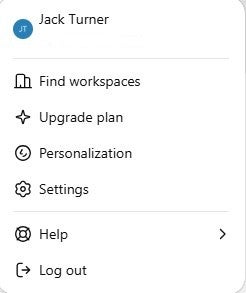
First, you’ll need to log into your account. Then, go to the settings menu, which is located in the bottom left of the screen, by clicking on your account icon:

This will give you access to the following menu:

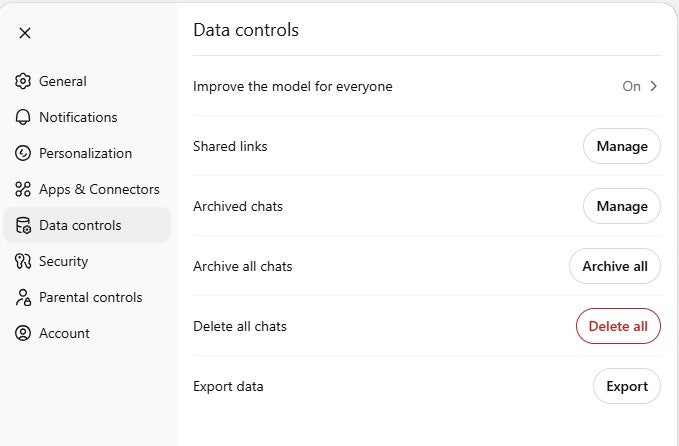
Now, in the settings menu, you’ll want to head to the Data Controls section.

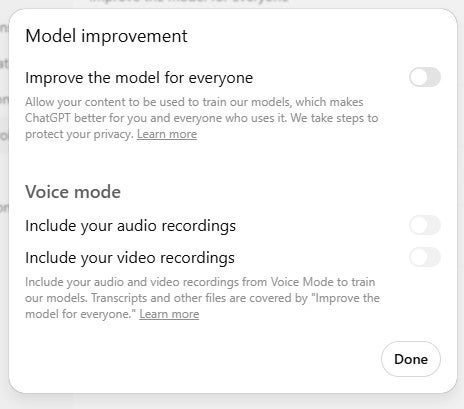
From here, there’s a button at the top of the options marked ‘Improve the model for everyone’, which by default is set to on. This is the magic button you’ll need to click if you’re adamant about turning off data training permanently.

While we’re taking a look at the Data Controls setting, it’s worth noting that if you want to, you can delete your entire chat history from here. Chances are that this data will have already been used to train ChatGPT’s models, but it’s worth knowing it’s there for future reference.

That’s it, you’re done!

While we’re in this menu, there’s a couple of other interesting options that it’s worth taking a look at. Firstly, this is where you can delete your account from, if you ever want to go scorched earth and remove yourself from ChatGPT entirely.

There is also an export data option here, which you can use to extract a report of all your data from the system.

How to Use ChatGPT Anonymously

If you’re concerned about your data being collected by ChatGPT, it is actually possible to use the service anonymously.

You don’t actually need to log into ChatGPT to use it. It does mean foregoing some of the personalization options, and it won’t protect you from having your data used for training purposes, but it does mean that any chats you have won’t be linked to your account.

Whatever you decide to do, there are some things we’d suggest never sharing with ChatGPT, including financial data, creative data, and personal information.

Written by:
Now a freelance writer, Adam is a journalist with over 10 years experience – getting his start at UK consumer publication Which?, before working across titles such as TechRadar, Tom's Guide and What Hi-Fi with Future Plc. From VPNs and antivirus software to cricket and film, investigations and research to reviews and how-to guides; Adam brings a vast array of experience and interests to his writing.

AI Models Are Being Trained on Protected Photos of Children

A new report has found hundreds of photos of children in common databases used to train AI models and image generators.

Even if your child’s photos are protected behind strict privacy laws, AI models are still likely using them to train, according to a new report.

The negative press surrounding AI is nothing if not persistent. It feels like every other day reveals a new story about an AI error that resulted in real-life consequences for everyday people.

Now, it’s been reported that AI models are indeed soaking up all the information they can find online, which includes photos of children from around the web.

Human Rights Watch: Children’s Photos Are Being Used to Train AI

The report from the Human Rights Watch (HRW) found 190 photos of Australian children in a common database of online screenshots that is used to train AI models like popular image generators.

This was actually the second such report in regard to AI training on photos of children. The HRW released a similar report in June that detailed a similar problem that saw 170 photos of Brazilian children online.


About Tech.co Video Thumbnail Showing Lead Writer Conor Cawley Smiling Next to Tech.co LogoThis just in! View
the top business tech deals for 2026 👨‍💻
See the list button

“Children should not have to live in fear that their photos might be stolen and weaponized against them. The Australian government should urgently adopt laws to protect children’s data from AI-fueled misuse.” – Hye Jung Han, Human Rights Watch

Even worse, the data within the photos sometimes provided information, like the name of the individual and the location in which the photo was taken. Researchers also found that the photos were scraped from content that has strict privacy settings, like unlisted YouTube videos.

AI Training Is Forever

The database in question — LAION-5B — is maintained by a non-profit, volunteer organization called LAION that admits the misuse of children’s photos to train AI models is a “larger and very concerning issue.” The company is does its best to shut down these issues with haste.

Unfortunately, that isn’t necessarily enough to keep these models in check.

“Current AI models cannot forget data they were trained on, even if the data was later removed from the training data set.” – Hye Jung Han, Human Rights Watch

That means that even if a photo has been entirely erased from the internet, scrubbed from every database you can find, if an AI trained on it, you’ll still be able to find it.

The Legality of AI

Generative AI models develop fast. In fact, their evolution and adoption into everyday technology has been alarmingly fast, which hasn’t allowed for regulatory bodies to catch up.

Now that it’s been a few years, though, the legal ramifications are catching up. Australia is currently voting on reforms to the Children’s Online Privacy Code, which would include more stipulations to protect against AI usage, but that isn’t the only case.

In fact, US record labels like Sony, Universal, and Warner are all suing AI music generators for copyright infringement, because their models are trained on music that belongs to them.

All that to say, the wild west days of AI can only last so long before people start seeing how these models actually operate. That is, of course, if it doesn’t soak up all the electricity first.

Written by:
Now a freelance writer, Adam is a journalist with over 10 years experience – getting his start at UK consumer publication Which?, before working across titles such as TechRadar, Tom's Guide and What Hi-Fi with Future Plc. From VPNs and antivirus software to cricket and film, investigations and research to reviews and how-to guides; Adam brings a vast array of experience and interests to his writing.

Russian Hackers to Blame for TeamViewer Security Breach

The same hackers led the infamous SolarWinds attack in 2021 and breached Microsoft's corporate systems late last year.

TeamViewer has fallen victim to a data breach that it is attributing to state-backed Russian hacker group.

The IT support giant last week reported the “irregularity” and has now confirmed details of an attack that it says has been contained to its internal corporate IT environment.

In an update to the incident last Friday, TeamViewer wrote that the threat actor APT29 (also known as Midnight Blizzard) was responsible for the breach – Russia’s Foreign Intelligence Service, SVR RF, is thought to be behind APT29.

TeamViewer Breach: the Timeline

The exploitation of TeamViewer’s systems first came to light when the company put up a statement on its Trust Center on Thursday confirming that, on Wednesday, June 26, 2024, “our security team detected an irregularity in TeamViewer’s internal corporate IT environment.”

That statement was followed the next day by two updates confirming that TeamViewer’s security team were investigating the incident together with “leading cyber security experts and relevant government authorities.”


About Tech.co Video Thumbnail Showing Lead Writer Conor Cawley Smiling Next to Tech.co LogoThis just in! View
the top business tech deals for 2026 👨‍💻
See the list button

In the first update, the company confirmed that it was attributing the activity to APT29 / Midnight Blizzard, but that it believed no customer data had been breached.

“Following best-practice architecture, we have a strong segregation of the Corporate IT, the production environment, and the TeamViewer connectivity platform in place. This means we keep all servers, networks, and accounts strictly separate to help prevent unauthorized access and lateral movement between the different environments.” ~the TeamViewer statement

On Sunday, TeamViewer reconfirmed that the attack was limited to its internal environment, meaning that employee data such as names, corporate contact information and encrypted employee passwords had all been compromised.

Sunday’s update also stated that the company had “started to rebuild the internal corporate IT environment towards a fully trusted state” and that the effects of the password leak in particular had been mitigated.

Who Is APT29?

APT29 is a hacker group that is almost certainly backed by the Kremlin. The APT part of the name stands for ‘advanced persistent threat actor,’ although it also goes by many other monikers, such as Midnight Blizzard, Nobelium, CozyBear, CozyDuke, the Dukes and Office Monkey.

Although the group has been active since 2008, it first came to notoriety in 2015 when it gained access to the US Department of Defense’s (aka The Pentagon) network via a phishing operation.

In a targeted campaign of breaching the systems of government departments and other international organizations, APT29 has also been held responsible for cyberattacks on the Democratic National Committee and Covid-19 vaccine developers.

In its Nobelium guise, it was behind the infamous SolarWinds attack in 2021 and breached Microsoft’s corporate systems late last year.

Is TeamViewer Safe?

Although TeamViewer’s statements have been at pains to point out that no customer data has been leaked and that security is “deeply rooted in our DNA,” the breach will understandably call into question the overall security of the software.

The ATP29 hack isn’t the first in the company’s recent history, with Chinese hackers exposing vulnerabilities in 2019. And it’s notorious for being an open playing field for scammers to play in.

Luckily, we’ve covered the question of whether TeamViewer is safe in a dedicated article. In that analysis we praised its use of 256-bit AES encryption, while noting that “if used incorrectly, it could leave your devices open to abuse from third parties.”

If you use the remote access software, we recommend that you mitigate risks by using strong passwords, implementing two-factor authentication, carrying out all security updates when prompted, and turning on its advanced security options.

Written by:
Now a freelance writer, Adam is a journalist with over 10 years experience – getting his start at UK consumer publication Which?, before working across titles such as TechRadar, Tom's Guide and What Hi-Fi with Future Plc. From VPNs and antivirus software to cricket and film, investigations and research to reviews and how-to guides; Adam brings a vast array of experience and interests to his writing.

What Is Skeleton Key? AI Jailbreak Technique Explained

ChatGPT and other AI models are at risk from new jailbreak technique that could "produce ordinarily forbidden behaviors."

Of the many criticisms levelled at artificial intelligence models, one of the most emotive is the idea that the technology’s power may be undermined and manipulated by bad actors, whether for malign uses or mere sport.

One way they do this is through “jailbreaks” — defined by our A-to-Z glossary of AI terms as “a form of hacking with the goal of bypassing the ethical safeguards of AI models.”

Now Microsoft has revealed a newly discovered jailbreak technique — called Skeleton Key — that has been found to be effective on some of the world’s most popular AI chatbots, including OpenAI’s ChatGPT, Google’s Gemini and Anthropic’s Claude.

Guardrails vs Jailbreaks

To help prevent generative AI chatbots from causing harm, developers put moderation tools known as “guardrails” in place. In theory, these are supposed to prevent the models from being impacted by biases, impeding user privacy, or generally be used for negative purposes.

It’s possible, however, to dodge these guardrails when certain prompts are entered. Attempts like this to override moderation are called “jailbreaks.”


About Tech.co Video Thumbnail Showing Lead Writer Conor Cawley Smiling Next to Tech.co LogoThis just in! View
the top business tech deals for 2026 👨‍💻
See the list button

Unfortunately, the number of possible jailbreaks is thought to be “virtually unlimited”, with Skeleton Key being one of the latest and potentially most problematic.

What Is Skeleton Key?

Mark Russinovich, Chief Technology Officer of Microsoft Azure, has written a blog post to explain what Skeleton Key is and what is being done to mitigate its harmful potential.

He explains that Skeleton Key is a jailbreak attack that uses a multi-turn strategy to get the AI model to ignore its own guardrails. It’s the technique’s “full bypass abilities” that has prompted the Skeleton Key analogy.

“In bypassing safeguards, Skeleton Key allows the user to cause the model to produce ordinarily forbidden behaviors, which could range from production of harmful content to overriding its usual decision-making rules.” – Mark Russinovich, Chief Technology Officer of Microsoft Azure

With the guardrails ignored, the compromised AI model cannot “determine malicious or unsanctioned requests from any other”.

How Skeleton Key Is Used and its Effect

Rather than try to change an AI model’s guidelines altogether, exploiters of Skeleton Key use prompts that seek to undermine its behaviors.

The result is that instead of having the request flat-out rejected, the model will give a warning of harmful content. The attacker can then fool the chatbot into producing an output that may be offensive, harmful, or even illegal.

An example is given in the post where the query asks for instructions to make a Molotov Cocktail (a crude, handmade explosive). The chatbot initially warns that it is programmed to be “safe and helpful.”

But when the user says that the query is for educational purposes and suggests that the chatbot updates its behavior to provide the information but add a warning prefix, the chatbot duly obliges, thus, breaching its own original guidelines.

Microsoft’s testing used the Skeleton Key technique to gather otherwise unavailable information in a diverse range of categories, including explosives, bioweapons, political content, self-harm, racism, drugs, graphic sex, and violence.

Mitigating the Use of Skeleton Key

In addition to sharing its findings with other AI providers and implementing its own “prompt shields” to protect Microsoft Azure AI-managed models (e.g. Copilot) from Skeleton Key, the blog also lists several measures developers can take to mitigate the risk.

They include:

  • Input filtering to detect and blocks inputs that contain harmful or malicious intent.
  • System messaging to provide additional safeguards where jailbreak techniques are attempted.
  • Output filtering to prevent query answers that breach AI model’s own safety criteria.
  • Abuse monitoring that uses AI detection to recognizes attempts to violate guardrails.

Microsoft confirms that it has made these software updates to its own AI technology and large language models.

Written by:
Now a freelance writer, Adam is a journalist with over 10 years experience – getting his start at UK consumer publication Which?, before working across titles such as TechRadar, Tom's Guide and What Hi-Fi with Future Plc. From VPNs and antivirus software to cricket and film, investigations and research to reviews and how-to guides; Adam brings a vast array of experience and interests to his writing.

Microsoft Brings AI Image Generation to Word & Powerpoint, Plus Other New Copilot Features

Word and PowerPoint are in the crosshairs for Microsoft's Copilot devs, with Teams and Excel also getting additional AI kick.

Microsoft has unveiled a list of new user features for its Copilot chatbot, with the forthcoming integration of AI-generated image creation in Word and PowerPoint the most eye-catching.

Additional Copilot functionality for Teams, Excel, SharePoint and Loop have also been rolled out in June or are on the roadmap for release in the coming weeks.

With no ChatGPT app yet available for Windows devices – despite now having rolled out on Macs – it’s worth discovering how Copilot can enhance your Microsoft 365 experience. We cover some of its most notable new functionality below.

Word and PowerPoint Level Up

Among the list of new features detailed in Microsoft’s ‘What’s new in Copilot‘ blog, the ability to add visuals to Word and PowerPoint documents is the one that’s likely to have the most widespread appeal.

Rolling out to the programs in July, the update will see them co-opting the capabilities of the Microsoft Designer tool for creating AI image creation.


About Tech.co Video Thumbnail Showing Lead Writer Conor Cawley Smiling Next to Tech.co LogoThis just in! View
the top business tech deals for 2026 👨‍💻
See the list button

Users will be able to open Copilot while using Word or PowerPoint and then use prompts to create the image they want to insert into the document. Copilot will then employ Microsoft’s stock photography library to simulate the desired image.

The blog shows examples where the user has asked Copilot to “Create an image of a colorful chair in a Claymation style” and “Find me an image of space”.

“PowerPoint and Word users can create the perfect AI-generated image with a simple prompt, or pull in the ideal stock photo. To do this, they just open Copilot and use a prompt to create an image… and Copilot will generate the image.” – Seth Patton, General Manager of product marketing at Microsoft

In addition to image creation, Copilot is also giving Word users extra tools to reference PDFs and emails when creating and editing documents.

While PowerPoint users will be able to incorporate summaries from PDFs and Word documents to quickly produce presentations.

A New Tool for Teams

For users of the Teams messaging app, the Copilot tool can be utilized to customize draft messages before they’re sent.

This allows users to type a prompt such as “add a call to action,” “make it persuasive,” or “convert my message into a list and add inclusive language”, with Copilot then suggesting an alternative version of your draft.

A screen recording embedded in the blog sees Teams’ ‘Adjust’ tool being used to instruct Copilot to add a joke about web design to the message. Our sides may still be fully intact, but the facility of the tool is clear to comprehend.

Additional functionality has also been added to allow greater control over who has access to Teams recordings, transcripts and AI-generated summaries.

Extra Features for Excel and More

Excel users were previously only able to apply Copilot summaries to specific tables. But Microsoft’s AI tool is now able to recognize and analyze unformatted date ranges (so long as they have a single row of headers at the top).

Copilot has also been tweaked in the spreadsheets program so that queries result in “more conversational and comprehensive answers”. And the chatbot can be used to explain formula errors, too.

Elsewhere, businesses using Microsoft’s cloud-based SharePoint tool will get functionality to rewrite text on their pages and news posts. And there’s more scope for AI-assisted document creation in Loop.

The latest changes follow new Copilot features for Microsoft 365 rolled out earlier in the year.

Written by:
Now a freelance writer, Adam is a journalist with over 10 years experience – getting his start at UK consumer publication Which?, before working across titles such as TechRadar, Tom's Guide and What Hi-Fi with Future Plc. From VPNs and antivirus software to cricket and film, investigations and research to reviews and how-to guides; Adam brings a vast array of experience and interests to his writing.

YouTube Now Lets You Report AI-Generated Videos That Look Like You: Here’s How

Video sharing giant says it has tightened up YouTube privacy guidelines to address privacy concerns and protect users.

YouTube is fighting back against the relentless rise of deepfake videos – one of the more concerning current AI trends – by giving its users a clearer way to report such content.

In updating its privacy guidelines, YouTube sets out the steps that it requires people to follow in situations where “AI-generated or other synthetic content that looks or sounds like you” have been discovered.

The guidelines – which the company says are in place to protect users and address potential privacy concerns – apply to people the world over, regardless of the privacy laws in their own country.

What Content Can be Reported?

The YouTube Privacy Guidelines set out the circumstances under which privacy violation notices can be raised, with the factors it will consider when evaluating complaints and defining who is able to raise the claim.

It says that you can request a video to be removed from the platform if “someone has used AI to alter or create synthetic content that looks or sounds like you”. It then qualifies that criterion, saying that “the content should depict a realistic altered or synthetic version of your likeness”.


About Tech.co Video Thumbnail Showing Lead Writer Conor Cawley Smiling Next to Tech.co LogoThis just in! View
the top business tech deals for 2026 👨‍💻
See the list button

Ultimately, it will then be up to the discretion of YouTube’s moderators to evaluate complaints by considering several factors.

The content, it says, must be altered or synthetic, its subject must be uniquely identified, and it must be realistic. YouTube will also consider whether the video “contains parody, satire or other public interest value” and, if it features a public figure, whether they are “engaging in a sensitive behavior such as criminal activity, violence, or endorsing a product or political candidate”.

How to Report a Privacy Violation

If you think that an AI-generated video on YouTube violates these guidelines, then it can be reported by taking the following steps:

  • Head to the platform’s Privacy Complaint Process page
  • Click through the screening questions. You’ll be urged to consider whether the video is also a case of harassment, to contact the uploader directly first, to review its Community Guidelines, and warns against “abusing the privacy process”
  • Click “Report altered or synthetic content” button
  • Complete and submit the complaint form, including your personal details, information about the offending video, and providing any relevant supporting evidence

YouTube says it will then notify the uploader of the privacy complaint and provide them an opportunity to remove or edit their content. They’re given 48 hours in which to respond.

If the uploader removes the video or YouTube takes further action, you’ll subsequently be notified.

Who Can Report a Privacy Violation?

It’s worth noting that, except in specified circumstances, only ‘first-party’ claims can be made. You can’t raise a complaint on behalf of somebody else who has had their likeness exploited.

The exhaustive list of exceptions include claims made on behalf of children, vulnerable adults, the deceased, somebody without access to the internet, and where the claim is made by a legal representative.

The offended party must also be able to show that they are uniquely identifiable in the video.

“To be considered uniquely identifiable, there must be enough information in the video that allows others to recognize you. Note that just because you can identify yourself within the video, it does not mean you’re uniquely identifiable to others. A first name without additional context or a fleeting image, for example, would not likely qualify as uniquely identifiable.” – YouTube Privacy Guidelines

Written by:
Now a freelance writer, Adam is a journalist with over 10 years experience – getting his start at UK consumer publication Which?, before working across titles such as TechRadar, Tom's Guide and What Hi-Fi with Future Plc. From VPNs and antivirus software to cricket and film, investigations and research to reviews and how-to guides; Adam brings a vast array of experience and interests to his writing.

Best Free AI Training Courses You Can Take in July 2024

Figure out the ethical tangles behind big data or build your IBM Watson chatbot with these free courses.

Artificial intelligence: The tech world has talked about it so much across the past three years that even your grandmother has likely heard of ChatGPT, and may be using it to craft a new chocolate chip cookie recipe as you read this.

Every industry is expanding into automation processing, both to boost their efficiency and as an excuse for cutting down on the number of employees on their payroll. What can you do about it? For many, the maxim about joining those you fail to beat might apply, with average employees across the country all looking for a free online course or five that can teach them what they need to know in order to use AI.

Here, we’ve rounded up the best online AI training courses available for the month of July.

Some of the courses below are for complete novices and some are for experts hoping to hone their skills even further. One thing they all have in common, though: You’ll be able to sign up, start, and finish any of them within just days or perhaps weeks, all without paying a dime.

AWS: Foundations of Prompt Engineering

Length: 4 hours

Amazon Web Services offers a fast four-hour course specifically for the average AI worker hoping to build their AI skills.

Titled “Foundations of Prompt Engineering,” this e-learning course takes a look at how users can create the best prompts — the term used for any instructive input that a generative text AI bot needs in order to create anything.


About Tech.co Video Thumbnail Showing Lead Writer Conor Cawley Smiling Next to Tech.co LogoThis just in! View
the top business tech deals for 2026 👨‍💻
See the list button

You’ll learn how to craft one-shot prompts and advanced prompts, while also gaining an understanding of how to avoid “potential prompt misuses” and how to fight against the biases that can easily seep into AI results. Amazon has the full lesson plan available online, starting with the basics of how large language models (LLMs) operate and continuing on to more model-specific techniques.

This course is listed for “intermediate” level learners. If that’s too advanced, check out the next option below.

LinkedIn: What Is Generative AI?

Length: About 1 hour

LinkedIn is packed with free AI elearning courses, including a passel of 101-level explainers that can guide a complete newbie through the process of figuring out what Artificial Intelligence even is, what priciples guide the technology, and what practical applications to care about.

You can peruse the full suite of online lessons for yourself over here. One of the easiest and highest-quality options is a handy course of quick videos titled “What Is Generative AI?” It’s aimed at helping white collar workers understand how to communicate with text or image generating AIs like ChatGPT or Google’s Gemini.

This is the one to start with if you don’t know the first thing about AI. With north of 1.2 million views, it’s among LinkedIn’s most popular AI productivity courses.

You can take the course today by heading over to the LinkedIn website — you’ll need a LinkedIn Learning account, but the one-month free trial should be plenty of time.

LinkedIn: Applying Generative AI as a Business Professional

⏰ Length: 6 hours

Let’s be real: Most people looking up a free AI educational course already have a decent understanding of what today’s AI tools can do and at least a general sense of how they work. What these users need is a lesson in what specific areas AI can help them within the workplace.

For that, LinkedIn has six hours’ worth of answers. “Applying Generative AI as a Business Professional” does just what it says with its title, delivering methods of upping productivity for all workers, entry-level and up. You’ll “explore the uses of AI across various business functions,” from researching and writing to boosting communication skills by summarize and refining your own thoughts.

Check out the course now on the LinkedIn platform.

IBM: AI Applications With Watson

⏰ Length: 6-12 hours

IBM’s Watson has been making headlines since long before the AI boom — we covered four startups using Watson back in 2017. With this course, you’ll be introduced to “developing and deploying cognitive applications” built using the Watson technology specifically.

This one isn’t for beginners, as you’ll need some prerequisites: Basic knowledge of object-oriented programming, use of the command line, Node.js, and IBM Watson Assistant. The course itself only takes two to four hours per week across three weeks, so you can tackle it with one evening a week. Once completed, you’ll have a handle on how to program tools to build queries and extra data from large repositories.

This course is an example of the wealth of free knowledge online for those willing to step outside the low-code or no-code language barrier. Check it out here, or check out the wide range of IBM courses online to figure out plenty of other, equally specific chatbot programming skills.

UC Davis: Big Data, Artificial Intelligence, and Ethics

⏰ Length: 12 hours

If directly configuring Watson is a little too technical, but you’re after an intermediate experience that can give you some depth and insight, consider the University of California, Davis and its course unpacking the ethical questions behind the data that powers AI.

What opportunities does big data open up? What limitations? What case studies depict AI and ethics? You’ll answer these questions, as well as use Natural Language Programming directly for your own analysis.

It’s all available on Coursera, so you’ll get a shareable certificate once the course is complete and you’ve powered through the five assessment quizzes to prove you know what you’re talking about. Check it out now: At 12 hours long, it should give you plenty of bang for your (free) buck.

Gearing Up to Tackle AI

AI technology may or may not prove to be the job killer that many CEOs are hoping will power their bottom line for years to come. They definitely need to work on addressing the immense amounts of electricity that the technology relies on, for one thing.

However, AI is one tool in the average person’s toolkit when it comes to speeding up their work, and many generative text options even offer a completely free version. Those who are looking to level up at work or are looking for a new position entirely can learn AI skills to get a foot in the door. The tech is already wreaking havoc with high school English papers nationwide, after all.

Previous Tech.co guides on AI tips and best practices might prove useful, from our list of the best prompts to AI resume templates or free PDF analysis.

But whatever you do, please just don’t use ChatGPT to file legal briefs. Even the Supreme Court is against the concept.

Written by:
Now a freelance writer, Adam is a journalist with over 10 years experience – getting his start at UK consumer publication Which?, before working across titles such as TechRadar, Tom's Guide and What Hi-Fi with Future Plc. From VPNs and antivirus software to cricket and film, investigations and research to reviews and how-to guides; Adam brings a vast array of experience and interests to his writing.

Survey: Nearly Half of US Firms Hope to Reduce Staff By Using AI

You're not wrong to worry, it turns out: A lot of bosses really do want to replace you with automation and AI.

Afraid that advances in artificial intelligence will make it harder to find jobs? You should be, a new survey confirms.

45% of businesses that responded to a recent report listed staff and labor reductions as a goal behind the use of new task automation processes since January 2022. Even more (85%) cited a goal of enhancing their output speed or quality.

The genuine value that lies in AI tools remains to be seen, but the nascent technology has made leaps and bounds over the past few years, making terms like ChatGPT household names. At the same time, we’ve seen a sustained movement in the tech industry towards ever more layoffs. Surveys like this help the connection between those two trends come into focus.

AI Plans for the Next Two Years? Even More Staff Reductions

The report, completed by the Federal Reserve Bank of Richmond just last month, polled hundreds of firms about their adaptation of automation technology over the past few years, as well as their plans for the next two.

Whether looking to the recent past or the near future, similar trends emerged. While 45% of firms said that they adapted automation over the past few years as part of a path towards reducing their employees, a very similar 46% of firms said they planned to do the same “over the next two years.”


About Tech.co Video Thumbnail Showing Lead Writer Conor Cawley Smiling Next to Tech.co LogoThis just in! View
the top business tech deals for 2026 👨‍💻
See the list button

Still, getting rid of workers was only the fourth biggest reason why firms planned to adapt AI across the next 24 months. The top three reasons were to enhance business processes (75%), increasing the quantity of employee output (57%) or increasing the quality of employee output (also 57%).

Firms could pick multiple answers for their forecasted goals, yet just 19% said that they planned to use AI to complete “tasks associated with hard-to-find positions.”

Manufacturing Companies Are Automating More

Not all these companies are adapting AI at all, or at least not just yet. A little fewer than half had started automating tasks in the last two years, while a little over half said that they had not done so.

In addition, the manufacturing sector — one that has long embraced traditional forms of automation — was more likely to have picked up new automations.

“Of the Fifth District firms that responded, 46 percent had automated tasks in the past two years while 51 percent had not (the remainder were unsure). Manufacturing firms were more likely than service sector firms to have implemented automation (53 percent compared to 43 percent).” – the report

If the company goals listed in this report wind up happening, we should see a continued boost in production across plenty of different sectors, combined with continued job losses as nearly half of companies continue replacing humans with AI.

Is Your Job Safe?

Businesses have been relying on more than just AI to downsize over the last few years: Another survey found that a quarter of CEO and executives were hoping for employees to leave in the wake of their anti-remote-work return-to-office pushes.

The AI hype bubble may yet burst, if the technology can’t prove that it can handle replacing entire employees across a variety of positions. Until then, however, you’ll likely see the tech job market continue to limp along. While you’re waiting, we’ve got a few articles that might help.

First, check out the latest roundup of fully remote positions open this month across some of the most remote-friendly companies from Microsoft to Nvidia. Second, try prepping for job interviews with our guides to the most likely questions to be ready for, as well as the single most important question that you can ask during an interview. The market might be tough, but AI still can’t do everything.

Written by:
Now a freelance writer, Adam is a journalist with over 10 years experience – getting his start at UK consumer publication Which?, before working across titles such as TechRadar, Tom's Guide and What Hi-Fi with Future Plc. From VPNs and antivirus software to cricket and film, investigations and research to reviews and how-to guides; Adam brings a vast array of experience and interests to his writing.

45 Top Fully Remote Jobs You Can Apply for in July 2024

Some of the most remote-friendly companies include Microsoft, Nvidia, and Stripe. They're all hiring now.

One might argue that return-to-office mandates don’t work, since they fail to boost productivity and they hurt workers. Talk to some executives in C-suites across the nation, however, and you just might hear another story.

A recent survey found that 25% of VP and C-suite executives say that they hoped for “some voluntary turnover during” a return to the office push. In other words, one in four executives want to push their workers towards leaving the company in order to downsize, and want to cut out remote work to force them out. Worse, that’s just the number of executives who’ll admit to this.

For huge swathes of hard-working employees, however, fully remote or hybrid job positions are the only option. Perhaps they’re caring for young children or elderly family members during all hours of the day, or maybe they have disabilities that prevent them from leaving their home.

Whatever the case, workplace flexibility is a core need for many, even beyond those who simply want to cut out their commute, wear pajamas all the time, or become digital nomads. The good news? You can still find plenty of companies happy to let you decide your own remote-working fate.

Here are the best companies offering work-from-home jobs in July 2024.

Microsoft

Microsoft is still the top dog when it comes to remote-friendly tech companies. They’re huge, they’re well-respected, and they’ve actually maintained their reputation for putting fully remote workers first. That’s a sharp contrast to companies like Google or Zoom, both of which have pushed for their workers to largely move to physical offices in recent years, marking a reversal of their previous policies.

You might be drawn to Microsoft for its AI investments, which range from the Copilot chatbot and partnerships with OpenAI to bet-hedging investment in startups like Mistral AI. Whatever the case, Microsoft has plenty of open positions.

Here’s a look at just a few job openings that the company has open now, among the 934 fully remote jobs listed on its careers portal as July 2024 dawns:

  • Senior Software Engineer (Redmond, WA, US)
  • Senior Architect (Redmond, WA, US)
  • Data Scientist (Multiple locations, US)
  • Customer Experience Program Manager (Multiple locations, Germany)
  • Microsoft Technical Trainer – Data & AI (Madrid, Spain)
  • Hardware Analyst and Planner (Redmond, WA, US)
  • Product Manager (Atlanta, GA, USA)
  • Software Engineering Lead (Dublin, Ireland)
  • Principal Software Engineering Manager (Bucharest, Romania)

Visit the Microsoft careers page yourself for even more positions that might be a fit for you.

Stripe

The past few years have been great for payments companies like Stripe, and Stripe has been great for remote-friendly work policies.

The company has deals with tech giants like Wix and the “Buy Now, Pay Later” service Affirm. Just last year, Stripe even became the first payment company to provide Tap to Pay on Android. Through it all, they’ve stayed remote friendly: As company cofounder and president John Collison told Fortune last year, about “30% or 40%” of the company were remote at the time.


About Tech.co Video Thumbnail Showing Lead Writer Conor Cawley Smiling Next to Tech.co LogoThis just in! View
the top business tech deals for 2026 👨‍💻
See the list button

We often include the geographic location where a position is based out of, both so you’ll know if the timezone is a fit and so you can look for a position near you in case the company expects you to come in on occasion. However, Stripe doesn’t even list a location for its fully remote positions beyond “Remote in United States” — potentially a strong signal that they won’t try to shift your position to a hybrid or in-office role down the road.

As long as you’re in the US, this handful of the job titles currently open at the company could be for you. We even put them in alphabetical order, for those of you who want job listings in the format of an “ABCs”-style nursery rhyme:

  • Account Executive, Digital Natives
  • Backend API Engineer, Risk Product Experience
  • Customer Success Manager
  • Data Analyst
  • Enterprise Risk Manager
  • Financial Crimes Risk Assessment Lead
  • Growth Marketing Manager
  • Head of AMER Card Networks Partnerships
  • Incident Response Manager

You can read more details about these positions and many more over on the Stripe jobs portal.

Shopify

It’s a top ecommerce website builder with the name-recognition to make it appealing to a hungry tech worker hoping to build a resume. It’s also a remote-first company that has appeared on our monthly remote job-roundups plenty of times in the past.

You can check out our own Shopify review on this site if you need more information. Suffice it to say, the company needs tech workers to keep its software up to a high industry standard, and they’re looking for fully remote employees: Every single open position is a remote one. Geographic locations aren’t even listed, beyond general terms like “Americas” or “EMEA.”

The company isn’t huge, but does have 60 remote roles open currently, which offers a lot to chose from. Here are a few of your options:

  • Software Engineer
  • Recruiter
  • Product Marketing Lead
  • State & Local Tax Manager
  • B2B Performance Marketing Manager
  • Product Pricing Lead
  • Product Management
  • Sales Development Manager
  • UX Designers
  • Applied Machine Learning

Check out more available remote jobs at the Shopify career page to learn more.

Indeed

When the job search gets tough for everyone, why not land a job at a huge job-search platform like Indeed? I can only assume this is the white collar equivalent of selling shovels during a gold rush.

Jokes aside, though, this company is another one with a strong track record in supporting its remote employee base: The company named itself as the 17th best remote work company in 2024, which is low enough on the list that I’ll give them a pass for rating themselves. They’re hiring fully remotely across many different departments, and, once again, they don’t list geographic locations, which signals their dedication to a remote-first work environment.

That said, there is one downside: Indeed has a smaller team in comparison to tech-world giants like Google or Microsoft, so the total number of currently open roles hovers around just a little over a dozen. Here are a few to get you started:

  • Sr. National Account Manager
  • Senior Marketing Specialist (Mobile App)
  • Associate Marketing Data Scientist
  • Security Software Engineer
  • Senior IT Compliance Analyst
  • Marketing Data Scientist
  • Senior Security Software Engineer
  • Corporate Counsel – Product

You can track down more remote positions at the careers page now — complete with salary ranges.

Nvidia

The fact that this $1 trillion AI company is fully avoiding the “back to the office” mentality that’s plaguing the tech industry tells you everything you need to know about the value of working remotely. Plus, with north of 26,000 employees worldwide, the organization has plenty of space for ambitious employees to work their way up the corporate ladder.

The company enjoyed a Fortune feature last year contrasting its remote-friendly policies with opposing stances from other tech companies like Amazon or Meta. The mandate to allow Nvidia employees to work remotely indefinitely appears to still be in effect: The company website lists about 100 remote positions around the globe.

Here, we’ve rounded up some remote positions in the US that are currently open to applicants:

  • Senior Account Manager – Financial Services (NY, US)
  • Software Engineer, Nsight Systems Machine Learning (TX, Austin, US)
  • Senior Software Systems Engineer, Identity and Zero Trust (US, CA)
  • Account Manager, Manufacturing – Humanoid Robotics (US, CA)
  • Solutions Architect, Telco Infrastructure (WA, US)
  • Data Scientist, Autonomous Vehicle Infrastructure Analytics (WA, US)
  • Senior Graphics Software Engineer (CO, US)
  • Product Manager, Image Processing Software (OR, US)
  • GPU Developer Advocate (FL, US)

For more information on each role, check out the full careers page here.

Written by:
Now a freelance writer, Adam is a journalist with over 10 years experience – getting his start at UK consumer publication Which?, before working across titles such as TechRadar, Tom's Guide and What Hi-Fi with Future Plc. From VPNs and antivirus software to cricket and film, investigations and research to reviews and how-to guides; Adam brings a vast array of experience and interests to his writing.

Direct Express Card $1.2 Million Settlement: Can You Claim?

Customers are entitled to claim in a recent settlement that accuses the bank of mishandling fraud claims in recent years.

Direct Express debit card customers could be looking at a small pay day, after a recent class action settlement was given the green light.

Plaintiffs in the case accused the bank of mishandling fraud claims between 2018 and 2022, and while the bank had admitted to no wrongdoing, it has agreed to settle.

Read on to find out the terms of the settlement, and if you can claim.

Direct Express Settlement Explained

The case against Direct Express revolves around claims that it mishandled fraud claims. Plaintiffs have accused the bank of not paying out on legitimate claims for fraud from debit card owners.

The instigators of the case, Almon, et al. v. Conduent State & Local Solutions, Inc, state that Conduent and Comerica, operators of Direct Express, were in violation of the Electronic Funds Transfer Act (15 U.S.C. § 1693f) and Regulation E (“12 C.F.R. § 1005.11”).


About Tech.co Video Thumbnail Showing Lead Writer Conor Cawley Smiling Next to Tech.co LogoThis just in! View
the top business tech deals for 2026 👨‍💻
See the list button

Conduent and Comerica haven’t admitted to any wrongdoing in the case, but they have agreed on a settlement pay out of $1.2 million.

Want to work remotely? Check out our pick of the 48 best WFH jobs for June.

Who is Eligible for Direct Express Settlement?

If you want to be part of the Direct Express settlement and make a claim for your entitlement of the $1.2 million, you’ll need to make sure you check the right boxes:

  • You were a Direct Express account holder between February 12 2018 and September 28 2022.
  • You submitted one or more fraud claim and had it rejected, during this period
  • You have received an email or postcard about the settlement, but if you didn’t, you could still be eligible.

If you haven’t received notice about the settlement directly, and think you may be eligible, then you can contact the claims administrator for more information at info@DirectExpressClassAction.com.

How To Claim in Direct Express Settlement

The process for claiming is the settlement is straightforward. If you’ve received notice, in the form of an email or postcard, then you’ll need to make a claim by filling in the online form. If you haven’t, then as mentioned above, contact the claims administrator.

If you don’t want to be included on the settlement, you can request to be excluded, providing you do so by August 13.  You’ll need to provide the following:

  • Full name, address and last four digits of your Direct Express Debit Card number
  • A statement that you wish to be excluded from the settlement, and that you understand you will not receive a pay out
  • Identity of you representation (if applicable)
  • Signature with date that the exclusion was signed

This information should then be sent to the following address:

Almon, et al. v. Conduent State & Local Solutions, Inc.
c/o Kroll Settlement Administration LLC
PO Box 225391
New York, NY 10150-5391

The pay out date for the settlement should occur sometime after the final hearing, which is currently set for September 5 2024, although this may be subject to change.

Written by:
Now a freelance writer, Adam is a journalist with over 10 years experience – getting his start at UK consumer publication Which?, before working across titles such as TechRadar, Tom's Guide and What Hi-Fi with Future Plc. From VPNs and antivirus software to cricket and film, investigations and research to reviews and how-to guides; Adam brings a vast array of experience and interests to his writing.

RCS Is Coming to iPhones With iOS 18 Beta 2. Here’s What Will Change.

Read receipts, typing indicators, and high-quality media are coming to Android texts on iPhones soon.

For millennial smartphone owners, the “blue texts vs. green texts” cold war between mobile tech heavyweights Apple and Android may seem as if it has no end.

However, as the latest iOS model rolls out this week, everything is about to change.

The iOS 18 beta 2 update is here, and it includes the debut of Rich Communication Services messaging, or RCS. With this protocol replacing Apple’s long held dependance on Short Message Service (or SMS), iPhones everywhere are now a lot more compatible with receiving data from Android. Here’s what new functionalities iPhones are unlocking.

What’s Changing With RCS on iPhones

The full details of the shift in messaging protocols haven’t been released, but beta users are already discussing what they’ve experienced, and Apple has confirmed some elements of what you can expect when you download the update for yourself.

For the first time, iPhone users with the latest iOS will be able to get these benefits when receiving incoming texts from Android devices:


About Tech.co Video Thumbnail Showing Lead Writer Conor Cawley Smiling Next to Tech.co LogoThis just in! View
the top business tech deals for 2026 👨‍💻
See the list button

  • High-quality photos and videos can be received from Android devices, replacing low-res and grainy media.
  • Read receipts and delivered receipts will be available for texts sent to Android devices.
  • Typing indicators will let you know when your Android-using friends are drafting a response to you.

However, the one big change everyone was hoping for is not coming: You’ll still see green bubbles surrounding Android texts.

Green Text Bubbles Won’t Go Away

That’s right: Even after this new protocol change, texting fellow iPhone users and texting your Android-equipped friends will still be two separate experiences.

This is because iMessage is still only available to iPhone users, and it’s what’s behind the blue bubbles that differentiate your messages from all the non-iMessage texts that remain within green bubbles. In other words, the great text bubble cold war will continue apace.

The new functionality listed above is great to have, but some extra iMessage-related tools won’t be rolling out to all RCS texts: You (likely) won’t be able to edit or unsend RCS texts like you can with iMessages.

Plus, we haven’t gotten any confirmation that RCS texts will have end-to-end encryption like iMessages do, so that seems unlikely as well.

When Will Your iPhone Get RCS Texts?

The new iOS is still in beta, so regular users like you or me won’t be experiencing the shift from SMS to RCS any time soon. It’s not far away, though; according to reports, the new update is set to roll out with the release of iOS 18 in Fall 2024.

Apple typically has to be forced into consumer-friendly choices like messaging compatibility — most famously, EU regulations tipped Apple’s hand several years ago and forced the tech giant into swapping out its proprietary lightning port with the universal-standard USB-C.

For the time being, however, green and blue bubbles will have to keep coexisting on iPhones everywhere.

Written by:
Now a freelance writer, Adam is a journalist with over 10 years experience – getting his start at UK consumer publication Which?, before working across titles such as TechRadar, Tom's Guide and What Hi-Fi with Future Plc. From VPNs and antivirus software to cricket and film, investigations and research to reviews and how-to guides; Adam brings a vast array of experience and interests to his writing.

The One Interview Question You Should Always Ask (And Those To Avoid)

Drawing blanks at the end of interviews? Stand out by asking this unique question.

If you hate interviews, you aren’t alone. Research suggests the majority of job applicants fear something about the interview process, whether it be being the center of attention, or getting caught off guard with unexpected questions.

But the good news is you can do something about it. Aside from doing your research and preparing your answers to the best of your ability, arming yourself with a killer question to ask at the end is a great way to strengthen your competitive advantage, and avoid getting caught off guard at the end of the interview.

If you’re drawing blanks, we reveal a must-have question to ask at the end of your interview, according to a former Google recruiter. We also cover other tried-and-tested questions you should be aware of – as well as some that you should avoid at all costs.

Preparing For An Interview? Make Sure You Ask This Question

Congrats, you’ve made it through your interview. The interrogation has come to an end and the interviewer is turning the tables by giving you a chance to ask a question.

Asking questions allows you to learn more about what it’s like to work for the company, and crucially, it lets you demonstrate your intentions for the company and role. While asking anything is better than drawing blanks, former Google recruiter Nolan Church believes there’s one question that trumps them all:


About Tech.co Video Thumbnail Showing Lead Writer Conor Cawley Smiling Next to Tech.co LogoThis just in! View
the top business tech deals for 2026 👨‍💻
See the list button

‘What’s the No. 1 problem I can solve in the first 30 days?’

According to Church, this question is unrivaled because it has multiple intentions. Asking interviewees about the most critical problem facing their company is a great way to decipher what challenges the company is facing. From there, you can decide if this is a job that you have the desire and capacity to do.

The question should prompt an interesting discussion, and help you understand if your approach aligns with the one that’s currently being taken by the company, and whether they’re receptive to new ideas.

In addition, if you’re interested in taking the next steps with the company, asking this question is a great way to position you for future success. According to Church, by enquiring about what the most critical problem for the team is during the interview stage, you get a head start when it comes to thinking about how to solve these problems.

It also portrays you as a candidate who is capable of hitting the ground running, and is willing to go above and beyond when it comes to helping the company address its biggest roadblocks. If it doesn’t feel like a natural fit for your interview, there are lots of alternatives that service similar purposes including ‘What are some problems I would be able to solve within the first month?‘, or “How could I impress you within my first month of working for the company?“.

Both of these interview questions demonstrate strategic thinking and a sense of confidence and act as a solid jump-off point for further discussion. We’d recommend asking more than one question at the end of the interview, however, so if you’re in need of some extra inspiration, read on for some other fail-safe ideas.

Other Winning Questions to Ask Your Interviewer

The right interview question will depend on your unique circumstances and relationship to the role and company. You may naturally come up with follow-up questions during the conversation too. But if you feel stuck, here are some great options to keep up your sleeve.

“What do you like about working at this company?”

This simple question is a great way to find out more about the reality of working for the company. It’ll give you an insight into which perks the companies offer, and which benefits are the most popular with employees. If it’s hard for the interviewer to answer the question, it’s also a good indicator of the company’s shortcomings.

“Why did you join the company?”

Similarly to the previous question, this gives you insights into the appeal of the company from someone else’s eyes. It could also prompt follow-up questions about whether the company fulfilled the expectations of the interviewer.

“When will I hear back from you?”

This tried-and-true interview classic serves a functional purpose, by filling you in about the next stage of the process. What’s more, aside from quelling future anxieties, asking when you should expect a response is also a great way to signal your interest in the role.

“What could I do to prepare myself for the job?”

Enquiring about preparation in your interview shows your interviewer you’re proactive, and that you will take the opportunity seriously. Its also an effective way to gain practical advice that will bode you well in the future. Obviously though, only ask this question if you’re interested in the job.

“Why is this position open?”

Asking this question is a valuable way to learn about the company’s current circumstances. Whether they’re focusing on expansion, or backfilling a role after a previous employee was promoted or quit, their answer will help inform you about trends taking place within the company, and the direction they’re currently taking.

“How do you measure success in the role?”

Asking this question will give you insights about the company’s key performance indicators (KPIs), and help you decide if their definition of success is compatible with your own.

“Where does your company expect to be in five years?”

By flipping the script and asking the interviewer about the company’s future goals, you’ll come across as assertive, and gather more information about the company’s long-term vision. This will also help you determine whether the company would be a good fit for you later down the line.

Avoid These Interview Questions At All Costs

While many people claim ‘there’s no such thing as a stupid question’, we don’t agree. Asking the wrong question at the end of an interview can make you come across as underprepared or unprofessional – ultimately jeopardizing your chances of progressing in the process.

To prevent you from putting your foot in it, here are some questions to avoid asking in an interview context:

“What’s the salary?”

Enquiring about pay and benefits directly could harm your chances of succeeding as the interviewer may assume you aren’t interested in the job for the right reasons. We’d recommend waiting for the employer to bring this up first, then taking their lead. If it doesn’t come up naturally, ask the recruiter or company’s HR contact.

“What does your company do?”

Asking simplistic questions like this shows that you did zero research before the interview. It implies you have a base-level understanding of the company, and are probably not serious about pursuing the opportunity.

“What would I be doing in the role?”

Similar to the last question, asking this will make you seem woefully unprepared and disinterested in the role. If you’re curious to learn more about the job, we’d advise rephrasing the question and asking what a day would look like in the role instead.

“Can I apply for another role in the company?”

Enquiring about other jobs will show employers that you’re not serious about the position. If you’re genuinely curious about pursuing other vacancies in the company, we’d recommend asking the recruiters about this in a follow-up email instead. However, it’s fine, and encouraged, to ask about future progression opportunities.

Now you’re armed with all the questions to ask – and not ask – at the end of an interview, learn how to write a follow-up email after the meeting itself. Alternatively, if you can’t stand the thought of putting yourself through an interview, learn about some popular no-interview jobs, and how to apply to them.

Written by:
Now a freelance writer, Adam is a journalist with over 10 years experience – getting his start at UK consumer publication Which?, before working across titles such as TechRadar, Tom's Guide and What Hi-Fi with Future Plc. From VPNs and antivirus software to cricket and film, investigations and research to reviews and how-to guides; Adam brings a vast array of experience and interests to his writing.

Huge US Retailer Confirms Data Breach Following Snowflake Hack

Official declaration from Marcus Neiman says 64,472 customers are affected, but the hacker claims it's significantly more.

A data breach affecting more than 64,000 people has been admitted by US luxury goods retailer Marcus Neiman.

The story emerged when the company filed a data breach notification at the Office of the Maine Attorney General, with the submission stating that the breach occurred on April 14 of this year and was discovered, over a month later, on May 24.

Marcus Neiman has subsequently confirmed that the breach had occurred as a consequence of the hack suffered by cloud storage company Snowflake. But the hacker who has placed the data for sale claims that the actual number is far higher.

Personal Information Affected

The data breach notification was filed on Monday, June 24, and was accompanied by a sample letter to be sent to potentially impacted Maine residents.

The letter confirms that “an unauthorized third party gained access to a database platform used by Neiman Marcus Group” and that the type of personal information affected included names, contact information, dates of birth, and gift card numbers for Neiman Marcus and its associated Bergdorf Goodman department store.


About Tech.co Video Thumbnail Showing Lead Writer Conor Cawley Smiling Next to Tech.co LogoThis just in! View
the top business tech deals for 2026 👨‍💻
See the list button

It states that the company has taken steps to contain the issue, “including by disabling access to the relevant database platform,” and that all gift cards remain valid.

The total number of persons affected, the breach notice says, is 64,472.

Data for Sale

In a statement to the website BleepingComputer, a Marcus Neiman spokesperson confirmed that the hacked data had been stored in a database platform supplied by Snowflake – the cloud storage specialist that was a victim of a major hack earlier in the year.

A day after the breach notification was filed, a threat actor named Sp1d3r used a hacking forum to apparently put the data on sale for $150,000.

However, the post suggests that the number of customer transactions affected could be as many as 70 million, and that the last four digits of customer SNNs had also been compromised.

What You Should Do Next

If you’ve ever bought anything from Marcus Neiman and are concerned that your data may become exposed, there are several measures you can take to protect yourself.

The abovementioned letter that the company is sending out to customers in Maine suggests that you start by ordering a free credit report (online or by phone on 1-877-322-8228) and seeing if there is any unusual activity. Any unauthorized transactions should be reported to your payment card company or bank, and you should consider placing a fraud alert on your credit file, too.

A search on website haveibeenpwned.com would also be worthwhile to see whether your email address is connected to any known data breaches. You should be alert to any odd activity on your bank records and to suspicious emails and phone calls.

If you feel quite sure that your details have been compromised, we would advise that you play things super safe and change your online passwords.

Other Recent Data Breaches

Marcus Neiman won’t be the last company to have their customer information data breached by a threat actor, and it’s certainly not the first.

A range of large, global companies have been exposed in only the last few weeks and months, the most notable recent example being Ticketmaster. A hacker group called ShinyHunters stole 1.3 terabytes-worth of date that contained information of over half a billion Ticketmaster customers.

Dropbox announced in April that it had been the victim of a data breach, while the same fate befell Roku in March.

Meanwhile, communications company AT&T tried to turn its own breach into a PR win, by offering a free security bundle and identity theft insurance to all affected users.

Written by:
Now a freelance writer, Adam is a journalist with over 10 years experience – getting his start at UK consumer publication Which?, before working across titles such as TechRadar, Tom's Guide and What Hi-Fi with Future Plc. From VPNs and antivirus software to cricket and film, investigations and research to reviews and how-to guides; Adam brings a vast array of experience and interests to his writing.

All Apple Mac Users Can Now Get Free ChatGPT App – Here’s How

Availability of the chatbot app has been opened up to all users with a compatible Mac, but Windows users continue to wait.

ChatGPT’s dedicated macOS app is now available to download for all Mac users and for free, giving easier access to OpenAI’s chatbot on compatible devices.

The company announced the news with a post on its X account – saying that it would give “faster access to ChatGPT” – together with several short videos of different functions available. Previously, the app has only been available to Mac users who subscribed to ChatGPT’s ‘Plus’ tier.

The news comes in the wake of Apple’s announcement at WWDC 2024 that ChatGPT would be integrated into Siri and other macOS, iOS and iPadOS apps as part of its Apple Intelligence unveiling.

What Macs Can Do With ChatGPT

Anybody who already uses ChatGPT via a browser or other apps will be accustomed to the tools it offers users.

Among the tools previewed on OpenAI’s X feed are the ability to take a screenshot to input into ChatGPT, search past conversations, and find out more about anything on your computer.


About Tech.co Video Thumbnail Showing Lead Writer Conor Cawley Smiling Next to Tech.co LogoThis just in! View
the top business tech deals for 2026 👨‍💻
See the list button

However, it’s worth noting that on the OpenAI support site, it states that the system requirements for downloading the ChatGPT app are macOS 14 and Apple Silicon (M1 or better).

Anybody with an older Mac can still use the chatbot, of course, but will have to do so via the ChatGPT webpage rather than the dedicated app.

How to Get and Use the ChatGPT Mac App

The ChatGPT app for Macs is available now. Once you’ve downloaded it on to a compatible device, it’s extremely easy to use.

Simply hit the “Option + Space” shortcut and the ‘Message ChatGPT’ box will appear. From there, you can type a query, upload a file, take a screenshot or webcam photo, or choose to open up the full app.

In just the same way as you would have done before on ChatGPT via web browser, you can then expand on or refine your query.

You also have the option to control ChatGPT via voice controls. Tap the headphone icon in the app and away you go.

When Will Windows Get Native ChatGPT App?

The introduction of the dedicated Mac app leaves Windows as the only mainstream operating system not have one. ChatGPT released iOS and Android apps in May and July last year respectively.

Despite the billions of dollars that Microsoft has invested in OpenAI, the latter has prioritized Apple products for its desktop app roll-out. It is understood that the Windows app will be available later in 2024.

Until then, Windows users who want to utilize ChatGPT will have to do so via their web browser as before. Meanwhile, Microsoft continues to push its own Copilot chatbot, recently rolling out new features for Windows 11 and making it more intuitive to use on devices such as its Surface Pro 10 and the Surface Laptop 6.

Copilot is “embedded” within Windows, Microsoft 365, Teams, and Edge, among others, with new functionality that includes AI summaries of workplace meetings, generating email templates and tweaking your Windows interface.

Written by:
Now a freelance writer, Adam is a journalist with over 10 years experience – getting his start at UK consumer publication Which?, before working across titles such as TechRadar, Tom's Guide and What Hi-Fi with Future Plc. From VPNs and antivirus software to cricket and film, investigations and research to reviews and how-to guides; Adam brings a vast array of experience and interests to his writing.
Back to top