All the New Copilot Features Microsoft Revealed for Windows 11

Email drafts, meeting recaps, and much more: The average Windows user may not realize what a timesaver Copilot can be.

Microsoft just debuted two AI PCs with high-powered Copilot functionality, explaining the hardware specs and latest software features at a new digital event. These are the first Surface AI PCs built for businesses: Surface Pro 10 and the Surface Laptop 6.

The big selling point is that both devices come with a range of never-before-used AI functions, right down to a new physical Copilot keyboard button to instantly access the generative bot at a moment’s notice.

It’s another example of how AI is getting baked into new computing tech, specifically within a business context. AI is still the buzziest buzzword in Silicon Valley, but this Microsoft announcement is another signal that artificial intelligence may be here to stay.

Here’s our full list of the AI functionality that the two new devices have to offer.

Copilot Features and Functions for Windows 11

Copilot is now “embedded” within Windows, Microsoft 365, Teams, and Edge, among others.

The new Copilot-powered features can be tough to break down, given Microsoft’s edict to deliver a seamless AI layer across all devices and software at all times. But in the digital event today, leaders at the tech company broke down some examples of what AI functions might prove most useful to a typical office worker. 


About Tech.co Video Thumbnail Showing Lead Writer Conor Cawley Smiling Next to Tech.co LogoThis just in! View
the top business tech deals for 2026 👨‍💻
See the list button

Click through these examples of Copilot for Microsoft 365 in action, as it sorts through emails, summarizes an email, and recaps a meeting. Image source: Microsoft

Catching up on Email With AI Summaries

Returning from a vacation to find hundreds of emails to open and sift through? Copilot for Microsoft 365 can help. It can isolate the most critical meeting invites and summarize relevant emails.

If you’re working on a specific project, you can name it, allowing the AI to comb through your unread email for anything related to that keyword that you need to know.

Summarizing Workplace Meetings with AI

You can also summarize meetings themselves. Ask Copilot for Microsoft 365 to sum up a meeting you missed, and it can deliver a list of those who attended, the key decisions that were made, and any action items that resulted.

Generating Email Templates

Need to send your team an email updating them on that meeting you just summarized? Copilot for Microsoft 365 can do that, too. It will pay attention to your prompt’s requirements: For example, you can ask it to keep the draft “high level and business focused for a senior executive audience” in order to get a draft that will be close to what your team needs.

Once you have a draft, you can fine-tune it yourself.

Find and Create Content Using Online Data

Copilot for Windows can help you find information you need on the web. Once you have it, you can create your own content with Copilot’s help.

Reduce Help Desk Calls

You can also control your own computer settings by talking to the bot itself, cutting down on help desk calls.

Copilot for Windows doesn’t have quite the same business-wide capability as its Microsoft 365 counterpart, since it doesn’t have access to the same data, but it can help you adjust settings and troubleshoot common problems. Microsoft describes it as an “adjunct IT assistant.”

Change your Wallpaper (or Make Other Small Tweaks)

One example of Copilot’s usefulness: You can command it with the prompt “change my wallpaper” and it will pull up your desktop background control setting. You might also ask it to turn on “do not disturb” mode, turn on battery saver mode, or create a personalized setup guide.

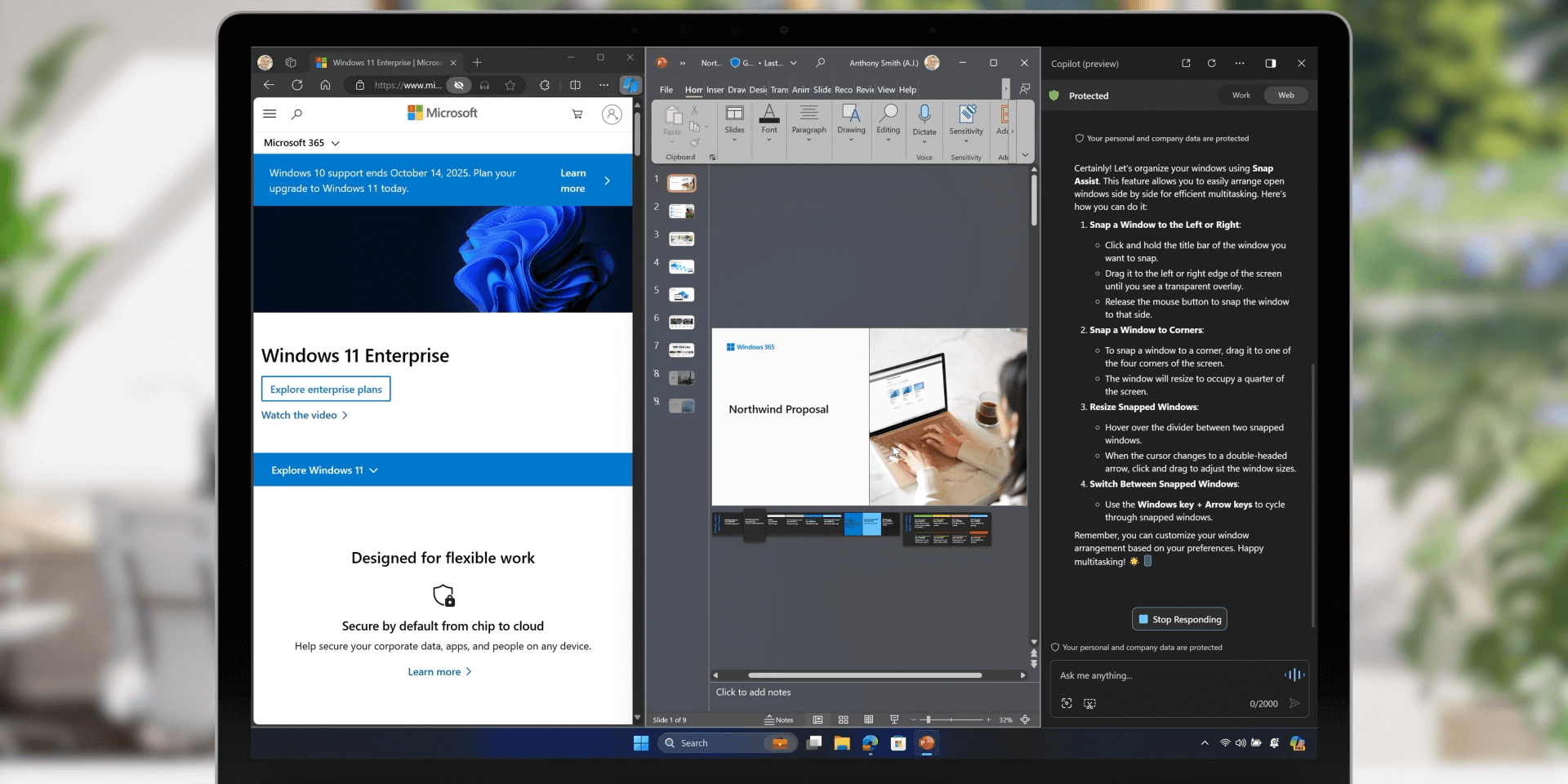
Copilot for Windows aids users from the righthand sidebar

Here, Copilot for Windows helps guide a user through organizing their device. Copilot is available in the right-hand sidebar. Image source: Microsoft

Free up Storage Space

You can also ask it to “clean up my storage,” which will trigger the bot to delete unneeded files by opening your storage settings and auto-selecting the clean-up options.

Security Tools for Windows 365

Remote and hybrid workers can also access Copilot for Windows 365, which is great for accessibility, but makes security concerns more important than ever. Just one breach can turn into a huge data leak for any corporation. To address this, the new business devices have plenty of security protocols.

Windows 365 now has single sign-on, as well as cloud PC encryption. Screen captures and watermarking also help to prevent employees from leaking private information.

The new devices also include streamlining functions like the Surface Management Portal to better manage all your software, and the Surface IT toolkit, used for data compliance.

“Advancing the New Era of Work” with Copilot

Microsoft’s stated goal with its new AI tools is to put all its business clients on the path towards becoming an AI-centered organization. How seriously do you believe your business can pivot towards AI and benefit from it in the long run? It all depends.

There’s no denying that AI has made huge strides in recent years. At the same time, it’s faced a string of serious criticisms, from the questionable data scraping practices that are used to “train” each model to the environmental impact of operating AI to the jobs that will no doubt be lost amid a rush to cut costs with the still-unproven technology.

We’ll definitely be learning as we go. One thing’s clear: With the depth of Microsoft’s AI integrations across the entirety of its new 2024 hardware and software releases, it’s clear we won’t be able to escape this latest innovation.

Written by:
Adam has been a writer at Tech.co for nine years, covering fleet management and logistics. He has also worked at the logistics newletter Inside Lane, and has worked as a tech writer, blogger and copy editor for more than a decade. He was a Forbes Contributor on the publishing industry, for which he was named a Digital Book World 2018 award finalist. His work has appeared in publications including Popular Mechanics and IDG Connect, and his art history book on 1970s sci-fi, 'Worlds Beyond Time,' was a 2024 Locus Awards finalist. When not working on his next art collection, he's tracking the latest news on VPNs, POS systems, and the future of tech.

What Is the Microsoft Surface Copilot Key and What Does It Do?

The new Copilot key will be available on Microsoft's Surface Pro 10 and Surface Laptop 6 devices on April 9th.

Microsoft’s Surface Pro 10 and Surface Laptop 6 just made their public debut as the tech giant’s first “AI PCs” — business-oriented devices with native Copilot AI functionality.

Both these devices come with their own built-in Copilot keyboard button, which they say gives “instantaneous support” for those who need the AI generative text bot.

Will adding a physical AI key actually have a big impact? Can an AI button take over the place that the computer Start button holds in our hearts? Here’s what to know and how it might be able to help you in the workplace.

What to Know About the Copilot Key

The Copilot key itself is marked with the Copilot logo, an abstracted wavy loop in a gradient multicolor palette. The key is replacing the menu key (or application key) and will sit on the lower right-hand side of the keyboard, next to the alt key.

It’s an optional key: Copilot is not currently available in all regions, so laptop models sold within those regions will not include the key itself. However, if you have access to Copilot where you live, you can expect to receive a model with the physical key.


About Tech.co Video Thumbnail Showing Lead Writer Conor Cawley Smiling Next to Tech.co LogoThis just in! View
the top business tech deals for 2026 👨‍💻
See the list button

Surface Pro Keyboard 2024

The new 2024 Surface Pro keyboard, with the Copilot key included. Image source: Microsoft

The keyboard itself is also getting a facelift: A “bold” keyset includes a larger font in order to make the keyboard more easily readable, as well as better backlighting.

What Does the Copilot Key Actually Do?

Hit the key, and you’ll instantly launch Copilot for Windows, the generative text chatbot that you can communicate without through typed prompts. If you’ve ever used similar generative text bots like ChatGPT or Google Gemini, you should be familar with the process.

If Copilot for Windows is not available or has not yet been enabled on either the Surface Pro 10 and the Surface Laptop 6, pressing the Copilot key will simply launch Windows Search.

The New Surface Device Hardware

The Surface Pro 10 and the Surface Laptop 6 both come with new specs aimed at powering AI features that are so new they haven’t actually rolled out yet.

Both new devices have Intel’s most recent Core Ultra processors. They’ll also have a Neural Processing Unit, or NPU — a key element that aids with all the AI processing users will be requiring of these devices.

Microsoft Surface Pro 10

The Microsoft Surface Pro 10 has a Copilot key and:

  • Entry-level specs:
    • Intel Core Ultra 5 CPU
    • 8GB of RAM
    • 256GB of SSD storage
    • Platinum or Black
    • Starts at: $1,199
  • High-end specs:
    • Intel Core Ultra 7 CPU
    • 64GB of RAM
    • 1TB of storage
    • Platinum only
    • Starts at: $2,799

There’s no word yet on the specs for consumer model, but these commercial ones will start shipping on April 9th.

Microsoft Surface Laptop 6

The Microsoft Surface Laptop 6 has a Copilot key and:

  • Entry-level specs:
    • Intel Core Ultra 5 CPU
    • 8GB of RAM
    • 256GB of SSD storage
    • Starts at: $1,199
  • High-end specs:
    • Intel Core Ultra 7 CPU
    • 64GB of RAM
    • 1TB of storage
    • Starts at: $2,799

Externally, both new devices will look pretty similar to the previous models in each respective line, retaining similar bezels and designs.

The commercial Laptop 6 model will begin shipping on April 9th.

Written by:
Adam has been a writer at Tech.co for nine years, covering fleet management and logistics. He has also worked at the logistics newletter Inside Lane, and has worked as a tech writer, blogger and copy editor for more than a decade. He was a Forbes Contributor on the publishing industry, for which he was named a Digital Book World 2018 award finalist. His work has appeared in publications including Popular Mechanics and IDG Connect, and his art history book on 1970s sci-fi, 'Worlds Beyond Time,' was a 2024 Locus Awards finalist. When not working on his next art collection, he's tracking the latest news on VPNs, POS systems, and the future of tech.

How to Delete Your Glassdoor Account and Remove All Data (With Images)

After the anonymity of Glassdoor has been pulled into question, users are looking to delete their accounts. We show you how.

Glassdoor has been in the news recently, after a user discovered that their full name, which they wished to remain anonymous, has been attached to their account profile without their consent.

Glassdoor is a site that thrives of anonymity, relying on protecting users so that they may leave honest reviews of companies that they’ve worked for, to help job seekers. As a result, it’s understandable that a lot of users are looking to delete their accounts.

If you’re one of them, read on for a step-by-step guide on how to delete your account, as well as all associated personal data.

How to Delete Your Glassdoor Account

If you want to delete your Glassdoor account, it’s important to know that there are two steps you’ll need to take to totally scrub your profile from Glassdoor’s servers. The first is a simple account closure, which we’ll go through now, but you’ll want to follow the second step too, for total piece of mind.

Firstly, log into Glassdoor, and click on the account icon in the top right corner:


About Tech.co Video Thumbnail Showing Lead Writer Conor Cawley Smiling Next to Tech.co LogoThis just in! View
the top business tech deals for 2026 👨‍💻
See the list button

glassdoor account

Next, you’ll want to select Settings from the drop down menu.

From here you’ll find yourself on the account settings page. Scroll down to the bottom, and you’ll find the Deactivate Account option. Click on the red button here.

At this point you’ll need to sign in again. If it’s been a while and you’ve forgotten your login details, you can easily request a password reset from this screen.

Next up you’ll be presented with a warning that you are about to delete your Glassdoor account, as well as any associated contributions you may have made to the site. If you’re happy with this, continue.

You now no longer have a Glassdoor account. If you want to return in the future, you can sign up again with the same email address, but you will be starting from scratch.

Read on to find out how to strip all your data from Glassdoor.

How to Remove ALL Personal Data from Glassdoor

Now you’ve closed your Glassdoor account, you might be thinking the job is done. Not quite. Even though you no longer have a presence on the site, the company may still be retaining some of your data.

The next thing you’ll want to do is put in a request via Glassdoor’s automated privacy tool, which will remove consent for Glassdoor (as well as its subsidiary, Fishbowl) to use your data. If you want to, you can also request that the company send you a copy of all the data it has on you.

After this, you’ll be sent an email with a link, which you’ll need to follow to verify your account. You’ll then receive a message that your request has been accepted and will be processed within 30 days.

Why You May Want to Delete Your Glassdoor Account

Glassdoor can be a great place to read reviews of companies (including your own), job search, and share your thoughts with other users.

One of the key features of Glassdoor was always that users could be anonymous if they wished, which many found important when wanting to truthfully discuss the companies they worked for. Glassdoor even states itself that real names won’t be used, unless authorized.

However, that right to anonymity has been dragged into question, after a Glassdoor user of ten years, Monica, discovered that after she reached out to the company’s customer support, it attached her real name, taken from her support request, to her account.

When Monica asked that this was removed, Glassdoor informed her that she was required to have her name attached to her profile.

It’s worth noting that while her name wasn’t displayed on the front end of the site for other users to see, Monica was not comfortable with the idea of Glassdoor taking this information and attaching it to her profile, without her consent.

Speaking to Techcrunch, Monica voiced concerns that having this information on the site’s backend meant that it could be vulnerable in cases like a data breach, and all her reviews and comments about places she had worked could easily be attributed to her.

While Glassdoor hasn’t suffered a data breach to our knowledge, the list of companies that haven’t been affected by data breaches gets shorter each day, and the company has had form in the past with sloppy data handling. In 2016, it was sued for sending out a message with the email addresses of 600,000 users for all to see.

It’s not too hard to understand Monica’s fears, and it’s only right that in 2024, we should have the final say on what information a company does or doesn’t hold about us.

Written by:
Adam has been a writer at Tech.co for nine years, covering fleet management and logistics. He has also worked at the logistics newletter Inside Lane, and has worked as a tech writer, blogger and copy editor for more than a decade. He was a Forbes Contributor on the publishing industry, for which he was named a Digital Book World 2018 award finalist. His work has appeared in publications including Popular Mechanics and IDG Connect, and his art history book on 1970s sci-fi, 'Worlds Beyond Time,' was a 2024 Locus Awards finalist. When not working on his next art collection, he's tracking the latest news on VPNs, POS systems, and the future of tech.

Dell Slaps Remote Workers with Brutal Office Ultimatum

Leaked Dell memos reveal employees can continue to work remotely, but they won't be eligible for promotions or new roles.

It has been scarcely over a month since Dell announced a return to office mandate that, by the company’s own admission, was designed to help “thin the herd” of its workforce.

Now, the tech giant appears to be doubling down on its uncompromising RTO stance, with a new leaked memo revealing that the company has plainly told its employees they won’t get promoted unless they commit to attending the office.

It goes as far as to say that fully remote Dell workers won’t be eligible to apply for many vacant positions at the firm, as most will specify hybrid working as a job requirement.

Dell Blocking Promotions for Fully Remote Workers

The new report comes to us via Business Insider (BI), which says it obtained a leaked internal memo from Dell to its employees fully outlining the company’s new hybrid vs remote working policy.

On the plus side, Dell will continue to offer select fully remote jobs to those that want them. It’s just making plain that these staffers won’t be eligible for the same career advancement as those who work in a hybrid capacity.


About Tech.co Video Thumbnail Showing Lead Writer Conor Cawley Smiling Next to Tech.co LogoThis just in! View
the top business tech deals for 2026 👨‍💻
See the list button

As per the memo: “For remote team members, it is important to understand the trade-offs: Career advancement, including applying to new roles in the company, will require a team member to reclassify as hybrid onsite.”

Understandably, Dell employees say the company’s rank-and-file have been “complaining behind closed doors” given it will amount to a de facto relocation notice for some employees, as well as stopping many others from climbing the career ladder if home working is their preference.

What Hybrid Work at Dell Looks Like

Under Dell’s new system, hybrid roles are stipulated as attending one of the company’s “approved” locations 39 days a quarter, which works out as approximately three days a week, as is becoming the industry standard among companies ending fully remote work.

In a statement to BI, Dell defended its new focus on hybrid working, saying that “in-person connections paired with a flexible approach are critical to drive innovation and value differentiation.”

As canned corporate musings go, it scores at least 90/100 on the jargon-o-meter, with Dell’s recent RTO U-turn being made all the more incomprehensible by the fact it has so been so vocal in its commitment to flexible working in the past.

The Curious Case of Dell’s Return to Office Mandate

Dell’s workforce appear to be very confused by the company’s shift towards an enforced return to office this year, as well it might be.

In the past, Dell employees stated that the industry titan “cared about the work, not the location,” while its namesake CEO Michael Dell has been on the record multiple times as saying remote work was “absolutely here to stay.”

He even once went as far as to publicly shame less flexible companies on LinkedIn, posting: “If you are counting on forced hours spent in a traditional office to create collaboration and provide a feeling of belonging within your organization, you’re doing it wrong.”

However, the company now appears to be joining the herd as well as wanting to thin its herd, even if it comes at the expense of employees who now live far enough from a green lighted office to make hybrid work an impossibility.

Written by:
Adam has been a writer at Tech.co for nine years, covering fleet management and logistics. He has also worked at the logistics newletter Inside Lane, and has worked as a tech writer, blogger and copy editor for more than a decade. He was a Forbes Contributor on the publishing industry, for which he was named a Digital Book World 2018 award finalist. His work has appeared in publications including Popular Mechanics and IDG Connect, and his art history book on 1970s sci-fi, 'Worlds Beyond Time,' was a 2024 Locus Awards finalist. When not working on his next art collection, he's tracking the latest news on VPNs, POS systems, and the future of tech.

GPT-5: OpenAI May Launch “Better” Model for ChatGPT This Summer

Sam Altman says GPT-4 "kinda sucks" but says he's excited by GPT-5. So are we - and here's why you should be, too.

Most of us are pretty impressed by ChatGPTSure, it’s got its shortcomings, but it definitely doesn’t suck, right?

Not according to OpenAI CEO Sam Altman, who has publicly criticism his company’s current large language model, GPT-4, helping fuel new rumors suggesting the AI powerhouse could be preparing to release GPT-5 as soon as this summer.

That’s because, just days after Altman admitted that GPT-4 still “kinda sucks,” an anonymous CEO claiming to have inside knowledge of OpenAI’s roadmap said that GPT-5 would launch in only a few months time.

All of which has sent the internet into a frenzy anticipating what the “materially better” new model will mean for ChatGPT, which is already one of the best AI chatbots and now is poised to get even smarter.

Here’s all the latest GPT-5 news, updates, and a full preview of what to expect from the next big ChatGPT upgrade this year.

GPT-5 Latest News and Updates for March 2024

All eyes are on OpenAI this March after a new report from Business Insider teased the prospect of GPT-5 being unveiled as soon as summer 2024.

The publication says it has been tipped off by an unnamed CEO, one who has apparently seen the new OpenAI model in action. The mystery source says that GPT-5 is “really good, like materially better” and raises the prospect of ChatGPT being turbocharged in the near future.

However, one important caveat is that what becomes available to OpenAI’s enterprise customers and what’s rolled out to ChatGPT may be two different things.


About Tech.co Video Thumbnail Showing Lead Writer Conor Cawley Smiling Next to Tech.co LogoThis just in! View
the top business tech deals for 2026 👨‍💻
See the list button

For its part, OpenAI hasn’t confirmed anything beyond saying in the past that GPT-5 (and even GPT-6) were under devleopment, and that the company had something “exciting” in the making this year.

In an earlier March 2024 interview with the Lex Freidman Podcast, Altman said the “honest answer” is he doesn’t know when GPT-5 will be ready, saying that his company has “a lot of other important things to release” before its next major LLM update.

“A lot” could well refer to OpenAI’s wildly impressive AI video generator Sora and even a potential incremental GPT-4.5 release.

This is also the now infamous interview where Altman said that GPT-4 “kinda sucks,” though equally he says it provides the “glimmer of something amazing” while discussing the “exponential curve” of GPT’s development.


In other words, everything to do with GPT-5 and the next major ChatGPT update is now a major talking point in the tech world, so here’s everything else we know about it and what to expect.

What is GPT-5?

GPT is shorthand AI jargon for “Generative pre-trained transformer.” It’s a large language model, or LLM, developed by AI powerhouse OpenAI that serves as the framework for company’s chatbot, ChatGPT – one of the best AI chatbots around.

Another way to think of it is that a GPT model is the brains of ChatGPT, or its engine if you prefer. GPT-5 will be the fifth full release of such a model by OpenAI.

The first was a proof of concept revealed in a research paper back in 2018, and the most recent, GPT-4, came into public view in 2023.

Right now, it looks like GPT-5 could be released in the near future, or still be a ways off. All we know for sure is that the new model has been confirmed and its training is underway.

How long this takes is an unanswerable question, as OpenAI could take as long as they want refining its basic capabilities – or try to rush out the new version as soon as possible to stay in pole position in the AI arms race.

GPT-5: What to Expect and What We Want to See

The first thing to expect from GPT-5 is that it might be preceded by another, more incremental update to the OpenAI model in the form of GPT-4.5.

This might find its way into ChatGPT sooner rather than later, while GPT-5 stays under development and slowly rolls out behind closed doors to OpenAI’s enterprise customers. Let’s take a look at that gossip and everything else to expect from GPT-5.

GPT-4.5 Leak Tips June 2024 Release Window

As demonstrated by the incremental release of GPT-3.5, which paved the way for ChatGPT-4 itself, OpenAI looks like it’s adopting an incremental update strategy that will see GPT-4.5 released before GPT-5.

This means before we get to what we might see in GPT-5, we need to pause to consider GPT-4.5.

In fact, a claimed GPT-4.5 release window may already have been leaked by OpenAI, if internet tech sleuths are to be believed. Apparently, both Microsoft’s Bing and the DuckDuckGo search engine indexed an OpenAI blog post referencing the availability of a GPT-4.5 model with a June 2024 “knowledge cut-off date.”

It follows that GPT-4.5 itself could be released around summer ’24, as OpenAI tries to keep up with newly release rivals like Anthropic’s Claude 3, and ultimately paving the way for GPT-5 to launch in late-2024 or some point in 2025.

Adding even more weight to the rumor that GPT-4.5’s release could be imminent is the fact that you can now use GPT-4 Turbo free in Copilot, whereas previously Copilot was only one of the best ways to get GPT-4 for free.

Throw in the March 2024 Microsoft Surface event and you’ve even got a catwalk for GPT-4.5 to be initially teased, given Microsoft is one of OpenAI’s biggest partners, investors, and even sits on the company’s board.

GPT-5 Confirmed to be Under Development

As well as the likelihood that the release of GPT-4.5 by OpenAI is nearing, we also now have it confirmed that the company is indeed working on GPT-5, so its next-gen LLM is actually under development as opposed to just being an internet pipedream.

OpenAI CEO Sam Altman revealed as much at the start of 2024, speaking to Bill Gates on the tech icon’s Unconfuse Me podcast.

Expect a Major Leap in GPT-5 Parameters vs GPT-4

Now, as we approach more speculative territory and GPT-5 rumors, another thing we know more or less for certain is that GPT-5 will offer significantly enhanced machine learning specs compared to GPT-4.

The headline one is likely to be its parameters, where a massive leap is expected as GPT-5’s abilities vastly exceed anything previous models were capable of. We don’t know exactly what this will be, but by way of an idea, the jump from GPT-3’s 175 billion parameters to GPT-4’s reported 1.5 trillion is an 8-9x increase.

Whether or not OpenAI can match that remains to be seen, but a law of diminishing returns could be emerging based on the fact that the 115x jump from GPT-2 to GPT-3 is almost certainly never going to be repeated.

If OpenAI can approach a 4-5x parameter increase with GPT-5, it would be a phenomenal accomplishment, especially when you consider that the latest industry benchmark, Anthropic’s Claude 3 Opus, is a 2 trillion parameter model, so even doubling the parameters of GPT-4 would be an impressive feat.

Because we’re talking in the trillions here, the impact of any increase will be eye-catching. It’s also safe to expect GPT-5 to have a larger context window and more current knowledge cut-off date, with an outside chance it might even be able to process certain information (such as social media sources) in real-time.

Sora and Multimodality at the Fore of GPT-5

As excited as people are for the seemingly imminent launch of GPT-4.5, there’s even more interest in OpenAI’s recently announced text-to-video generator, dubbed Sora.

Sora is the latest salvo in OpenAI’s quest to build true multimodality into its products right now, ChatGPT Plus (the chatbot’s paid tier, costing $20 a month) offers integration with OpenAI’s DALL-E AI image generator. It lets you make “original” AI images simply by inputting a text prompt into ChatGPT.

With Sora, you’ll be able to do the same, only you’ll get a video output instead. The early displays of Sora’s powers have sent the internet into a frenzy, and even after more than 10 years of seeing tech’s “next big thing” come and go, I have to say it’s wildly impressive.

There’s every chance Sora could make its way into public beta or ChatGPT Plus availability before GPT-5 is even released, but even if that’s the case, it’ll be bigger and better than ever when OpenAI’s next-gen LLM does finally land.

Screenshot of Sora video showing woman walking through Tokyo at night

GPT-5 Could Usher in Project Q* Era of AGI

Of course, in any discussion of GPT-5 it’s impossible to ignore the fact that, behind the scenes, OpenAI is working to develop not only its current suite of AI products, but also to bring forth a new breed of Artificial General Intelligence (AGI) technologies currently dubbed Project Q*.

AGI is the term given when AI becomes “superintelligent,” or gains the capacity to learn, reason and make decisions with human levels of cognition. It basically means that AGI systems are able to operate completely independent of learned information, thereby moving a step closer to being sentient beings.

When current AI technologies can’t seem to stop themselves hallucinating information or generating the odd racist image for japes, it’s a hugely controversial prospect to say the least and is being opposed by many within the industry on ethical grounds.

Nevertheless, OpenAI is one of its chief proponents and with the next major GPT release, GPT-5, there’s a chance we’ll learn more about its ultimate aims for Project Q* AGI superintelligence, if not see a finished product, as per Altman’s own statements.

GPT-6 Also “Confirmed” by OpenAI

Why just get ahead of ourselves when we can get completely ahead of ourselves? In another statement, this time dated back to a Y Combinator event last September, OpenAI CEO Sam Altman referenced the development not only of GPT-5 but also its successor, GPT-6.

He stated that both were still a ways off in terms of release; both were targeting greater reliability at a lower cost; and as we just hinted above, both would fall short of being classified as AGI products.

GPT-5 Potential Release

Based on what we’ve heard and what we’ve seen in the past, there are a number of possibilities.

Hot of the presses right now, as we’ve said, is the possibility that GPT-5 could launch as soon as summer 2024.

However, with a claimed GPT-4.5 leak also suggest a summer 2024 launch, it might be that GPT-5 proper is revealed at a later days.

Other possibilities that seem reasonable, based on OpenAI’s past reveals, could seeGPT-5 released in November 2024 at the next OpenAI DevDay.

That’s when we first got introduced to GPT-4 Turbo – the newest, most powerful version of GPT-4 – and if GPT-4.5 is indeed unveiled this summer then DevDay 2024 could give us our first look at GPT-5.

That, or GPT-4.5 Turbo could make its way into the public eye at DevDay 2024, both paving the way and somewhat delaying GPT-5;s launch into 2025.

GPT Model Release History and Timeline

To get an idea of when GPT-5 might be launched, it’s helpful to look at when past GPT models have been released. Here’s an overview of OpenAI’s GPT model history.

GPT-1

The original GPT was unveiled back in June 2018, but only as a proof of concept forming a key part of OpenAI’s research paper “Improving Language Understanding by Generative Pre-Training.”

The 117 million parameter model wasn’t released to the public and it would still be a good few years before OpenAI had a model they were happy to include in a consumer-facing product.

GPT-2

The second foundational GPT release was first revealed in February 2019, before being fully released in November of that year. Capable of basic text generation, summarization, translation and reasoning, it was hailed as a breakthrough in its field.

The 1.5 billion parameter model was pre-trained on a dataset of eight million webpages, becoming the first publicly available GPT release, though its use was largely of the experimental variety and confined to the machine learning community.

GPT 3

GPT-3 represented another major step forward for OpenAI and was released in June 2020. The 175 billion parameter model was now capable of producing text that many reviewers found to be indistinguishable for that written by humans.

While still a couple of years away from the release of ChatGPT, OpenAI’s latest effort had everyone in the tech world talking, while The Guardian even published an entire article written by GPT-3 to demonstrate its hitherto inconceivable abilities.

GPT-3.5

Released in March 2022, GPT-3.5 was the bedrock on which ChatGPT was built. It was based on the same 175 billion parameter transformer as GPT-3, but was fine-tuned and trained on data up to June 2021.

The announcement of GPT-3.5 was closely followed in November 2022 by the launch of ChatGPT. The rest, as they say, is history.

GPT-4

As anyone who used ChatGPT in its early incarnations will tell you, the world’s now-favorite AI chatbot was as obviously flawed as it was wildly impressive. Unveiled in March 2023, GPT-4 was OpenAI’s attempt to fix that.

By Altman’s own admission, it’s still a work in progress, but GPT-4 has been a mind-blowing step forward for AI technology that’s now good enough to be widely used not only by lazy college students, but by major businesses as part of their day-to-day operations.

While the actual number of GPT-4 parameters remain unconfirmed by OpenAI, it’s generally understood to be in the region of 1.5 trillion.

Written by:
Adam has been a writer at Tech.co for nine years, covering fleet management and logistics. He has also worked at the logistics newletter Inside Lane, and has worked as a tech writer, blogger and copy editor for more than a decade. He was a Forbes Contributor on the publishing industry, for which he was named a Digital Book World 2018 award finalist. His work has appeared in publications including Popular Mechanics and IDG Connect, and his art history book on 1970s sci-fi, 'Worlds Beyond Time,' was a 2024 Locus Awards finalist. When not working on his next art collection, he's tracking the latest news on VPNs, POS systems, and the future of tech.

The 9 Best Digital Nomad Visas: Countries with Zero or Low Tax and Income Requirements

Looking to travel the world and earn some money while you do it? Here are the top digital nomad visas you should know about.

Digital nomads are remote employees who travel around between different locations as they work. Unattached to an office and able to fulfill their role as long as they have an internet connection, there is no need for this type of employee to reside in a permanent location.

In response to the rise of flexible working arrangements and the growing appeal of digital nomad jobs – as well as local economic struggles – lots of countries have begun offering digital nomad visas. Many offer significantly reduced tax rates, especially during the first few months of stay.

Which European country will let you get a local job alongside your remote job? And which island will give you a $200 customs allowance along with tax-free living? If you’d like to find out, read on – we’ve got the lowdown on the best digital nomad visas.

In this guide, we’ll cover:

What Is a Digital Nomad?

A digital nomad is any worker who spends their life living in different locations because they’re able to work completely remotely. Unlike other workers, they’re not tied to an office or a city – all they need is a computer and an internet connection.

While digital nomads have been around almost as long as the internet has, before the COVID-19 pandemic, the lifestyle was only possible for people in a few niche roles in a narrow range of industries.

Since the pandemic, millions of workers have gone fully remote, which has made it much more accessible. You no longer need to be a high-flying exec or graphic designer to the stars to travel the world while still getting paid. This step change has encouraged more countries than ever before to offer special nomad visas.


About Tech.co Video Thumbnail Showing Lead Writer Conor Cawley Smiling Next to Tech.co LogoThis just in! View
the top business tech deals for 2026 👨‍💻
See the list button

In some developing countries, digital nomad visas are being used as a way to attract high earners from fully developed countries, who will inject lots more money into the local economy than the average permanent resident.

All Countries With Digital Nomad Visas

Overall, there are more than 60 countries worldwide that offer some form of digital nomad Visa. Not all of them include tax breaks or benefits, but here they are:

  • Europe: Spain, Portugal, Italy, Croatia, Czechia, Germany, Greece, Estonia, Malta, Norway, France, Iceland, Ireland, Romania, Netherlands, Georgia, Hungary, Montenegro, Latvia, Albania, Cyprus, Armenia and North Macedonia
  • Central/South America: Argentina, Belize, Brazil, Costa Rica, Colombia, Mexico, El Salvador, Ecuador, Panama and Peru
  • Caribbean: Barbados, Bermuda, Bahamas, Dominican Republic, Aruba, Antigua & Barbuda, the Cayman Islands, Anguilla, Curacao, Saint Lucia, Grenada and Montserrat
  • Africa: UAE, Egypt, Cabo Verde, South Africa, Mauritius, Seychelles and Namibia
  • Asia/Oceania: UAE, Malaysia, Thailand, Philippines (pending confirmation), Australia and New Zealand

The 9 Best Digital Nomad Visas: Duration, Costs and Taxes

We’ve scoured the internet for the best digital nomad visas, focusing on the countries that have the most amenable tax laws, the lowest income requirements, and the cheapest application fees, as well as any unique perks on offer. Here’s our top 9 for 2024:

Costa Rica

Costa Rica offers one of the most popular digital nomad visas on the planet. Costa Rica’s laws mean that as long as you’re not employed by a Costa Rican company, you won’t have to pay any income tax at all.

So, anyone with a remote job in the US or the EU will be living tax free in Costa Rica. However, it doesn’t stop there – you also be exempt from import tax if you have to ship in equipment for your work, and you’ll be able to avoid remittance taxes too.

Arenal volcano costa rica

Costa Rica’s Arenal Volcano

The visa application only costs $100 to complete, and the only entry requirement really worth knowing about is the minimum income requirement of $3,000 before tax. You also have to prove that you consistently are earning this. Freelancers who cannot provide this information may need to create a limited company to satisfy this condition, as doing so will allow them to pay themselves a consistent income.

Costa Rica is considered a very safe country with generally good internet connectivity and has a slightly lower cost of living when compared with some of the Caribbean islands that offer digital nomad visas, such as Anguilla and Bermuda.

Malta

Malta is a picturesque island nation home to just over half a million people located in the Mediterranean Sea – and it offers a digital nomad visa for remote workers.

The minimum income threshold for your visa application to be considered is €2,700, while the application itself costs around €300 to complete.

Digital nomads who apply for a visa to work in Malta will be exempt from income taxes for the first 12 months of their stay. You will have to pay taxes after that period finishes, but Malta’s tax rate is set at just 10%, so you’ll be paying a lot less than you probably are right now in the US, UK, and most other parts of the EU.

While the local economy isn’t as cheap as some of the other countries on this list, you’ll generally pay a little less than you would while holidaying in a big European city, such as Madrid or Berlin, and English is widely spoken as a second language.

Anguilla

Anguilla is a British Overseas Territory located in the Caribbean that offers a 12-month digital nomad visa and doesn’t charge any local income taxes. You also won’t be subject to any additional taxes, as the government funds itself via customs duties and tourism.

Impressively, there are no income requirements at all for your job. All you have to provide is your passport, birth certificate, and a brief description of the work you’ll be doing while there, whether it’s for your job or university.

anguilla

Small boats moored on a beach in Anguilla

The entire application process can be completed online and most people hear back within 14 days of submission. It’s widely considered to be one of the most relaxed digital nomad visa applications on the planet.

The only catch is you’ll have to pay a $2000 entry fee, and if you want to bring family members with you, that’ll cost you extra. The standard of living on the island is pretty high too, and so are the living costs – but it’s worth exploring considering you won’t have to pay anything in taxes.

Croatia

Croatia – a small country located in southern Europe – offers a 12-month digital nomad visa that exempts all holders from income taxes while in the country. It’s a similar principle to Costa Rica – if you’re not working for a Croatian company, you won’t be asked to pay.

The income requirement is pretty low compared to Costa Rica, however, and is set at around $2,500. If you don’t earn a steady income above this threshold, you can also apply if you earn can prove you have just over $31,000 in savings.

However, there is a catch – you won’t be able to renew your visa immediately, and you’ll have to wait for a further six months after the expiry date to re-apply if you want to stay in the country. In a way, it’s a visa for true digital nomads who stay in one place for short periods, and then move on to their next adventure quickly.

Uruguay

Uruguay is a small country of around 3.5 million people located on the east coast of South America, just south of Brazil. It’s known for its low levels of poverty and well-run healthcare system. Montevideo, the capital, has an extremely high quality of life and is considered one of the continent’s best cities to live in.

Uruguay offers an initial 6-month digital nomad visa for remote workers who want to live in the country, with the fee set at between $10-50.

montevideo, capital of urugay

Montevideo, the capital of Uruguay

It’s easy to get your hands on too – all you have to do is book your trip to Urugy as a regular tourist, then complete an online form with some information about how you plan to support yourself while there.

Once you have your permit, you’ll have to head to the National Civil Identification Office to collect your Uruguayan documents. After the initial six months, visa applicants can apply for a 6-month extension to apply for permanent

One advantage of working in Uruguay compared to some other locations (especially ones in Asia) is that it’s just 2 hours ahead of New York. This makes it a strong option for a lot of US workers who need to have significant overlap with their teams during the day.

Bermuda

Like Anguilla, digital nomads making their homes in Bermuda don’t have to pay any taxes at all. But on top of that, you’ll get a $200 customs allowance every time you enter the country.

The visa application fee is lower than most of its Caribbean neighbors at just $263. However, it only lasts for a year, and when it runs out, you’ll have to apply again.

The entry requirements are pretty basic: you need a valid passport, a clean criminal record, and proof of employment to enrol in an educational institution.

However, much like Anguilla, Bermuda living costs are quite high – so, while you’ll get to keep much more money than you would working in the US or Europe, you’ll be spending a lot more in your spare time, too.

There are a couple of co-working spaces dotted around the island, but there are many more beachside cafes and Bermuda is known for having excellent internet connectivity.

Georgia

Georgia – located east of the Black Sea, just south of Russia – is welcoming more tourists through its borders than ever before. It has become an attractive destination for digital nomads thanks to its liberal visa policies.

Citizens of 98 countries can stay in Georgia for one year without a visa, including those residing in the US and European Union. You’ll need to be earning $2,000 a month or have $24,000 in your bank account, and a valid passport and proof of employment.

tblisi, Georgia

Tbilisi, the capital of Georgia

For your first 183 days as a digital nomad in Georgia, you won’t have to pay any tax – and after that, you’ll pay an income tax rate of 20%. You can also apply for “Small Business Status” which means you’ll only pay a 1% tax on your revenues if you earn under ~$184,000

Georgia’s capital and biggest city, Tbilisi, has lots of co-working spaces and a vibrant nightlife scene, but there are also beachfront villages and historic towns to choose from. The cost of living is very low all across Georgia compared to places like the UK and US, so most digital nomads will be able to take their pick.

Portugal

Portugal offers a 12-month long, renewable digital nomad visa that has a minimum income requirement of €3,280 to apply.

The application costs just €75-90 to complete, but you will have to provide a lot of information, including proof of work, accommodation, a clean criminal record, and various other documents. It also can’t be done solely online – you’ll have to head to your local Portuguese consulate at some point in the process.

There used to be a way you could pay almost no taxes in Portugal by applying for the non-habitual resident’s scheme, which made income earned globally tax-free – but this is no longer the case after changes to the law that came into force in 2024.

The tax rate for digital nomads is a flat 20%, which is still a lot less than the standard rates paid by Portuguese nationals, which can reach 48%.

Portugal’s living standards are average-to-cheap relative to the rest of Europe. What’s more, Portugal is widely considered to be one of the safest countries in the world, with much lower crime rates than countries like Spain, France, and the United Kingdom.

Spain

The Spanish digital nomad visa is among the most search-for digital nomad visas in the United States right now, according to search volume data seen by Tech.co.

Spain offers a 1-year digital nomad visa and a 3-year digital nomad residency permit for people who want to settle down in the country longer-term. It costs around €80 to complete the application, although you will have to visit the Spanish embassy or consulate.

Spain barcelona

Park Guell, Barcelona

Digital nomads are classed as non-residents and those earning under €600,000 are subject to a 24% income tax, which is much lower than residents, who are taxed up to 47%.

Interestingly, the Spanish tourism board says that digital nomads in Spain “can also work for a company located in Spain, as long as the percentage of this particular work doesn´t exceed 20% of the total amount of his/her professional activity.”

However, not everyone will be able to apply – you need a college or university degree and extensive proof of where you’re working and how much you’re earning.

How to Become a Digital Nomad

In 2024, it’s easier to become a digital nomad than at pretty much any other point in history. Of course, the first thing you’ll need is a fully remote job role. Luckily, in 2024, big companies like Google and Microsoft both have hundreds of vacant remote positions.

Lots of positions at startups and small businesses are now fully remote too. If you can prove you’ve got the skills and you can work independently, there’s no reason why they should restrict where you’re doing your job from.

If you’ve already got a remote job, then the next phase will be picking a location and ironing out the details with your manager or CEO. Your company may have policies relating to working in different parts of the world, paying taxes while abroad, and working remotely from places that aren’t your home, such as coffee shops.

Whatever your situation, there’s often a lot of admin that goes into being a digital nomad – but if you have dreams to see the world and aren’t prepared to sacrifice your career trajectory for it, it’ll be more than worth it.

Written by:
Adam has been a writer at Tech.co for nine years, covering fleet management and logistics. He has also worked at the logistics newletter Inside Lane, and has worked as a tech writer, blogger and copy editor for more than a decade. He was a Forbes Contributor on the publishing industry, for which he was named a Digital Book World 2018 award finalist. His work has appeared in publications including Popular Mechanics and IDG Connect, and his art history book on 1970s sci-fi, 'Worlds Beyond Time,' was a 2024 Locus Awards finalist. When not working on his next art collection, he's tracking the latest news on VPNs, POS systems, and the future of tech.

What Is AI Washing, and Why Are Companies Being Fined For It?

Two firms have just been fined for making false and misleading statements about using AI. Here's everything you need to know.

This week, two investment firms were ordered to pay $400K in fines by the US Securities and Exchanges Commission (SEC) for engaging in a practice dubbed “AI washing”. It’s one of the first known cases of its kind, but judging by the way some businesses advertise their use of AI, it might not be the last.

But why were the companies fined, and what exactly is AI washing in the first place? We’ve got the latest on the legal case and why you should be very careful about investing in businesses that claim they’re using AI.

What Is AI Washing? The New PR Tactic Explained

AI washing refers to the practice of companies making false, misleading, or exaggerated statements about how they’re using or developing artificial intelligence systems.

You may have heard the term “washing” used in other contexts. Businesses pumping money into and then heavily publicizing eco-friendly initiatives while still investing in fossil fuels and other environmentally unfriendly activities is often referred to as “greenwashing”.


About Tech.co Video Thumbnail Showing Lead Writer Conor Cawley Smiling Next to Tech.co LogoThis just in! View
the top business tech deals for 2026 👨‍💻
See the list button

Russia and Qatar have both been accused in recent years of “sports washing” by hosting the 2018 and 2022 FIFA World Cups – effectively using the competition to normalize their presence on the international stage and shift the spotlight away from the human rights abuses regularly taking place on their government’s watch.

Similarly, with AI washing, companies try to focus all publicity around their purported use of AI and enhance their reputation, perceived value, and stock price in the process, rather than actually committing to actually developing the kind of AI tools or systems that would make traders invest.

SEC Fines Investment Firms for AI Washing

Two companies have been charged by the SEC for making “false and misleading” claims about their use of artificial intelligence.

“We find that Delphia and Global Predictions marketed to their clients and prospective clients that they were using AI in certain ways when, in fact, they were not,” Chair Gary Gensler explained in a statement on the SEC’s website.

Delphia, the first company fined, falsely claimed to “predict which companies and trends are about to make it big and invest in them before everyone else” the SEC says.

Global Predictions, on the other hand, called itself the “first regulated AI financial advisor” and said its platform made “AI-drive forecasts”. It also made a litany of other misleading claims about its practices relating to AI, the SEC says.

Rather than being dragged through court any longer, both the above companies have settled their respective cases, and will pay up to $400,000 in penalties as a result.

Be Wary of AI Investment Opportunities

Crypto. NFTs. Artificial intelligence. What do they all have in common? They’re all buzzwords that have taken their turn being the flavor of the month over the past two years.

But the legitimate success of these products means they’ve become popular with scammers – as well as “genuine” companies – trying to persuade people to invest in things that aren’t all that revolutionary or innovative.

Right now, companies actually using AI are treated as progressive, forward-thinking, and innovative – all great signals for investors looking for companies on the verge of making it big. But that also makes it highly useful for companies looking to portray themselves as the next big thing in tech – even if they can’t come up with the goods when required.

If you’re getting into investing, it’s important to do your own research, and treat companies trading in emergent technology – like AI – with some caution. There are loads of legitimate AI investment opportunities out there – just make sure you don’t get sold down the river by a company claiming something that they’re not.

Written by:
Adam has been a writer at Tech.co for nine years, covering fleet management and logistics. He has also worked at the logistics newletter Inside Lane, and has worked as a tech writer, blogger and copy editor for more than a decade. He was a Forbes Contributor on the publishing industry, for which he was named a Digital Book World 2018 award finalist. His work has appeared in publications including Popular Mechanics and IDG Connect, and his art history book on 1970s sci-fi, 'Worlds Beyond Time,' was a 2024 Locus Awards finalist. When not working on his next art collection, he's tracking the latest news on VPNs, POS systems, and the future of tech.

6 Best Free AI Scheduling Assistants in 2024 For Enhanced Productivity

Hit your productivity goals without losing your head with these useful, free AI scheduling tools.

If the site of your jam-packed Google Calendar, or ever-expanding to-do list is leaving you feeling overwhelmed, you’re not alone. Many of us struggle with time management, but whether you’re a busy stay-at-home parent or an entrepreneur, chances are AI scheduling assistants can probably help.

AI scheduling assistants are tools that help users schedule their time, manage conflicts, and generally, improve their productivity. By utilizing machine learning algorithms to make personalized recommendations, the software is leaps and bounds more advanced than traditional scheduling methods, and lots of high-quality, free options exist.

If you’re looking to bolster your productivity while lowering your stress, this guide rounds up six AI scheduling assistants that should be on your radar. Read on to learn more about their use cases and limitations.

6 Best AI Scheduling Assistants

AI scheduling assistants streamline your timetable, leaving you with more time to get on with tasks. Here are our favorite free solutions:

  1. Trevor – Best for simple daily scheduling 
  2. Clockwise – Best for managing and scheduling meetings
  3. Sidekick AI – Best for syncing personal & work calendars  
  4. ReclaimAI – Best for managing recurring tasks
  5. BeforeSunset AI – Best for preventing burnout
  6. ClickUp – Best for task scheduling and automating 

1. Trevor

  • Best for: Simple daily scheduling 
  • Compatibility: Mac & Windows

Trevor is an intuitive daily planning app that uses time blocking to help users effectively manage their schedules. By using time blocking, a process of reserving a specific amount of time to work on a specific task, the app is designed to minimize distractions and maximize deep work, so users can stay focused for longer.

Trevor AI scheduling software

Trevor’s ‘unified to-do list’ also gives you a full overview of your daily view, and lets you tick off tasks one by one. Trevor also leverages artificial intelligence to make the experience more personal. Specifically, the app predicts the base duration for each of your tasks and the optimal time to schedule them based on your previous behavior.

Aside from these smart AI features, Trevor offers a generous free plan with unlimited task scheduling, integrations with Google or Microsoft Calender, and a five-step action plan to enhance focus time. However, you’ll have to upgrade to Trevor’s Pro plan ($3.99 per month) for the provider’s personal AI model, advanced features like recurring scheduled tasks, and priority human support.


2. Clockwise 

  • Best for: Syncing personal & work calendars  
  • Compatibility: Chrome, Firefox, Slack & Asana integrations 

Clockwise is a customizable scheduling solution designed to help you organize your time better. Its free plan offers a range of useful features including lunch, flexible travel time holds, smart scheduling suggestions, and smart meeting break options.

However, what really separates Clockwise from the competition is its calendar-syncing options. Its personal-to-work calendar syncing feature lets user harmonize events from their personal Google calendar to their work one automatically. The capability blocks personal details from showing up in work events too, to keep private information concealed.

Clockwise AI scheduling software

Clockwise free features lend themselves well to individual users and small teams, but if you intend to use the tool for corporate use you’ll be better off opting for the Teams or Business plan, and they have more genius user limits and more business-friendly capabilities like team analytics, team production tools, and more generous calendar syncing options. 

3. Sidekick AI

  • Best for: Managing and scheduling meetings
  • Compatibility: Mac, Windows, Google Play & App Store

Sidekick is a smart AI scheduling tool that helps users stay organized before, during, and after meetings. The provider’s free ‘Hero’ plan lets you manage an unlimited number of meetings, integrate with Google Meet, Zoom, Skype & Teams, and connect with an unlimited number of Groups and Contacts.

Sidekick AI scheduling software

Unlike Trevor and Clockwise, Sidekick has a mobile app alongside desktop options, making it easier for users to manage processes on the go. However, since Clockwise is primarily a meeting organization tool, it will be less useful for users who don’t manage regular calls.

4. Reclaim AI

  • Best for: Managing recurring events 
  • Compatibility: Mac & Windows

Reclaim AI is a smart scheduling app that lets users prioritize tasks with a personalized weekly schedule. It offers a raft of time-saving AI features including auto scheduling, time blockers, and advanced time management, and claims to help users spare up to 40% of their time.

Aside from these core capabilities, Reclaim also offers a unique ‘Habits’ feature on its free tier, designed to help users manage recurring tasks. The feature helps you prioritize habits, by automatically declining interruptions that interfere with them, and adapting them to your schedule as your week changes.

Reclaim AI Habits feature. Source: ReclaimAI

The platform also uses patent-pending challenges to automatically schedule events based on your priorities, reducing the amount of manual data input. Reclaim AI’s free plans boast limited user limits and add-ons, however, so if you want to use the app with your team, or integrate with tools like Zoom or Slack you’ll have to upgrade to a paid tier.

5. BeforeSunset AI

  • Best for: Preventing burnout
  • Compatibility: Google Play & App Store

BeforeSunset AI is a versatile project management platform and a daily planner that helps individuals and businesses stay on top of tasks. The app uses the time-blocking method to encourage productive periods and also lets users plan their day with its AI features, create to-do lists, and create subtasks to make the steps more manageable.

Sunset AI scheduling software

Unlike most scheduling assistants, the app also promotes mindfulness by ensuring users balance their personal needs with their productivity targets, and create balanced, healthy work routines. The platform also prioritizes wellbeing by encouraging break times and using AI to reduce manual input.

With unlimited to-do lists and subtasks on offer, BeforeSunset’s free plan is generous too. But if you want to level up its AI features, and measure your growth with data-backed analytics, you’ll have to upgrade to it’s Personal Pro ($12 per month) or Team Pro ($13.99 per month) package.

6. ClickUp

  • Best for: Task scheduling and automating
  • Compatibility: Windows, Mac & Google Play

ClickUp is an all-in-one business productivity tool that lets users schedule a wide variety of tasks including announcements, social media posts, blogs, meetings are more. Its multi-view display makes keeping track of tasks simple, and because it’s a business solution first, the platform makes it easy to sync schedules and collaborate with other members of your team.

ClickUp time management features

ClickUp users can easily switch between views too, whether they rather view their schedule through Calander, Gantt, Timeline, or Wordload formats. The platform’s drag-and-drop scheduling feature, which is included in its free plan, lets users easily insert tasks and drop them across a date range too, making long-term planning incredibly user-friendly.

However, since ClickUp is a comprehensive task management tool rather than a dedicated scheduling assistant, it’s less suited for individual users looking to manage daily tasks. If you’d like to see how ClickUp compares to other task managers, check out our guide to the best task management software.

Written by:
Adam has been a writer at Tech.co for nine years, covering fleet management and logistics. He has also worked at the logistics newletter Inside Lane, and has worked as a tech writer, blogger and copy editor for more than a decade. He was a Forbes Contributor on the publishing industry, for which he was named a Digital Book World 2018 award finalist. His work has appeared in publications including Popular Mechanics and IDG Connect, and his art history book on 1970s sci-fi, 'Worlds Beyond Time,' was a 2024 Locus Awards finalist. When not working on his next art collection, he's tracking the latest news on VPNs, POS systems, and the future of tech.

Is Apple Partnering with Google Gemini to Power New iPhone AI Features?

Apple is in talks with Gemini to use its AI model in its devices, but could this deal attract unwanted regulatory attention?

As Apple plays catch up with generative AI, the iPhone manufacturer is in negotiations with Google to embed the company’s new AI model Genimi into its new iPhone operating system, according to sources in Bloomberg.

The company has also carried out similar talks with OpenAI, as it looks to launch a series of cloud-based AI features, in collaboration with on-device features powered by its in-house AI model, Ajax.

However, while this deal would represent a massive leap forward for Apple, which has famously been lagging behind in the race for AI dominance, it could also attract unwanted legal attention, as Google and Apple’s cozy relationship continues to be scrutinized by regulators in the US and overseas.

Google and Apple’s Potential Partnership Could Be Major For Gemini

Apple is in active negotiations with Google for Gemini to power certain features in its new iOS 18 iPhone operating system, according to a report by Bloomberg News. The partnership would be Gemini’s biggest to date and represent a huge leap forward for the recently rebranded model by expanding its use to over two billion active Apple devices.

Bloomberg’s report also revealed Apple recently held talks with ChatGPT creator OpenAI about potentially using its artificial intelligence model, suggesting the competitor could be a back up option if the partnership with Google doesn’t come to fruition.


About Tech.co Video Thumbnail Showing Lead Writer Conor Cawley Smiling Next to Tech.co LogoThis just in! View
the top business tech deals for 2026 👨‍💻
See the list button

While the tech giants are yet to agree on terms, Apple and Google’s potential deal would expand on a decades-long history between the two tech giants. The iPhone retailer first made Google its default search engine on its Safari web browser in 2002, before extending this contract in 2021.

However, while this development could be mutually beneficial for both parties, it’s an indication that Apple hasn’t made the leaps and bounds in AI that many experts may have thought. The California-based company has been testing its own large language model (LLM) since last year, which is known internally as Ajax.

The LLM has proven to be relatively useful in prototyping products, but still falls short of well-established alternatives like Google Gemini and ChatGPT, according to sources familiar with the matter. For this reason, Apple is planning to use its own AI model to power features on its devices, but is looking to parter with a more comprehensive AI model to power cloud-based features.

What AI Features Could Be Coming to iPhone?

In Apple’s annual shareholder meeting in February, CEO Tim Cook promised the company is planning to “break new ground in generative AI” this year, and teased the pending release of a number of Gen AI-driven features.

No official announcement has been made, but Bloomberg’s report revealed the software features will likely be focused on creating images and writing essays on simple prompts, in a similar way to OpenAI’s ChatGPT and Dall-E. It’s also been revealed that the outsourced generative AI capabilities would be integrated into apps like Siri, while Apple’s in-house AI model would be used in the iPhone operating system.

The rollout of more AI services would be a huge win for Apple, especially as the smartphone retailer continues to be outpaced by other competitors like Samsung, which recently rolled out its very own AI system Galaxy AI. However, with question marks still hanging over Google’s AI model, as well as the partnership between the two tech titans, Apple’s next steps with Google isn’t likely to be straightforward.

Potential Partnership Could Be The Target of Legal Scrutiny

Apple’s current multi-million dollar deal with Google has been a source of legal contention in recent years, with the U.S. Department of Justice alleging that the tech companies’ partnership breaks competition law by abusing Google’s current search monopoly.

As Google continues to battle regulators on home soil and Europe, the company’s potential AI deal will likely add more fuel to the fire, especially with Microsoft and OpenAI currently attracting similar scrutiny by the US Federal Trade Commission for violating antitrust laws.

Legal disputes aside, Google’s Gemini also faced backlash last month for producing racially inaccurate images. Gemini’s image generator was immediately paused as a result, and the CEO condemned the issue as “completely unacceptable“. However, the events still raised ethical concerns around Gemini and made users question whether Google is doing enough to tackle AI’s bias problem.

Written by:
Adam has been a writer at Tech.co for nine years, covering fleet management and logistics. He has also worked at the logistics newletter Inside Lane, and has worked as a tech writer, blogger and copy editor for more than a decade. He was a Forbes Contributor on the publishing industry, for which he was named a Digital Book World 2018 award finalist. His work has appeared in publications including Popular Mechanics and IDG Connect, and his art history book on 1970s sci-fi, 'Worlds Beyond Time,' was a 2024 Locus Awards finalist. When not working on his next art collection, he's tracking the latest news on VPNs, POS systems, and the future of tech.

Fully Remote Jobs at Microsoft You Can Apply for in March 2024

The tech giant has hundreds of completely remote roles currently open this month. We take a look at the best of the bunch.

Remote work became all the rage during the pandemic. While the working world has returned to a sense of normalcy, lots of companies continue to offer remote work as an option, so millions of workers are still spending more time at home than in the office – or not commuting in at all.

The trend shows very few signs of letting up, either. In 2024, the planet’s biggest tech companies are opening up hundreds of new remote jobs in offices all across the globe – and industry giants Microsoft and Google are leading the way.

In this guide, we’ve compiled the best remote jobs currently open at Microsoft in March 2024, explained some of the pros and cons of working remotely, and some of the benefits and perks on offer from Microsoft.

The Pros and Cons of Remote Work

Much like in-office work, there are advantages and disadvantages to working remotely. And, if you’ve never had a remote job before, it’s good to be aware of these before you start hunting.

Perhaps the biggest, most direct advantage of working from home is being able to skip out on the commute. In 2023, it was confirmed that the average US remote worker says 55 minutes a day avoiding the dreaded journey into the office.

Along with clawing some time back each working day, remote workers often highlight the added flexibility that working from home brings is one of it biggest advantages. You’ll probably feel this benefit most if you have children  – and you’ll save significantly on childcare costs while you’re at it.

Remote working arrangements also make it possible for young people to travel the world while maintaining a steady job – a class of workers now referred to as digital nomads.


About Tech.co Video Thumbnail Showing Lead Writer Conor Cawley Smiling Next to Tech.co LogoThis just in! View
the top business tech deals for 2026 👨‍💻
See the list button

There are some disadvantages though. One recent study suggested that remote workers are more likely to be overlooked for promotions, and anyone who’s participated in a disjointed team Zoom call will know that there’s nothing quite like face-to-face meetings. 

Microsoft Perks and Employee Benefits

Big tech companies are notorious for providing endless streams of work perks and benefits, but Microsoft really pushes the envelope in this regard.

The company will “give you time away to focus on the people who matter most with leave for new parents and family caregiver leave, adoption assistance, parenting classes, and family support programs” the company explains on their website, “as well as subsidized and discounted childcare and back-up care for children, adults, and elders.”

The company also hands out bonuses to employees regularly and awards new hires with stock as soon as they join.

On company review portal Glassdoor, which compiles ratings from former and current employees of businesses, Microsoft’s current score is 4.4/5 – a little higher than Apple’s 4.2/5.

Applying for fully Remote Jobs: Interview Tips

A good employee is a good employee, whether they’re working in an office, or remotely – but that hasn’t stopped managers and business owners questioning how productive their staff are when they’re away from the office.

If you’re interviewing for a fully remote role, it’s always good to emphasize that you can work independently and autonomously. If you can provide examples of times when you’ve done this, that’ll make you an even stronger candidate for a remote role.

In a nutshell, people hiring into remote roles want self-motivated go-getters who don’t need to have their hand held through tasks, and are comfortable problem solving on their own.

Being a good remote employee is all about taking responsibility and initiative. If you think you have what it takes, head over to the Microsoft careers page and start applying today.

Written by:
Adam has been a writer at Tech.co for nine years, covering fleet management and logistics. He has also worked at the logistics newletter Inside Lane, and has worked as a tech writer, blogger and copy editor for more than a decade. He was a Forbes Contributor on the publishing industry, for which he was named a Digital Book World 2018 award finalist. His work has appeared in publications including Popular Mechanics and IDG Connect, and his art history book on 1970s sci-fi, 'Worlds Beyond Time,' was a 2024 Locus Awards finalist. When not working on his next art collection, he's tracking the latest news on VPNs, POS systems, and the future of tech.

ChatGPT Has a Body Now: What Is Figure 01 and How Does it Work?

OpenAI has been working with a robotics firm developing humanoid models - and the results so far are impressive.

After shocking the world just recently with its hyperrealistic image generator Sora, OpenAI is back at it again – with something even more dystopian.

The Microsoft-backed AI startup has partnered with robotics firm Figure to create a humanoid robot powered by its GPT family of language models.

The result is a robot that can “see”, respond to external stimuli, and converse fluently with humans in its vicinity – it’s equal parts fascinating and frightening.

What is Figure 01?

Figure 01 is a humanoid robot developed by robotics firm Figure. The company posted a video to YouTube this week displaying the robot’s capabilities for the first time.

During the video, a man asks the robot to pass him something edible from the table.

“On it – so I gave you the apple because it’s the only, um, edible item I could provide you with from the table” the robot responds in an eerily human way.

Figure 01 is then instructed to explain why it did that while packing trash away, which it does successfully. In the process, it showcases an ability to simultaneously complete distinct physical and mental tasks.


About Tech.co Video Thumbnail Showing Lead Writer Conor Cawley Smiling Next to Tech.co LogoThis just in! View
the top business tech deals for 2026 👨‍💻
See the list button

Crucially, Figure 01 is not being operated by anyone. It’s making decisions based on the external stimuli being presented to it. This puts it far, far ahead of OpenAI’s Optimus, another humanoid-like robot developed by Tesla, which has proved less impressive thus far.

What’s Going on Inside Figure 01’s Head?

What’s doing the mental legwork in the video above is a Visual Language Model (VLM) which was developed by Figure in collaboration with OpenAI.

“With OpenAI, Figure 01 can now have full conversations with people” the company explained in a recent tweet.

The robotic company says that the OpenAI models provide “high-level visual and language intelligence” while its own neural networks “deliver fast, low-level, dexterous robot actions”.

Figure 01: What’s Next?

Figure AI was recently valued at $2.6 billion and has attracted significant investment from Amazon founder Jeff Bezos, as well as OpenAI backers Microsoft and fellow tech giant Intel. So, it’s highly unlikely this will be the last we hear from the robotics firm.

Figure has stated previously that its goal is to produce robots that are capable of completing everyday tasks autonomously.

And, while startups, universities, and research groups have made great strides with the physical mechanics in the last decade, we’ve not seen such deep collaboration and integration with an advanced language model thus far.

It’s unlikely we’ll see Figure 01, or any other robotic humanoid, commuting into the office and having chats at the water cooler any time soon. But humanoid robotics factories are on the horizon, with Amazon going to great lengths to make this a reality sooner rather than later.

What’s more, building costs for this sort of technology have dropped sharply in recent years, and with more and more robotics companies receiving millions of dollars in funding, it’s impossible to really gauge how quickly things are truly moving.

Written by:
Adam has been a writer at Tech.co for nine years, covering fleet management and logistics. He has also worked at the logistics newletter Inside Lane, and has worked as a tech writer, blogger and copy editor for more than a decade. He was a Forbes Contributor on the publishing industry, for which he was named a Digital Book World 2018 award finalist. His work has appeared in publications including Popular Mechanics and IDG Connect, and his art history book on 1970s sci-fi, 'Worlds Beyond Time,' was a 2024 Locus Awards finalist. When not working on his next art collection, he's tracking the latest news on VPNs, POS systems, and the future of tech.

Everything to Expect at the Microsoft Surface Event Today

Next Surface event confirmed by Microsoft and set to cover AI, Windows, hardware and Copilot. Here's everything to expect.

Today’s the day of Microsoft’s next big Surface event, with the tech giant heading into its March 21 gathering under the banner of introducing us to a “new era of work” powered by AI, Copilot and Windows. And new Surface hardware, of course.

I’ve covered Microsoft Surface launches since day zero, with the first line on my resume overlapping with the launch of the first Surface device over 10 years ago in October 2012. I reported on it then as a fresh-faced intern straight out of college, and now over a decade later I can safely say this looks like the most important Surface event since that original one.

That’s because the March 2024 Surface event is all about AI and the role it’s going to play not just in how we interact with software, but how we use our hardware and physical devices, both at work and at play, going forward.

With that in mind, here’s everything you need to know about the spring 2024 Microsoft Surface event including full details of the time, date and location, all the rumored devices we’re expecting to see today, and of course how to watch the Microsoft Surface event wherever you are.

When is the Next Microsoft Surface Event? Times and Date

Microsoft is confirmed to be holding its next big Surface event on Thursday, March 21. That’s today, so the wait is nearly over!

It’ll be a digital-first affair kicking off at 9am PDT, which is the company’s local time, or 12pm EDT in the US. That’s 4pm UK time, 5pm in most of mainland Europe, 9:30pm IST in India and 3am on March 22 AEDT in Australia.


About Tech.co Video Thumbnail Showing Lead Writer Conor Cawley Smiling Next to Tech.co LogoThis just in! View
the top business tech deals for 2026 👨‍💻
See the list button

The event was first mooted by Microsoft on-looker WalkingCat on X (formerly Twitter), who has offered up accurate predictions of previous company events such as Build 2023.

It gained serious traction when that speculation was reported as a real possibility by Microsoft insider Thurrot, after which Microsoft confirmed the event itself and launched a landing page for it on its website.

A Surface event in March 2024 comes as something of a surprise, given Microsoft’s track record for hardware launches tends to see them happening annually in September.

Prior to this spring’s Microsoft event, the company last held a Surface event in September 2023.

How to Watch the Microsoft Surface Event Today

If you want to tune in to see all of Microsoft’s big Surface, Windows, and Copilot AI reveals today as they happen, then it’s good news.

To watch the March 2024 Surface event online, all you need to do is head to Microsoft’s Surface event live stream landing page or its dedicated Surface YouTube channel at the designated time, as outlined above.

These should be open and accessible all over the world, but remember, if you run into trouble viewing it where you are, you can always try using one of the best cheap VPNs to point yourself to a country where live streaming the Surface event is possible.

In many countries, VPNs are legal and seriously clever bits of software that let you reroute your computer’s IP address to different locations all over the globe. This in turn can be a helpful way of accessing certain geo-restricted content, as well as giving you an extra layer of security when browsing the web.

Microsoft Surface Event (Spring 2024): What to Expect

Like you, we’re licking our lips at the thought of an early, work-centric Microsoft Surface event.

The prospect of new Surface hardware reveals coupled with major AI, Windows and Copilot developments has it lined up to be a blockbuster event. It also has the potential to overlap with a mega OpenAI announcement, as we’ll shortly explain, making this one of the biggest tech events in 2024 to date.

Here’s what we think could appear on March 21 at the Surface event.

Surface Pro 10

Many of the rumors surrounding the imminent Surface event relate to the next iteration of the Surface Pro 2-in-1, which (barring any major surprises) should be called the Surface Pro 10.

The Surface Pro 10 will be a business focused device that’s branded as one of the company’s first “AI PCs.” In practice, this could mean a dedicated Copilot key on the device – something that Microsoft actually revealed for PCs back at CES 2024 in January – alongside AI software updates.

Elsewhere, dedicated Microsoft blog Windows Central has it pegged to be offered with an OLED display option, which in practice means it should display HDR content more vibrantly, with colors brighter and more distinctive than ever.

The Pro 10 is expected to be launched in two variants: an Intel Core Ultra model shipping as soon as April, and a Snapdragon X Elite version tipped to hit shelves in June.

We say shelves because, alongside the business models, both the Surface Pro 10 and Surface Laptop 6 (more on that in a moment) are expected to get more pared down consumer equivalents. Whether or not this is communicated simply through model numbers or more obvious branding remains to be seen.

Surface Pro 9 Plus, anyone?

Press render of Microsoft Surface device family

Surface Laptop 6

The Surface Laptop 6 is rumored to be getting all of the above upgrades plus some additional ones.

Namely, it’s going to be more of an obvious redesign compared to the Pro 10, featuring a thinner display bezel, redesigned corners that are rounder, a haptic touchpad, and a pair of USB-C ports (plus a USB-A one).

Again, AI capabilities will be at the fore on the software side of things, while the eventual offering of the Surface Laptop 6 with a Snapdragon X Elite chip is an even bigger deal than with the new Surface Pro.

This is because it’ll be the first time Microsoft has shipped one of its Surface laptops with an ARM-based SoC (System-on-Chip). These chips tend to be less power hungry and therefore better suited to mobile workers, which in the age of fully remote jobs and digital nomads is more folks than ever before.

In other words, battery life on the Snapdragon X Elite version of the Surface Laptop 6 is expected to be as close to all-day as we’ve seen in the range, which is genuinely great (if unconfirmed) news.

New “AI Explorer” Feature Coming to Windows 11

On the software side of things, we’ve heard practically non-stop chatter about a new “AI Explorer” feature that will launch as part of a major Windows 11 update following this spring’s Microsoft event.

There’s going to be a lot of hyperbole around this, but in a nutshell what reports suggest are that AI Explorer will be the feature that Microsoft says distinguishes between “AI PCs” and non-AI PCs.

Mostly, this is going to be a marketing-led distinction, as you can ultimately turn any PC into an AI PC with an internet connection – duh – but it will mean that certain features come baked in to Windows in a potentially useful new way.

Specifically, we’re hearing that AI Explorer will build on current Copilot features to create a searchable, contextually aware history/timeline on your computer that brings together information from things you’ve searched for, documents you’ve opened, conversations you’ve had, and even work processes you might want to complete.

In a day-to-day example, this might mean you can ask your “AI PC” for the names of all the tradespeople you’ve talked about while preparing to renovate your home, or (to use the example Windows Central gave) to remind you what restaurants a colleague called Jenna said they liked for lunch.

Better still, it could automatically offer you the option to jump to work-related tasks like image editing from the same window you’re viewing an image in. The possibilities are vast, but the only catch is that the crystal ball suggests AI Explorer won’t be available until the Windows 11 24H2 update, which is Microsoft’s fall Windows update this year.

In other words, all that shiny new Surface hardware being touted as being an AI PC…won’t actually be an AI PC until football’s back again.

Microsoft Windows 11 logo running on laptop screen being used in work setting

OpenAI Could Launch GPT-4.5 Turbo

We’re connecting the dots here, but here’s what’s gone down in Copilot Land recently.

For a while, Microsoft’s Copilot has represented the best way to get GPT-4 for free. GPT-4 is one of OpenAI’s two premium LLMs (large language models), which are best understood as the brains behind the AI chatbots you interact with on your screen.

Now, Microsoft has made GPT-4 Turbo available on the free version of Copilot, too. This was previously behind the $20 a month Copilot Pro fee, just as OpenAI charges 20 bucks a month to use it on its own ChatGPT Plus tier.

Couple this with the fact that numerous recent leaks have suggested that the launch of a GPT-4.5 Turbo model is just around the corner, and we think there’s a very real chance Microsoft could be joined on the digital stage by OpenAI to announce GPT-4.5 Turbo this March.

In fact, GPT-4.5 Turbo has been given a rumored availability date of June by some, which aligns with the shipping of some versions of the new Surface hardware.

Coincidence? Possibly, but given OpenAI and Microsoft’s cozy relationship, which sees MS sit on the OpenAI board in a non-voting capacity, and you see where we’re coming from here. With new rumors suggesting the launch of GPT-5 could be as soon as this summer, this is one area we’re especially keen to watch today.

Written by:
Adam has been a writer at Tech.co for nine years, covering fleet management and logistics. He has also worked at the logistics newletter Inside Lane, and has worked as a tech writer, blogger and copy editor for more than a decade. He was a Forbes Contributor on the publishing industry, for which he was named a Digital Book World 2018 award finalist. His work has appeared in publications including Popular Mechanics and IDG Connect, and his art history book on 1970s sci-fi, 'Worlds Beyond Time,' was a 2024 Locus Awards finalist. When not working on his next art collection, he's tracking the latest news on VPNs, POS systems, and the future of tech.

Microsoft Unveils Sleek New Unified App for Teams Users

The new app will improve the overall experience of users by providing additional features, like multi-window functionality.

If you’ve ever accidentally dialed your boss instead of your bestie on Microsoft Teams because you were flicking between a ton of tabs, you’ll be happy to learn that such issues will soon be a thing of the past.

Microsoft has announced a new unified application for its popular video conferencing platform that provides a centralized location for both personal and professional accounts. This new feature is described by Microsoft as a “single application” that allows users to “switch between multiple cloud environments, tenants, and account types across personal and work.”

So, how does this nifty new Microsoft Teams feature work? And more importantly, when can you get your hands on it?

A New Unified Experience

Using the new Microsoft Teams unified app will enable users to manage and add accounts by clicking on your profile picture in the top right-hand corner. And thanks to individual icons clearly laid out in the taskbar, you can seamlessly switch between personal and professional Teams accounts.

The app will also enable you to join a meeting via a chosen account, and because you won’t need to keep signing in to your account prior to joining a meeting, you shouldn’t be late. Microsoft will include these features in upcoming builds, it said.


About Tech.co Video Thumbnail Showing Lead Writer Conor Cawley Smiling Next to Tech.co LogoThis just in! View
the top business tech deals for 2026 👨‍💻
See the list button

Microsoft Teams notifications are also beefed up in the unified app, making it clear which of your accounts they originate from. Each notification box also contains simple action items, such as answer and decline buttons.

“We listened to users about their communication needs in various aspects of their lives and how they want to use Teams. The feedback was clear that a multi-window experience is preferred.”- Microsoft spokesperson in a blog post

When and Where Is the New Unified Microsoft Teams App Available?

If you’re a member of the Windows Insider program, you’re in luck. You can try the Microsoft Teams unified app, currently called Microsoft Teams (work or school), in Windows 11 Build 26080.

For everyone else, you’re going to have to wait a bit. An official launch of the unified app is scheduled for later this year, and it will simply be known as “Microsoft Teams” in the future.

“This preview version of Microsoft Teams is immediately available on clean installs of Windows 11 Insider Preview Build 26080 and higher. Existing Windows Insiders need to be on Microsoft Teams version 24057.2000.2723.3544 or higher to see this capability, which is rolling out gradually.” – Microsoft

Given that this is a preview release, Microsoft has made it clear that users can expect to see changes between Microsoft Teams (free) and Microsoft Teams (work or school).

“These changes and more updates will continue until we reach general availability. Notably in this release, Teams will launch into a separate icon for single accounts.”

Microsoft also confirmed plans to ditch the consumer-facing “Microsoft Teams (free)” plan at some point in the future, although it didn’t provide a precise date.

Written by:
Adam has been a writer at Tech.co for nine years, covering fleet management and logistics. He has also worked at the logistics newletter Inside Lane, and has worked as a tech writer, blogger and copy editor for more than a decade. He was a Forbes Contributor on the publishing industry, for which he was named a Digital Book World 2018 award finalist. His work has appeared in publications including Popular Mechanics and IDG Connect, and his art history book on 1970s sci-fi, 'Worlds Beyond Time,' was a 2024 Locus Awards finalist. When not working on his next art collection, he's tracking the latest news on VPNs, POS systems, and the future of tech.

US TikTok Ban Edges Closer to Reality After House Passes Bill

TikTok's US ban inches closer to become reality, as politicians vote to enact bill that would see it removed from app stores.

The controversial ‘TikTok Ban’ bill has passed the House vote, making an outright ban on the Chinese-owned social media platform more real than ever.

With the next battle for the bill being taken to the Senate, Bytedance, the company behind TikTok, faces the stark reality that its 150 million US userbase could soon be a thing of the past.

Concerned about an impending ban, the company is asking its users to put pressure on politicians.

An America-wide ban on TikTok is increasingly becoming a real possibility, with the US House of Representatives passing a bill supporting the motion this week.

As CNN reports, 352 members of the House voted in support of the “Protecting Americans from Foreign Adversary Controlled Applications Act.” But the bill’s future isn’t 100% certain as 65 politicians voted against it, 50 of them Democrats and 15 from the Republican party.


About Tech.co Video Thumbnail Showing Lead Writer Conor Cawley Smiling Next to Tech.co LogoThis just in! View
the top business tech deals for 2026 👨‍💻
See the list button

Now that the House vote has passed, the bill will move to the Senate. If senators agree to the bill, President Biden will have the opportunity to sign and enact it into law. Should all these things happen, TikTok owner ByteDance would have six months to disinvest in the app to avoid a US ban.

Its creation mainly stems from fears that Chinese government officials could use TikTok as a means to collect and spy on the data of US citizens, potentially jeopardizing American national security.

The bill’s co-author, Wisconsin Republican Mike Gallagher, said the country cannot risk “having a dominant news platform in America controlled or owned by a company that is beholden to the Chinese Communist Party.”

Disagreement Over TikTok Ban Bill

With the House voting in support of the bill and the president indicating that he would sign it, a TikTok ban across the States does seem inevitable.

But a slight spanner in the works has appeared now that former US President Donald Trump, whose administration previously wanted to ban TikTok in 2020, has objected to the bill.

Speaking to CNBC this week, Trump warned that a TikTok ban would “make Facebook bigger” and described the social networking site as “an enemy of the people.”

He said TikTok has good and bad points, adding: “There are a lot of people on TikTok that love it. There are a lot of young kids on TikTok who will go crazy without it.”

Another Republican politician, Marjorie Taylor Greene, has also opposed the TikTok bill. She warned that the move would give Congress the power to order further corporation sales, potentially using US data protection and national security fears as an excuse.

There are also politicians who fear a US TikTok ban would anger a large userbase of 150 million Americans, particularly young people, ahead of the November presidential election.

TikTok Urges Users to Contact Politicians

Top brass at TikTok HQ are understandably raging at the prospect of a US ban, which the company views as a freedom of expression violation against its users.

In a statement released after the vote on Wednesday, a spokesperson for the company said: “This process was secret and the bill was jammed through for one reason: it’s a ban.

“We are hopeful that the Senate will consider the facts, listen to their constituents, and realize the impact on the economy, 7 million small businesses, and the 170 million Americans who use our service.”

TikTok is even asking its users to ring politicians on Capital Hill to express their opposition to the legislation. This has led many members of Congress to receive rising numbers of calls from concerned TikTok users.

In an X video, TikTok CEO Shou Zi Chew warned that the ban would make other social media apps more powerful and deprive American content creators and businesses of billions of dollars.

“We will continue to do all we can including exercising our legal rights to protect this amazing platform that we have built with you,” he said. “We believe we can overcome this together… Protect your constitutional rights. Make your voices heard.” – TikTok CEO Shou Zi Chew

Chinese government officials agree with TikTok’s opposition to the bill, with a spokesperson from its foreign ministry accusing the US of continually “suppressing TikTok” without finding evidence that the app hinders US national security.

“This kind of bullying behaviour that cannot win in fair competition disrupts companies’ normal business activity, damages the confidence of international investors in the investment environment, and damages the normal international economic and trade order,” the statement continued.

Written by:
Adam has been a writer at Tech.co for nine years, covering fleet management and logistics. He has also worked at the logistics newletter Inside Lane, and has worked as a tech writer, blogger and copy editor for more than a decade. He was a Forbes Contributor on the publishing industry, for which he was named a Digital Book World 2018 award finalist. His work has appeared in publications including Popular Mechanics and IDG Connect, and his art history book on 1970s sci-fi, 'Worlds Beyond Time,' was a 2024 Locus Awards finalist. When not working on his next art collection, he's tracking the latest news on VPNs, POS systems, and the future of tech.

8 Free ChatGPT and DALL-E Courses That You Can Complete in Just an Hour

Become an AI master on your lunch break, with these free ChatGPT and Dall-E courses.

If you’re not trying to get the most out of ChatGPT in 2024, you’re going to get left behind. Due to the generative AI chatbot’s seemingly limitless applications, it’s going to be an asset whether you’re trying to open doors professionally, support a lucrative side hustle, or streamline tasks in your everyday life.

Becoming a chatbot expert may be easier, cheaper, and quicker than you think. There’s currently a wide range of free courses available designed to help users get to grips with the AI chatbot and OpenAI’s image generator DALL-E, whether you’re new to the tools or a seasoned AI developer. What’s even better, we’ve picked out the ones that only take about an hour.

We’ve rounded up the best options for users looking to become a ChatGPT prompt master without breaking the bank, and for those keen on learning more about Open AI’s image creator. Read on to learn more about these different courses – including their lengths and specialisms – or jump to a specific program using the links below.


1. DataCamp’s Introduction to ChatGPT

  • Best for beginners looking to use ChatGPT for business
  • Length: One hour

If you’re after a quick crash course into ChatGPT, look no further than Data Camp’s concise one-hour course. The program, which features 27 different exercises and 8 videos, covers a range of common business use cases for ChatGPT – including text summarization, prompt generation, coding, and more.

No prior knowledge is required either, making it ideal for workers with little to no experience with ChatGPT. However, if you’re looking to gain more than just foundational knowledge of ChatGPT, and have a decent amount of time to invest, we’d recommend choosing a course with a more comprehensive syllabus.


About Tech.co Video Thumbnail Showing Lead Writer Conor Cawley Smiling Next to Tech.co LogoThis just in! View
the top business tech deals for 2026 👨‍💻
See the list button


2. Udemy’s Using ChatGPT to Make Money

  • Budding AI money-makers
  • Length: About an hour

Want to make money out of AI? You’re not alone, but if you’re struggling to get started, then this free course could make those imagined dollars real. The video course, run by Natalie Disque, sets down the basics for using ChatGPT for profit, and covers potential ways to make that happen.

The course won’t make you a millionaire overnight, but will give you a good starting point for creating ideas and starting down the path of generating income from ChatGPT and other AI tools.

If you need some more inspiration, be sure to check out our own guide to making money with ChatGPT.

Learn more about the course here

3. Udemy’s ChatGPT for Beginners: The Ultimate Use Cases for Everyone

  • Best for beginners who prefer video learning
  • Length: 47 minutes

Udemy’s ChatGPT course provides a general overview of OpenAI’s chatbot and is geared toward personal users, professionals, students, and anyone else trying to learn more about how AI can benefit them.

The general purpose course covers a wide range of topics, including how ChatGPT can be used to streamline workflows and improve efficiency at work, as well as how it can be used as a tool in people’s personal lives.

Udemy’s course is taught via on-demand videos. Tutorial videos include a basic intro to the technology, step-by-step setup instructions, tips and tricks for effectively using the chatbot, as well as advice on how to integrate it into your business or personal workflow.

Learn more about the course here

4. Deep Learning AI’s Building Systems with the ChatGPT API

  • Best for ChatGPT users looking to build multi-step systems
  • Length: One hour

If you’ve already grasped the basics of ChatGPT, and are looking to develop your knowledge and use the chatbot to create multi-step systems – this short course should be on your radar.

The program, which is run in collaboration with ChatGPT creator OpenAI teaches students how to build chains of prompts that interact with the completions of prior prompts, systems where Python code interacts with prompts, and customer service chatbots.

The course is suitable for beginners, but you’ll need a basic understanding of ChatGPT and Python to get the most out of it. But don’t worry, the program is taught by Andrew Ng from DeepLearning.AI and Isa Fulford from OpenAI, so even if you’re no AI expert you’ll be in good hands.

Learn more about the course here

5. edX’s Introduction to ChatGPT

  • Best for beginners looking to use ChatGPT for general purposes
  • Length: 1-2 hours

edX’s practical introduction to ChatGPT is designed to give users a comprehensive understanding of the chatbot, its features, and its limitations.

The course is broken down into three modules, with the first one covering how to get started with ChatGPT, the second how to enhance your experience with customizations, and the third how to master more advanced applications like language translation and creative content generation.

Unlike lots of other courses on this list, edX’s introductory course also covers the ethical implications of using ChatGPT, making it ideal for users looking to benefit from the chatbot consciously.

Learn more about the course here

6. Deep Learning AI’s ChatGPT Prompt Engineering for Developers

  • Best for experienced AI developers
  • Length: one hour

Deep Learning AI’s prompt engineering course is designed for AI developers looking to become even more adept at creating prompts using ChatGPT. The course covers how LLM’s work, highlights some best practices for prompt engineering, and reveals how LLM APIs can be used for a variety of tasks including summarizing, interring, transforming text, and expanding.

Like Deep Learning AI’s Building Systems with AI course, the program is run in partnership with OpenAI, and is taught by Isa Fulford and Andrew Ng. The course is also open to beginners with a basic understanding of Python, but is also suitable for advanced machine-learning engineers.

Free DALL-E Courses That Take an Hour

DALL-E offers uncapped opportunities to users, as long as they know how to get the most out of the platform. Here are two free and quick courses to help you unlock the creative potential of DALL-E.

7. Udemy’s Free DALL-E AI Art Generation Guide

  • Best for beginners looking to get to grips with the basics of DALL-E
  • Length: 53 minutes

If you’re new to DALL-E and are curious about what OpenAI’s AI image creator could do for you, Udemy’s short video course will be a great place to start. The program gives a cursory introduction to DALL-E, explains how you can use it in simple steps, and also teaches students how to enhance its potential through ChatGPT.

By the end of the course, you would have gotten to grips with the AI tool, produced your first AI-generated image, and developed a strategy for consistently achieving desired results. The program also gives a basic overview of other AI image generators, so you can be sure you’re using the best resources in the game.

Learn more about the course here

8. LinkedIn’s DALL-E: the Creative Process and the Art of Prompting course 

  • Best for LinkedIn Premium users using DALL-E 2
  • Length 56 minutes 

This short course, led by creative director Chad Nelson, shows beginners how students can get up and running with OpenAI’s image generator, DALL-E 2. The program explores the software’s applications for designers, artists, and creatives, explains how the tool can be used to generate art in a wide variety of styles, and uses exercises to test your knowledge at the end of each section of the course.

Students who have completed the course also unlock a certificate to display on their LinkedIn. This is a great way to signal your achievement to employers and other members of your professional community. Right now, this course is free (along with a bunch of other AI courses).  However, you only have until 5th April to sign up for free, after which you’ll need to be a LinkedIn Premium user, this privilege of which costs anywhere from $29.99 per month to unlock.

Learn more about the course here

Written by:
Adam has been a writer at Tech.co for nine years, covering fleet management and logistics. He has also worked at the logistics newletter Inside Lane, and has worked as a tech writer, blogger and copy editor for more than a decade. He was a Forbes Contributor on the publishing industry, for which he was named a Digital Book World 2018 award finalist. His work has appeared in publications including Popular Mechanics and IDG Connect, and his art history book on 1970s sci-fi, 'Worlds Beyond Time,' was a 2024 Locus Awards finalist. When not working on his next art collection, he's tracking the latest news on VPNs, POS systems, and the future of tech.

OpenAI’s GPT-4 Turbo is Now Free in Microsoft Copilot, Here’s How to Use It

Copilot users can now access GPT-4 Turbo for free, meaning more accurate, better results. We show you how to get it today.

Microsoft’s Copilot AI chatbot was already the best way to use GPT-4 for free. Now, it’s got even better by adding the more advanced GPT-4 Turbo model to its engine room.

The news that GPT-4 Turbo is beginning to replace GPT-4 as the large language model, or LLM, that powers the free version of Copilot is a big deal for a few reasons.

Namely, it shows that Microsoft is continuing to add value to its Copilot offering by giving everyone access to the latest and greatest AI chatbot capabilities, whether they want to pony up a month subscription fee or not.

By way of background, GPT-4 Turbo was previously only available on Copilot Pro, which costs $20 a month, or the same as OpenAI’s own ChatGPT Plus tier.

Now, here are the other reasons why it’s important, how it compares to the old Copilot with GPT-4. and of course how to use GPT-4 Turbo on Copilot yourself.

Why You Should Care About GPT-4 Turbo on Copilot

Copilot integrating the GPT-4 Turbo model into its free version was first announced on X (formerly Twitter) by top Microsoft exec Mikhail Parakhin. As befits a reveal by the tech giant’s CEO of Advertising and Web Services, it’s worth getting excited about.


About Tech.co Video Thumbnail Showing Lead Writer Conor Cawley Smiling Next to Tech.co LogoThis just in! View
the top business tech deals for 2026 👨‍💻
See the list button

That’s because, as we’ve said, GPT-4 Turbo is more advanced than GPT-4, meaning in real world usage it will give you better responses, faster.

For starters, its context window is 128k tokens, compared to just 32k with GPT-4. In practice, this means that an AI chatbot powered by GPT-4 Turbo is able to process more than 4x the amount of text.

While many casual users may never get close to using its full context window, it means you’re able to prompt it with way more context to improve your output results, if you want.

It also has a more recent knowledge cut-off date, which in plain English means when you ask it something, it’s able to draw on more current information to informing its response. For GPT-4 Turbo, it’s pulling info up to April 2023, while older versions are restricted to January 2022.

Plus, as we’ve said, it’s all free – provided you know where to access GPT-4 Turbo in Copilot, of course.

How to Use GPT-4 Turbo in Copilot for Free

Anyone can now get OpenAI’s smarter GPT-4 Turbo model in Copilot for free, though you have to choose to use the chatbot in Creative or Precise Mode to activate it.

From start to finish, here’s how to do it:

  • Go to the Microsoft Copilot website
  • In the top right-hand corner, click ‘Sign in’
  • Sign in to (or create) your Microsoft account
  • Now, select ‘Creative’ or ‘Precise’ under ‘Choose a conversation style’
Screenshot of Microsoft Copilot showing how to choose Creative or Precise mode and use GPT-4 Turbo

From there, you’ll now have automatically enabled GPT-4 Turbo in the background of Copilot, which we rate as one of the best AI chatbots you can use.

Among other things, Microsoft also recently added the ability to make custom GPTs in Copilot. This means when you do train it up on a series of prompts you find useful for a specific task, you can now save it use in future without the need to do the instructive legwork every time.

How GPT-4 Turbo in Copilot Performs When Tested

We also wanted to see how Copilot with GPT-4 Turbo performed compared to GPT-4. To do this, I asked it to answer the popular tongue-twister: “How much wood would a woodchuck chuck if a woodchuck could chuck wood?”

Turbo was clearly superior, as GPT-4 initially didn’t even attempt to logically answer the query, however whimsical it might be.

Screenshot of Copilot responding with GPT-4 model

GPT-4 Turbo, on the other hand, went all-in with the logical side of things and cited an appropriate reference in trying to solve the iconic if nonsensical query.

Screenshot showing GPT-4 Turbo response in Copilot

It’s important to remember that these responses, while informed heavily by the differences between Turbo and regular GPT-4, are also influenced by “Balanced” mode compared to “Precise” mode.

Your mileage may vary, but my initial impressions based on this and other questions I asked Copilot, such as about the Eagles’ succession plans for Jason Kelce, are that most people will now want to toggle between Precise and Creative modes, leaving Balanced mode largely in the dust.

Written by:
Adam has been a writer at Tech.co for nine years, covering fleet management and logistics. He has also worked at the logistics newletter Inside Lane, and has worked as a tech writer, blogger and copy editor for more than a decade. He was a Forbes Contributor on the publishing industry, for which he was named a Digital Book World 2018 award finalist. His work has appeared in publications including Popular Mechanics and IDG Connect, and his art history book on 1970s sci-fi, 'Worlds Beyond Time,' was a 2024 Locus Awards finalist. When not working on his next art collection, he's tracking the latest news on VPNs, POS systems, and the future of tech.

Virgin Launches ‘Work From Cruise’ Workations for Remote Workers

The new cruise, targeted towards remote workers, aims to blur the lines between work and play.

Major cruise line Virgin Voyages is debuting a month-long workation cruise, blurring the lines between work and play by offering remote employees the chance to ‘work, travel and eat their way through Europe’.

The Scarlet Summer Season Pass tackles one of the biggest issues plaguing cruise-based workers, by offering the ‘fastest Wi-Fi at sea’, alongside a range of amenities like spin classes and Michelin-inspired menus.

Whether the idea of working from a cruise floats your boat or not, as flexible working continues to be the new employment gold standard and young professionals keep being tempted by sunnier shores, it’s likely the workation trend won’t be budging any time soon. Read on to learn more about Virgin Voyage’s new cruise.

Virgin Debuts Scarlet Summer Season Pass For Remote Workers

While tuning into a Zoom call from the middle of the Mediterranean might sound like a sackable offense, British cruise line Virgin Voyages has launched a new cruise package designed specifically for remote employees.

The Scarlet Summer Season Pass offers wanderlust yuppies the chance to travel the coastline of Southern Europe without using up their annual leave – with stops on the itinerary including glamorous destinations like Cannes, Palma de Mallorca, and Ajaccio in Corsica.


About Tech.co Video Thumbnail Showing Lead Writer Conor Cawley Smiling Next to Tech.co LogoThis just in! View
the top business tech deals for 2026 👨‍💻
See the list button

“No longer does working from home mean being tied to a desk or home office and eating leftovers for lunch,” – Virgin Voyages CEO Nirmal Saverimuttu

The adults-only cruise also offers just about all the amenities remote workers could find on land, including group yoga and HIIT classes, daily coffee credits, and an in-house laundry service. But the real kicker is the ship’s new integrated Starlink PRO Wi-Fi service.

Unlike the majority of Virgin Voyages Cruise passes, Scarlet Summer passengers have unlimited access to the Wi-Fi service, which claims to be the “fastest at sea”. This gives Virgin Voyages a huge leg up over competitors, with sluggish internet speeds and pricey packages deterring many curious travelers from taking workation cruises.

Virgin Isn’t The First Cruise Line to Cater to Employees

Virgin Voyages may be one of the first major commercial cruise liners to launch an employee-focused package, but the concept of working your 9-5 while sailing the seas is nothing new.

Nomad Cruise is a digital nomad cruise line that has been organizing trips for remote workers since 2015. The cruise line – which claims to be the ‘world’s first floating Digital Nomad Conference’ – gives employees and entrepreneurs a chance to network, skill-share, and make friends, while exploring exotic locations from Japan to the Arctic circle.

As cruise lines scramble to tap new markets after the pandemic, lots of other big names have made their service more palatable to remote workers too. For example, Miami-based cruise line Azamara launched a ‘Work & Wander’ package last November, offering passengers access to office equipment, IT support, and high-speed internet and an increasing number of mainstream liners like Royal Caribbean have begun offering Starlink WiFi to cruisers.

Workations Are Here to Stay

Whether or not a floating office is something that appeals to you, blurring the lines between work and leisure is proving to be a savvy business move for cruise liners, especially at a time when 35% of US workers have the freedom to work remotely.

“I’ve been fortunate enough to be able to do my work from anywhere. When I started Virgin, I was actually working out of a houseboat. I’ve never thought of work and play as two different things, it’s all just living.” – Richard Branson CEO of Virgin

Virgin Voyages Scarlet Summer Season Pass was inspired by its founder Richard Branson’s philosophy of combining work and play – a sentiment shared by many members of the rising digital nomad population. Moving away from the notion that employees need to be chained to a desk to be productive, workations give workers the chance to explore new horizons without stagnating in their careers.

You don’t need to be sea-bound to partake in the trend either. According to data from Google Trends, searches for the term increased by 458% in 2023 compared to 2018, suggesting that more workers than ever are trading in the workplace with sandy shores.

But if you’ve caught the travel bug but your workplace policy doesn’t let you work from anywhere, rest assured. Here are some jobs that are perfect for digital nomads in 2024.

Written by:
Adam has been a writer at Tech.co for nine years, covering fleet management and logistics. He has also worked at the logistics newletter Inside Lane, and has worked as a tech writer, blogger and copy editor for more than a decade. He was a Forbes Contributor on the publishing industry, for which he was named a Digital Book World 2018 award finalist. His work has appeared in publications including Popular Mechanics and IDG Connect, and his art history book on 1970s sci-fi, 'Worlds Beyond Time,' was a 2024 Locus Awards finalist. When not working on his next art collection, he's tracking the latest news on VPNs, POS systems, and the future of tech.

Fully Remote Companies are the Most Productive, Report Finds

Despite many companies calling workers back into the office, remote businesses remain the most efficient, our report found.

It could be time to put your company’s return to office policy (RTO) on ice, with new findings from Tech.co’s inaugural Impact of Technology on the Workplace report revealing that fully remote businesses are overwhelmingly more productive than hybrid and fully in-person workforces.

These insights challenge the notion held by some business leaders that companies ending fully remote work is an effective way to boost performance and profits in 2024. Some of the big name firms to implement stringent RTO mandates recently include tech giants IBM and Amazon.

In-person workplaces continue to provide valuable spaces for many workers, however, especially those who face distractions at home. So, if you’re serious about improving your businesses efficiency, read on to learn about how different working environments can impact productivity, and how output can be maximized through the deployment of AI.

In addition, you can also download the full report for free to learn more and discover our other key findings this year.

Fully Remote Businesses Are More Productive

The RTO movement that’s pulling thousands of US workers back into the office may not be as impactful as many people assume. That’s according to findings from our 2024 Impact of Technology on the Workplace study, which surveyed over 1,000 business leaders across a wide range of industries.

The report found that 64% of fully remote businesses believed they were highly productive, compared to only 54% of fully in-person businesses, and 53% of businesses that requested workers into the physical locations two to four days a week. Fully office-based businesses also reported the highest levels of low productivity (7%), with only 2% of remote teams selecting the same metric in comparison.

Self-reported productivity split by organization’s remote work policy

When asked why remote working yelled better results, many workers cited in-office distractions like people talking, poor equipment, and lack of private spaces to make calls. These views weren’t held by everyone, though. The report found that 34% of remote businesses still face productivity roadblocks, with common home office gripes including distractions from young family members, and the limitation of virtual communication.

However, in another win for remote companies, the report also revealed that companies without physical offices face far fewer challenges when it comes to recruiting new staff. Specifically, 44% of fully remote companies found recruiting talent easy, compared to only 32% of fully in-person companies and 31% of hybrid teams.

With the market finally leveling out following the hiring post-Covid boom, the hiring landscape continues to be tough for all companies looking to expand or backfill roles. However, these results show that barriers to attracting talent can be eased somewhat by offering a perk that’s popular with candidates.


About Tech.co Video Thumbnail Showing Lead Writer Conor Cawley Smiling Next to Tech.co LogoThis just in! View
the top business tech deals for 2026 👨‍💻
See the list button

What Does This Mean for Return to Office Mandates?

So, with hybrid and fully in-person companies reporting the lowest levels of productivity, where does this leave those who have recently turned their heels on remote work?

Even though return to office statistics clearly show enforced mandates don’t work, the days of the physical workspace are far from numbered. Despite the success of the COVID-19 remote work experiment, in-person working continues to provide valuable opportunities to collaborate, socialize, and connect with fellow team members.

Physical workspaces prove to be especially useful for companies that prioritize and rely heavily on communication and innovation, like those specializing in sales, development, and consulting.

Despite the popularity of fully remote jobs, many workers are willing to make the commute too. In fact, according to our report, employees tend to come into the office even more than they are required to – with 62% of employees commuting in one day more than is expected of them, and 14% coming in for an extra two to four days.

The fact that workers are willing to come into the office more than is required of them is a clear display that in-person work provides a clear argument for office-based working. But whichever side of the RTO vs WFH debate you fall on, experimenting with different working arrangements isn’t the only way to increase levels of productivity, as we explore next.

AI Is A Huge Productivity Booster

Our report also found that how you work is just as important as where you work when it comes to getting results, with 72% of businesses that use AI extensively self-reported high organizational productivity, compared to only 51% of businesses that didn’t leverage the technology at all. There does appear to be a tipping point, however, with only 65% of businesses that depend on AI fully to innovate and make key decisions reporting high levels of output.

% of respondents who reported high organizational productivity split by their organization’s level of AI use

How are businesses using AI tools like ChatGPT to streamline processes? Well, our report found data analysis was the most common task businesses automated with AI – with almost a third of respondents (32%) using it for this purpose – while writing tasks, scheduling and, calendar management, and data entry were also popular use cases.

These results support the notion that artificial intelligence is a valuable tool in driving up efficiency, specifically when it comes to automating clerical and administrative tasks. However, they also demonstrate that natural language processing is only successful to an extent, and still isn’t able to outperform employees when it comes to innately human skills like lateral thinking, creativity, and emotional intelligence.

Ultimately, maintaining a balanced AI strategy is important, in order for business leaders to find a productivity sweet spot going forward. Shaping your working model around the needs and desires of your employees is necessary too, if you don’t want enhanced productivity to come at the expense of a loyal and happy workforce.

Written by:
Adam has been a writer at Tech.co for nine years, covering fleet management and logistics. He has also worked at the logistics newletter Inside Lane, and has worked as a tech writer, blogger and copy editor for more than a decade. He was a Forbes Contributor on the publishing industry, for which he was named a Digital Book World 2018 award finalist. His work has appeared in publications including Popular Mechanics and IDG Connect, and his art history book on 1970s sci-fi, 'Worlds Beyond Time,' was a 2024 Locus Awards finalist. When not working on his next art collection, he's tracking the latest news on VPNs, POS systems, and the future of tech.

Ideogram Is a Free AI Image Generator and Legit DALL-E 3 Rival

The new AI image generator is truly great when it comes to realistic portrait shots, but it's far from perfect.

There are a lot of AI image generators out there right now. From DALL-E and Midjourney to Adobe Firefly and Stable Diffusion, we’re currently in a serious boom when it comes to technology that generate images from a single prompt.

Still, the technology is far from perfect. Whether it be illegible words on a sign or the mangled hands of uncanny valley residents, AI image generators are very much still getting their sea legs.

However, we had a chance to test Ideogram, the new image generator from Ideogram AI, and we’ll be the first to admit: We’re pretty impressed.

Ideogram Can Generate Lifelike Portraits

One of the hardest things for AI image generators to generate is people. Given all the detail of the human body, combined with the uncanny valley effect, makes it hard for robots to pull it off.

Ideogram really excels here, though. In fact, with my very first prompt testing out Ideogram, the AI image generator popped out a shockingly accurate and impressively realistic picture of a guy in a purple flannel wearing a dog on his head.


About Tech.co Video Thumbnail Showing Lead Writer Conor Cawley Smiling Next to Tech.co LogoThis just in! View
the top business tech deals for 2026 👨‍💻
See the list button

This continued to be the case across my testing. Ideogram seems built to create effective and realistic portraits of humans that don’t have weird hands, scrunched faces, or any of the other AI faults that have become so common in the industry.

Click the images above to see the prompts that generated them.

Ideogram Still Struggles with Complex Prompts

Of course, Ideogram is far from perfect. Given the AI image generation technology is still basically in its infancy, mistakes are all too common, and Ideogram isn’t so impressive that it evades this trend.

In fact, as soon as you go beyond the portrait shots, Ideogram get a little dicey. Group shots, for example, showed some truly horrific faces, while animal shots showed everything from slight imperfections to full-on disembodied frames. Even food pictures still have this oddly glossy finish that makes it far from appetizing.

Still, when you compare it to some of the errors from other AI image generators, it’s fairly par for the course, so we can’t hold it against Ideogram too much.

Click the images above to see the prompts that generated them.

Will AI Image Generators Ever Be Perfect?

Yes, AI image generators are still finding their footing when it comes to nailing prompts, but as with any technology, it will evolve. Ideogram is proof of this, since it can handle realistic human shots much better than many options on the market today.

Still, the idea that AI image generators will ever be flawlessly perfect is hard to swallow. After all, they seem to struggle with so many basic images right now, and true realism is going to be just as unsettling as it is difficult to achieve.

If you want the best results from AI image generators, though, it’s all about the prompts. Check out our guide to some of the best prompts for AI services, so you can start utilizing these services to their full potential.

Written by:
Adam has been a writer at Tech.co for nine years, covering fleet management and logistics. He has also worked at the logistics newletter Inside Lane, and has worked as a tech writer, blogger and copy editor for more than a decade. He was a Forbes Contributor on the publishing industry, for which he was named a Digital Book World 2018 award finalist. His work has appeared in publications including Popular Mechanics and IDG Connect, and his art history book on 1970s sci-fi, 'Worlds Beyond Time,' was a 2024 Locus Awards finalist. When not working on his next art collection, he's tracking the latest news on VPNs, POS systems, and the future of tech.

What Is IRS Direct File? Free Online Tax System Explained

The new tax system from the IRS will be free to use, although the pilot program in 2024 is only available in a few states.

There’s a new way to file your taxes in the US, with the IRS announcing a free tool that can help you out, as long as you live in one of the states where they’re launching the pilot.

Tax season is arguably one of the more stressful times of the year, and the myriad of paid tax services don’t help much. All the complicated tax forms and convoluted payment plans can make the entire experience unbearable.

Luckily, the IRS is finally on board with providing a service that can handle the filing of federal taxes without costing users an arm and a leg to get it done.

What Is IRS Direct File?

IRS Direct File is a free online tax system from the federal agency that hopes to alleviate the stress and financial burden of filing your taxes in the US.

“Direct File will offer millions of Americans a free and simple way to file their taxes, with no expensive and unnecessary filing fees and no upselling, putting hundreds of dollars back in the pocket of working families each year, consistent with President Biden’s pledge to lower costs.” -Lael Brainard, National Economic Advisor

It’s worth noting the IRS Direct File will only allow you to file your federal taxes, so if you have state taxes that need filing, you’ll need to do so with a different tool. However, IRS Direct File does make it possible to integrate your federal tax information to other services, so at least you can get started with the new tool.

Which States Are Eligible to Use IRS Direct File?

While the launch of IRS Direct File is good news for tax payers around the US, only some citizens will have access to file their taxes by April 2024. The pilot program is only available in 12 states across the country, so make sure to check your eligibility before canceling your paid-for tax service.

Here are the 12 states that are eligible to file their federal taxes with IRS Direct File in 2024:


About Tech.co Video Thumbnail Showing Lead Writer Conor Cawley Smiling Next to Tech.co LogoThis just in! View
the top business tech deals for 2026 👨‍💻
See the list button

  • New York
  • California
  • Florida
  • New Hampshire
  • Nevada
  • South Dakota
  • Tennessee
  • Texas
  • Washington
  • Wyoming
  • Arizona
  • Massachusetts

The future of the service has not been announced, but it’s assumed that more states will be added in the future to eventually provide a full-on national service to file your taxes.

Is IRS Direct File Safe?

When it comes to something as serious as filing your taxes, wondering about the security of the service in question is more than reasonable. It’s even more concerning when you realize that the IRS experienced a security beach just a few short years ago.

Fortunately, it looks like the federal agency is at least trying to take security seriously, with a substantially thorough privacy policy that covers everything from what they track to how to file a complaint. The IRS also plans to use ID.me — the identity verification system — to ensure user data is as protected as possible during the process.

All that to say, IRS Direct File seems as safe as any other tax filing system, although given the increasing number of security breaches across the industry, it’s anyone’s guess to how secure it will be in the long run.

Written by:
Adam has been a writer at Tech.co for nine years, covering fleet management and logistics. He has also worked at the logistics newletter Inside Lane, and has worked as a tech writer, blogger and copy editor for more than a decade. He was a Forbes Contributor on the publishing industry, for which he was named a Digital Book World 2018 award finalist. His work has appeared in publications including Popular Mechanics and IDG Connect, and his art history book on 1970s sci-fi, 'Worlds Beyond Time,' was a 2024 Locus Awards finalist. When not working on his next art collection, he's tracking the latest news on VPNs, POS systems, and the future of tech.

What Is Shadow AI? Enterprise IT’s Latest Security Threat

Just 4.39% of companies have fully integrated AI tools throughout their business. The others might have a shadow AI problem.

The rise of artificial intelligence over the past few years has shaken up the entire tech industry, and the enterprise cybersecurity industry is no exception: They’re suddenly dealing with shadow AI.

The term “Shadow AI” refers to any unauthorized use of AI within an organization. Since the IT department doesn’t know about it, they have no way to track or control the use of AI.

This leaves the company open to potential exploitation or other issues. Here’s why shadow AI could be a growing problem, and what your company can do about it.

What Is Shadow AI?

Shadow AI describes employees using AI to help them with tasks without company knowledge or consent. When employees don’t explain this use to their company, that company is unaware of the shadow AI use that is going on within its ranks. Get it? Because the AI use is happening… in the shadows.

Tasks may get done faster, but without visibility and guidelines surrounding AI use, it’s impossible to fully control the results. And for any business manager, that lack of control is a red flag for the continued success of the business.


About Tech.co Video Thumbnail Showing Lead Writer Conor Cawley Smiling Next to Tech.co LogoThis just in! View
the top business tech deals for 2026 👨‍💻
See the list button

There’s plenty of evidence to suggest that shadow AI is already a big problem across many industries, even if it hasn’t led to any catastrophic security failures just yet. At least, none that we’ve heard about: After all, a sizeable minority of tech companies fail to report breaches after the fact.

Here’s one big additional fact that lends extra context around the potential threat of shadow AI.

Only 4.39% of companies have fully integrated AI tools throughout their organization

That’s just 1 in 25 companies that have firm AI guidelines, according to data from Tech.co’s 2024 report on the Impact of Technology on the Workplace.

AI Tool use in Organizations graph

In contrast, 44% of respondents to another survey said they used AIs in professional settings as well as personal settings. That survey, which looked at French companies specifically, estimated that 28% of employees were using AI without company supervision.

In other words, despite the buzz surrounding generative text and image tools over the past few years, businesses have been slow to come up with regulations for AI.

Why Shadow AI Is Dangerous

It’s a challenge to nail down the dangers of a practice that, by definition, isn’t monitored or fully understood. Here are the biggest areas of concern.

Internal or external misinformation

Our report found that 49% of senior leadership are concerned about the risk of large language AI models generating false information. We’ve already seen reports of faulty AI-powered legal briefs, as well as other blunders, so it’s easy to imagine the same happening with an internal business report or an email to an important client.

Cybersecurity risk

Deploying AI for coding purposes is one popular use case, but if used by an IT support team, that code might contain AI-generated bugs or openings for criminals to slip a malware logic bomb past your security protocols.

Exposed data

Plus, many AI users are unaware that their prompts will be recorded by the company behind their free AI tool. If private company data is used for a prompt, it will be exposed. That’s why you should never share sensitive company data with an AI platform, among other things.

Compliance failures

Governments around the globe are rolling out AI restrictions and guidelines of their own. Without a representative to track federal or state regulation within your company, you can’t be sure that employees aren’t opening your business up to an investigation from a regulatory watchdog down the road.

How Your Company Can Combat Shadow AI Use

Ultimately, shadow AI’s threat is caused by non-existent or limited business policies surrounding AI use within the workplace. So, the answer is relatively simple: You’ll need to create guidelines that limit AI use to specific tasks within specific roles.

And, with 50% of U.S. companies saying that they are currently “updating their internal policies to govern the use of ChatGPT and end Shadow GPT,” this solution appears to be rolling out already, albeit slowly.

The safest option is a total ban on AI use: Apple, Amazon, Samsung, and Goldman Sachs are among a few companies that have banned at least some versions of AI from on-the-clock use. However, this also means you can’t benefit from the tech tools, either.

You’ll likely want to include a caveat about future AI use within your guidelines: Pending approval, workers should be able to expand AI use outside of your initial guidelines, since AI tools will continue evolving in the future.

Best Practices for Company AI Use

AI use within your company doesn’t have to be all bad. Tech.co’s 2024 report on tech in the workplace found that those who used more collaboration tools and AI self-reported higher productivity, while an impressive 59% of AI users have greater job satisfaction.

Here are some tips for getting the most from AI:

  • Check out training courses. Many AI training materials are available free online.
  • Don’t try to replace jobs. AI has a long way to go before it can fully replace a human being. Our report found that 63% of senior leadership professionals whose organizations use AI for writing tasks state that AI tools have had no impact on removing job roles.
  • Limit AI to specific bots and specific tasks. ChatGPT or Claude 3 may be the best options currently.
  • Read up on prompts. The best prompts get the best results, so we put together a guide to suggesting how to think about prompt writing.

ChatGPT was the most popular AI tool used within businesses in our 2024 survey, but others may work just as well or better: One of our recent tests found that Claude 3 wrote better, easier-to-parse text results when compared with ChatGPT.

Top AI Tools Graph

Finally, it’s important to remember that generative text or image bots aren’t actually “intelligent” — you’ll always want a human guide to double-check for hallucinations or other lies before you rubber stamp anything an AI has to offer.

Written by:
Adam has been a writer at Tech.co for nine years, covering fleet management and logistics. He has also worked at the logistics newletter Inside Lane, and has worked as a tech writer, blogger and copy editor for more than a decade. He was a Forbes Contributor on the publishing industry, for which he was named a Digital Book World 2018 award finalist. His work has appeared in publications including Popular Mechanics and IDG Connect, and his art history book on 1970s sci-fi, 'Worlds Beyond Time,' was a 2024 Locus Awards finalist. When not working on his next art collection, he's tracking the latest news on VPNs, POS systems, and the future of tech.
Back to top