Experts’ Predictions for the Future of Tech in 2023

We've combed through hundreds of top tech predictions from industry experts – here's what to expect in 2023 and beyond.

Tech.co’s roundup of tech predictions has become an annual new year’s tradition, and we’ve always introduced it with a quick look at what decades-old pop culture thought would be happening that year. 2022 was the year of Soylent Green, 2019 had both Blade Runner and Akira, and even 2021 had Johnny Mnemonic.

But the pickings are slim for 2023, aside from an X-Men sequel and one story from a 1980s Twilight Zone revival. In that episode, called “Quarantine,” a man from 2023 takes a cryogenic nap, waking up to find a world that has abandoned technology entirely.

Wait, on second thought, that sounds like a Utopia: All the rest you could want, followed by a world without any notifications or emails?

You might have a few centuries left before all technology is obsolete, but don’t go to sleep just yet. We’ve sifted through over two hundred opinions from experts and industry insiders about what to expect in tech evolution across the next twelve months. These are the most fascinating predictions they had to offer.

What’s to come…

We Use AI as a Tool for Humans, Not a Replacement for Them

By far the most-predicted tech advancement for the new year? Businesses adapting more AI processes than ever.

While AI has been a buzzword in tech circles for years and years, actual use of the technology has not been widespread. But in 2023 — facing economic headwinds and tighter budgets — more businesses will figure out how artificial intelligence can help them on a practical level. Varun Ganapathi, Ph.D., CTO and co-founder at healthcare AI company AKASA, highlights that relation to financial instability, saying that “out of all software, AI is the most deflationary force. Deflation basically means getting the same amount of output with less money — and the way to accomplish that is largely through the use of automation and AI.”

And, since AI programs offer a modular solution, they’re easier than ever for companies to adapt them.

“I like to think of this using a construction analogy: in the past, we built AI brick by brick. It was time intensive, and we needed experts to ensure every brick was laid with precision. Now, instead of bricks, the industry has evolved to use prefabricated homes that you can build in a day.” – Anmol Bhasin, CTO, ServiceTitan

But AI won’t be so useful as to replace humans. Any job is a series of tasks, and AI is more useful at a set task than at an entire job. AI won’t take over for anyone, because AI programs will still need executive decision makers to point them at the right problems.

“People thought the big hold-up for AI would be creativity, but ironically it may be the reverse. It may be that AI will actually help us become more creative — by seeding us with initial ideas that we can build upon and refine.” – Ganapathi

Sara Varni, CMO of Attentive, also argues that an economic-spurred push for optimization and efficiency will naturally lead to AI and automation, saying that “AI isn’t just helping marketers write higher-performing copy or even telling them when to send messages—it’s helping us figure out what to send in the first place.”

In honor of AI, we generated our lead image for this article using an AI platform.

Interestingly, a few predictions singled out one industry in particular as ripe for AI aid: Music.

AI Reaches the Music World

“I think artificial intelligence and machine learning will play a pivotal role in shaping the future of the tech world in 2023,” says machine learning engineer Amey Dharwadker. The creative arts are augmented, not replaced, by these types of tools.

“For example, machine learning algorithms will be used to create original music compositions and visual art, as well as analyze and classify different art and design styles.” – Dharwadker

Ramiro Somosierra, founder and editor at Gear Aficionado, cites existing services like Soundful, which allows for the creation of music tracks with a few clicks. “Probably the impact will not be that noticed in the mainstream, but I really believe that the ‘functional’ music industry will be shaken up,” Somosierra says, referring to the field of background or beat music typically used for marketing or other content in which the music isn’t the centerpiece.

“As someone with a deep interest in both AI and music, I think that finally, 2023 will be the year when we will start seeing this technology disrupt the music scene.” – Somosierra

Businesses Will Go Green. Or At Least Become Greener.

With the EU shooting to be climate-neutral by 2050 and the US passing one of its greenest climate bills yet just last August, the global push to cut down on greenhouse gas emissions has seen headway. But many businesses have yet to get onboard with contributing measurable evidence that they care about the future of the planet as much as the future of their stakeholders’ pocketbooks. 2023 may be a tipping point.

“2023 will be a year when both parties find common ground on the energy transition in order to lower energy prices, strengthen the country’s power infrastructure, and create skilled, good-paying jobs. The permitting reform from the incoming chair of the House Energy and Commerce Committee aims to expedite permitting for all energy projects and grant a boost in wind installations across states, such as Texas, Iowa, Oklahoma, and Kansas, from the production tax credit.” – John Horton, CEO, CPower

With bipartisan support, Horton states, thousands of green jobs will be introduced to the local market, forming a symbol of national unity. Steve Raeder, CEO for Summit Ridge Energy, has a similar position, saying that the Inflation Reduction Act will provide strong tailwinds for long-term growth in community solar. But recessionary pressure is another reason why the energy issue is a tricky one.

“Ratepayers, particularly those with income levels below the median household average, need alternative, lower-cost energy solutions now more than ever.” -Raeder

Demand for home solar and electric vehicles is way up, indicating consumer interest that could drive the corporate world towards greater changes as well, such as better monitoring their hardware supply chain infrastructure to streamline it and reduce shipping waste.

But software supply chains will also have a big year in 2023:

Continued Software Supply Chain Instability Invites Large-Scale Attacks.

Google is blowing the whistle on open source software vulnerabilities, with large-scale cybersecurity incidents like Log4shell shining a light on the consequences of failing to address risks. Major supply chain attacks seem likely to grow, even if recent executive orders to shore up the area for government vendors is a step in the right direction.

“We need to see more companies focus on strengthening their security practices, from considering a zero-trust approach to further securing infrastructure services (e.g. code signing, PKI, and hardening the release process).” – Zoom CISO Michael Adams

Some solutions could be bringing in third-party risk assessments, identity and access management, and timely patching. After all, the term “supply chain attack” can be misleading. The majority of the problems originate from mistakes or oversights that have left the chain open to attack in the first place. Seal those issues up, and you’ve halted a lot of potential attacks before they start.

“I believe that the bulk of discoveries arising from improvements in supply chain visibility next year will highlight that most threats arise from mistake, not malice.” – Jon Geater, Chief Product and Technology Officer at RKVST.

Supply chains aside, experts predicted one additional cyber-battleground will be a top concern in the new year: Web browsers.

Browser Security Becomes a Top Enterprise Priority

In just the last two or three years, we’ve shifted towards remote and hybrid workplaces in a big way. And that’s transformed the web browser from an innocuous home application to a fundamental workplace productivity tool, points out Tal Dery, co-founder and CTO of Red Access.

“For the average enterprise employee today, the web browser functions more like a central operating system than just another application — serving as their primary gateway to the digital world of work. In 2023, we’ll see browsing security and management go from a secondary consideration to a central concern and point of security for organizations both large and small.” – Dery

Other remote-first work developments might include advancements in AR meeting rooms or meaningful shifts towards cloud computing, even in industries that have resisted cloud technology in recent years, such as government agencies or the financial sector.

Increased Tool Consolidation Across the Cybersecurity Market

Cybersecurity might be improving, but that doesn’t mean it’s expanding. In the new year, expect to see your security department striving to avoid any signs of bloatware or any new tech stacks that aren’t fully justifiable. But that’s easier said than done.

“There’s no hiding that the cybersecurity market is overly complicated. In our experience, it has been extremely difficult for customers to decide which technologies are crucial and which are extraneous – as every new product on the market claims to be the ‘silver bullet’ for malware.” – Lalit Ahluwalia, CEO & Global Cybersecurity Lead, Inspira Enterprise

And, since our experts also predict that 5G will usher in even more “internet of things” devices in the near future, the need for a streamlined, effective cybersecurity strategy will be greater than ever.

Ahluwalia notes that closing gaps in security tech and closing inefficencies with integrating it are two major ways to shore up existing defenses. The key here is to shift the security focus to a desired outcome – and then figure out what the really essential tools are to achieving it.

The Rise of Digital Twins

Speaking of cutting out any tools that aren’t essential, we see heavier corporate use of digital twins in the near future.

Businesses are relying more and more on digital twins when seeking real-time feedback on new processes or products. This term refers to a software simulation designed to replicate a real-world device or devices. With digital twins, businesses can see how a new item, or system might react in certain environments or stressors, letting them pick apart the strengths or flaws behind a new design or material at a fraction of the time and cost that a physical stress-test would require.

Manufacturing industries love this tool, since it delivers quick and accurate predictions of error.

“The data in point clouds can be used to create digital representations of real-world objects; supply chains can be built and optimized; processes and pieces of machinery can be automated with the help of technologies like AI; safety can be enhanced; quality control and predictive maintenance can be perfected. Construction, aviation, healthcare, and academia, among others, will all see dramatic improvements in efficiency and cost savings as a result.” – Steve Rose, Vice President, MoneyTransfers

Maya Natarajan, Senior Director of Product Marketing at Neo4j, also predicts the continued rise of digital twins, thanks to their broad functional versatility.

“Whether it’s construction, supply chain, or cybersecurity, digital twins offer analytical capabilities that enable organizations to gain complete visibility into their inventory, networks, vulnerabilities, and more.” – Natarajan

The End of the Fintech Boom

Not every industry will fare well amid a constricting economy, and the warning signs are already showing for the fintech sector, which had been booming in the decade leading up to 2020. Data from investment management firm Finch Capital shows fintech funding hit $6 billion in 2020 and $19 billion in 2021 – only to drop 25% across 2022.

Fintech won’t collapse, but growth will keep slowing, predicts Matt Smith, the CEO and co-founder of compliance technology and data analytics firm SteelEye.

“The number of new fintech firms founded is down 85% since 2020. Market consolidation continues, and fintech M&A spiked in the first half of 2022, with 591 recorded deals.” – Smith

We Start “Editing” Nature More


Has nature been doing its own thing for long enough? 2023 could be the year that we start making nature work better for us with a little something called gene editing.

OK, perhaps it’ll take a few more years after that to safely perfect our customization abilities. But the potential is there, according to James Rehm, Chief Operating Officer at Skuuudle. Once perfected, the process can be similar to word processing, allowing us to delete or replace specific genetic material.

“I think we’re headed toward a future where we can modify anything from DNA to entire ecosystems to see how they work together. As a result of advancements in nanotechnology, we will be able to design materials with novel properties like resistance to water and the ability to repair themselves. Even while CRISPR-Cas9 has been available for a while, the pace at which gene editing technology is developing in 2023 will greatly increase our power to ‘edit nature’ by modifying DNA.” – Rehm

Applications for the gene editing process might include eliminating food allergies or creating healthier farm crops, as well as the correction of DNA mutations.

This will all usher in plenty of debates on the ethics, of course, but that’s nothing new for the tech industry, where data privacy laws and questionable AI database biases are regularly discussed. One thing’s for sure, if gene editing really does take off in the new year then we’ll be getting some good Black Mirror episodes out of it.


Written by:
Adam has been a writer at Tech.co for nine years, covering fleet management and logistics. He has also worked at the logistics newletter Inside Lane, and has worked as a tech writer, blogger and copy editor for more than a decade. He was a Forbes Contributor on the publishing industry, for which he was named a Digital Book World 2018 award finalist. His work has appeared in publications including Popular Mechanics and IDG Connect, and his art history book on 1970s sci-fi, 'Worlds Beyond Time,' was a 2024 Locus Awards finalist. When not working on his next art collection, he's tracking the latest news on VPNs, POS systems, and the future of tech.

The Best Microsoft Teams Tips and Tricks

Keyboard shortcuts, captions, do not disturb and even games - we uncover the best Microsoft Teams hacks.

It’s been one heck of a year for hybrid workers. From the swaths of tech layoffs to the bounty of newly remote jobs around the country, a lot has changed in 2022, and that couldn’t be truer for everyone’s favorite team collaboration platform: Microsoft Teams.

Over the last year, Microsoft Teams has added a wide range of new features and functions to its platform, improving productivity, facilitating team communication, and even adding a little fun to the workplace. In fact, there are so many new additions to the platform that we wanted to make sure our readers were fully up to date on what you can do with Microsoft Teams.

In this guide, we’ll cover some of the tips and tricks that make Microsoft Teams such a popular collaboration platform in the business world.

Facilitate Team Communication

The goal of web conferencing software like Microsoft Teams is to stay in touch with your team, which could explain the name. Subsequently, there are a lot of features aimed at facilitating better communication, whether it be in video meetings or in message threads.

Here are some tips and tricks to do just that:

Search for message threads

As any employee that has used a messaging platform like Slack can attest, the importance of being able to find previously sent messages is unparalleled. Whether you’re trying to track down a link you misplaced or just need to find out what that particular campaign is called, tracking down archived messages shouldn’t be a hassle.

Microsoft Teams understood that, as the platform launched an update in September that allowed users to take it a step further and search for full-on message threads, so you can see everything discussed rather than a single message. This gives a lot more context when it comes to searching for messages and can much more effectively keep team members in touch.

Live translated captions

The hybrid work movement has made working from anywhere a possibility across the business world. Subsequently, many managers have used that to their advantage, hiring employees from different countries than their own. That can present some language barriers, though, which could hamper your ability to keep communication lines open on your team.

Luckily, technology has advanced quickly enough that this problem needn’t concern Microsoft Teams users, as the platform now offers live translated captions during meetings. The fully software-based system provides fast, mostly accurate translations, so shooting the breeze with your co-workers across the world will be easier than ever.[/vc_column_text]

Microsoft Teams Live Translated Captions

Short video messages

Virtually every study in business says that video is the future. From TikTok to Zoom, the medium has become increasingly popular for everything from entertainment to communication. While Microsoft Teams has offered video conferencing for a while now, sometimes a more modern and creative way to stay in touch is wanted.

That’s why the platform added the ability to send and receive video messages right on the platform. Dubbed Video Clips, the feature allows users to record short video clips for explaining processes or providing vital information for a project. It’s largely aimed at hybrid work teams that may not have the schedule to manage short meetings for small details.

[/vc_column][/vc_row]

Improve Productivity

While facilitating effective communication is obviously important for platforms like Microsoft Teams, it certainly wouldn’t hurt if productivity went up as well. After all, Microsoft Teams markets itself as more than just a video conferencing tool, so what else can it do to give your team a little extra when it comes to productivity?

It turns out, quite a bit! In fact, the reason Teams is so widely used by businesses is because it offers features that go beyond communication and make actual work easier for employees. Here are a few ways to use Microsoft Teams to improve productivity.

Picture-in-picture functionality

Whether you’re in an office or working from home, video calls have become part of your everyday life. As many employees will likely agree, not every single video meeting requires your full attention, which means that getting a little work done during the lulls could really improve your productivity. Unfortunately, some video conferencing platforms make it hard to access other apps or sites while you’re in a meeting.

But not Microsoft Teams! Thanks to a recent update, the Microsoft Teams app on iPhones and iPads allows for picture-in-picture functionality, so you can access other apps while in a meeting. It even provides an adjustable window, so you can choose exactly how much screen space your video meeting takes up.

Intelligent recap

The power of artificial intelligence has been used numerous times to improve productivity in business. Microsoft Teams is no different, with plenty of automated, intelligent features aimed at helping your team work more efficiently. One of them is the intelligent recap on meetings, which offers an AI-powered post-meeting summary provided to all attendees.

Released in an October update that saw a wide range of Teams improvements, intelligent recap is still a bit rudimentary, recapping everything in the whole meeting rather than picking out specific important aspects. Still, given the pace with which Microsoft Teams is updated, we’d imagine this feature will get quite helpful in the coming months.

eSign integrations

We all know that signing in and out of various accounts is a huge time waster when it comes to everyday business. In fact, Microsoft Teams used to have an esign integration that allowed users to sign online documents that required users to sign into the account every single time they used it.

Fortunately, that is no longer the case, as a recent update solved the problem by allowing users to sign in every 30 days, rather than every single day. Sure, it may seem small, but those tiny improvements to the site can make a big difference when it comes to bolstering productivity.

Have Some Fun

Work doesn’t always have to be about work. With work-life balance becoming more and more important to employees and employers in 2022, finding a way to engage your team outside of work can go a long way in retaining top talent and encouraging productivity.

Microsoft Teams is designed to do more than just host meetings and get work done. The platform is made to bring coworkers together beyond the confines of work projects in order to build a culture that people actually want to work within. Here’s how Microsoft Teams brings a little fun to the workplace.

Games for Work

If you’ve ever played an icebreaker at the beginning of a meeting, you know there’s a dire need for updated standards of fun. Video conferencing platforms can give you the video chat functionality to talk to your team, but that doesn’t mean it can actually make your games fun.

Well, Microsoft Teams actually can make your games fun, as it provides four of its own directly in the platform. That’s right, Microsoft Teams recently launched a new feature called Games for Work that offers Minesweeper, Solitaire, Wordament, and IceBreakers are all available directly on the platform and can be played with coworkers.

Microsoft Teams Games for Work

Jazzy hold music

The only thing worse than being put on hold is having to do so in silence. Phone calls have hold music, elevators have elevator music, and fortunately for users, Microsoft Teams has hold music too!

That’s right, an update from November allows admins to add hold music to Microsoft Teams, which will activate when calls are transferred between employees. It might not be considered fun but try not to dance when those life jazz beats start pumping through your laptop speaker in between meetings.

Basic Functionality

Microsoft Teams has so much to it that it can be easy to forget some of the most basic features built into the platform. In an effort to give you a little more insight into what Microsoft Teams can offer you, here are a few basic functionality tips that can help you use the platform to its full potential.

Keyboard shortcuts

In 2022, keyboard shortcuts are built into virtually every platform you can imagine; you just have to figure out which ones work for you. Here are some of the most helpful keyboard shortcuts for Microsoft Teams:

  • Search: Ctrl + E
  • Start new chat: Ctrl + N
  • Shut off camera: Ctrl + Shift + O
  • Mute meeting: Ctrl + Shift + M
  • Open filter: Ctrl + Shift + F
  • Turn on background blur: Ctrl + Shift + P

There are a lot more, but those are a good starting point. For more information on the keyboard shortcuts for Microsoft Teams, check out the website to see a full list.

Filter messages

Team messaging platforms are great, but with larger teams, they can get a bit cumbersome. After all, not every single team member needs to be looped in on every single communication, which is where filtering messages can be really helpful.

Like Slack, Twitter, and many other platforms, Teams utilizes the “@” symbol to allow users to tag and filter messages to specific. Just type out the symbol and starting write a person or group name and you’ll be given a drop-down list of options for your messages.

Do not disturb

No one wants to be available for messages at all times. Sometimes, a little down time to get on a roll and finish work is needed, which is where changing the settings on your notifications comes in handy.

Unlike your phone, Microsoft Teams doesn’t have a dedicated Do Not Disturb mode, so if you want to get a little privacy, you’ll have to head on over to the settings page and deactivate notifications for the time being. Make sure to put a time limit on, though, as you won’t want to miss anything important that comes in later in the week. And hey, if you don’t want to be disturbed by this platform, check our some Microsoft Teams alternatives in the meantime.

Written by:
Adam has been a writer at Tech.co for nine years, covering fleet management and logistics. He has also worked at the logistics newletter Inside Lane, and has worked as a tech writer, blogger and copy editor for more than a decade. He was a Forbes Contributor on the publishing industry, for which he was named a Digital Book World 2018 award finalist. His work has appeared in publications including Popular Mechanics and IDG Connect, and his art history book on 1970s sci-fi, 'Worlds Beyond Time,' was a 2024 Locus Awards finalist. When not working on his next art collection, he's tracking the latest news on VPNs, POS systems, and the future of tech.

Six New Tech Startups to Look Out For in 2023

Running a tech startup in 2022 was no easy feat. Meet the budding businesses that are defying the odds. 

With over 305 million start-ups being created every year globally, standing out from the crowd is a huge challenge. Only companies with cutting-edge concepts and crystal-clear market strategies stand a chance of surviving through their first year, let alone making a profit.

We’ve scoured the startup scene to find out which budding businesses have made big waves in 2022 — and whose growth is showing no signs of slowing down. From state-of-the-art clean energy solutions to breakthrough podcasting platforms, here are six new tech startups you should be keeping an eye on in 2023, and beyond.

Reverion

Taking a proactive approach to dealing with the climate crisis, Reverion is a Munich-based startup that’s gaining momentum at a rapid speed. As the clean energy market rises exponentially, Rerverion aims to solve some major challenges plaguing the sector by rethinking the way biogas is extracted.

After researching the field for seven years, the brains behind the company have figured out a way to optimize the efficiency of the process by using fuel cells. According to Reverion’s CEO Stephan Herrmann, this novel strategy is able to improve the efficiency of biogas extraction from 60% to 80%, a far cry from the 0.2% jump in efficiency that’s taking place annually.

And in addition to streamlining biofuel production, Reversion is also developing ways to improve energy storage for when supply exceeds demand, taking a multi-pronged approach to sustainable power generation. 

The Bavarian startup has already secured  €7 million in June this year and has landed a place on Tech Crunch’s Top 20 Startup Battlefield. With Reverion currently piloting 10 module power plant units — enough capacity to power 100 households each — needless to say we’re eagerly following the company’s next steps.

Valar Labs

Another startup that’s dedicated to changing the world for the good, is Valar labs. The Palo Alto-based company uses emerging artificial intelligence (AI) technology to tackle pressing questions in cancer care.

The company, which was founded in 2021 by researchers from Harvard and Stanford, has invested in clinical-grade deep learning to unlock the potential of image data, helping oncologists make much more informed decisions about their patients.

By using breakthrough technology to solve one of the world’s longest-standing problems, Valar Labs has the potential to bring cancer care forward by leaps and bounds. In a medical field where current tools aren’t going far enough to reduce uncertainty, this breakthrough is pretty major.

This April, the startup raised a staggering $4 million in a seed funding round. The company’s founders, Damir Vrabac, Anirudh Joshi, and Viswesh Krishna, intend to use these funds to expand their operations and development efforts, so we’re expecting big things from the biotech company going forwards.

Wander

Also founded in 2021, Wander is a short-term rental startup that works in a similar way to apps like Airbnb and Vrbo. Unlike its competitors, however, Wander owns each property it lists and caters explicitly to digital nomads a growing population of workers that can work anywhere with a stable internet connection.

Screenshots from Wander's mobile app.

Screenshots from Wander’s mobile app. Source: wander.com

Tapping into the US 16.9 million-strong market of digital nomads (up almost 10 million from 2019) has proved to be a smart move for the Austin-based company. The startup accrued 30,000 users on its waitlist in under a year, as well as over 2,000 founding members, each agreeing to pledge $100 during the company’s beta phase.

“We want to create the infrastructure to experience the world. With the pandemic you realize [digital nomads] are your banker, your lawyer. It’s really everyone.” – Wander CEO John Andrew Entwhistle

Wander’s apex came in 2022, however. In October the company launched Altas, an initiative that gives Wander customers the opportunity to invest in the homes they book. The startup is expecting this scheme to double their number of available rentals by 2023, and with Credit Suisse just pledging to invest $100 million into the company, it looks like Wander’s dream might soon become a reality.

Skio

While the ecommerce industry has cooled a little since the pandemic, it’s still estimated to be worth $905 billion in the US alone, and riding this wave are companies like Skio.

Founded in 2021, Skio is a software startup that makes it easier for brands on Shopify to sell subscriptions. Bridging the gap between fintech and infrastructure, the New-York based startup helps brands achieve this in various ways, from scheduling payments and taking care of consumer processes.

By using modern solutions like passwordless logins and one-click checkout to provide a seamless experience to their customers, Skio has been able to grow much faster than similar services. And in addition to attracting high-profile customers like Bev, Kave Beauty, and Muddy Bites, the company boasts an impressive near-zero churn rate — and investors are taking note.

Throughout its short lifespan, Skio has already been able to attract a total of $7.4 million in funding through investors like Combinator and Adjacent. And with the company continuing to profit off dissatisfied ReCharge customers – its software rival – we think we’ll start hearing its name even more in 2023.

Phantom

NFTs and other types of blockchain are fast entering the mainstream, but gaps in financial and crypto literacy still create barriers to entry for average Joes looking to invest. Phantom aims to solve this problem, by providing people with a user-friendly digital wallet for storing and managing NFTs.

Phantom appFounded in 2021 in Silicon Valley, the startup initially ran on the Solana blockchain platform to host its activities. However, the software recently expanded its support to Ethereum and Polygon to bring communities together from across the web3 space and to expand its user access even further.

And its supported assets aren’t the only thing that’s expanding. In just six months after its launch, the app welcomed 2 million active users, and its current user base is estimated to be upwards of 3 million. However, this is only a drop in the ocean to Phantom’s co-founder and CEO, who sees the platform assisting anywhere from 10 to 50 billion users in the near future.

While these figures might sound unrealistic to some, Phantom’s upwards trajectory is unquestionable. The crypto company has already achieved unicorn status this year and secured $109 million in series B financing to support its transition to Ethereum and Polygon. Needless to say, we’re expected to see a lot more of this app in 2023.

Callin

The podcasting and multi-media market is a notoriously hard one to break into. Seeming to break this mold is Callin, a podcasting app that allows users to create and enjoy live audio content all from one streamlined platform.

Launched in 2021, the new silicon valley startup looks to combine the best aspects of social audio with a brand new concept called “social podcasting”. According to David Sacks, the startup’s founder, this notion combines the best aspects of social audio, such as live conversations and social discoverability, with podcasting, creating a first for the industry.

Straight off the bat, Callin was able to raise $12 million in funding from investors including LAUNCH and Goldcrest Capital. It currently boasts over 10,000 downloads on the Play Store alone, and as the podcasting industry continues to boom — with ad revenue following in hot pursuit — 2023 is poised to be a very good year for the disruptive platform.

Written by:
Adam has been a writer at Tech.co for nine years, covering fleet management and logistics. He has also worked at the logistics newletter Inside Lane, and has worked as a tech writer, blogger and copy editor for more than a decade. He was a Forbes Contributor on the publishing industry, for which he was named a Digital Book World 2018 award finalist. His work has appeared in publications including Popular Mechanics and IDG Connect, and his art history book on 1970s sci-fi, 'Worlds Beyond Time,' was a 2024 Locus Awards finalist. When not working on his next art collection, he's tracking the latest news on VPNs, POS systems, and the future of tech.

Business Owners Share Their Best Recession Tips for 2023

The looming recession of 2023 has businesses spooked, but these experts have some advice for surviving the worst of it.
Let’s be honest, 2022 has not been a fun year for tech companies. Between the massive layoffs that have hit virtually every business in the country and the rising rate of inflation, it’s safe to assume that economic conditions are likely contributing to the sleepless nights of employees and employers alike.

Even worse, experts have noted that 2023 isn’t going to be much better. The looming recession is poised to put pressure on businesses of all shapes and sizes, which could mean more layoffs and even shuttered businesses if you can’t find a way to make ends meet.

A recession isn’t a death rattle for all businesses, though. With the right strategy, you can fend off a recession, and we’ve tapped a wide range of business experts, entrepreneurs, and founders to provide you with some advice on how to survive the upcoming recession in 2023.

Take Care of Your Money

The first thing many business owners think about when a recession hits is money, which is a good idea. In all likelihood, profits are going to be lower and costs are going to be higher, so keeping track of your funds in a more comprehensive and detailed way can make a big difference for getting through the toughest of times.

“Take care of your cash flow: you need to have money in your hands, and you need to know where it goes, where it comes from, and how often it comes and goes.” – Garrett Yamasaki, founder of WeLoveDoodles

That doesn’t necessarily mean you should be cutting across the board, though. If you want to make it through a recession, you need to make money on top of keeping costs low, ensuring that your cash reserves aren’t depleted before the economy can rebound. Subsequently, you need to find ways to invest in areas of your business that make money.

“The more you can invest in your marketing, in your customer service, and in your employees, the better off your business will be once the economy starts to recover. When you play it safe, your business falls off and you just might not recover from it. So, keep going. Every single day. Like the economy isn’t in shambles. Your business depends on it.” – Amy Weiher, founder and creative director at Weiher Creative

Your best bet is to make a plan and stick with it. Take stock of your finances, find areas that can be profitable, and invest. Likewise, there are likely some areas of your business that don’t directly contribute to your revenue stream that can be tabled until the recession is in the rear-view mirror. Simply put, it’s all about planning.

“Use the data and build a 90-day budget. You should have a clear understanding of what items have high cost and don’t directly drive revenue, in addition to which channels perform better than others.” – Sara Hanlon, partner and cofounder of Peer Sales Agency

Focus on Priorities

Money is always at the forefront of the mind during a recession. However, if you want to make it through these tough times, you’re going to need to keep in mind that money isn’t the only thing that keeps your business running. In fact, there’s another, arguably more important asset that drives your business to succeed more than anything else: people.

“The most important thing for you to do first is to concentrate on your customers, as they are the lifeblood of your company. You must understand your customers’ needs and interests in order to provide them with the best possible customer experience.” – Neil Anders, vice president of Rockstar Lifestyles

That’s right, your customers are key to your success, but they aren’t the only people that make sure your business functions properly on a day-to-day basis. Your employees will also need some attention, particularly given that a recession is likely taking an even heavier toll on them than on your business.

“If your employees are feeling stressed and anxious about the future, they won’t be able to do their best work. Make sure to provide them with fair treatment and reasonable expectations and make plans to keep them informed about the company’s progress throughout the recession.” – Jeroen Van Gils, CEO of EcoLife

Ask for Help

Recessions put a serious strain on economy, but the government is designed to help in these kinds of situations. If you don’t think you’ll make it through the worst it, you should absolutely investigate some government assistance programs that can give you a little help when the cards are down.

“Many government programs provide assistance to small businesses during recessions; staying informed about these relief efforts can help business owners access financial aid when needed.” – Rajesh Namase, cofounder of TechRT

Those that consider asking for help as weak are rarely in a good position when hard times come along. The government can obviously provide assistance, but if you really want to ensure your business can make it through the recession, you’ll want to branch out and ask from help whoever is in your corner.

“Lean on your network. Reach out to your professional network and ask for help. This could include asking a mentor or colleague for advice or even getting a loan or grant from a local government program. Knowing that you have people in your corner can give you the confidence and resources you need to move forward.” – Caitlyn Parish, founder and CEO of Cicinia

Get Creative

It’s easy to maintain the status quo when times are good. Unfortunately, during recessions, doing the same stuff that always worked won’t pay off, as the times they are a-changing. The key to surviving a recession is to get a bit creative with how your business operates.

“In a recession, it’s vital to innovate and adapt. Find creative solutions to keep your business fresh and up to date. Challenging times often require flexibility.” – Gareth Parkin, the founder of GoPromotional

Don’t just be creative for the sake of creativity, though. Branching out from your standard operations requires specific planning and concrete strategy to ensure that you aren’t going too far out on a limb. But if you can get creative and prepare effectively, the sky is truly the limit.

“Though surviving a recession can be daunting to a small business owner, with preparation and creative solutions there is no limit to its potential growth.” – Oberon Copeland, owner and CEO of Veryinformed.com

[/vc_column_text][/vc_column][/vc_row]

Written by:
Adam has been a writer at Tech.co for nine years, covering fleet management and logistics. He has also worked at the logistics newletter Inside Lane, and has worked as a tech writer, blogger and copy editor for more than a decade. He was a Forbes Contributor on the publishing industry, for which he was named a Digital Book World 2018 award finalist. His work has appeared in publications including Popular Mechanics and IDG Connect, and his art history book on 1970s sci-fi, 'Worlds Beyond Time,' was a 2024 Locus Awards finalist. When not working on his next art collection, he's tracking the latest news on VPNs, POS systems, and the future of tech.

The Worst Scams of 2022 – and How to Protect Yourself

2022 has been full of scams. We've made a list of cybercriminals' favorite tactics, so you won't get caught out in 2023.
Unfortunately for businesses and consumers alike, 2022 has proved to be an incredibly fruitful year for scammers.

Cybercriminals from all four corners of the globe have wasted no time targeting email inboxes, WhatsApp chats, Facebook’s marketplace, and Crypto wallets during the past twelve months, utilizing the latest social engineering techniques to dupe unsuspecting victims into parting ways with their private information and hard-earned cash.

Being aware of the scams that took place in 2022 – and knowing what’s out there as we head into 2023 – is one of the best ways to protect yourself. In this article, we cover:

Zelle Facebook Marketplace Scams

Zelle Facebook marketplace scams have been some of the most widely searched scams of the year. According to our tools that measure the search volume of keywords, tens of thousands of people have been searching Google for information on these scams every month.

Zelle is an app that allows users to send money between banks. All that is needed to transfer cash is the receiver’s email address or phone number. Zelle doesn’t offer payment protection plans for financial transactions authorized by account owners.

This state of play has made Zelle a favorite for scammers. In one type of Zelle Facebook marketplace scam, a “buyer” – who is actually a scammer – contacts a seller, requesting their email addresses in order to pay them via Zelle for an expensive item.

However, no payment is sent. Instead, the scammer sends a fake email purporting to be from Zelle, detailing how the product has been bought using a business account, and that to receive the payment, the seller must have a business account too.

The scammer then pretends they’ve received a similar email and informs the seller that they have transferred some money to cover the seller’s business account upgrade (they haven’t) and asks to be reimbursed, banking on the fact that the seller won’t check their account before doing so (Image Credit: Reddit user u/ImRoxi)

Zelle Scam

This isn’t the only way payment systems like Zelle, which require little verification and have no payment protection, can be exploited. The volume of searches around Zelle scams suggests there are likely multiple methods currently in use.

“Hi Mum”/“Hi Dad” WhatsApp Scams

WhatsApp has been a hotbed for scams in 2022, and one scam that has been spotted multiple times this year is the “Hi Mum”/”Hi Dad” scam (Image Credit: Mosman Collective).

Hi mum Whatsapp Scam picture

In this scam, the threat actor impersonates their target’s child and pretends they’re simply messaging them from a new phone number.

The scammer will then construct a story, such as pretending they’re stuck in a foreign country and their bank card isn’t working, in order to coax targets into sending cash via a bank transaction or some other form of money transfer. Several different iterations of this scam have been observed in 2022, with a number of different “stories” deployed by cybercriminals.

Crypto Scams

In terms of total money fraudulently obtained, there are few scamming methods that have reached the dizzying heights that crypto scams have.

In June of this year, the FTC reported that more than 46,000 people had lost a combined $1 billion to crypto scams since the beginning of 2021. This amounts to one out of every four dollars lost to scams and makes it by far the most fraud-laden type of payment.

In the first quarter of 2022 alone, $329 million was lost to crypto scams by US citizens.

The vast majority of stolen cryptocurrency is taken through investment-related scams (typically fake investment opportunities), while romance scams are also a popular scamming method that was used to illegally obtain bitcoin and other digital currencies from unsuspecting victims in 2022.

Romance Scams

Romance scams aren’t all about cryptocurrency – in fact, they have a much wider reach.

Romance scams involve victims being duped into sending money to criminals who have convinced them, through various means, that they have romantic intentions that have already or will lead to a loving relationship (Image Credit: Reddit User u/curlyangel85)

Romance Scam

It’s entirely unsurprising that romance scams have taken off when you think about it. As the saying goes, love really is blind – it’s the ideal emotion to put at the center of your social engineering operation and can lead even the most sensible of people to willfully ignore blatant warning signs.

One romance scammer even found himself at the center of one of the most-watched documentaries of the year, the Tinder Swindler, which was released just before Valentine’s Day – a time of year that usually sees an explosion of romance-based fraud.

Shimon Hayut, who masqueraded as a millionaire businessman to extort a collection of women out of hundreds of thousands of dollars, was initially arrested in Greece in 2019.

Between the year of Hayut’s arrest and 2021, romance scams increased by 25% – and multinational credit reporting company Experian predicts the statistics will soon show 2022 was another blockbuster year for perpetrators of this scamming method.

Geek Squad Email Scam

Best Buy – and more specifically, its computer support service Geek Squad – hit the headlines throughout 2022 after scammers consistently impersonated the company and tried to con hundreds of thousands of customers.

Geek Squad is a subsidiary of Canadian electronics corporation Best Buy and offers various on-demand tech support services for clients. The service is widely used across both the United States and Canada.

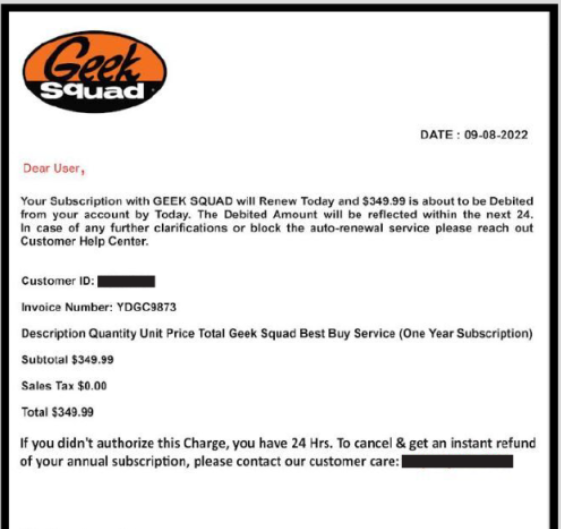
The high frequency of Geek Squad scams has led the FTC to put out several alerts showing people how to spot them (Image Credit: FTC).

Geek squad scam

Geek Squad scams come in many forms, with scammers contacting prospective victims via email, text, and over the phone. One version of the scam is called the “auto-renewal scam”(an example of which is pictured above) which looks to scare the victim into acting quickly by threatening a renewal of an expensive subscription if they don’t act.

However, Geek Squad “overpayment” scams, as well as Geek Squad “tech support” scams – the latter of which involves threat actors subsuming remote control of victims’ computers to fix non-existent problems and instead steal their information – have also been spotted.

Cash App Scams

Cash App scams were another collection of scamming methods widely used throughout 2022 to try and con victims out of their hard-earned cash.

Cash App scammers will deploy a myriad of different social engineering methods to achieve this, including pretending to send “random” payments, offering investment opportunities, impersonating the company’s customer support, and demanding you “re-verify” your account.

Some Cash App scams even play off the companies #cashappfriday competition, and demand victims pay a fee before their “prize” is released.

As well as traditional scamming methods, there have been several reports this year of Cash App scammers utilizing physical debit cards in their operations. Some scammers have reportedly bought stolen details on the dark web, and started posting unsolicited Cash App debit cards to the people the stolen information belongs to while also setting up Cash App accounts in their name.

Inside the Cash App mail, victims will find instructions to scan a QR code to set up their Cash App card – but as we know, the account has already been set up by the scammer, and they’ll have access to any funds that their victims deposit.

Because Cash App is so regularly impersonated by scammers, it’s important to treat all correspondence purporting to be from the company with great caution.

Google Voice Scams

Google Voice is becoming an increasingly popular choice for businesses that need a VoIP solution – and naturally, this means scams have increased too. Now, Google Voice is being used to steal people’s phone numbers and, in turn, other personal information.

Google Voice scams require a prospective victim to have first posted something online along with their phone number – maybe they’re selling something on a site like Craigslist, or have lost their pet.

The scammer will track down these users and claim they want to purchase such an item, or that they’ve found their lost pet. However, they request that you verify your identity before continuing.

The scammer will then send victims a “verification code” – but what they’ve actually done is set up a Google Voice account with the victim’s phone number and this is the two-factor authentication code that Google will send to devices when new accounts are registered (Image Credit: FTC).

Google Voice text

Victims who are duped into going along with the full scam and handing over this verification number have now allowed the scammer to set up a Google Voice account using their info.

Eva Velasquez, President & CEO of the Identity Theft Resource Center (ITRC), told NBC12 that have taken “thousands of calls to the center from victims of this scam”, with 6,700 reports coming in the last 15 months.

Paypal Scams

Paypal is one of the most commonly impersonated brands, and if you take a second to think about it, you can probably work out why – it’s a money-transferring service that sends out large volumes of correspondence and information to customers regarding transactions they’ve made or received.

Last year, the Better Business Bureau found that Paypal was the most commonly impersonated payment system, and was used to scam people significantly more than Zelle:

BB table showing paypal scams

In 2022, Paypal is still being regularly utilized in “classic” phishing campaigns, in which social engineering techniques are deployed to coax victims into handing over their details. These attacks can take place via text or email.

However, there are also “advanced fee” scams, in which victims are conned into sending money to scammers on the proviso that they will be sent more back (which never happens).

“Overpayment scams”, on the other hand, often require more complex hacking and subversion tactics to make it appear as if victims have been transferred a large amount of cash. They are then asked to send it back, after which those who fall for the scam simply send their own money over to the criminal.

Amazon Scams

In 2022, SMS is still being used by scammers as an avenue to wreak havoc, and it’s likely they’ll continue to flood our phones with malicious links as we head into 2023.

Amazon is a particularly popular choice for scammers at this time of year, with millions of people expecting text communications from the company relating to items they’ve ordered, which will naturally make their hit rate higher.

Amazon scams often claim that someone has made a payment on or gained unauthorized access to a victim’s account and that they need to take immediate action, or that they’ve recently missed an order. Other scammers will construct bogus competitions with the promise of monetary prizes.

Amazon text message scams include malicious links that will load malware onto your device or allow a threat actor to subsume remote control of your phone.

Amazon, which tracks phishing campaigns that utilize their name and other brand assets, warns that “fraudsters can now insert their scam messages into a thread of legitimate messages that you might have received from us.”

With this in mind, it’s always safest to contact Amazon another way, and avoid clicking links in text messages altogether.

How to Protect Yourself From Scams in 2023

As we’ve mentioned previously, the best defense you have against scams is knowledge. Being able to recognize the common formats scam messages typically take is vital.

If you’re a consumer, remember the golden rule: if you weren’t expecting to receive correspondence from a company and you have, or something just doesn’t seem right, contact the company’s customer support channel.

On top of this, never hand over your phone number, email address, bank details, or any other personal information unless you’re completely sure you’re talking to a legitimate representative of a company with whom you have prior dealings.

Remember: If you’re ever in doubt, don’t give your information out.

If you’re a business owner, on the other hand, regular training for employees, which could include exercises like phishing simulations, online cybersecurity courses, and enforcing password best practices, is crucial to keeping your systems safe.

After all, you could have the most watertight security system money can buy, but if employees aren’t clued up, they’re just as much of an exploitable vulnerability as a misconfigured firewall.

However, that’s not to say tech can’t help. Password managers, for example, can ensure that employees aren’t just reusing passwords, or not making them long enough, in an effort to remember them. If account information is stolen during a scam, this will greatly minimize the damage any given threat actor can do.

These are just one example of a step you can take to protect your business. If you’d like to stay up to date on news regarding the latest scamming techniques, data breaches, and software vulnerabilities, as well as the latest tech you need to bolster your defenses, sign up for Tech.co’s weekly email newsletter today:

Written by:
Adam has been a writer at Tech.co for nine years, covering fleet management and logistics. He has also worked at the logistics newletter Inside Lane, and has worked as a tech writer, blogger and copy editor for more than a decade. He was a Forbes Contributor on the publishing industry, for which he was named a Digital Book World 2018 award finalist. His work has appeared in publications including Popular Mechanics and IDG Connect, and his art history book on 1970s sci-fi, 'Worlds Beyond Time,' was a 2024 Locus Awards finalist. When not working on his next art collection, he's tracking the latest news on VPNs, POS systems, and the future of tech.

Tech.co’s Favorite Apps of 2022

From productivity tools to puzzle games to retro '90s throwbacks, here are all our favorite apps to check out.

2022 was a year packed with huge tech news, from the collapse of crypto and NFTs to the announcement of the still-far-away Metaverse to the rise of AI artwork.

But all those dramatic stakes can get a little overwhelming, particularly for those of us trying to weather an assortment of pandemics and recessions. Sometimes you just want to pull out your phone for a simple activity that won’t knock over the first domino leading to Tesla stock tanking or the destablization of El Salvador.

The Tech.co team put their heads together to come up with a handful of the best apps that you may not have known about or simply haven’t taken the time to check out amid an endless torrent of news.

Most of them are free, but none of them will cost you more than a few bucks. And if you find one or two that you like, you’ll be entering the new year with a renewed love for the types of technology that won’t actually inspire any existential dread. That’s a win in our book.

Living Worlds

Living Worlds

What it is: Old-school animated pixel artwork
Who’s behind it: Mark Ferrari and Ian Gilman
What it costs: $1.99
Where to find it: iOS, Android

“Possibly my favorite app I discovered this year was Living Worlds, which does nothing but feature 12 different nature scenes, all depicted with nostalgic, gently-animated early ’90s digital art from master craftsman Mark Ferrari. There’s one for each month, because the original use was for a personal organizer software. The best part: You can’t do anything else with your phone while you’re running it, so I turn it on in the background when I have work to do and need to keep myself off Twitter.” -Adam Rowe

The pixel scenery in the Living Worlds app is the real deal, and stands apart from any modern attempts to capture this blocky, era-specific art style. Plus, each artwork has a lot more going on than you might think: The sun rises and sets in real time for each one, and some will evolve depending on the time of the month, with an autumn tree’s leaves turning from green to orange to red, or a winter scene growing more snowy before finally adding a Christmas tree on the 25th.

If you want to try cutting down on your screen time, you ought to replace it with something, and any ’90s lovers could do a lot worse than the rainy forests, sunny beaches, or jungle waterfalls in this app.

Wordle app

Wordle

What it is: A puzzle game in which you guess a new five-letter word each day
Who’s behind it: Josh Wardle (get it?) and the New York Times
What it costs: Free
Where to find it: The web, iOS, Android

“As an Editor, I love a word challenge anyway, but Wordle is especially addictive as it’s so simple and satisfying, while being nicely time boxed at just one puzzle/6 guesses per day. It’s a mindful activity for me — a little win I can (almost) guarantee and a few minutes I can look forward to taking for myself, no matter what else is going on. Plus, it’s slightly competitive to compare results with friends and family, which adds to the fun. Yes, I still have a Wordle group chat where we compare scores! The simple pleasures in life are often the best, so while the hype may have died down now, I will continue to play this little gem of an app.” -Jen McIlveen, Tech.co Editor

If you were on the internet at all for the first couple months of 2022, you probably don’t need an explainer about Wordle. The guessing game was a quick sensation, thanks in part to the incredibly sharable grid of emoji circles that could be used to hint at how someone else had managed to guess the day’s word.

First created by Welsh software engineer Josh Wardle, Wordle was snapped up by the New York Times for a seven-figure sum soon after it became a hit, and was folded into their roster of puzzle games like the Spelling Bee and the paper’s official crossword. You can play online, or you can download either the standalone Wordle app for Android or find Wordle inside the NYT Crossword app if you have an Apple device.

Libby

What it is: Local library ebook delivery system
Who’s behind it: OverDrive, Inc.
What it costs: Free
Where to find it: iOS, Android

“Libby’s a quick and easy way to get a library book within minutes, rather than waiting for a hold that could take a week or longer. You do have to like ebooks and your library has to have the one you want, but the app is easy on the eyes and offers a lot of options, from text sizes to type of lighting (sepia’s the best) and general design (including OpenDyslexic, a typeface designed to mitigate common affects of dyslexia).” -Adam Rowe

Once you download Libby, you’ll be guided through how to pick your local library branch and enter your library card details.

Your library system will need to be paying for Libby, however, so it’s not available to everyone. But it’s a great resource for plenty of free books that you don’t even have to leave home to access, and it even lets users highlight favorite phrases or set a virtual bookmark to save their place.

Forest

What it is: Productivity app
Who’s behind it: Seekrtech, LTD.
What it costs: $3.99
Where to find it: iOS, Android, Chrome extension

“An app I’ve really leaned on this year is Forest. Productivity apps are a dime a dozen, but I appreciate this ones simple, stripped back approach. At its core the app is a countdown, which you set to a time limit of your choosing, so you can focus on a task. As time passes, a tree slowly grows on the screen. However, if you give into the temptation to switch to your emails or stick on Netflix, the app will remind you that you’re supposed to be focusing. Ignore it, and your tree dies. That’s it. I find the incentive of seeing my tree through to full growth is enough to stop me poking at my phone while I focus on the task at hand, whether it’s work, reading a chapter of a book, or just about anything I might get easily distracted during.” – Jack Turner, Tech.co Deputy Editor

Forest offers additional perks like a collaboration mode that lets you join other users of the app and all focus together: If one of you strays, everyone’s tree dies. Users earn currency while using the app, which can be used to unlock other types of trees. Virtual coins can also be used to pay for real trees to be planted, with the app creators claiming almost 1,500,000 being planted to date.

“I stuck it on while I was writing this,” Jack says, “and not only did I not feel tempted to break off to gawk at the latest Musk/Twitter headlines, I stayed 100% focused, and am now the proud owner of a digital Christmas tree, complete with presents.”

Poolsuite.FM

What it is: Music app
Who’s behind it: Vacation, Inc.
What it costs: Free
Where to find it: The web, iOS

“Poolsuite.FM is nothing but vibes. The music player is designed with an agressively retro aesthetic that embraces the excess, wealth, and swimsuit lycra of a sun-drenched Miami beach in 1997. Users can shuffle through six different radio station playlists with names like Indie Summer, Hangover Club, and Balearic Sundown. The music itself is always chill and feel-good, though the genres cover everything from 1980s dance to Japanese city pop.” -Adam Rowe

The Poolsuite.FM app is a lesson in fully committing to the bit, with an interface that recreates and remixes the long-abandoned typographic styles of old VHS logos, Nokia 3310 mobile devices, or the 8-bit Commodore 64 computer. It’s ultimately a simple music player, but it radiates enough personality that you can practically smell the tanning oil. Check out the website, where you can play a feed of on-theme YouTube clips and sign the guestbook. Well, after you wait for it to boot up.

Plus, One Anti-Recommendation: Lensa

“Sure, it’s AI, hence the buzz, but how good is it really? Especially in a world where photo sharing on apps such as Instagram is already causing a plethora of body image issues and insecurities, particularly for younger users, do we need more fake photo tools?” -Jen McIlveen

AI selfie editing app Lensa has been dinged for dubious security practices in the recent past, which is not a fault that we tend to look past here at Tech.co. And you’ll have to pay for it as well, despite the product simply delivering photo filters: Premium subscriptions cost $7.99/month or $29.99/year. But the core concern here is that it promotes the unrealistically flawless body expectations that were bad enough when reserved them for photoshopped celebrity magazine covers.

In 2023, we recommend freeing yourself from body image fears and kicking back with a game of Wordle while vibing to some city pop.

Written by:
Adam has been a writer at Tech.co for nine years, covering fleet management and logistics. He has also worked at the logistics newletter Inside Lane, and has worked as a tech writer, blogger and copy editor for more than a decade. He was a Forbes Contributor on the publishing industry, for which he was named a Digital Book World 2018 award finalist. His work has appeared in publications including Popular Mechanics and IDG Connect, and his art history book on 1970s sci-fi, 'Worlds Beyond Time,' was a 2024 Locus Awards finalist. When not working on his next art collection, he's tracking the latest news on VPNs, POS systems, and the future of tech.

Remote Workers Less Confident About Finding Similar Roles

A new study also shows that workers in the US are the happiest they have been since the pandemic.

A new survey of American workers has revealed that those that are fully remote are less sure than in-person staff about their chances of finding a comparable position at another company, should they be made redundant.

Despite murmurings of a recession in 2023, and a large number of layoffs in the tech sector, the study also shows that on the whole, workers are feeling fairly optimistic going into the new year.

While remote work has seen a huge increase in the past few years, with many companies now offering fully remote roles, we are starting to see some companies, such as Twitter, change their minds on more flexible working.

Finding Work After Redundancy

The study, from CNBC, surveyed 10,000 workers in the US, to gauge opinion on the current state of the job market and workplace happiness.

The data collected showed that even though layoffs are currently making the headlines daily, more than half of respondents, 59% stated that they weren’t concerned about themselves or a member of their household being made redundant. However, when broken down by race, these numbers told their own story, with Asian, Black and Hispanic workers more likely to be concerned than white workers about losing their jobs.

80% of people say that if they lost their job, they could find a new one within six months, with 36% stating that they could land a job with similar pay within a month.

However, while 41% of in-person office workers were confident on finding a similar role within in a month, only 24% of remote workers felt the same way.

Worker Morale at All Time High

You might forgive workers for being a bit down in 2022 – coming off the back off a disruptive pandemic, faced with economic unrest as we head into 2023, and high profile companies making layoffs at huge scale. And yet, the study from CNBC shows that morale is at its highest, since it began recording it in May 2020.

72% of workers feel that moral among coworkers is excellent or good, up, from 69% in May 2022. 42% of respondents said that they were “thriving” at work, while 18% said that they were “struggling.”

Perhaps the most impressive statistic in the findings is that a huge 91% of workers consider their job to be meaningful to them, while 84% feel that their contributions are valued a lot or some by colleagues.

Understaffing a Major Issue

Overall, the study shows an optimistically healthy outlook for the average American worker, but it does reveal some pockets of dissent. In companies which are understaffed, staff are more likely to quit. 46% of workers in this position said they had considered leaving their role in the last three months.

The most understaffed industries according to the report, included government (62% respondents stated their company was understaffed), healthcare and pharmaceutical (55%) and airline (54%).

Despite the survey showing that people aren’t hugely concerned about redundancy, 67% did say that economic downturn was the biggest threat to their job. This concern is even high for workers aged 65 and above.

Written by:
Adam has been a writer at Tech.co for nine years, covering fleet management and logistics. He has also worked at the logistics newletter Inside Lane, and has worked as a tech writer, blogger and copy editor for more than a decade. He was a Forbes Contributor on the publishing industry, for which he was named a Digital Book World 2018 award finalist. His work has appeared in publications including Popular Mechanics and IDG Connect, and his art history book on 1970s sci-fi, 'Worlds Beyond Time,' was a 2024 Locus Awards finalist. When not working on his next art collection, he's tracking the latest news on VPNs, POS systems, and the future of tech.

FBI Recommends Using Ad Blockers to Avoid Cybercrime

Cyber criminals are using adverts to dupe victims into downloading harmful software and handing over sensitive data.

The FBI has told the American public to download an ad blocker in order to protect from online security threats, as cyber criminals use adverts to push ransomware and steal details.

The messaging is likely to upset many website owners, who rely on revenue from adverts to stay operational. However, there are ways to use an ad blocker and still support your favorite sites.

An ad blocker will provide protection against fraudulent advert, but won’t protect against more common phishing and ransomware scams, so we’d also suggest using password managers and antivirus software.

Cyber Criminals Using Adverts to Catch Out Users

In a statement from the FBI this week, the agency suggested that internet users download an ad blocker, as cyber criminals adopt more and more sophisticated ways to dupe victims into downloading harmful software or handing over their details.

According to the FBI, cyber criminals are purchasing adverts that appear in internet search results, usually masquerading as a legitimate business or service. As these adverts appear at the top of a search page, there is a high chance of an unwitting victim clicking on them, after which they will be redirected to a website which appears to be the real deal, but is instead a fraudulent facsimile of the authentic website. Here, the user will be prompted to download harmful software, or enter personal and financial information.

The FBI mentions that some of these adverts focus on financial services, especially cryptocurrency exchange sites, where users are prompted to log in to their account, unaware that the site isn’t the real deal. Doing so effectively hands over the keys to the user’s crypto account to a scammer.

How to Avoid a Fraudulent Advert

In its alert, the FBI gives some tips on how to spot and avoid these fraudulent adverts, including:

  • Checking the URL before clicking on an advert. Hovering your mouse cursor over the link will reveal the actual URL – be vigilant for misspelt addresses, or odd looking suffixes.
  • Instead of using a search engine, such as Google, to look for companies, enter the address into the browser address bar directly instead. Good advice from the FBI, but this one does depend on the user knowing the URL in the first place, and also not making a typo.
  • Use an ad blocker. As the name suggests, these will block all adverts from appearing, meaning not only will you not be caught out by scam ads, but you also won’t see real ones.

Using an ad blocker may protect users from fraudulent adverts, but could also seriously diminish the online experience. Many websites rely on adverts to keep the lights on, and as such some will refuse to even let you visit the page if you have an ad blocker turned on. If you are using an ad blocker, be sure to add your favorite sites to the apps whitelist, which means that adverts on that site will be displayed, but you won’t be subjected to them elsewhere.

Staying Safe Online

The scams that the FBI has detailed in its latest alert are nothing new, but the delivery method of fake adverts is one that is increasing in popularity. Microsoft warned last month of cyber criminals using Google adverts to distribute ransomware, emulating official companies such as Adobe, Team Viewer and Zoom.

To help stay safe online, using and ad blocker as the FBI recommends is a good first step to protect yourself against these fraudulent adverts.

To go further, we’d also recommend using a password manager to ensure the creation of strong, secure passwords and avoid poor practice (such as writing your password down manually to remember it).

Antivirus software is also a strong tool in the defence against online threats. This software will warn when links look suspicious, as well as flag dubious files before downloading.

Written by:
Adam has been a writer at Tech.co for nine years, covering fleet management and logistics. He has also worked at the logistics newletter Inside Lane, and has worked as a tech writer, blogger and copy editor for more than a decade. He was a Forbes Contributor on the publishing industry, for which he was named a Digital Book World 2018 award finalist. His work has appeared in publications including Popular Mechanics and IDG Connect, and his art history book on 1970s sci-fi, 'Worlds Beyond Time,' was a 2024 Locus Awards finalist. When not working on his next art collection, he's tracking the latest news on VPNs, POS systems, and the future of tech.

Twitter Chaos Helps Mastodon Reach 2.5 Million Users

The app’s CEO revealed the milestone in a blog post, while taking a jab at Musk’s censorship spree.

The insurgent social media app Mastodon now boasts a user base of 2.5 million, as jaded Twitter users continue to jump ship from Elon Musk’s increasingly lawless platform.

While the German-born app has been around since 2016, its number of users skyrocketed by over 2 million after Musk’s Twitter takeover in October. This is despite Musk temporarily banning all links to the site and blocking Mastodon’s official Twitter account.

Even as Musk decides to step down as Twitter’s CEO, Mastodon is undeniably the more principled social platform. So as its user numbers continue to creep up, should Twitter be worried?

Mastodon Continues to Cash in on Twitter’s Turmoil

Since serial CEO, Elon Musk, first took the wheel of Twitter back in October, his management of the social media app has been akin to watching a slow-motion car crash – a complete catastrophe that we can’t seem to look away from.

But while Musk’s path of destruction has left a number of scorned individuals in its wake – including several banned journalists and former members of his own company, one clear victor has benefited from the chaos – Mastodon.

Founded in 2016 by the software developer Eugen Rochko, Mastodon prides itself on being the democratizing, decentralized version of Twitter – running on open-source technology that anyone is able to edit and funneling all profits back into the company.

“We are excited to see Mastodon grow and become a household name in newsrooms across the world…” – Eugen Rochko, Mastodon Founder and CEO

And this refreshingly principled approach seems to be resonating. According to a blog post from Rochko himself, the platform’s current monthly active users are standing at 2.5 million, a far cry from its previous user base of 300k in October.

What’s more, as the blue bird’s future looks increasingly uncertain, Mastodon and Twitter alternatives like Post, Hive, and Discord are expected to surge in popularity even more as we enter 2023.

Twitter Uses Dirty Tactics to Suppress Competition

Unfortunately for the open-sourced app, not all social platforms play fair. On December the 16th, Twitter suspended the @joinmastodon account after they shared a link to @ElonJet, a suspended Twitter account that broadcasted Musk’s live flight information.

Mastodon's suspended Twitter account

On the same day, Musk rolled out a policy that blocked users from sharing Mastodon user profiles and links to instances on the app, while also temporarily suspending the accounts of several high-profile journalists from publications like CNN, The Washington Post, and The New York Times.

Mastodon CEO Fights Back in Blog Post

Rochko called out Twitter’s actions in his recent blog post, labeling these restrictions as “a stark reminder that centralized platforms can impose arbitrary and unfair limits on what you can and can’t say”.

The German CEO also cited the importance of freedom of the press in functional democracies, taking a direct jab at Musk and his recent censorship offensive.

While Mastodon’s army of supporters is still a drop in the ocean of Twitter’s 368 million active users, the events of the past few months have highlighted how much value social media users place on freedom of expression and principles like decentralization.

Even though Twitter’s monopoly isn’t expected to dissolve anytime soon, maybe instead of baselessly branding itself as a “free speech haven” while removing safeguards for its users, it could stand to learn some lessons from its truly democratic, open-source alternative.

Written by:
Adam has been a writer at Tech.co for nine years, covering fleet management and logistics. He has also worked at the logistics newletter Inside Lane, and has worked as a tech writer, blogger and copy editor for more than a decade. He was a Forbes Contributor on the publishing industry, for which he was named a Digital Book World 2018 award finalist. His work has appeared in publications including Popular Mechanics and IDG Connect, and his art history book on 1970s sci-fi, 'Worlds Beyond Time,' was a 2024 Locus Awards finalist. When not working on his next art collection, he's tracking the latest news on VPNs, POS systems, and the future of tech.

Are You Being “Quietly Promoted”? Here’s How to Find Out

According to new research, 78% of Americans are currently falling victim to this trend.

Move over “quiet quitting” and “quiet firing“, a new term has entered the workplace vernacular: “quiet promotions” – a phenomenon where employees are dished out escalating amounts of work without receiving a pay increase or a title change.

In what can almost be considered the inverse of “quiet quitting“, the workplace trend in which workers resist going above and beyond, quiet promotions are instigated from the top down and often result in workers feeling overworked or taken advantage of.

Due to movements like the great resignation, new research suggests three-quarters of Americans have currently experienced the phenomenon in some capacity. If this situation sounds familiar to you, we outline some tell-tail signs, before helping you figure out how to flip the practice in your favor.

What is a Quiet Promotion?

According to JobSage, quiet promotions occur when workers receive increased workloads without being rewarded with additional compensation or a change in position.

Quiet promotions commonly occur when companies find themselves short-staffed, without enough workers to tend to the mounting task loads and growing lists of responsibilities.

Much like the case with quiet quitting and quiet firing, the term affixes a new label to a longstanding workplace phenomenon. However, due to recent workplace trends like the 2021 great resignation and widespread layoffs spurred on by the surging cost of living, quiet promotions are now thought to be more prevalent than ever.

A study from JobSage, which surveyed over 1,000 full-time American employees, revealed that 78% of workers have been subjected to increased workloads without being compensated for their efforts. The survey also found that 73% of workers have been asked to take on more work by their manager than was originally outlined in their job description.

Quiet promotions don’t take place evenly across industries, though. JobSage found that the phenomenon occurs the most in the art and design and hospitality sectors, with a shocking 89% of those working in these industries workers falling victim to the practice.

But is being given greater responsibilities in the workplace always a bad thing? According to Claire Warner, founder of workplace culture and wellbeing consultancy Lift, quiet promotions can be a “double-edged sword”, since many of us are seeking to develop and progress in our careers.

However, with swelling workloads and inadequate recognition leading to higher cases of workplace dissatisfaction and burnout – and 57% of survey respondents reporting that it makes them feel manipulated or taken advantage of – it seems that the trade-off between growth and exploitation just isn’t worth it.

How to Spot the Signs of a Quiet Promotion

Suspect you might be in the majority of US workers that have borne witness to this trend? According to JobSage, here are the main signs to look out for:

  • Being asked by a manager to take on work above your position
  • Being given more work than others with the same job title
  • Absorbing the work from a coworker that’s left the company
  • Knowing your employer would suffer if you failed to take on more work
  • Felling manipulated or taken advantage of in a workplace setting

Aside from these warning signs, other red flags include being asked to be a “team player”, and feeling like you don’t have the opportunity to resist these requests.

If these examples are ringing alarm bells, don’t worry. There are a number of actions you can take to avoid feeling helpless in this situation.

Tips for Addressing Quiet Promotions Head On

JobSage’s research reveals that only 22% of employees have pushed back against being quietly promoted.

This is hardly surprising. Given the current amount of layoffs hitting the headlines, not to mention additional challenges experienced by minority and international workers, rejecting extra responsibilities isn’t always viable.

However, in most cases, acquiring new skills and working diligently will bode well for your future in the company. So, if directly confronting your manager isn’t an option, keeping a clear record of the evolution of your duties, task list, and responsibilities will make it much easier for you to petition higher-ups for that legitimate, well-earned job promotion.

And if your company doesn’t have the means or capacity to compensate you fairly or recognize your progression, it might be time to look for better-paid, fairer opportunities elsewhere.

Written by:
Adam has been a writer at Tech.co for nine years, covering fleet management and logistics. He has also worked at the logistics newletter Inside Lane, and has worked as a tech writer, blogger and copy editor for more than a decade. He was a Forbes Contributor on the publishing industry, for which he was named a Digital Book World 2018 award finalist. His work has appeared in publications including Popular Mechanics and IDG Connect, and his art history book on 1970s sci-fi, 'Worlds Beyond Time,' was a 2024 Locus Awards finalist. When not working on his next art collection, he's tracking the latest news on VPNs, POS systems, and the future of tech.

California’s New Fleet Tracking Laws Aim to Guard Driver Privacy

Civil penalties may be $250 for a first violation, and rise to $1,000 per affected employee for each additional violation.

California’s new vehicle tracking regulations are set to roll out across the next year, ushering in a set of laws aimed at enhancing privacy protections for the drivers of trucking fleets operating within the US state.

The new law, designated as Assembly Bill No. 984, will add a handful of guidelines surrounding technology that monitors drivers’ activity.

And since “monitoring activity” describes how almost all major fleet management system hardware works, any fleets operating out of California will need to double-check what type of data they’re collecting.

That said, there’s no huge rush: The bill gives everyone up until January 1, 2024, to ensure that their monitoring devices are up to par.

How Does This Change Fleet Activity Monitoring?

Governor Gavin Newsom signed the bill into law back in September amid a wider push for privacy protections. In general, it’s okay to use an electronic tracking device only when the vehicle owner being tracked has consented.

When it comes to fleets, the new law is intended to add further restrictions. First, the employer can’t use a device unless it is during work hours. Second, it can only be used if “strictly necessary for the performance of the employee’s duties.”

Violate these rules, and your fleet will be hit with civil penalties. In addition, the law covers any potential for an employer to retaliate against any employees who push back against unlawful use of tracking devices, as the summary explains:

“The bill would also prohibit retaliation against an employee by an employer or a person acting on the employer’s behalf for disabling an alternative device’s monitoring capabilities outside of work hours, and would authorize an employee to file a complaint with the Labor Commissioner for a violation of that prohibition.”

Employers will need to notify employees about exactly what type of activities will be monitored and what data will be gathered as a result, including dates, times, and frequency of data collection, and how long the data will be kept.

How Could I Be Fined for Vehicle Tracking?

Civil penalties may be $250 for a first violation, and might be $1,000 per affected employee for each additional violation. But what data is “strictly necessary” data to collect? That part isn’t currently defined.

For years, the more expensive dash cams have been able to use AI and facial recognition tools to check up on who’s driving a truck and whether they’re taking the proper safety precautions such as buckling their seat belt before starting up a vehicle.

Under the new bill, it seems likely that these types of panopticon-esque tools will be considered too much. But until the government issues a few examples of what’s allowed and what isn’t, we won’t know for sure. The legal wording is simply too vague at the moment.

Staying Safe While on the Go

The California bill covers plenty of additional ins and outs on what drivers can do, but most elements under scrutiny aren’t exactly surprising: If a driver is found to have falsified or forged a “disabled person placard” or a clean air sticker, they’ll be fined and could be imprisoned in some cases. You (hopefully) don’t need to be told to cease and desist any forging of documents.

As always, we’d recommend staying in touch with your local fleets and verifying with them what they’ve learned about how best to stay on the good side of these new regulations.

But one thing’s for sure: You can still use a top fleet management system, even if some of the more extreme data-collection features aren’t for your fleet. At Tech.co, we’ve done the research and ranked the best FMS options over here, with industry giants including Verizon Connect and Samsara leading the pack.

And if picking out the right dash cam is a challenge you’ll be tackling ahead of 2024, we’ve listed which dash cam features and prices might be the optimal ones for your fleet as well.

Written by:
Adam has been a writer at Tech.co for nine years, covering fleet management and logistics. He has also worked at the logistics newletter Inside Lane, and has worked as a tech writer, blogger and copy editor for more than a decade. He was a Forbes Contributor on the publishing industry, for which he was named a Digital Book World 2018 award finalist. His work has appeared in publications including Popular Mechanics and IDG Connect, and his art history book on 1970s sci-fi, 'Worlds Beyond Time,' was a 2024 Locus Awards finalist. When not working on his next art collection, he's tracking the latest news on VPNs, POS systems, and the future of tech.

Google’s New Client-Side Encryption Adds Even More Security

Eligible admins can start using the beta version of Google's latest client-side encryption feature now with a few steps.

Your data is safer than ever: Google has added another security feature to its Workspace and education suites.

The tech giant is rolling out client-side encryption — Workspace Enterprise Plus, Education Plus, and Education Standard customers can all apply now for the beta version of the function.

Google has limited the new security feature to web browser use for now, but given how many companies operate remotely and from the cloud, that’s a big boon for workforce security for everyone using Google’s professional services.

What Is Client-Side Encryption?

Client-side encryption stands apart from the server-side variety, offering even more protection: Server-side encryption requires that the server remain trusted in order to stay secure, but any data that has already been encrypted on the client’s side will always remain secure, even if bad actors attempt to access it from the server.

No one anticipates the server being breached, sure, but it never hurts to have another layer of security in case it ever is.

Technically, this isn’t end-to-end encryption, as many tech sites have reported: End-to-end encryption refers to a communication process, with both the sender and receiver using a software key to encrypt a message before sending it and decrypt it after receiving it. Client-side encryption just allows the client to safely store data without allowing access from a server or service provider. Google explains it all in the blog post announcement:

“Using client-side encryption in Gmail ensures sensitive data in the email body and attachments are indecipherable to Google servers. Customers retain control over encryption keys and the identity service to access those keys.”

How to Get Started

Admins can start using the beta version of the security now with a few steps. First, you’ll need to have an eligiable Workspace plan. Then, you’ll have to find the feature and turn it on. The process will look like this:

Admin console > Security > Access and data control > Client-side encryption

Once the switch is flipped, all end users can add client-side encryption to any message by clicking the lock icon and selecting “additional encryption.”

This new tool isn’t a huge leap from how Google ensures data is kept safe: The tech conglomerate already makes the functionality available for many popular services including Google Drive, Google Docs, Sheets, and Slides, Google Meet, and Google Calendar (in beta).

Staying Safe Online

From endless new Google Meet security updates to its pioneering focus on ensuring open source software stays bug-free, Google is keeping its eye on the cybersecurity ball.

If you’re looking for a web conferencing service for your business, we’d rate Google Meet’s services fairly highly, although there are plenty of other options as well.

And if protecting private data is a top concern, you’ll be happy to know that new client-side encryption is just the tip of the iceberg for the service’s security tools.

Written by:
Adam has been a writer at Tech.co for nine years, covering fleet management and logistics. He has also worked at the logistics newletter Inside Lane, and has worked as a tech writer, blogger and copy editor for more than a decade. He was a Forbes Contributor on the publishing industry, for which he was named a Digital Book World 2018 award finalist. His work has appeared in publications including Popular Mechanics and IDG Connect, and his art history book on 1970s sci-fi, 'Worlds Beyond Time,' was a 2024 Locus Awards finalist. When not working on his next art collection, he's tracking the latest news on VPNs, POS systems, and the future of tech.

POLL CLOSED: Over 10 million Twitter Users Vote for Musk to Quit

Musk has said he will abide by the results of the poll, which means he'll have to step down to keep his word.

More than 10 million people have voted for Musk to resign from his position as Twitter’s CEO in a poll that took place on the social media platform.

The poll – posted from the billionaire SpaceX owner’s personal Twitter account – has attracted over 17.5 million respondents in less than 24 hours.

The vote reflects widespread dissatisfaction with Musk’s decision-making since he became chief executive less than two months ago, in a short tenure that has been as controversial as it has been chaotic.

Musk’s Self-Afflicted Public Judgment Day

Yesterday, Elon Musk set up a poll asking users whether he should step down as head of Twitter. The billionaire said in the same post that he plans to abide by the results of the poll, whatever they may be.

A large majority – 57.5% of poll respondents – have expressed that they want Elon Musk to resign from his position, while 42.5% would like the Tesla chief to continue at the helm.

Musk has been mired in scandal and controversy since the moment he took over Twitter, with scoops detailing the CEO’s unhealthy working practices and refusal to pay rent for Twitter’s offices among a string of other negative stories that have caused significant damage to his reputation in the last six weeks.

Was Musk Planning to Leave Twitter All Along?

Whenever Elon Musk does anything – especially on Twitter – it’s always worth asking whether his actions are an ill-informed attempt at humor, entirely theatrical or serve some sort of additional end for him that at present is somewhat unclear.

This might be the case here. Musk isn’t just posting this poll on a whim – reports that he was looking for an individual to lead Twitter began swirling just two weeks after his takeover in late October.

It’s unlikely Musk would have put out such a poll coupled with a promise to step down if he wasn’t already planning to do so.

Was the poll designed to portray him as someone who listens to “the people”? Or is he just trying to drum up more drama and more subsequent coverage for his acquisition? at this stage, it’s anyone’s guess.

If Musk keeps his word and steps down, however, finding a replacement that’s both competent and uncontroversial – yet still willing to take charge at Twitter in its current, dumpster fire-like state – will be no easy task.

Written by:
Adam has been a writer at Tech.co for nine years, covering fleet management and logistics. He has also worked at the logistics newletter Inside Lane, and has worked as a tech writer, blogger and copy editor for more than a decade. He was a Forbes Contributor on the publishing industry, for which he was named a Digital Book World 2018 award finalist. His work has appeared in publications including Popular Mechanics and IDG Connect, and his art history book on 1970s sci-fi, 'Worlds Beyond Time,' was a 2024 Locus Awards finalist. When not working on his next art collection, he's tracking the latest news on VPNs, POS systems, and the future of tech.

Study: Nearly Third of People Still Writing Down Passwords

Using methods like sticky notes could make you three times more vulnerable to attacks, according to new research.

Even though cases of identity theft are at an all-time high, almost three-quarters of Americans rely on handwritten notes or their own memory to remember passwords, according to new research.

Aside from relying on manual methods to remember codes, the report also revealed that re-using the same passwords is another leading reason why users have been experiencing breaches.

As the threat landscape intensifies, jotting down simple passwords on sticky notes is no longer a sufficient way to protect your accounts. So, if you’re serious about beating the odds, read on to discover some simple ways to level up your password security.

Only One-Fifth of Americans Use a Password Manager

Despite the increasing efficiency of password managers, tools that generate, manage and store passwords for users, 79% of Americans are still reluctant to pick them up, according to a recent survey by security.org.

How American's keep track of online passwords

How Americans are keeping track of passwords. Source: security.org

The survey, which collected insights from over 1,000 Americans, revealed that instead of using the tool, a quarter of respondents remember passwords by logging them on a digital device, 32% of them jot them down on a piece of paper, and a staggering 41% just rely on memory.

ID Theft is on the Up, Especially for Certain Users

For many of us, keeping a digital or physical copy of a password has become habitual. But whether you keep all your confidential codes on a sticky note or in a notes doc on your phone, failing to adopt modern solutions could drastically increase your chances of being breached.

This has been showcased in security.org’s password study, which found that web users that bypass password managers are three times more likely to encounter identity theft than those who use them correctly.

And aside from relying on paper copies and your own, often unreliable memory, re-using passwords is another major prerequisite for victims of cyber fraud, with 50% of identity theft victims failing to regularly come up with unique passcodes — a 15% increase from 2021.

How to Keep Your Accounts Safe

Fortunately, it’s not all doom and gloom. Despite the increasing sophistication and guile of cyber criminals, keeping them out of your account is actually fairly straightforward.

According to security.org, the simple and most effective way to block out these threats is by creating and regularly changing a strong password. Drawing on the National Insitute of Standards and Technology’s guidelines, they explain that a strong password should adhere to these four rules:

  • Contain 12 characters or more
  • Don’t be repeated for other accounts
  • Be divorced from personal meaning
  • Be regularly updated

By following these four simple principles, and using a password manager to log codes across your platforms, your chances of encountering a breach will drop significantly.

But which password manager should users opt for? As high inflation rates tighten purse strings across the US, free password managers like Google Password Manager and iCloud Keychain, unsurprisingly, continue to be the most commonly used solutions.

However, due to the safety and privacy concerns associated with free methods, Tech.co’s suggests that businesses are much better off going for quality options like LastPass and 1Password. Learn more about the best password managers on the market.

Written by:
Adam has been a writer at Tech.co for nine years, covering fleet management and logistics. He has also worked at the logistics newletter Inside Lane, and has worked as a tech writer, blogger and copy editor for more than a decade. He was a Forbes Contributor on the publishing industry, for which he was named a Digital Book World 2018 award finalist. His work has appeared in publications including Popular Mechanics and IDG Connect, and his art history book on 1970s sci-fi, 'Worlds Beyond Time,' was a 2024 Locus Awards finalist. When not working on his next art collection, he's tracking the latest news on VPNs, POS systems, and the future of tech.

Musk Bans Mastodon and Journalists in Twitter Censorship U-Turn

As Musk cracks down on “doxxing”, popular accounts like @ElonJet have been barred.

In what’s potentially been the most chaotic 24 hours of Twitter’s history, Elon Musk continues to wage a war against his opposition by suspending the Mastodon account and banning a slew of high-profile journalists from the app.

The increasingly erratic CEO is also preventing Twitter users from posting links to the social media rival, and is flagging its content as “potentially harmful”.

As staff numbers drop and the platform struggles to cover its own rent, Musk is appearing to go into survival mode. But with the self-confessed “free-speech absolutist” directly contradicting his own values, could these bans mark his biggest blunder so far?

Twitter Bans the Mastodon Account and Flags Links to the App

Elon Musk, Twitter’s CEO and previous world’s richest man decided to ban Mastodon’s account on Thursday night — the social media platform that’s widely being pegged as Twitter’s top alternative.

While the reason behind this ban hasn’t immediately become clear, according to The Verge the suspension took place shortly after Mastodon tweeted a link to @ElonJet’s page, an account that tracks Musk’s private jet usage in real-time.

The Silicon Valley company is also blocking users from linking to Mastodon accounts and a variety of servers, including to an ‘instance’ that lists notable Twitter alternatives.

According to a recent Tweet sent out by BBC technology journalist Rory Cellan-Jones (pictured above), attempting to post a link to a Mastodon account will land you with the message “Tweet failed to send”. Other Twitter users that have attempted to link to instances have been told the platform “can’t complete this request” because the link contains “potentially harmful” content.

But as the bluebird spirals further into chaos, Mastodon isn’t the only perceived threat Musk is cracking down on.

Twitter Bans Journalists and @ElonJet Account

During Musk’s Thursday night tirade, the Space X chief officer also decided to permanently suspend the accounts of several high-profile journalists, including Ryan Mac of the New York Times, Donnie O’Sullivan of CNN, and Drew Harwell of The Washington Post.

Musk falsely claimed that these reporters, which have all criticized the CEO in recent months, have violated his new doxxing policy, which bans accounts that are “dedicated to sharing someone’s live location”.

This policy was introduced retrospectively after Musk suspended the @ElonJet Twitter account this Wednesday, which has 500 thousand followers before its adjournment. The account’s creator, a 20-year-old called Jack Sweeney, also had his personal account banned in response to this new policy.

This suspension comes as a surprise to many, with Musk previously tweeting that he intends to keep the @ElonJet active, even though he considers it to be “a direct personal safety risk” in November of this year.

But what does the billionaire’s one-eighty on free speech reveal about the future of the social media platform?

Is Elon Musk Losing His Grip on Twitter?

From axing 50% of Twitter’s total workforce to providing hotel-style beds for remaining, overworked employees to crash on, Musk’s short stint as Twitter’s CEO has been nothing but eventful.

However, for a platform that advertises itself as a “free speech haven” and has and very lax content moderation policy to match, the chief executives’ latest moves fly directly in the face of Twitter’s central ideology.

Even Musk’s most loyal followers seem to be becoming disillusioned with the Chief Twit’s hypocrisy, with 43% of Musk’s Twitters followers voting that accounts guilty of “doxxing” the CEO’s location should be unsuspended immediately.

So, as the executive continues to lay down one rule for himself and another for his opponents, while other incriminating findings come to the surface, it’s uncertain how long support for the executive will continue.

Written by:
Adam has been a writer at Tech.co for nine years, covering fleet management and logistics. He has also worked at the logistics newletter Inside Lane, and has worked as a tech writer, blogger and copy editor for more than a decade. He was a Forbes Contributor on the publishing industry, for which he was named a Digital Book World 2018 award finalist. His work has appeared in publications including Popular Mechanics and IDG Connect, and his art history book on 1970s sci-fi, 'Worlds Beyond Time,' was a 2024 Locus Awards finalist. When not working on his next art collection, he's tracking the latest news on VPNs, POS systems, and the future of tech.

Microsoft Named Best-Managed Company in the US 2022

Apple came in second place, closely followed by IBM, knocking the previous years' top 5 tech companies off the board

Microsoft has been named the best-run company in the US for a third year in a row, beating Apple, Meta and Amazon to the top spot, despite a year of record-breaking layoffs and its slowest forecasted revenue growth in five years.

Apple came in second place, followed by IBM, General Motors  and Whirlpool,  knocking the previous years’ top 5 tech companies off the board.

The results come off the back of year of tremendous economic uncertainty with soaring inflation, mass layoffs and businesses scrabbling to retain retain their top talent. We take a look at how Microsoft, despite its setbacks, still managed to thrive.

Microsoft Is Officially the Best-Run Company in 2022

Of the 902 companies listed in the Top Management 250 report, Microsoft once again came out on top, as the best managed company in the US in 2022 – outperforming every competitor, with a top 10 score in every category on the list except customer satisfaction, awarding it an overall score of 98.6.

The report – which measures a company’s performance on customer satisfaction, social responsibility, employee engagement, development and financial strength – ranks America’s largest publicly traded companies on an analysis of 34 third-party data inputs to conclude which business is ‘doing the right things well.’

How Microsoft Compares to Other Businesses

Despite a year of unprecedented change, Microsoft managed to secure first place for the third year in a row, blowing Apple, Google (Alphabet) and Meta out of the water. While Microsoft performs well year-on-year, the difference between first and second place this year has more than doubled – with a 20 point overall difference between Apple and Microsoft, in comparison the 10 point overall difference between first and second place (Microsoft and Amazon) in 2021 due to Microsoft’s improved scored in financial strength and innovation.

Through the year Microsoft has made significant changes to its business model, providing more solutions than ever before to help businesses better adapt to a post-pandemic, hybrid-friendly world. With live translation features, Cisco compatibility and remote help tools for IT teams, it has continued to develop solutions to support businesses globally. While financially 2022 hasn’t been Microsoft’s best financial year, its score may be in part due to its surge in product development, with strategic moves to boosts the company’s retention.

Amazon, in comparison dropped from second to 8th place in the new Top Management 250 list, with its most significant loss of points due to lack of innovation, for which it lost 30+ points between 2021 and 2022. It also lost points for customer satisfaction, but gained two for social responsibility, securing it a top 10 position. In contrast to Microsoft, Amazon suffered a significant loss in profits due to its controversial walkouts, massive layoffs and alarming staff turnover throughout 2022. After cutting multiple divisions and laying off over 10,000 employees, it comes as no surprise that Amazon struggled to retain its score for innovation.

Massive Drop for Meta

The biggest mover on the list was Meta, dropping from position 31 to 130 with significant losses in its scores for financial strength (84.4 to 78.8), innovation (81.7 to 70.5) and social responsibility (57 to 49.2), but this may have been expected. Meta’s year has been plagued with financial strain from the start, with some blaming Zuckerberg’s egomaniac approach to the Metaverse as cause for its $80 billion loss in value.

Meta’s customer satisfaction, in comparison to other businesses on the list, were also significantly low, with a score of just 32.5 in comparison to Apple’s customer score of 60.7. While its score has improved since 2021 (27.3) it shows that there’s still a lot for Meta to do in order to compete with other businesses this category – however, with its highly publicised plan for more large scale layoffs, Meta may not have the team in-house to support the attention this category needs.

Other movers on the list worth noting was Apple. In contrast to Amazon and Microsoft, Apple actually gained points for customer satisfaction, jumping from 57.2 points in 2021 to 60.7 pushing it neatly into second place. The financial strength of the company had also improved, but it lost points for innovation (111.8 to 90.3) and social responsibility.

What Other Companies Can Learn From Microsoft In 2023

In a year of economic uncertainty Microsoft has done many things right – a lot of which was down to its own research. Microsoft has advised companies to “re-recruit, re-onboard, and re-energize employees” based off the back of a survey, to tackle retention and gain a better understanding of what employees need.

This results of the Top Management 250 list suggests that companies who prioritise employee retention and product development are the best managed companies in the US. In a time where businesses are struggling to retain their top talent, business leaders should be doing everything they can to retain their staff and prioritise the work environment so that they can focus on innovation.

Written by:
Adam has been a writer at Tech.co for nine years, covering fleet management and logistics. He has also worked at the logistics newletter Inside Lane, and has worked as a tech writer, blogger and copy editor for more than a decade. He was a Forbes Contributor on the publishing industry, for which he was named a Digital Book World 2018 award finalist. His work has appeared in publications including Popular Mechanics and IDG Connect, and his art history book on 1970s sci-fi, 'Worlds Beyond Time,' was a 2024 Locus Awards finalist. When not working on his next art collection, he's tracking the latest news on VPNs, POS systems, and the future of tech.

Microsoft Teams Announces Discord-Like Communities Features

Teams has launched this consumer-facing platform in hopes of building community among friends, family, and small businesses.

Is there anything Microsoft Teams can’t do? The team collaboration platform is now adding a community feature that will allow users to communicate without all the business infrastructure. Oh yeah, and the new feature will be completely free.

Microsoft Teams is one of the most frequently updated collaboration platforms online today. With the resources of Microsoft and the customer feedback of 270 million active users, the collaboration service is constantly adding new features and improving performance to handle all the newly hybrid workers using it.

Now, the platform is branching out from its business roots with a community feature that will replicate the experience of consumer-facing platforms like Discord and Facebook.

Microsoft Teams Adds Communities Feature

A Microsoft 365 blog post announced that Microsoft Teams has added a new communities tool that will enable access to certain Microsoft Teams feature like calendar, meeting, chat, and file/photo sharing for no charge.

The goal will be to provide a communication tool for everyday users trying to make plans and stay in touch, rather than businesses looking to facilitate hybrid work. There are, of course, dozens of apps that do exactly that, but Microsoft Teams believes they can offer a bit more when it comes to productivity.

“What we’ve learned so far as we’ve been building this is that there is a set of communities who are looking to get things done. These are very distinct from pure fan communities or discussion communities, and where I think our strengths are as a company… is our ability to provide those productivity tools.” – Amit Fulay, VP of product at Microsoft to the Verge

The new communities feature will be available exclusively as an app at first, but as is often the case with Microsoft Teams, more updates will come down the road.

Microsoft Teams Communities

Can I Still Use the New Community Feature for Business?

While the new communities feature for Microsoft Teams is specifically aimed away from the business functionality of the collaboration platform, that doesn’t mean your small business can’t still benefit from its use. In fact, Microsoft Teams specifically outlines a few ways in which the new feature can benefit small businesses.

“With communities in Teams, your small business can move seamlessly from customer calls to team events and everything in between. You can create a virtual community group with diehard customers to announce a new sale, or just as easily create a Carpool Community for coworkers who want to share a ride to the office.”

Suffice it to say, the communities feature in Microsoft Teams is definitely a new frontier for the platform, but it could provide a unique means of communicating that takes itself less seriously than the business-focused Teams platform. And if there’s one thing we can use in 2022, it’s a little more community.


Written by:
Adam has been a writer at Tech.co for nine years, covering fleet management and logistics. He has also worked at the logistics newletter Inside Lane, and has worked as a tech writer, blogger and copy editor for more than a decade. He was a Forbes Contributor on the publishing industry, for which he was named a Digital Book World 2018 award finalist. His work has appeared in publications including Popular Mechanics and IDG Connect, and his art history book on 1970s sci-fi, 'Worlds Beyond Time,' was a 2024 Locus Awards finalist. When not working on his next art collection, he's tracking the latest news on VPNs, POS systems, and the future of tech.

Why Billionaire Elon Musk Won’t Pay Twitter’s Rent

As Twitter's financial woes continue, details emerge that not even the rent is getting paid at the company HQ.

Update: Since we published this story, Twitter has been issued with an eviction notice for its Colorado office due to unpaid rent (June 15th 2023).

A newly published report has revealed that Elon Musk has refused to pay rent on Twitter’s San Francisco office space for several weeks.

The decision to withhold rent appears to be the latest cost-cutting measure deployed during the Tesla chief’s short tenure in charge of the social media site.

It’s also the latest instalment in the seemingly endless stream of scandals, controversies, and issues that have plagued the platform since his takeover in late October.

Twitter’s Rent Refusal

According to a report recently published in the New York Times, Twitter has stopped paying rent for its HQ, located in San Francisco, as well as its global offices.

The reason, the report claims, is that Musk is trying to renegotiate the conditions of the company’s office lease – but the missed payments have angered the real estate companies he’s trying to broker more favorable terms with.

Musk will likely argue that Twitter’s now smaller workforce – a result of both layoffs and resignations – has made the terms of the current lease inappropriate.

The billionaire SpaceX owner is reportedly also refusing to pay almost $200,000 bill for private flights that Musk took the week he completed the acquisition of the platform.

Twitter’s Financial Woes Continue

The news that Twitter is refusing to pay rent is swirling shortly after reports that many of the company’s office supplies are being auctioned off to raise funds. Twitter, by Musk’s own admission, is in dire financial straits.

The platform hasn’t exactly been a profit-making machine throughout its existence, however – when Musk took over, he revealed the company was losing about $4 million a day.

But it seems the situation is going from bad to worse. A source has also told the New York Times that Musk’s team is even exploring the legal consequences of not paying severance to the thousands of employees the company laid off after his takeover. Many fired employees are still waiting on paperwork formalizing their departure.

Twitter: The Dumpster Fire That Just Keeps on Burning

It’s hard to put into words quite what is happening at Twitter. It’s hard to think of a more chaotic and disaster-filled takeover of a tech company, and it’s even more difficult to keep up with the daily revelations of just how bad things are behind the scenes.

Elon Musk’s beliefs regarding “free speech absolutism”, for instance, have already led to racists, homophobes, and other bigoted individuals returning to the platform in droves.

50 of the platform’s top 100 advertising agencies jumped ship before December (although Amazon and Apple have now resumed spending), while fledgling Twitter alternatives like Mastodon experienced record numbers of sign-ups, as did a collection of smaller social media platforms.

The billionaire’s views on how the company should be run, on the other hand – which were on show for all to see when he demanded employees to work longer hours for no extra pay – have caused mass resignations, which have only added to the exodus of employees Musk himself instigated by laying off half of Twitter’s staff. Those who have stayed might find themselves sleeping at the company’s headquarters in the near future.

While Musk’s personal opinions and direct actions have been under the microscope, there have been reports suggesting Twitter’s security setup and practices were appalling before Musk even took over.

Among a myriad of problems – including multiple instances of employees “intentionally installing spyware on their work computers at the request of external organizations” – thousands of employees had privileged access to Twitter’s production systems.

Public confidence in all aspects of Twitter’s operations is at a historic low, and it’s hard to see any real way back for the platform from here. What 2023 has in store for Twitter is anyone’s guess – but with Musk at the helm, you’d be hard-pressed to find someone who thinks it’ll improve.

Written by:
Adam has been a writer at Tech.co for nine years, covering fleet management and logistics. He has also worked at the logistics newletter Inside Lane, and has worked as a tech writer, blogger and copy editor for more than a decade. He was a Forbes Contributor on the publishing industry, for which he was named a Digital Book World 2018 award finalist. His work has appeared in publications including Popular Mechanics and IDG Connect, and his art history book on 1970s sci-fi, 'Worlds Beyond Time,' was a 2024 Locus Awards finalist. When not working on his next art collection, he's tracking the latest news on VPNs, POS systems, and the future of tech.

Researchers Uncover 22 Security Concerns Surrounding Google One VPN

The Google VPN's source code review is out, and it found a couple dozen potential privacy issues. Here's what to know.

Researchers have unpacked 22 potential cybersecurity issues surrounding and adjacent to Google’s new VPN, the Google One VPN.

Of these concerns, just three rose to the level of “medium severity,” while the rest were rated as low severity or “informational observations.”

Google has already fixed one of the biggest issues and a few others, but the new report notes that many of the flagged problems haven’t yet been resolved. Google certainly has a decent track record for taking security bugs seriously (and even led the charge on patching up the open source software security industry recently), so we expect them to address these concerns sooner rather than later.

What Are the Google One VPN Security Issues?

Google asked for the report itself, using the third-party firm NCC Group, and the group has just released the entire 52-page public report to all online. Specifically, it’s a technical component analysis and source code review, and the 24 findings can be broken down into three different categories:

  • Three findings rated medium-severity
  • Ten findings rated low-severity
  • Nine findings rated as informational observations

Google has addressed one finding from each category, leaving a total of 19 remaining. The report details the top three medium-level security concerns first.

The biggest one is already fixed: It would have potentially left the Windows VPN application open to execution by someone with adminstrator access rather than stronger user restrictions.

“While NCC Group did not find any software vulnerabilities in this application, potential insecure coding practices could result in a privilege escalation attack. This issue was correctly addressed by Google during the retest, and now the application is executed with user privileges.” ~the report

The other two medium risk findings still remain. They both relate to the login process for both the Windows and MacOS versions of the VPN, and leave the service open to being denied availability by “local malicious applications” or could leak an OAuth token through temporary local ports.

Should You Use Google One VPN?

There are plenty of reasons why these security issues seem unlikely to pose a huge problem. For one thing, Google is well aware of all of them, having engaged NCC Group to investigate them in the first place, and Google knows it is in its own best interest to patch up all risks when it comes to security and user privacy.

Plus, even the more serious security concerns detailed above didn’t rise to the level of high or critical severity, which is common with VPNs like Encrypt.me.

Ultimately, the Google One VPN is about as trustworthy as any other VPN on the market when it comes to security. That said, there is one reason why you may not want to opt for it: Anyone who uses Google’s VPN will be funneling all their internet activity through Google, an internet tech giant with a long, storied history of scooping up data through third-party tracking software.

If you’re a privacy-conscious type, keeping your activity hidden from the ad-tech duopoly of Google and Facebook is likely one of your priorities. To explore your smaller VPN options while keeping your internet use safe, secure, and speedy, we’ve rounded up all the top options over here.

Written by:
Adam has been a writer at Tech.co for nine years, covering fleet management and logistics. He has also worked at the logistics newletter Inside Lane, and has worked as a tech writer, blogger and copy editor for more than a decade. He was a Forbes Contributor on the publishing industry, for which he was named a Digital Book World 2018 award finalist. His work has appeared in publications including Popular Mechanics and IDG Connect, and his art history book on 1970s sci-fi, 'Worlds Beyond Time,' was a 2024 Locus Awards finalist. When not working on his next art collection, he's tracking the latest news on VPNs, POS systems, and the future of tech.

WhatsApp Scams To Look Out for

We track the latest WhatsApp scams that users have received on the platform.

WhatsApp is a huge social media platform, with over 2.7 billion accounts worldwide and over 75 million users in the United States. Unfortunately, the sheer size and global reach of the platform make WhatsApp scams commonplace, just like other social media.

In 2023, US citizens alone lost $770 million to social media scams – and malicious actors are continuing to turn to WhatsApp to find their next victims. Some have used the platform to conduct AI voice cloning scams too, which are particularly prevalent in India.

WhatsApp scams often prey on users through impersonation, emergencies, gifts, romance, jobs, authentication, banks, cryptocurrency, ecommerce, prizes, and broken phones. This page is regularly updated to include the latest scams on WhatsApp, and currently includes:

In this guide, we also cover how to avoid WhatsApp scams and what you should do if you receive an unsolicited WhatsApp message.

incogni logo
Receiving Scam Messages? Incogni will help you remove your phone number, email address and other personal information from the internet.
Take Back Control of Your Data

WhatsApp Scams in 2024

Although WhatsApp scam pictures can be found all over the internet, scammers change the format of their messages regularly, so it’s good to familiarise yourself with the types of scams you may encounter on WhatsApp, as well as common tactics used by malicious actors.

WhatsApp scams are often sent out en masse, and try to invoke a sense of urgency in the sender.

Maybe it’s a family member who needs financial support immediately, or a representative of a celebrity asking you to donate to their new cause. Inside an app like WhatsApp, correspondence can feel more familiar than on email, or even text message – and scammers take advantage of this. Broadly, scammers usually want to do one of three things:

  • Steal your money or cryptocurrency.
  • Obtain your personally identifiable information.
  • Load malware onto your device.
Protect Your Data with SurfShark VPN

Connect an unlimited number of devices for just $2.49 per month.

Being able to identify common causes of WhatsApp scamming will help you stay safe and ensure you aren’t duped by the con artists lurking around on the platform.

Family Member Impersonation Scams on WhatsApp

Who do people trust the most? Often it’s their family members – which is why an increasing number of WhatsApp scams involve malicious actors impersonating victims’ nearest and dearest.

A much-seen iteration of this scam is commonly known as the ‘Hi Mom, Hi Dad” scam, and involves the threat actor pretending to be a parent’s child with a new phone number.

Then, the scammer uses social engineering techniques – such as claiming their online bank account isn’t working, or that they’ve lost files and pictures – to extort money and/or personal information out of the unsuspecting victim (Image credit: Mosman Collective).

Hi mum Whatsapp Scam picture

Jennifer Mcllveen, Editor of Tech.co, learned her grandfather recently fell victim to this kind of WhatsApp scam, after receiving the following message: “Hi dad, my other phone crashed so hence the new temporary number. Message me if you read this ❤️️”

“My family was on vacation at the time the scammer sent the message, so it seemed more plausible to my grandpa that his son (my dad) would be using a temporary number,” she explained.

“The impersonator went on to ask my grandpa to make some payments for them, claiming they needed the money that day and promising to pay him right back. By the time my grandfather realized something was wrong, he’d already sent over $2,800.”

Other people have had similar experiences with WhatsApp messages purporting to be from family members. One member of the public that contacted Tech.co by email said they’d received a convincing message from a scammer pretending to be their cousin, and that the scammer was even using their profile picture.

Similarly, the scammer then asked to be lent money, which immediately aroused suspicion. Luckily, in this case, the scammer was thwarted.

How Do I Protect Myself? If you’ve been messaged by a family member claiming to have a new number, message their old number to confirm it is in fact them. Do not click on any links sent from the new number until you have confirmed it is a family member.


Wrong Number Scams on WhatsApp

WhatsApp wrong number scams have been around for a while and often involve more subtle long-winded social engineering techniques.

They typically start with a message from an unknown number, introduce themselves or their business, and then claim that they entered the wrong number to explain their message (Image Credit: IBT Times India)

Wrong Number Whatsapp Scam

However, far from closing the conversation there, scammers will then ask you if you’d like to invest in their business. They may ask for your name and where in the world you’re based.

How Do I Protect Myself? As a general rule, if you’re contacted by a number you don’t recognize on WhatsApp, do not reply, and certainly do not give out any personal information. No legitimate business will be looking for investors in off-the-cuff WhatsApp conversations.

WhatsApp Call Forwarding Scams

Call forwarding scams hit the headlines towards the end of 2022, but are undoubtedly still being used as a way to take control of a victim’s WhatsApp account.

In a call forwarding scam, a victim will get a call from a scammer, who will try to convince them to ring a number. Unbeknownst to the victim, this is a call forwarding service request line, and it means that all calls to their number will now be directed to the scammer’s phone.

The scammer will then go through the WhatsApp setup process with the victim’s phone number, and ask for a one-time password (OTP) to be sent via phone call. As calls have been forwarded to the scammer’s phone, they can now take over the victim’s WhatsApp account.

How Do I Protect Myself? Be very wary of calls from unknown numbers on WhatsApp, especially if they don’t follow the traditional mobile/landline format used in your country. In reality, however, all unknown numbers should be treated with suspicion.

If they’re calling you on WhatsApp and you think it might be legitimate, you can always message the number to investigate – as long as you’re vigilant and don’t give away any personal information or click on any links.

“Complete This Survey” WhatsApp Scams

Last year, Kaspersky warned WhatsApp users about a scam message being circulated on the app that asked users to complete a short survey about their experience on WhatsApp.

Users were also asked to pay a small amount of money in order to receive the cash prize for the survey. Another, similar WhatsApp survey scam offering free Amazon gifts upon completion, such as Huawei phones, made the news in 2022 (Image Credit: Hindustan Times).

How Do I Protect Myself? Think logically. What kind of competition needs you to pay money in order to receive money? A fake one, that’s what.

WhatsApp Romance Scams

Although romance scams often start on dating apps like Tinder, dating apps are also the most attuned to hunting down and banning accounts trying to extort people. Furthermore, on almost all dating apps, you can block and report accounts if you think they’re acting suspiciously.

However, this means scammers often attempt to quickly move to WhatsApp or other social media platforms to continue their social engineering, and eventually extort large amounts of cash out of lovesick victims (Image Credit: New York Times).

Romance Whatsapp Scam

Other romance scams spotted in the last year involved WhatsApp users being invited to a group for strangers seeking romantic relationships, only to be redirected via the link to a fake Facebook login page that stole the details of anyone that filled in the credential fields.

How do I Protect Myself? Never enter any account credentials into a link sent to you by an unverified number, especially for a major site. In the above case, you’d be able to find the Facebook group via your Facebook app or the website.

Learn how to spot Facebook and Facebook marketplace scams here.

WhatsApp Job Offer Scams

Lucrative – but ultimately fake – job offers are becoming a common way to lure in victims, with promises of high salaries and payouts often included to coax victims into applying.

Once the victim is hooked, scammers using this method typically try, through a variety of means, to get them to pay upfront for something, while continually promising payment for their work (Image credit: Reddit user meizymango):

whatsapp job offer scam picture

One user commenting in the Reddit thread says that after accepting the test task, they were redirected to another messaging app, Telegram, and asked to pay a sum of money.

How Do I Protect Myself? Jobs are hard to come by – especially ones where you’ll be working with celebrity social media accounts. If you haven’t applied for one of these roles and you’re getting a generic WhatsApp message about it, it’s probably too good to be true. Never apply for a job like this without verifying the company and the representative first. No genuine job will ask you to pay upfront at any stage of the application process.

Also, in the example note the repeated claims that the target will be paid “instantly”, as well as the poor spelling and grammar. These are classic signs of a scam and any message that includes wild promises of immediate payment is not to be trusted.

WhatsApp Bank Scams

This year, there has been at least one report of scammers impersonating banks on WhatsApp – another institution people often trust.

One version of this con was reported on TikTok by US-based English teacher Amanda Seimitz in May of last year. It involved a scammer contacting her on WhatsApp purporting to be from her bank. The malicious actor claimed she had to update her banking details in order to pay outstanding bills and send/receive payments.

How do I Protect Myself? Nowadays, the vast majority of banks send you some information to prove to you that they hold your personal information, so first, check for that. Secondly, your bank will have a customer support line – if you’re worried whether a message is in fact from your bank, just start an independent channel of communication.

WhatsApp Two-Factor Authentication Scams

There have been some cases of scammers attempting to bypass WhatsApp’s two-factor authentication (2FA) system in order to take control of user accounts.

Scammers do this by first making a login attempt, which triggers a notification being sent to the victim’s phone, notifying them that someone is trying to log in.

Then, they message the target requesting the 2FA code, claiming they sent it to them by mistake, and are likely hoping that they don’t see or receive the login attempt notification. Here’s an example (Image Credit: Reddit user nitrous642):

WhatsApp 2FA scam

If a scammer is successful, they could easily impersonate the victim and commit even more scams, such as extracting money from family members. Requests for money would look significantly less suspicious coming from a target’s actual phone number.

How do I Protect Myself? Of course, using 2FA where you can is always advised, including on WhatsApp. However, you should never, ever give your 2FA code to anyone. If an individual is requesting you send it to them, they’re attempting to take control of your account. There’s no other reason they’d need this.

WhatsApp Crypto Scams

A particular problem over the last year in India, WhatsApp groups full of Bitcoin “analysts” promising near-to 100% returns on investments have been popping up regularly.

Names and other details were not revealed, nor were company details or website addresses, and no one consented to be added to these groups – three signs there’s something shady going on (Image Credit: Inc42).

Crypto Whatsapp Scams

“Cheerleaders” were present in the group, seemingly used to confirm the claims made by analysts – however, it’s likely they’re just part of the scam too.

However, this problem isn’t just confined to India. Tech.co’s Isobel O’Sullivan recently received a WhatsApp crypto scam claiming that punters could make “between £1000 and £5000 dollars a day”:

WhatsApp crypto scam received by Tech.co writer

How do I Protect Myself? Don’t be swayed by multiple people “confirming” that a method of money-making does in fact work. Not all scammers work alone.

WhatsApp Gold Scams

The WhatsApp Gold scam has been around for a little while, dating back to 2017, and preys upon peoples fear of missing out. It is best known as a Facebook post which claims that a video from WhatsApp, called Martinelli, is about to be released, and will cause your WhatsApp account to be breached if opened.

To avoid this, the scam post urges uses to download WhatsApp Gold. There’s an issue with this – WhatsApp Gold doesn’t exist. Follow the download link, and you’ll open yourself up to malicious malware and viruses, and risk having you data stolen.

How do I Protect Myself? Never download updates or ‘newer versions’ of WhatsApp from anywhere except the Apple App store or Google Play store.

WhatsApp Ecommerce Scams

Sometimes, scammers go back to basics. Instead of orchestrating an elaborate romance scam or pretending to be someone’s family member, they simply try to con people looking to purchase items on ecommerce platforms, shifting the conversations over to WhatsApp and scamming them there.

A verified reviewer on pissedconsumer.com that goes by the name of “Christian S Vce” reports that he was “trying to buy something online alibaba.com” when a scammer “tricked me off the platform [and] contacted me on WhatsApp making all these promises that they were a legitimate company, but now that they’ve got my money they running and not responding anymore.”

scam message from online seller

How do I Protect Myself? If you’re looking to purchase an item online, always make your purchase through legitimate websites that verify sellers and use protected payment methods. Most major ecommerce websites and platforms now do this. Treat any efforts to persuade you to make the payment another way with extreme caution – avoid sending money directly to bank accounts, especially for expensive purchases.

“You’ve Won Something” WhatsApp Scams

This is a sub-genre of phishing scam that is becoming more prevalent on WhatsApp and is a classic method of duping people into clicking on malicious links over text or email.

Often, the link posted as part of the message will track very closely to a legitimate website name, but will have some telltale signs, such as an accented character, like the scam text impersonating UK supermarket ASDA (Image Credit: DG Cars) or a subtle spelling error somewhere in the URL.

Asda WhatsApp Scam

How do I Protect Myself? The old mantra “if it’s too good to be true, it probably is” is an excellent principle to live by on the internet. If you really want to check if you genuinely did win something, contact the customer service department of the company or business.

“My Phone has Broken” WhatsApp Scam

Reports of a WhatsApp scam have been circulating as recently as October 2022. It involves threat actors impersonating a family member or friend of a target in a WhatsApp message, and texting them from a “new” number claiming their “phone has broken”. Sometimes, threat actors will say the new number belongs to a friend in an effort to convey trust.

The threat actor will subsequently ask targets to urgently transfer the money to a bank account to pay a bill, a fine, or a similar sort of payment. This is sometimes called “push payment fraud”.

How Do I Protect Myself? If you’re using WhatsApp and you receive a message from a number you don’t recognize claiming to be someone you know, ask for proof of identity, and certainly do not part with any money or personal information.

WhatsApp Scams on Other Platforms

Unfortunately, WhatsApp scams aren’t confined to the WhatsApp app itself. WhatsApp is a bit of a household name, so it’s perfect for conveying legitimacy for email phishing campaigns, which usually focus on famous brands like Geek Squad and PayPal.

Tech.co reported on a WhatsApp email scam that was making the headlines back in April, which redirected unsuspecting users to a malicious webpage.

Users that clicked the “Allow” button on this page – which the site claimed would confirm they aren’t a robot – had malware downloaded onto their device (Image Credit: Amorblox)

Whatsapp Email Scam

How do I Protect Myself? If you receive an email from a big brand that includes spelling mistakes, is formatted in an odd way, or comes from an email address that looks strange, don’t open it, and certainly don’t click on it. Like with banks and other companies, you can always contact the company through a distinct, official channel to confirm that the email whether the email is legitimate.

Also, a lot of contemporary antivirus software comes with phishing protection and filtering, so it’s worth checking out some providers.

Tips for Avoiding Scams and Staying Safe Online

The simple rule for avoiding WhatsApp scams is this: Never answer WhatsApp messages or calls from numbers you don’t recognize, and never click on links included in WhatsApp messages from unknown numbers.

If the person messaging you claims to be a family member or friend, you can contact them through a different means (such as a social media account, or their actual number) to verify whether it’s legitimate or not.

As you can probably tell from some of the scams discussed in this article, the internet can be a dangerous place – and with 2.7 billion people using WhastApp worldwide, it’s going to be one of the most targeted platforms. However, there are lots of cyber threats to look out for – not all of them are confined to WhatsApp. When it comes to suspicious messages you receive – regardless of the platform – follow these rules:

  • Don’t Click On Links: One click is all it takes to load malware onto your device. If you’re at all suspicious, don’t click.
  • Check With Customer Service: If you want to confirm the legitimacy of an email, contact the company directly.
  • Educate Yourself: Keep up to date with the latest scams, so you can spot and avoid them.

These are all well and good, but there are other things we’d advise doing to keep yourself safe. One thing that will instantly improve your security – especially in terms of your social media accounts – is using a password manager.

Password managers will help you ensure all of your passwords are sufficiently long and completely unique to every account you own. This means that even if one of your accounts is compromised, criminals won’t have an easy way into all the rest of the websites you hold one with.

So, whatever app you’re using, be sure to keep your ears to the ground and your eyes open – or you too could end up falling victim to one of these scams.

Written by:
Adam has been a writer at Tech.co for nine years, covering fleet management and logistics. He has also worked at the logistics newletter Inside Lane, and has worked as a tech writer, blogger and copy editor for more than a decade. He was a Forbes Contributor on the publishing industry, for which he was named a Digital Book World 2018 award finalist. His work has appeared in publications including Popular Mechanics and IDG Connect, and his art history book on 1970s sci-fi, 'Worlds Beyond Time,' was a 2024 Locus Awards finalist. When not working on his next art collection, he's tracking the latest news on VPNs, POS systems, and the future of tech.

Remote Meetings Are Getting Shorter, and Four More Surprising Finds

New research has shown that we're having more remote meetings, but they're not taking as long.

With the meteoric rise in remote working in the past few years, it may be no surprise that new research has shown that we’re having more remote meetings than ever before.

The study, from the Harvard Business Review, shows that remote meetings are now more frequent, as well as shorter. They’re also, as it  turns out, essential.

The study details five ways that remote meetings have changed since the start of the pandemic, thanks to services such as Microsoft Teams, and Google Meet.

Remote Meetings Research Findings

The research, carried out by the Harvard Business Review, compared six-week snapshots of meetings from April to May 2020, during Covid lockdowns, with the same periods in 2021, and 2022. It collected data from Zoom, Microsoft Teams, and Webex, resulting in 48 million meetings for over half a million employees.

1. Remote meetings are more frequent than ever

The research found that employees in 2022 were having 60% more remote meetings than they were in 2020. An average of around five per week in 2020, up to eight in 2022.

2. Remote meetings are shorter

If you’re horrified by the fact that you’re having more meetings now, then good news, they don’t last as long. Meetings have decreased in length on average by 25%, from 43 minutes in 2020 to 33 minutes in 2022. Perhaps a sign that we’re getting more used to the tech, and no longer fumbling to finish a Zoom call in a natural way.

3. Remote meetings have become smaller

It seems that fewer people are getting invited to remote meetings these days. Between 2020 and 2022, the average number of attendees has halved from 20 to 10. In 2020, just 17% of meetings were one-on-one. In 2022, it was 42%.

4. Remote meetings are more spontaneous 

In 2020, just 17% of meetings were unplanned. In 2022 however, that number has jumped to 66%, showing signs that we’re more accustomed to using virtual meetings in a more casual way.

5. Company leavers have fewer meetings

The study found that those who left the organisation during the six week windows had significantly fewer meetings than their colleagues, including a huge 67% fewer spontaneous meetings.

Advice for Successful Remote Meetings

From these enlightening revelations about the state of remote meetings in 2022, the Harvard Business Review has made some recommendations on how to get the most out of remote meetings.

One suggestion is that employees should try to be synchronous with their co-workers, matching working patterns where possible. Even where teams are working in different time zones, efforts should be made to ensure that there is some overlap. This allows for more natural interactions throughout the working day, and studies have shown that it can drastically increase the quality of work.

Another suggestion is to make it easier for co-workers to interact, removing boundaries and addressing ‘Zoom fatigue’. This could be as simple as telling staff that they don’t need to have their cameras on, encouraging audio only meetings as an alternative.

Another point made by the research is that employees that are less engaged are attending fewer meetings. The solution isn’t to force them to attend as many meetings as possible, but to hold discussions with them about the reasons why they have become less engaged, and then work with them on these issues. Meetings are important for knowledge sharing, social interactions and team building, so if an employee is skipping them, it could be a sign that they are checking out.

The Best Web Conferencing Tools

There is no doubt that the move to remote meetings was severely accelerated by the pandemic, through necessity more than choice. It’s now a daily part of most workers lives, and we’ve all become fairly comfortable with it.

The tools have improved significantly too, even in the past two years. When Zoom was pushed into the limelight back in Spring 2020, it was a fairly barebones web conferencing platform, lacking even the most basic security features. Now it’s a fully featured software that hosts a wide range of features. Similarly, tools such as Microsoft Teams and Google Meet have continued to proactively listen to customers and improved their offerings, adding everything from accessibility features to team building games.

As the competition in the web conferencing space has heated up, it’s spurred the providers to try and out do each other, which is great news for the customers. We’ve reviewed the main web conferencing platforms, and can tell you which one would work best for your business.

Written by:
Adam has been a writer at Tech.co for nine years, covering fleet management and logistics. He has also worked at the logistics newletter Inside Lane, and has worked as a tech writer, blogger and copy editor for more than a decade. He was a Forbes Contributor on the publishing industry, for which he was named a Digital Book World 2018 award finalist. His work has appeared in publications including Popular Mechanics and IDG Connect, and his art history book on 1970s sci-fi, 'Worlds Beyond Time,' was a 2024 Locus Awards finalist. When not working on his next art collection, he's tracking the latest news on VPNs, POS systems, and the future of tech.
Back to top